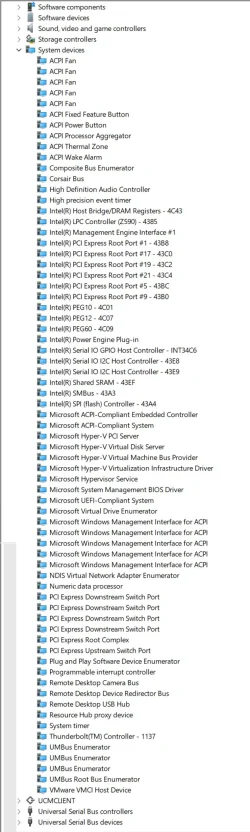
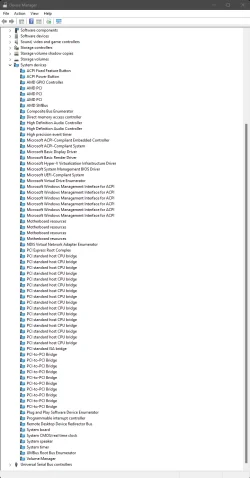
My current-level Win11 system has been continuously upgraded starting with Windows 7. I have not done a clean Windows install since the cows came home, primarily because I remember how long it took me to get everything properly reconfigured after a Win 7 clean install. Now my Device Manager screen looks like this:
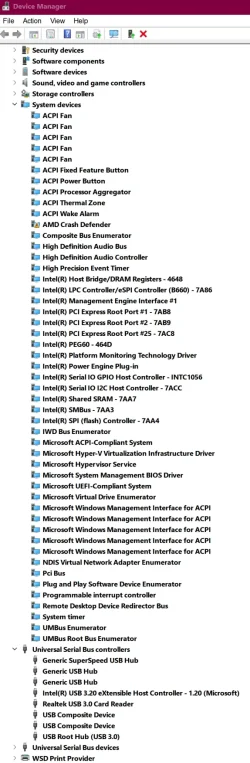
All that strikes me as being a bit excessive. But is it? And if it is, is there a way to eliminate the unneeded devices without doing a clean install? Maybe there's a website that tells what each of these devices does?
All that strikes me as being a bit excessive. But is it? And if it is, is there a way to eliminate the unneeded devices without doing a clean install? Maybe there's a website that tells what each of these devices does?
My Computer
At a glance
Win11 ProAMD Ryzen 5 5500U16 GBRadeon 2100
- OS
- Win11 Pro
- Computer type
- PC/Desktop
- Manufacturer/Model
- BeeLink SER Mini
- CPU
- AMD Ryzen 5 5500U
- Motherboard
- BeeLink SER
- Memory
- 16 GB
- Graphics Card(s)
- Radeon 2100
- Sound Card
- none
- Monitor(s) Displays
- Primary: Phillips 4K; Secondary: LG 4K
- Screen Resolution
- Both 3860 x 2160
- Hard Drives
- C: NVme 500 GB Windows only
D: 128 GB NVme User data + Windows Temp via Junction Link
- PSU
- External
- Case
- Mini
- Cooling
- Internal fan
- Keyboard
- Logitech Wireless Lighted
- Mouse
- Kensington ExpertMouse wireless trackball
- Internet Speed
- 500/500
- Browser
- Brave
- Antivirus
- Windows Defender