BIOS bug fix: Internal SATA Drives show up as removeable media


Applies to: Windows 11 Windows 10 Windows 8 Windows 8.1 Windows 7 Enterprise Windows 7 Home Premium Windows 7 Home Basic Windows 7 Professional Windows 7 Ultimate Less

Symptoms​

Internal SATA devices (HDDs or SSDs) may show as removable media in your task bar.

93ef66e2-cda2-f6eb-61fc-1c0ffe64d84e.png


Cause​

Whether or not a device is considered removable is determined by your system’s BIOS and how it marks the various SATA ports on the motherboard. The inbox driver directly inspects SATA ports and considers devices connected to those ports marked “external” as removable devices. Not all storage drivers do this, which can be a potential cause for corruption or data loss.

Resolution​

First, check for and install available BIOS updates from your PC manufacturer. If none are available, you can follow these steps to override the way the inbox driver surfaces devices on certain ports:
  1. Open a command prompt with administrator privileges.
  2. In the command prompt window, type the following command in hit Enter: devmgmt.msc
  3. Under Disk Drives, identify the SATA device you would like the inbox driver to consider internal and open properties for this device by right-clicking and selecting Properties.
  4. Note the bus number from the properties overview (“1” in the below example).
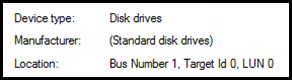
    11d9c144-b2b9-b701-79e4-94507e8847a5.png
  5. For Windows 7:
    1. Type the following command in the previously opened command prompt and hit Enter:

      reg add “HKLM\SYSTEM\CurrentControlSet\Services\msahci\Controller0\Channelx\” /f /v TreatAsInternalPort /t REG_DWORD /d 0x00000001

      Where x corresponds to the Bus Number you noted in step 4.
  6. For Windows 8 and later:
    1. Type the following command in the previously opened command prompt and hit Enter:

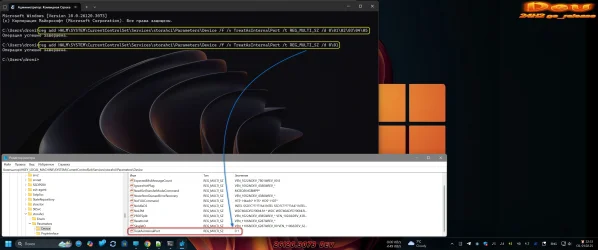
      reg add “HKLM\SYSTEM\CurrentControlSet\Services\storahci\Parameters\Device” /f /v TreatAsInternalPort /t REG_MULTI_SZ /d x

      Where x corresponds to the Bus Number you noted in step 4.

Source:
 
If you want to add multiple drives, it only seems to remember the last bus number used.

For multiple drives, manually edit the entry in the registry (not too sure how to do this from the command prompt)

1684537450777.png
 

My Computers My Computers

  • At a glance

    Windows 11 26H2Intel i9 14900KF64GB Corsair Vengeance RGBMSI 4090 Suprim X
    OS
    Windows 11 26H2
    Computer type
    PC/Desktop
    Manufacturer/Model
    Custom Built
    CPU
    Intel i9 14900KF
    Motherboard
    ASUS Z790 ProArt Creator WiFi
    Memory
    64GB Corsair Vengeance RGB
    Graphics Card(s)
    MSI 4090 Suprim X
    Sound Card
    Onboard
    Monitor(s) Displays
    1 x Asus 24". 1 x Asus 32"
    Screen Resolution
    1920 x 1080 & 2560 x 1440 (4K DSR)
    Hard Drives
    Multiple
    PSU
    Corsair 1200HX
    Case
    Corsair 7000D RGB
    Cooling
    Corsair H150I Capellix XT
    Keyboard
    Corsair K70 RGB PRO
    Mouse
    Corsair M55 RGB Pro
    Internet Speed
    1000Mbps
    Browser
    Edge
    Antivirus
    Windows Default
  • At a glance

    Windows 11 25H2Intel i7 6800K32GB DDR4 (Corsair)ASUS GTX 1080ti
    Operating System
    Windows 11 25H2
    Computer type
    PC/Desktop
    Manufacturer/Model
    Custom Built
    CPU
    Intel i7 6800K
    Motherboard
    ASUS Z99 Deluxe
    Memory
    32GB DDR4 (Corsair)
    Graphics card(s)
    ASUS GTX 1080ti
    Sound Card
    Onboard
    Monitor(s) Displays
    1x Viewsonic 24" 1x LG 19"
    Screen Resolution
    1920 x 1080 & 1600 x 900
    Hard Drives
    3 x SATA SSD
    PSU
    650W Gigabyte Bronze
    Case
    Coolermaster HAF-X
    Cooling
    Noctua NH-15 Chroma black
    Keyboard
    Generic RGB
    Mouse
    Microsoft Basic
    Internet Speed
    1000Mbps
    Browser
    Edge
    Antivirus
    Windows Default
Microsoft is losin' it. ^^

You can't fix a "BIOS bug" with a registry edit.
You CAN fix a driver or Windows bug with a registry edit.
 

My Computers My Computers

  • At a glance

    Win 11 Home ♦♦♦26300.9550 ♦♦♦♦♦♦♦26H2AMD Ryzen 7 3700XG.Skill (F4-3200C14D-16GTZKW)EVGA RTX 2070 (08G-P4-2171-KR)
    OS
    Win 11 Home ♦♦♦26300.9550 ♦♦♦♦♦♦♦26H2
    Computer type
    PC/Desktop
    Manufacturer/Model
    Built by Ghot® [May 2020]
    CPU
    AMD Ryzen 7 3700X
    Motherboard
    Asus Pro WS X570-ACE (BIOS 5302)
    Memory
    G.Skill (F4-3200C14D-16GTZKW)
    Graphics Card(s)
    EVGA RTX 2070 (08G-P4-2171-KR)
    Sound Card
    Realtek ALC1220P / ALC S1220A
    Monitor(s) Displays
    Dell U3011 30"
    Screen Resolution
    2560 x 1600
    Hard Drives
    2x Samsung 860 EVO 500GB,
    WD 4TB Black FZBX - SATA III,
    WD 8TB Black FZBX - SATA III,
    DRW-24B1ST CD/DVD Burner
    PSU
    PC Power & Cooling 750W Quad EPS12V
    Case
    Cooler Master ATCS 840 Tower
    Cooling
    CM Hyper 212 EVO (push/pull)
    Keyboard
    Ducky DK9008 Shine II Blue LED
    Mouse
    Logitech Optical M-100
    Internet Speed
    300/300
    Browser
    Firefox (latest)
    Antivirus
    Bitdefender Total Security
    Other Info
    Speakers: Klipsch Pro Media 2.1
  • At a glance

    Windows XP Pro 32bit w/SP3AMD Athlon 64 X2 5000+ (OC'd @ 3.2Ghz)TWIN2X2048-6400C4DHX (2 x 1GB, DDR2 800)EVGA 256-P2-N758-TR GeForce 8600GT SSC
    Operating System
    Windows XP Pro 32bit w/SP3
    Computer type
    PC/Desktop
    Manufacturer/Model
    Built by Ghot® (not in use)
    CPU
    AMD Athlon 64 X2 5000+ (OC'd @ 3.2Ghz)
    Motherboard
    ASUS M2N32-SLI Deluxe Wireless Edition
    Memory
    TWIN2X2048-6400C4DHX (2 x 1GB, DDR2 800)
    Graphics card(s)
    EVGA 256-P2-N758-TR GeForce 8600GT SSC
    Sound Card
    Onboard
    Monitor(s) Displays
    ViewSonic G90FB Black 19" Professional (CRT)
    Screen Resolution
    up to 2048 x 1536
    Hard Drives
    WD 36GB 10,000rpm Raptor SATA
    Seagate 80GB 7200rpm SATA
    Lite-On LTR-52246S CD/RW
    Lite-On LH-18A1P CD/DVD Burner
    PSU
    PC Power & Cooling Silencer 750 Quad EPS12V
    Case
    Generic Beige case, 80mm fans
    Cooling
    ZALMAN 9500A 92mm CPU Cooler
    Keyboard
    Logitech Classic Keybooard 200
    Mouse
    Logitech Optical M-BT96a
    Internet Speed
    300/300
    Browser
    Firefox 3.x ??
    Antivirus
    Symantec (Norton)
    Other Info
    Still assembled, still runs. Haven't turned it on for 15 years?
Drive - Samsung 970 EVO Pro 500g
Location - Bus Number 0, Target Id 0, LUN 0

Tried both the W7 and the W8+ commands - no change......
 

My Computer My Computer

At a glance

Windows 11 Pro 25H2 (26200.9168)AMD Ryzen 7 7800X3D32gb Team Group (T-Force) DDR5-6000Zotac nVidia GeForce RTX 4070 SUPER - 12gb
OS
Windows 11 Pro 25H2 (26200.9168)
Computer type
PC/Desktop
Manufacturer/Model
Pre-built
CPU
AMD Ryzen 7 7800X3D
Motherboard
MSI Pro B650-VC WiFi
Memory
32gb Team Group (T-Force) DDR5-6000
Graphics Card(s)
Zotac nVidia GeForce RTX 4070 SUPER - 12gb
Sound Card
Sound BlasterX G6
Monitor(s) Displays
Koorui G2421V and ViewSonic VX2453
Screen Resolution
P:2560x1440 S:1920x1080
Hard Drives
WD Blue SN5000 - 500gb NVME
WD Blue SN580 - 2TB NVME
Seagate 4TB HDD - ST4000VN008-2DR166
Keyboard
Mountain Everest
Mouse
Logitech G502 Hero
Internet Speed
T-Mobile Home Internet
Browser
Firefox
Other Info
QNAP TS-469 Pro NAS
TP-Link W7200 (2 unit mesh network)
Elgato Streamdeck
Not working for me...
1684552074267.png
1684552005956.png
1684601307292.png
Got it working using Admin level Powershell, just not Admin level Command Prompt.
PS C:\Users\vince> reg.exe add “HKLM\SYSTEM\CurrentControlSet\Services\storahci\Parameters\Device” /f /v TreatAsInternalPort /t REG_MULTI_SZ /d 1
The operation completed successfully.
 
Last edited:

My Computer My Computer

At a glance

WindowsXP/7/8/8.1/10/11,Linux,Android,FreeBSD...Intel® Core™ i7-8750H 8th Gen 2.2Ghz up to 4....64GB using 2x32GB CL16 Mushkin redLine modulesIntel UHD 630 & NVIDIA GeForce GTX 1050 Ti wi...
OS
WindowsXP/7/8/8.1/10/11,Linux,Android,FreeBSD Unix
Computer type
Laptop
Manufacturer/Model
Dell XPS 15 9570
CPU
Intel® Core™ i7-8750H 8th Gen 2.2Ghz up to 4.1Ghz
Motherboard
Dell XPS 15 9570
Memory
64GB using 2x32GB CL16 Mushkin redLine modules
Graphics Card(s)
Intel UHD 630 & NVIDIA GeForce GTX 1050 Ti with 4GB DDR5
Sound Card
Realtek ALC3266-CG
Monitor(s) Displays
15.6" 4K Touch UltraHD 3840x2160 made by Sharp
Screen Resolution
3840x2160 4K UltraHD
Hard Drives
Samsung MZ-V9P4T0B/AM 990 PRO 4TB PCIe®4.0 NVMe™ M.2 SSD was Toshiba KXG60ZNV1T02 NVMe 1TB SSD
PSU
Dell XPS 15 9570
Case
Dell XPS 15 9570
Cooling
Stock
Keyboard
Stock
Mouse
SwitftPoint ProPoint
Internet Speed
Comcast/XFinity 1.44Gbps/42.5Mbps
Browser
Microsoft EDGE (Chromium based) & Google Chrome
Antivirus
Windows Defender that came with Windows
Firstly, if you need to specify multiple bus numbers in the 'reg' command, you can do it as follows

reg.exe add “HKLM\SYSTEM\CurrentControlSet\Services\storahci\Parameters\Device” /f /v TreatAsInternalPort /t REG_MULTI_SZ /d 1\02\03\0

i.e. it's 1\02\03\0, where 1, 2, 3... are the bus numbers and \0 are separators/terminators after each number.

Secondly (and more importantly), most of the time it is not a "bug" at all. SATA standard is initially designed as hotswappable. And an internal SATA port can be perfectly useful for hotswapping as well. There's nothing unusual about it.

These ports are reported by BIOS to Windows as "removable" because in your BIOS settings hotswapping is explicitly enabled for these ports (which is often the default). So, it is not a "bug", it is technically you who requested removability for these drives by failing to adjust your BIOS settings from their default values. Go to your BIOS, find SATA controller configuration and see whether it is possible to disable hotswapping for your internal SATA ports. Most BIOSes have individual per-port settings for this. Once you disable hotswapping for your SATA ports, the corresponding drives will no longer appear as "removable" in Windows.

And only if this is not possible for some reason (no setting in BIOS, genuine BIOS bug, etc.) you will need the above workaround through registry.
 

My Computer My Computer

At a glance

Windows 11 ProIntel(R) Core(TM) i7-5930K CPU @ 3.50GHzNVIDIA GeForce GTX 970
OS
Windows 11 Pro
Computer type
PC/Desktop
CPU
Intel(R) Core(TM) i7-5930K CPU @ 3.50GHz
Motherboard
EVGA X99 Micro
Graphics Card(s)
NVIDIA GeForce GTX 970
Not working for me...
It is not working for you because you used some strange fancy quotation marks around the key name in your command. Apparently, you copy-pasted it from some other location that used the same kind of quotes. You have to use plain " in command-line for it to work.
 

My Computer My Computer

At a glance

Windows 11 ProIntel(R) Core(TM) i7-5930K CPU @ 3.50GHzNVIDIA GeForce GTX 970
OS
Windows 11 Pro
Computer type
PC/Desktop
CPU
Intel(R) Core(TM) i7-5930K CPU @ 3.50GHz
Motherboard
EVGA X99 Micro
Graphics Card(s)
NVIDIA GeForce GTX 970

My Computer My Computer

At a glance

Windows 11 Stable, Beta, Dev, CanaryAMD Ryzen 9 PRO 5950X128 GbIntel(R) Arc(TM) A380 Graphics (2 ГБ)
OS
Windows 11 Stable, Beta, Dev, Canary
Computer type
PC/Desktop
Manufacturer/Model
Micro-Star International Co., Ltd. MS-7D54
CPU
AMD Ryzen 9 PRO 5950X
Motherboard
MSI MAG X570S Tomahawk Max WiFi (MS-7D54) (2 PCI-E x1, 2 PCI-E x16, 2 M.2, 4 DDR4 DIMM, Audio, Video, 2.5GbE LAN, WiFi)
Memory
128 Gb
Graphics Card(s)
Intel(R) Arc(TM) A380 Graphics (2 ГБ)
Sound Card
Устройство с поддержкой High Definition Audio
Monitor(s) Displays
HP X34 [34" LCD] (6CM1300J5J) {2021}
Screen Resolution
3440x1440
Hard Drives
KINGSTON SFYRD2000G (2000 ГБ, PCI-E 4.0 x4)
PSU
Be Quiet! Dark Rock Pro 4
Case
Cooler Master HAF XB EVO
Internet Speed
1000 Mb/s
Browser
Chrome
Antivirus
Windows Defender
It is not working for you because you used some strange fancy quotation marks around the key name in your command. Apparently, you copy-pasted it from some other location that used the same kind of quotes. You have to use plain " in command-line for it to work.

Just noticed that the original location that used incorrect quotation marks (thus preventing these commands from working) is the Microsoft's support article itself, quoted verbatim here :D Quotation marks in post #1 as well as in my post #6 are incorrect.

Let me try it again:

reg.exe add "HKLM\SYSTEM\CurrentControlSet\Services\storahci\Parameters\Device" /f /v TreatAsInternalPort /t REG_MULTI_SZ /d 1\02\03\0

This command should work properly, provided one specified the correct bus numbers. Although, as @Dronix noted above, the quotation marks are not necessary at all for this key.
 
Last edited:

My Computer My Computer

At a glance

Windows 11 ProIntel(R) Core(TM) i7-5930K CPU @ 3.50GHzNVIDIA GeForce GTX 970
OS
Windows 11 Pro
Computer type
PC/Desktop
CPU
Intel(R) Core(TM) i7-5930K CPU @ 3.50GHz
Motherboard
EVGA X99 Micro
Graphics Card(s)
NVIDIA GeForce GTX 970

Latest Support Threads

Back
Top Bottom