Bluetooth disappeared from my Windows 11.


pillainp

Well-known member
Member
Local time
10:11 PM
Posts
29
OS
Windows 11 Pro x64 25H2 26200.8894
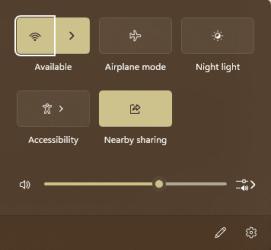
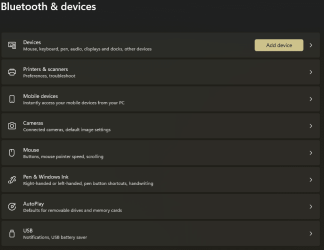
Bluetooth functionality has completely disappeared from my WIndows 11 build.

I happened to notice this just today, and I know for a fact that it was working just a couple of days ago, as Alexa connects to it.

In Device Manager, the Bluetooth listing is available only under hidden devices, and all the items are greyed/dimmed.

Driver, as can be seen, is 23.70.0.2, and it cannot be rolled back or updated. I am worried about uninstalling, as then I may never get it back.

The only active item seems to be thisentry named oem73.inf that I have never noticed before.
 
Windows Build/Version
Windows 11 Pro 23H2 Beta (Insider) Build 22635.4225

Attachments

  • Screenshot 2024-09-29 215543.png
    Screenshot 2024-09-29 215543.png
    114.1 KB · Views: 4
  • Screenshot 2024-09-29 215938.png
    Screenshot 2024-09-29 215938.png
    16.3 KB · Views: 3
  • Screenshot 2024-09-29 215951.png
    Screenshot 2024-09-29 215951.png
    24.2 KB · Views: 4

My Computers My Computers

  • At a glance

    Windows 11 Pro x64 25H2 26200.8894Intel Core Ultra 7 270K Plus64GB (2*32GB) G.Skill TridentZ DDR5 6000MHz 3...Sapphire NITRO+ AMD Radeon™ RX 7900 XTX Vapor...
    OS
    Windows 11 Pro x64 25H2 26200.8894
    Computer type
    PC/Desktop
    Manufacturer/Model
    CUSTOM
    CPU
    Intel Core Ultra 7 270K Plus
    Motherboard
    AsRock Z890 Phantom Gaming Nova wifi
    Memory
    64GB (2*32GB) G.Skill TridentZ DDR5 6000MHz 30-40-40-96 (F5-6000J3040G32GX2-TZ5RK)
    Graphics Card(s)
    Sapphire NITRO+ AMD Radeon™ RX 7900 XTX Vapor-X 24GB
    Sound Card
    Onboard ALC4082
    Monitor(s) Displays
    Dell UP2716D
    Screen Resolution
    2560 X 1440
    Hard Drives
    1 x 1TB SAMSUNG 9100 PRO NVME Gen5 M.2
    1 x 1TB SAMSUNG 990 PRO PCIe Gen4 M.2
    2 x 2TB SAMSUNG 990 PRO PCIe Gen4 M.2
    1 x SAMSUNG 980 PRO 500GB PCIE NVME - M.2 (MZ-V8P500)
    1 x SAMSUNG 860 EVO 2TB SATAIII SSD; (MZ-76E2T0BW)
    PSU
    ANTEC HCG1200 PRO PLATINUM
    Case
    Fractal Design Meshify 2 XL
    Cooling
    ARCTIC LIQUID FREEZER III PRO 420MM ARGB
    Keyboard
    Logitech G512
    Mouse
    Logitech G502 X Hero
    Internet Speed
    1Gbps FTTH
    Browser
    Maxthon 7
    Antivirus
    Avast Ultimate
  • Computer type
    Laptop
n Device Manager, the Bluetooth listing is available only under hidden devices, and all the items are greyed/dimmed.

Driver, as can be seen, is 23.70.0.2, and it cannot be rolled back or updated. I am worried about uninstalling, as then I may never get it back.
Always a concern, but you got to do what you got to do if you want BT to work. Walk through these suggestions, testing after each one.
Before you start go to ASUS site for your mobo and download latest BT driver and save it for use later if necessary.

1. Run troubleshooter settings>system>troubleshoot >other troubleshooters>blue tooth>RUN

2. Make sure you have no corrupt system files that is causing this problem. Open a command prompt as administrator and type sfc /scannow
Pay attention to the scan results to see if SFC found anything it could not repair. If it found corruption it could not fix followup with this command (note the spaces)
dism /online /cleanup-image /restorehealth
Restart computer
(Note-you can follow up with another sfc /scannow command to make sure that dism repaired the files if you wish)

3.. In device manager, right click on BT device and select uninstall, Restart and windows will reinstall it using the current installed driver. You will have to re-pair your BT device.

3. If that doesn't work, In device manager, right click on BT device and select uninstall, this time checking the box to uninstall the driver. Restart.
Use the ASUS BT driver file you downloaded to reinstall BT. Restart and re-pair bt device

4.. If none of that works, do a system restore using a point made prior to when the issue started. Better yet, restore an image if you have one.

5. Repair install Windows 11 with an inplace upgrade Repair Install Windows 11 with an In-place Upgrade Tutorial
Note: any iso you download now will be for 23h2. 24h2 is expected to be released in about 2 weeks. MS hasn't put out the release version of its iso yet.
 

My Computers My Computers

  • At a glance

    Windows 11 Pro 25H2 26200.9457i9-10900 10 core 20 threads32 gbnone-Intel UHD Graphics 630
    OS
    Windows 11 Pro 25H2 26200.9457
    Computer type
    PC/Desktop
    Manufacturer/Model
    Dell Optiplex 7080
    CPU
    i9-10900 10 core 20 threads
    Motherboard
    DELL 0J37VM
    Memory
    32 gb
    Graphics Card(s)
    none-Intel UHD Graphics 630
    Sound Card
    Integrated Realtek
    Monitor(s) Displays
    Benq 27
    Screen Resolution
    2560x1440
    Hard Drives
    2x1tb Solidigm m.2 nvme /External drives 512gb Samsung m.2 sata+2tb Kingston m2.nvme
    PSU
    500w
    Case
    MT
    Cooling
    Dell Premium
    Keyboard
    Logitech wired
    Mouse
    Logitech wireless
    Internet Speed
    so slow I'm too embarrassed to tell
    Browser
    #1 Edge #2 Firefox
    Antivirus
    Defender+MWB Premium
  • At a glance

    Windows 11 Pro 24H2 26200.9457AMD Ryzen 7 6800U32 gbintegrated
    Operating System
    Windows 11 Pro 24H2 26200.9457
    Computer type
    PC/Desktop
    Manufacturer/Model
    Beelink Mini PC SER5
    CPU
    AMD Ryzen 7 6800U
    Memory
    32 gb
    Graphics card(s)
    integrated
    Sound Card
    integrated
    Monitor(s) Displays
    Benq 27
    Screen Resolution
    2560x1440
    Hard Drives
    1TB Crucial nvme
    Keyboard
    Logitech wired
    Mouse
    Logitech wireless
    Internet Speed
    still too embarrassed to tell
    Browser
    Firefox
    Antivirus
    Defender
  • System 3 is non compliant Dell 9020 i7-4770/24gb ram Win11 PRO 26200.9457
If none of that works, the Bluetooth adapter may have stopped working.
 

My Computers My Computers

  • At a glance

    Windows 11 Pro 25H2Intel Core i7-10700K16GB (8GB PC4-19200 DDR4 SDRAM x2)NVIDIA GeForce GTX 1050 TI
    OS
    Windows 11 Pro 25H2
    Computer type
    PC/Desktop
    Manufacturer/Model
    PowerSpec B746
    CPU
    Intel Core i7-10700K
    Motherboard
    ASRock Z490 Phantom Gaming 4/ax
    Memory
    16GB (8GB PC4-19200 DDR4 SDRAM x2)
    Graphics Card(s)
    NVIDIA GeForce GTX 1050 TI
    Sound Card
    Realtek Audio
    Monitor(s) Displays
    #1. LG ULTRAWIDE 34" #2. AOC Q32G2WG3 32"
    Screen Resolution
    #1. 3440 X 1440 #2. 1920 x 1080
    Hard Drives
    NVMe WDC WDS100T2B0C-00PXH0 1TB
    Samsung SSD 860 EVO 1TB
    PSU
    750 Watts (62.5A)
    Case
    PowerSpec/Lian Li ATX 205
    Keyboard
    Logitech K270
    Mouse
    Logitech M185
    Browser
    Microsoft Edge and Firefox
    Antivirus
    Webroot SecureAnywhere CE 26.1
  • At a glance

    Windows 11 Canary ChannelIntel Core i5-8400 CPU @ 2.80GHz16 MB DDR 4-2666
    Operating System
    Windows 11 Canary Channel
    Computer type
    PC/Desktop
    Manufacturer/Model
    PowerSpec G156
    CPU
    Intel Core i5-8400 CPU @ 2.80GHz
    Motherboard
    AsusTeK Prime B360M-A
    Memory
    16 MB DDR 4-2666
    Monitor(s) Displays
    23" Speptre HDMI 75Hz
    Screen Resolution
    1920x1080
    Hard Drives
    Samsung 970 EVO 500GB NVMe
    Keyboard
    Logitek K270
    Mouse
    Logitek M185
    Browser
    Firefox, Edge and Edge Canary
    Antivirus
    Windows Defender
Make sure to check the UEFI/BIOS to make sure Bluetooth is enabled.
 
Last edited:

My Computer My Computer

At a glance

WindowsXP/7/8/8.1/10/11,Linux,Android,FreeBSD...Intel® Core™ i7-8750H 8th Gen 2.2Ghz up to 4....64GB using 2x32GB CL16 Mushkin redLine modulesIntel UHD 630 & NVIDIA GeForce GTX 1050 Ti wi...
OS
WindowsXP/7/8/8.1/10/11,Linux,Android,FreeBSD Unix
Computer type
Laptop
Manufacturer/Model
Dell XPS 15 9570
CPU
Intel® Core™ i7-8750H 8th Gen 2.2Ghz up to 4.1Ghz
Motherboard
Dell XPS 15 9570
Memory
64GB using 2x32GB CL16 Mushkin redLine modules
Graphics Card(s)
Intel UHD 630 & NVIDIA GeForce GTX 1050 Ti with 4GB DDR5
Sound Card
Realtek ALC3266-CG
Monitor(s) Displays
15.6" 4K Touch UltraHD 3840x2160 made by Sharp
Screen Resolution
3840x2160 4K UltraHD
Hard Drives
Samsung MZ-V9P4T0B/AM 990 PRO 4TB PCIe®4.0 NVMe™ M.2 SSD was Toshiba KXG60ZNV1T02 NVMe 1TB SSD
PSU
Dell XPS 15 9570
Case
Dell XPS 15 9570
Cooling
Stock
Keyboard
Stock
Mouse
SwitftPoint ProPoint
Internet Speed
Comcast/XFinity 1.44Gbps/42.5Mbps
Browser
Microsoft EDGE (Chromium based) & Google Chrome
Antivirus
Windows Defender that came with Windows
If you haven't got it working yet could try a cheap usb bluetooth adapter.
 

My Computer My Computer

At a glance

11 Pro 25H2i7-10750H16GB Samsung DDR4 3200Intel + Nvidia RTX3060 Laptop
OS
11 Pro 25H2
Computer type
Laptop
Manufacturer/Model
MSI
CPU
i7-10750H
Motherboard
MSI MS-17F5
Memory
16GB Samsung DDR4 3200
Graphics Card(s)
Intel + Nvidia RTX3060 Laptop
Sound Card
Realtek
Monitor(s) Displays
Samsung 24" Curved (HDMI)
Screen Resolution
1920x1080
Hard Drives
Sabrent Rocket Gen3 1Tb Smasung EVO 870 1TB
Antivirus
Bitdefender
Back
Top Bottom