quad_father85
Active member
- Local time
- 9:25 PM
- Posts
- 7
- OS
- Windows 11
I am a quadriplegic and use a HeadMouse with a sensor dot on my glasses to control the mouse cursor. I accidentally fell asleep while wearing it with the Bookmark Manager tab open, and something changed.
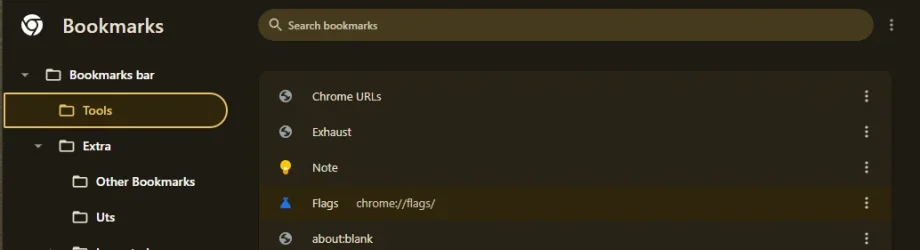
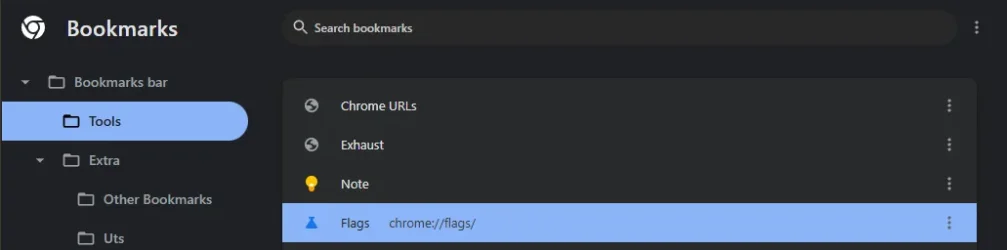
Now, everything in the left pane appears bold. When I select a bookmark, it no longer highlights in light blue—it just displays the URL next to it. As you can see in the attached screenshot, "Publications | Intelligence Committee" is selected. The left pane shows a border around the selection along with highlighted text.
Here is what I have tried so far:
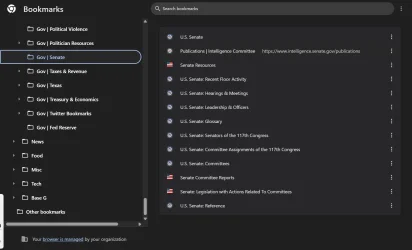
Now, everything in the left pane appears bold. When I select a bookmark, it no longer highlights in light blue—it just displays the URL next to it. As you can see in the attached screenshot, "Publications | Intelligence Committee" is selected. The left pane shows a border around the selection along with highlighted text.
Here is what I have tried so far:
- Updated Chrome.
- Tested in Incognito mode (the issue persists).
- Checked the zoom level (
Ctrl+0was already set). - Switched to light mode: the highlight does appear, but it is extremely faded.
- Reset yesterday, with no luck.
- Created a new profile, but the highlight is still very faded.
My Computer
At a glance
Windows 1124G
- OS
- Windows 11
- Computer type
- Laptop
- Manufacturer/Model
- Thinkpad 21JNCTO1WW
- Memory
- 24G