Browser tab, then computer, crash, from EXCEPTION_ACCESS_VIOLATION_READ


ok.

If possible please post share links for step #1


The computer has 32 GB so if possible start testing early.


Code:
Location     : Bottom-Slot 1(top)
BankLabel    : ChannelA0
Manufacturer : Unknown - [0xBA01]
MemoryType   : DDR4
FormFactor   : SODIMM
Capacity     : 16GB
Speed        : 2400
Serial       : 00000000
PartNumber   : 16GU2X16LIII43-12-K
ECC          : False
TypeDetail   : {Synchronous, Unbuffered (Unregistered)}

Location     : Bottom-Slot 2(under)
BankLabel    : ChannelB0
Manufacturer : Unknown - [0xBA01]
MemoryType   : DDR4
FormFactor   : SODIMM
Capacity     : 16GB
Speed        : 2400
Serial       : 00000000
PartNumber   : 16GU2X16LIII43-12-K
ECC          : False
TypeDetail   : {Synchronous, Unbuffered (Unregistered)}
 

My Computer

System One

  • OS
    Windows 10
    Computer type
    Laptop
    Manufacturer/Model
    HP
    CPU
    Intel(R) Core(TM) i7-4800MQ CPU @ 2.70GHz
    Motherboard
    Product : 190A Version : KBC Version 94.56
    Memory
    16 GB Total: Manufacturer : Samsung MemoryType : DDR3 FormFactor : SODIMM Capacity : 8GB Speed : 1600
    Graphics Card(s)
    NVIDIA Quadro K3100M; Intel(R) HD Graphics 4600
    Sound Card
    IDT High Definition Audio CODEC; PNP Device ID HDAUDIO\FUNC_01&VEN_111D&DEV_76E0
    Hard Drives
    Model Hitachi HTS727575A9E364
    Antivirus
    Microsoft Defender
    Other Info
    Mobile Workstation
Are there entries in Reliability History ?
Start typing ---reliability ---in the Search box to access it.
 

My Computer

System One

  • OS
    win 10
    Computer type
    PC/Desktop
    Manufacturer/Model
    home built
    CPU
    amd ryzen 5-2600
    Motherboard
    gigabyte b450m-ds3h
    Memory
    ng skill sniper x 16gb
    Graphics Card(s)
    nvidea gtx 1050
    Monitor(s) Displays
    benq fp 92
    Hard Drives
    samsung 860 evo 500gb m2 ssd
    PSU
    antec ea550g
    Case
    nzxt noctis 450
    Browser
    edge
ok.

If possible please post share links for step #1


The computer has 32 GB so if possible start testing early.


Code:
Location     : Bottom-Slot 1(top)
BankLabel    : ChannelA0
Manufacturer : Unknown - [0xBA01]
MemoryType   : DDR4
FormFactor   : SODIMM
Capacity     : 16GB
Speed        : 2400
Serial       : 00000000
PartNumber   : 16GU2X16LIII43-12-K
ECC          : False
TypeDetail   : {Synchronous, Unbuffered (Unregistered)}

Location     : Bottom-Slot 2(under)
BankLabel    : ChannelB0
Manufacturer : Unknown - [0xBA01]
MemoryType   : DDR4
FormFactor   : SODIMM
Capacity     : 16GB
Speed        : 2400
Serial       : 00000000
PartNumber   : 16GU2X16LIII43-12-K
ECC          : False
TypeDetail   : {Synchronous, Unbuffered (Unregistered)}
When you say post links for Step 1, do you mean
1) Run administrative command prompt: > post share links

wevtutil epl Application "%userprofile%\Desktop\application.evtx"

wevtutil epl System "%userprofile%\Desktop\system.evtx"

If so, both ran without error.

The UEFI user interface was confusing, with many options, and my not knowing what to run based on the instruction. I'm on a different computer now and cannot find online an image representing the menu that I saw for my diagnostics.

I ran one test - I think it was the left option on the upper line of the graphic menu - and it found no errors with either the processor or the memory (not sure what the second thing was).

I then opted for a memory test. The "fast" version found no errors in the seven minutes it ran. I then started the "extensive" version I think it was called, to just loop, and run overnight, so I'll see the result in the morning.

If there's more I should have done, or something different, please let me know.
 

My Computer

System One

  • OS
    Windows 11
    Computer type
    PC/Desktop
    Manufacturer/Model
    LOOP AIO LP-270206
    CPU
    Intel® CoreTM i5-10400 Processor 12M Cache
    Motherboard
    Asus Pro H410T/CSM
    Memory
    16GB - Kingston DDR4 SODIMM, 2666
    Screen Resolution
    1920x1080
    Hard Drives
    Samsung MZ-V8V500B/AM 500 GB SSD (OS and apps)
    WD 1TB SSD (data)
    Antivirus
    Defender
1) The HP UEFI hardware diagnostics will run indefinitely in loop until failure so once there are two or more loops click escape.


2) Then take pictures > post images displaying the tests performed with results.


3) After completing HP UEFI hardware diagnostic post share links for event viewer: (check the desktop for the new files)

a) system
b) application


4) If all of the extensive HP UEFI tests ran for two or more loops > post images > plan to run more rigorous/thorough RAM testing.

Every test has:

True positives
True negatives
False positives
False negatives
Accuracy
Inaccuracy
etc.


This will be the most thorough memory testing so plan to run overnight and the following day:

5) Run Memtest86+ for 8 or more passes > take pictures > post images or share links

Memtest86+ | The Open-Source Memory Testing Tool

Just 1 error is a test fail and testing can be aborted.

The more the passes the better the testing conditions.

It sometimes takes passes into the 20's to detect malfunctioning RAM.

The RAM can be tested all at one time or one at a time in the same DIMM.


MemTest86+ - Test RAM
 

My Computer

System One

  • OS
    Windows 10
    Computer type
    Laptop
    Manufacturer/Model
    HP
    CPU
    Intel(R) Core(TM) i7-4800MQ CPU @ 2.70GHz
    Motherboard
    Product : 190A Version : KBC Version 94.56
    Memory
    16 GB Total: Manufacturer : Samsung MemoryType : DDR3 FormFactor : SODIMM Capacity : 8GB Speed : 1600
    Graphics Card(s)
    NVIDIA Quadro K3100M; Intel(R) HD Graphics 4600
    Sound Card
    IDT High Definition Audio CODEC; PNP Device ID HDAUDIO\FUNC_01&VEN_111D&DEV_76E0
    Hard Drives
    Model Hitachi HTS727575A9E364
    Antivirus
    Microsoft Defender
    Other Info
    Mobile Workstation
Are there entries in Reliability History ?
Start typing ---reliability ---in the Search box to access it.

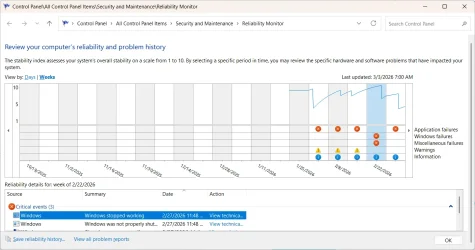
My reliability history is shown below:

1772546222774.webp

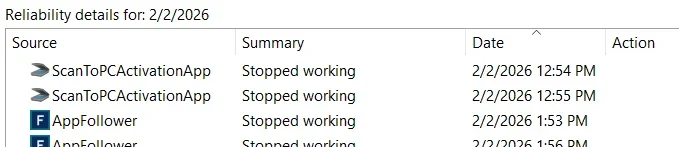
The issues did not begin until 2/2, when there were problems with the HP Scan-to-PC app, and something called AppFollower that doesn't even appear as an installed app.

1772546512218.webp

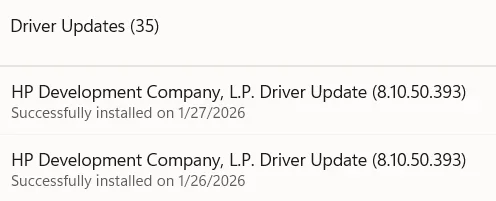
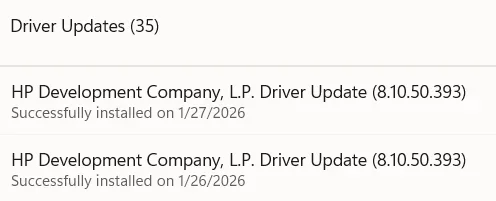
The only material change I can think of or find is the installation on 2/26 and 2/27 of two HP driver updates (actually looks like the same number):

1772546677895.webp

I ran several HP UEFI diagnostics overnight and this morning, and all passed.

Any suggestions from this?
 

My Computer

System One

  • OS
    Windows 11
    Computer type
    PC/Desktop
    Manufacturer/Model
    LOOP AIO LP-270206
    CPU
    Intel® CoreTM i5-10400 Processor 12M Cache
    Motherboard
    Asus Pro H410T/CSM
    Memory
    16GB - Kingston DDR4 SODIMM, 2666
    Screen Resolution
    1920x1080
    Hard Drives
    Samsung MZ-V8V500B/AM 500 GB SSD (OS and apps)
    WD 1TB SSD (data)
    Antivirus
    Defender
Please post images displaying the tests performed with results.
 

My Computer

System One

  • OS
    Windows 10
    Computer type
    Laptop
    Manufacturer/Model
    HP
    CPU
    Intel(R) Core(TM) i7-4800MQ CPU @ 2.70GHz
    Motherboard
    Product : 190A Version : KBC Version 94.56
    Memory
    16 GB Total: Manufacturer : Samsung MemoryType : DDR3 FormFactor : SODIMM Capacity : 8GB Speed : 1600
    Graphics Card(s)
    NVIDIA Quadro K3100M; Intel(R) HD Graphics 4600
    Sound Card
    IDT High Definition Audio CODEC; PNP Device ID HDAUDIO\FUNC_01&VEN_111D&DEV_76E0
    Hard Drives
    Model Hitachi HTS727575A9E364
    Antivirus
    Microsoft Defender
    Other Info
    Mobile Workstation
1) The HP UEFI hardware diagnostics will run indefinitely in loop until failure so once there are two or more loops click escape.


2) Then take pictures > post images displaying the tests performed with results.


3) After completing HP UEFI hardware diagnostic post share links for event viewer: (check the desktop for the new files)

a) system
b) application


4) If all of the extensive HP UEFI tests ran for two or more loops > post images > plan to run more rigorous/thorough RAM testing.

Every test has:

True positives
True negatives
False positives
False negatives
Accuracy
Inaccuracy
etc.


This will be the most thorough memory testing so plan to run overnight and the following day:

5) Run Memtest86+ for 8 or more passes > take pictures > post images or share links

Memtest86+ | The Open-Source Memory Testing Tool

Just 1 error is a test fail and testing can be aborted.

The more the passes the better the testing conditions.

It sometimes takes passes into the 20's to detect malfunctioning RAM.

The RAM can be tested all at one time or one at a time in the same DIMM.


MemTest86+ - Test RAM

Long response, and I didn't do everything. From a usability standpoint, and the testing I ran, I'm not concerned enough to dive in more, on time-consuming things, but I hope what I post is useful.

Please see Browser tab, then computer, crash, from EXCEPTION_ACCESS_VIOLATION_READ from above for further material information.

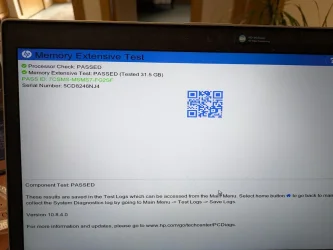
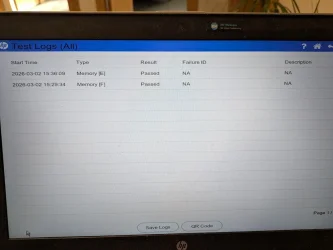
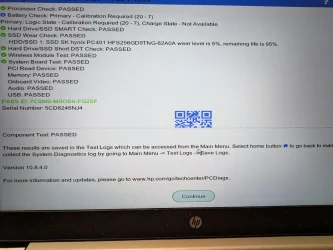
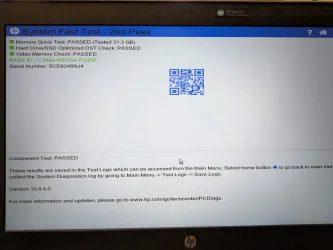
Below are screen shots from the UEFI testing I did:

From memory testing that ran continuous loop for 16 1/2 hours:

1772547202368.webp

Summary of fast test run yesterday and extensive test run overnight:

1772547269615.webp

First result I got from "symptom test" run this morning:

1772547326819.webp

Summary of the test that happened after the above one, at which point I stopped running the test.

1772549827079.webp

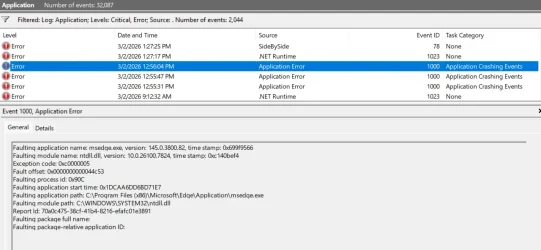
Application critical errors from event viewer:

1772549955508.webp

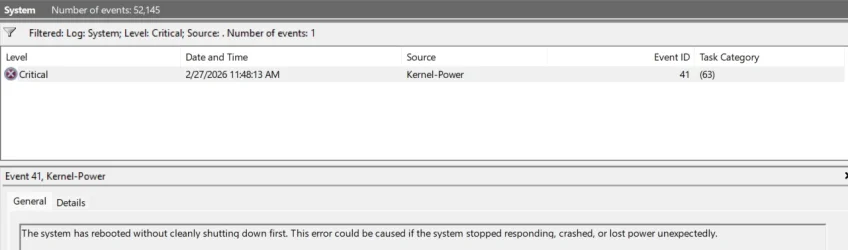
System critical error:

1772550019162.webp

This is imperfect, but so is life. Let me know what you learned from this, and I'm happy that my computer seems to be working okay for the moment.
 

My Computer

System One

  • OS
    Windows 11
    Computer type
    PC/Desktop
    Manufacturer/Model
    LOOP AIO LP-270206
    CPU
    Intel® CoreTM i5-10400 Processor 12M Cache
    Motherboard
    Asus Pro H410T/CSM
    Memory
    16GB - Kingston DDR4 SODIMM, 2666
    Screen Resolution
    1920x1080
    Hard Drives
    Samsung MZ-V8V500B/AM 500 GB SSD (OS and apps)
    WD 1TB SSD (data)
    Antivirus
    Defender
HP UEFI version 10.8.4 passed extensive testing.


Please plan Memtest86+ testing for 8 or more passes.

The more the passes the better the testing conditions.
 

My Computer

System One

  • OS
    Windows 10
    Computer type
    Laptop
    Manufacturer/Model
    HP
    CPU
    Intel(R) Core(TM) i7-4800MQ CPU @ 2.70GHz
    Motherboard
    Product : 190A Version : KBC Version 94.56
    Memory
    16 GB Total: Manufacturer : Samsung MemoryType : DDR3 FormFactor : SODIMM Capacity : 8GB Speed : 1600
    Graphics Card(s)
    NVIDIA Quadro K3100M; Intel(R) HD Graphics 4600
    Sound Card
    IDT High Definition Audio CODEC; PNP Device ID HDAUDIO\FUNC_01&VEN_111D&DEV_76E0
    Hard Drives
    Model Hitachi HTS727575A9E364
    Antivirus
    Microsoft Defender
    Other Info
    Mobile Workstation
1) Please open administrative command prompt and type or copy and paste:

bcdedit /deletevalue {badmemory} badmemorylist


2)Reboot


3) Rerun Tuneup plus (post #11, step #3) > post a share link into the newest post


Code:
RAM Defects
-----------
identifier {badmemory}
badmemorylist 0x8b408
0x8b409
0x8b40f
0x18c64e
 

My Computer

System One

  • OS
    Windows 10
    Computer type
    Laptop
    Manufacturer/Model
    HP
    CPU
    Intel(R) Core(TM) i7-4800MQ CPU @ 2.70GHz
    Motherboard
    Product : 190A Version : KBC Version 94.56
    Memory
    16 GB Total: Manufacturer : Samsung MemoryType : DDR3 FormFactor : SODIMM Capacity : 8GB Speed : 1600
    Graphics Card(s)
    NVIDIA Quadro K3100M; Intel(R) HD Graphics 4600
    Sound Card
    IDT High Definition Audio CODEC; PNP Device ID HDAUDIO\FUNC_01&VEN_111D&DEV_76E0
    Hard Drives
    Model Hitachi HTS727575A9E364
    Antivirus
    Microsoft Defender
    Other Info
    Mobile Workstation
112022 Please excuse me for stepping in on this for
This is imperfect, but so is life. Let me know what you learned from this, and I'm happy that my computer seems to be working okay for the moment.
@112022 I once had a very similar kernel-power issue with a Dell laptop and I had to send it in on warranty for repair. I would advise following through with the remainder of zbook's instructions. From personal experience I can validate that he is excellent at this sort of precision troubleshooting. I daresay you could not expect better help in this venue if you paid for it in cash. Of course, if you choose not to continue that is your prerogative but you would likely benefit from going the full extent or shipping that unit back for repair.
 

My Computer

System One

  • OS
    WIN 11, WIN 10, WIN 8.1, WIN 7 U, WIN 7 PRO, WIN 7 HOME (32 Bit), LINUX MINT
    Computer type
    PC/Desktop
    Manufacturer/Model
    DIY, ASUS, and DELL
    CPU
    Intel i7 6900K and i9-7960X / AMD 3800X (8 core)
    Motherboard
    ASUS X99E-WS USB 3.1 and ASUS X299 SAGE
    Memory
    128 GB CORSAIR DOMINATOR PLATINUM (B DIE)
    Graphics Card(s)
    NVIDIA 1070 and RTX 3070
    Sound Card
    Crystal Sound (onboard)
    Monitor(s) Displays
    single Samsung 30" 4K and 8" aux monitor
    Screen Resolution
    4K and something equally attrocious. I'll be working on this.
    Hard Drives
    A, B, C, D, E, F, G, H, I, J, K, L, M, N, O, P, Q, R, S, T, U, V, W

    Ports X, Y, and Z are reserved for USB access and removable drives.

    Drive types consist of the following: Various mechanical hard drives bearing the brand names, Seagate, Toshiba, and Western Digital. Various NVMe drives bearing the brand names Kingston, Intel, Silicon Power, Crucial, Western Digital, and Team Group. Various SATA SSDs bearing various different brand names.

    RAID arrays included:

    LSI RAID 10 (WD Velociraptors) 1115.72 GB
    LSI RAID 10 (WD SSDS) 463.80 GB

    INTEL RAID 0 (KINGSTON HYPER X) System 447.14 GB
    INTEL RAID 1 TOSHIBA ENTERPRIZE class Data 2794.52 GB
    INTEL RAID 1 SEAGATE HYBRID 931.51 GB
    PSU
    SEVERAL. I prefer my Corsair Platinum HX1000i but I also like EVGA power supplies
    Case
    ThermalTake Level 10 GT (among others)
    Cooling
    Noctua is my favorite and I use it in my main. I also own various other coolers.
    Keyboard
    all kinds.
    Mouse
    all kinds
    Internet Speed
    360 mbps - 1 gbps (depending)
    Browser
    FIREFOX
    Antivirus
    KASPERSKY (no apologies)
    Other Info
    Gave Dell touch screen with Windows 11 to daughter and got me an OTVOC. Being a PC builder I own many desktop PCs as well. I am a father of five providing PCs, laptops, and tablets for all my family, most of which I have modified, rebuilt, or simply built from scratch. I do not own a cell phone, never have, never will.
1) Please open administrative command prompt and type or copy and paste:

bcdedit /deletevalue {badmemory} badmemorylist


2)Reboot


3) Rerun Tuneup plus (post #11, step #3) > post a share link into the newest post


Code:
RAM Defects
-----------
identifier {badmemory}
badmemorylist 0x8b408
0x8b409
0x8b40f
0x18c64e
Okay, I had done this yesterday as well (Browser tab, then computer, crash, from EXCEPTION_ACCESS_VIOLATION_READ).

See below from my doing it today, and please tell me what you think.

Code:
 Microsoft Windows 11 Pro  Version 25H2 (OS Build 26200.7840)
 
==================================================================

    Started on Tue 03/03/2026 at 15:40:55.73
    
        [SFC /ScanNow]
    
Beginning system scan.  This process will take some time.

Results:
 
Windows Resource Protection did not find any integrity violations.
 
==================================================================

    Started on Tue 03/03/2026 at 15:43:32.76

        [DISM /online /cleanup-image /ScanHealth]

Deployment Image Servicing and Management tool
Version: 10.0.26100.5074

Image Version: 10.0.26200.7840
 
No component store corruption detected.

The operation completed successfully.
 
==================================================================

    Started on Tue 03/03/2026 at 15:45:27.30

        [DISM /online /cleanup-image /RestoreHealth]

Deployment Image Servicing and Management tool
Version: 10.0.26100.5074

Image Version: 10.0.26200.7840
 
The restore operation completed successfully.

The operation completed successfully.
 
==================================================================

The second "SFC /ScanNow" was skipped, as the first output the following:

Windows Resource Protection did not find any integrity violations.
 
==================================================================

    Started on Tue 03/03/2026 at 15:46:53.30

        [ChkDsk /Scan] 
 
The type of the file system is NTFS.
Volume label is Windows.
 
Stage 1: Examining basic file system structure ...
1491968 file records processed.                                                       
File verification completed.
Phase duration (File record verification): 16.47 seconds.
47946 large file records processed.                                   
Phase duration (Orphan file record recovery): 44.49 milliseconds.
0 bad file records processed.                                     
Phase duration (Bad file record checking): 0.04 milliseconds.
 
Stage 2: Examining file name linkage ...
4466 reparse records processed.                                     
2020606 index entries processed.                                                       
Index verification completed.
Phase duration (Index verification): 44.05 seconds.
0 unindexed files scanned.                                       
Phase duration (Orphan reconnection): 13.98 seconds.
0 unindexed files recovered to lost and found.                   
Phase duration (Orphan recovery to lost and found): 0.14 milliseconds.
4466 reparse records processed.                                     
Phase duration (Reparse point and Object ID verification): 20.29 milliseconds.
 
Stage 3: Examining security descriptors ...
Security descriptor verification completed.
Phase duration (Security descriptor verification): 191.01 milliseconds.
264320 data files processed.                                           
Phase duration (Data attribute verification): 0.06 milliseconds.
CHKDSK is verifying Usn Journal...
37192464 USN bytes processed.                                                           
Usn Journal verification completed.
Phase duration (USN journal verification): 298.59 milliseconds.

Windows has scanned the file system and found no problems.

No further action is required.
 
229699583 KB total disk space.
173936556 KB in 542098 files.
616396 KB in 264321 indexes.
0 KB in bad sectors.
1623551 KB in use by the system.
65536 KB occupied by the log file.
53523080 KB available on disk.
 
4096 bytes in each allocation unit.
57424895 total allocation units on disk.
13380770 allocation units available on disk.
Total duration: 1.25 minutes (75077 ms).
 
==================================================================
 
    Started on Tue 03/03/2026 at 15:48:18.84
 
AutoReboot   
 
FALSE       
 
==================================================================
 
        [Set AutoReboot = False]
 
Updating property(s) of '\\DAVEG-HP-WIN10\ROOT\CIMV2:Win32_OSRecoveryConfiguration.Name="Microsoft Windows 11 Pro|C:\\WINDOWS|\\Device\\Harddisk0\\Partition3"'
Property(s) update successful.
==================================================================
 
AutoReboot   
 
FALSE       
 
==================================================================
 
DebugInfoType   
 
7             
 
==================================================================

        [Set DebugInfoType = 7]

Updating property(s) of '\\DAVEG-HP-WIN10\ROOT\CIMV2:Win32_OSRecoveryConfiguration.Name="Microsoft Windows 11 Pro|C:\\WINDOWS|\\Device\\Harddisk0\\Partition3"'
Property(s) update successful.
==================================================================
 
DebugInfoType   
 
7             
 
==================================================================

        [WMIC PageFile list]

AllocatedBaseSize=4864
CurrentUsage=0
Description=C:\pagefile.sys
InstallDate=20180710215726.697191-240
Name=C:\pagefile.sys
PeakUsage=1
Status=
TempPageFile=FALSE
 
==================================================================
 
AutomaticManagedPagefile   
 
TRUE                     
 
==================================================================

        [Set AutomaticManagedPagefile = True]

Updating property(s) of '\\DAVEG-HP-WIN10\ROOT\CIMV2:Win32_ComputerSystem.Name="DAVEG-HP-WIN10"'
Property(s) update successful.
==================================================================
 
AutomaticManagedPagefile   
 
TRUE                     
 
==================================================================

        [BcdEdit /enum {badmemory}]

RAM Defects
-----------
identifier              {badmemory}
 
==================================================================

    Finished on Tue 03/03/2026 at 15:48:20.90
    It took 7 minutes and 25 seconds to complete the operations.
Microsoft Windows 11 Pro Version 25H2 (OS Build 26200.7840)

==================================================================

Started on Tue 03/03/2026 at 15:40:55.73

[SFC /ScanNow]

Beginning system scan. This process will take some time.

Results:

Windows Resource Protection did not find any integrity violations.

==================================================================

Started on Tue 03/03/2026 at 15:43:32.76

[DISM /online /cleanup-image /ScanHealth]

Deployment Image Servicing and Management tool
Version: 10.0.26100.5074

Image Version: 10.0.26200.7840

No component store corruption detected.

The operation completed successfully.

==================================================================

Started on Tue 03/03/2026 at 15:45:27.30

[DISM /online /cleanup-image /RestoreHealth]

Deployment Image Servicing and Management tool
Version: 10.0.26100.5074

Image Version: 10.0.26200.7840

The restore operation completed successfully.

The operation completed successfully.

==================================================================

The second "SFC /ScanNow" was skipped, as the first output the following:

Windows Resource Protection did not find any integrity violations.

==================================================================

Started on Tue 03/03/2026 at 15:46:53.30

[ChkDsk /Scan]

The type of the file system is NTFS.
Volume label is Windows.

Stage 1: Examining basic file system structure ...
1491968 file records processed.
File verification completed.
Phase duration (File record verification): 16.47 seconds.
47946 large file records processed.
Phase duration (Orphan file record recovery): 44.49 milliseconds.
0 bad file records processed.
Phase duration (Bad file record checking): 0.04 milliseconds.

Stage 2: Examining file name linkage ...
4466 reparse records processed.
2020606 index entries processed.
Index verification completed.
Phase duration (Index verification): 44.05 seconds.
0 unindexed files scanned.
Phase duration (Orphan reconnection): 13.98 seconds.
0 unindexed files recovered to lost and found.
Phase duration (Orphan recovery to lost and found): 0.14 milliseconds.
4466 reparse records processed.
Phase duration (Reparse point and Object ID verification): 20.29 milliseconds.

Stage 3: Examining security descriptors ...
Security descriptor verification completed.
Phase duration (Security descriptor verification): 191.01 milliseconds.
264320 data files processed.
Phase duration (Data attribute verification): 0.06 milliseconds.
CHKDSK is verifying Usn Journal...
37192464 USN bytes processed.
Usn Journal verification completed.
Phase duration (USN journal verification): 298.59 milliseconds.

Windows has scanned the file system and found no problems.

No further action is required.

229699583 KB total disk space.
173936556 KB in 542098 files.
616396 KB in 264321 indexes.
0 KB in bad sectors.
1623551 KB in use by the system.
65536 KB occupied by the log file.
53523080 KB available on disk.

4096 bytes in each allocation unit.
57424895 total allocation units on disk.
13380770 allocation units available on disk.
Total duration: 1.25 minutes (75077 ms).

==================================================================

Started on Tue 03/03/2026 at 15:48:18.84

AutoReboot

FALSE

==================================================================

[Set AutoReboot = False]

Updating property(s) of '\\DAVEG-HP-WIN10\ROOT\CIMV2:Win32_OSRecoveryConfiguration.Name="Microsoft Windows 11 Pro|C:\\WINDOWS|\\Device\\Harddisk0\\Partition3"'
Property(s) update successful.
==================================================================

AutoReboot

FALSE

==================================================================

DebugInfoType

7

==================================================================

[Set DebugInfoType = 7]

Updating property(s) of '\\DAVEG-HP-WIN10\ROOT\CIMV2:Win32_OSRecoveryConfiguration.Name="Microsoft Windows 11 Pro|C:\\WINDOWS|\\Device\\Harddisk0\\Partition3"'
Property(s) update successful.
==================================================================

DebugInfoType

7

==================================================================

[WMIC PageFile list]

AllocatedBaseSize=4864
CurrentUsage=0
Description=C:\pagefile.sys
InstallDate=20180710215726.697191-240
Name=C:\pagefile.sys
PeakUsage=1
Status=
TempPageFile=FALSE

==================================================================

AutomaticManagedPagefile

TRUE

==================================================================

[Set AutomaticManagedPagefile = True]

Updating property(s) of '\\DAVEG-HP-WIN10\ROOT\CIMV2:Win32_ComputerSystem.Name="DAVEG-HP-WIN10"'
Property(s) update successful.
==================================================================

AutomaticManagedPagefile

TRUE

==================================================================

[BcdEdit /enum {badmemory}]

RAM Defects
-----------
identifier {badmemory}

==================================================================

Finished on Tue 03/03/2026 at 15:48:20.90
It took 7 minutes and 25 seconds to complete the operations.

 

My Computer

System One

  • OS
    Windows 11
    Computer type
    PC/Desktop
    Manufacturer/Model
    LOOP AIO LP-270206
    CPU
    Intel® CoreTM i5-10400 Processor 12M Cache
    Motherboard
    Asus Pro H410T/CSM
    Memory
    16GB - Kingston DDR4 SODIMM, 2666
    Screen Resolution
    1920x1080
    Hard Drives
    Samsung MZ-V8V500B/AM 500 GB SSD (OS and apps)
    WD 1TB SSD (data)
    Antivirus
    Defender
Reference Post 25.
Double click on the first APP FAILURE and this will give you a Report Sent page.
The first two lines can be used to determine the cause of the problem by carrying out a search.
 

My Computer

System One

  • OS
    win 10
    Computer type
    PC/Desktop
    Manufacturer/Model
    home built
    CPU
    amd ryzen 5-2600
    Motherboard
    gigabyte b450m-ds3h
    Memory
    ng skill sniper x 16gb
    Graphics Card(s)
    nvidea gtx 1050
    Monitor(s) Displays
    benq fp 92
    Hard Drives
    samsung 860 evo 500gb m2 ssd
    PSU
    antec ea550g
    Case
    nzxt noctis 450
    Browser
    edge
112022 Please excuse me for stepping in on this for

@112022 I once had a very similar kernel-power issue with a Dell laptop and I had to send it in on warranty for repair. I would advise following through with the remainder of zbook's instructions. From personal experience I can validate that he is excellent at this sort of precision troubleshooting. I daresay you could not expect better help in this venue if you paid for it in cash. Of course, if you choose not to continue that is your prerogative but you would likely benefit from going the full extent or shipping that unit back for repair.

Thanks. @zbook has been amazing with suggestions, and I appreciate the thoroughness.

I neglected to mention in my comments yesterday that based on

1772631138260.webp

(Many of my "reliability-reported" errors started after this driver update) I rolled the driver back, and had no issues found by reliability after doing so.

I think the suggestion in Browser tab, then computer, crash, from EXCEPTION_ACCESS_VIOLATION_READ :
1) Please open administrative command prompt and type or copy and paste:

bcdedit /deletevalue {badmemory} badmemorylist


2)Reboot


3) Rerun Tuneup plus (post #11, step #3) > post a share link into the newest post

was the biggest bang-for-buck fix. I'd never known about the bcdedit function.
 

My Computer

System One

  • OS
    Windows 11
    Computer type
    PC/Desktop
    Manufacturer/Model
    LOOP AIO LP-270206
    CPU
    Intel® CoreTM i5-10400 Processor 12M Cache
    Motherboard
    Asus Pro H410T/CSM
    Memory
    16GB - Kingston DDR4 SODIMM, 2666
    Screen Resolution
    1920x1080
    Hard Drives
    Samsung MZ-V8V500B/AM 500 GB SSD (OS and apps)
    WD 1TB SSD (data)
    Antivirus
    Defender
My new Acer Sf14-51T (AI) crashed for the 3rd time this year while browsing in Edge with only New Windows Outlook running at the background. I suspect a Copilot issue. Updated to the last BIOS and W11 25H2 build 26200.7922. Got Event 41 (see attached) but no other warnings. Had to abort to shut down and when rebooted Edge restored all my tabs, did not lose any data, Dism online no issues and SFC repaired as usual the C:\WINDOWS\System32\drivers\BthHfEnum.sys file. Could be Acer firmware/programs (Ai) issues, appreciate any comments
Thanks
Frank


Please open a new thread.


In the new thread please post share links for:


1) V2 log collector:


2) Run administrative command prompt: > post share links

wevtutil epl Application "%userprofile%\Desktop\application.evtx"

wevtutil epl System "%userprofile%\Desktop\system.evtx"


In case the above commands produce error messages then comment into the thread and:

open event viewer:

a) system > post a share link

b) application > post a share link


For share links please use:


Drop Box

Google drive

GoFile.io
 

My Computer

System One

  • OS
    Windows 10
    Computer type
    Laptop
    Manufacturer/Model
    HP
    CPU
    Intel(R) Core(TM) i7-4800MQ CPU @ 2.70GHz
    Motherboard
    Product : 190A Version : KBC Version 94.56
    Memory
    16 GB Total: Manufacturer : Samsung MemoryType : DDR3 FormFactor : SODIMM Capacity : 8GB Speed : 1600
    Graphics Card(s)
    NVIDIA Quadro K3100M; Intel(R) HD Graphics 4600
    Sound Card
    IDT High Definition Audio CODEC; PNP Device ID HDAUDIO\FUNC_01&VEN_111D&DEV_76E0
    Hard Drives
    Model Hitachi HTS727575A9E364
    Antivirus
    Microsoft Defender
    Other Info
    Mobile Workstation

My Computer

System One

  • OS
    Windows 10
    Computer type
    Laptop
    Manufacturer/Model
    HP
    CPU
    Intel(R) Core(TM) i7-4800MQ CPU @ 2.70GHz
    Motherboard
    Product : 190A Version : KBC Version 94.56
    Memory
    16 GB Total: Manufacturer : Samsung MemoryType : DDR3 FormFactor : SODIMM Capacity : 8GB Speed : 1600
    Graphics Card(s)
    NVIDIA Quadro K3100M; Intel(R) HD Graphics 4600
    Sound Card
    IDT High Definition Audio CODEC; PNP Device ID HDAUDIO\FUNC_01&VEN_111D&DEV_76E0
    Hard Drives
    Model Hitachi HTS727575A9E364
    Antivirus
    Microsoft Defender
    Other Info
    Mobile Workstation
V2 log collector failed, I have 2 folders in my desktop I sent you the 2nd one with the dmp file. How do I make a new thread?
Thanks for helping
Frank


1) For the new thread> view the posting instructions > right upper corner > click "Post thread"


2) In the new thread post images or share links displaying the error attempting to run the V2 log collector.


3) Uninstall any non Microsoft Antivirus and Firewall


4) Before running V2 view the menu bar > click extract all > when the window reappears then run V2


5) Make sure that cleaning is not performed during the troubleshooting (there was less than one day of log files and a 30 day look back is typically used for troubleshooting)


6) Run administrative command prompt: > post share links

wevtutil epl Application "%userprofile%\Desktop\application.evtx"

wevtutil epl System "%userprofile%\Desktop\system.evtx"


In case the above commands produce error messages then comment into the thread and:

open event viewer:

a) system > post a share link

b) application > post a share link


7) Add WMIC:

DISM /Online /Add-Capability /CapabilityName:WMIC~~~~


8) Run tuneup_plus_log.bat > post a share link


9) Enable regback:


10) Create a new restore point:


11) For any new BSOD > post a new V2 share link into the newest post
 

My Computer

System One

  • OS
    Windows 10
    Computer type
    Laptop
    Manufacturer/Model
    HP
    CPU
    Intel(R) Core(TM) i7-4800MQ CPU @ 2.70GHz
    Motherboard
    Product : 190A Version : KBC Version 94.56
    Memory
    16 GB Total: Manufacturer : Samsung MemoryType : DDR3 FormFactor : SODIMM Capacity : 8GB Speed : 1600
    Graphics Card(s)
    NVIDIA Quadro K3100M; Intel(R) HD Graphics 4600
    Sound Card
    IDT High Definition Audio CODEC; PNP Device ID HDAUDIO\FUNC_01&VEN_111D&DEV_76E0
    Hard Drives
    Model Hitachi HTS727575A9E364
    Antivirus
    Microsoft Defender
    Other Info
    Mobile Workstation

My Computer

System One

  • OS
    Windows 10
    Computer type
    Laptop
    Manufacturer/Model
    HP
    CPU
    Intel(R) Core(TM) i7-4800MQ CPU @ 2.70GHz
    Motherboard
    Product : 190A Version : KBC Version 94.56
    Memory
    16 GB Total: Manufacturer : Samsung MemoryType : DDR3 FormFactor : SODIMM Capacity : 8GB Speed : 1600
    Graphics Card(s)
    NVIDIA Quadro K3100M; Intel(R) HD Graphics 4600
    Sound Card
    IDT High Definition Audio CODEC; PNP Device ID HDAUDIO\FUNC_01&VEN_111D&DEV_76E0
    Hard Drives
    Model Hitachi HTS727575A9E364
    Antivirus
    Microsoft Defender
    Other Info
    Mobile Workstation
Back
Top Bottom