Browsers Seem To Not Be Refreshing Quick Enough


Caxtin

Well-known member
Member
Local time
4:09 AM
Posts
118
OS
Windows 11 Pro 64-bit / 24H2 / Build 26100.6584
Windows 11 Pro. 24H2 / 10.0.26100 Build 26100

I normally use Firefox and for accounts, Chrome.
Lately, when I open a browser, and page up or down, it will seem the browser gets frozen. I can see the thumbnails of that page, but seems the screen is not refreshing fast enough. I started noticing this few months now.

For my internet, I just checked and I get 930 down and 73 up.
I tried Chrome, still the same. When I close the browser and reopen it, it will start working right whenever I open a browser.

Cheers
 
Windows Build/Version
Windows 11 Pro. 24H2 / 10.0.26100 Build 26100

My Computers My Computers

  • At a glance

    Windows 11 Pro 64-bit / 24H2 / Build 26100.6584Intel(R) Core(TM) i7-13700, 16 Core(s)Total: 64.00 GBNVIDIA GeForce RTX 4060 Ti
    OS
    Windows 11 Pro 64-bit / 24H2 / Build 26100.6584
    Computer type
    PC/Desktop
    Manufacturer/Model
    Dell XPS 8960
    CPU
    Intel(R) Core(TM) i7-13700, 16 Core(s)
    Motherboard
    Dell Inc. Base Board.
    Memory
    Total: 64.00 GB
    Graphics Card(s)
    NVIDIA GeForce RTX 4060 Ti
    Sound Card
    Realtek Audio & Integrated NVIDIA High Definition Audio
    Monitor(s) Displays
    Three Dell Monitors
    Screen Resolution
    1920 x 1080
    Hard Drives
    1TB ATA
    1TB ATA
    2TB ATA
    2TB ATA
    Keyboard
    Dell Keyboard
    Mouse
    Wireless Mouse
    Internet Speed
    935 Mbs (Down) 31 Mbs (Up)
    Browser
    Google Chrome. Firefox. Opera.
    Antivirus
    Windows Defender
    Other Info
    TP-Link Gigabit PCI Express Adapter (Ethernet 802.3)
    Sophos TAP Adapter Provider (Ethernet 802.3)
  • At a glance

    Microsoft Windows 11 Home 64-bit. 22631 Multi...13th Gen Intel(R) Core(TM) i7-1355UTotal Memory: 16.00 GB Usable Memory: 15.69 GBIntel(R) Iris(R) Xe Graphics
    Operating System
    Microsoft Windows 11 Home 64-bit. 22631 Multiprocessor Free
    Computer type
    Laptop
    Manufacturer/Model
    Dell Inspiron 15-3530
    CPU
    13th Gen Intel(R) Core(TM) i7-1355U
    Motherboard
    Dell Inc. 0122F5
    Memory
    Total Memory: 16.00 GB Usable Memory: 15.69 GB
    Graphics card(s)
    Intel(R) Iris(R) Xe Graphics
    Sound Card
    (1) Intel® Smart Sound Technology for Bluetooth® Audio (2) Intel® Smart Sound Technology for USB Audio (3) Realtek Audio
    Monitor(s) Displays
    Integrated
    Screen Resolution
    1920 x 1080
    Hard Drives
    NVMe PC SN740 NVMe WD 512GB
    PSU
    Integrated
    Keyboard
    Integrated
    Mouse
    Integrated
    Internet Speed
    143 Mbs Down / 43 Mbs Up
    Browser
    Google Chrome . Firefox
    Antivirus
    Windows Defender
Could be graphics card related.
  • Make sure your graphics card driver is up-to-date
  • Try toggling the hardware acceleration setting in the brower(s)
 

My Computer My Computer

At a glance

Linux Mint
OS
Linux Mint
Computer type
Laptop
Manufacturer/Model
System76 Lemur Pro
Windows 11 Pro. 24H2 / 10.0.26100 Build 26100

I normally use Firefox and for accounts, Chrome.
Lately, when I open a browser, and page up or down, it will seem the browser gets frozen. I can see the thumbnails of that page, but seems the screen is not refreshing fast enough. I started noticing this few months now.

For my internet, I just checked and I get 930 down and 73 up.
I tried Chrome, still the same. When I close the browser and reopen it, it will start working right whenever I open a browser.

Cheers
Is the system you are having issues with one of the two you have on your profile?
16GB is not much today.. I use 32GB on my main desktop PC and now my laptop too since giving it an upgrade.
how much video memory (vRAM) do you have on the system you are having lagging with..
you specs don't say.. and if its shared memory that could cause lag too because you don't really have enough system memory for both..
as Windows 11 uses 3 to 8 GB with all those back ground process running.
I am using 11.3GB of system memory with a bunch of my regular apps in use.
and 1.7GB of vRAM out of 8GB..

I just wanted to offer some insight on what the issue may be...
depends on how many apps you are using at any given time.
of course it may be something else.
 

My Computers My Computers

  • At a glance

    Windows 11 Pro (x64)(v25H2)(26200.8655)AMD Ryzen 9 3900X 12-Core/24-threads64GB, 2x G.Skill 32GB (PC3200)(DDR4-2137)ASUS PRIME GeForce RTX 5070 12GB OC Edition, ...
    OS
    Windows 11 Pro (x64)(v25H2)(26200.8655)
    Computer type
    PC/Desktop
    Manufacturer/Model
    [Self-built](custom-build)(June 2020)
    CPU
    AMD Ryzen 9 3900X 12-Core/24-threads
    Motherboard
    Asus PRIME X570-PRO (BIOS_r5044 [01/04/2026])
    Memory
    64GB, 2x G.Skill 32GB (PC3200)(DDR4-2137)
    Graphics Card(s)
    ASUS PRIME GeForce RTX 5070 12GB OC Edition, GPU by NVIDIA.
    Sound Card
    Realtek® ALC1220A 8-Channel High Definition Audio CODEC
    Monitor(s) Displays
    24" DELL Gaming Monitor - G2422HS - DisplayPort used
    Screen Resolution
    1920x1080p at 165Hz (16:9 Aspect Ratio)
    Hard Drives
    2TB Samsung 980 Pro (NVMe)(SSD)
    4TB Samsung 990 Pro (NVMe)(SSD)
    2TB Samsung 870 EVO (SSD)

    NVMe 2TB
    -- OS(Win11 Pro x64),
    -- programs,
    -- programming(MS Visual Studios 2022 Community Ed.),
    -- music

    NVMe 4TB
    video game installs.

    #3 FILE Server!
    PSU
    Thermaltake TOUGHPOWER DPS G RGB Titanium Certified 1250Watt
    Case
    Corsair Graphite Series 780T Full Tower PC Case
    Cooling
    AMD Wraith cooler (stock) & 3x Corsair case fans
    Keyboard
    Redragon K580 VATA RGB LED Backlit Mechanical Gaming Keyboard (brown switches).
    Mouse
    Redragon M602 RGB Wired USB Gaming mouse
    Internet Speed
    2,100Mbps Download, 300Mbps Upload
    Browser
    Firefox & Google Chrome
    Antivirus
    n/a aka "ABOVE TOP SECRET!" lol ;)
    Other Info
    My System is the ULTIMATE GAMING RIG ^_^
    TP-Link BE9300 Tri-Band Wi-Fi 7 Wireless 2.5Gigabit Router
    Model Archer BE550 (v1.0)
    Arris S34 Cable Modem

    printer/scanner/copier: Brother DCP-7065DN

    Nvidia GFX Drivers: (v610.52hf)
    Realtek UAD Drivers: (v6.0.9995.1)
    Realtek LAN Drivers:(v1125.29.50.202)(2026-04-19)
    Intel LAN Drivers: (v14.01.24.00)(2025-10-03)
  • At a glance

    Windows 11 Pro x64AMD Ryzen 7 5800H32GB GSkill DDR4 2x 16GB sticksRyzen 7 5800H integrated AMD Radeon Graphics ...
    Operating System
    Windows 11 Pro x64
    Computer type
    Laptop
    Manufacturer/Model
    DELL G15 Ryzen edition, model 5515
    CPU
    AMD Ryzen 7 5800H
    Motherboard
    DELL G15 Ryzen edition
    Memory
    32GB GSkill DDR4 2x 16GB sticks
    Graphics card(s)
    Ryzen 7 5800H integrated AMD Radeon Graphics and Nvidia GeForce 3060 6GB
    Sound Card
    Realtek ALC3254 with Nahimic 3D Audio for Gamers
    Monitor(s) Displays
    built-in
    Screen Resolution
    1920x1080
    Hard Drives
    512GB NVMe SSD, 1TB Samsung 970 EVO NVMe SSD
    PSU
    unknown
    Case
    laptop
    Keyboard
    built-in
    Mouse
    Logitech B100 USB
    Internet Speed
    2,100Mbps download, 300Mbps upload
    Browser
    Firefox & Google Chrome
Is the system you are having issues with one of the two you have on your profile?
Thank you so much for asking me the question. I replied "Yes!". However, before I posted, I decided to check my System in my profile. The System 1 Spec is wrong; that was my previous main computer. I do not know why it's specs were here. I have updated System 1 Specs to my main computer; which is the one I am asking most of the questions about.

Thanks again for pointing that out, well appreciate.
 

My Computers My Computers

  • At a glance

    Windows 11 Pro 64-bit / 24H2 / Build 26100.6584Intel(R) Core(TM) i7-13700, 16 Core(s)Total: 64.00 GBNVIDIA GeForce RTX 4060 Ti
    OS
    Windows 11 Pro 64-bit / 24H2 / Build 26100.6584
    Computer type
    PC/Desktop
    Manufacturer/Model
    Dell XPS 8960
    CPU
    Intel(R) Core(TM) i7-13700, 16 Core(s)
    Motherboard
    Dell Inc. Base Board.
    Memory
    Total: 64.00 GB
    Graphics Card(s)
    NVIDIA GeForce RTX 4060 Ti
    Sound Card
    Realtek Audio & Integrated NVIDIA High Definition Audio
    Monitor(s) Displays
    Three Dell Monitors
    Screen Resolution
    1920 x 1080
    Hard Drives
    1TB ATA
    1TB ATA
    2TB ATA
    2TB ATA
    Keyboard
    Dell Keyboard
    Mouse
    Wireless Mouse
    Internet Speed
    935 Mbs (Down) 31 Mbs (Up)
    Browser
    Google Chrome. Firefox. Opera.
    Antivirus
    Windows Defender
    Other Info
    TP-Link Gigabit PCI Express Adapter (Ethernet 802.3)
    Sophos TAP Adapter Provider (Ethernet 802.3)
  • At a glance

    Microsoft Windows 11 Home 64-bit. 22631 Multi...13th Gen Intel(R) Core(TM) i7-1355UTotal Memory: 16.00 GB Usable Memory: 15.69 GBIntel(R) Iris(R) Xe Graphics
    Operating System
    Microsoft Windows 11 Home 64-bit. 22631 Multiprocessor Free
    Computer type
    Laptop
    Manufacturer/Model
    Dell Inspiron 15-3530
    CPU
    13th Gen Intel(R) Core(TM) i7-1355U
    Motherboard
    Dell Inc. 0122F5
    Memory
    Total Memory: 16.00 GB Usable Memory: 15.69 GB
    Graphics card(s)
    Intel(R) Iris(R) Xe Graphics
    Sound Card
    (1) Intel® Smart Sound Technology for Bluetooth® Audio (2) Intel® Smart Sound Technology for USB Audio (3) Realtek Audio
    Monitor(s) Displays
    Integrated
    Screen Resolution
    1920 x 1080
    Hard Drives
    NVMe PC SN740 NVMe WD 512GB
    PSU
    Integrated
    Keyboard
    Integrated
    Mouse
    Integrated
    Internet Speed
    143 Mbs Down / 43 Mbs Up
    Browser
    Google Chrome . Firefox
    Antivirus
    Windows Defender
Could be graphics card related.
  • Make sure your graphics card driver is up-to-date
  • Try toggling the hardware acceleration setting in the brower(s)
Graphic card driver is up to date.
When it happens again, I'll toggle hardware acceleration setting.
Thanks for that info.
 

My Computers My Computers

  • At a glance

    Windows 11 Pro 64-bit / 24H2 / Build 26100.6584Intel(R) Core(TM) i7-13700, 16 Core(s)Total: 64.00 GBNVIDIA GeForce RTX 4060 Ti
    OS
    Windows 11 Pro 64-bit / 24H2 / Build 26100.6584
    Computer type
    PC/Desktop
    Manufacturer/Model
    Dell XPS 8960
    CPU
    Intel(R) Core(TM) i7-13700, 16 Core(s)
    Motherboard
    Dell Inc. Base Board.
    Memory
    Total: 64.00 GB
    Graphics Card(s)
    NVIDIA GeForce RTX 4060 Ti
    Sound Card
    Realtek Audio & Integrated NVIDIA High Definition Audio
    Monitor(s) Displays
    Three Dell Monitors
    Screen Resolution
    1920 x 1080
    Hard Drives
    1TB ATA
    1TB ATA
    2TB ATA
    2TB ATA
    Keyboard
    Dell Keyboard
    Mouse
    Wireless Mouse
    Internet Speed
    935 Mbs (Down) 31 Mbs (Up)
    Browser
    Google Chrome. Firefox. Opera.
    Antivirus
    Windows Defender
    Other Info
    TP-Link Gigabit PCI Express Adapter (Ethernet 802.3)
    Sophos TAP Adapter Provider (Ethernet 802.3)
  • At a glance

    Microsoft Windows 11 Home 64-bit. 22631 Multi...13th Gen Intel(R) Core(TM) i7-1355UTotal Memory: 16.00 GB Usable Memory: 15.69 GBIntel(R) Iris(R) Xe Graphics
    Operating System
    Microsoft Windows 11 Home 64-bit. 22631 Multiprocessor Free
    Computer type
    Laptop
    Manufacturer/Model
    Dell Inspiron 15-3530
    CPU
    13th Gen Intel(R) Core(TM) i7-1355U
    Motherboard
    Dell Inc. 0122F5
    Memory
    Total Memory: 16.00 GB Usable Memory: 15.69 GB
    Graphics card(s)
    Intel(R) Iris(R) Xe Graphics
    Sound Card
    (1) Intel® Smart Sound Technology for Bluetooth® Audio (2) Intel® Smart Sound Technology for USB Audio (3) Realtek Audio
    Monitor(s) Displays
    Integrated
    Screen Resolution
    1920 x 1080
    Hard Drives
    NVMe PC SN740 NVMe WD 512GB
    PSU
    Integrated
    Keyboard
    Integrated
    Mouse
    Integrated
    Internet Speed
    143 Mbs Down / 43 Mbs Up
    Browser
    Google Chrome . Firefox
    Antivirus
    Windows Defender
with memory: Total: 64.00 GB
you shouldn't be having any PC lag.. RAM wise..

and a NVIDIA GeForce RTX 4060 Ti is still pretty new ish so you shouldn't been having any issues with it hopefully.

but "TP-Link Gigabit PCI Express Adapter (Ethernet 802.3)"
is that only 1Gbps max speed for that adapter?
why that over integrated sounds like an very old Ethernet adapter..
maybe driver issues could be causing an issue with that...

I am trying to be helpful but there could be other factors I am not aware of...
 

My Computers My Computers

  • At a glance

    Windows 11 Pro (x64)(v25H2)(26200.8655)AMD Ryzen 9 3900X 12-Core/24-threads64GB, 2x G.Skill 32GB (PC3200)(DDR4-2137)ASUS PRIME GeForce RTX 5070 12GB OC Edition, ...
    OS
    Windows 11 Pro (x64)(v25H2)(26200.8655)
    Computer type
    PC/Desktop
    Manufacturer/Model
    [Self-built](custom-build)(June 2020)
    CPU
    AMD Ryzen 9 3900X 12-Core/24-threads
    Motherboard
    Asus PRIME X570-PRO (BIOS_r5044 [01/04/2026])
    Memory
    64GB, 2x G.Skill 32GB (PC3200)(DDR4-2137)
    Graphics Card(s)
    ASUS PRIME GeForce RTX 5070 12GB OC Edition, GPU by NVIDIA.
    Sound Card
    Realtek® ALC1220A 8-Channel High Definition Audio CODEC
    Monitor(s) Displays
    24" DELL Gaming Monitor - G2422HS - DisplayPort used
    Screen Resolution
    1920x1080p at 165Hz (16:9 Aspect Ratio)
    Hard Drives
    2TB Samsung 980 Pro (NVMe)(SSD)
    4TB Samsung 990 Pro (NVMe)(SSD)
    2TB Samsung 870 EVO (SSD)

    NVMe 2TB
    -- OS(Win11 Pro x64),
    -- programs,
    -- programming(MS Visual Studios 2022 Community Ed.),
    -- music

    NVMe 4TB
    video game installs.

    #3 FILE Server!
    PSU
    Thermaltake TOUGHPOWER DPS G RGB Titanium Certified 1250Watt
    Case
    Corsair Graphite Series 780T Full Tower PC Case
    Cooling
    AMD Wraith cooler (stock) & 3x Corsair case fans
    Keyboard
    Redragon K580 VATA RGB LED Backlit Mechanical Gaming Keyboard (brown switches).
    Mouse
    Redragon M602 RGB Wired USB Gaming mouse
    Internet Speed
    2,100Mbps Download, 300Mbps Upload
    Browser
    Firefox & Google Chrome
    Antivirus
    n/a aka "ABOVE TOP SECRET!" lol ;)
    Other Info
    My System is the ULTIMATE GAMING RIG ^_^
    TP-Link BE9300 Tri-Band Wi-Fi 7 Wireless 2.5Gigabit Router
    Model Archer BE550 (v1.0)
    Arris S34 Cable Modem

    printer/scanner/copier: Brother DCP-7065DN

    Nvidia GFX Drivers: (v610.52hf)
    Realtek UAD Drivers: (v6.0.9995.1)
    Realtek LAN Drivers:(v1125.29.50.202)(2026-04-19)
    Intel LAN Drivers: (v14.01.24.00)(2025-10-03)
  • At a glance

    Windows 11 Pro x64AMD Ryzen 7 5800H32GB GSkill DDR4 2x 16GB sticksRyzen 7 5800H integrated AMD Radeon Graphics ...
    Operating System
    Windows 11 Pro x64
    Computer type
    Laptop
    Manufacturer/Model
    DELL G15 Ryzen edition, model 5515
    CPU
    AMD Ryzen 7 5800H
    Motherboard
    DELL G15 Ryzen edition
    Memory
    32GB GSkill DDR4 2x 16GB sticks
    Graphics card(s)
    Ryzen 7 5800H integrated AMD Radeon Graphics and Nvidia GeForce 3060 6GB
    Sound Card
    Realtek ALC3254 with Nahimic 3D Audio for Gamers
    Monitor(s) Displays
    built-in
    Screen Resolution
    1920x1080
    Hard Drives
    512GB NVMe SSD, 1TB Samsung 970 EVO NVMe SSD
    PSU
    unknown
    Case
    laptop
    Keyboard
    built-in
    Mouse
    Logitech B100 USB
    Internet Speed
    2,100Mbps download, 300Mbps upload
    Browser
    Firefox & Google Chrome
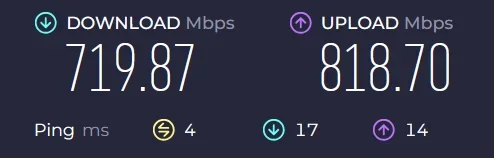
I can't imagine it's your hardware that's the issue. My hardware is a notch below what you have with an i5-14500 and the RTX 4060. The one advantage I have is better upload speed, but it's hard to see that causing what you see.

1758204426418.webp

I'd be looking at something running in the background, what do you get if you do a clean boot?

How to perform a clean boot in Windows


My Computers My Computers

  • At a glance

    Win 11 Pro 25H2, Build 26200.8655Intel Core i5 1450064GB DDR4GeForce RTX 4060
    OS
    Win 11 Pro 25H2, Build 26200.8655
    Computer type
    PC/Desktop
    Manufacturer/Model
    Home Brew
    CPU
    Intel Core i5 14500
    Motherboard
    Gigabyte B760M G P WIFI
    Memory
    64GB DDR4
    Graphics Card(s)
    GeForce RTX 4060
    Sound Card
    Chipset Realtek
    Monitor(s) Displays
    LG 45" Ultragear, Acer 24" 1080p
    Screen Resolution
    5120x1440, 1920x1080
    Hard Drives
    Crucial P310 2TB 2280 PCIe Gen4 3D NAND NVMe M.2 SSD (O/S)
    Silicon Power 2TB US75 NVMe PCIe Gen4 M.2 2280 SSD (backup)
    Crucial BX500 2TB 3D NAND (2nd backup)
    Seagate 4TB Ironwolf, rotating HDD archive files
    External off-line backup Drives: 2 NVMe 4TB drives in external enclosures
    PSU
    Thermaltake Toughpower GF3 750W
    Case
    LIAN LI LANCOOL 216 E-ATX PC Case
    Cooling
    Lots of fans!
    Keyboard
    Microsoft Comfort Curve 2000
    Mouse
    Logitech G305
    Internet Speed
    Verizon FiOS 1GB
    Browser
    Firefox
    Antivirus
    Malware Bytes & Windows Defender Security
  • At a glance

    Win 11 Pro 25H2, Build 26200.8524Intel Core i5 1440032GB DDR5Intel 700 Embedded GPU
    Operating System
    Win 11 Pro 25H2, Build 26200.8524
    Computer type
    PC/Desktop
    Manufacturer/Model
    Home Brew
    CPU
    Intel Core i5 14400
    Motherboard
    Gigabyte B760M DS3H AX
    Memory
    32GB DDR5
    Graphics card(s)
    Intel 700 Embedded GPU
    Sound Card
    Realtek Embedded
    Monitor(s) Displays
    27" HP 1080p
    Screen Resolution
    1920x1080
    Hard Drives
    Crucial P310 2TB 2280 PCIe Gen4 eD NAND PCIe SSD
    Samsung EVO 990 2TB NVMe Gen4 SSD
    Samsung 2TB SATA SSD
    PSU
    Thermaltake Smart BM3 650W
    Case
    Okinos Micro ATX Case
    Cooling
    Fans
    Keyboard
    Microsoft Comfort Curve 2000
    Mouse
    Logitech G305
    Internet Speed
    Verizon FiOS 1GB
    Browser
    Firefox
    Antivirus
    Malware Bytes & Windows Defender Security
Back
Top Bottom