

cinematic6436
Well-known member
- Local time
- 5:54 PM
- Posts
- 23
- OS
- Windows 11
I have a directory (DCIM) with two subdirectories -- Pictures and Camera. They are synced with SyncThing and SyncTrayzor to my android phone, which uses Syncthing Fork. Photos taken on the phone are stored in Camera and are duplicated onto my computer as soon as the phone connects to the wifi. Pictures is a directory that has random stuff.
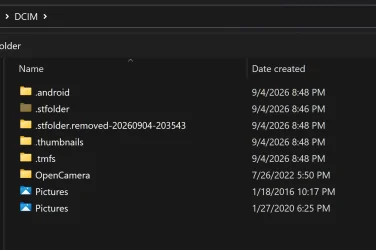
I recently upgraded phones, transferred everything onto the new one, successfully got everything syncing properly again -- and was surprised to see the Camera directory in Windows Explorer is now identified as Pictures. If I go to the DCIM directory, there's now two directories named Pictures (see screenshot). If I view the same location using the command prompt on my computer, the directories appear as Camera and Pictures. Same when viewed in Cx File Explorer on my phone.
Has anyone experienced this before? How can I see that second Pictures directory as Camera in Windows Explorer again?
I recently upgraded phones, transferred everything onto the new one, successfully got everything syncing properly again -- and was surprised to see the Camera directory in Windows Explorer is now identified as Pictures. If I go to the DCIM directory, there's now two directories named Pictures (see screenshot). If I view the same location using the command prompt on my computer, the directories appear as Camera and Pictures. Same when viewed in Cx File Explorer on my phone.
Has anyone experienced this before? How can I see that second Pictures directory as Camera in Windows Explorer again?
- Windows Build/Version
- Version 25H2 (OS Build 26200.9278)
My Computer
At a glance
Windows 11
- OS
- Windows 11






