- Local time
- 11:20 PM
- Posts
- 68
- OS
- Windows 11 Pro
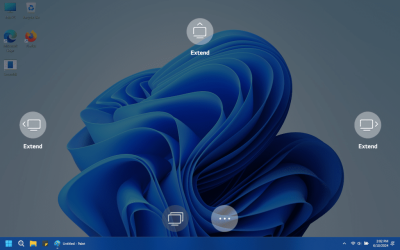
I have a new 17" LG Gram Windows 11 laptop! I have a second (virtual) monitor connected in duplicate mode (see long story below). When I open the lid on the laptop I see this stupid overlay, with icons on all 4 edges of the screen, wanting me to choose extended mode or duplicate mode.
Please tell me how to I DISABLE this stupid overlay?
NOTE: I already ensured that this new laptop is setup to NOT turn off the built-in display, or sleep when the lid is closed. I am 100% sure it is not sleeping, but I can see that the built-in display is turning off as I close the lid! WTF
Background:
I use Chrome Remote Desktop to manage all the PC's in my home, and a few family PC's outside my home. Until now, I've been able to work around issues with remotely viewing (Intel display) laptops that have the lid closed. They don't like to display windows start menu, native apps, and settings correctly. The text and images turn out all jumbled, wrong size, clickable buttons are in the wrong place, etc.
And now this new LG Gram Windows 11 Intel Xe graphics laptop has made it IMPOSSIBLE to overcome. When this new laptop lid is closed, I cannot open ANYTHING AT ALL remotely. Not the start menu, or Firefox, or Windows Settings... nothing. All I see is a blank screen. I can remote into it fine, but cannot make anything come up on the screen until I walk over and open the lid. Then the stuff that I opened pops right up!
After some research I found a "virtual display driver" GitHub - itsmikethetech/Virtual-Display-Driver This solved the entire issue of viewing the screen using Chrome Remote Desktop when the laptop lid is closed!
17" LG Gram Laptop
Intel(R) Core(TM) i7-1360P
Intel Iris Xe
Please tell me how to I DISABLE this stupid overlay?
NOTE: I already ensured that this new laptop is setup to NOT turn off the built-in display, or sleep when the lid is closed. I am 100% sure it is not sleeping, but I can see that the built-in display is turning off as I close the lid! WTF
Background:
I use Chrome Remote Desktop to manage all the PC's in my home, and a few family PC's outside my home. Until now, I've been able to work around issues with remotely viewing (Intel display) laptops that have the lid closed. They don't like to display windows start menu, native apps, and settings correctly. The text and images turn out all jumbled, wrong size, clickable buttons are in the wrong place, etc.
And now this new LG Gram Windows 11 Intel Xe graphics laptop has made it IMPOSSIBLE to overcome. When this new laptop lid is closed, I cannot open ANYTHING AT ALL remotely. Not the start menu, or Firefox, or Windows Settings... nothing. All I see is a blank screen. I can remote into it fine, but cannot make anything come up on the screen until I walk over and open the lid. Then the stuff that I opened pops right up!
After some research I found a "virtual display driver" GitHub - itsmikethetech/Virtual-Display-Driver This solved the entire issue of viewing the screen using Chrome Remote Desktop when the laptop lid is closed!
17" LG Gram Laptop
Intel(R) Core(TM) i7-1360P
Intel Iris Xe
- Windows Build/Version
- 23H2 (build 22631.3672)
My Computers
-
At a glance
Windows 11 ProIntel Core i7-11700k16GB Patriot Viper Steel @ DDR4-3200RTX2070- OS
- Windows 11 Pro
- Computer type
- PC/Desktop
- Manufacturer/Model
- ASUS z590
- CPU
- Intel Core i7-11700k
- Motherboard
- ASUS z590
- Memory
- 16GB Patriot Viper Steel @ DDR4-3200
- Graphics Card(s)
- RTX2070
- Monitor(s) Displays
- Sony XBR65Z9D
- Hard Drives
- 1TB Crucial T500 M.2 PCIe Gen4 + many SATA + many USB
- PSU
- AS Rock Steel Legend 850W
- Case
- Silverstone
- Internet Speed
- 1Gbps
-
At a glance
Windows 11 ProIntel Core Ultra 7 255H32GB Samsung LPDDR5-8533NVIDIA GeForce RTX 5060 Laptop GPU- Operating System
- Windows 11 Pro
- Computer type
- Laptop
- Manufacturer/Model
- Lenovo T1G Gen 8
- CPU
- Intel Core Ultra 7 255H
- Motherboard
- 21TD000LUS
- Memory
- 32GB Samsung LPDDR5-8533
- Graphics card(s)
- NVIDIA GeForce RTX 5060 Laptop GPU
- Monitor(s) Displays
- 16" WQUXGA IPS HDR+DoVi
- Screen Resolution
- 3840x2400
- Hard Drives
- 1TB M.2 PCIe Gen5 NVMe
- Keyboard
- Redragon S113-KN-DE (Brown switches)
- Mouse
- Logitech MX Ergo S
- Internet Speed
- 1Gbps