JavaScript is disabled. For a better experience, please enable JavaScript in your browser before proceeding.
You are using an out of date browser. It may not display this or other websites correctly.
You should upgrade or use an
alternative browser .
Solved Can I salvage my SSD?
Well-known member
Power User
VIP
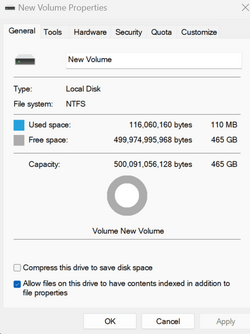
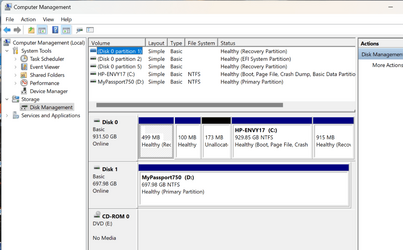
I wanted to give my old, portable Seagate SSD a new life and securely erased it with the diskpart command 'clean all' then a couple more diskpart commands (don't ask, I forgot which diskpart commands I used) until I could do a quick format in Disk Management, and the result looks OK, see the pics below.
But the darn SSD does not show up in File Explorer
Can I salvage my SSD?
Well-known member
Member
VIP
You have not assigned a drive letter to the SSD New Volume.Change Drive Letter and Paths .
Windows 11 Pro Ryzen 9 3900X G-Skill RipjawsV F4-3600C18 (16GB x 2) Gigabyte RX 5700 XT Gaming OC Windows 11 Pro PC/Desktop Ryzen 9 3900X ASUS ROG Strix X570-E Gaming G-Skill RipjawsV F4-3600C18 (16GB x 2) Gigabyte RX 5700 XT Gaming OC Realtek ALC1220P ASUS VE278 (x 2) 1920x1080 Samsung 850 Pro 256GB Corsair HX1000 Corsair Carbide 400R AMD Wraith Prism (Stock) Logitech G213 Logitech G502 100Mbps down / 40Mbps up Firefox - Chrome - Edge Windows Defender - Clamwin
Well-known member
Guru
VIP
You have a volume created on the SSD. You can't see it because you simply need to assign it a drive letter.
Win11 Pro 25H2 (RTM+) Intel i7-14650HX 32 GB No GPU - Built-in Intel Graphics Win11 Pro 25H2 (RTM+) PC/Desktop Acemagic Intel i7-14650HX 32 GB No GPU - Built-in Intel Graphics Integrated Varies as machine will often be moved to locations with different monitors Varies 1 x 1TB Gen 4 NVMe SSD 120W Power Brick Corsair K70 Max RGB Magnetic Keyboard Logitech MX Master 3 1Gb Up / 1 Gb Down Edge Windows Defender
Win11 Pro 25H2 (RTM+) Intel i7-1255U 16 GB Intel Iris Xe Graphics Win11 Pro 25H2 (RTM+) Laptop Lenovo ThinkBook 13x Gen 2 Intel i7-1255U 16 GB Intel Iris Xe Graphics Realtek® ALC3306-CG codec 13.3-inch IPS Display WQXGA (2560 x 1600) 2 TB 4 x 4 NVMe SSD USB-C / Thunderbolt 4 Power / Charging Backlit, spill resistant keyboard Buttonless Glass Precision Touchpad 1Gb Up / 1Gb Down Edge Windows Defender WiFi 6e / Bluetooth 5.1 / Facial Recognition / Fingerprint Sensor / ToF (Time of Flight) Human Presence Sensor
Well-known member
Power User
VIP
Stupid question - if you view the drive in Computer Management, does it have a drive letter?
Windows 11 Professional 25H2 Intel Core i9 11900K 64GB NVIDIA GeForce GTX 1650 Windows 11 Professional 25H2 PC/Desktop Digital Storm VELOX Intel Core i9 11900K ASUS PRIME Z590-P 64GB NVIDIA GeForce GTX 1650 Realtek onboard Acer R221Q 21.5" 1920 x 1080 2 x Samsung SSD 990 EVO Plus (1 TB) None VELOX Cooler Master Logitech Kensington trackball Firefox, Chrome Windows Defender, Malwarebytes
Well-known member
Pro User
VIP
Stupid question - if you view the drive in Computer Management, does it have a drive letter?
Yes, it will be seen in the Storage section. When I work with a drive in Disk Management I assure it has a drive letter so it is able to be seen in File Explorer. If no letter FE won't see it and neither will programs. Removable drives such as USB Thumb drives don't need the same and best not to install programs on them as removal usually breaks that install.
Win11 Pro RTM Version 24H2 Build 26100.4202 Intel Core i5 11th Gen. 2.40GHz 12GB Win11 Pro RTM Version 24H2 Build 26100.4202 Laptop Dell Vostro 3400 Intel Core i5 11th Gen. 2.40GHz 12GB 256GB SSD NVMe M.2
Win11 Pro RTM Version 24H2 Build 26100.4202 Intel Core i5 10th Gen. 2.90GHz 16GB Onboard, no VGA, using a DisplayPort-to-VGA a... Win11 Pro RTM Version 24H2 Build 26100.4202 PC/Desktop Dell Vostro 5890 Intel Core i5 10th Gen. 2.90GHz 16GB Onboard, no VGA, using a DisplayPort-to-VGA adapter 24" Dell 512GB SSD NVMe, 4TB Seagate HDD Firefox, Edge Windows Defender/Microsoft Security
Well-known member
Power User
VIP
Thread Starter
Yay! Thanks to all who responded
I mark this thread solved






 I mark this thread solved