Can W11 use EXTEND screen to more than 1 extra monitor.


jimbo45

Well-known member
Pro User
VIP
Local time
3:44 AM
Posts
5,940
Location
Hafnarfjörður IS
OS
Windows XP,11 Linux Fedora Rawhide pre-release 46
Hi folks
I have a main 4 screen setup -- with some Stock trading software one can have different graphs / charts / processes on all 4 screens. Can Windows 11 be made in the "Extend screen" facility to extend the screen across all 4 Monitors so a "Windowed application" can be moved to any of the 4 screens at will.

Running W11 pro insider Preview build 22518.

Cheers
jimbo
 

My Computer My Computer

At a glance

Windows XP,11 Linux Fedora Rawhide pre-releas...2 X Intel i7
OS
Windows XP,11 Linux Fedora Rawhide pre-release 46
Computer type
PC/Desktop
CPU
2 X Intel i7
Screen Resolution
4KUHD X 2
Personally still on Win 10.

However the extend option will by default allow access to all screens available to the OS, (Graphics processor permitting).
If you mean to stretch a virtual Screen across multiple monitors that the OS sees as a single ultra wide screen then you would need specialist software AFAIK

Once setup you can select a windowed application and use Win+Arrow keys to move them around the screens, which is often more precise than the mouse as it aligns them too

I personally run a dual monitor system on my main desktop, but can also run a three screen set including my Laptop screen into the mix, either from the Laptop or with a bit of work use the laptop screen as a monitor from the desktop

As stated above - the usability is dependent on the graphics card and it's memory speed and availability but includes vertical as well as horizontal stacking
 

My Computers My Computers

  • At a glance

    Windows 11 Pro x64 [Latest Release Preview] [...AMD RYZEN 9 7950X OEM64GB [2x32GB Corsair Vengeance 560 AMD DDR5]3XS* ASUS DUAL RTX 4060 OC 8G
    OS
    Windows 11 Pro x64 [Latest Release Preview] [Win11 PRO HighEnd MUP-00005 DD]
    Computer type
    PC/Desktop
    Manufacturer/Model
    Scan 3XS to my design
    CPU
    AMD RYZEN 9 7950X OEM
    Motherboard
    *3XS*ASUS TUF B650 PLUS WIFI
    Memory
    64GB [2x32GB Corsair Vengeance 560 AMD DDR5]
    Graphics Card(s)
    3XS* ASUS DUAL RTX 4060 OC 8G
    Sound Card
    On motherboard Feeding SPDiF 5.1 system [plus local sound to each monitor]
    Monitor(s) Displays
    32" UHD 32 Bit HDR Monitor + 43" UHD 4K 32Bit HDR TV
    Screen Resolution
    2 x 3840 x 2160
    Hard Drives
    3XS Samsung 980Pro 2TB M.2 PCIe4 4 x 8TB Data + Various Externals from 1TB to 8TB, 10TB NAS
    PSU
    3XS Corsair RM850x 850w Fully Modular
    Case
    FDesign Define 7 XL BK TGL Case - Black
    Cooling
    3XS iCUE H150i ELITE Liquid Cool, Quiet Case fans
    Keyboard
    Wireless Logitec MX Keys + K830 [Depending on where I'm Sat]
    Mouse
    Wireless Logitec - MX Master 3S +
    Internet Speed
    950 MB Down 55 MB Up
    Browser
    Latest Chrome
    Antivirus
    BitDefender Total Security [Latest]
    Other Info
    Also run...
    Dell XPS 17 Laptop
    HP Laptop 8GB - Windows 10 Pro x64 HP 15.2"
    Nexus 7 Android tablet [x2]
    Samsung 10.2" tablet
    Blackview 10.2 Tablet
    Sony Z3 Android Smartphone
    Samsung S9 Plus Smartphone
    Wacom Pro Medium Pen Pad
    Wacom Pro Small Pen Pad
    Wacom ExpressKey Remote
    Loopdeck+ Graphics Controller
    Shuttle Pro v2 Control Pad
  • At a glance

    Windows 11 Pro x64 [Latest release]i7 10750H32 GBStock Intel + GTX 1650 Ti
    Operating System
    Windows 11 Pro x64 [Latest release]
    Computer type
    Laptop
    Manufacturer/Model
    Dell XPS 17 9700
    CPU
    i7 10750H
    Motherboard
    Stock
    Memory
    32 GB
    Graphics card(s)
    Stock Intel + GTX 1650 Ti
    Sound Card
    Stock 4 speaker
    Monitor(s) Displays
    Stock 17" + 32" 4K 3840 x 2160 HDR-10
    Screen Resolution
    3840 x 2400 HDR touchscreen
    Hard Drives
    2TB M2 NVMe
    PSU
    Stock
    Case
    Stock Aluminium / Carbon Fibre
    Cooling
    Stock + 2 fan cooling pad
    Keyboard
    Stock Illuminated + Logi - MX Keys
    Mouse
    Stock Trackpad +Logi Mx Master 3 or MX Ergo Trackball
    Internet Speed
    950 MB Down 55 MB Up
    Browser
    Latest Chrome
    Antivirus
    BitDefender Total Security 2021
    Other Info
    Also use an Adjustable Support for Laptop and Adjustable stand for monitor
Works here...,
The only anomaly I experience is, when I drag a window to full screen within the 4K monitor, it spreads across the entire monitor array! 🤷‍♂️
I think it's a glitch with my crappy GPU, though.
 

My Computers My Computers

  • At a glance

    Windows 11 Pro
    OS
    Windows 11 Pro
    Computer type
    PC/Desktop
    Manufacturer/Model
    ASUS ROG Strix
  • At a glance

    Windows 11 Pro
    Operating System
    Windows 11 Pro
    Computer type
    Laptop
    Manufacturer/Model
    ASUS VivoBook
  • ASUS VivoBook 'Lite' ~ Windows 11 Home
Personally still on Win 10.

However the extend option will by default allow access to all screens available to the OS, (Graphics processor permitting).
If you mean to stretch a virtual Screen across multiple monitors that the OS sees as a single ultra wide screen then you would need specialist software AFAIK

Once setup you can select a windowed application and use Win+Arrow keys to move them around the screens, which is often more precise than the mouse as it aligns them too

I personally run a dual monitor system on my main desktop, but can also run a three screen set including my Laptop screen into the mix, either from the Laptop or with a bit of work use the laptop screen as a monitor from the desktop

As stated above - the usability is dependent on the graphics card and it's memory speed and availability but includes vertical as well as horizontal stacking
Thanks

With a bit of jigging around it's orking fine on W11

What I wanted it for particularly --I'm running a Linux WSL2 (Debian) with Full GNOME GUI desktop and its nice to have that available on a seperate monitor in its own "workspace"
I'm actually running g this reply on Firefox on the WSLdeb.png

The VM is mega fast compared to even Hyper-V -- Very surprised at that !!!!

Cheers

and Have good Holidays next week and New Year -- I readthe there's loads of new omicron cases and maybe anothe lockdown -- hapenning a lot in Europe too --.

jimbo
 

My Computer My Computer

At a glance

Windows XP,11 Linux Fedora Rawhide pre-releas...2 X Intel i7
OS
Windows XP,11 Linux Fedora Rawhide pre-release 46
Computer type
PC/Desktop
CPU
2 X Intel i7
Screen Resolution
4KUHD X 2
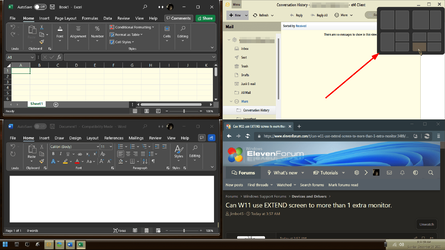
Snap Layouts are handy..., a tad bit annoying though, when hovering over M/M/C buttons!

000257.png
 

My Computers My Computers

  • At a glance

    Windows 11 Pro
    OS
    Windows 11 Pro
    Computer type
    PC/Desktop
    Manufacturer/Model
    ASUS ROG Strix
  • At a glance

    Windows 11 Pro
    Operating System
    Windows 11 Pro
    Computer type
    Laptop
    Manufacturer/Model
    ASUS VivoBook
  • ASUS VivoBook 'Lite' ~ Windows 11 Home
I have two 24" monitors and a 65" smartv and running Win11. Naturally the smartv will default back to 1920x1080 when connected to the video card because that's the limit of the two monitors. I find it works great to drag and drop some apps or just set some to open in whichever monitor you prefer. I have one of my video player icons on the smartv screen for when I want to stream a movie from my computer. This works the same as it did on Win10.

cheers
 

My Computer My Computer

At a glance

Windows 11 ProIntel Core i7-11700K Desktop Processor 8 CoresCorsair Vengeance LPX 32GB (2 x 16GB) DDR4 DR...ASUS GTX ROG STRIX 1080 8GB
OS
Windows 11 Pro
Computer type
PC/Desktop
Manufacturer/Model
ASUS
CPU
Intel Core i7-11700K Desktop Processor 8 Cores
Motherboard
ASUS ROG Strix Z590-A Gaming WiFi LGA 1200
Memory
Corsair Vengeance LPX 32GB (2 x 16GB) DDR4 DRAM 3600MHz
Graphics Card(s)
ASUS GTX ROG STRIX 1080 8GB
Sound Card
Sound Blaster Z SE
Monitor(s) Displays
ASUS VG34VQL1B plus a Samsung 60" Smartv
Screen Resolution
3440x1440, 165Hz
Hard Drives
Samsung 980 Series - (OS)1TB Pro Gen4 NVMe M.2, 1TB Gen3. x4 NVMe 1.4 - M.2, WD 1TB, WD 500GB, WD 350GB
PSU
Silverstone Olympia OP1000W PSW
Case
Phanteks Enthoo Pro
Cooling
Noctua NH-D15 SSO2 D-Type Premium CPU Cooler, NF-A15 x 2 PWM Fans
Keyboard
Corsair K70 RGB
Mouse
Logitech 310 wireless
Internet Speed
1 GB
Browser
Firefox
Antivirus
ESET Internet Security
Other Info
Testing Windows 10 Pro on 350GB drive
Back
Top Bottom