Solved Cannot assign default app for .jpg or .jpeg files in Irfanview


ineuw

Well-known member
Local time
6:32 PM
Posts
21
Location
Canada
OS
Windows 11 24H2
Installed Irfanview and discovered that .jpg or .jpeg files cannot be assigned a default app.

I tried every posted suggestion, but the .jpg file properties is missing the 'Open with' option.
 
Windows Build/Version
Windows 11 Pro 22H2 OS build 22261.1992

My Computer My Computer

At a glance

Windows 11 24H2Pentium Gold Pro 6500 4.00GHz16GBIntel on board
OS
Windows 11 24H2
Computer type
PC/Desktop
Manufacturer/Model
user assembled standard hardware
CPU
Pentium Gold Pro 6500 4.00GHz
Motherboard
AsRock Z590 Steel Legend
Memory
16GB
Graphics Card(s)
Intel on board
Sound Card
on board
Monitor(s) Displays
24" LG
Screen Resolution
Preferred 1600 x 900 or 1664 x 936 (16:9)
Hard Drives
128GB internal system SSD
1TB data SSD
PSU
Antec 650w Bronze
Case
Antec Mid Tower
Cooling
standard CPU and 120mm case fan
Keyboard
104 US or French Canada Qwerty
Mouse
Microsoft wireless
Internet Speed
60Mbit
Browser
Firefox, Vivaldi, Google Chrome Edge
Antivirus
Windows 11 Pro
Installed Irfanview and discovered that .jpg or .jpeg files cannot be assigned a default app.

I tried every posted suggestion, but the .jpg file properties is missing the 'Open with' option.


In the Taskbar search box type: defaults
Then scroll down and pick: Choose defaults by file type.
Find .jpg and .jpeg and choose Irfanview

If you don't see Irfanview on the list, scroll down and choose: Choose an app on your PC
...and browse to Irfanview.


I would imagine that somewhere in Irfanview Options or Preferences, you can also choose what file types to open with Irfanview
 

My Computers My Computers

  • At a glance

    Win 11 Home ♦♦♦26200.8737 ♦♦♦♦♦♦♦25H2AMD Ryzen 7 3700XG.Skill (F4-3200C14D-16GTZKW)EVGA RTX 2070 (08G-P4-2171-KR)
    OS
    Win 11 Home ♦♦♦26200.8737 ♦♦♦♦♦♦♦25H2
    Computer type
    PC/Desktop
    Manufacturer/Model
    Built by Ghot® [May 2020]
    CPU
    AMD Ryzen 7 3700X
    Motherboard
    Asus Pro WS X570-ACE (BIOS 5302)
    Memory
    G.Skill (F4-3200C14D-16GTZKW)
    Graphics Card(s)
    EVGA RTX 2070 (08G-P4-2171-KR)
    Sound Card
    Realtek ALC1220P / ALC S1220A
    Monitor(s) Displays
    Dell U3011 30"
    Screen Resolution
    2560 x 1600
    Hard Drives
    2x Samsung 860 EVO 500GB,
    WD 4TB Black FZBX - SATA III,
    WD 8TB Black FZBX - SATA III,
    DRW-24B1ST CD/DVD Burner
    PSU
    PC Power & Cooling 750W Quad EPS12V
    Case
    Cooler Master ATCS 840 Tower
    Cooling
    CM Hyper 212 EVO (push/pull)
    Keyboard
    Ducky DK9008 Shine II Blue LED
    Mouse
    Logitech Optical M-100
    Internet Speed
    300/300
    Browser
    Firefox (latest)
    Antivirus
    Bitdefender Total Security
    Other Info
    Speakers: Klipsch Pro Media 2.1
  • At a glance

    Windows XP Pro 32bit w/SP3AMD Athlon 64 X2 5000+ (OC'd @ 3.2Ghz)TWIN2X2048-6400C4DHX (2 x 1GB, DDR2 800)EVGA 256-P2-N758-TR GeForce 8600GT SSC
    Operating System
    Windows XP Pro 32bit w/SP3
    Computer type
    PC/Desktop
    Manufacturer/Model
    Built by Ghot® (not in use)
    CPU
    AMD Athlon 64 X2 5000+ (OC'd @ 3.2Ghz)
    Motherboard
    ASUS M2N32-SLI Deluxe Wireless Edition
    Memory
    TWIN2X2048-6400C4DHX (2 x 1GB, DDR2 800)
    Graphics card(s)
    EVGA 256-P2-N758-TR GeForce 8600GT SSC
    Sound Card
    Onboard
    Monitor(s) Displays
    ViewSonic G90FB Black 19" Professional (CRT)
    Screen Resolution
    up to 2048 x 1536
    Hard Drives
    WD 36GB 10,000rpm Raptor SATA
    Seagate 80GB 7200rpm SATA
    Lite-On LTR-52246S CD/RW
    Lite-On LH-18A1P CD/DVD Burner
    PSU
    PC Power & Cooling Silencer 750 Quad EPS12V
    Case
    Generic Beige case, 80mm fans
    Cooling
    ZALMAN 9500A 92mm CPU Cooler
    Keyboard
    Logitech Classic Keybooard 200
    Mouse
    Logitech Optical M-BT96a
    Internet Speed
    300/300
    Browser
    Firefox 3.x ??
    Antivirus
    Symantec (Norton)
    Other Info
    Still assembled, still runs. Haven't turned it on for 15 years?
Thanks for the reply, but Windows deliberately blocks these types. All your suggestions as well as others' posts with the same issue have been tried.
 

My Computer My Computer

At a glance

Windows 11 24H2Pentium Gold Pro 6500 4.00GHz16GBIntel on board
OS
Windows 11 24H2
Computer type
PC/Desktop
Manufacturer/Model
user assembled standard hardware
CPU
Pentium Gold Pro 6500 4.00GHz
Motherboard
AsRock Z590 Steel Legend
Memory
16GB
Graphics Card(s)
Intel on board
Sound Card
on board
Monitor(s) Displays
24" LG
Screen Resolution
Preferred 1600 x 900 or 1664 x 936 (16:9)
Hard Drives
128GB internal system SSD
1TB data SSD
PSU
Antec 650w Bronze
Case
Antec Mid Tower
Cooling
standard CPU and 120mm case fan
Keyboard
104 US or French Canada Qwerty
Mouse
Microsoft wireless
Internet Speed
60Mbit
Browser
Firefox, Vivaldi, Google Chrome Edge
Antivirus
Windows 11 Pro
Thanks for the reply, but Windows deliberately blocks these types. All your suggestions as well as others' posts with the same issue have been tried.


Blocks .jpg and .jpeg??
They work fine on my Windows 10 and 11, but I don't use Irfanview.
I use XnView (for image handling and batch processes), and Paint Shop Pro 7.04 (for image editing).


If it turns out that it's an Irfanview problem... just switch to XnView


I just use the "minimal" version, and it handles all image file types.


Image1.jpg
 
Last edited:

My Computers My Computers

  • At a glance

    Win 11 Home ♦♦♦26200.8737 ♦♦♦♦♦♦♦25H2AMD Ryzen 7 3700XG.Skill (F4-3200C14D-16GTZKW)EVGA RTX 2070 (08G-P4-2171-KR)
    OS
    Win 11 Home ♦♦♦26200.8737 ♦♦♦♦♦♦♦25H2
    Computer type
    PC/Desktop
    Manufacturer/Model
    Built by Ghot® [May 2020]
    CPU
    AMD Ryzen 7 3700X
    Motherboard
    Asus Pro WS X570-ACE (BIOS 5302)
    Memory
    G.Skill (F4-3200C14D-16GTZKW)
    Graphics Card(s)
    EVGA RTX 2070 (08G-P4-2171-KR)
    Sound Card
    Realtek ALC1220P / ALC S1220A
    Monitor(s) Displays
    Dell U3011 30"
    Screen Resolution
    2560 x 1600
    Hard Drives
    2x Samsung 860 EVO 500GB,
    WD 4TB Black FZBX - SATA III,
    WD 8TB Black FZBX - SATA III,
    DRW-24B1ST CD/DVD Burner
    PSU
    PC Power & Cooling 750W Quad EPS12V
    Case
    Cooler Master ATCS 840 Tower
    Cooling
    CM Hyper 212 EVO (push/pull)
    Keyboard
    Ducky DK9008 Shine II Blue LED
    Mouse
    Logitech Optical M-100
    Internet Speed
    300/300
    Browser
    Firefox (latest)
    Antivirus
    Bitdefender Total Security
    Other Info
    Speakers: Klipsch Pro Media 2.1
  • At a glance

    Windows XP Pro 32bit w/SP3AMD Athlon 64 X2 5000+ (OC'd @ 3.2Ghz)TWIN2X2048-6400C4DHX (2 x 1GB, DDR2 800)EVGA 256-P2-N758-TR GeForce 8600GT SSC
    Operating System
    Windows XP Pro 32bit w/SP3
    Computer type
    PC/Desktop
    Manufacturer/Model
    Built by Ghot® (not in use)
    CPU
    AMD Athlon 64 X2 5000+ (OC'd @ 3.2Ghz)
    Motherboard
    ASUS M2N32-SLI Deluxe Wireless Edition
    Memory
    TWIN2X2048-6400C4DHX (2 x 1GB, DDR2 800)
    Graphics card(s)
    EVGA 256-P2-N758-TR GeForce 8600GT SSC
    Sound Card
    Onboard
    Monitor(s) Displays
    ViewSonic G90FB Black 19" Professional (CRT)
    Screen Resolution
    up to 2048 x 1536
    Hard Drives
    WD 36GB 10,000rpm Raptor SATA
    Seagate 80GB 7200rpm SATA
    Lite-On LTR-52246S CD/RW
    Lite-On LH-18A1P CD/DVD Burner
    PSU
    PC Power & Cooling Silencer 750 Quad EPS12V
    Case
    Generic Beige case, 80mm fans
    Cooling
    ZALMAN 9500A 92mm CPU Cooler
    Keyboard
    Logitech Classic Keybooard 200
    Mouse
    Logitech Optical M-BT96a
    Internet Speed
    300/300
    Browser
    Firefox 3.x ??
    Antivirus
    Symantec (Norton)
    Other Info
    Still assembled, still runs. Haven't turned it on for 15 years?

My Computers My Computers

  • At a glance

    windows 11 22631.5039Core i9 12th gen 12900HK 2.9 MHz (overcloked:...32 Gigs DDR5-4800nVidia RTX 3070 Ti / 8 Gigs DDR6
    OS
    windows 11 22631.5039
    Computer type
    Laptop
    Manufacturer/Model
    MSI Raider GE76
    CPU
    Core i9 12th gen 12900HK 2.9 MHz (overcloked: 3890.48)
    Motherboard
    MSI
    Memory
    32 Gigs DDR5-4800
    Graphics Card(s)
    nVidia RTX 3070 Ti / 8 Gigs DDR6
    Sound Card
    DYNAUDIO - Steelsries Arena 7- Sound Effects by Nahimic 3
    Monitor(s) Displays
    17.3" 1920 x 1080 360 Hz 3 ms, IPS / Connected to MSI 32 inch curved @ 165 Hz
    Screen Resolution
    1920 x 1080 / Both
    Hard Drives
    Samsung 990 Pro 2TB (OS) - Solidigm P41 2TB (Storage)
    PSU
    280 watts
    Case
    MSI GE series
    Cooling
    internal
    Keyboard
    Steelseries
    Mouse
    G903 Lightspeed
    Internet Speed
    1000 Mbps
    Browser
    Firefox / Opera GX- Do not like Edge
    Antivirus
    Malwarebytes'
    Other Info
    just ask.
  • At a glance

    Windows 10 22H2Intel Core i7 7820HK 2.9 Ghz16 Gigs DDR4 2400 MhznVidia 1070 8GB RAM
    Operating System
    Windows 10 22H2
    Computer type
    Laptop
    Manufacturer/Model
    MSI GT73 7RE VR Titan
    CPU
    Intel Core i7 7820HK 2.9 Ghz
    Motherboard
    MSI
    Memory
    16 Gigs DDR4 2400 Mhz
    Graphics card(s)
    nVidia 1070 8GB RAM
    Sound Card
    DYNAUDIO / Nahimic 2
    Monitor(s) Displays
    IPS / 120HZ
    Screen Resolution
    1920x1080P
    Hard Drives
    Samsung NVME EVO 970 1TB / Samsung SSD (SATA) 1TB
    PSU
    240 watts
    Case
    MSI
    Cooling
    Internal
    Keyboard
    Steelseries
    Mouse
    Logitech G903 Lightspeed
    Internet Speed
    1 Gb/s
    Browser
    Firefox / Vivaldi
    Antivirus
    MalwareBytes'
    Other Info
    none.
There is no issue with Irfanview.

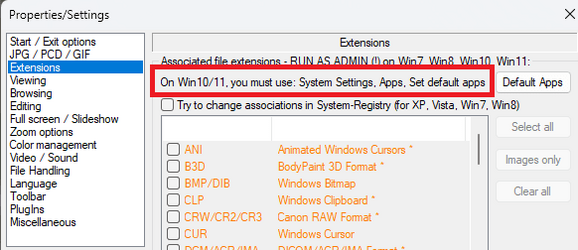
Open Irfanview as ADMIN.

Select Options > Properties/Settings > Extensions

Select Images only (or just the ones you want)

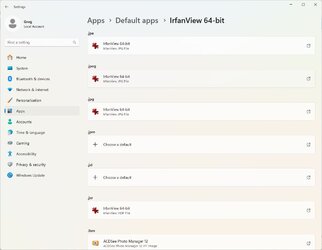
Select Default Apps, scroll down to Irfanview and make changes there if needed.

Close Default apps when done.

In Irfanview select OK (important!)

1696658019413.png

1696658137905.png
 
Last edited:

My Computers My Computers

  • At a glance

    Win 11 Pro 25H2 26200.8737Intel® Core™ i7-14700KG.SKILL Ripjaws S5 Series 64GB (2 x 32GB) DDR5ASUS GeForce RTX 4070 Super 12GB
    OS
    Win 11 Pro 25H2 26200.8737
    Computer type
    PC/Desktop
    Manufacturer/Model
    Self Built
    CPU
    Intel® Core™ i7-14700K
    Motherboard
    ASUS TUF Z690-PLUS WIFI BIOS 4505 11/29/25
    Memory
    G.SKILL Ripjaws S5 Series 64GB (2 x 32GB) DDR5
    Graphics Card(s)
    ASUS GeForce RTX 4070 Super 12GB
    Sound Card
    Sound Blaster AE-5 Plus
    Monitor(s) Displays
    ASUS TUF Gaming 27" 2K HDR Gaming
    Screen Resolution
    2560 x 1440
    Hard Drives
    Samsung 990 Pro 1TB NVMe (Win 11 25H2)
    SK hynix P41 500GB NVMe 25H2 DEV/Games
    SK hynix P41 2TB NVMe (x3)
    Crucial P3 Plus 4TB
    PSU
    Corsair RM850x Shift
    Case
    Antec Dark Phantom DP502 FLUX
    Cooling
    Corsair Nautilus 360 RS AIO
    Keyboard
    Logitech MK 320
    Mouse
    Razer Basilisk V3
    Internet Speed
    750Mbs
    Browser
    Firefox
    Antivirus
    Winows Security
    Other Info
    MR 8.1 Home
  • At a glance

    Win 11 Pro 25H2 26200.8737Intel Core i7-11700F64 GB DDR4MSI GeForce RTX 3060 Ventus 2X 12GB
    Operating System
    Win 11 Pro 25H2 26200.8737
    Computer type
    PC/Desktop
    Manufacturer/Model
    Self Built
    CPU
    Intel Core i7-11700F
    Motherboard
    Asus TUF Gaming Z590 Plus WiFi (BIOS 2803)
    Memory
    64 GB DDR4
    Graphics card(s)
    MSI GeForce RTX 3060 Ventus 2X 12GB
    Sound Card
    SoundBlaster Audigy Fx V2
    Monitor(s) Displays
    Samsung F27T350
    Screen Resolution
    1920x1080
    Hard Drives
    Samsung 980 Pro 1TB
    Samsung 970 EVO Plus 2TB
    Samsung 870 EVO 500GB SSD
    PSU
    Corsair HX750
    Case
    Cougar MX330-G Window
    Cooling
    Thermalright Frozen Edge 240 Black AIO
    Internet Speed
    350Mbps
    Browser
    Firefox
    Antivirus
    Windows Security
  • System Three
    Win 11 Pro 25H2 26200.8737
    ASUS PRIME Z370-P II BIOS 3004 7/12/21
    Intel Core i7-8700 CPU @ 3.20GHz
    32GB DDR4 RAM (4x8)
    iGPU Intel UHD Graphics 630
    Mid-Tower Desktop
I have to say your postings are very... curious...
Thanks for the reply, but Windows deliberately blocks these types. All your suggestions as well as others' posts with the same issue have been tried.
Huh? To be clear - Are you saying Windows blocks jpeg/jpg files?

And please clarify this statement...
I tried every posted suggestion, but the .jpg file properties is missing the 'Open with' option.

To be clear Windows 11 fully supports jpeg/jpg files. I create them all the time as I'm also a photographer.
 

My Computers My Computers

  • At a glance

    Windows 11 Pro 24H2 (Build 26100.4770)Intel Core 9 Ultra 285K64G (4x16) DDR5 Corsair RGB Dominator Platinu...Radeon (XFX Mercury) RX 9070XT OC (with Magne...
    OS
    Windows 11 Pro 24H2 (Build 26100.4770)
    Computer type
    PC/Desktop
    Manufacturer/Model
    Custom built
    CPU
    Intel Core 9 Ultra 285K
    Motherboard
    Gigabyte Aorus Z890 Xtreme AI Top
    Memory
    64G (4x16) DDR5 Corsair RGB Dominator Platinum (6400Mhz)
    Graphics Card(s)
    Radeon (XFX Mercury) RX 9070XT OC (with Magnetic Fans)
    Sound Card
    Onboard (DTS:X® Ultra Audio: ESS ES9280A DAC)
    Monitor(s) Displays
    27-inch Eizo Color Edge - CG2700X
    Screen Resolution
    3840 x 2160
    Hard Drives
    4 Samsung NVM 990 Pro drives: 1TB (OS), 2TB, 2 X 4TB.
    PSU
    Seasonic TX-1300 (1300 Watts)
    Case
    Cooler Master H500M
    Cooling
    Corsair Link Titan 280 RX RGB
    Keyboard
    Logitech Craft
    Mouse
    Logitech MX Master 3S
    Internet Speed
    1TB Download. 512mb Upload
    Browser
    Microsoft Edge Chromium
    Antivirus
    Windows Security
    Other Info
    System used for gaming, photography, music, school.
  • At a glance

    Windows 11 Pro 24H2 (Build 26100.4061)Intel Core i9-9900K32gig (4 x 8) Corsair Dominator Platinum DDR4...Radeon XFX Merc 7900XT (20gig)
    Operating System
    Windows 11 Pro 24H2 (Build 26100.4061)
    Computer type
    PC/Desktop
    Manufacturer/Model
    Custom built
    CPU
    Intel Core i9-9900K
    Motherboard
    Gigabyte Z390 Aorus Xtreme
    Memory
    32gig (4 x 8) Corsair Dominator Platinum DDR4 3600Mhz (B-Die)
    Graphics card(s)
    Radeon XFX Merc 7900XT (20gig)
    Sound Card
    Onboard
    Monitor(s) Displays
    24-Inch NEC PA242W
    Screen Resolution
    2880 x 1800
    Hard Drives
    2 X NVME, 1 X SATA SSD
    PSU
    EVGA Super Nova 1000 P2 (1000 Watt)
    Case
    Phantek Enthoo Luxe
    Cooling
    Corsair H115i Elite AIO Cooler
    Keyboard
    Logitech Keys
    Mouse
    Logitech MX Master 3
    Internet Speed
    1TB Download. 512mb Upload
    Browser
    Microsoft Edge Chromium
    Antivirus
    Windows Security
    Other Info
    Backup System
Seen what OP is experiencing, frequently. It's just Windows preciously guarding its

Go to a jpg file > right click > open with > choose Irfanview > select always use

Alternatively uninstall (use RevoUninstaller) Window's mickey mouse image viewing programs (so there's no default option left!). Double click on a jpg file > Windows will ask you to choose the program and offer to use it always.

On most occasions, I blame poorly written software but with Win11 this type of thing is common - trying to take the deafult option away from one of Window's preciously guarded inferior options. Ever tried to re-assign pdf files away from Edge to Adobe ("Do you really want to? Why not just try Edge first? Nag, nag nag ... oh allright, if you really want to")
 

My Computers My Computers

  • At a glance

    Windows 11 2xH2 (latest update ... forever anal)Intel i5-124008GBNVIDIA GeForce GT730
    OS
    Windows 11 2xH2 (latest update ... forever anal)
    Computer type
    PC/Desktop
    Manufacturer/Model
    HP Slim S01
    CPU
    Intel i5-12400
    Memory
    8GB
    Graphics Card(s)
    NVIDIA GeForce GT730
    Sound Card
    OOBE
    Monitor(s) Displays
    Acer 32"
    Screen Resolution
    1920x1080
    Hard Drives
    512GB KIOXIA NVMe
    1TB SATA SSD
    PSU
    OOBE
    Case
    OOBE
    Cooling
    OOBE
    Keyboard
    BT
    Mouse
    BT
    Browser
    Brave FFox Chrome Opera
    Antivirus
    KIS
  • At a glance

    Windows 11 Pro 2xH2 (latest update ... 4ever ...i7-1165G7 @ 2.80GHzIntel Iris Xe Graphics
    Operating System
    Windows 11 Pro 2xH2 (latest update ... 4ever anal)
    Computer type
    Laptop
    Manufacturer/Model
    HP Pavillion 15
    CPU
    i7-1165G7 @ 2.80GHz
    Graphics card(s)
    Intel Iris Xe Graphics
    Hard Drives
    Samsung NVMe 512GB
    + numerous/multiple SSD Type C USB enclosures
    Internet Speed
    NBN FTTN 50
    Browser
    Brave
    Antivirus
    KIS
Sorry, I'm going have to call bull**** here....
On most occasions, I blame poorly written software but with Win11 this type of thing is common - trying to take the deafult option away from one of Window's preciously guarded inferior options. Ever tried to re-assign pdf files away from Edge to Adobe ("Do you really want to? Why not just try Edge first? Nag, nag nag ... oh allright, if you really want to")
I've used every non-server Windows OS since Windows 95 and have NEVER had an issue with Windows handling jpeg/jpg files. And as a photographer, I've been using Windows since XP up to Windows 11 and have never had an issue.

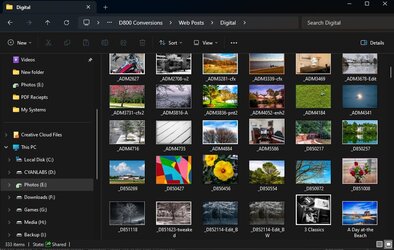
I would venture to bet the OP's files are corrupt or the app they using to read the jpeg/jpg files is problematic. This is Windows 11 Explorer displaying jpeg files...

Windows Explorer showing jpeg files.jpg

I have hundreds of jpeg/jpg files and images and Windows 11 Explorer displays them all without issues. That also includes Windows' "Photos" app, as well as third party apps like Adobe Bridge. Zero issues.
 

My Computers My Computers

  • At a glance

    Windows 11 Pro 24H2 (Build 26100.4770)Intel Core 9 Ultra 285K64G (4x16) DDR5 Corsair RGB Dominator Platinu...Radeon (XFX Mercury) RX 9070XT OC (with Magne...
    OS
    Windows 11 Pro 24H2 (Build 26100.4770)
    Computer type
    PC/Desktop
    Manufacturer/Model
    Custom built
    CPU
    Intel Core 9 Ultra 285K
    Motherboard
    Gigabyte Aorus Z890 Xtreme AI Top
    Memory
    64G (4x16) DDR5 Corsair RGB Dominator Platinum (6400Mhz)
    Graphics Card(s)
    Radeon (XFX Mercury) RX 9070XT OC (with Magnetic Fans)
    Sound Card
    Onboard (DTS:X® Ultra Audio: ESS ES9280A DAC)
    Monitor(s) Displays
    27-inch Eizo Color Edge - CG2700X
    Screen Resolution
    3840 x 2160
    Hard Drives
    4 Samsung NVM 990 Pro drives: 1TB (OS), 2TB, 2 X 4TB.
    PSU
    Seasonic TX-1300 (1300 Watts)
    Case
    Cooler Master H500M
    Cooling
    Corsair Link Titan 280 RX RGB
    Keyboard
    Logitech Craft
    Mouse
    Logitech MX Master 3S
    Internet Speed
    1TB Download. 512mb Upload
    Browser
    Microsoft Edge Chromium
    Antivirus
    Windows Security
    Other Info
    System used for gaming, photography, music, school.
  • At a glance

    Windows 11 Pro 24H2 (Build 26100.4061)Intel Core i9-9900K32gig (4 x 8) Corsair Dominator Platinum DDR4...Radeon XFX Merc 7900XT (20gig)
    Operating System
    Windows 11 Pro 24H2 (Build 26100.4061)
    Computer type
    PC/Desktop
    Manufacturer/Model
    Custom built
    CPU
    Intel Core i9-9900K
    Motherboard
    Gigabyte Z390 Aorus Xtreme
    Memory
    32gig (4 x 8) Corsair Dominator Platinum DDR4 3600Mhz (B-Die)
    Graphics card(s)
    Radeon XFX Merc 7900XT (20gig)
    Sound Card
    Onboard
    Monitor(s) Displays
    24-Inch NEC PA242W
    Screen Resolution
    2880 x 1800
    Hard Drives
    2 X NVME, 1 X SATA SSD
    PSU
    EVGA Super Nova 1000 P2 (1000 Watt)
    Case
    Phantek Enthoo Luxe
    Cooling
    Corsair H115i Elite AIO Cooler
    Keyboard
    Logitech Keys
    Mouse
    Logitech MX Master 3
    Internet Speed
    1TB Download. 512mb Upload
    Browser
    Microsoft Edge Chromium
    Antivirus
    Windows Security
    Other Info
    Backup System
I am amazed at your comments. None of you know or use IrfanView? I am using IrfanView as the default photo and paint editor in Windows since 2005, as hundreds of millions of other users. I think it's also available for download from Microsoft. It works fine in all Windows versions. But, Windows 11 is promoting their photo app as the default .jpg editor, and any change contrary to this cannot be done because I need a complete fresh reinstall from the beginning and try again.

I can open anything with IrfanView through "Open with" but cannot assign it as the default for ".jpg."

This very recent article from windowsreport is 100% correct, but I am missing the relevant controls because I removed a number of apps after installation. the photo app included.
 

My Computer My Computer

At a glance

Windows 11 24H2Pentium Gold Pro 6500 4.00GHz16GBIntel on board
OS
Windows 11 24H2
Computer type
PC/Desktop
Manufacturer/Model
user assembled standard hardware
CPU
Pentium Gold Pro 6500 4.00GHz
Motherboard
AsRock Z590 Steel Legend
Memory
16GB
Graphics Card(s)
Intel on board
Sound Card
on board
Monitor(s) Displays
24" LG
Screen Resolution
Preferred 1600 x 900 or 1664 x 936 (16:9)
Hard Drives
128GB internal system SSD
1TB data SSD
PSU
Antec 650w Bronze
Case
Antec Mid Tower
Cooling
standard CPU and 120mm case fan
Keyboard
104 US or French Canada Qwerty
Mouse
Microsoft wireless
Internet Speed
60Mbit
Browser
Firefox, Vivaldi, Google Chrome Edge
Antivirus
Windows 11 Pro
But, Windows 11 is promoting their photo app as the default .jpg editor, and any change contrary to this cannot be done because I need a complete fresh reinstall from the beginning and try again.
Your statement is erroneous and shows that you are doing something incorrectly.

Screenshot 2023-10-09 113940.pngScreenshot 2023-10-09 114248.pngScreenshot 2023-10-09 115917.png
 
Last edited:

My Computers My Computers

  • At a glance

    All Branches but ReleaseAMD Ryzen 7 7735HS 3200-4500 Mhz 8 cores x 232 GB DDR5Radeon Graphic / NVIDIA GeForce RTX 4060 8 GB...
    OS
    All Branches but Release
    Computer type
    Laptop
    Manufacturer/Model
    Acer Nitro ANV15-51
    CPU
    AMD Ryzen 7 7735HS 3200-4500 Mhz 8 cores x 2
    Motherboard
    Sportage_RBH
    Memory
    32 GB DDR5
    Graphics Card(s)
    Radeon Graphic / NVIDIA GeForce RTX 4060 8 GB GDDR6
    Sound Card
    AMD/Realtek(R) Audio
    Monitor(s) Displays
    Integrated Monitor (15.3"vis)
    Screen Resolution
    FHD 1920X1080 16:9 144Hz
    Hard Drives
    KINGSTON OM8SEP4512Q-AA 1TB
    Western Digital 256GB
    PSU
    19V DC 6.32 A 120 W
    Cooling
    Dual Fans
    Mouse
    MS Bluetooth
    Internet Speed
    Fiber 1GB Cox -us & 1GB Orange-fr
    Browser
    Edge Canary- Firefox Nightly-Chrome Dev-Chrome Dev
    Antivirus
    Windows Defender
  • At a glance

    Windows 11 BetaAMD A9-94208 GB of DDR4AMD Radeon R5
    Operating System
    Windows 11 Beta
    Computer type
    Laptop
    Manufacturer/Model
    Asus X751BP
    CPU
    AMD A9-9420
    Memory
    8 GB of DDR4
    Graphics card(s)
    AMD Radeon R5
    Screen Resolution
    1600x900
    Hard Drives
    Seagate 1 TB
I have Irfanview installed.
I use it exclusively for images.
I have uninstalled *ALL* other Windows image software (using the full benefits of RevoUninstall (freeware version) including the Advanced cleaning option to remove leftover files/folders/registry entries - a must !!)
I have Irfanview set as my auto default image software.

ivdefault.jpg
 

My Computers My Computers

  • At a glance

    Windows 11 2xH2 (latest update ... forever anal)Intel i5-124008GBNVIDIA GeForce GT730
    OS
    Windows 11 2xH2 (latest update ... forever anal)
    Computer type
    PC/Desktop
    Manufacturer/Model
    HP Slim S01
    CPU
    Intel i5-12400
    Memory
    8GB
    Graphics Card(s)
    NVIDIA GeForce GT730
    Sound Card
    OOBE
    Monitor(s) Displays
    Acer 32"
    Screen Resolution
    1920x1080
    Hard Drives
    512GB KIOXIA NVMe
    1TB SATA SSD
    PSU
    OOBE
    Case
    OOBE
    Cooling
    OOBE
    Keyboard
    BT
    Mouse
    BT
    Browser
    Brave FFox Chrome Opera
    Antivirus
    KIS
  • At a glance

    Windows 11 Pro 2xH2 (latest update ... 4ever ...i7-1165G7 @ 2.80GHzIntel Iris Xe Graphics
    Operating System
    Windows 11 Pro 2xH2 (latest update ... 4ever anal)
    Computer type
    Laptop
    Manufacturer/Model
    HP Pavillion 15
    CPU
    i7-1165G7 @ 2.80GHz
    Graphics card(s)
    Intel Iris Xe Graphics
    Hard Drives
    Samsung NVMe 512GB
    + numerous/multiple SSD Type C USB enclosures
    Internet Speed
    NBN FTTN 50
    Browser
    Brave
    Antivirus
    KIS
I have Irfanview installed.
I use it exclusively for images.
I have uninstalled *ALL* other Windows image software (using the full benefits of RevoUninstall (freeware version) including the Advanced cleaning option to remove leftover files/folders/registry entries - a must !!)
I have Irfanview set as my auto default image software.
A must?
As you can see from screenshot 1, I have Photos, Photoshop, Paint and never felt compelled to remove any of them.
I, too, use Irfanview as default program for most graphic files.
 

My Computers My Computers

  • At a glance

    All Branches but ReleaseAMD Ryzen 7 7735HS 3200-4500 Mhz 8 cores x 232 GB DDR5Radeon Graphic / NVIDIA GeForce RTX 4060 8 GB...
    OS
    All Branches but Release
    Computer type
    Laptop
    Manufacturer/Model
    Acer Nitro ANV15-51
    CPU
    AMD Ryzen 7 7735HS 3200-4500 Mhz 8 cores x 2
    Motherboard
    Sportage_RBH
    Memory
    32 GB DDR5
    Graphics Card(s)
    Radeon Graphic / NVIDIA GeForce RTX 4060 8 GB GDDR6
    Sound Card
    AMD/Realtek(R) Audio
    Monitor(s) Displays
    Integrated Monitor (15.3"vis)
    Screen Resolution
    FHD 1920X1080 16:9 144Hz
    Hard Drives
    KINGSTON OM8SEP4512Q-AA 1TB
    Western Digital 256GB
    PSU
    19V DC 6.32 A 120 W
    Cooling
    Dual Fans
    Mouse
    MS Bluetooth
    Internet Speed
    Fiber 1GB Cox -us & 1GB Orange-fr
    Browser
    Edge Canary- Firefox Nightly-Chrome Dev-Chrome Dev
    Antivirus
    Windows Defender
  • At a glance

    Windows 11 BetaAMD A9-94208 GB of DDR4AMD Radeon R5
    Operating System
    Windows 11 Beta
    Computer type
    Laptop
    Manufacturer/Model
    Asus X751BP
    CPU
    AMD A9-9420
    Memory
    8 GB of DDR4
    Graphics card(s)
    AMD Radeon R5
    Screen Resolution
    1600x900
    Hard Drives
    Seagate 1 TB
I have Irfanview installed.
I use it exclusively for images.
I have uninstalled *ALL* other Windows image software (using the full benefits of RevoUninstall (freeware version) including the Advanced cleaning option to remove leftover files/folders/registry entries - a must !!)
I have Irfanview set as my auto default image software.


OAT, please read my post. All you are doing is telling me that you can read Irfan's two year old message in the type selection. Do a bit of a search for recent articles on the same subject. I am not the only one who has a problem.
I do exactly the same steps, clean uninstall with Revo, removed every app remotely dealing with images, but I am missing that page and those options. That is why I mentioned that a reinstall is a must. It's just a matter of my time.
 

My Computer My Computer

At a glance

Windows 11 24H2Pentium Gold Pro 6500 4.00GHz16GBIntel on board
OS
Windows 11 24H2
Computer type
PC/Desktop
Manufacturer/Model
user assembled standard hardware
CPU
Pentium Gold Pro 6500 4.00GHz
Motherboard
AsRock Z590 Steel Legend
Memory
16GB
Graphics Card(s)
Intel on board
Sound Card
on board
Monitor(s) Displays
24" LG
Screen Resolution
Preferred 1600 x 900 or 1664 x 936 (16:9)
Hard Drives
128GB internal system SSD
1TB data SSD
PSU
Antec 650w Bronze
Case
Antec Mid Tower
Cooling
standard CPU and 120mm case fan
Keyboard
104 US or French Canada Qwerty
Mouse
Microsoft wireless
Internet Speed
60Mbit
Browser
Firefox, Vivaldi, Google Chrome Edge
Antivirus
Windows 11 Pro
the .jpg file properties is missing the 'Open with' option
I can open anything with IrfanView through "Open with" but cannot assign it as the default for ".jpg
Those comments contradict each other.

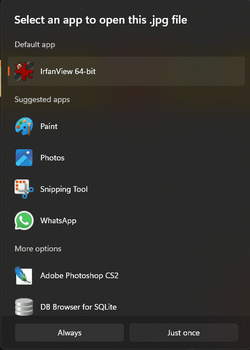
What happens when you try using the Open with facility to set IrfanView as the default using the Always button shown in OAT's post #11?
Or by going to Settings, Apps, default apps and putting .jpg in the search box [OAT's second diagram]?


All the best,
Denis
 
Last edited:

My Computer My Computer

At a glance

Windows 11 Home x64 Version 25H2 Build 26200....
OS
Windows 11 Home x64 Version 25H2 Build 26200.8037
  • Like
Reactions: OAT
Right-click any .jpg file
Choose another app (irrespective of whether IrfVw is listed)
If Iv is listed in the next window, one click to select then choose Always at the bottom
If Iv is not listed, scroll to bottom > Choose another app > navigate to the Iv installation folder > choose i_view64.exe > Open > choose Always
 

My Computers My Computers

  • At a glance

    Windows 11 2xH2 (latest update ... forever anal)Intel i5-124008GBNVIDIA GeForce GT730
    OS
    Windows 11 2xH2 (latest update ... forever anal)
    Computer type
    PC/Desktop
    Manufacturer/Model
    HP Slim S01
    CPU
    Intel i5-12400
    Memory
    8GB
    Graphics Card(s)
    NVIDIA GeForce GT730
    Sound Card
    OOBE
    Monitor(s) Displays
    Acer 32"
    Screen Resolution
    1920x1080
    Hard Drives
    512GB KIOXIA NVMe
    1TB SATA SSD
    PSU
    OOBE
    Case
    OOBE
    Cooling
    OOBE
    Keyboard
    BT
    Mouse
    BT
    Browser
    Brave FFox Chrome Opera
    Antivirus
    KIS
  • At a glance

    Windows 11 Pro 2xH2 (latest update ... 4ever ...i7-1165G7 @ 2.80GHzIntel Iris Xe Graphics
    Operating System
    Windows 11 Pro 2xH2 (latest update ... 4ever anal)
    Computer type
    Laptop
    Manufacturer/Model
    HP Pavillion 15
    CPU
    i7-1165G7 @ 2.80GHz
    Graphics card(s)
    Intel Iris Xe Graphics
    Hard Drives
    Samsung NVMe 512GB
    + numerous/multiple SSD Type C USB enclosures
    Internet Speed
    NBN FTTN 50
    Browser
    Brave
    Antivirus
    KIS
  • Like
Reactions: OAT
Right-click any .jpg file
Choose another app (irrespective of whether IrfVw is listed)
If Iv is listed in the next window, one click to select then choose Always at the bottom
If Iv is not listed, scroll to bottom > Choose another app > navigate to the Iv installation folder > choose i_view64.exe > Open > choose Always

"choose always" is changed to "choose once" :-) and please consider this post closed. everyone is beating a dead horese
 

My Computer My Computer

At a glance

Windows 11 24H2Pentium Gold Pro 6500 4.00GHz16GBIntel on board
OS
Windows 11 24H2
Computer type
PC/Desktop
Manufacturer/Model
user assembled standard hardware
CPU
Pentium Gold Pro 6500 4.00GHz
Motherboard
AsRock Z590 Steel Legend
Memory
16GB
Graphics Card(s)
Intel on board
Sound Card
on board
Monitor(s) Displays
24" LG
Screen Resolution
Preferred 1600 x 900 or 1664 x 936 (16:9)
Hard Drives
128GB internal system SSD
1TB data SSD
PSU
Antec 650w Bronze
Case
Antec Mid Tower
Cooling
standard CPU and 120mm case fan
Keyboard
104 US or French Canada Qwerty
Mouse
Microsoft wireless
Internet Speed
60Mbit
Browser
Firefox, Vivaldi, Google Chrome Edge
Antivirus
Windows 11 Pro
Maybe it's just horse CPR? :-)
 

My Computers My Computers

  • At a glance

    Win 11 Home ♦♦♦26200.8737 ♦♦♦♦♦♦♦25H2AMD Ryzen 7 3700XG.Skill (F4-3200C14D-16GTZKW)EVGA RTX 2070 (08G-P4-2171-KR)
    OS
    Win 11 Home ♦♦♦26200.8737 ♦♦♦♦♦♦♦25H2
    Computer type
    PC/Desktop
    Manufacturer/Model
    Built by Ghot® [May 2020]
    CPU
    AMD Ryzen 7 3700X
    Motherboard
    Asus Pro WS X570-ACE (BIOS 5302)
    Memory
    G.Skill (F4-3200C14D-16GTZKW)
    Graphics Card(s)
    EVGA RTX 2070 (08G-P4-2171-KR)
    Sound Card
    Realtek ALC1220P / ALC S1220A
    Monitor(s) Displays
    Dell U3011 30"
    Screen Resolution
    2560 x 1600
    Hard Drives
    2x Samsung 860 EVO 500GB,
    WD 4TB Black FZBX - SATA III,
    WD 8TB Black FZBX - SATA III,
    DRW-24B1ST CD/DVD Burner
    PSU
    PC Power & Cooling 750W Quad EPS12V
    Case
    Cooler Master ATCS 840 Tower
    Cooling
    CM Hyper 212 EVO (push/pull)
    Keyboard
    Ducky DK9008 Shine II Blue LED
    Mouse
    Logitech Optical M-100
    Internet Speed
    300/300
    Browser
    Firefox (latest)
    Antivirus
    Bitdefender Total Security
    Other Info
    Speakers: Klipsch Pro Media 2.1
  • At a glance

    Windows XP Pro 32bit w/SP3AMD Athlon 64 X2 5000+ (OC'd @ 3.2Ghz)TWIN2X2048-6400C4DHX (2 x 1GB, DDR2 800)EVGA 256-P2-N758-TR GeForce 8600GT SSC
    Operating System
    Windows XP Pro 32bit w/SP3
    Computer type
    PC/Desktop
    Manufacturer/Model
    Built by Ghot® (not in use)
    CPU
    AMD Athlon 64 X2 5000+ (OC'd @ 3.2Ghz)
    Motherboard
    ASUS M2N32-SLI Deluxe Wireless Edition
    Memory
    TWIN2X2048-6400C4DHX (2 x 1GB, DDR2 800)
    Graphics card(s)
    EVGA 256-P2-N758-TR GeForce 8600GT SSC
    Sound Card
    Onboard
    Monitor(s) Displays
    ViewSonic G90FB Black 19" Professional (CRT)
    Screen Resolution
    up to 2048 x 1536
    Hard Drives
    WD 36GB 10,000rpm Raptor SATA
    Seagate 80GB 7200rpm SATA
    Lite-On LTR-52246S CD/RW
    Lite-On LH-18A1P CD/DVD Burner
    PSU
    PC Power & Cooling Silencer 750 Quad EPS12V
    Case
    Generic Beige case, 80mm fans
    Cooling
    ZALMAN 9500A 92mm CPU Cooler
    Keyboard
    Logitech Classic Keybooard 200
    Mouse
    Logitech Optical M-BT96a
    Internet Speed
    300/300
    Browser
    Firefox 3.x ??
    Antivirus
    Symantec (Norton)
    Other Info
    Still assembled, still runs. Haven't turned it on for 15 years?
There is no issue with Irfanview.

Open Irfanview as ADMIN.

Select Options > Properties/Settings > Extensions

Select Images only (or just the ones you want)

Select Default Apps, scroll down to Irfanview and make changes there if needed.

Close Default apps when done.

In Irfanview select OK (important!)

View attachment 73320

View attachment 73322
This used to work fine before this week's clean reinstall of Win11 23H2. (I had dual boot Grub selection not showing up) But after opening, as per your post, irfanview as Admin > options > prop/settings... etc , then setting default apps by file type as in your pictured black box of "Default apps', you can see that .jpg is not even there to select. All image file associations were selected upon irfanview's initial installation as well. The elephant in the china shop is Win11 23H2. In lieu of automatically opening .jpg files and others with irfanview, I now have to "right click, open with'. it's not right I tells ya! Screenshot 2024-03-08 193929.pngScreenshot 2024-03-08 194424.png
 

My Computer My Computer

At a glance

Windows 11 Pro 23H2 (OS Build [22631.4751])Intel Core i5-11600KF48GB DDR4-2667 = 2x8 Patriot + 2x16 G.SkillNvidia GeForce RTX 3060
OS
Windows 11 Pro 23H2 (OS Build [22631.4751])
Computer type
PC/Desktop
Manufacturer/Model
CyberPower Inc.
CPU
Intel Core i5-11600KF
Motherboard
MSI MPG Z590 Gaming Carbon WIFI
Memory
48GB DDR4-2667 = 2x8 Patriot + 2x16 G.Skill
Graphics Card(s)
Nvidia GeForce RTX 3060
Sound Card
All on-board: Nvidia High-def Audio, Nvidia Virtual Audio Device, Realtek USB Audio
Monitor(s) Displays
LG 32GN63T-Baus
Screen Resolution
2560 x 1440
Hard Drives
GP-ASM2NE6100TTTD GIGABYTE AORUS NVMe Gen4 M.2 1TB PCI-E 4.0, CT250MX500SSD1, CT1000MX500SSD1, 2x NVMe Gen3 M.2 NE-256 2280, 1x NVMe Gen3 M.2 NE-1TB 2280
PSU
EVGA 600W Gold 80 Plus
Case
Phantek Eclipse P600S Silent ATX
Cooling
Phantek PH-TC12DX U-Type Dual
Keyboard
NOHI 01 MODEL:KB-161-306
Mouse
CyberPowerPC Elite M1-131
Internet Speed
DL 827.77Mbps, UL 23.93 Mbps, Ping 4ms
Browser
Firefox 134.0.2 (64-bit)
Antivirus
Emsisoft Anti-Malware Home
I prefer closing my posts. After this was posted, I fried the SSD of Windows 11. The drive was replaced, but the .iso cannot be installed because of some motherboard and CPU conflicts.
 

My Computer My Computer

At a glance

Windows 11 24H2Pentium Gold Pro 6500 4.00GHz16GBIntel on board
OS
Windows 11 24H2
Computer type
PC/Desktop
Manufacturer/Model
user assembled standard hardware
CPU
Pentium Gold Pro 6500 4.00GHz
Motherboard
AsRock Z590 Steel Legend
Memory
16GB
Graphics Card(s)
Intel on board
Sound Card
on board
Monitor(s) Displays
24" LG
Screen Resolution
Preferred 1600 x 900 or 1664 x 936 (16:9)
Hard Drives
128GB internal system SSD
1TB data SSD
PSU
Antec 650w Bronze
Case
Antec Mid Tower
Cooling
standard CPU and 120mm case fan
Keyboard
104 US or French Canada Qwerty
Mouse
Microsoft wireless
Internet Speed
60Mbit
Browser
Firefox, Vivaldi, Google Chrome Edge
Antivirus
Windows 11 Pro
Back
Top Bottom