Solved Cannot Choose Destination Folder for Hasleo Backup Suite Free V4.9.0


therealsimpsons

Well-known member
Member
Local time
11:50 AM
Posts
68
OS
Win 11 64-Bit Home
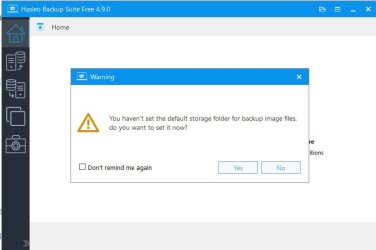
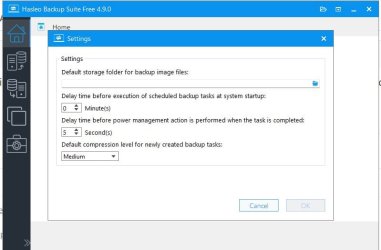
When I open the program, the first thing that pops up is a notice that I have not chosen the default storage folder, and do I want to choose it now. I click on Yes and the next screen is settings. There is a line for destination folder, but it isn't live. I can't use it to browse the PC, and I can't type in it. What am I doing wrong, please?
 
Windows Build/Version
23H2 22631.3958

Attachments

  • Hasleo Open.jpg
    Hasleo Open.jpg
    23.6 KB · Views: 1
  • Hasleo Settings.jpg
    Hasleo Settings.jpg
    35.5 KB · Views: 1

My Computer My Computer

At a glance

Win 11 64-Bit Home12 Gen Intel i7-12700K 360 GHz32 GBEVGA Nividia GeForce RTX 3060 12GB
OS
Win 11 64-Bit Home
Computer type
PC/Desktop
Manufacturer/Model
Custom Build
CPU
12 Gen Intel i7-12700K 360 GHz
Motherboard
Gigabyte B760M
Memory
32 GB
Graphics Card(s)
EVGA Nividia GeForce RTX 3060 12GB
Sound Card
None
Monitor(s) Displays
Dell 32in curved
Screen Resolution
2560 x 1440
Hard Drives
Samsung 1 TB SSD M.2 970 EVO Nvme PicIe 3.0 x 4
Seagate 2 TB SATA 7200 RPM 64MB
PSU
Apevia 800W GOLD
Case
Apevia ENZO
Cooling
2 Case Fans, ZeroTherm ZT100 Thermal Grease
Keyboard
Logitech K360
Mouse
Logitech GS 502 Hero
Internet Speed
650 mbps
Browser
Duck Duck Go
Antivirus
Webroot Anywhere
Have you <click>ed on the folder icon at the end of that DropDown...?
 

My Computer My Computer

At a glance

Windows 10, Linux MINT (V-guests 7, 11, ZorinOS)Intel Core i7-1070032gB (DDR4)Intel UHD Graphics 630
OS
Windows 10, Linux MINT (V-guests 7, 11, ZorinOS)
Computer type
PC/Desktop
Manufacturer/Model
HP Z2 G5 Workstation
CPU
Intel Core i7-10700
Motherboard
HP Model# 8751
Memory
32gB (DDR4)
Graphics Card(s)
Intel UHD Graphics 630
Sound Card
Realtek basic audio
Monitor(s) Displays
32" (Viewsonic) UHD
Screen Resolution
3840 x 2160
Hard Drives
2-NvME (mainboard), 1-NvME (PCIe), 1-SATA3 SSD
Have you <click>ed on the folder icon at the end of that DropDown...?
Yes, on both screens.

Went back and did it again, now it works. Hmmmmm
 

My Computer My Computer

At a glance

Win 11 64-Bit Home12 Gen Intel i7-12700K 360 GHz32 GBEVGA Nividia GeForce RTX 3060 12GB
OS
Win 11 64-Bit Home
Computer type
PC/Desktop
Manufacturer/Model
Custom Build
CPU
12 Gen Intel i7-12700K 360 GHz
Motherboard
Gigabyte B760M
Memory
32 GB
Graphics Card(s)
EVGA Nividia GeForce RTX 3060 12GB
Sound Card
None
Monitor(s) Displays
Dell 32in curved
Screen Resolution
2560 x 1440
Hard Drives
Samsung 1 TB SSD M.2 970 EVO Nvme PicIe 3.0 x 4
Seagate 2 TB SATA 7200 RPM 64MB
PSU
Apevia 800W GOLD
Case
Apevia ENZO
Cooling
2 Case Fans, ZeroTherm ZT100 Thermal Grease
Keyboard
Logitech K360
Mouse
Logitech GS 502 Hero
Internet Speed
650 mbps
Browser
Duck Duck Go
Antivirus
Webroot Anywhere
Back
Top Bottom