Solved Cannot disable a service on Windows 11


CLS

Well-known member
Member
Local time
2:52 AM
Posts
176
Location
Malmo
OS
Windows 11 Pro 25H2
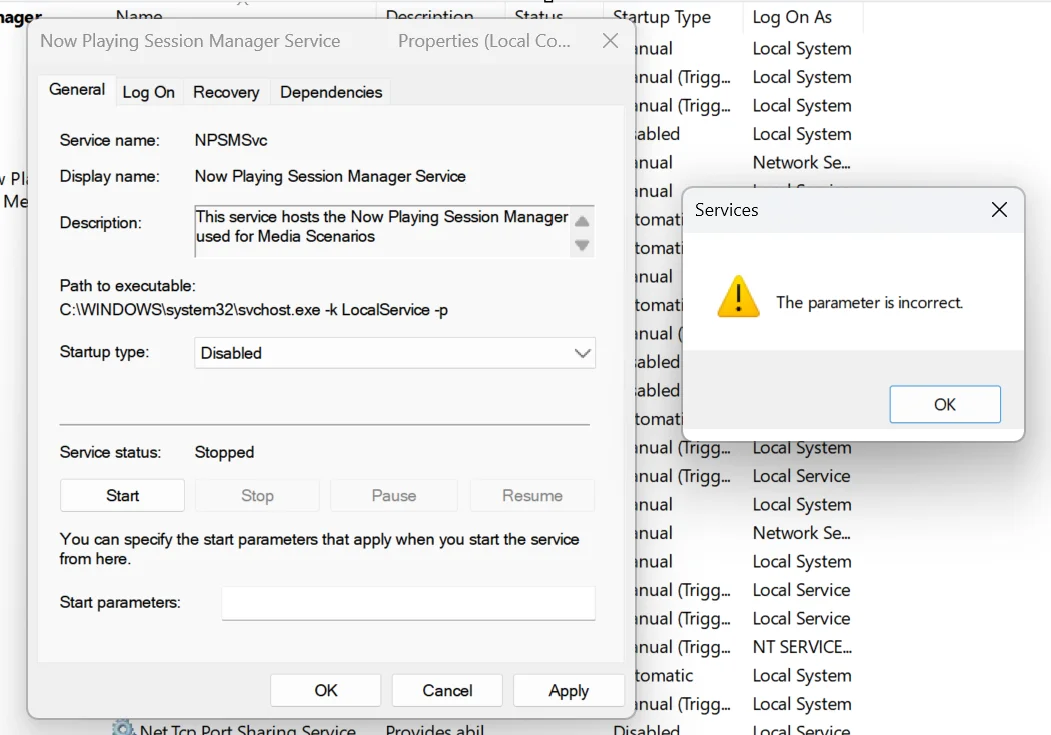
I want to disable the service "Now playing session manager service" (NPSMSvc), when I try to disable it, a error message show up that says "the parameter is incorrect".

This service seems to have some connection with the Spotify app. When I start spotify, the service will start. I could not find any options in Spotify regarding to this service.

Please help.

1784891552687.webp
 

My Computer My Computer

At a glance

Windows 11 Pro 25H2Ryzen 7 6800HKingston Fury Impact DDR5 32GBAMD Radeon 680M (AMD Rembrandt)
OS
Windows 11 Pro 25H2
Computer type
PC/Desktop
Manufacturer/Model
ASUS ExpertCenter PN53
CPU
Ryzen 7 6800H
Motherboard
ASUS PN53
Memory
Kingston Fury Impact DDR5 32GB
Graphics Card(s)
AMD Radeon 680M (AMD Rembrandt)
Sound Card
AMD audio
Monitor(s) Displays
Dell U3223QE (32")
Screen Resolution
4K (3840x2160)
Hard Drives
Samsung NVMe SSD 990 Pro 1 TB (internal)
Samsung NVMe SSD 980 Pro 1 TB (internal)
Western Digital Black SN7100 2 TB (External)
PSU
External power supply 150W
Case
Mini PC
Cooling
Build-in fan (speed 1600 RPM Normal mode)
Keyboard
Logitech MX Keys Mini (graphite)
Mouse
Logitech M705
Internet Speed
1000/1000 Mbit
Browser
Microsoft Edge
Antivirus
Windows Defender
Hi,


How to Manage or Disable
    • Safe to turn off: Yes, you can disable it if you do not want media overlays on your volume/sound panel.
    • Registry adjustment: Open regedit, navigate to HKEY_LOCAL_MACHINE\SYSTEM\CurrentControlSet\Services\NPSMSvc, change the Start DWORD value to 4, and restart your computer.


Thank You
 

My Computers My Computers

  • At a glance

    Windows 11 Professionnel 26H2 26300.9539 previewAMD Ryzen 5600G2 x 16 GB DDR4 3600
    OS
    Windows 11 Professionnel 26H2 26300.9539 preview
    Computer type
    PC/Desktop
    Manufacturer/Model
    MSI
    CPU
    AMD Ryzen 5600G
    Motherboard
    PRO B550M-VC WIFI , BIOS: 7C95vHFE0
    Memory
    2 x 16 GB DDR4 3600
    Sound Card
    Built motherboard Realtek
    Monitor(s) Displays
    Asus VP228
    Screen Resolution
    1920x1080
    Hard Drives
    WD Black SN850X 1TB
    PSU
    180 watts
    Keyboard
    Corded standard Logitech
    Mouse
    RZ Microstock PX-H9
    Internet Speed
    Bell Fibe 500 Mbit/s Up and Down
    Browser
    Edge
    Antivirus
    Microsoft
  • Computer type
    PC/Desktop
Hi,


How to Manage or Disable
    • Safe to turn off: Yes, you can disable it if you do not want media overlays on your volume/sound panel.
    • Registry adjustment: Open regedit, navigate to HKEY_LOCAL_MACHINE\SYSTEM\CurrentControlSet\Services\NPSMSvc, change the Start DWORD value to 4, and restart your computer.


Thank You
Thanks!
 

My Computer My Computer

At a glance

Windows 11 Pro 25H2Ryzen 7 6800HKingston Fury Impact DDR5 32GBAMD Radeon 680M (AMD Rembrandt)
OS
Windows 11 Pro 25H2
Computer type
PC/Desktop
Manufacturer/Model
ASUS ExpertCenter PN53
CPU
Ryzen 7 6800H
Motherboard
ASUS PN53
Memory
Kingston Fury Impact DDR5 32GB
Graphics Card(s)
AMD Radeon 680M (AMD Rembrandt)
Sound Card
AMD audio
Monitor(s) Displays
Dell U3223QE (32")
Screen Resolution
4K (3840x2160)
Hard Drives
Samsung NVMe SSD 990 Pro 1 TB (internal)
Samsung NVMe SSD 980 Pro 1 TB (internal)
Western Digital Black SN7100 2 TB (External)
PSU
External power supply 150W
Case
Mini PC
Cooling
Build-in fan (speed 1600 RPM Normal mode)
Keyboard
Logitech MX Keys Mini (graphite)
Mouse
Logitech M705
Internet Speed
1000/1000 Mbit
Browser
Microsoft Edge
Antivirus
Windows Defender
Back
Top Bottom






