Solved Can't adjust login screen after update


NatS1011

Member
Local time
4:52 AM
Posts
53
OS
Windows 11
This should be an easy issue, but I am stuck.

I had my Lock Screen set to Windows Spotlight, which adjusted the login screen to this also as I wanted. This was good and I was happy.

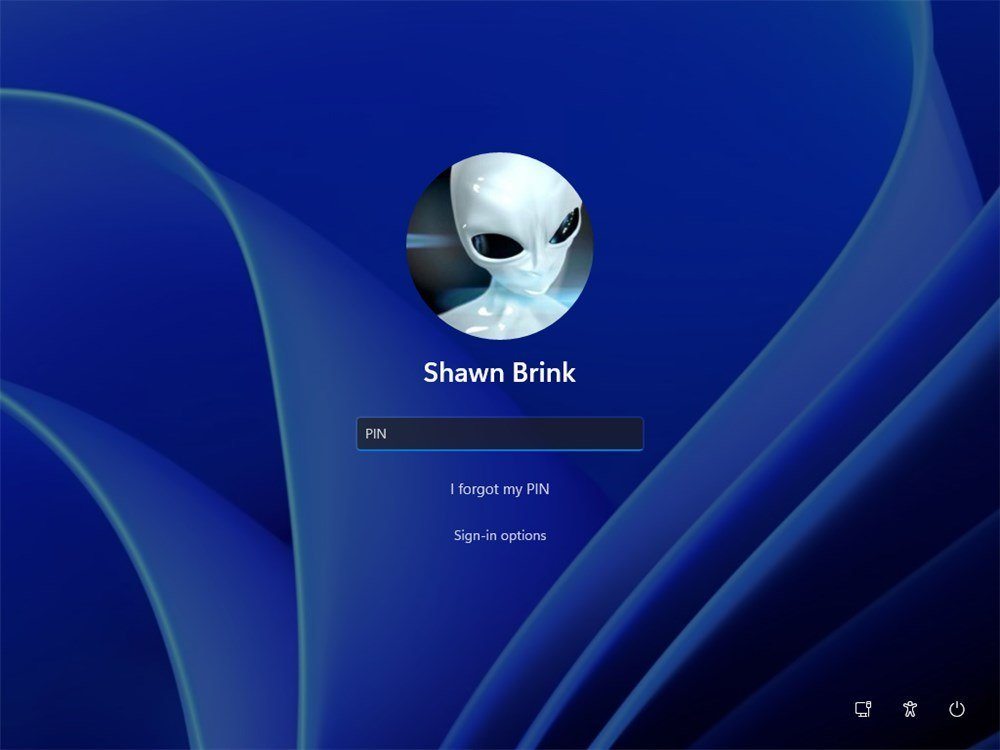
After some Windows Update though, now the Lock Screen and login screen don't match. The Lock Screen is correct on Windows Spotlight, but the Login Screen has reverted to the static windows default background, which isn't even my user background.

I followed all the instructions here, but that just adjust the Lock Screen and not the Login Screen even though the instructions claim it should do the login screen.
 

My Computer My Computer

At a glance

Windows 11System > About won't say...
OS
Windows 11
Computer type
Laptop
Manufacturer/Model
Dell / Inspiron 7440 14 2-in-1
CPU
System > About won't say...
Keyboard
built in
Mouse
built in trackpad

Hi, Nat

If you look at Option One step 3, in that picture you’ll see the place where it is currently set to “Picture” is yours the same, can you drop down that box and select Spotlight?

IMG_5564.webp


My Computers My Computers

  • At a glance

    Windows 11 Pro 25H2 Build 26200.8894Intel(R) Core(TM) i7-4770K CPU @ 3.50GHz32.0 GB of I forget and the box is in storage.Gigabyte nVidia GeForce GTX 1660 Super OC 6GB
    OS
    Windows 11 Pro 25H2 Build 26200.8894
    Computer type
    PC/Desktop
    Manufacturer/Model
    Sin-built 2013
    CPU
    Intel(R) Core(TM) i7-4770K CPU @ 3.50GHz
    Motherboard
    ASUS ROG Maximus VI Formula
    Memory
    32.0 GB of I forget and the box is in storage.
    Graphics Card(s)
    Gigabyte nVidia GeForce GTX 1660 Super OC 6GB
    Sound Card
    ROG SupremeFX Formula 8-Channel High Definition Audio
    Monitor(s) Displays
    5 x LG 25MS500-B - 1 x 24MK430H-B - 1 x Wacom Pro 22" Touch Screen Tablet
    Screen Resolution
    All over the place
    Hard Drives
    Too many to list. OS on Samsung 1TB 870 QVO SATA
    PSU
    Silverstone 1500
    Case
    NZXT Phantom 820 Full-Tower Case
    Cooling
    Noctua NH-D15 Elite Class Dual Tower CPU Cooler / 6 x EziDIY 120mm / 2 x Corsair 140mm somethings / 1 x 140mm Thermaltake something / 2 x 200mm Corsair.
    Keyboard
    Corsair K95 / Logitech diNovo Edge Wireless
    Mouse
    Logitech: G402 / G502 / Mx Masters / Mx Air Cordless
    Internet Speed
    2000/500Mbps
    Browser
    All sorts
    Antivirus
    Kaspersky Premium
    Other Info
    ㅤㅤㅤㅤㅤㅤㅤㅤㅤㅤㅤㅤㅤㅤㅤㅤㅤㅤㅤㅤㅤㅤㅤㅤㅤㅤㅤㅤㅤㅤㅤㅤㅤㅤㅤㅤㅤㅤㅤㅤ⠀⠀⠀⠀⠀⠀⠀⠀⠀⠀
    TP-Link BE9300 WiFi 7 Bluetooth 5.4 (Archer TBE550E)
    TP-Link TX201 V1 2.5GB Lan

    Grandstream HT812 - VoIP
    ASUS DSL-AX82U - Mesh
    ASUS RT-AC68U - Mesh
    ASUS RT-BE88U Router

    Brother MFC-L2880DW Printer

    I’m on a horse.
  • At a glance

    Windows 11 Pro 25H2 Build 26200.8894 (Wifes)13th Generation Intel® Core™ i5-1340P Process...16GB LPDDR5-52001x Intel® Iris® Xe Graphics
    Operating System
    Windows 11 Pro 25H2 Build 26200.8894 (Wifes)
    Computer type
    Laptop
    Manufacturer/Model
    LENOVO Yoga 7 14IRL8 - Type 82YL
    CPU
    13th Generation Intel® Core™ i5-1340P Processor(Core™ i5-1340P)
    Memory
    16GB LPDDR5-5200
    Graphics card(s)
    1x Intel® Iris® Xe Graphics
    Sound Card
    Optimized with Dolby Atmos®
    Screen Resolution
    QHD 2880 x 1800 OLED
    Hard Drives
    M.2 512 GB SSD PCIe
    Mouse
    Logiteck MX Master 3S
    Internet Speed
    2000/500
    Antivirus
    Defender / Malwarebytes
    Other Info
    …still on a horse.


    Wireless Network: Wi-Fi 6E 2x2 AX; Bluetooth® 5.1 or above
    Ports: 1x 1 Novo button; 2 in 1 Audio Combo jack; Micro SD Card Reader; HDMI 1.4b; 2 x USB Type-C (TBT4)
    USB 3.2 Gen 2 DP 1.4a
    PD 3.0); 1 x USB 3.2 Gen1 Type A
    Camera
    1x 1080P FHD IR/RGB Hybrid with Privacy Shutter and Dual Array Microphone
    Graphics
    1x Intel® Iris® Xe Graphics
    Monitor
    14" WUXGA
    Form Factor
    Convertible Notebook
  • Windows 11 Pro 25H2 Build 26200.8894 (Wifes)

    Yoga 7 2-in-1 14IML9 - Type 83DJ

    Processor: Intel® Core™ Ultra 7 155H Processor(Core™ Ultra 7 155H)

    Memory: 32GB LPD5X-7467

    Hard Drive: 1 TB SSD PCIe

    Wireless Network: 1x Wi-Fi 6E 2x2 AX; Bluetooth® 5.1 or above

    Ports: 1 x HDMI 2.1 TMDS; 1 x Novo Button; 1 x Combo Audio Jack
    2 x USB-C (USB 4.0)
    1 x USB-A 3.2 Gen 1

    Camera: 1080P FHD IR Hybrid with Dual Microphone

    Graphics: Intel® Arc™ Graphics

    Monitor: 14" 2.8K

    ...Where's my horse?
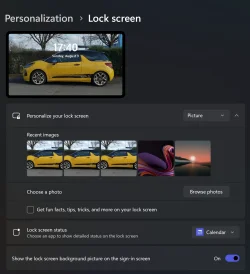
Mine looks like this:

Screenshot 2025-07-15 130307.webp


Its set to Windows Spotlight just like I wanted, and it works on the lock screen but not the login.
 

My Computer My Computer

At a glance

Windows 11System > About won't say...
OS
Windows 11
Computer type
Laptop
Manufacturer/Model
Dell / Inspiron 7440 14 2-in-1
CPU
System > About won't say...
Keyboard
built in
Mouse
built in trackpad

Hi Nat. My mistake, I didn’t read your post correctly.

Go to this tutorial, go to Option Three and download and run the Registry file. See if that fixes things.


My Computers My Computers

  • At a glance

    Windows 11 Pro 25H2 Build 26200.8894Intel(R) Core(TM) i7-4770K CPU @ 3.50GHz32.0 GB of I forget and the box is in storage.Gigabyte nVidia GeForce GTX 1660 Super OC 6GB
    OS
    Windows 11 Pro 25H2 Build 26200.8894
    Computer type
    PC/Desktop
    Manufacturer/Model
    Sin-built 2013
    CPU
    Intel(R) Core(TM) i7-4770K CPU @ 3.50GHz
    Motherboard
    ASUS ROG Maximus VI Formula
    Memory
    32.0 GB of I forget and the box is in storage.
    Graphics Card(s)
    Gigabyte nVidia GeForce GTX 1660 Super OC 6GB
    Sound Card
    ROG SupremeFX Formula 8-Channel High Definition Audio
    Monitor(s) Displays
    5 x LG 25MS500-B - 1 x 24MK430H-B - 1 x Wacom Pro 22" Touch Screen Tablet
    Screen Resolution
    All over the place
    Hard Drives
    Too many to list. OS on Samsung 1TB 870 QVO SATA
    PSU
    Silverstone 1500
    Case
    NZXT Phantom 820 Full-Tower Case
    Cooling
    Noctua NH-D15 Elite Class Dual Tower CPU Cooler / 6 x EziDIY 120mm / 2 x Corsair 140mm somethings / 1 x 140mm Thermaltake something / 2 x 200mm Corsair.
    Keyboard
    Corsair K95 / Logitech diNovo Edge Wireless
    Mouse
    Logitech: G402 / G502 / Mx Masters / Mx Air Cordless
    Internet Speed
    2000/500Mbps
    Browser
    All sorts
    Antivirus
    Kaspersky Premium
    Other Info
    ㅤㅤㅤㅤㅤㅤㅤㅤㅤㅤㅤㅤㅤㅤㅤㅤㅤㅤㅤㅤㅤㅤㅤㅤㅤㅤㅤㅤㅤㅤㅤㅤㅤㅤㅤㅤㅤㅤㅤㅤ⠀⠀⠀⠀⠀⠀⠀⠀⠀⠀
    TP-Link BE9300 WiFi 7 Bluetooth 5.4 (Archer TBE550E)
    TP-Link TX201 V1 2.5GB Lan

    Grandstream HT812 - VoIP
    ASUS DSL-AX82U - Mesh
    ASUS RT-AC68U - Mesh
    ASUS RT-BE88U Router

    Brother MFC-L2880DW Printer

    I’m on a horse.
  • At a glance

    Windows 11 Pro 25H2 Build 26200.8894 (Wifes)13th Generation Intel® Core™ i5-1340P Process...16GB LPDDR5-52001x Intel® Iris® Xe Graphics
    Operating System
    Windows 11 Pro 25H2 Build 26200.8894 (Wifes)
    Computer type
    Laptop
    Manufacturer/Model
    LENOVO Yoga 7 14IRL8 - Type 82YL
    CPU
    13th Generation Intel® Core™ i5-1340P Processor(Core™ i5-1340P)
    Memory
    16GB LPDDR5-5200
    Graphics card(s)
    1x Intel® Iris® Xe Graphics
    Sound Card
    Optimized with Dolby Atmos®
    Screen Resolution
    QHD 2880 x 1800 OLED
    Hard Drives
    M.2 512 GB SSD PCIe
    Mouse
    Logiteck MX Master 3S
    Internet Speed
    2000/500
    Antivirus
    Defender / Malwarebytes
    Other Info
    …still on a horse.


    Wireless Network: Wi-Fi 6E 2x2 AX; Bluetooth® 5.1 or above
    Ports: 1x 1 Novo button; 2 in 1 Audio Combo jack; Micro SD Card Reader; HDMI 1.4b; 2 x USB Type-C (TBT4)
    USB 3.2 Gen 2 DP 1.4a
    PD 3.0); 1 x USB 3.2 Gen1 Type A
    Camera
    1x 1080P FHD IR/RGB Hybrid with Privacy Shutter and Dual Array Microphone
    Graphics
    1x Intel® Iris® Xe Graphics
    Monitor
    14" WUXGA
    Form Factor
    Convertible Notebook
  • Windows 11 Pro 25H2 Build 26200.8894 (Wifes)

    Yoga 7 2-in-1 14IML9 - Type 83DJ

    Processor: Intel® Core™ Ultra 7 155H Processor(Core™ Ultra 7 155H)

    Memory: 32GB LPD5X-7467

    Hard Drive: 1 TB SSD PCIe

    Wireless Network: 1x Wi-Fi 6E 2x2 AX; Bluetooth® 5.1 or above

    Ports: 1 x HDMI 2.1 TMDS; 1 x Novo Button; 1 x Combo Audio Jack
    2 x USB-C (USB 4.0)
    1 x USB-A 3.2 Gen 1

    Camera: 1080P FHD IR Hybrid with Dual Microphone

    Graphics: Intel® Arc™ Graphics

    Monitor: 14" 2.8K

    ...Where's my horse?
Thanks that worked!
 

My Computer My Computer

At a glance

Windows 11System > About won't say...
OS
Windows 11
Computer type
Laptop
Manufacturer/Model
Dell / Inspiron 7440 14 2-in-1
CPU
System > About won't say...
Keyboard
built in
Mouse
built in trackpad

go to Option Three and download and run the Registry file. See if that fixes things.
My login screen is set to use the picture of my choice. It works on the lock screen but not on the login screen which always defaults to the Windows blue folds image. My understanding from your recommendation to Nat is that the reg file will get rid of images completely on the login screen. Is that correct or can I use it to make my lock screen image become my login also?

login.webp
 

My Computer My Computer

At a glance

Windows 11Intel(R) Core(TM) i9-10900K CPU @ 3.70GHz32,0 GBNvidia GeForce RTX2080 Super
OS
Windows 11
Computer type
Laptop
Manufacturer/Model
Alienware A51M R2
CPU
Intel(R) Core(TM) i9-10900K CPU @ 3.70GHz
Memory
32,0 GB
Graphics Card(s)
Nvidia GeForce RTX2080 Super
Sound Card
Realtek
Screen Resolution
4K
Hard Drives
2TB (2x 1TB PCle M.2 SSD) RAID 0 [Boot] + 2TB (2x 1TB
PCle M.2 SSD) Non-Raid [Storage]
@antspants ... and it reverted after another system update and the problem has come back. Do I have to redo this after every system update?

@QuicktellPro "My understanding from your recommendation to Nat is that the reg file will get rid of images completely on the login screen." That is what it looked like it should do on my reading of it, but for me it did actually make my login screen = my lock screen ... at least until the next system update and now I am back to the blue windows default. Of course, I was using the dynamic login screen, so maybe that worked because it was removing the default image that was "over" the dynamic login screen, at which point substituting your own image might not work? I honestly have no idea. For me Windows 11 either runs like crud with multiple AIs and people downloading all my data to remote servers (probably to train AIs), or it just is so janky complex and broken that I don't know what actually makes anything work properly.
 

My Computer My Computer

At a glance

Windows 11System > About won't say...
OS
Windows 11
Computer type
Laptop
Manufacturer/Model
Dell / Inspiron 7440 14 2-in-1
CPU
System > About won't say...
Keyboard
built in
Mouse
built in trackpad
After a Windows update 2 days ago (KB5064838), my login screen changed to my image without any input from myself. It stayed that way for 2 reboots and then reverted to the default blue image. This morning, however, my image has reappeared. Lord knows what's going on with this rubbish version of Windows!
 

My Computer My Computer

At a glance

Windows 11Intel(R) Core(TM) i9-10900K CPU @ 3.70GHz32,0 GBNvidia GeForce RTX2080 Super
OS
Windows 11
Computer type
Laptop
Manufacturer/Model
Alienware A51M R2
CPU
Intel(R) Core(TM) i9-10900K CPU @ 3.70GHz
Memory
32,0 GB
Graphics Card(s)
Nvidia GeForce RTX2080 Super
Sound Card
Realtek
Screen Resolution
4K
Hard Drives
2TB (2x 1TB PCle M.2 SSD) RAID 0 [Boot] + 2TB (2x 1TB
PCle M.2 SSD) Non-Raid [Storage]
Following my last post, my login image remained for only one day before it changed back to the default image. It has remained that way for the whole week.

Why MS would want to do this is beyond me, unless they are just flexing muscle and saying "We have total control of your PC now."
 

My Computer My Computer

At a glance

Windows 11Intel(R) Core(TM) i9-10900K CPU @ 3.70GHz32,0 GBNvidia GeForce RTX2080 Super
OS
Windows 11
Computer type
Laptop
Manufacturer/Model
Alienware A51M R2
CPU
Intel(R) Core(TM) i9-10900K CPU @ 3.70GHz
Memory
32,0 GB
Graphics Card(s)
Nvidia GeForce RTX2080 Super
Sound Card
Realtek
Screen Resolution
4K
Hard Drives
2TB (2x 1TB PCle M.2 SSD) RAID 0 [Boot] + 2TB (2x 1TB
PCle M.2 SSD) Non-Raid [Storage]
@QuicktellPro I am in a similar boat and reaching a similar conclusion.
 

My Computer My Computer

At a glance

Windows 11System > About won't say...
OS
Windows 11
Computer type
Laptop
Manufacturer/Model
Dell / Inspiron 7440 14 2-in-1
CPU
System > About won't say...
Keyboard
built in
Mouse
built in trackpad
:grrr:
 

My Computer My Computer

At a glance

Windows 11Intel(R) Core(TM) i9-10900K CPU @ 3.70GHz32,0 GBNvidia GeForce RTX2080 Super
OS
Windows 11
Computer type
Laptop
Manufacturer/Model
Alienware A51M R2
CPU
Intel(R) Core(TM) i9-10900K CPU @ 3.70GHz
Memory
32,0 GB
Graphics Card(s)
Nvidia GeForce RTX2080 Super
Sound Card
Realtek
Screen Resolution
4K
Hard Drives
2TB (2x 1TB PCle M.2 SSD) RAID 0 [Boot] + 2TB (2x 1TB
PCle M.2 SSD) Non-Raid [Storage]
I was about to post a new thread with this exact issue (lock-screen image not appearing on the sign-in screen) when I came across this thread.

I assume it's still a problem?
 

My Computer My Computer

At a glance

Windows 11
OS
Windows 11
I was about to post a new thread with this exact issue (lock-screen image not appearing on the sign-in screen) when I came across this thread.

I assume it's still a problem?
For me, it is. Updating to 25H2 made no difference.
 

My Computer My Computer

At a glance

Windows 11Intel(R) Core(TM) i9-10900K CPU @ 3.70GHz32,0 GBNvidia GeForce RTX2080 Super
OS
Windows 11
Computer type
Laptop
Manufacturer/Model
Alienware A51M R2
CPU
Intel(R) Core(TM) i9-10900K CPU @ 3.70GHz
Memory
32,0 GB
Graphics Card(s)
Nvidia GeForce RTX2080 Super
Sound Card
Realtek
Screen Resolution
4K
Hard Drives
2TB (2x 1TB PCle M.2 SSD) RAID 0 [Boot] + 2TB (2x 1TB
PCle M.2 SSD) Non-Raid [Storage]
Back
Top Bottom