can't login gmail on firefox....it has been hijacked by gemini?


Msongs

Well-known member
Member
Local time
5:13 AM
Posts
22
OS
win 10
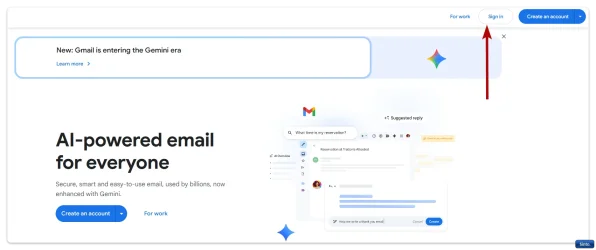
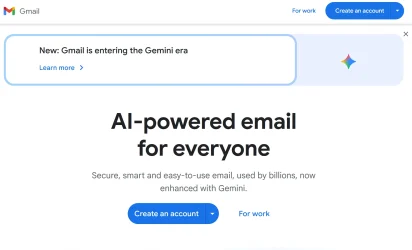
so I open my Firefox gmail bookmark link and cannot access gmail. nothing but junk about gemini AI and how I have to create a new account. (see attached pic)

endless circles of clicking do not lead to a login page for my existing gmail accounts. did manage to finally get it to work (doom clicking) but when I logged out and back in same non functioning thing.

So I tried using chrome and browser and it still works fine so far.

what's going on?
 

Attachments
  • gmail.webp
    gmail.webp
    53.7 KB · Views: 2

My Computer

System One

  • OS
    win 10
    Computer type
    PC/Desktop
    Manufacturer/Model
    dell 8930
    CPU
    i7
    Memory
    16gb
    Graphics Card(s)
    nvidia 1050ti
    Sound Card
    onboard
    Monitor(s) Displays
    ned and dell
    Screen Resolution
    2k
    Hard Drives
    ssd
    Internet Speed
    350mbps
    Browser
    firefox
On my Firefox there is a sign-in button between 'For work" and "Create an account".

You can just go straight to https://accounts.google.com, login and the select mail from the waffle icon
 

My Computer

System One

  • OS
    Linux Mint
    Computer type
    Laptop
    Manufacturer/Model
    System76 Lemur Pro
I am guessing you have either blocked the sign in or an addon is causing issues.
Test with a different browser.

Win-2036.webp
 
Last edited:

My Computers

System One System Two

  • OS
    Windows 11 Pro 25H2 Build 26200.8524
    Computer type
    PC/Desktop
    Manufacturer/Model
    Sin-built 2013
    CPU
    Intel(R) Core(TM) i7-4770K CPU @ 3.50GHz
    Motherboard
    ASUS ROG Maximus VI Formula
    Memory
    32.0 GB of I forget and the box is in storage.
    Graphics Card(s)
    Gigabyte nVidia GeForce GTX 1660 Super OC 6GB
    Sound Card
    Onboard thingy
    Monitor(s) Displays
    5 x LG 25MS500-B - 1 x 24MK430H-B - 1 x Wacom Pro 22" Touch Screen Tablet
    Screen Resolution
    All over the place
    Hard Drives
    Too many to list.
    OS on Samsung 1TB 870 QVO SATA
    PSU
    Silverstone 1500
    Case
    NZXT Phantom 820 Full-Tower Case
    Cooling
    Noctua NH-D15 Elite Class Dual Tower CPU Cooler / 6 x EziDIY 120mm / 2 x Corsair 140mm somethings / 1 x 140mm Thermaltake something / 2 x 200mm Corsair.
    Keyboard
    Corsair K95 / Logitech diNovo Edge Wireless
    Mouse
    Logitech: G402 / G502 / Mx Masters / Mx Air Cordless
    Internet Speed
    2000/500Mbps
    Browser
    All sorts
    Antivirus
    Kaspersky Premium
    Other Info
    ㅤㅤㅤㅤㅤㅤㅤㅤㅤㅤㅤㅤㅤㅤㅤㅤㅤㅤㅤㅤㅤㅤㅤㅤㅤㅤㅤㅤㅤㅤㅤㅤㅤㅤㅤㅤㅤㅤㅤㅤ⠀⠀⠀⠀⠀⠀⠀⠀⠀⠀
    TP-Link BE9300 WiFi 7 Bluetooth 5.4 (Archer TBE550E)
    TP-Link TX201 V1 2.5GB Lan

    Grandstream HT812 - VoIP
    ASUS DSL-AX82U - Mesh
    ASUS RT-AC68U - Mesh
    ASUS RT-BE88U Router

    Brother MFC-L2880DW Printer

    I’m on a horse.
  • Operating System
    Windows 11 Pro 25H2 Build 26200.8524
    Computer type
    Laptop
    Manufacturer/Model
    LENOVO Yoga 7 14IRL8 - 7i EVO OLED 14" Touchscreen i5 12 Core 16GB/512GB
    CPU
    Intel Core 12th Gen i5-1240P Processor (1.7 - 4.4GHz)
    Memory
    16GB LPDDR5 RAM
    Graphics card(s)
    Intel Iris Xe Graphics Processor
    Sound Card
    Optimized with Dolby Atmos®
    Screen Resolution
    QHD 2880 x 1800 OLED
    Hard Drives
    M.2 512GB
    Antivirus
    Defender / Malwarebytes
    Other Info
    …still on a horse.
Have you tried clicking on the small X to the right of the Gemini icon to see if that will close the prompt to sign in so you can go to your standarrd email?
 

My Computers

System One System Two

  • OS
    Windows 11 Pro
    Computer type
    PC/Desktop
    Manufacturer/Model
    GMKtec K11
    CPU
    AMD Ryzen 9 8945HS
    Memory
    32GB DDR5 SO-DIMM
    Graphics Card(s)
    Integrated AMD Radeon 780M (4.00 GHz)
    Monitor(s) Displays
    Benq 2250HM
    Screen Resolution
    1920 x 1080
    Hard Drives
    1 TB PCIe 4.0 NVMe M.2 SSD
  • Operating System
    Windows 11 Home
    Computer type
    Laptop
    Manufacturer/Model
    ASUS Zenbook 14 OLED 14" Laptop - UX3405CA-QL192W
    CPU
    Intel® Core™ Ultra 7 - 255H processor
    Memory
    16 GB LPDDR5 SDRAM
    Graphics card(s)
    Intel Arc 140T onboard graphics
    Screen Resolution
    1920 x 1200 (16:10 WUXGA resolution) OLED Touchscreen
    Hard Drives
    1TB SSD
I use Gmail in Chrome, which also has the Gemini feature. However, I don't see that feature to be very useful, so I have it disabled. I just go to "Settings -> See All Settings -> General" and turn off "Smart Features". Firefox should have a similar setting to turn all the Gemini stuff off.
 

My Computers

System One System Two

  • OS
    Windows 11 Home, 25H2, Latest OS Build
    Computer type
    Laptop
    Manufacturer/Model
    HP 15-dw0xx
    CPU
    Intel(R) Core(TM) i3-8145U CPU @ 2.10GHz 2.30 GHz
    Memory
    8GB
    Screen Resolution
    1366 x 768
    Hard Drives
    930 GB
    Keyboard
    Built In
    Mouse
    Wireless Logitech M325S
    Browser
    Chrome 139.0.7258.128
    Antivirus
    Windows Defender
    Other Info
    Cygwin64
  • Operating System
    Windows 10 Home, Version 22H2, Build19045.3693
    Computer type
    PC/Desktop
    Manufacturer/Model
    HP Pavilion
    CPU
    AMD E-300 with Radeon HD Graphics 1.30 GHz
    Memory
    10GB
    Graphics card(s)
    Radeon HD Graphics 1.30 GHz
    Sound Card
    Realtek
    Monitor(s) Displays
    15"
    Screen Resolution
    1280 x 1024
    Hard Drives
    700 GB
    Keyboard
    Wireless
    Mouse
    Wireless
    Browser
    Chrome
    Antivirus
    Windows Defender
    Other Info
    This computer is connected to my IC-735 radio.

Latest Support Threads

Back
Top Bottom