Can't open some G-mail links


CountMike

Well-known member
Pro User
VIP
Local time
7:30 AM
Posts
2,802
OS
W11 Pro and Insider Dev
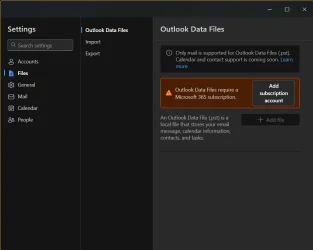
Since last update I can't open some e-mail links. I get this
1757246010518.webp

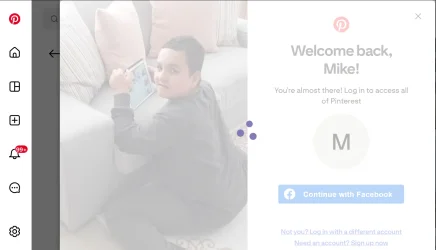
and this
1757246053854.webp
I have no and probably never will have any subscriptions for anything.
Had similar message in text editor but went away when disable "help" from copilot which I believe was uninstalled.
 

My Computer

System One

  • OS
    W11 Pro and Insider Dev
    Computer type
    PC/Desktop
    Manufacturer/Model
    Home brewed
    CPU
    AMD Ryzen 9 7900x
    Motherboard
    ASROCK b650 PRO RS
    Memory
    2x16GB Kingston 6000MHz, Cl 32 @ 6200MHz Cl30
    Graphics Card(s)
    Gigabyte Rx 6600XT Gaming OC 8G Pro
    Sound Card
    MB, Realtek Ac1220p
    Monitor(s) Displays
    3 x 27"
    Screen Resolution
    1080p
    Hard Drives
    Kingston KC3000. 1TBSamsung 970 evo Plus 500GB, Crucial P1 NVMe 1TB, Lexar NVMe 2 TB, Silicon Power M.2 SATA 500GB
    PSU
    Seasonic 750W
    Case
    Custom Raidmax
    Cooling
    Arctic Liquid Freezer III 360mm
    Internet Speed
    20/19 mbps
Since last update I can't open some e-mail links. I get this

View attachment 144636

and this
View attachment 144637
I have no and probably never will have any subscriptions for anything.
Had similar message in text editor but went away when disable "help" from copilot which I believe was uninstalled.
What's your version of Ms Office -. I've no problem with Office 2021 -- I haven't upgraded to 2024 since I still want publisher which is retired from Office 2024.

Gmail works fine both on phone and computer. I'm on Win11 pro canary, latest build and also have Win11 pro dev build. Works OK on both those builds.

Cheers
jimbo
 

My Computer

System One

  • OS
    Windows XP,11 Linux Fedora Rawhide pre-release 45
    Computer type
    PC/Desktop
    CPU
    2 X Intel i7
    Screen Resolution
    4KUHD X 2
What's your version of Ms Office -. I've no problem with Office 2021 -- I haven't upgraded to 2024 since I still want publisher which is retired from Office 2024.

Gmail works fine both on phone and computer. I'm on Win11 pro canary, latest build and also have Win11 pro dev build. Works OK on both those builds.

Cheers
jimbo
It's MS Office 2013 and I have no intention to upgrade specially not to some subscription model. I haven't tried in Insider Beta I run on same PC, tnx for reminding me.
Edit
Same with Insider Beta. Just to add, I can see and download pictures one by onbe, it just doesn't open in any browser.
 

My Computer

System One

  • OS
    W11 Pro and Insider Dev
    Computer type
    PC/Desktop
    Manufacturer/Model
    Home brewed
    CPU
    AMD Ryzen 9 7900x
    Motherboard
    ASROCK b650 PRO RS
    Memory
    2x16GB Kingston 6000MHz, Cl 32 @ 6200MHz Cl30
    Graphics Card(s)
    Gigabyte Rx 6600XT Gaming OC 8G Pro
    Sound Card
    MB, Realtek Ac1220p
    Monitor(s) Displays
    3 x 27"
    Screen Resolution
    1080p
    Hard Drives
    Kingston KC3000. 1TBSamsung 970 evo Plus 500GB, Crucial P1 NVMe 1TB, Lexar NVMe 2 TB, Silicon Power M.2 SATA 500GB
    PSU
    Seasonic 750W
    Case
    Custom Raidmax
    Cooling
    Arctic Liquid Freezer III 360mm
    Internet Speed
    20/19 mbps
It's MS Office 2013 and I have no intention to upgrade specially not to some subscription model. I haven't tried in Insider Beta I run on same PC, tnx for reminding me.
Can't help on Office 2013 but Office 2019 works too -- I think gmail made some recent changes so Office 2013 doesn't work with gmail - at least not without supreme difficulty.

You can get some really cheap versions of Office 2019 (better Office 2021) which really work ok and gmail connection is easy and automatic.

Note though both these versions of office reach EOL soon so install within the period or that's it !!!.

Office 2021 EOL is end of october 2026
Office 2019 EOL is mid october 2025 (a few weeks from now)
Office 2013 EOL -- already dead.

Cheers
jimbo
 

My Computer

System One

  • OS
    Windows XP,11 Linux Fedora Rawhide pre-release 45
    Computer type
    PC/Desktop
    CPU
    2 X Intel i7
    Screen Resolution
    4KUHD X 2
Can't help on Office 2013 but Office 2019 works too -- I think gmail made some recent changes so Office 2013 doesn't work with gmail - at least not without supreme difficulty.

You can get some really cheap versions of Office 2019 (better Office 2021) which really work ok and gmail connection is easy and automatic.

Note though both these versions of office reach EOL soon so install within the period or that's it !!!.

Office 2021 EOL is end of october 2026
Office 2019 EOL is mid october 2025 (a few weeks from now)
Office 2013 EOL -- already dead.

Cheers
jimbo
That's crazy, what about people without any MS Office ?
 

My Computer

System One

  • OS
    W11 Pro and Insider Dev
    Computer type
    PC/Desktop
    Manufacturer/Model
    Home brewed
    CPU
    AMD Ryzen 9 7900x
    Motherboard
    ASROCK b650 PRO RS
    Memory
    2x16GB Kingston 6000MHz, Cl 32 @ 6200MHz Cl30
    Graphics Card(s)
    Gigabyte Rx 6600XT Gaming OC 8G Pro
    Sound Card
    MB, Realtek Ac1220p
    Monitor(s) Displays
    3 x 27"
    Screen Resolution
    1080p
    Hard Drives
    Kingston KC3000. 1TBSamsung 970 evo Plus 500GB, Crucial P1 NVMe 1TB, Lexar NVMe 2 TB, Silicon Power M.2 SATA 500GB
    PSU
    Seasonic 750W
    Case
    Custom Raidmax
    Cooling
    Arctic Liquid Freezer III 360mm
    Internet Speed
    20/19 mbps
That's crazy, what about people without any MS Office ?
I agree - but I'm not Ms or Google !!!!.

Office 2010 works BTW as you can install from an ISO -- the other "Click2run" stuff just hoses everything up. For email outlook in office 2010 is fine for basic email etc.

I've found all these apps etc designed to be "simple" - are hideous if they don't work or you have anything other than a 100% bog standard system.

Gmail as a stand alone app ?? -- works on phones but never tried on W11.

Cheers
jimbo
 

My Computer

System One

  • OS
    Windows XP,11 Linux Fedora Rawhide pre-release 45
    Computer type
    PC/Desktop
    CPU
    2 X Intel i7
    Screen Resolution
    4KUHD X 2
I agree - but I'm not Ms or Google !!!!.

Office 2010 works BTW as you can install from an ISO -- the other "Click2run" stuff just hoses everything up. For email outlook in office 2010 is fine for basic email etc.

I've found all these apps etc designed to be "simple" - are hideous if they don't work or you have anything other than a 100% bog standard system.

Gmail as a stand alone app ?? -- works on phones but never tried on W11.

Cheers
jimbo
Just started Mail app in my old laptop with W10. it gave me no choice to reject installing new Outlook APP and when it updated, same problem as with W11. There's no office of any kind on it and no mention any subscription requirement. I'll have to change at least Pinterest to G-mail but what about other ones ? May have to use different program to receive Hotmail messages.
"Hideous" is understatement, Godawful at best but fast and handy when Ms doesn't screw them up.
 

My Computer

System One

  • OS
    W11 Pro and Insider Dev
    Computer type
    PC/Desktop
    Manufacturer/Model
    Home brewed
    CPU
    AMD Ryzen 9 7900x
    Motherboard
    ASROCK b650 PRO RS
    Memory
    2x16GB Kingston 6000MHz, Cl 32 @ 6200MHz Cl30
    Graphics Card(s)
    Gigabyte Rx 6600XT Gaming OC 8G Pro
    Sound Card
    MB, Realtek Ac1220p
    Monitor(s) Displays
    3 x 27"
    Screen Resolution
    1080p
    Hard Drives
    Kingston KC3000. 1TBSamsung 970 evo Plus 500GB, Crucial P1 NVMe 1TB, Lexar NVMe 2 TB, Silicon Power M.2 SATA 500GB
    PSU
    Seasonic 750W
    Case
    Custom Raidmax
    Cooling
    Arctic Liquid Freezer III 360mm
    Internet Speed
    20/19 mbps
Gmail now requires Oa2 authentication which is not provided in Outlook2013. "Gmail OA2" refers to using OAuth 2.0 (OA2) for accessing a Gmail account, which is the modern and secure method to grant third-party applications access to a user's Gmail data. Instead of sharing a username and password, users authorize an application by granting it specific permissions, such as reading or sending emails, without revealing their password.

You can still access gmail on the web. If you require an email application to handle your gmail, your options include outlook new( which replaced the old windows mail app and is included with Windows 11), a newer version of MS Office , OFC365, or Thunderbird. There may be more that I am unaware of.
 

My Computers

System One System Two

  • OS
    Windows 11 Pro 25H2 26200.8655
    Computer type
    PC/Desktop
    Manufacturer/Model
    Dell Optiplex 7080
    CPU
    i9-10900 10 core 20 threads
    Motherboard
    DELL 0J37VM
    Memory
    32 gb
    Graphics Card(s)
    none-Intel UHD Graphics 630
    Sound Card
    Integrated Realtek
    Monitor(s) Displays
    Benq 27
    Screen Resolution
    2560x1440
    Hard Drives
    2x1tb Solidigm m.2 nvme /External drives 512gb Samsung m.2 sata+2tb Kingston m2.nvme
    PSU
    500w
    Case
    MT
    Cooling
    Dell Premium
    Keyboard
    Logitech wired
    Mouse
    Logitech wireless
    Internet Speed
    so slow I'm too embarrassed to tell
    Browser
    #1 Edge #2 Firefox
    Antivirus
    Defender+MWB Premium
  • Operating System
    Windows 11 Pro 24H2 26200.8457
    Computer type
    PC/Desktop
    Manufacturer/Model
    Beelink Mini PC SER5
    CPU
    AMD Ryzen 7 6800U
    Memory
    32 gb
    Graphics card(s)
    integrated
    Sound Card
    integrated
    Monitor(s) Displays
    Benq 27
    Screen Resolution
    2560x1440
    Hard Drives
    1TB Crucial nvme
    Keyboard
    Logitech wired
    Mouse
    Logitech wireless
    Internet Speed
    still too embarrassed to tell
    Browser
    Firefox
    Antivirus
    Defender
    Other Info
    System 3 is non compliant Dell 9020 i7-4770/24gb ram Win11 PRO 26200.8457
Gmail now requires Oa2 authentication which is not provided in Outlook2013. "Gmail OA2" refers to using OAuth 2.0 (OA2) for accessing a Gmail account, which is the modern and secure method to grant third-party applications access to a user's Gmail data. Instead of sharing a username and password, users authorize an application by granting it specific permissions, such as reading or sending emails, without revealing their password.

You can still access gmail on the web. If you require an email application to handle your gmail, your options include outlook new( which replaced the old windows mail app and is included with Windows 11), a newer version of MS Office , OFC365, or Thunderbird. There may be more that I am unaware of.
Thanks. but it isn't about G-mail but Outlook APP. Isn't Outlook APP on the web application as opposed to MS Outlook in the Office?
 

My Computer

System One

  • OS
    W11 Pro and Insider Dev
    Computer type
    PC/Desktop
    Manufacturer/Model
    Home brewed
    CPU
    AMD Ryzen 9 7900x
    Motherboard
    ASROCK b650 PRO RS
    Memory
    2x16GB Kingston 6000MHz, Cl 32 @ 6200MHz Cl30
    Graphics Card(s)
    Gigabyte Rx 6600XT Gaming OC 8G Pro
    Sound Card
    MB, Realtek Ac1220p
    Monitor(s) Displays
    3 x 27"
    Screen Resolution
    1080p
    Hard Drives
    Kingston KC3000. 1TBSamsung 970 evo Plus 500GB, Crucial P1 NVMe 1TB, Lexar NVMe 2 TB, Silicon Power M.2 SATA 500GB
    PSU
    Seasonic 750W
    Case
    Custom Raidmax
    Cooling
    Arctic Liquid Freezer III 360mm
    Internet Speed
    20/19 mbps
Just to clarify, my MS Office Pro is 2019, retail, sorry about that. Office application Outlook has same problem.
Just found I can get MS Office 2024 professional Plus relatively cheap if that would solve my problem but what about that "Subscription" part? Would APP work still ?
Edit.
No MS Publisher in it, could I have both versions at same time? From 2019 I'd like to keep just MS Publisher. My main Office program since Office version 1.

 
Last edited:

My Computer

System One

  • OS
    W11 Pro and Insider Dev
    Computer type
    PC/Desktop
    Manufacturer/Model
    Home brewed
    CPU
    AMD Ryzen 9 7900x
    Motherboard
    ASROCK b650 PRO RS
    Memory
    2x16GB Kingston 6000MHz, Cl 32 @ 6200MHz Cl30
    Graphics Card(s)
    Gigabyte Rx 6600XT Gaming OC 8G Pro
    Sound Card
    MB, Realtek Ac1220p
    Monitor(s) Displays
    3 x 27"
    Screen Resolution
    1080p
    Hard Drives
    Kingston KC3000. 1TBSamsung 970 evo Plus 500GB, Crucial P1 NVMe 1TB, Lexar NVMe 2 TB, Silicon Power M.2 SATA 500GB
    PSU
    Seasonic 750W
    Case
    Custom Raidmax
    Cooling
    Arctic Liquid Freezer III 360mm
    Internet Speed
    20/19 mbps
Last update fixed those problems.
 

My Computer

System One

  • OS
    W11 Pro and Insider Dev
    Computer type
    PC/Desktop
    Manufacturer/Model
    Home brewed
    CPU
    AMD Ryzen 9 7900x
    Motherboard
    ASROCK b650 PRO RS
    Memory
    2x16GB Kingston 6000MHz, Cl 32 @ 6200MHz Cl30
    Graphics Card(s)
    Gigabyte Rx 6600XT Gaming OC 8G Pro
    Sound Card
    MB, Realtek Ac1220p
    Monitor(s) Displays
    3 x 27"
    Screen Resolution
    1080p
    Hard Drives
    Kingston KC3000. 1TBSamsung 970 evo Plus 500GB, Crucial P1 NVMe 1TB, Lexar NVMe 2 TB, Silicon Power M.2 SATA 500GB
    PSU
    Seasonic 750W
    Case
    Custom Raidmax
    Cooling
    Arctic Liquid Freezer III 360mm
    Internet Speed
    20/19 mbps
Gmail now requires Oa2 authentication which is not provided in Outlook2013.
FWIW: I am still happily using Gmail on Outlook 2010, using an 'app password'. I imagine O2013 would do the same.
 

My Computers

System One System Two

  • OS
    W10
    Computer type
    PC/Desktop
    Manufacturer/Model
    Home brew
    CPU
    Ryzen3-2200G
    Motherboard
    GA-A320M-S2H
    Memory
    16 GB Kingston HyperX DDR4
    Graphics Card(s)
    Integrated
    Sound Card
    Integrated
    Monitor(s) Displays
    LG W2246
    Screen Resolution
    1920x1080
    Hard Drives
    Intel 760p 256GB NVMe M.2
    Seagate Barracuda 7200 1TB
    Gash Seagate ST31608
    PSU
    2006-vintage no-name
    Case
    Acer Aspire 2006
    Cooling
    Air (fan-assist)
    Keyboard
    HP SK-2885
    Mouse
    wireless
    Internet Speed
    32 mbps
    Browser
    FF latest
    Antivirus
    MS Defender
  • Operating System
    W10
    Computer type
    Laptop
    Manufacturer/Model
    HP 255 G8
    CPU
    Ryzen 5 3500U
    Memory
    8 GB
    Graphics card(s)
    on-board
    Monitor(s) Displays
    16"
    Screen Resolution
    1920x1080
    Hard Drives
    Samsung SSD 512GB Nvme
    Browser
    FF + Edge
    Antivirus
    MS Defender

Latest Support Threads

Back
Top Bottom