
Cast (to a wireless display) Pops Up Repeatedly (without any request)


Bardiferously

Well-known member
Member
Local time
1:04 PM
Posts
38
OS
Windows 11
Okay, this is truly bizarre. I've rebuilt an HP deskto PC that had Windows 11 and was wiped clean, reformatted, and reinstalled. That was a few weeks ago.

Suddenly, the Cast pop-up window appeared without any invitation and won't go away. At times the pop-up takes over the Active window there is no control in any other window, so much that only a hard-shutdown will stop it. But after a reboot, the Cast will pop back up, regardless.
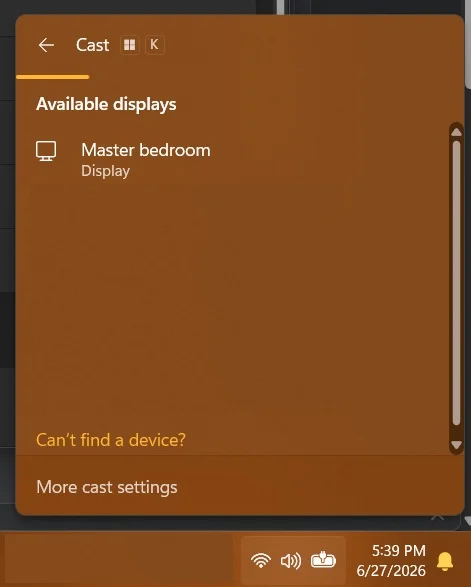
Cast pop-up.webp
I have no idea why it keeps coming up or how to stop it.

HELP!!!
 

My Computers My Computers

  • At a glance

    Windows 1111th Gen Intel Core i5-1135G7 @ 2.40GHz8GB (not upgradeable)Intel Iris Xe Graphics
    OS
    Windows 11
    Computer type
    Laptop
    Manufacturer/Model
    Lenovo
    CPU
    11th Gen Intel Core i5-1135G7 @ 2.40GHz
    Motherboard
    LNVNB161216 (U3E1)
    Memory
    8GB (not upgradeable)
    Graphics Card(s)
    Intel Iris Xe Graphics
    Screen Resolution
    HD 1920 x 1080
    Hard Drives
    VMe SAMSUNG MZALQ256HBJD-00BL2 256GB
    Mouse
    Logitech MX2
    Internet Speed
    Very good, in most of my regular places
    Browser
    Chrome, Firefox, Edge (in that order)
    Antivirus
    Norton 360
  • At a glance

    Windows 10AMD Ryzen 5 4500 6-Core ProcessorCorsair DDR4-2132 (1066 MHz) CMK16GX4M2B3200C...NVIDIA GeForce RTX 2080 Ti
    Operating System
    Windows 10
    Computer type
    PC/Desktop
    Manufacturer/Model
    Homebuilt in an old Dell case
    CPU
    AMD Ryzen 5 4500 6-Core Processor
    Motherboard
    ASUS PRIME B550M-A (AM4)
    Memory
    Corsair DDR4-2132 (1066 MHz) CMK16GX4M2B3200C16 (2x8GB)
    Graphics card(s)
    NVIDIA GeForce RTX 2080 Ti
    Monitor(s) Displays
    Samsung 27"
    Screen Resolution
    1920x1080
    Hard Drives
    500GB m.2 Samsung 980
    1TB WDC WD10EADX-00TDHB0
    1TB WDC WD1002FAEX-00Y9A0
    Case
    Old Dell Dimension Vista PC
In the Search box,type in---dxdiag--- and look in the Display page to see if Miracast is mentioned.
If it is,then uninstall it,power off shutdown then restart.
Forgot to mention that whilst in dxdiag,check the other pages for comments.
If the problem no longer shows,then reinstall Miracast from the Microsoft store.
 

My Computer My Computer

At a glance

win 10amd ryzen 5-2600ng skill sniper x 16gbnvidea gtx 1050
OS
win 10
Computer type
PC/Desktop
Manufacturer/Model
home built
CPU
amd ryzen 5-2600
Motherboard
gigabyte b450m-ds3h
Memory
ng skill sniper x 16gb
Graphics Card(s)
nvidea gtx 1050
Monitor(s) Displays
benq fp 92
Hard Drives
samsung 860 evo 500gb m2 ssd
PSU
antec ea550g
Case
nzxt noctis 450
Browser
edge
You said you rebuilt this PC.

1. Ensure there is no grounding issues
2. Double check the connected keyboard
3. You accidentally press WIN+K. while using the KB.

This popup should not appear by itself, and because it sounds like it locks you out of everything, I suspect a deeper issue with either your hardware or Windows itself...
 

My Computers My Computers

  • At a glance

    Win 11 Pro 25H2 26200.9168 / Linux Mint 22.3Ryzen 7 2700U Pro32GBiGPU Vega 10
    OS
    Win 11 Pro 25H2 26200.9168 / Linux Mint 22.3
    Computer type
    Laptop
    Manufacturer/Model
    Lenovo A485
    CPU
    Ryzen 7 2700U Pro
    Motherboard
    Lenovo (WiFi/BT module upgraded to Intel Wireless-AC-9260)
    Memory
    32GB
    Graphics Card(s)
    iGPU Vega 10
    Sound Card
    Realtek
    Monitor(s) Displays
    14" FHD (built-in) + 14" Lenovo Thinkvision M14t (touch+pen) + 32" Asus PB328
    Screen Resolution
    FHD + FHD + 1440p
    Hard Drives
    Intel 660p m.2 nVME PCIe3.0 x2 512GB
    PSU
    125W(Dock)/65W(Travel Adapter)
    Keyboard
    Thinkpad / Logitech MX Keys
    Mouse
    Logitech MX Master 2S
    Internet Speed
    1/1Gbit
    Browser
    Firefox
    Antivirus
    Windows Defender
    Other Info
    SecureBoot: Enabled
    TPM2.0: Enabled
    AMD-V: Enabled
  • At a glance

    Win 11 Pro 25H2 26200.9267(RP)i7-7700k @4.8GHz32GB 2x16GB 2133MHz CL15EVGA GTX1080Ti FTW 11GB
    Operating System
    Win 11 Pro 25H2 26200.9267(RP)
    Computer type
    PC/Desktop
    Manufacturer/Model
    Custom
    CPU
    i7-7700k @4.8GHz
    Motherboard
    Asus PRIME Z270-A
    Memory
    32GB 2x16GB 2133MHz CL15
    Graphics card(s)
    EVGA GTX1080Ti FTW 11GB
    Sound Card
    Integrated
    Monitor(s) Displays
    32" 10-bit Asus PB328Q
    Screen Resolution
    WQHD 2560x1440
    Hard Drives
    512GB ADATA SX8000NP NVMe PCIe Gen 3 x4
    PSU
    850W
    Case
    Fractal Design Define 7
    Cooling
    Noctua NH-D15 chromax.black
    Keyboard
    Logitech MX Keys
    Mouse
    Logitech MX Master 2S
    Internet Speed
    1/1Gbit
    Browser
    Firefox
    Antivirus
    Windows Defender
    Other Info
    AC WiFi Card
  • Asus U46SV (laptop), i5-2410M, 8GB RAM, 500GB SSD, 750GB HDD, Windows 10. (used as a local Minecraft server and data dump)
I don't have 11, but if I am not mistaken your screenshot shows the Windows Key + K as the trigger, This seems to indicate the keyboard sent that request, or the PC thinks it did. Unplug the keyboard and see if it goes away. You can disable the shortcut too, I asked AI as again I do not have 11

Disable the Windows + K Shortcut Entirely
If you cannot replace the keyboard right away, you can use a free, official Microsoft tool to completely disable that specific keyboard shortcut so it can no longer trigger the pop-up. Download and install Microsoft PowerToys (available safely from the Microsoft Store). Open PowerToys and click on Keyboard Manager on the left menu. Make sure "Enable Keyboard Manager" is turned On. Click Remap a shortcut. Click the + (Add shortcut remapping) button. Under "Select:", press or input Win + K. Under "To:", click the dropdown menu and change it to Disable. Click OK at the top right to save.

Someone will correct me if the process is different ;)

A Guy
 

My Computers My Computers

  • At a glance

    Windows 10 Home x64INTEL Core i5-11400KINGSTON HyperX Fury Black DDR4 16GB (2 x 8GB...EVGA GeForce GTX 750 Superclocked 1GB 128-Bit...
    OS
    Windows 10 Home x64
    Computer type
    PC/Desktop
    Manufacturer/Model
    Custom
    CPU
    INTEL Core i5-11400
    Motherboard
    ASUS PRIME H570-PLUS
    Memory
    KINGSTON HyperX Fury Black DDR4 16GB (2 x 8GB) 3200MHz, CL16
    Graphics Card(s)
    EVGA GeForce GTX 750 Superclocked 1GB 128-Bit GDDR5
    Monitor(s) Displays
    LG 32MA68HY 32" IPS
    Screen Resolution
    1920 x 1080
    Hard Drives
    SAMSUNG 250GB 970 EVO Plus NVMe, M.2 SSD, Crucial 250GB MX500, SEAGATE 500GB Barracuda® 7200.12, SATA 3 Gb/s, 7200 RPM, 16MB cache
    PSU
    CORSAIR RM550x 80 PLUS Gold 550W
    Case
    ANTEC P10 FLUX
    Cooling
    be quiet! Pure Rock 2, 5 x 120 mm Case Fans
    Internet Speed
    480 + Mbps Up/ 12+ Mbps Down
    Browser
    Vivaldi Snapshot
    Antivirus
    Avast
  • At a glance

    Windows 10 Home x64Intel Core i5-750Kingston HyperX Fury Black 8GB (2x4GB) DDR3-1...MSI GeForce GT 240 N240GT-MD1G/D5 1 GB DDR5
    Operating System
    Windows 10 Home x64
    Computer type
    PC/Desktop
    Manufacturer/Model
    Custom
    CPU
    Intel Core i5-750
    Motherboard
    ASUS P7P55D
    Memory
    Kingston HyperX Fury Black 8GB (2x4GB) DDR3-1600MHz CL8
    Graphics card(s)
    MSI GeForce GT 240 N240GT-MD1G/D5 1 GB DDR5
    Monitor(s) Displays
    LG 32MA68HY 32" IPS
    Screen Resolution
    1980x1040
    Hard Drives
    Samsung Electronics 840 EVO 120GB, SEAGATE 500GB Barracuda® 7200.12, SATA 3 Gb/s, 7200 RPM, 16MB cache
    PSU
    Antec TruePower New TP-550 550W
    Case
    Antec 300
    Cooling
    Cooler Master Hyper 212+, 4 Noctua NF-P12 120mm, 1 Noctua NF-P14 FLX
    Internet Speed
    480+ Mbps Down/12+Mbps Up
    Browser
    Vivaldi Snapshot
    Antivirus
    Avast

Latest Support Threads

Back
Top Bottom




