Chrome keeps wanting to be my default browser


nocruoro

Well-known member
Member
Local time
2:43 PM
Posts
149
OS
Windows 11 Home
Hi I'm only use chrome for separate logins for guests instead of guest users

Firefox is my main browser and i keep private bookmarks. But Chrome has frequently asks to be the default browser, acting like a stubborn nagging person.
Their help forum is very inactive too


Can this be turned off within chrome://flags or any other way that affects how Chrome checks if it is my default browser?
 

My Computer My Computer

At a glance

Windows 11 Home
OS
Windows 11 Home
Computer type
Laptop
Manufacturer/Model
Lenovo Yoga 7 Slim 14I110

Uninstall Google Chrome. Use RevoUninstaller
  • select the program from the list
  • do NOT create a restore point when prompted (not needed, waste of time)
  • do NOT RESTART, even if prompted
  • when uninstall is compete, choose Advanced option to remove all left over folders/files/registry entries
  • select all items listed, each time, always. Every one. Then delete them
  • restart your computer
  • run FFox, make sure it's the default browser
  • download and (re) install Google Chrome
  • make sure you choose the install option that shows every option available to the user (don't just click and go for it)
  • unselect the option that wants to install GC as the default browser
  • when finished go to GC settings and amke sure default browser is not selected
  • open FFox and make sure settings are for it to be the default browser
 

My Computers My Computers

  • At a glance

    Windows 11 2xH2 (latest update ... forever anal)Intel i5-124008GBNVIDIA GeForce GT730
    OS
    Windows 11 2xH2 (latest update ... forever anal)
    Computer type
    PC/Desktop
    Manufacturer/Model
    HP Slim S01
    CPU
    Intel i5-12400
    Memory
    8GB
    Graphics Card(s)
    NVIDIA GeForce GT730
    Sound Card
    OOBE
    Monitor(s) Displays
    Acer 32"
    Screen Resolution
    1920x1080
    Hard Drives
    512GB KIOXIA NVMe
    1TB SATA SSD
    PSU
    OOBE
    Case
    OOBE
    Cooling
    OOBE
    Keyboard
    BT
    Mouse
    BT
    Browser
    Brave FFox Chrome Opera
    Antivirus
    KIS
  • At a glance

    Windows 11 Pro 2xH2 (latest update ... 4ever ...i7-1165G7 @ 2.80GHzIntel Iris Xe Graphics
    Operating System
    Windows 11 Pro 2xH2 (latest update ... 4ever anal)
    Computer type
    Laptop
    Manufacturer/Model
    HP Pavillion 15
    CPU
    i7-1165G7 @ 2.80GHz
    Graphics card(s)
    Intel Iris Xe Graphics
    Hard Drives
    Samsung NVMe 512GB
    + numerous/multiple SSD Type C USB enclosures
    Internet Speed
    NBN FTTN 50
    Browser
    Brave
    Antivirus
    KIS
Uninstall Google Chrome. Use RevoUninstaller
  • select the program from the list
  • do NOT create a restore point when prompted (not needed, waste of time)
  • do NOT RESTART, even if prompted
  • when uninstall is compete, choose Advanced option to remove all left over folders/files/registry entries
  • select all items listed, each time, always. Every one. Then delete them
  • restart your computer
  • run FFox, make sure it's the default browser
  • download and (re) install Google Chrome
  • make sure you choose the install option that shows every option available to the user (don't just click and go for it)
  • unselect the option that wants to install GC as the default browser
  • when finished go to GC settings and amke sure default browser is not selected
  • open FFox and make sure settings are for it to be the default browser
I already did that before i came here.
 

My Computer My Computer

At a glance

Windows 11 Home
OS
Windows 11 Home
Computer type
Laptop
Manufacturer/Model
Lenovo Yoga 7 Slim 14I110
I already did that before i came here.
So you uninstalled Chrome but still receive "nag" notices for Chrome default browser ?
 

My Computer My Computer

At a glance

Win11 Ver 25H2 26200.6899Intel i58gb
OS
Win11 Ver 25H2 26200.6899
Computer type
Laptop
Manufacturer/Model
Dell
CPU
Intel i5
Memory
8gb
Screen Resolution
1920x1080
Hard Drives
256gb
Browser
Firefox
Antivirus
Windows Defender
I already did that before i came here.
Sorry, can't help you any further. I refuse to have GC browser on any of my devices so can't check what's going on ... maybe a new marketing ploy by Google.

Maybe consider using another chromium based browser like Brave or Opera
 

My Computers My Computers

  • At a glance

    Windows 11 2xH2 (latest update ... forever anal)Intel i5-124008GBNVIDIA GeForce GT730
    OS
    Windows 11 2xH2 (latest update ... forever anal)
    Computer type
    PC/Desktop
    Manufacturer/Model
    HP Slim S01
    CPU
    Intel i5-12400
    Memory
    8GB
    Graphics Card(s)
    NVIDIA GeForce GT730
    Sound Card
    OOBE
    Monitor(s) Displays
    Acer 32"
    Screen Resolution
    1920x1080
    Hard Drives
    512GB KIOXIA NVMe
    1TB SATA SSD
    PSU
    OOBE
    Case
    OOBE
    Cooling
    OOBE
    Keyboard
    BT
    Mouse
    BT
    Browser
    Brave FFox Chrome Opera
    Antivirus
    KIS
  • At a glance

    Windows 11 Pro 2xH2 (latest update ... 4ever ...i7-1165G7 @ 2.80GHzIntel Iris Xe Graphics
    Operating System
    Windows 11 Pro 2xH2 (latest update ... 4ever anal)
    Computer type
    Laptop
    Manufacturer/Model
    HP Pavillion 15
    CPU
    i7-1165G7 @ 2.80GHz
    Graphics card(s)
    Intel Iris Xe Graphics
    Hard Drives
    Samsung NVMe 512GB
    + numerous/multiple SSD Type C USB enclosures
    Internet Speed
    NBN FTTN 50
    Browser
    Brave
    Antivirus
    KIS
Hi I'm only use chrome for separate logins for guests instead of guest users

Firefox is my main browser and i keep private bookmarks. But Chrome has frequently asks to be the default browser, acting like a stubborn nagging person.
Their help forum is very inactive too


Can this be turned off within chrome://flags or any other way that affects how Chrome checks if it is my default browser?

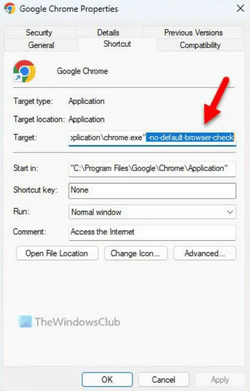
Does this not work???
I was going to test it . . . I was sure I had Chrome on this computer but apparently I uninstalled it recently.

1683936216396.png

You can also use Multiple Profiles on Firefox at same time though Ive never tried it.
 

My Computers My Computers

  • At a glance

    Windows 11 (up to date)Intel i5 12400Corsair Vengeance LPX 16GBOn Board the Z690
    OS
    Windows 11 (up to date)
    Computer type
    PC/Desktop
    Manufacturer/Model
    Custom
    CPU
    Intel i5 12400
    Motherboard
    Gigabyte Z690 UA
    Memory
    Corsair Vengeance LPX 16GB
    Graphics Card(s)
    On Board the Z690
    Sound Card
    On Board
    Monitor(s) Displays
    43" Samsung tu7000
    Screen Resolution
    2560 x 1440
    Hard Drives
    SAMSUNG SSD 1TB NVMe M.2
    PSU
    Thermaltake smart 500w 80+
    Case
    LIAN LANCOOL_205M
    Cooling
    Bunch of fans . . . :o) (lights dont work)
    Keyboard
    Unicomp: Ultra Classic White Buckling Spring USB
    Mouse
    M510
    Internet Speed
    50mbps on Ethernet
    Browser
    Fire Fox
    Antivirus
    Windows
    Other Info
    Love this computer but I still prefer Win-7 like I love my old Lazy Boy Recliner . . . it just feels better.
  • At a glance

    WIN-7-64BIT and Win-11 pro for testing on uns...i5-3570K CPU @ 3.40GHz, 3801 Mhz, 4 Core(s), ...16 GB - Crucial Ballistick 4GB PC3-14900 DDR3...NVIDIA GeForce GTX 1050
    Operating System
    WIN-7-64BIT and Win-11 pro for testing on unsupported hardware
    Computer type
    PC/Desktop
    Manufacturer/Model
    Home built
    CPU
    i5-3570K CPU @ 3.40GHz, 3801 Mhz, 4 Core(s), 4 Logical Processor(s)
    Motherboard
    GA-Z77-HD3
    Memory
    16 GB - Crucial Ballistick 4GB PC3-14900 DDR3-1333 MHz
    Graphics card(s)
    NVIDIA GeForce GTX 1050
    Sound Card
    On Board
    Monitor(s) Displays
    ASUS VP278
    Screen Resolution
    1920 x 1080
    Hard Drives
    4 - internal Samsung 2.5" SSD, 1 WD HDD 7200 and some external drives
    PSU
    EVGA 550w
    Case
    Old Gygabyte Tower
    Cooling
    Yes
    Keyboard
    Unicomp - UNIOP4A USB (like the old IBM Model H that I started with)
    Mouse
    M510
    Internet Speed
    50mbps
    Browser
    Firefox
    Antivirus
    Windows
    Other Info
    The only thing it lack is USB-3.2 on the front face but it has 3.0 on the back

Latest Support Threads

Back
Top Bottom