
Clean install no longer finds all drivers


kelper

Well-known member
Pro User
VIP
Local time
5:00 PM
Posts
4,296
Location
Hawes, North Yorkshire
OS
Windows 11 Pro 25H2 26200.9278
I was testing Hasleo Win to USB Pro and found I had no internet. I could use a Ethernet to USB adapter to get internet, but even using Windows Update it could not find drivers for the following:

Network Controller
Multimedia Controller
PCI Data Acquisition and Signal Processing Controller

I tried with Rufus and got the same result. All options were deselected.
I can only assume that the Windows 11 26200.9168 contains fewer drivers.

I was able to download drivers from the manufacturer's website and install them with pnputil, but I never had this problem with previous clean installs.

My laptop was bought new last November.
 

My Computers My Computers

  • At a glance

    Windows 11 Pro 25H2 26200.9278AMD Ryzen 7 5825U with Radeon Graphics16GB
    OS
    Windows 11 Pro 25H2 26200.9278
    Computer type
    Laptop
    Manufacturer/Model
    Acemagic LX15PRO
    CPU
    AMD Ryzen 7 5825U with Radeon Graphics
    Motherboard
    BIOS CT_BI_AMI_LX15PRO_AB8139_A-004
    Memory
    16GB
    Screen Resolution
    1920 x 1080
    Hard Drives
    SSD 2TB
    Internet Speed
    30 Mbps
    Browser
    Brave
    Antivirus
    Webroot SecureAnywhere Complete beta
  • At a glance

    Windows 11 Pro 23H2 22631.2506Atom N450 1.66GHz2GB
    Operating System
    Windows 11 Pro 23H2 22631.2506
    Computer type
    Laptop
    Manufacturer/Model
    HP Mini 210-1090NR PC (bought in late 2009!)
    CPU
    Atom N450 1.66GHz
    Memory
    2GB
    Browser
    Brave
    Antivirus
    Webroot
  • Acer Swift SF114-34 laptop
    OS Windows 11 Pro 26200.8894
    CPU Pentium Silver N6000
    RAM 4GB
    BIOS v1.17
    SSD Samsung 970 EVO Plus SSD 2TB (an upgrade)
Sounds about right. I know they want to phase out printer drivers entirely from windows updates.
 
Last edited:

My Computer My Computer

At a glance

windows 10 21h2
OS
windows 10 21h2
I think the blame here that your computer manufacturer did not provide the device drivers to Microsoft if they were included they would automatically be installed.
 

My Computer My Computer

At a glance

Windows 11AMD Ryzen 7 5700GMicron Technology DDR4-3200 16GBNVIDIA GeForce RTX 3060
OS
Windows 11
Computer type
PC/Desktop
Manufacturer/Model
HP Pavilion
CPU
AMD Ryzen 7 5700G
Motherboard
Erica6
Memory
Micron Technology DDR4-3200 16GB
Graphics Card(s)
NVIDIA GeForce RTX 3060
Sound Card
Realtek ALC671
Monitor(s) Displays
Samsung SyncMaster U28E590
Screen Resolution
3840 x 2160
Hard Drives
SAMSUNG MZVLQ1T0HALB-000H1
Drivers should always be downloaded from each manufacturer website for your appropriate Windows version and installed by you.
Don't trust nor expect Windows Update to deliver proper drivers.
 

My Computer My Computer

At a glance

Windows 11
OS
Windows 11
Computer type
PC/Desktop
@FreeBooter
Good theory, but the wifi card is a standard Realtek 8852BE.
 

My Computers My Computers

  • At a glance

    Windows 11 Pro 25H2 26200.9278AMD Ryzen 7 5825U with Radeon Graphics16GB
    OS
    Windows 11 Pro 25H2 26200.9278
    Computer type
    Laptop
    Manufacturer/Model
    Acemagic LX15PRO
    CPU
    AMD Ryzen 7 5825U with Radeon Graphics
    Motherboard
    BIOS CT_BI_AMI_LX15PRO_AB8139_A-004
    Memory
    16GB
    Screen Resolution
    1920 x 1080
    Hard Drives
    SSD 2TB
    Internet Speed
    30 Mbps
    Browser
    Brave
    Antivirus
    Webroot SecureAnywhere Complete beta
  • At a glance

    Windows 11 Pro 23H2 22631.2506Atom N450 1.66GHz2GB
    Operating System
    Windows 11 Pro 23H2 22631.2506
    Computer type
    Laptop
    Manufacturer/Model
    HP Mini 210-1090NR PC (bought in late 2009!)
    CPU
    Atom N450 1.66GHz
    Memory
    2GB
    Browser
    Brave
    Antivirus
    Webroot
  • Acer Swift SF114-34 laptop
    OS Windows 11 Pro 26200.8894
    CPU Pentium Silver N6000
    RAM 4GB
    BIOS v1.17
    SSD Samsung 970 EVO Plus SSD 2TB (an upgrade)
Drivers should always be downloaded from each manufacturer website for your appropriate Windows version and installed by you.
Don't trust nor expect Windows Update to deliver proper drivers.
I don't think I have ever had a problem with the drivers Windows installs. I completely disagree with you.
 

My Computers My Computers

  • At a glance

    Windows 11 Pro 25H2 26200.9278AMD Ryzen 7 5825U with Radeon Graphics16GB
    OS
    Windows 11 Pro 25H2 26200.9278
    Computer type
    Laptop
    Manufacturer/Model
    Acemagic LX15PRO
    CPU
    AMD Ryzen 7 5825U with Radeon Graphics
    Motherboard
    BIOS CT_BI_AMI_LX15PRO_AB8139_A-004
    Memory
    16GB
    Screen Resolution
    1920 x 1080
    Hard Drives
    SSD 2TB
    Internet Speed
    30 Mbps
    Browser
    Brave
    Antivirus
    Webroot SecureAnywhere Complete beta
  • At a glance

    Windows 11 Pro 23H2 22631.2506Atom N450 1.66GHz2GB
    Operating System
    Windows 11 Pro 23H2 22631.2506
    Computer type
    Laptop
    Manufacturer/Model
    HP Mini 210-1090NR PC (bought in late 2009!)
    CPU
    Atom N450 1.66GHz
    Memory
    2GB
    Browser
    Brave
    Antivirus
    Webroot
  • Acer Swift SF114-34 laptop
    OS Windows 11 Pro 26200.8894
    CPU Pentium Silver N6000
    RAM 4GB
    BIOS v1.17
    SSD Samsung 970 EVO Plus SSD 2TB (an upgrade)
What happens when you try to install the driver from Device Manager?

In the Update Drivers window that opens, select Search automatically for updated driver software. Windows proceeds to search for updated drivers. If it finds any, it installs the updated drivers.


My Computer My Computer

At a glance

Windows 11AMD Ryzen 7 5700GMicron Technology DDR4-3200 16GBNVIDIA GeForce RTX 3060
OS
Windows 11
Computer type
PC/Desktop
Manufacturer/Model
HP Pavilion
CPU
AMD Ryzen 7 5700G
Motherboard
Erica6
Memory
Micron Technology DDR4-3200 16GB
Graphics Card(s)
NVIDIA GeForce RTX 3060
Sound Card
Realtek ALC671
Monitor(s) Displays
Samsung SyncMaster U28E590
Screen Resolution
3840 x 2160
Hard Drives
SAMSUNG MZVLQ1T0HALB-000H1
It suggests using Windows Updates, which fails to find them.
 

My Computers My Computers

  • At a glance

    Windows 11 Pro 25H2 26200.9278AMD Ryzen 7 5825U with Radeon Graphics16GB
    OS
    Windows 11 Pro 25H2 26200.9278
    Computer type
    Laptop
    Manufacturer/Model
    Acemagic LX15PRO
    CPU
    AMD Ryzen 7 5825U with Radeon Graphics
    Motherboard
    BIOS CT_BI_AMI_LX15PRO_AB8139_A-004
    Memory
    16GB
    Screen Resolution
    1920 x 1080
    Hard Drives
    SSD 2TB
    Internet Speed
    30 Mbps
    Browser
    Brave
    Antivirus
    Webroot SecureAnywhere Complete beta
  • At a glance

    Windows 11 Pro 23H2 22631.2506Atom N450 1.66GHz2GB
    Operating System
    Windows 11 Pro 23H2 22631.2506
    Computer type
    Laptop
    Manufacturer/Model
    HP Mini 210-1090NR PC (bought in late 2009!)
    CPU
    Atom N450 1.66GHz
    Memory
    2GB
    Browser
    Brave
    Antivirus
    Webroot
  • Acer Swift SF114-34 laptop
    OS Windows 11 Pro 26200.8894
    CPU Pentium Silver N6000
    RAM 4GB
    BIOS v1.17
    SSD Samsung 970 EVO Plus SSD 2TB (an upgrade)
I tried with Rufus and got the same result. All options were deselected.
I can only assume that the Windows 11 26200.9168 contains fewer drivers.
My laptop was bought new last November.
This experience isn't that uncommon for relatively new PC's.

When MS decides to ship a Windows release, they have to gather a collection of drivers which they think will fit the broadest range of supported systems. Some of this is based on collected telemetry data, reporting how many PC's are running which drivers.

Over time, older and unsupported devices get dropped. Existing drivers get a newer version, and maybe a new device gets popular and added in. But it's never a perfect combination. Your PC may have a newer device which doesn't really work well with the older driver, but if they include the new driver then older devices from the same vendor don't work either.

Like it or not, the presumption goes: A factory installed Windows will always have the correct drivers in order to operate. Which is why everyone suggests you export the drivers from a new PC, as soon as you get it. Or check if the OEM has the same drivers available for download.

For everything else, the fallback is WU. Because a bigger selection of drivers can be hosted in the cloud. Of course, the Catch-22 is if you don't have a working network, WU is entirely useless.
 

My Computer My Computer

At a glance

Windows 7
OS
Windows 7
For everything else, the fallback is WU. Because a bigger selection of drivers can be hosted in the cloud. Of course, the Catch-22 is if you don't have a working network, WU is entirely useless.
But Windows Update couldn't find a driver for my Realtek wifi card. Anyway, I was able to get it sorted, I just wanted to know if this was a common issue.
 

My Computers My Computers

  • At a glance

    Windows 11 Pro 25H2 26200.9278AMD Ryzen 7 5825U with Radeon Graphics16GB
    OS
    Windows 11 Pro 25H2 26200.9278
    Computer type
    Laptop
    Manufacturer/Model
    Acemagic LX15PRO
    CPU
    AMD Ryzen 7 5825U with Radeon Graphics
    Motherboard
    BIOS CT_BI_AMI_LX15PRO_AB8139_A-004
    Memory
    16GB
    Screen Resolution
    1920 x 1080
    Hard Drives
    SSD 2TB
    Internet Speed
    30 Mbps
    Browser
    Brave
    Antivirus
    Webroot SecureAnywhere Complete beta
  • At a glance

    Windows 11 Pro 23H2 22631.2506Atom N450 1.66GHz2GB
    Operating System
    Windows 11 Pro 23H2 22631.2506
    Computer type
    Laptop
    Manufacturer/Model
    HP Mini 210-1090NR PC (bought in late 2009!)
    CPU
    Atom N450 1.66GHz
    Memory
    2GB
    Browser
    Brave
    Antivirus
    Webroot
  • Acer Swift SF114-34 laptop
    OS Windows 11 Pro 26200.8894
    CPU Pentium Silver N6000
    RAM 4GB
    BIOS v1.17
    SSD Samsung 970 EVO Plus SSD 2TB (an upgrade)
Can be. If your PC is too old, or too new, the Windows ISO ends up missing your required drivers.

One the key problems is driver matching. You can have two rules: the most restrictive (exact match on device HWID and revision) or least restrictive (same company, same "family" of chips). Sometimes a later version of the chip is different enough you cannot use an earlier driver that Windows has, it will have compatibility problems. Intel RAID is an infamous example of this.

Other times using not the exact driver doesn't matter, and the Windows driver works well enough for most cases. But this driver matching also leads to many user complaints ("WU replaced my existing driver with a bad driver").

It's a balancing act between do you try to help users get a working system at any cost, but this same action bites them later on? :rolleyes:
 

My Computer My Computer

At a glance

Windows 7
OS
Windows 7
Am having strange driver issue with pe I made from 9168. I will boot it up in a mo and post some screenies
 

My Computers My Computers

  • At a glance

    Win7,Win11i7-97002x16gb 3600mhz
    OS
    Win7,Win11
    Computer type
    PC/Desktop
    CPU
    i7-9700
    Motherboard
    gigabyte b365m ds3h
    Memory
    2x16gb 3600mhz
    Monitor(s) Displays
    benq gw2480
    PSU
    bequiet pure power 11 400CM
    Cooling
    cryorig m9i
  • At a glance

    win7,win11i5-84002x8gb 3200
    Operating System
    win7,win11
    Computer type
    PC/Desktop
    CPU
    i5-8400
    Motherboard
    gigabyte b365m ds3h
    Memory
    2x8gb 3200
    PSU
    xfx pro 450
I've already installed Windows three times since yesterday morning. I think I'll try on an older laptop after doing a fresh Macrium backup!
 

My Computers My Computers

  • At a glance

    Windows 11 Pro 25H2 26200.9278AMD Ryzen 7 5825U with Radeon Graphics16GB
    OS
    Windows 11 Pro 25H2 26200.9278
    Computer type
    Laptop
    Manufacturer/Model
    Acemagic LX15PRO
    CPU
    AMD Ryzen 7 5825U with Radeon Graphics
    Motherboard
    BIOS CT_BI_AMI_LX15PRO_AB8139_A-004
    Memory
    16GB
    Screen Resolution
    1920 x 1080
    Hard Drives
    SSD 2TB
    Internet Speed
    30 Mbps
    Browser
    Brave
    Antivirus
    Webroot SecureAnywhere Complete beta
  • At a glance

    Windows 11 Pro 23H2 22631.2506Atom N450 1.66GHz2GB
    Operating System
    Windows 11 Pro 23H2 22631.2506
    Computer type
    Laptop
    Manufacturer/Model
    HP Mini 210-1090NR PC (bought in late 2009!)
    CPU
    Atom N450 1.66GHz
    Memory
    2GB
    Browser
    Brave
    Antivirus
    Webroot
  • Acer Swift SF114-34 laptop
    OS Windows 11 Pro 26200.8894
    CPU Pentium Silver N6000
    RAM 4GB
    BIOS v1.17
    SSD Samsung 970 EVO Plus SSD 2TB (an upgrade)
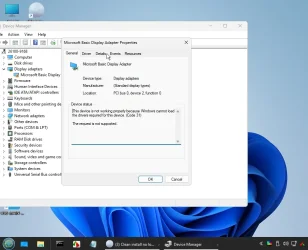
displayadapter1.webp
 

My Computers My Computers

  • At a glance

    Win7,Win11i7-97002x16gb 3600mhz
    OS
    Win7,Win11
    Computer type
    PC/Desktop
    CPU
    i7-9700
    Motherboard
    gigabyte b365m ds3h
    Memory
    2x16gb 3600mhz
    Monitor(s) Displays
    benq gw2480
    PSU
    bequiet pure power 11 400CM
    Cooling
    cryorig m9i
  • At a glance

    win7,win11i5-84002x8gb 3200
    Operating System
    win7,win11
    Computer type
    PC/Desktop
    CPU
    i5-8400
    Motherboard
    gigabyte b365m ds3h
    Memory
    2x8gb 3200
    PSU
    xfx pro 450
Device not started: Device has problem: 0x1f (CM_PROB_FAILED_ADD), problem status: 0xc00000bb


Code:
dvi:      Class GUID of device changed to: {4d36e968-e325-11ce-bfc1-08002be10318}.
     ump:      {Plug and Play Service: Device Install for PCI\VEN_8086&DEV_3E98&SUBSYS_D0001458&REV_02\3&11583659&0&10}
     dvi:           Install flags: 0x00010211
     dvi:           {Core Device Install} 16:44:11.640
     utl:                {Select Drivers - PCI\VEN_8086&DEV_3E98&SUBSYS_D0001458&REV_02\3&11583659&0&10} 16:44:11.640
     utl:                     Driver Node:
     utl:                          Status         - Selected | Installed | Designated
     utl:                          Driver INF     - display.inf (X:\Windows\System32\DriverStore\FileRepository\display.inf_amd64_34a28de3c87d810f\display.inf)
     utl:                          Class GUID     - {4d36e968-e325-11ce-bfc1-08002be10318}
     utl:                          Driver Version - 06/21/2006,10.0.26100.1
     utl:                          Configuration  - PCI\CC_0300 [MSBDA]
     utl:                          Driver Rank    - 00FB2006
     utl:                          Signer Score   - Inbox (0D000003)
     utl:                {Select Drivers - exit(0x00000000} 16:44:11.640
     dvi:                {Configure Device - PCI\VEN_8086&DEV_3E98&SUBSYS_D0001458&REV_02\3&11583659&0&10} 16:44:11.640
     dvi:                     Device Status: 0x01802400 [0x1f - 0xc00000bb]
     dvi:                     Config Flags: 0x00000000
     dvi:                     Parent Device: ACPI\PNP0A08\0
     sto:                     {Configure Driver Package: X:\Windows\System32\DriverStore\FileRepository\display.inf_amd64_34a28de3c87d810f\display.inf} 16:44:11.640
     sto:                          Source Filter  = PCI\CC_0300
     inf:                          Config Options = IsolationCompat
     inf:                          Class GUID     = {4d36e968-e325-11ce-bfc1-08002be10318}
     inf:                          Class Options  = Configurable
     inf:                          {Configure Driver: Microsoft Basic Display Adapter}
     inf:                               Section Name = MSBDA
     inf:                               {Add Service: BasicDisplay}
     inf:                                    Flags         = 0x2
     inf:                                    Start Type    = 1
     inf:                                    Service Type  = 1
     inf:                                    Error Control = 0
     inf:                                    Image Path    = \SystemRoot\System32\DriverStore\FileRepository\basicdisplay.inf_amd64_9f34636ebdd89def\BasicDisplay.sys
     inf:                                    Group         = Video
     inf:                                    Updated service 'BasicDisplay'.
     inf:                               {Add Service: exit(0x00000000)}
     inf:                               Hardware Id  = PCI\CC_0300
     inf:                               {Configure Driver Configuration: MSBDA}
     inf:                                    Service Name  = BasicDisplay
     inf:                                    Exclude IDs   = PCI\VEN_1414&DEV_5353
     inf:                                    Included INFs = basicdisplay.inf
     inf:                                    Config Flags  = 0x00000000
     inf:                               {Configure Driver Configuration: exit(0x00000000)}
     inf:                          {Configure Driver: exit(0x00000000)}
     flq:                          {FILE_QUEUE_COMMIT} 16:44:11.656
     flq:                          {FILE_QUEUE_COMMIT - exit(0x00000000)} 16:44:11.656
     sto:                          Driver configuration complete.
     sto:                     {Configure Driver Package: exit(0x00000000)} 16:44:11.656
     dvi:                     Install Device: Configuring device. 16:44:11.656
     dvi:                          Configuration: display.inf:PCI\CC_0300,MSBDA
     dvi:                     Install Device: Configuring device completed. 16:44:11.656
     dvi:                     Device Status: 0x01802400 [0x1f - 0xc00000bb]
     dvi:                     Install Device: Starting device 'PCI\VEN_8086&DEV_3E98&SUBSYS_D0001458&REV_02\3&11583659&0&10'. 16:44:11.656
     dvi:                     Install Device: Starting device completed. 16:44:11.656
!!!  dvi:                     Device not started: Device has problem: 0x1f (CM_PROB_FAILED_ADD), problem status: 0xc00000bb.
     dvi:                {Configure Device - exit(0x00000000)} 16:44:11.656
     dvi:           {Core Device Install - exit(0x00000000)} 16:44:11.656
     ump:      {Plug and Play Service: Device Install exit(00000000)}
     ndv:      {Install Related Drivers} 16:44:11.656
     ndv:      {Install Related Drivers: exit(0x00000000)} 16:44:11.656
     dvi:      {DIF_NEWDEVICEWIZARD_FINISHINSTALL} 16:44:11.676
     dvi:           Default installer: Enter 16:44:11.676
     dvi:           Default installer: Exit
     dvi:      {DIF_NEWDEVICEWIZARD_FINISHINSTALL - exit(0xe000020e)} 16:44:11.676
     ndv: {Update Driver Software Wizard exit(00000000)}
<<<  Section end 2026/09/04 16:44:14.728
<<<  [Exit status: SUCCESS]
 

My Computers My Computers

  • At a glance

    Win7,Win11i7-97002x16gb 3600mhz
    OS
    Win7,Win11
    Computer type
    PC/Desktop
    CPU
    i7-9700
    Motherboard
    gigabyte b365m ds3h
    Memory
    2x16gb 3600mhz
    Monitor(s) Displays
    benq gw2480
    PSU
    bequiet pure power 11 400CM
    Cooling
    cryorig m9i
  • At a glance

    win7,win11i5-84002x8gb 3200
    Operating System
    win7,win11
    Computer type
    PC/Desktop
    CPU
    i5-8400
    Motherboard
    gigabyte b365m ds3h
    Memory
    2x8gb 3200
    PSU
    xfx pro 450

Latest Support Threads

Back
Top Bottom




