- Local time
- 12:56 PM
- Posts
- 42
- OS
- Windows 11
I have noticed that my excellent small YU2 stereo speakers, which have their own DAC and internal amplifier and which accept USB sound output from my PC, have started to make low cracking or popping noises at random intervals.
YU2 do not supply drivers, just stating that Windows will automatically install the correct drivers, and I suppose that this happened when I first connected the speakers.
As far as I can tell, the driver in question is C:\WINDOWS\system32\drivers\usbaudio.sys version 10.0.26100.2454
I have attached three screen snips from Device Manager. I think that the NVIDIA item drives the sound from the built-in speakers (not used) on the Monitor, and the Realtek item is for SpDif audio output (Not used).
I notice that Windows has also downloaded, but not actually used C:\WINDOWS\system32\drivers\usbaudio2.sys. I don't think that these speakers are USB Audio Class 2 devices, but in any case, I cannot force Windows to accept the usbaudio2.sys driver for my device.
I have tried to update the usbaudio.sys driver, but Windows tells me that it is the best driver available.
I have tried running the Windows audio troubleshooter, but it asks me to reproduce the problem as it tries to diagnose it, and because the noise occurs randomly, I can't do what it wants.
I have not yet tried to connect the speakers to the stereo audio output from my motherboard (Gigabyte X570 Aorus Master) using the speakers' 3.5mm aux input, because I wanted to use the (superior?) DAC and amp of the speakers, and also because I cannot find the interconnect cable for this purpose that came with the speakers. (cables ,cables everywhere, they get in the feet, they get in the hair ....)
I would very much appreciate any help.
Windows Build/VersionVersion 24H2 (OS Build 26100.2605)
YU2 do not supply drivers, just stating that Windows will automatically install the correct drivers, and I suppose that this happened when I first connected the speakers.
As far as I can tell, the driver in question is C:\WINDOWS\system32\drivers\usbaudio.sys version 10.0.26100.2454
I have attached three screen snips from Device Manager. I think that the NVIDIA item drives the sound from the built-in speakers (not used) on the Monitor, and the Realtek item is for SpDif audio output (Not used).
I notice that Windows has also downloaded, but not actually used C:\WINDOWS\system32\drivers\usbaudio2.sys. I don't think that these speakers are USB Audio Class 2 devices, but in any case, I cannot force Windows to accept the usbaudio2.sys driver for my device.
I have tried to update the usbaudio.sys driver, but Windows tells me that it is the best driver available.
I have tried running the Windows audio troubleshooter, but it asks me to reproduce the problem as it tries to diagnose it, and because the noise occurs randomly, I can't do what it wants.
I have not yet tried to connect the speakers to the stereo audio output from my motherboard (Gigabyte X570 Aorus Master) using the speakers' 3.5mm aux input, because I wanted to use the (superior?) DAC and amp of the speakers, and also because I cannot find the interconnect cable for this purpose that came with the speakers. (cables ,cables everywhere, they get in the feet, they get in the hair ....)
I would very much appreciate any help.
Windows Build/VersionVersion 24H2 (OS Build 26100.2605)
Attachments
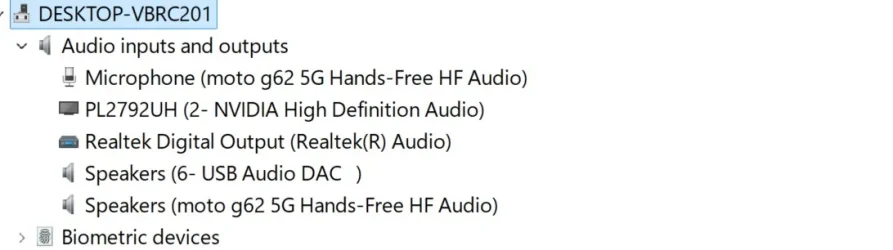
Audio Inputs and Outputs.webp
28.2 KB · Views: 0
Sound Video And Game Controllers.webp
18.4 KB · Views: 0
System.Sound.webp
66.6 KB · Views: 0
My Computer
My Computer
At a glance
Windows 11amd ryzen 7 3700x32 gig corsair dominatornot a gamer so a very basic fanless
- OS
- Windows 11
- Computer type
- PC/Desktop
- Manufacturer/Model
- home assembled
- CPU
- amd ryzen 7 3700x
- Motherboard
- gigabyte aorus master x570
- Memory
- 32 gig corsair dominator
- Graphics Card(s)
- not a gamer so a very basic fanless
- Monitor(s) Displays
- iiyama
- Hard Drives
- 4 x 1terabyte nvme ssd
- PSU
- corsair rmi 850 watt
- Case
- fractal design r5
- Cooling
- noctua