
After a warning from Windows 11 that my HDD is getting dangerously low I checked contents. I find that about half (one TB) is occupied by my “Users” subfolder. See the image below (personal info redacted). Is it okay to delete the contents (or most of) of this folder? Presumably most of the contents of this folder is redundant and resident elsewhere on one of my local drives. I’ll save the really important stuff locally.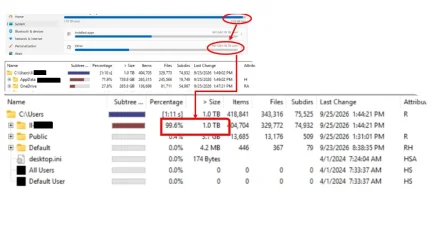
Last edited:
My Computers
-
At a glance
Windows 1113th Gen Intel(R) Core(TM) i5-13400F 2.50 GHz32.0 GBNVIDIA Gforce RTX 4060- OS
- Windows 11
- Computer type
- PC/Desktop
- Manufacturer/Model
- Device name CyberPowerPC
- CPU
- 13th Gen Intel(R) Core(TM) i5-13400F 2.50 GHz
- Memory
- 32.0 GB
- Graphics Card(s)
- NVIDIA Gforce RTX 4060
- Hard Drives
- 2 TB ADATA Legend 800 Gold SSD and several HDDs
- PSU
- 650W
- Browser
- Chrome
- Other Info
- Windows 11 23H2 10.0.26100 Build 26100
-
At a glance
Windows 10 Home 22H2 19045.4123Intel(R) Core(TM) i7-4790 CPU @ 3.60GHz 3.60 GHz32.0 GBGforce GTX 745- Operating System
- Windows 10 Home 22H2 19045.4123
- Computer type
- PC/Desktop
- Manufacturer/Model
- Acer_Desktop
- CPU
- Intel(R) Core(TM) i7-4790 CPU @ 3.60GHz 3.60 GHz
- Memory
- 32.0 GB
- Graphics card(s)
- Gforce GTX 745
- Sound Card
- ONN24
- Hard Drives
- Many
- Keyboard
- JLAB supports 2 computers/monitors
- Mouse
- Acer wired USB
- Browser
- Chrome
- Antivirus
- Only what W10 installed
- Other Info
- 64-bit operating system, x64-based processor
-
OS Windows 11 Home 25H2, 26200.8894, 5/20/2025
Computer type = PC/Laptop
Manufacturer/Model = HP
Device name = Victus
CPU = 12th Gen Intel(R) Core(TM) i7-12700H (2.30 GHz)
Motherboard
Memory = 16.0 GB (15.7 GB usable)
Graphics Card = NVIDIA GeForce RTX 3050 Laptop GPU (4 GB)
Sound Card = Internal
Monitor(s) Displays = Attached
Screen Resolution = UNK
Hard Drives = 954 GB and several external HDDs
PSU = UNK
Case = NA
Cooling = UNK
Keyboard = NA
Mouse = Wireless Logitech (Touchpad also)
Internet Speed = 31Mbps download; 8.24 Mbps upload
Browser = Chrome
Antivirus=Windows Defender only
Other Info






