Context Menu Question


mccmw

Well-known member
Member
VIP
Local time
5:36 AM
Posts
520
OS
Windows 11
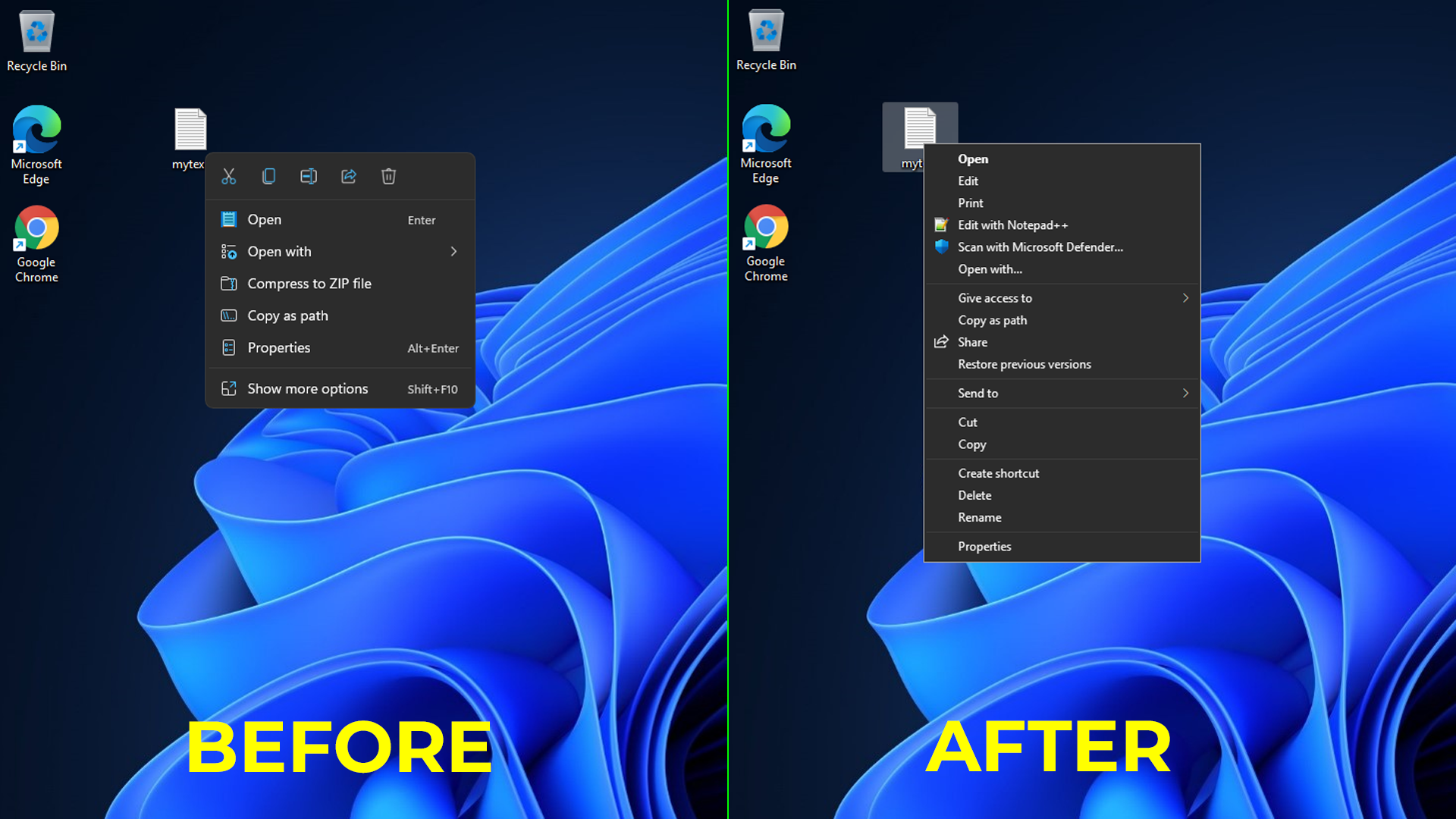
I don't mind the condensed Windows 11 context menu most of the time....don't need the old one that could end up very long. However, there are a few items I would like to add to the context menu without having to select "Show More Options." Is there an app that will let me do that? I'm sure there is probably a link or tutorial buried somewhere here in the forums that I'm missing. Thanks
 

My Computers My Computers

  • At a glance

    Windows 11Intel i7-7700K32GB 2666Mhz (Kingston Hyper X Fury)Powercolor RX6600XT
    OS
    Windows 11
    Computer type
    PC/Desktop
    Manufacturer/Model
    Custom
    CPU
    Intel i7-7700K
    Motherboard
    Asus Prime Z-270A
    Memory
    32GB 2666Mhz (Kingston Hyper X Fury)
    Graphics Card(s)
    Powercolor RX6600XT
    Sound Card
    N/A
    Monitor(s) Displays
    KTC
    Screen Resolution
    2560 x 1440
    Hard Drives
    1TB Western Digital SN770 (System) and 2TB Western Digital SN770 (Storage)
    Antivirus
    Windows Security
  • At a glance

    Windows 11 Homei9-11900H32GBIntegrated Intel and Nvidia 3050Ti
    Operating System
    Windows 11 Home
    Computer type
    Laptop
    Manufacturer/Model
    Dell/XPS 15 9510
    CPU
    i9-11900H
    Motherboard
    Unknown
    Memory
    32GB
    Graphics card(s)
    Integrated Intel and Nvidia 3050Ti
    Sound Card
    Integrated (Realtek)
    Monitor(s) Displays
    None
    Screen Resolution
    1920 x 1200 (non-Touch)
    Hard Drives
    2TB SK Hynix P41 Platinum
    Antivirus
    Windows Security

My Computer My Computer

At a glance

Windows 11 Pro 23H2 build 22631.2861
OS
Windows 11 Pro 23H2 build 22631.2861
If you want to get the old context menus back Tom's Hardware has a good write up on a regedit that gets the job done.


My Computer My Computer

At a glance

Windows 11 HomeAMD Ryzen 9 5900HX16 GB DDR4Nvidia RTX 3070
OS
Windows 11 Home
Computer type
Laptop
Manufacturer/Model
Alienware M15 Ryzen Edition
CPU
AMD Ryzen 9 5900HX
Memory
16 GB DDR4
Graphics Card(s)
Nvidia RTX 3070
Hard Drives
1TB SSD
Browser
Edge
Antivirus
Defender
Hi...thanks for quick response. I looked at the app and it only provides access to the expanded context menu. Likewise, I'm not looking to have the full context menu (e.g. old context menus) to come up. I'm hoping there's a simple way to do something like the following:

- When you right click a file in File Explorer (or on desktop), you get the condensed context menu with open, open with, properties, the small icons on the top for (delete, rename, etc.), etc, To get to the other options like unzip or virus scan you have to expand using the more options.
- I don't need the cluttered old context menu that can be very long depending on the number of apps that have added to, but would just like to add 1 or 2 addition options to the condensed Windows 11 context menu.
 

My Computers My Computers

  • At a glance

    Windows 11Intel i7-7700K32GB 2666Mhz (Kingston Hyper X Fury)Powercolor RX6600XT
    OS
    Windows 11
    Computer type
    PC/Desktop
    Manufacturer/Model
    Custom
    CPU
    Intel i7-7700K
    Motherboard
    Asus Prime Z-270A
    Memory
    32GB 2666Mhz (Kingston Hyper X Fury)
    Graphics Card(s)
    Powercolor RX6600XT
    Sound Card
    N/A
    Monitor(s) Displays
    KTC
    Screen Resolution
    2560 x 1440
    Hard Drives
    1TB Western Digital SN770 (System) and 2TB Western Digital SN770 (Storage)
    Antivirus
    Windows Security
  • At a glance

    Windows 11 Homei9-11900H32GBIntegrated Intel and Nvidia 3050Ti
    Operating System
    Windows 11 Home
    Computer type
    Laptop
    Manufacturer/Model
    Dell/XPS 15 9510
    CPU
    i9-11900H
    Motherboard
    Unknown
    Memory
    32GB
    Graphics card(s)
    Integrated Intel and Nvidia 3050Ti
    Sound Card
    Integrated (Realtek)
    Monitor(s) Displays
    None
    Screen Resolution
    1920 x 1200 (non-Touch)
    Hard Drives
    2TB SK Hynix P41 Platinum
    Antivirus
    Windows Security
It most probably is possible. Here's NanaZip's context menu showing an example. However it probably requires some advanced registry moding.
1667661320845.png
 

My Computer My Computer

At a glance

Windows 11
OS
Windows 11
Yep...that's exactly what I'm after.
 

My Computers My Computers

  • At a glance

    Windows 11Intel i7-7700K32GB 2666Mhz (Kingston Hyper X Fury)Powercolor RX6600XT
    OS
    Windows 11
    Computer type
    PC/Desktop
    Manufacturer/Model
    Custom
    CPU
    Intel i7-7700K
    Motherboard
    Asus Prime Z-270A
    Memory
    32GB 2666Mhz (Kingston Hyper X Fury)
    Graphics Card(s)
    Powercolor RX6600XT
    Sound Card
    N/A
    Monitor(s) Displays
    KTC
    Screen Resolution
    2560 x 1440
    Hard Drives
    1TB Western Digital SN770 (System) and 2TB Western Digital SN770 (Storage)
    Antivirus
    Windows Security
  • At a glance

    Windows 11 Homei9-11900H32GBIntegrated Intel and Nvidia 3050Ti
    Operating System
    Windows 11 Home
    Computer type
    Laptop
    Manufacturer/Model
    Dell/XPS 15 9510
    CPU
    i9-11900H
    Motherboard
    Unknown
    Memory
    32GB
    Graphics card(s)
    Integrated Intel and Nvidia 3050Ti
    Sound Card
    Integrated (Realtek)
    Monitor(s) Displays
    None
    Screen Resolution
    1920 x 1200 (non-Touch)
    Hard Drives
    2TB SK Hynix P41 Platinum
    Antivirus
    Windows Security
Have a look at this one:
 

My Computer My Computer

At a glance

Win 11 Enterprisei7
OS
Win 11 Enterprise
Computer type
Laptop
CPU
i7
Hard Drives
SSD

Latest Support Threads

Back
Top Bottom