Solved Context Menu Reordering


izzyforeal

I hate peer pressure and you should too.
Member
Local time
7:11 PM
Posts
118
Location
Ohio
OS
Windows 11 Home
Hello to you all, I'd like to know if there is a way to rearrange the items in context menu. If something is in the middle that I want on the top, is there a way to get that done? Thanks. -Izzy
 
Windows Build/Version
Windows 11 (22H2)

My Computer

System One

  • OS
    Windows 11 Home
    Computer type
    Laptop
    Manufacturer/Model
    Dell Inspiron 7445 2in1
    CPU
    AMD Ryzen 7 8840HS
    Motherboard
    0MT90K
    Memory
    Kingston FURY Impact 32GB (2x16GB) 5600MT/s DDR5
    Graphics Card(s)
    AMD Radeon 780M Graphics
    Sound Card
    AMD High Definition Audio Device
    Monitor(s) Displays
    Dell 27"
    Screen Resolution
    2560x1440
    Hard Drives
    EG6 KIOXIA 1TB (NVMe)
    PSU
    6-Cell 97WHr Integrated
    Case
    Platinum Silver
    Keyboard
    Arteck 5.1
    Mouse
    Logitech M650
    Internet Speed
    1000 | 25
    Browser
    Google Chrome
    Antivirus
    Windows Defender
    Other Info
    If you listen cartefully, you can hear me not caring.
Hi Izzy. I am yet to try this but member @dacrone posted a link to an app on the Microsoft store today, I am interested in looking at it myself when I can later to see what it can do. Worth a look?

 
Last edited:

My Computers

System One System Two

  • OS
    Windows 11 Pro 25H2 Build 26200.8524
    Computer type
    PC/Desktop
    Manufacturer/Model
    Sin-built 2013
    CPU
    Intel(R) Core(TM) i7-4770K CPU @ 3.50GHz
    Motherboard
    ASUS ROG Maximus VI Formula
    Memory
    32.0 GB of I forget and the box is in storage.
    Graphics Card(s)
    Gigabyte nVidia GeForce GTX 1660 Super OC 6GB
    Sound Card
    Onboard thingy
    Monitor(s) Displays
    5 x LG 25MS500-B - 1 x 24MK430H-B - 1 x Wacom Pro 22" Touch Screen Tablet
    Screen Resolution
    All over the place
    Hard Drives
    Too many to list.
    OS on Samsung 1TB 870 QVO SATA
    PSU
    Silverstone 1500
    Case
    NZXT Phantom 820 Full-Tower Case
    Cooling
    Noctua NH-D15 Elite Class Dual Tower CPU Cooler / 6 x EziDIY 120mm / 2 x Corsair 140mm somethings / 1 x 140mm Thermaltake something / 2 x 200mm Corsair.
    Keyboard
    Corsair K95 / Logitech diNovo Edge Wireless
    Mouse
    Logitech: G402 / G502 / Mx Masters / Mx Air Cordless
    Internet Speed
    2000/500Mbps
    Browser
    All sorts
    Antivirus
    Kaspersky Premium
    Other Info
    ㅤㅤㅤㅤㅤㅤㅤㅤㅤㅤㅤㅤㅤㅤㅤㅤㅤㅤㅤㅤㅤㅤㅤㅤㅤㅤㅤㅤㅤㅤㅤㅤㅤㅤㅤㅤㅤㅤㅤㅤ⠀⠀⠀⠀⠀⠀⠀⠀⠀⠀
    TP-Link BE9300 WiFi 7 Bluetooth 5.4 (Archer TBE550E)
    TP-Link TX201 V1 2.5GB Lan

    Grandstream HT812 - VoIP
    ASUS DSL-AX82U - Mesh
    ASUS RT-AC68U - Mesh
    ASUS RT-BE88U Router

    Brother MFC-L2880DW Printer

    I’m on a horse.
  • Operating System
    Windows 11 Pro 25H2 Build 26200.8524
    Computer type
    Laptop
    Manufacturer/Model
    LENOVO Yoga 7 14IRL8 - 7i EVO OLED 14" Touchscreen i5 12 Core 16GB/512GB
    CPU
    Intel Core 12th Gen i5-1240P Processor (1.7 - 4.4GHz)
    Memory
    16GB LPDDR5 RAM
    Graphics card(s)
    Intel Iris Xe Graphics Processor
    Sound Card
    Optimized with Dolby Atmos®
    Screen Resolution
    QHD 2880 x 1800 OLED
    Hard Drives
    M.2 512GB
    Antivirus
    Defender / Malwarebytes
    Other Info
    …still on a horse.
Hi Izzy. I am yet o try this but member @dacrone posted a link to an app on the Microsoft store today, I am interested in looking at it myself when I can later to see what it can do. Worth a look?

That's actually pretty cool but not what I'm after. I want to take the existing context menus and change the order of how things appear in the list. Thanks anyway antspants!
 

My Computer

System One

  • OS
    Windows 11 Home
    Computer type
    Laptop
    Manufacturer/Model
    Dell Inspiron 7445 2in1
    CPU
    AMD Ryzen 7 8840HS
    Motherboard
    0MT90K
    Memory
    Kingston FURY Impact 32GB (2x16GB) 5600MT/s DDR5
    Graphics Card(s)
    AMD Radeon 780M Graphics
    Sound Card
    AMD High Definition Audio Device
    Monitor(s) Displays
    Dell 27"
    Screen Resolution
    2560x1440
    Hard Drives
    EG6 KIOXIA 1TB (NVMe)
    PSU
    6-Cell 97WHr Integrated
    Case
    Platinum Silver
    Keyboard
    Arteck 5.1
    Mouse
    Logitech M650
    Internet Speed
    1000 | 25
    Browser
    Google Chrome
    Antivirus
    Windows Defender
    Other Info
    If you listen cartefully, you can hear me not caring.
There was a thread I replied to about the same needs a while back. I’ll do my best to find it for you, Izzy.
 

My Computers

System One System Two

  • OS
    Windows 11 Pro 25H2 Build 26200.8524
    Computer type
    PC/Desktop
    Manufacturer/Model
    Sin-built 2013
    CPU
    Intel(R) Core(TM) i7-4770K CPU @ 3.50GHz
    Motherboard
    ASUS ROG Maximus VI Formula
    Memory
    32.0 GB of I forget and the box is in storage.
    Graphics Card(s)
    Gigabyte nVidia GeForce GTX 1660 Super OC 6GB
    Sound Card
    Onboard thingy
    Monitor(s) Displays
    5 x LG 25MS500-B - 1 x 24MK430H-B - 1 x Wacom Pro 22" Touch Screen Tablet
    Screen Resolution
    All over the place
    Hard Drives
    Too many to list.
    OS on Samsung 1TB 870 QVO SATA
    PSU
    Silverstone 1500
    Case
    NZXT Phantom 820 Full-Tower Case
    Cooling
    Noctua NH-D15 Elite Class Dual Tower CPU Cooler / 6 x EziDIY 120mm / 2 x Corsair 140mm somethings / 1 x 140mm Thermaltake something / 2 x 200mm Corsair.
    Keyboard
    Corsair K95 / Logitech diNovo Edge Wireless
    Mouse
    Logitech: G402 / G502 / Mx Masters / Mx Air Cordless
    Internet Speed
    2000/500Mbps
    Browser
    All sorts
    Antivirus
    Kaspersky Premium
    Other Info
    ㅤㅤㅤㅤㅤㅤㅤㅤㅤㅤㅤㅤㅤㅤㅤㅤㅤㅤㅤㅤㅤㅤㅤㅤㅤㅤㅤㅤㅤㅤㅤㅤㅤㅤㅤㅤㅤㅤㅤㅤ⠀⠀⠀⠀⠀⠀⠀⠀⠀⠀
    TP-Link BE9300 WiFi 7 Bluetooth 5.4 (Archer TBE550E)
    TP-Link TX201 V1 2.5GB Lan

    Grandstream HT812 - VoIP
    ASUS DSL-AX82U - Mesh
    ASUS RT-AC68U - Mesh
    ASUS RT-BE88U Router

    Brother MFC-L2880DW Printer

    I’m on a horse.
  • Operating System
    Windows 11 Pro 25H2 Build 26200.8524
    Computer type
    Laptop
    Manufacturer/Model
    LENOVO Yoga 7 14IRL8 - 7i EVO OLED 14" Touchscreen i5 12 Core 16GB/512GB
    CPU
    Intel Core 12th Gen i5-1240P Processor (1.7 - 4.4GHz)
    Memory
    16GB LPDDR5 RAM
    Graphics card(s)
    Intel Iris Xe Graphics Processor
    Sound Card
    Optimized with Dolby Atmos®
    Screen Resolution
    QHD 2880 x 1800 OLED
    Hard Drives
    M.2 512GB
    Antivirus
    Defender / Malwarebytes
    Other Info
    …still on a horse.
There is another context menu app called “Shell” again, I am yet to investigate it.

My memory is not that great, but winareo I believe allowed for reordering. Again, my memory

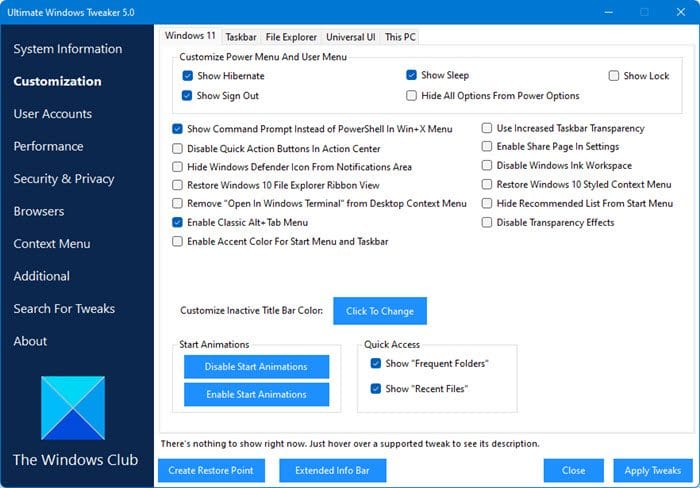
There was also Unlimited Windows Tweaker

IMG_3730.png
IMG_3729.png
 

My Computers

System One System Two

  • OS
    Windows 11 Pro 25H2 Build 26200.8524
    Computer type
    PC/Desktop
    Manufacturer/Model
    Sin-built 2013
    CPU
    Intel(R) Core(TM) i7-4770K CPU @ 3.50GHz
    Motherboard
    ASUS ROG Maximus VI Formula
    Memory
    32.0 GB of I forget and the box is in storage.
    Graphics Card(s)
    Gigabyte nVidia GeForce GTX 1660 Super OC 6GB
    Sound Card
    Onboard thingy
    Monitor(s) Displays
    5 x LG 25MS500-B - 1 x 24MK430H-B - 1 x Wacom Pro 22" Touch Screen Tablet
    Screen Resolution
    All over the place
    Hard Drives
    Too many to list.
    OS on Samsung 1TB 870 QVO SATA
    PSU
    Silverstone 1500
    Case
    NZXT Phantom 820 Full-Tower Case
    Cooling
    Noctua NH-D15 Elite Class Dual Tower CPU Cooler / 6 x EziDIY 120mm / 2 x Corsair 140mm somethings / 1 x 140mm Thermaltake something / 2 x 200mm Corsair.
    Keyboard
    Corsair K95 / Logitech diNovo Edge Wireless
    Mouse
    Logitech: G402 / G502 / Mx Masters / Mx Air Cordless
    Internet Speed
    2000/500Mbps
    Browser
    All sorts
    Antivirus
    Kaspersky Premium
    Other Info
    ㅤㅤㅤㅤㅤㅤㅤㅤㅤㅤㅤㅤㅤㅤㅤㅤㅤㅤㅤㅤㅤㅤㅤㅤㅤㅤㅤㅤㅤㅤㅤㅤㅤㅤㅤㅤㅤㅤㅤㅤ⠀⠀⠀⠀⠀⠀⠀⠀⠀⠀
    TP-Link BE9300 WiFi 7 Bluetooth 5.4 (Archer TBE550E)
    TP-Link TX201 V1 2.5GB Lan

    Grandstream HT812 - VoIP
    ASUS DSL-AX82U - Mesh
    ASUS RT-AC68U - Mesh
    ASUS RT-BE88U Router

    Brother MFC-L2880DW Printer

    I’m on a horse.
  • Operating System
    Windows 11 Pro 25H2 Build 26200.8524
    Computer type
    Laptop
    Manufacturer/Model
    LENOVO Yoga 7 14IRL8 - 7i EVO OLED 14" Touchscreen i5 12 Core 16GB/512GB
    CPU
    Intel Core 12th Gen i5-1240P Processor (1.7 - 4.4GHz)
    Memory
    16GB LPDDR5 RAM
    Graphics card(s)
    Intel Iris Xe Graphics Processor
    Sound Card
    Optimized with Dolby Atmos®
    Screen Resolution
    QHD 2880 x 1800 OLED
    Hard Drives
    M.2 512GB
    Antivirus
    Defender / Malwarebytes
    Other Info
    …still on a horse.

My Computers

System One System Two

  • OS
    Windows 11 Pro 25H2 Build 26200.8524
    Computer type
    PC/Desktop
    Manufacturer/Model
    Sin-built 2013
    CPU
    Intel(R) Core(TM) i7-4770K CPU @ 3.50GHz
    Motherboard
    ASUS ROG Maximus VI Formula
    Memory
    32.0 GB of I forget and the box is in storage.
    Graphics Card(s)
    Gigabyte nVidia GeForce GTX 1660 Super OC 6GB
    Sound Card
    Onboard thingy
    Monitor(s) Displays
    5 x LG 25MS500-B - 1 x 24MK430H-B - 1 x Wacom Pro 22" Touch Screen Tablet
    Screen Resolution
    All over the place
    Hard Drives
    Too many to list.
    OS on Samsung 1TB 870 QVO SATA
    PSU
    Silverstone 1500
    Case
    NZXT Phantom 820 Full-Tower Case
    Cooling
    Noctua NH-D15 Elite Class Dual Tower CPU Cooler / 6 x EziDIY 120mm / 2 x Corsair 140mm somethings / 1 x 140mm Thermaltake something / 2 x 200mm Corsair.
    Keyboard
    Corsair K95 / Logitech diNovo Edge Wireless
    Mouse
    Logitech: G402 / G502 / Mx Masters / Mx Air Cordless
    Internet Speed
    2000/500Mbps
    Browser
    All sorts
    Antivirus
    Kaspersky Premium
    Other Info
    ㅤㅤㅤㅤㅤㅤㅤㅤㅤㅤㅤㅤㅤㅤㅤㅤㅤㅤㅤㅤㅤㅤㅤㅤㅤㅤㅤㅤㅤㅤㅤㅤㅤㅤㅤㅤㅤㅤㅤㅤ⠀⠀⠀⠀⠀⠀⠀⠀⠀⠀
    TP-Link BE9300 WiFi 7 Bluetooth 5.4 (Archer TBE550E)
    TP-Link TX201 V1 2.5GB Lan

    Grandstream HT812 - VoIP
    ASUS DSL-AX82U - Mesh
    ASUS RT-AC68U - Mesh
    ASUS RT-BE88U Router

    Brother MFC-L2880DW Printer

    I’m on a horse.
  • Operating System
    Windows 11 Pro 25H2 Build 26200.8524
    Computer type
    Laptop
    Manufacturer/Model
    LENOVO Yoga 7 14IRL8 - 7i EVO OLED 14" Touchscreen i5 12 Core 16GB/512GB
    CPU
    Intel Core 12th Gen i5-1240P Processor (1.7 - 4.4GHz)
    Memory
    16GB LPDDR5 RAM
    Graphics card(s)
    Intel Iris Xe Graphics Processor
    Sound Card
    Optimized with Dolby Atmos®
    Screen Resolution
    QHD 2880 x 1800 OLED
    Hard Drives
    M.2 512GB
    Antivirus
    Defender / Malwarebytes
    Other Info
    …still on a horse.
There is another context menu app called “Shell” again, I am yet to investigate it.

My memory is not that great, but winareo I believe allowed for reordering. Again, my memory

There was also Unlimited Windows Tweaker

View attachment 78164
View attachment 78165
antspants, you're a rockstar but no, none of them do it. What I'm after is a way to switch WINRAR and MP3TAG, like if I wanted to swap positions.
 

Attachments

  • 2023-11-17_23h18_37.png
    2023-11-17_23h18_37.png
    30.6 KB · Views: 3

My Computer

System One

  • OS
    Windows 11 Home
    Computer type
    Laptop
    Manufacturer/Model
    Dell Inspiron 7445 2in1
    CPU
    AMD Ryzen 7 8840HS
    Motherboard
    0MT90K
    Memory
    Kingston FURY Impact 32GB (2x16GB) 5600MT/s DDR5
    Graphics Card(s)
    AMD Radeon 780M Graphics
    Sound Card
    AMD High Definition Audio Device
    Monitor(s) Displays
    Dell 27"
    Screen Resolution
    2560x1440
    Hard Drives
    EG6 KIOXIA 1TB (NVMe)
    PSU
    6-Cell 97WHr Integrated
    Case
    Platinum Silver
    Keyboard
    Arteck 5.1
    Mouse
    Logitech M650
    Internet Speed
    1000 | 25
    Browser
    Google Chrome
    Antivirus
    Windows Defender
    Other Info
    If you listen cartefully, you can hear me not caring.

maybe what you want to do, might be available in the registry, positioning entries. I know there are members here that know about this stuff, they will come. 🙏
 

My Computers

System One System Two

  • OS
    Windows 11 Pro 25H2 Build 26200.8524
    Computer type
    PC/Desktop
    Manufacturer/Model
    Sin-built 2013
    CPU
    Intel(R) Core(TM) i7-4770K CPU @ 3.50GHz
    Motherboard
    ASUS ROG Maximus VI Formula
    Memory
    32.0 GB of I forget and the box is in storage.
    Graphics Card(s)
    Gigabyte nVidia GeForce GTX 1660 Super OC 6GB
    Sound Card
    Onboard thingy
    Monitor(s) Displays
    5 x LG 25MS500-B - 1 x 24MK430H-B - 1 x Wacom Pro 22" Touch Screen Tablet
    Screen Resolution
    All over the place
    Hard Drives
    Too many to list.
    OS on Samsung 1TB 870 QVO SATA
    PSU
    Silverstone 1500
    Case
    NZXT Phantom 820 Full-Tower Case
    Cooling
    Noctua NH-D15 Elite Class Dual Tower CPU Cooler / 6 x EziDIY 120mm / 2 x Corsair 140mm somethings / 1 x 140mm Thermaltake something / 2 x 200mm Corsair.
    Keyboard
    Corsair K95 / Logitech diNovo Edge Wireless
    Mouse
    Logitech: G402 / G502 / Mx Masters / Mx Air Cordless
    Internet Speed
    2000/500Mbps
    Browser
    All sorts
    Antivirus
    Kaspersky Premium
    Other Info
    ㅤㅤㅤㅤㅤㅤㅤㅤㅤㅤㅤㅤㅤㅤㅤㅤㅤㅤㅤㅤㅤㅤㅤㅤㅤㅤㅤㅤㅤㅤㅤㅤㅤㅤㅤㅤㅤㅤㅤㅤ⠀⠀⠀⠀⠀⠀⠀⠀⠀⠀
    TP-Link BE9300 WiFi 7 Bluetooth 5.4 (Archer TBE550E)
    TP-Link TX201 V1 2.5GB Lan

    Grandstream HT812 - VoIP
    ASUS DSL-AX82U - Mesh
    ASUS RT-AC68U - Mesh
    ASUS RT-BE88U Router

    Brother MFC-L2880DW Printer

    I’m on a horse.
  • Operating System
    Windows 11 Pro 25H2 Build 26200.8524
    Computer type
    Laptop
    Manufacturer/Model
    LENOVO Yoga 7 14IRL8 - 7i EVO OLED 14" Touchscreen i5 12 Core 16GB/512GB
    CPU
    Intel Core 12th Gen i5-1240P Processor (1.7 - 4.4GHz)
    Memory
    16GB LPDDR5 RAM
    Graphics card(s)
    Intel Iris Xe Graphics Processor
    Sound Card
    Optimized with Dolby Atmos®
    Screen Resolution
    QHD 2880 x 1800 OLED
    Hard Drives
    M.2 512GB
    Antivirus
    Defender / Malwarebytes
    Other Info
    …still on a horse.
maybe what you want to do, might be available in the registry, positioning entries. I know there are members here that know about this stuff, they will come. 🙏
Thank you kindly.
 

My Computer

System One

  • OS
    Windows 11 Home
    Computer type
    Laptop
    Manufacturer/Model
    Dell Inspiron 7445 2in1
    CPU
    AMD Ryzen 7 8840HS
    Motherboard
    0MT90K
    Memory
    Kingston FURY Impact 32GB (2x16GB) 5600MT/s DDR5
    Graphics Card(s)
    AMD Radeon 780M Graphics
    Sound Card
    AMD High Definition Audio Device
    Monitor(s) Displays
    Dell 27"
    Screen Resolution
    2560x1440
    Hard Drives
    EG6 KIOXIA 1TB (NVMe)
    PSU
    6-Cell 97WHr Integrated
    Case
    Platinum Silver
    Keyboard
    Arteck 5.1
    Mouse
    Logitech M650
    Internet Speed
    1000 | 25
    Browser
    Google Chrome
    Antivirus
    Windows Defender
    Other Info
    If you listen cartefully, you can hear me not caring.
Maybe it might be advisable to make a system backup before making too many changes.

Sometimes we can fall into the trap of fixing our computers until they're broken. 🤣
 

My Computers

System One System Two

  • OS
    Windows 11 Pro
    Computer type
    PC/Desktop
    Manufacturer/Model
    Stigg's Build
    CPU
    Intel Core i9-10900X
    Motherboard
    GIGABYTE X299X DESIGNARE 10G
    Memory
    Corsair 64 GB (4 x 16 GB) CMW64GX4M4C3000C15 Vengeance RGB Pro 3000Mhz DDR4
    Graphics Card(s)
    GIGABYTE GeForce GTX 1660 Super Mini ITX 6 GB OC
    Sound Card
    Realtek ALC1220
    Monitor(s) Displays
    Samsung 27" FHD LED FreeSync Gaming Monitor (LS27F350FHEXXY)
    Screen Resolution
    1920 x 1080
    Hard Drives
    Samsung 970 Pro Series 1TB M.2 2280 NVMe SSD
    Western Digital Red Pro WD8003FFBX-68B9AN0 8 TB, 7200 RPM, SATA-III
    Western Digital Red Pro WD8003FFBX-68B9AN0 8 TB, 7200 RPM, SATA-III
    PSU
    Corsair HX1200 1200W 80 Plus Platinum
    Case
    Fractal Design Define 7 Black Solid Case
    Cooling
    Noctua NH-D15 Chromax Black
    Keyboard
    Razer Ornata V2
    Mouse
    Razer DeathAdder Essential
    Internet Speed
    FTTN 100Mbps / 40Mbps
    Browser
    Mozilla Firefox
    Antivirus
    N/A
    Other Info
    Logitech BRIO 4k Ultra HD USB-C Webcam
  • Operating System
    Windows 10 Pro
    Computer type
    Laptop
    Manufacturer/Model
    ASUS ROG Zephyrus M GM501GS
    CPU
    Core i7-8750H
    Motherboard
    Zephyrus M GM501GS
    Memory
    SK Hynix 32 GB (2 x 16 GB) HMA82GS6CJR8N-VK 16 GB DDR4-2666 DDR4 SDRAM
    Graphics card(s)
    NVIDIA GeForce GTX 1070
    Sound Card
    Realtek ALC294
    Monitor(s) Displays
    AU Optronics B156HAN07.1 [15.6" LCD]
    Screen Resolution
    1920 x 1080
    Hard Drives
    Samsung MZVKW512HMJP-00000 512 GB, PCI-E 3.0 x4
    Samsung SSD 860 QVO 4TB 4 TB, SATA-III
    PSU
    N/A
    Case
    N/A
    Cooling
    N/A
    Keyboard
    PC/AT Enhanced PS2 Keyboard (101/102-Key)
    Mouse
    Razer DeathAdder Essential
    Internet Speed
    FTTN 100Mbps / 40Mbps
    Browser
    Mozilla Firefox
    Antivirus
    N/A
    Other Info
    USB2.0 HD UVC Webcam
Maybe it might be advisable to make a system backup before making too many changes.

Sometimes we can fall into the trap of fixing our computers until they're broken. 🤣
Very, very true my friend. I think since there is nothing on the web I may just leave it be. Thanks to all of you!
 

My Computer

System One

  • OS
    Windows 11 Home
    Computer type
    Laptop
    Manufacturer/Model
    Dell Inspiron 7445 2in1
    CPU
    AMD Ryzen 7 8840HS
    Motherboard
    0MT90K
    Memory
    Kingston FURY Impact 32GB (2x16GB) 5600MT/s DDR5
    Graphics Card(s)
    AMD Radeon 780M Graphics
    Sound Card
    AMD High Definition Audio Device
    Monitor(s) Displays
    Dell 27"
    Screen Resolution
    2560x1440
    Hard Drives
    EG6 KIOXIA 1TB (NVMe)
    PSU
    6-Cell 97WHr Integrated
    Case
    Platinum Silver
    Keyboard
    Arteck 5.1
    Mouse
    Logitech M650
    Internet Speed
    1000 | 25
    Browser
    Google Chrome
    Antivirus
    Windows Defender
    Other Info
    If you listen cartefully, you can hear me not caring.
those entries are on the "show more options" portion (aka - the classic context menu), correct? you can use sordum's EcMenu context editor to remove those and just recreate them where desired...
 

My Computer

System One

  • OS
    Windows 11 Pro
those entries are on the "show more options" portion (aka - the classic context menu), correct? you can use sordum's EcMenu context editor to remove those and just recreate them where desired...
I appreciate it dacrone!
 

My Computer

System One

  • OS
    Windows 11 Home
    Computer type
    Laptop
    Manufacturer/Model
    Dell Inspiron 7445 2in1
    CPU
    AMD Ryzen 7 8840HS
    Motherboard
    0MT90K
    Memory
    Kingston FURY Impact 32GB (2x16GB) 5600MT/s DDR5
    Graphics Card(s)
    AMD Radeon 780M Graphics
    Sound Card
    AMD High Definition Audio Device
    Monitor(s) Displays
    Dell 27"
    Screen Resolution
    2560x1440
    Hard Drives
    EG6 KIOXIA 1TB (NVMe)
    PSU
    6-Cell 97WHr Integrated
    Case
    Platinum Silver
    Keyboard
    Arteck 5.1
    Mouse
    Logitech M650
    Internet Speed
    1000 | 25
    Browser
    Google Chrome
    Antivirus
    Windows Defender
    Other Info
    If you listen cartefully, you can hear me not caring.
I know this is an old thread, but to avoid getting the same suggestions that apparently did not work, it may be better to *not* open a new Thread.

Due to the large number of options in my Context Menu (which I don't want to delete), I too am seeking an App or Registry Hack that will allow me to re-order said options. There is seeming no pattern here to the order MS has chosen, so I'm surprised they don't have a re-order option built in.
 

My Computers

System One System Two

  • OS
    Windows 11 Pro 25H2
    Computer type
    Laptop
    Manufacturer/Model
    Dell/Precision 351
    CPU
    Intel i7 2.60Ghz
    Motherboard
    Dell 0y8h01
    Memory
    16GB
    Graphics Card(s)
    Nvidia Quadro P620 + Intel UHD Graphics 630
    Sound Card
    Realtek
    Monitor(s) Displays
    Laptop screen only
    Screen Resolution
    1920x1080p
    Hard Drives
    PC SN730 NVMe WDC 512GB
    Mouse
    Logitech Gaming Mouse G600
    Browser
    DuckDuckGo
    Antivirus
    BitDefender
  • Operating System
    Win 11
    Computer type
    PC/Desktop
    CPU
    AMD Ryzen 9950X3D
    Motherboard
    Asus ROG Crosshair X870E
    Memory
    Corsair Dominator DDR5 32GB
    Graphics card(s)
    nVidia RTX 5080
    Hard Drives
    2 Samsung NVMe M.2 SSD 9100 4TB
    PSU
    Seasonic GX-1200W
    Case
    LanCool 216
    Keyboard
    Steelseries Apex Pro Gen 3
Due to the large number of options in my Context Menu (which I don't want to delete), I too am seeking an App or Registry Hack that will allow me to re-order said options. There is seeming no pattern here to the order MS has chosen, so I'm surprised they don't have a re-order option built in.
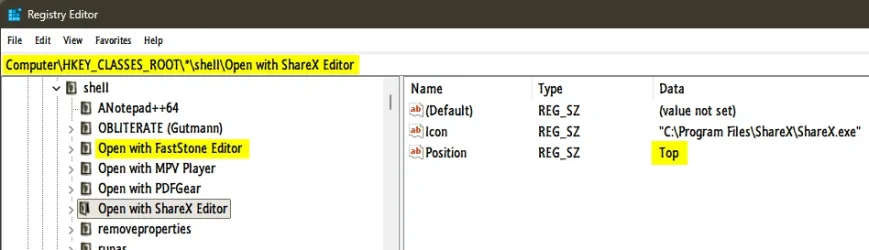
This may help:
Mind you, I only have a few custom entries, so, many entries might get a little more complicated!
However, having said that..., the Registry seems to list entries in alphanumerical order...

12019.webp

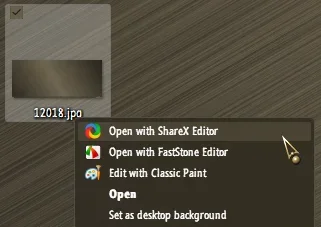
... but, the actual new listing, (ShareX), appears at the top anyway...

12020.webp

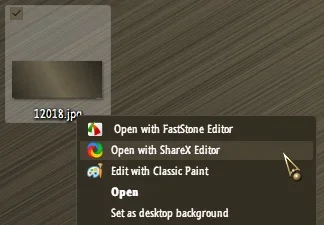
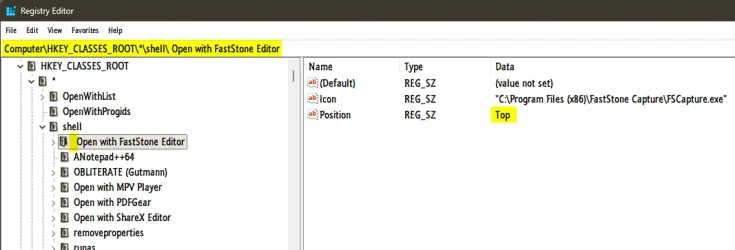
however, I WANT FastStone at the top...

12021.webp

... so, I rename the key with an invisible character at the beginning, (Alt255),
the title is offset by one character, but hey, you gotta try sumpthin, right! 🤷‍♂️

12022.webp
 

My Computers

System One System Two

  • OS
    Windows 11 Pro
    Computer type
    PC/Desktop
    Manufacturer/Model
    ASUS ROG Strix
  • Operating System
    Windows 11 Pro
    Computer type
    Laptop
    Manufacturer/Model
    ASUS VivoBook
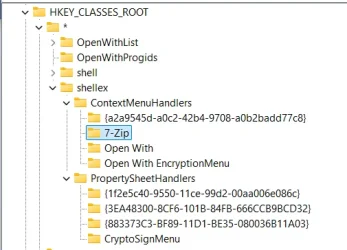
HKEY_CLASSES_ROOT\*\shellex

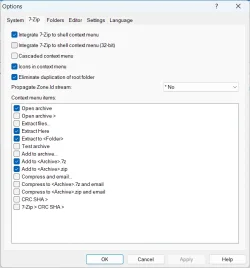
Shell entries is easier to modify for context menu, but shellex entries are more complicated to handle.
Some applications give you build-in control in options for that shellex context menus like 7-Zip:


SS_20260128_11413500.webpSS_20260128_11442253.webp
 

My Computer

System One

  • OS
    Windows 11 25H2 Home Single Language (26200.8037)
    Computer type
    Laptop
    Manufacturer/Model
    LENOVO IdeaPad 5 15ITL05
    CPU
    Intel Core i3-1115G4
    Motherboard
    There is no such a God, I only know mother-Earth
    Memory
    8GB
    Graphics Card(s)
    on-board
    Sound Card
    on-board
    Monitor(s) Displays
    (s) is too ambitious for me
    Screen Resolution
    1920*1080
    Hard Drives
    256GB (SSD)
    PSU
    I was very young when I last saw a PSU
    Case
    ...
    Cooling
    My coldness is enough to cool the computer
    Keyboard
    A broken and very clean keyboard
    Mouse
    Rat
    Internet Speed
    Slowest internet connection in Europe
    Browser
    ChromePortable / FirefoxPortable / TorBrowser
    Antivirus
    G-Virus
    Other Info
    I can simply say that I took the red pill and I am not happy with it.

Latest Support Threads

Back
Top Bottom