
Solved Creating My Own Themes In Win 11


needlenoses

Well-known member
Member
Local time
11:05 AM
Posts
261
Location
British columbia Canada
OS
windows 11 up tp date.
I need some direction in my quest to create my own themes using photos that I have on my hard drive. Like from various trips etc. I don't quite know where to start. I go into personalizing, themes but don't see how to proceed. Help to get going on this would be appreciated. Latest updated version of 11.
 

My Computer

System One

  • OS
    windows 11 up tp date.
    Computer type
    PC/Desktop
    Manufacturer/Model
    Self Built on ASUS board
    CPU
    AMD Rysen 5 5600 G
    Motherboard
    ASUS Prime B360-Plus
    Memory
    32 gig
    Graphics Card(s)
    Nvidia GEFORCE RTX 2060 6 gig
    Sound Card
    NVIDIA
    Monitor(s) Displays
    Samsung Odyssey CG560 43 inch
    Screen Resolution
    1920 X 1080
    Hard Drives
    Samsung 2T SSD Primary/ Samsung 1T SSD secondary; WD 4T for PLEX Storage; WD 4T external also for Plex . Also 3 HDD drives for PLEX backup.
    Case
    Deepcool CG560
    Keyboard
    Logitech
    Mouse
    Logitech
    Internet Speed
    500 down/500 up 3 ms ping
    Browser
    Edge
    Antivirus
    Defender
    Other Info
    Building a new desktop on the horizon; this was definitely a budget build based on circumstances at the time.

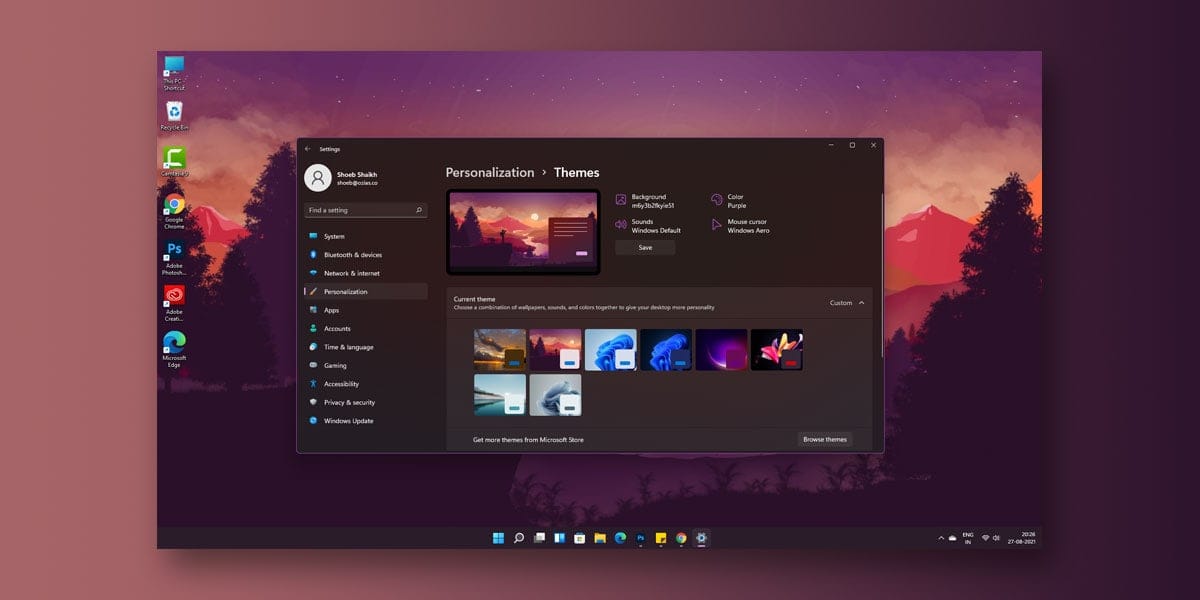
You can then tweak even further how Windows looks by using Win Tools Classic Color Panel Customize Colors in Windows 10 - WinTools.Info

That first article should tell you what Windows 11 will allow you to change. Personally, I like to control every aspect of the way Windows looks like back in the Windows 7 days where we could fine tune every aspect of both our desktop and a window. What I have done is install Windows 7 as a virtual machine for no purpose other than theme building.
I build my themes, export them to a file, and then use the themes in Windows 11. It works great.
 

My Computers

System One System Two

  • OS
    Windows 11 Pro 25H2
    Computer type
    PC/Desktop
    Manufacturer/Model
    Dell Optiplex 7080
    CPU
    i9-10900 10 core 20 threads
    Motherboard
    DELL 0J37VM
    Memory
    32 gb
    Graphics Card(s)
    none-Intel UHD Graphics 630
    Sound Card
    Integrated Realtek
    Monitor(s) Displays
    Benq 27
    Screen Resolution
    2560x1440
    Hard Drives
    2x1tb Solidigm m.2 nvme /External drives 512gb Samsung m.2 sata+2tb Kingston m2.nvme
    PSU
    500w
    Case
    MT
    Cooling
    Dell Premium
    Keyboard
    Logitech wired
    Mouse
    Logitech wireless
    Internet Speed
    so slow I'm too embarrassed to tell
    Browser
    #1 Edge #2 Firefox
    Antivirus
    Defender+MWB Premium
  • Operating System
    Windows 11 Pro 24H2 26200.8457
    Computer type
    PC/Desktop
    Manufacturer/Model
    Beelink Mini PC SER5
    CPU
    AMD Ryzen 7 6800U
    Memory
    32 gb
    Graphics card(s)
    integrated
    Sound Card
    integrated
    Monitor(s) Displays
    Benq 27
    Screen Resolution
    2560x1440
    Hard Drives
    1TB Crucial nvme
    Keyboard
    Logitech wired
    Mouse
    Logitech wireless
    Internet Speed
    still too embarrassed to tell
    Browser
    Firefox
    Antivirus
    Defender
    Other Info
    System 3 is non compliant Dell 9020 i7-4770/24gb ram Win11 PRO 26200.8457
I don't think this is what I am after. I guess what I want to do is have my desktop background act like a delayed slideshow like the themes that I have already downloaded for win 10 and 11 from Microsoft, but with my selected images, not someone else's.
 

My Computer

System One

  • OS
    windows 11 up tp date.
    Computer type
    PC/Desktop
    Manufacturer/Model
    Self Built on ASUS board
    CPU
    AMD Rysen 5 5600 G
    Motherboard
    ASUS Prime B360-Plus
    Memory
    32 gig
    Graphics Card(s)
    Nvidia GEFORCE RTX 2060 6 gig
    Sound Card
    NVIDIA
    Monitor(s) Displays
    Samsung Odyssey CG560 43 inch
    Screen Resolution
    1920 X 1080
    Hard Drives
    Samsung 2T SSD Primary/ Samsung 1T SSD secondary; WD 4T for PLEX Storage; WD 4T external also for Plex . Also 3 HDD drives for PLEX backup.
    Case
    Deepcool CG560
    Keyboard
    Logitech
    Mouse
    Logitech
    Internet Speed
    500 down/500 up 3 ms ping
    Browser
    Edge
    Antivirus
    Defender
    Other Info
    Building a new desktop on the horizon; this was definitely a budget build based on circumstances at the time.
That's easy.
  • Settings
  • Select Personalization > Background
  • Select Slideshow and then click on the Browse button
  • Select the folder where you have placed all your preferred wallpaper pictures
  • Change other settings like:
    • Change picture every
    • Shuffle the picture order
    • Choose a fit for your desktop image
 

My Computers

System One System Two

  • OS
    Windows 11 Pro 25H2
    Computer type
    PC/Desktop
    Manufacturer/Model
    Dell Optiplex 7080
    CPU
    i9-10900 10 core 20 threads
    Motherboard
    DELL 0J37VM
    Memory
    32 gb
    Graphics Card(s)
    none-Intel UHD Graphics 630
    Sound Card
    Integrated Realtek
    Monitor(s) Displays
    Benq 27
    Screen Resolution
    2560x1440
    Hard Drives
    2x1tb Solidigm m.2 nvme /External drives 512gb Samsung m.2 sata+2tb Kingston m2.nvme
    PSU
    500w
    Case
    MT
    Cooling
    Dell Premium
    Keyboard
    Logitech wired
    Mouse
    Logitech wireless
    Internet Speed
    so slow I'm too embarrassed to tell
    Browser
    #1 Edge #2 Firefox
    Antivirus
    Defender+MWB Premium
  • Operating System
    Windows 11 Pro 24H2 26200.8457
    Computer type
    PC/Desktop
    Manufacturer/Model
    Beelink Mini PC SER5
    CPU
    AMD Ryzen 7 6800U
    Memory
    32 gb
    Graphics card(s)
    integrated
    Sound Card
    integrated
    Monitor(s) Displays
    Benq 27
    Screen Resolution
    2560x1440
    Hard Drives
    1TB Crucial nvme
    Keyboard
    Logitech wired
    Mouse
    Logitech wireless
    Internet Speed
    still too embarrassed to tell
    Browser
    Firefox
    Antivirus
    Defender
    Other Info
    System 3 is non compliant Dell 9020 i7-4770/24gb ram Win11 PRO 26200.8457
I guess what I want to do is have my desktop background act like a delayed slideshow like the themes that I have already downloaded for win 10 and 11 from Microsoft, but with my selected images, not someone else's.
That's easy.
  • Settings
  • Select Personalization > Background
  • Select Slideshow and then click on the Browse button
  • Select the folder where you have placed all your preferred wallpaper pictures
  • Change other settings like:
    • Change picture every
    • Shuffle the picture order
    • Choose a fit for your desktop image

Glasscutter is correct, in fact I have done exactly that on all my machines. See my post #598 here:

desktop_-gif.27434


My Computers

System One System Two

  • OS
    Windows 11 Home
    Computer type
    Laptop
    Manufacturer/Model
    Acer Aspire 3 A315-23-R9VY
    CPU
    AMD Athlon Silver 3050U
    Memory
    8GB
    Graphics Card(s)
    Radeon Graphics
    Monitor(s) Displays
    laptop screen
    Screen Resolution
    1366x768 native resolution, up to 2560x1440 with Radeon Virtual Super Resolution
    Hard Drives
    1TB Samsung EVO 870 SSD (from April 2026: 250GB EVO 850)
    Internet Speed
    150 Mbps
    Browser
    Edge, Firefox
    Antivirus
    Defender
    Other Info
    fully 'Windows 11 ready' laptop. Windows 10 C: partition migrated from my old unsupported 'main machine' then upgraded to 11. A test migration ran Insider builds for 2 months. When 11 was released on 5th October 2021 it was re-imaged back to 10 and was offered the upgrade in Windows Update on 20th October. Windows Update offered the 22H2 Feature Update on 20th September 2022. It got the 23H2 Feature Update on 4th November 2023 through Windows Update, 24H2 on 3rd October 2024 through Windows Update by setting the Target Release Version for 24H2, and 25H2 on 30th September 2025 through Windows Update by setting the Target Release Version for 25H2.

    UPDATE - 11 April 2026: due to mechanical deterioration this PC has been retired from active duty. The OS with all software and files has been migrated to my System Seven below to carry on as my general purpose 'main machine'.

    My SYSTEM THREE is a Dell Latitude 5410, i7-10610U, 32GB RAM, 512GB NVMe ssd, supported device running Windows 11 Pro.

    My SYSTEM FOUR is a 2-in-1 convertible Lenovo Yoga 11e 20DA, Celeron N2930, 8GB RAM, 256GB ssd. Unsupported device: currently running Win10 Pro, plus Win11 Pro RTM and Insider Dev, Beta, and RP 24H2 as native boot vhdx.

    My SYSTEM FIVE is a Dell Latitude 3190 2-in-1, Pentium Silver N5030, 8GB RAM, 1TB NVMe ssd, supported device running Windows 11 Pro, plus Insider Beta, Dev, and Canary builds (and a few others) as a native boot .vhdx.

    My SYSTEM SIX is a Dell Latitude 5550, Core Ultra 7 165H, 64GB RAM, 1TB NVMe SSD, supported device, Windows 11 Pro 24H2, Hyper-V host machine. Updated to 25H2 on 30th September 2025.

    My SYSTEM SEVEN is a Lenovo Thinkpad T580, Intel Core i7-8650U, 16GB RAM, 512GB NVMe SSD + 2nd 512GB NVMe SSD, a supported device for Windows 11. This is my current general purpose 'main machine'. The installed Windows 11 Home from my System One has been migrated to this machine.
  • Operating System
    Windows 11 Pro
    Computer type
    Laptop
    Manufacturer/Model
    Dell Latitude E4310
    CPU
    Intel® Core™ i5-520M
    Motherboard
    0T6M8G
    Memory
    8GB
    Graphics card(s)
    (integrated graphics) Intel HD Graphics
    Screen Resolution
    1366x768
    Hard Drives
    500GB Crucial MX500 SSD
    Browser
    Firefox, Edge
    Antivirus
    Defender
    Other Info
    unsupported machine: Legacy bios, MBR, TPM 1.2, upgraded from W10 to W11 using W10/W11 hybrid install media workaround. In-place upgrade to 22H2 using ISO and a workaround. Feature Update to 23H2 by manually installing the Enablement Package. In-place upgrade to 24H2 using hybrid 23H2/24H2 install media. Upgraded to 25H2 by Enablement Package. Also running Insider Dev, and Canary builds and Windows 10 as native boot .vhdx.

    My SYSTEM THREE is a Dell Latitude 5410, i7-10610U, 32GB RAM, 512GB NVMe ssd, supported device running Windows 11 Pro.

    My SYSTEM FOUR is a 2-in-1 convertible Lenovo Yoga 11e 20DA, Celeron N2930, 8GB RAM, 256GB ssd. Unsupported device: currently running Win10 Pro, plus Win11 Pro RTM and Insider Dev, Beta, and RP 24H2 as native boot vhdx.

    My SYSTEM FIVE is a Dell Latitude 3190 2-in-1, Pentium Silver N5030, 8GB RAM, 1TB NVMe ssd, supported device running Windows 11 Pro, plus Insider Beta, Dev, and Canary builds (and a few others) as a native boot .vhdx.

    My SYSTEM SIX is a Dell Latitude 5550, Core Ultra 7 165H, 64GB RAM, 1TB NVMe SSD, supported device, Windows 11 Pro 24H2, Hyper-V host machine. Updated to 25H2 on 30th September 2025.

    My SYSTEM SEVEN is a Lenovo Thinkpad T580, Intel Core i7-8650U, 16GB RAM, 512GB NVMe SSD + 2nd 512GB NVMe SSD, a supported device for Windows 11. This is my current general purpose 'main machine'. The installed Windows 11 Home from my System One has been migrated to this machine.
I'm back; busy week here; I will give these steps a go this afternoon when I get a break. Much appreciated.:geek:

I am guessing that this process might even work on altering existing themes!!
 
Last edited:

My Computer

System One

  • OS
    windows 11 up tp date.
    Computer type
    PC/Desktop
    Manufacturer/Model
    Self Built on ASUS board
    CPU
    AMD Rysen 5 5600 G
    Motherboard
    ASUS Prime B360-Plus
    Memory
    32 gig
    Graphics Card(s)
    Nvidia GEFORCE RTX 2060 6 gig
    Sound Card
    NVIDIA
    Monitor(s) Displays
    Samsung Odyssey CG560 43 inch
    Screen Resolution
    1920 X 1080
    Hard Drives
    Samsung 2T SSD Primary/ Samsung 1T SSD secondary; WD 4T for PLEX Storage; WD 4T external also for Plex . Also 3 HDD drives for PLEX backup.
    Case
    Deepcool CG560
    Keyboard
    Logitech
    Mouse
    Logitech
    Internet Speed
    500 down/500 up 3 ms ping
    Browser
    Edge
    Antivirus
    Defender
    Other Info
    Building a new desktop on the horizon; this was definitely a budget build based on circumstances at the time.
altering existing themes!!
Actually, no. The folder for default themes is C:\Windows\Resources\Themes. When you use one of the default themes as the base of your new theme, alter it, and save it, it goes to %LocalAppData%\Microsoft\Windows\Themes. The existing default theme still exists in the original folder.
 

My Computers

System One System Two

  • OS
    Windows 11 Pro 25H2
    Computer type
    PC/Desktop
    Manufacturer/Model
    Dell Optiplex 7080
    CPU
    i9-10900 10 core 20 threads
    Motherboard
    DELL 0J37VM
    Memory
    32 gb
    Graphics Card(s)
    none-Intel UHD Graphics 630
    Sound Card
    Integrated Realtek
    Monitor(s) Displays
    Benq 27
    Screen Resolution
    2560x1440
    Hard Drives
    2x1tb Solidigm m.2 nvme /External drives 512gb Samsung m.2 sata+2tb Kingston m2.nvme
    PSU
    500w
    Case
    MT
    Cooling
    Dell Premium
    Keyboard
    Logitech wired
    Mouse
    Logitech wireless
    Internet Speed
    so slow I'm too embarrassed to tell
    Browser
    #1 Edge #2 Firefox
    Antivirus
    Defender+MWB Premium
  • Operating System
    Windows 11 Pro 24H2 26200.8457
    Computer type
    PC/Desktop
    Manufacturer/Model
    Beelink Mini PC SER5
    CPU
    AMD Ryzen 7 6800U
    Memory
    32 gb
    Graphics card(s)
    integrated
    Sound Card
    integrated
    Monitor(s) Displays
    Benq 27
    Screen Resolution
    2560x1440
    Hard Drives
    1TB Crucial nvme
    Keyboard
    Logitech wired
    Mouse
    Logitech wireless
    Internet Speed
    still too embarrassed to tell
    Browser
    Firefox
    Antivirus
    Defender
    Other Info
    System 3 is non compliant Dell 9020 i7-4770/24gb ram Win11 PRO 26200.8457
Ok, got that about altering themes; so I managed to create a theme using a folder with some pics in just for testing; worked fine but how to I save it and give the file a name etc.
 

My Computer

System One

  • OS
    windows 11 up tp date.
    Computer type
    PC/Desktop
    Manufacturer/Model
    Self Built on ASUS board
    CPU
    AMD Rysen 5 5600 G
    Motherboard
    ASUS Prime B360-Plus
    Memory
    32 gig
    Graphics Card(s)
    Nvidia GEFORCE RTX 2060 6 gig
    Sound Card
    NVIDIA
    Monitor(s) Displays
    Samsung Odyssey CG560 43 inch
    Screen Resolution
    1920 X 1080
    Hard Drives
    Samsung 2T SSD Primary/ Samsung 1T SSD secondary; WD 4T for PLEX Storage; WD 4T external also for Plex . Also 3 HDD drives for PLEX backup.
    Case
    Deepcool CG560
    Keyboard
    Logitech
    Mouse
    Logitech
    Internet Speed
    500 down/500 up 3 ms ping
    Browser
    Edge
    Antivirus
    Defender
    Other Info
    Building a new desktop on the horizon; this was definitely a budget build based on circumstances at the time.
Sorry; found where to save the files; no problem now; thanks to all for the help.
 

My Computer

System One

  • OS
    windows 11 up tp date.
    Computer type
    PC/Desktop
    Manufacturer/Model
    Self Built on ASUS board
    CPU
    AMD Rysen 5 5600 G
    Motherboard
    ASUS Prime B360-Plus
    Memory
    32 gig
    Graphics Card(s)
    Nvidia GEFORCE RTX 2060 6 gig
    Sound Card
    NVIDIA
    Monitor(s) Displays
    Samsung Odyssey CG560 43 inch
    Screen Resolution
    1920 X 1080
    Hard Drives
    Samsung 2T SSD Primary/ Samsung 1T SSD secondary; WD 4T for PLEX Storage; WD 4T external also for Plex . Also 3 HDD drives for PLEX backup.
    Case
    Deepcool CG560
    Keyboard
    Logitech
    Mouse
    Logitech
    Internet Speed
    500 down/500 up 3 ms ping
    Browser
    Edge
    Antivirus
    Defender
    Other Info
    Building a new desktop on the horizon; this was definitely a budget build based on circumstances at the time.
Sorry; found where to save the files; no problem now; thanks to all for the help.
Glad you found that for yourself.

For the benefit of others reading this thread, there are two stages in saving your custom theme. The first is to save its setting to your PC so that you can give the theme a name and select it again whenever you need. To do that click the Save button in Personalisation > Themes. That will add it to the list of available themes to select from.

Themes - Save.png


The second stage is optional, useful if you want to save your theme to a deskthemepack file (including the files of any custom images, sounds or cursors it may use). This can then be used to import your theme to another PC, or reinstall it on this PC should you ever need to do a clean install of Windows. To do that right-click on your (now) saved them and select 'Save theme for sharing'.

Themes - save for sharing.png
 

My Computers

System One System Two

  • OS
    Windows 11 Home
    Computer type
    Laptop
    Manufacturer/Model
    Acer Aspire 3 A315-23-R9VY
    CPU
    AMD Athlon Silver 3050U
    Memory
    8GB
    Graphics Card(s)
    Radeon Graphics
    Monitor(s) Displays
    laptop screen
    Screen Resolution
    1366x768 native resolution, up to 2560x1440 with Radeon Virtual Super Resolution
    Hard Drives
    1TB Samsung EVO 870 SSD (from April 2026: 250GB EVO 850)
    Internet Speed
    150 Mbps
    Browser
    Edge, Firefox
    Antivirus
    Defender
    Other Info
    fully 'Windows 11 ready' laptop. Windows 10 C: partition migrated from my old unsupported 'main machine' then upgraded to 11. A test migration ran Insider builds for 2 months. When 11 was released on 5th October 2021 it was re-imaged back to 10 and was offered the upgrade in Windows Update on 20th October. Windows Update offered the 22H2 Feature Update on 20th September 2022. It got the 23H2 Feature Update on 4th November 2023 through Windows Update, 24H2 on 3rd October 2024 through Windows Update by setting the Target Release Version for 24H2, and 25H2 on 30th September 2025 through Windows Update by setting the Target Release Version for 25H2.

    UPDATE - 11 April 2026: due to mechanical deterioration this PC has been retired from active duty. The OS with all software and files has been migrated to my System Seven below to carry on as my general purpose 'main machine'.

    My SYSTEM THREE is a Dell Latitude 5410, i7-10610U, 32GB RAM, 512GB NVMe ssd, supported device running Windows 11 Pro.

    My SYSTEM FOUR is a 2-in-1 convertible Lenovo Yoga 11e 20DA, Celeron N2930, 8GB RAM, 256GB ssd. Unsupported device: currently running Win10 Pro, plus Win11 Pro RTM and Insider Dev, Beta, and RP 24H2 as native boot vhdx.

    My SYSTEM FIVE is a Dell Latitude 3190 2-in-1, Pentium Silver N5030, 8GB RAM, 1TB NVMe ssd, supported device running Windows 11 Pro, plus Insider Beta, Dev, and Canary builds (and a few others) as a native boot .vhdx.

    My SYSTEM SIX is a Dell Latitude 5550, Core Ultra 7 165H, 64GB RAM, 1TB NVMe SSD, supported device, Windows 11 Pro 24H2, Hyper-V host machine. Updated to 25H2 on 30th September 2025.

    My SYSTEM SEVEN is a Lenovo Thinkpad T580, Intel Core i7-8650U, 16GB RAM, 512GB NVMe SSD + 2nd 512GB NVMe SSD, a supported device for Windows 11. This is my current general purpose 'main machine'. The installed Windows 11 Home from my System One has been migrated to this machine.
  • Operating System
    Windows 11 Pro
    Computer type
    Laptop
    Manufacturer/Model
    Dell Latitude E4310
    CPU
    Intel® Core™ i5-520M
    Motherboard
    0T6M8G
    Memory
    8GB
    Graphics card(s)
    (integrated graphics) Intel HD Graphics
    Screen Resolution
    1366x768
    Hard Drives
    500GB Crucial MX500 SSD
    Browser
    Firefox, Edge
    Antivirus
    Defender
    Other Info
    unsupported machine: Legacy bios, MBR, TPM 1.2, upgraded from W10 to W11 using W10/W11 hybrid install media workaround. In-place upgrade to 22H2 using ISO and a workaround. Feature Update to 23H2 by manually installing the Enablement Package. In-place upgrade to 24H2 using hybrid 23H2/24H2 install media. Upgraded to 25H2 by Enablement Package. Also running Insider Dev, and Canary builds and Windows 10 as native boot .vhdx.

    My SYSTEM THREE is a Dell Latitude 5410, i7-10610U, 32GB RAM, 512GB NVMe ssd, supported device running Windows 11 Pro.

    My SYSTEM FOUR is a 2-in-1 convertible Lenovo Yoga 11e 20DA, Celeron N2930, 8GB RAM, 256GB ssd. Unsupported device: currently running Win10 Pro, plus Win11 Pro RTM and Insider Dev, Beta, and RP 24H2 as native boot vhdx.

    My SYSTEM FIVE is a Dell Latitude 3190 2-in-1, Pentium Silver N5030, 8GB RAM, 1TB NVMe ssd, supported device running Windows 11 Pro, plus Insider Beta, Dev, and Canary builds (and a few others) as a native boot .vhdx.

    My SYSTEM SIX is a Dell Latitude 5550, Core Ultra 7 165H, 64GB RAM, 1TB NVMe SSD, supported device, Windows 11 Pro 24H2, Hyper-V host machine. Updated to 25H2 on 30th September 2025.

    My SYSTEM SEVEN is a Lenovo Thinkpad T580, Intel Core i7-8650U, 16GB RAM, 512GB NVMe SSD + 2nd 512GB NVMe SSD, a supported device for Windows 11. This is my current general purpose 'main machine'. The installed Windows 11 Home from my System One has been migrated to this machine.
Good addition to the thread; for my use at this time I am good the way it is; no need to play with icons or colours. tks.
 

My Computer

System One

  • OS
    windows 11 up tp date.
    Computer type
    PC/Desktop
    Manufacturer/Model
    Self Built on ASUS board
    CPU
    AMD Rysen 5 5600 G
    Motherboard
    ASUS Prime B360-Plus
    Memory
    32 gig
    Graphics Card(s)
    Nvidia GEFORCE RTX 2060 6 gig
    Sound Card
    NVIDIA
    Monitor(s) Displays
    Samsung Odyssey CG560 43 inch
    Screen Resolution
    1920 X 1080
    Hard Drives
    Samsung 2T SSD Primary/ Samsung 1T SSD secondary; WD 4T for PLEX Storage; WD 4T external also for Plex . Also 3 HDD drives for PLEX backup.
    Case
    Deepcool CG560
    Keyboard
    Logitech
    Mouse
    Logitech
    Internet Speed
    500 down/500 up 3 ms ping
    Browser
    Edge
    Antivirus
    Defender
    Other Info
    Building a new desktop on the horizon; this was definitely a budget build based on circumstances at the time.
Hello. I'm aware this is an old thread, but I have a question regarding some settings in .theme files. This is something I've wanted to do for a while but never figured out a way to do so. My question is, does anyone know if it is possible to set a custom system font via a .theme file? Naturally without using custom .msstyles ofc. I know it can be done with custom .msstyles, but I would like a way to do it without using custom visual styles or registry tweaks if possible.
 

My Computer

System One

  • OS
    Windows 11 Home
    Computer type
    Laptop
    Manufacturer/Model
    Jumper Tech EzBook S5
    CPU
    Intel N100
    Memory
    16.0 GB
    Graphics Card(s)
    Intel UHD Graphics
    Screen Resolution
    1920x1200
Back
Top Bottom




