Install and Enable “Group Policy Editor


bluzeboy11

Member
Local time
12:52 PM
Posts
2
OS
windows 11 home
cant install

Group Policy Editor” (gpedit.msc) in Home Edition​

i get a error​


My Computer

System One

  • OS
    windows 11 home
    Computer type
    PC/Desktop
    Manufacturer/Model
    dell
    CPU
    Intel(R) Core(TM) Ultra 7 355 (2.30 GHz)
    Memory
    32.0 GB (31.6 GB usable)
    Graphics Card(s)
    dell
    Sound Card
    dell
    Monitor(s) Displays
    dell
cant install

Group Policy Editor” (gpedit.msc) in Home Edition​

i get a error​

Can you outline the method you are using please?
If you are using a Script in Powershell are you running Powershell as an Administrator?
 

My Computer

System One

  • OS
    Windows 11
    Computer type
    PC/Desktop
    Manufacturer/Model
    Generic
    CPU
    AMD Ryzen 8700G
    Motherboard
    Gigabyte B650 UD AC
    Memory
    64 GB
    Graphics Card(s)
    Onboard
    Sound Card
    Onboard
    Monitor(s) Displays
    Del U2723QE
    Screen Resolution
    3840 x 2160
    Hard Drives
    Corsiar MP600 1TB
    PSU
    Silverstone 750 GOLD
    Case
    Silverstone FARA 513
Try this batch script.

Batch:
:: This batch script will enable Group Policy Editor (Gpedit.msc) on Windows 11 and Windows 10 Home Edition.

@echo off & Cls

(Net session >nul 2>&1)||(PowerShell start """%~0""" -verb RunAs & Exit /B)

pushd "%~dp0"

dir /b %SystemRoot%\servicing\Packages\Microsoft-Windows-GroupPolicy-ClientExtensions-Package~3*.mum >List.txt
dir /b %SystemRoot%\servicing\Packages\Microsoft-Windows-GroupPolicy-ClientTools-Package~3*.mum >>List.txt

for /f %%i in ('findstr /i . List.txt 2^>nul') do dism /online /norestart /add-package:"%SystemRoot%\servicing\Packages\%%i"


For /F %%B In ('wmic Os Get /Format:List ^| Find /I "Osarchitecture"') Do (Set Output=%%B)


If "%Output:~15,21%"=="64-bit"  (
    If Exist "%SystemRoot%\System32\gpedit.msc" (
    
    Goto :Skip
    
    ) Else (
    
    Copy "%SystemRoot%\SysWOW64\Gpedit.msc" "%SystemRoot%\System32"
    
    )

:Skip

 

My Computer

System One

  • OS
    Windows 11
    Computer type
    PC/Desktop
    Manufacturer/Model
    HP Pavilion
    CPU
    AMD Ryzen 7 5700G
    Motherboard
    Erica6
    Memory
    Micron Technology DDR4-3200 16GB
    Graphics Card(s)
    NVIDIA GeForce RTX 3060
    Sound Card
    Realtek ALC671
    Monitor(s) Displays
    Samsung SyncMaster U28E590
    Screen Resolution
    3840 x 2160
    Hard Drives
    SAMSUNG MZVLQ1T0HALB-000H1
I have seen lots of posts in which Home users who have succeeded in installing GPE have reported that, for many of its entries, it only acts as a viewer & is not able to change Registry entries itself.


Denis
 

My Computer

System One

  • OS
    Windows 11 Home x64 Version 25H2 Build 26200.8037
Why? Upgrading to an Education licence costs only a few dollars and you get a fully unlocked Group Policy Editor - which Pro doesn't have.
 

My Computers

System One System Two

  • OS
    Windows 11 Education For 25H2
    Computer type
    Laptop
    Manufacturer/Model
    HP ZBook G2
    CPU
    Intel® Core i7 5500u
    Motherboard
    HP
    Memory
    8 GB
    Graphics Card(s)
    Intel HD Family Graphics 5500 AMD Firepro 4150M
    Sound Card
    Realtek High Audio
    Hard Drives
    1 TB SSD
    Mouse
    HP USB Mouse
    Antivirus
    Windows Defender
  • Operating System
    Windows 11 Pro For Workstations 25H2
    Computer type
    Laptop
    Manufacturer/Model
    HP Zbook G4
    CPU
    Xeon 1535m v6
    Motherboard
    HP
    Memory
    32 GB
    Graphics card(s)
    AMD Quadro Pro 4100
    Sound Card
    Bang and Olufson Audio
    Hard Drives
    1TB SSD
    Mouse
    HP USB Mouse
    Antivirus
    Windows Defender
you can install it and use it on Home but half of GPOs in there wont apply when configured. I would suggest just using the Reg edits manually and saving yourself the time of finding out that the GPOs didn't work...

if you want it GP and SecPol enabled...

Code:
@echo off
pushd "%~dp0"
dir /b %SystemRoot%\servicing\Packages\Microsoft-Windows-GroupPolicy-ClientExtensions-Package~3*.mum >List.txt
dir /b %SystemRoot%\servicing\Packages\Microsoft-Windows-GroupPolicy-ClientTools-Package~3*.mum >>List.txt
for /f %%i in ('findstr /i . List.txt 2^>nul') do dism /online /norestart /add-package:"%SystemRoot%\servicing\Packages\%%i"
pause

or


Code:
FOR %F IN ("%SystemRoot%\servicing\Packages\Microsoft-Windows-GroupPolicy-ClientTools-Package~*.mum") DO ( DISM /Online /NoRestart /Add-Package:"%F" )
FOR %F IN ("%SystemRoot%\servicing\Packages\Microsoft-Windows-GroupPolicy-ClientExtensions-Package~*.mum") DO ( DISM /Online /NoRestart /Add-Package:"%F" )
 

My Computer

System One

  • OS
    Windows 11 Pro
i tried the batch the i used on windows 10 as Administrator i still get the same error
what are the reg edit that was suggested?
how does one do this
need a professional level OS to get it done.
 
Last edited:

My Computer

System One

  • OS
    windows 11 home
    Computer type
    PC/Desktop
    Manufacturer/Model
    dell
    CPU
    Intel(R) Core(TM) Ultra 7 355 (2.30 GHz)
    Memory
    32.0 GB (31.6 GB usable)
    Graphics Card(s)
    dell
    Sound Card
    dell
    Monitor(s) Displays
    dell
The problem is Home isn't really meant to administer a PC and you need a professional level OS to get it done. I don't understand why you can't upgrade to a new tier when the cost involved is minimal.
 

My Computers

System One System Two

  • OS
    Windows 11 Education For 25H2
    Computer type
    Laptop
    Manufacturer/Model
    HP ZBook G2
    CPU
    Intel® Core i7 5500u
    Motherboard
    HP
    Memory
    8 GB
    Graphics Card(s)
    Intel HD Family Graphics 5500 AMD Firepro 4150M
    Sound Card
    Realtek High Audio
    Hard Drives
    1 TB SSD
    Mouse
    HP USB Mouse
    Antivirus
    Windows Defender
  • Operating System
    Windows 11 Pro For Workstations 25H2
    Computer type
    Laptop
    Manufacturer/Model
    HP Zbook G4
    CPU
    Xeon 1535m v6
    Motherboard
    HP
    Memory
    32 GB
    Graphics card(s)
    AMD Quadro Pro 4100
    Sound Card
    Bang and Olufson Audio
    Hard Drives
    1TB SSD
    Mouse
    HP USB Mouse
    Antivirus
    Windows Defender
Home Edition deliberately ignores almost all Windows Group Policies. This is done to prevent businesses from trying to save money by buying Home instead of Pro. There are 3rd-party policy templates that will work on any Windows edition (Firefox for example), only because the app itself doesn't care about your Windows version.
 

My Computer

System One

  • OS
    Windows 7
@bluzeboy11
How much is your time worth asking the wrong question?


1.webp

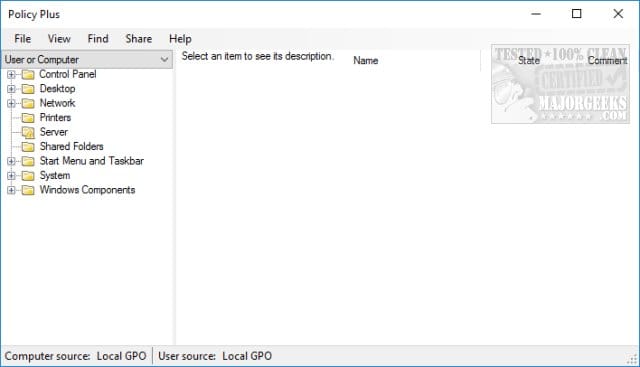
And then you may as well get yourself PolicyPlus (free)- with useful search and filter features.
 

My Computer

System One

  • OS
    Windows 11 Pro
    Computer type
    Laptop
    Manufacturer/Model
    Lenovo t480s
    CPU
    i7-8650U
    Memory
    16GB
    Graphics Card(s)
    Intel UHD 620
    Screen Resolution
    1920x1080
    Hard Drives
    C SN810 SDCPNRY-512G-1006
    Browser
    Edge, Firefox
    Antivirus
    Defender
Back
Top Bottom