Solved Dark mode conundrum - hard to see borders of different windows


RDG

Active member
Member
Local time
4:48 AM
Posts
176
OS
B0rn2luz!
Because I've found dark mode on this site easier on my eyes I've set it up for Windows and my browser. If I had my druthers it would be the softer charcoal like this site, but I'm basically happy with it. However, when I have multiple windows open it is challenging to determine which window is which. I thought I had found the solution via Windhawk's Bring Back Borders but that made changed I didn't want or like. Ideally, what is needed is a thin whitish frame around the window. Is there such a fix out there, somewhere? Thanks.
 
Windows Build/Version
Win11 Pro 10.0.22631 Build 22631

My Computer My Computer

At a glance

B0rn2luz!Intel(R) Core(TM) i5-8500 CPU @ 3.00GHzStorage: 4.6 TB, Installed RAM: 32 GB (31.9 G...
OS
B0rn2luz!
Computer type
PC/Desktop
Manufacturer/Model
Lenovo ThinkCentre M920S SFF
CPU
Intel(R) Core(TM) i5-8500 CPU @ 3.00GHz
Memory
Storage: 4.6 TB, Installed RAM: 32 GB (31.9 GB usable)
Cooling
No fan
Internet Speed
Fiber optics 600-700 download and upload
Browser
Firefox
Antivirus
Avast
Other Info
Product Number: 10ST008NUS

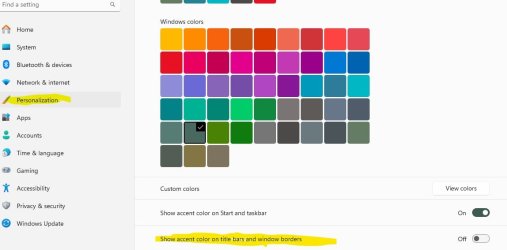
Go to Settings, select Personalization, then scroll down borders.jpg
 

My Computers My Computers

  • At a glance

    Windows 11 Home 25H2 26200.9550AMD Ryzen 3 5300G8gbRadeon Graphics 4.00GHZ
    OS
    Windows 11 Home 25H2 26200.9550
    Computer type
    PC/Desktop
    Manufacturer/Model
    HP Pavilion TP01-2xxx
    CPU
    AMD Ryzen 3 5300G
    Memory
    8gb
    Graphics Card(s)
    Radeon Graphics 4.00GHZ
    Monitor(s) Displays
    ViewSonic
    Keyboard
    HP
    Mouse
    wireless Microsoft
    Browser
    FireFox
    Antivirus
    Avira
  • At a glance

    Updated Windows 10 to 11 25H2 26200.9445Intel Core i3 8100 @3.60 GHz8.GBIntel UHD 360 (HP)
    Operating System
    Updated Windows 10 to 11 25H2 26200.9445
    Computer type
    PC/Desktop
    Manufacturer/Model
    HP
    CPU
    Intel Core i3 8100 @3.60 GHz
    Motherboard
    HP 8653 (U3E1)
    Memory
    8.GB
    Graphics card(s)
    Intel UHD 360 (HP)
    Sound Card
    Realtek High Def
    Monitor(s) Displays
    ViewSonic
    Browser
    Firefox
    Other Info
    #3 System: HP OmniBook 3 laptop Windows Home 25H2 11Pro 26200.9278
  • HP Omni laptop Windows 11 home
    11 25H2 26200.9457
    Intel Core 5 120U

My Computer My Computer

At a glance

B0rn2luz!Intel(R) Core(TM) i5-8500 CPU @ 3.00GHzStorage: 4.6 TB, Installed RAM: 32 GB (31.9 G...
OS
B0rn2luz!
Computer type
PC/Desktop
Manufacturer/Model
Lenovo ThinkCentre M920S SFF
CPU
Intel(R) Core(TM) i5-8500 CPU @ 3.00GHz
Memory
Storage: 4.6 TB, Installed RAM: 32 GB (31.9 GB usable)
Cooling
No fan
Internet Speed
Fiber optics 600-700 download and upload
Browser
Firefox
Antivirus
Avast
Other Info
Product Number: 10ST008NUS

I use a theme with different colors set for active/inactive window but in dark mode even with Show accent colors in borders enabled I still couldn't determine active vs inactive window easily. The problem is because the Windows border defaults to only 1 pixel in width. That's not enough to detect in dark mode., at least not for my eyes.

Set an accent color that is in direct contrast to black. Your active window border will use this color. If you use very bright neon like border colors it is much more obvious. but being a matchy-matchy gal I use colors from my desktop background.
Set an inactive title bar color using Winaero Tweaker . You can also use Winaero tweaker to increase the border width and border padding. Because of the active/inactive colors I chose, while I do see the active border a little better, I find the increase in border width affected the visible appearance of the the inactive border more.
 

My Computers My Computers

  • At a glance

    Windows 11 Pro 25H2 26200.9457i9-10900 10 core 20 threads32 gbnone-Intel UHD Graphics 630
    OS
    Windows 11 Pro 25H2 26200.9457
    Computer type
    PC/Desktop
    Manufacturer/Model
    Dell Optiplex 7080
    CPU
    i9-10900 10 core 20 threads
    Motherboard
    DELL 0J37VM
    Memory
    32 gb
    Graphics Card(s)
    none-Intel UHD Graphics 630
    Sound Card
    Integrated Realtek
    Monitor(s) Displays
    Benq 27
    Screen Resolution
    2560x1440
    Hard Drives
    2x1tb Solidigm m.2 nvme /External drives 512gb Samsung m.2 sata+2tb Kingston m2.nvme
    PSU
    500w
    Case
    MT
    Cooling
    Dell Premium
    Keyboard
    Logitech wired
    Mouse
    Logitech wireless
    Internet Speed
    so slow I'm too embarrassed to tell
    Browser
    #1 Edge #2 Firefox
    Antivirus
    Defender+MWB Premium
  • At a glance

    Windows 11 Pro 24H2 26200.9457AMD Ryzen 7 6800U32 gbintegrated
    Operating System
    Windows 11 Pro 24H2 26200.9457
    Computer type
    PC/Desktop
    Manufacturer/Model
    Beelink Mini PC SER5
    CPU
    AMD Ryzen 7 6800U
    Memory
    32 gb
    Graphics card(s)
    integrated
    Sound Card
    integrated
    Monitor(s) Displays
    Benq 27
    Screen Resolution
    2560x1440
    Hard Drives
    1TB Crucial nvme
    Keyboard
    Logitech wired
    Mouse
    Logitech wireless
    Internet Speed
    still too embarrassed to tell
    Browser
    Firefox
    Antivirus
    Defender
  • System 3 is non compliant Dell 9020 i7-4770/24gb ram Win11 PRO 26200.9457
  • Love
Reactions: RDG
Same annoyance as RDG with multiple windows open on a dark theme. Fixed for active window by Jaycee's tip but why does this border color disappear on inactive windows?
Any tips on modifying the inactive window border color also?
 

My Computers My Computers

  • At a glance

    Win11 Home 26h2 26300.9550 (orig X-Lite Optimum)Ryzen 5 7520U16GB DDR5Integrated graphics
    OS
    Win11 Home 26h2 26300.9550 (orig X-Lite Optimum)
    Computer type
    Laptop
    Manufacturer/Model
    Asus E1504FA
    CPU
    Ryzen 5 7520U
    Memory
    16GB DDR5
    Graphics Card(s)
    Integrated graphics
    Monitor(s) Displays
    15" Asus Laptop display + MSI MP245V external monitor
    Screen Resolution
    1920
    Hard Drives
    1TB Crucial P3+ PCIE 4.0 (in a PCIE 3.0 slot)
    Browser
    Vivaldi
    Antivirus
    Nil
  • At a glance

    Linux Manjaro KDE dual boot with Windows 25H22nd gen I58GB DDR3Integrated graphics
    Operating System
    Linux Manjaro KDE dual boot with Windows 25H2
    Computer type
    Laptop
    Manufacturer/Model
    Asus A53E
    CPU
    2nd gen I5
    Memory
    8GB DDR3
    Graphics card(s)
    Integrated graphics
    Hard Drives
    256GB SATA SSD
    Browser
    Firefox
    Antivirus
    Nil

My Computers My Computers

  • At a glance

    Windows 11 Pro 25H2 26200.9457i9-10900 10 core 20 threads32 gbnone-Intel UHD Graphics 630
    OS
    Windows 11 Pro 25H2 26200.9457
    Computer type
    PC/Desktop
    Manufacturer/Model
    Dell Optiplex 7080
    CPU
    i9-10900 10 core 20 threads
    Motherboard
    DELL 0J37VM
    Memory
    32 gb
    Graphics Card(s)
    none-Intel UHD Graphics 630
    Sound Card
    Integrated Realtek
    Monitor(s) Displays
    Benq 27
    Screen Resolution
    2560x1440
    Hard Drives
    2x1tb Solidigm m.2 nvme /External drives 512gb Samsung m.2 sata+2tb Kingston m2.nvme
    PSU
    500w
    Case
    MT
    Cooling
    Dell Premium
    Keyboard
    Logitech wired
    Mouse
    Logitech wireless
    Internet Speed
    so slow I'm too embarrassed to tell
    Browser
    #1 Edge #2 Firefox
    Antivirus
    Defender+MWB Premium
  • At a glance

    Windows 11 Pro 24H2 26200.9457AMD Ryzen 7 6800U32 gbintegrated
    Operating System
    Windows 11 Pro 24H2 26200.9457
    Computer type
    PC/Desktop
    Manufacturer/Model
    Beelink Mini PC SER5
    CPU
    AMD Ryzen 7 6800U
    Memory
    32 gb
    Graphics card(s)
    integrated
    Sound Card
    integrated
    Monitor(s) Displays
    Benq 27
    Screen Resolution
    2560x1440
    Hard Drives
    1TB Crucial nvme
    Keyboard
    Logitech wired
    Mouse
    Logitech wireless
    Internet Speed
    still too embarrassed to tell
    Browser
    Firefox
    Antivirus
    Defender
  • System 3 is non compliant Dell 9020 i7-4770/24gb ram Win11 PRO 26200.9457
This is what I found that simply works for 24H2...
reg file to add a key to change the accent color of inactive windows. The example changes the color to white (same as Active window) and results in this:
Obviously white is not a good choice for a mix of dark theme and light theme windows. A non-greyscale color is probably the go.
1729123067962.png
Edit: This is indeed the same reg key that is created by Winaero Tweaker to change the inactive title bar color which is a slightly misleading description as it changes the color of the border as well. Strange why MS would remove the users ability to edit all the elements to create their own theme that were there in Win7 and prior...someone thinks they know what is best for us mere paying customers. I wonder if such a person has a little tantrum when we hack the living daylights out of their precious O.S?
 

Attachments

Last edited:

My Computers My Computers

  • At a glance

    Win11 Home 26h2 26300.9550 (orig X-Lite Optimum)Ryzen 5 7520U16GB DDR5Integrated graphics
    OS
    Win11 Home 26h2 26300.9550 (orig X-Lite Optimum)
    Computer type
    Laptop
    Manufacturer/Model
    Asus E1504FA
    CPU
    Ryzen 5 7520U
    Memory
    16GB DDR5
    Graphics Card(s)
    Integrated graphics
    Monitor(s) Displays
    15" Asus Laptop display + MSI MP245V external monitor
    Screen Resolution
    1920
    Hard Drives
    1TB Crucial P3+ PCIE 4.0 (in a PCIE 3.0 slot)
    Browser
    Vivaldi
    Antivirus
    Nil
  • At a glance

    Linux Manjaro KDE dual boot with Windows 25H22nd gen I58GB DDR3Integrated graphics
    Operating System
    Linux Manjaro KDE dual boot with Windows 25H2
    Computer type
    Laptop
    Manufacturer/Model
    Asus A53E
    CPU
    2nd gen I5
    Memory
    8GB DDR3
    Graphics card(s)
    Integrated graphics
    Hard Drives
    256GB SATA SSD
    Browser
    Firefox
    Antivirus
    Nil
Same annoyance as RDG with multiple windows open on a dark theme. Fixed for active window by Jaycee's tip but why does this border color disappear on inactive windows?
Any tips on modifying the inactive window border color also?
I discovered that, too.
 

My Computer My Computer

At a glance

B0rn2luz!Intel(R) Core(TM) i5-8500 CPU @ 3.00GHzStorage: 4.6 TB, Installed RAM: 32 GB (31.9 G...
OS
B0rn2luz!
Computer type
PC/Desktop
Manufacturer/Model
Lenovo ThinkCentre M920S SFF
CPU
Intel(R) Core(TM) i5-8500 CPU @ 3.00GHz
Memory
Storage: 4.6 TB, Installed RAM: 32 GB (31.9 GB usable)
Cooling
No fan
Internet Speed
Fiber optics 600-700 download and upload
Browser
Firefox
Antivirus
Avast
Other Info
Product Number: 10ST008NUS

Any tips on modifying the inactive window border color also?
Yes, as mentioned in my post #4. Assign an inactive border color using WinaeroTweaker
 

My Computers My Computers

  • At a glance

    Windows 11 Pro 25H2 26200.9457i9-10900 10 core 20 threads32 gbnone-Intel UHD Graphics 630
    OS
    Windows 11 Pro 25H2 26200.9457
    Computer type
    PC/Desktop
    Manufacturer/Model
    Dell Optiplex 7080
    CPU
    i9-10900 10 core 20 threads
    Motherboard
    DELL 0J37VM
    Memory
    32 gb
    Graphics Card(s)
    none-Intel UHD Graphics 630
    Sound Card
    Integrated Realtek
    Monitor(s) Displays
    Benq 27
    Screen Resolution
    2560x1440
    Hard Drives
    2x1tb Solidigm m.2 nvme /External drives 512gb Samsung m.2 sata+2tb Kingston m2.nvme
    PSU
    500w
    Case
    MT
    Cooling
    Dell Premium
    Keyboard
    Logitech wired
    Mouse
    Logitech wireless
    Internet Speed
    so slow I'm too embarrassed to tell
    Browser
    #1 Edge #2 Firefox
    Antivirus
    Defender+MWB Premium
  • At a glance

    Windows 11 Pro 24H2 26200.9457AMD Ryzen 7 6800U32 gbintegrated
    Operating System
    Windows 11 Pro 24H2 26200.9457
    Computer type
    PC/Desktop
    Manufacturer/Model
    Beelink Mini PC SER5
    CPU
    AMD Ryzen 7 6800U
    Memory
    32 gb
    Graphics card(s)
    integrated
    Sound Card
    integrated
    Monitor(s) Displays
    Benq 27
    Screen Resolution
    2560x1440
    Hard Drives
    1TB Crucial nvme
    Keyboard
    Logitech wired
    Mouse
    Logitech wireless
    Internet Speed
    still too embarrassed to tell
    Browser
    Firefox
    Antivirus
    Defender
  • System 3 is non compliant Dell 9020 i7-4770/24gb ram Win11 PRO 26200.9457
Now all that is left is to figure out how to de-link the Title bar color from the border color.....
Can't remember if this could be done back in Win7 days since I only started using heavily dark themes on Win11 where it becomes harder to see the demarcation between active and inactive windows against a dark background.
Maybe I am looking at an impossibility and the Title Bar and Border are inseparable?
Feel free to chime in with your knowledge and experience.
 

My Computers My Computers

  • At a glance

    Win11 Home 26h2 26300.9550 (orig X-Lite Optimum)Ryzen 5 7520U16GB DDR5Integrated graphics
    OS
    Win11 Home 26h2 26300.9550 (orig X-Lite Optimum)
    Computer type
    Laptop
    Manufacturer/Model
    Asus E1504FA
    CPU
    Ryzen 5 7520U
    Memory
    16GB DDR5
    Graphics Card(s)
    Integrated graphics
    Monitor(s) Displays
    15" Asus Laptop display + MSI MP245V external monitor
    Screen Resolution
    1920
    Hard Drives
    1TB Crucial P3+ PCIE 4.0 (in a PCIE 3.0 slot)
    Browser
    Vivaldi
    Antivirus
    Nil
  • At a glance

    Linux Manjaro KDE dual boot with Windows 25H22nd gen I58GB DDR3Integrated graphics
    Operating System
    Linux Manjaro KDE dual boot with Windows 25H2
    Computer type
    Laptop
    Manufacturer/Model
    Asus A53E
    CPU
    2nd gen I5
    Memory
    8GB DDR3
    Graphics card(s)
    Integrated graphics
    Hard Drives
    256GB SATA SSD
    Browser
    Firefox
    Antivirus
    Nil
I use a theme with different colors set for active/inactive window but in dark mode even with Show accent colors in borders enabled I still couldn't determine active vs inactive window easily. The problem is because the Windows border defaults to only 1 pixel in width. That's not enough to detect in dark mode., at least not for my eyes.

Set an accent color that is in direct contrast to black. Your active window border will use this color. If you use very bright neon like border colors it is much more obvious. but being a matchy-matchy gal I use colors from my desktop background.
Set an inactive title bar color using Winaero Tweaker . You can also use Winaero tweaker to increase the border width and border padding. Because of the active/inactive colors I chose, while I do see the active border a little better, I find the increase in border width affected the visible appearance of the the inactive border more.
It worked! I must say, however, that looking at the tiny Winero Tweaker bright white screen really hurt my eyes now that I'm accustomed to dark mode. Thanks.
 

My Computer My Computer

At a glance

B0rn2luz!Intel(R) Core(TM) i5-8500 CPU @ 3.00GHzStorage: 4.6 TB, Installed RAM: 32 GB (31.9 G...
OS
B0rn2luz!
Computer type
PC/Desktop
Manufacturer/Model
Lenovo ThinkCentre M920S SFF
CPU
Intel(R) Core(TM) i5-8500 CPU @ 3.00GHz
Memory
Storage: 4.6 TB, Installed RAM: 32 GB (31.9 GB usable)
Cooling
No fan
Internet Speed
Fiber optics 600-700 download and upload
Browser
Firefox
Antivirus
Avast
Other Info
Product Number: 10ST008NUS

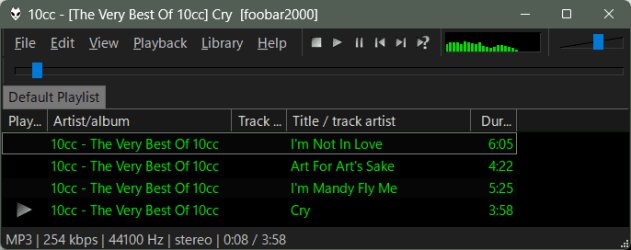
I tried a red border, thinking it would only affect the color of the border but some apps/programs used that color for the title bar, too. I love my Win11 blue wallpaper so I opted for a light blue (custom) and this is what it looks like. borders.jpg
 

My Computer My Computer

At a glance

B0rn2luz!Intel(R) Core(TM) i5-8500 CPU @ 3.00GHzStorage: 4.6 TB, Installed RAM: 32 GB (31.9 G...
OS
B0rn2luz!
Computer type
PC/Desktop
Manufacturer/Model
Lenovo ThinkCentre M920S SFF
CPU
Intel(R) Core(TM) i5-8500 CPU @ 3.00GHz
Memory
Storage: 4.6 TB, Installed RAM: 32 GB (31.9 GB usable)
Cooling
No fan
Internet Speed
Fiber optics 600-700 download and upload
Browser
Firefox
Antivirus
Avast
Other Info
Product Number: 10ST008NUS

There are dark themed apps and then there are almost dark themed apps with exceptions... like Title bars that take on Windows accent color instead of their own dark theme. I picked a color that was not too bright and the least clashing overall with the rest of my color scheme.
1729218078996.png
Not sure if that is the final color but I will live with it for a few days.
Figured out another problem as to why I could not update to latest version of 24H2... it is because I avoided creating a Microsoft account on install so I am in the naughty corner - always swimming against the flow :eyeroll:
 

My Computers My Computers

  • At a glance

    Win11 Home 26h2 26300.9550 (orig X-Lite Optimum)Ryzen 5 7520U16GB DDR5Integrated graphics
    OS
    Win11 Home 26h2 26300.9550 (orig X-Lite Optimum)
    Computer type
    Laptop
    Manufacturer/Model
    Asus E1504FA
    CPU
    Ryzen 5 7520U
    Memory
    16GB DDR5
    Graphics Card(s)
    Integrated graphics
    Monitor(s) Displays
    15" Asus Laptop display + MSI MP245V external monitor
    Screen Resolution
    1920
    Hard Drives
    1TB Crucial P3+ PCIE 4.0 (in a PCIE 3.0 slot)
    Browser
    Vivaldi
    Antivirus
    Nil
  • At a glance

    Linux Manjaro KDE dual boot with Windows 25H22nd gen I58GB DDR3Integrated graphics
    Operating System
    Linux Manjaro KDE dual boot with Windows 25H2
    Computer type
    Laptop
    Manufacturer/Model
    Asus A53E
    CPU
    2nd gen I5
    Memory
    8GB DDR3
    Graphics card(s)
    Integrated graphics
    Hard Drives
    256GB SATA SSD
    Browser
    Firefox
    Antivirus
    Nil
Figured out another problem as to why I could not update to latest version of 24H2... it is because I avoided creating a Microsoft account on install
Sorry, but I've never heard of that one. I suggst you look into the upgrade failure closer.How did you come to that conclusion.
 

My Computers My Computers

  • At a glance

    Windows 11 Pro 25H2 26200.9457i9-10900 10 core 20 threads32 gbnone-Intel UHD Graphics 630
    OS
    Windows 11 Pro 25H2 26200.9457
    Computer type
    PC/Desktop
    Manufacturer/Model
    Dell Optiplex 7080
    CPU
    i9-10900 10 core 20 threads
    Motherboard
    DELL 0J37VM
    Memory
    32 gb
    Graphics Card(s)
    none-Intel UHD Graphics 630
    Sound Card
    Integrated Realtek
    Monitor(s) Displays
    Benq 27
    Screen Resolution
    2560x1440
    Hard Drives
    2x1tb Solidigm m.2 nvme /External drives 512gb Samsung m.2 sata+2tb Kingston m2.nvme
    PSU
    500w
    Case
    MT
    Cooling
    Dell Premium
    Keyboard
    Logitech wired
    Mouse
    Logitech wireless
    Internet Speed
    so slow I'm too embarrassed to tell
    Browser
    #1 Edge #2 Firefox
    Antivirus
    Defender+MWB Premium
  • At a glance

    Windows 11 Pro 24H2 26200.9457AMD Ryzen 7 6800U32 gbintegrated
    Operating System
    Windows 11 Pro 24H2 26200.9457
    Computer type
    PC/Desktop
    Manufacturer/Model
    Beelink Mini PC SER5
    CPU
    AMD Ryzen 7 6800U
    Memory
    32 gb
    Graphics card(s)
    integrated
    Sound Card
    integrated
    Monitor(s) Displays
    Benq 27
    Screen Resolution
    2560x1440
    Hard Drives
    1TB Crucial nvme
    Keyboard
    Logitech wired
    Mouse
    Logitech wireless
    Internet Speed
    still too embarrassed to tell
    Browser
    Firefox
    Antivirus
    Defender
  • System 3 is non compliant Dell 9020 i7-4770/24gb ram Win11 PRO 26200.9457
Glasskuter, Its was off topic in this thread and flogging a dead horse as I will wait for a bug fixed fresh iso install some time in the future or reinstall a less buggy version if I get tired of waiting or bored. Reality is that I wouldn't use MS Windows except I run software that will not work under Linux directly, a Wine session or in a virtual machine running windows because there are needs to have direct access to hardware resources that can't be virtualized. It is a thing of joy to fire up my 2nd laptop running Linux I use to access an old but perfectly good Canon Scanner and anything on optical media as my new Laptop has no optical drive and Win11 is very good at making tech obsolete before its time. Lucky we still have the ocean to dump all the tech waste in. Running Win11 on the older laptop lost both the wireless network card functionality and Canon Scanner. A bonus of having a machine running Linux is that you can use GParted to blast problematic hard drive partitions that Win11 refuses to delete and shrink and split the system partition for people that blinked during install and ended up with the whole drive as a single partition - a recipe for huge losses.
 

My Computers My Computers

  • At a glance

    Win11 Home 26h2 26300.9550 (orig X-Lite Optimum)Ryzen 5 7520U16GB DDR5Integrated graphics
    OS
    Win11 Home 26h2 26300.9550 (orig X-Lite Optimum)
    Computer type
    Laptop
    Manufacturer/Model
    Asus E1504FA
    CPU
    Ryzen 5 7520U
    Memory
    16GB DDR5
    Graphics Card(s)
    Integrated graphics
    Monitor(s) Displays
    15" Asus Laptop display + MSI MP245V external monitor
    Screen Resolution
    1920
    Hard Drives
    1TB Crucial P3+ PCIE 4.0 (in a PCIE 3.0 slot)
    Browser
    Vivaldi
    Antivirus
    Nil
  • At a glance

    Linux Manjaro KDE dual boot with Windows 25H22nd gen I58GB DDR3Integrated graphics
    Operating System
    Linux Manjaro KDE dual boot with Windows 25H2
    Computer type
    Laptop
    Manufacturer/Model
    Asus A53E
    CPU
    2nd gen I5
    Memory
    8GB DDR3
    Graphics card(s)
    Integrated graphics
    Hard Drives
    256GB SATA SSD
    Browser
    Firefox
    Antivirus
    Nil

Latest Support Threads

Back
Top Bottom