Default registry values for colors? (Windows 11)


otfotot

New member
Local time
7:00 AM
Posts
2
OS
Windows 11
I just had an issue with some background colors (in notifications, etc.) in Windows after trying a few programs that altered the UI, colors and such (programs like WindowBlinds, OpenShell, StartAllBack...).
After trying them, this issue persisted and basically some value or a background color was turned into grayish blue instead of white and uninstalling these programs didn't help.

Luckily, I found an article with a "registry fix", which resets window colors and appearance. This article is pretty dated though, but it did help.
Essentially, I changed my old values from [HKEY_CURRENT_USER\Control Panel\Colors] and [HKEY_CURRENT_USER\Control Panel\Desktop\Colors] to those in the article and my one little problem went away. Now, the default values may have changed after the article and its quite likely since it was last updated in 2019 and there were a few values that weren't mentioned in the article.

Now, is there a way to find or get the default Windows 11 registry values for both [HKEY_CURRENT_USER\Control Panel\Colors] and [HKEY_CURRENT_USER\Control Panel\Desktop\Colors]?

I'd like to mirror those to my older ones and the now updated values. I noticed how different the numbers in my registry were compared to those in the article, so it would help to see what they all are by default. It also doesn't help, that a lot of subreddits are going private in protest of Reddit wanting to shut down 3rd party apps or something, so a few Google results I found of someone asking the same thing weren't visible at the moment.
 
Windows Build/Version
Windows 11

My Computer

System One

  • OS
    Windows 11
You can go to another virgin machine running 11 that has done no altering, export the registry [HKEY_CURRENT_USER\Control Panel\Colors] and [HKEY_CURRENT_USER\Control Panel\Desktop\Colors] and merge into your machine. Then restart.
 

My Computers

System One System Two

  • OS
    Windows 11 Pro 25H2
    Computer type
    PC/Desktop
    Manufacturer/Model
    Dell Optiplex 7080
    CPU
    i9-10900 10 core 20 threads
    Motherboard
    DELL 0J37VM
    Memory
    32 gb
    Graphics Card(s)
    none-Intel UHD Graphics 630
    Sound Card
    Integrated Realtek
    Monitor(s) Displays
    Benq 27
    Screen Resolution
    2560x1440
    Hard Drives
    2x1tb Solidigm m.2 nvme /External drives 512gb Samsung m.2 sata+2tb Kingston m2.nvme
    PSU
    500w
    Case
    MT
    Cooling
    Dell Premium
    Keyboard
    Logitech wired
    Mouse
    Logitech wireless
    Internet Speed
    so slow I'm too embarrassed to tell
    Browser
    #1 Edge #2 Firefox
    Antivirus
    Defender+MWB Premium
  • Operating System
    Windows 11 Pro 24H2 26200.8457
    Computer type
    PC/Desktop
    Manufacturer/Model
    Beelink Mini PC SER5
    CPU
    AMD Ryzen 7 6800U
    Memory
    32 gb
    Graphics card(s)
    integrated
    Sound Card
    integrated
    Monitor(s) Displays
    Benq 27
    Screen Resolution
    2560x1440
    Hard Drives
    1TB Crucial nvme
    Keyboard
    Logitech wired
    Mouse
    Logitech wireless
    Internet Speed
    still too embarrassed to tell
    Browser
    Firefox
    Antivirus
    Defender
    Other Info
    System 3 is non compliant Dell 9020 i7-4770/24gb ram Win11 PRO 26200.8457
These won't set things back to defaults, but they may help you...


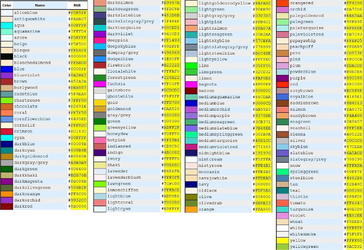
This is a BIG chart... it takes a few seconds to load, and then to magnify.
I would post the chart but as .jpg it's 16MB... too big.
This chart has HEX, RGB, CMYK codes...


Just HEX codes...
0000 COLORS.png


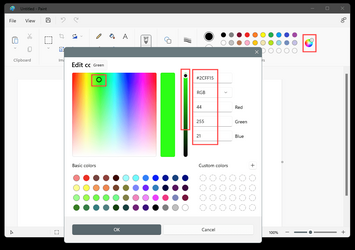
You can also just open PAINT, choose: Edit colors... move the slider to the top, then click anywhere on the color chart, to get the HEX or RGB color codes...


Image1.png
 
Last edited:

My Computers

System One System Two

  • OS
    Win 11 Home ♦♦♦26200.8457 ♦♦♦♦♦♦♦25H2
    Computer type
    PC/Desktop
    Manufacturer/Model
    Built by Ghot® [May 2020]
    CPU
    AMD Ryzen 7 3700X
    Motherboard
    Asus Pro WS X570-ACE (BIOS 5302)
    Memory
    G.Skill (F4-3200C14D-16GTZKW)
    Graphics Card(s)
    EVGA RTX 2070 (08G-P4-2171-KR)
    Sound Card
    Realtek ALC1220P / ALC S1220A
    Monitor(s) Displays
    Dell U3011 30"
    Screen Resolution
    2560 x 1600
    Hard Drives
    2x Samsung 860 EVO 500GB,
    WD 4TB Black FZBX - SATA III,
    WD 8TB Black FZBX - SATA III,
    DRW-24B1ST CD/DVD Burner
    PSU
    PC Power & Cooling 750W Quad EPS12V
    Case
    Cooler Master ATCS 840 Tower
    Cooling
    CM Hyper 212 EVO (push/pull)
    Keyboard
    Ducky DK9008 Shine II Blue LED
    Mouse
    Logitech Optical M-100
    Internet Speed
    300/300
    Browser
    Firefox (latest)
    Antivirus
    Bitdefender Total Security
    Other Info
    Speakers: Klipsch Pro Media 2.1
  • Operating System
    Windows XP Pro 32bit w/SP3
    Computer type
    PC/Desktop
    Manufacturer/Model
    Built by Ghot® (not in use)
    CPU
    AMD Athlon 64 X2 5000+ (OC'd @ 3.2Ghz)
    Motherboard
    ASUS M2N32-SLI Deluxe Wireless Edition
    Memory
    TWIN2X2048-6400C4DHX (2 x 1GB, DDR2 800)
    Graphics card(s)
    EVGA 256-P2-N758-TR GeForce 8600GT SSC
    Sound Card
    Onboard
    Monitor(s) Displays
    ViewSonic G90FB Black 19" Professional (CRT)
    Screen Resolution
    up to 2048 x 1536
    Hard Drives
    WD 36GB 10,000rpm Raptor SATA
    Seagate 80GB 7200rpm SATA
    Lite-On LTR-52246S CD/RW
    Lite-On LH-18A1P CD/DVD Burner
    PSU
    PC Power & Cooling Silencer 750 Quad EPS12V
    Case
    Generic Beige case, 80mm fans
    Cooling
    ZALMAN 9500A 92mm CPU Cooler
    Keyboard
    Logitech Classic Keybooard 200
    Mouse
    Logitech Optical M-BT96a
    Internet Speed
    300/300
    Browser
    Firefox 3.x ??
    Antivirus
    Symantec (Norton)
    Other Info
    Still assembled, still runs. Haven't turned it on for 15 years?
Another way to check RGB values: -


My Computers

System One System Two

  • OS
    Windows 11 Pro
    Computer type
    PC/Desktop
    Manufacturer/Model
    GMKtec K11
    CPU
    AMD Ryzen 9 8945HS
    Memory
    32GB DDR5 SO-DIMM
    Graphics Card(s)
    Integrated AMD Radeon 780M (4.00 GHz)
    Monitor(s) Displays
    Benq 2250HM
    Screen Resolution
    1920 x 1080
    Hard Drives
    1 TB PCIe 4.0 NVMe M.2 SSD
  • Operating System
    Windows 11 Home
    Computer type
    Laptop
    Manufacturer/Model
    ASUS Zenbook 14 OLED 14" Laptop - UX3405CA-QL192W
    CPU
    Intel® Core™ Ultra 7 - 255H processor
    Memory
    16 GB LPDDR5 SDRAM
    Graphics card(s)
    Intel Arc 140T onboard graphics
    Screen Resolution
    1920 x 1200 (16:10 WUXGA resolution) OLED Touchscreen
    Hard Drives
    1TB SSD
You can go to another virgin machine running 11 that has done no altering, export the registry [HKEY_CURRENT_USER\Control Panel\Colors] and [HKEY_CURRENT_USER\Control Panel\Desktop\Colors] and merge into your machine. Then restart.
Got it.

I guess that could be done via virtual machine? I don't have any other Windows machines besides my pc but that sounds good.

Another way to check RGB values: -


Thanks!

I kinda figured that would be a way to do it, if I was to manually select each color and value but I'm mostly just looking for the default values instead of "how can I change this color to another manually". But that probably will be helpful in some other case.
 

My Computer

System One

  • OS
    Windows 11
Hey to anyone who has messed with there regedit settings and didn't make a backup of the default regedit keys, if you want to restore all your regedit default values, use Microsoft Media Creation Tool and choose your windows edition, download it, and use the upgrade option, even if its the same windows version you are using, doing so you can keep all your files and installed programs while resetting regedit to its default values.
 

My Computer

System One

  • OS
    Windows 11 Pro
    Computer type
    Laptop
    Manufacturer/Model
    Acer AN51-5
    CPU
    Intel 12th Gen i5 12450H
    Memory
    20GB DDR4
    Graphics Card(s)
    RTX 3050 Ti
    Sound Card
    Realtek
    Monitor(s) Displays
    TCL 43in Android TV (Rooted)
    Screen Resolution
    4k
    Hard Drives
    1TB M.2 SSD + 500GB M.2 SSD
    Keyboard
    Logitech Wireless
    Mouse
    Razer Basilisk V3 X HyperSpeed
    Internet Speed
    120 MBPS
    Browser
    Chrome
    Antivirus
    Windows Defender
You don't need to find another PC, or run a repair install. The default colors are registered in the Default User's NTUSER.DAT, since all new users will inherit the same starting profile.

If you're technical, all you have to do is mount "C:\Users\Default\NTUSER.DAT" in regedit, and export the Control Panel keys you want. Then edit the exported reg file(s), so the key paths are corrected to HKCU.

Code:
Windows Registry Editor Version 5.00

[HKEY_CURRENT_USER\Control Panel\Colors]
"ActiveBorder"="180 180 180"
"ActiveTitle"="153 180 209"
"AppWorkspace"="171 171 171"
"Background"="0 0 0"
"ButtonAlternateFace"="0 0 0"
"ButtonDkShadow"="105 105 105"
"ButtonFace"="240 240 240"
"ButtonHilight"="255 255 255"
"ButtonLight"="227 227 227"
"ButtonShadow"="160 160 160"
"ButtonText"="0 0 0"
"GradientActiveTitle"="185 209 234"
"GradientInactiveTitle"="215 228 242"
"GrayText"="109 109 109"
"Hilight"="51 153 255"
"HilightText"="255 255 255"
"HotTrackingColor"="0 102 204"
"InactiveBorder"="244 247 252"
"InactiveTitle"="191 205 219"
"InactiveTitleText"="0 0 0"
"InfoText"="0 0 0"
"InfoWindow"="255 255 225"
"Menu"="240 240 240"
"MenuBar"="240 240 240"
"MenuHilight"="51 153 255"
"MenuText"="0 0 0"
"Scrollbar"="200 200 200"
"TitleText"="0 0 0"
"Window"="255 255 255"
"WindowFrame"="100 100 100"
"WindowText"="0 0 0"

[HKEY_CURRENT_USER\Control Panel\Desktop\Colors]
"ActiveBorder"="212 208 200"
"ActiveTitle"="10 36 106"
"AppWorkSpace"="128 128 128"
"ButtonAlternateFace"="181 181 181"
"ButtonDkShadow"="64 64 64"
"ButtonFace"="212 208 200"
"ButtonHiLight"="255 255 255"
"ButtonLight"="212 208 200"
"ButtonShadow"="128 128 128"
"ButtonText"="0 0 0"
"GradientActiveTitle"="166 202 240"
"GradientInactiveTitle"="192 192 192"
"GrayText"="128 128 128"
"Hilight"="10 36 106"
"HilightText"="255 255 255"
"HotTrackingColor"="0 0 128"
"InactiveBorder"="212 208 200"
"InactiveTitle"="128 128 128"
"InactiveTitleText"="212 208 200"
"InfoText"="0 0 0"
"InfoWindow"="255 255 255"
"Menu"="212 208 200"
"MenuText"="0 0 0"
"Scrollbar"="212 208 200"
"TitleText"="255 255 255"
"Window"="255 255 255"
"WindowFrame"="0 0 0"
"WindowText"="0 0 0"
 

Attachments

Last edited:

My Computer

System One

  • OS
    Windows 7
  • Like
Reactions: OAT
Here's an easier way to restore the colors. This works for any Windows release, so you don't need someone to provide you with a specific reg file.

Run these commands as Admin:
Code:
reg load HKU\DefaultUser C:\Users\Default\NTUSER.DAT
reg copy "HKU\DefaultUser\Control Panel\Colors" "HKCU\Control Panel\Colors" /s /f
reg copy "HKU\DefaultUser\Control Panel\Desktop\Colors" "HKCU\Control Panel\Desktop\Colors" /s /f
reg unload HKU\DefaultUser
 

My Computer

System One

  • OS
    Windows 7
Back
Top Bottom