Dell laptop, Windows 11 Home 24H2 Build 26100.4349
I don’t use my laptop a lot but today (a week after the June Patch Tuesday update) I saw that the desktop had changed from blue colour with slideshow pictures to solid black so I went to ‘Personalise’ and changed it to a blue colour which was okay.
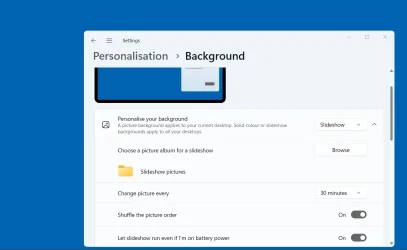
I then tried to reset it from ‘Solid colour’ to ‘Slideshow’ again but it will no longer change. It stays as ‘Solid colour’. See photo.
I ran the tuneup.bat file but it found no integrity violations and no component store corruption. The Chkdsk also found no disk problems.
I have the setting ‘Let slideshow run even when I’m on battery power’ set to ‘On’.
This only happens on my Administrator account.
My wife’s ‘Standard user’ account desktop background had also changed to solid black but I was able to change this to Blue and select ‘Slideshow’ and it changed as selected.
Is anyone else seeing this behaviour?
Is there a fix?
I don’t use my laptop a lot but today (a week after the June Patch Tuesday update) I saw that the desktop had changed from blue colour with slideshow pictures to solid black so I went to ‘Personalise’ and changed it to a blue colour which was okay.
I then tried to reset it from ‘Solid colour’ to ‘Slideshow’ again but it will no longer change. It stays as ‘Solid colour’. See photo.
I ran the tuneup.bat file but it found no integrity violations and no component store corruption. The Chkdsk also found no disk problems.
I have the setting ‘Let slideshow run even when I’m on battery power’ set to ‘On’.
This only happens on my Administrator account.
My wife’s ‘Standard user’ account desktop background had also changed to solid black but I was able to change this to Blue and select ‘Slideshow’ and it changed as selected.
Is anyone else seeing this behaviour?
Is there a fix?
My Computers
-
At a glance
Windows 11 ProAMD Ryzen 9 8945HS32GB DDR5 SO-DIMMIntegrated AMD Radeon 780M (4.00 GHz)- OS
- Windows 11 Pro
- Computer type
- PC/Desktop
- Manufacturer/Model
- GMKtec K11
- CPU
- AMD Ryzen 9 8945HS
- Memory
- 32GB DDR5 SO-DIMM
- Graphics Card(s)
- Integrated AMD Radeon 780M (4.00 GHz)
- Monitor(s) Displays
- Benq 2250HM
- Screen Resolution
- 1920 x 1080
- Hard Drives
- 1 TB PCIe 4.0 NVMe M.2 SSD
- Antivirus
- Bit Defender Total Security
-
At a glance
Windows 11 HomeIntel® Core™ Ultra 7 - 255H processor16 GB LPDDR5 SDRAMIntel Arc 140T onboard graphics- Operating System
- Windows 11 Home
- Computer type
- Laptop
- Manufacturer/Model
- ASUS Zenbook 14 OLED 14" Laptop - UX3405CA-QL192W
- CPU
- Intel® Core™ Ultra 7 - 255H processor
- Memory
- 16 GB LPDDR5 SDRAM
- Graphics card(s)
- Intel Arc 140T onboard graphics
- Screen Resolution
- 1920 x 1200 (16:10 WUXGA resolution) OLED Touchscreen
- Hard Drives
- 1TB SSD
- Antivirus
- Bit Defender Total Security