
Solved Desktop graffiti


lbeck

Well-known member
Member
Local time
3:43 AM
Posts
77
OS
Windows 11
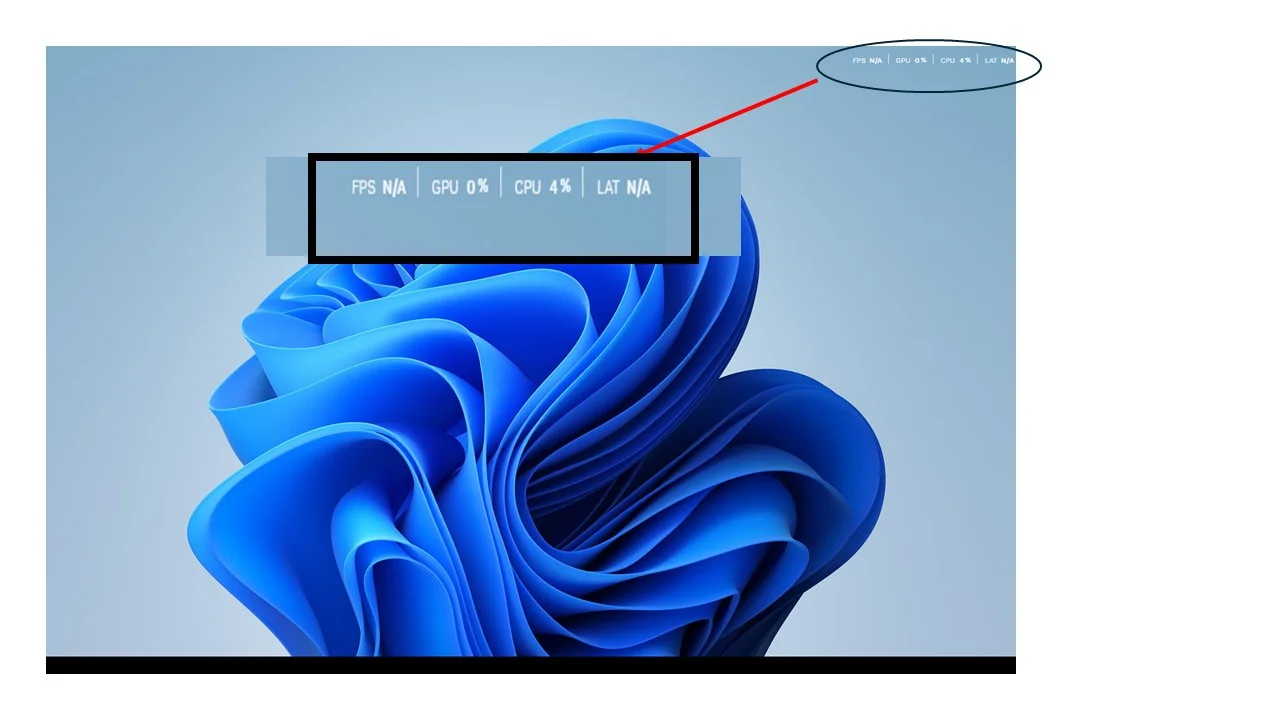
I recently had some monitor issues that this forum helped me to resolve. Now during cleanup I've found some information that I neither requested nor want that appears in the upper right of my main monitor. See the attached image.

Where did it come from (I don't care) and more importantly how do I get rid of it? It's distracting and annoying.

Thanks
Desktop graffiti.webp
 

My Computers My Computers

  • At a glance

    Windows 1113th Gen Intel(R) Core(TM) i5-13400F 2.50 GHz32.0 GBNVIDIA Gforce RTX 4060
    OS
    Windows 11
    Computer type
    PC/Desktop
    Manufacturer/Model
    Device name CyberPowerPC
    CPU
    13th Gen Intel(R) Core(TM) i5-13400F 2.50 GHz
    Memory
    32.0 GB
    Graphics Card(s)
    NVIDIA Gforce RTX 4060
    Hard Drives
    2 TB ADATA Legend 800 Gold SSD and several HDDs
    PSU
    650W
    Browser
    Chrome
    Other Info
    Windows 11 23H2 10.0.26100 Build 26100
  • At a glance

    Windows 10 Home 22H2 19045.4123Intel(R) Core(TM) i7-4790 CPU @ 3.60GHz 3.60 GHz32.0 GBGforce GTX 745
    Operating System
    Windows 10 Home 22H2 19045.4123
    Computer type
    PC/Desktop
    Manufacturer/Model
    Acer_Desktop
    CPU
    Intel(R) Core(TM) i7-4790 CPU @ 3.60GHz 3.60 GHz
    Memory
    32.0 GB
    Graphics card(s)
    Gforce GTX 745
    Sound Card
    ONN24
    Hard Drives
    Many
    Keyboard
    JLAB supports 2 computers/monitors
    Mouse
    Acer wired USB
    Browser
    Chrome
    Antivirus
    Only what W10 installed
    Other Info
    64-bit operating system, x64-based processor
  • OS Windows 11 Home 25H2, 26200.8894, 5/‎20/‎2025

    Computer type = PC/Laptop

    Manufacturer/Model = HP

    Device name = Victus

    CPU = 12th Gen Intel(R) Core(TM) i7-12700H (2.30 GHz)

    Motherboard

    Memory = 16.0 GB (15.7 GB usable)

    Graphics Card = NVIDIA GeForce RTX 3050 Laptop GPU (4 GB)

    Sound Card = Internal

    Monitor(s) Displays = Attached

    Screen Resolution = UNK

    Hard Drives = 954 GB and several external HDDs

    PSU = UNK

    Case = NA

    Cooling = UNK

    Keyboard = NA

    Mouse = Wireless Logitech (Touchpad also)

    Internet Speed = 31Mbps download; 8.24 Mbps upload

    Browser = Chrome

    Antivirus=Windows Defender only

    Other Info
I recently had some monitor issues that this forum helped me to resolve. Now during cleanup I've found some information that I neither requested nor want that appears in the upper right of my main monitor. See the attached image.

Where did it come from (I don't care) and more importantly how do I get rid of it? It's distracting and annoying.

ThanksView attachment 179894
Does your monitor have an included software package? Looks like an app for that or GPU driver software.
 

My Computers My Computers

  • At a glance

    Windows 11 26H2Intel Core Ultra 9 275HX (24-Core)64GB DDR5 6400MT/sNVIDIA GeForce RTX 5080 and Intel UHD Graphics
    OS
    Windows 11 26H2
    Computer type
    Laptop
    Manufacturer/Model
    Alienware 18 Area-51
    CPU
    Intel Core Ultra 9 275HX (24-Core)
    Motherboard
    Alienware
    Memory
    64GB DDR5 6400MT/s
    Graphics Card(s)
    NVIDIA GeForce RTX 5080 and Intel UHD Graphics
    Sound Card
    Onboard, Realtek high-performance Audio chips (ALC3329 & ALC1708))
    Monitor(s) Displays
    300HZ 18-inch QHD 500 nit Comfort View+
    Screen Resolution
    2560 x 1600
    Hard Drives
    2TB NVMe M.2 PCIe Gen 5 SSD
    Case
    Magnesium Alloy
    Cooling
    Advanced Cryo-Tech Quad-Fan Cooling system & large vapor chamber
    Keyboard
    Cherry MX ultra low profile mechanical keyboard with per key AlienFX RGB lighting
    Mouse
    Logitech MX Master 4
    Browser
    Vivaldi (main), Firefox, Chrome, Edge
    Antivirus
    MS Defender and Malwarebytes Free
  • At a glance

    Windows 11 26H2Qualcomm Snapdragon X Elite (12 Core) ARM bas...16GB LPDDR5Qualcomm Adreno X1-85
    Operating System
    Windows 11 26H2
    Computer type
    Laptop
    Manufacturer/Model
    Microsoft Surface Laptop 7
    CPU
    Qualcomm Snapdragon X Elite (12 Core) ARM based CPU
    Motherboard
    Microsoft Corp.
    Memory
    16GB LPDDR5
    Graphics card(s)
    Qualcomm Adreno X1-85
    Sound Card
    Omnisonic speakers with Dolby Atmos spatial sound
    Monitor(s) Displays
    120 Hz 13.8-inch 600 nit PixelSense Flow touchscreen
    Screen Resolution
    2304x1536
    Hard Drives
    1TB NVMe Gen 4 SSD
    Case
    Anodized Aluminum
    Cooling
    Traditional active cooling fan system
    Keyboard
    Mechanical QWERTY, backlit when in use
    Mouse
    Logitech MX Master 4 and Surface Arc Mouse
    Browser
    Vivaldi (main), Firefox, Chrome, Edge
    Antivirus
    MS Defender and Malwarebytes Free
It's the NVIDIA Overlay, probably. Alt-R toggles it, or you can go into settings in the NVIDIA app and disable it.
 

My Computer My Computer

At a glance

Win11 Ent. 25H2
OS
Win11 Ent. 25H2
Yep Alt+R got rid of it.

Thanks to you both.
 

My Computers My Computers

  • At a glance

    Windows 1113th Gen Intel(R) Core(TM) i5-13400F 2.50 GHz32.0 GBNVIDIA Gforce RTX 4060
    OS
    Windows 11
    Computer type
    PC/Desktop
    Manufacturer/Model
    Device name CyberPowerPC
    CPU
    13th Gen Intel(R) Core(TM) i5-13400F 2.50 GHz
    Memory
    32.0 GB
    Graphics Card(s)
    NVIDIA Gforce RTX 4060
    Hard Drives
    2 TB ADATA Legend 800 Gold SSD and several HDDs
    PSU
    650W
    Browser
    Chrome
    Other Info
    Windows 11 23H2 10.0.26100 Build 26100
  • At a glance

    Windows 10 Home 22H2 19045.4123Intel(R) Core(TM) i7-4790 CPU @ 3.60GHz 3.60 GHz32.0 GBGforce GTX 745
    Operating System
    Windows 10 Home 22H2 19045.4123
    Computer type
    PC/Desktop
    Manufacturer/Model
    Acer_Desktop
    CPU
    Intel(R) Core(TM) i7-4790 CPU @ 3.60GHz 3.60 GHz
    Memory
    32.0 GB
    Graphics card(s)
    Gforce GTX 745
    Sound Card
    ONN24
    Hard Drives
    Many
    Keyboard
    JLAB supports 2 computers/monitors
    Mouse
    Acer wired USB
    Browser
    Chrome
    Antivirus
    Only what W10 installed
    Other Info
    64-bit operating system, x64-based processor
  • OS Windows 11 Home 25H2, 26200.8894, 5/‎20/‎2025

    Computer type = PC/Laptop

    Manufacturer/Model = HP

    Device name = Victus

    CPU = 12th Gen Intel(R) Core(TM) i7-12700H (2.30 GHz)

    Motherboard

    Memory = 16.0 GB (15.7 GB usable)

    Graphics Card = NVIDIA GeForce RTX 3050 Laptop GPU (4 GB)

    Sound Card = Internal

    Monitor(s) Displays = Attached

    Screen Resolution = UNK

    Hard Drives = 954 GB and several external HDDs

    PSU = UNK

    Case = NA

    Cooling = UNK

    Keyboard = NA

    Mouse = Wireless Logitech (Touchpad also)

    Internet Speed = 31Mbps download; 8.24 Mbps upload

    Browser = Chrome

    Antivirus=Windows Defender only

    Other Info

Latest Support Threads

Latest Tutorials

Back
Top Bottom




