Did you manually update your Secure Boot Keys ?


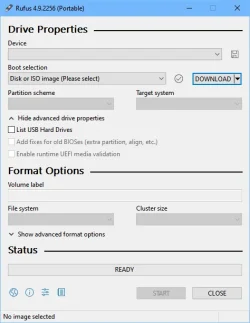
"All you do is . . . . " Well, yeah. Mosby's instruction for Rufus is to click the arrow that's to the right of "Select" - but there is no down arrow. Copilot agreed with me that it wasn't there and made a suggestion that seemed incorrect for the most recent Rufus I was using. So, sorry to prolong the agony but I'll politely pass on all that work. :boom:

Is this your laptop?

Did you update the BIOS in August? There is a BIOS on the support page for August 25th (F.30 Rev.A) but it doesn’t say what’s in it. At a guess, you need it.
Make sure this IS your laptop (Should be exact model underneath)

HP Spectre x360 13.5 inch 2-in-1 Laptop PC 14-ef0000

^ IS where HP keeps diverting me?
 
Last edited:

My Computers

System One System Two

  • OS
    Windows 11 Pro 25H2 Build 26200.8524
    Computer type
    PC/Desktop
    Manufacturer/Model
    Sin-built 2013
    CPU
    Intel(R) Core(TM) i7-4770K CPU @ 3.50GHz
    Motherboard
    ASUS ROG Maximus VI Formula
    Memory
    32.0 GB of I forget and the box is in storage.
    Graphics Card(s)
    Gigabyte nVidia GeForce GTX 1660 Super OC 6GB
    Sound Card
    Onboard thingy
    Monitor(s) Displays
    5 x LG 25MS500-B - 1 x 24MK430H-B - 1 x Wacom Pro 22" Touch Screen Tablet
    Screen Resolution
    All over the place
    Hard Drives
    Too many to list.
    OS on Samsung 1TB 870 QVO SATA
    PSU
    Silverstone 1500
    Case
    NZXT Phantom 820 Full-Tower Case
    Cooling
    Noctua NH-D15 Elite Class Dual Tower CPU Cooler / 6 x EziDIY 120mm / 2 x Corsair 140mm somethings / 1 x 140mm Thermaltake something / 2 x 200mm Corsair.
    Keyboard
    Corsair K95 / Logitech diNovo Edge Wireless
    Mouse
    Logitech: G402 / G502 / Mx Masters / Mx Air Cordless
    Internet Speed
    2000/500Mbps
    Browser
    All sorts
    Antivirus
    Kaspersky Premium
    Other Info
    ㅤㅤㅤㅤㅤㅤㅤㅤㅤㅤㅤㅤㅤㅤㅤㅤㅤㅤㅤㅤㅤㅤㅤㅤㅤㅤㅤㅤㅤㅤㅤㅤㅤㅤㅤㅤㅤㅤㅤㅤ⠀⠀⠀⠀⠀⠀⠀⠀⠀⠀
    TP-Link BE9300 WiFi 7 Bluetooth 5.4 (Archer TBE550E)
    TP-Link TX201 V1 2.5GB Lan

    Grandstream HT812 - VoIP
    ASUS DSL-AX82U - Mesh
    ASUS RT-AC68U - Mesh
    ASUS RT-BE88U Router

    Brother MFC-L2880DW Printer

    I’m on a horse.
  • Operating System
    Windows 11 Pro 25H2 Build 26200.8524
    Computer type
    Laptop
    Manufacturer/Model
    LENOVO Yoga 7 14IRL8 - 7i EVO OLED 14" Touchscreen i5 12 Core 16GB/512GB
    CPU
    Intel Core 12th Gen i5-1240P Processor (1.7 - 4.4GHz)
    Memory
    16GB LPDDR5 RAM
    Graphics card(s)
    Intel Iris Xe Graphics Processor
    Sound Card
    Optimized with Dolby Atmos®
    Screen Resolution
    QHD 2880 x 1800 OLED
    Hard Drives
    M.2 512GB
    Antivirus
    Defender / Malwarebytes
    Other Info
    …still on a horse.
Last edited:

My Computers

System One System Two

  • OS
    Windows 11 Pro 25H2 Build 26200.8524
    Computer type
    PC/Desktop
    Manufacturer/Model
    Sin-built 2013
    CPU
    Intel(R) Core(TM) i7-4770K CPU @ 3.50GHz
    Motherboard
    ASUS ROG Maximus VI Formula
    Memory
    32.0 GB of I forget and the box is in storage.
    Graphics Card(s)
    Gigabyte nVidia GeForce GTX 1660 Super OC 6GB
    Sound Card
    Onboard thingy
    Monitor(s) Displays
    5 x LG 25MS500-B - 1 x 24MK430H-B - 1 x Wacom Pro 22" Touch Screen Tablet
    Screen Resolution
    All over the place
    Hard Drives
    Too many to list.
    OS on Samsung 1TB 870 QVO SATA
    PSU
    Silverstone 1500
    Case
    NZXT Phantom 820 Full-Tower Case
    Cooling
    Noctua NH-D15 Elite Class Dual Tower CPU Cooler / 6 x EziDIY 120mm / 2 x Corsair 140mm somethings / 1 x 140mm Thermaltake something / 2 x 200mm Corsair.
    Keyboard
    Corsair K95 / Logitech diNovo Edge Wireless
    Mouse
    Logitech: G402 / G502 / Mx Masters / Mx Air Cordless
    Internet Speed
    2000/500Mbps
    Browser
    All sorts
    Antivirus
    Kaspersky Premium
    Other Info
    ㅤㅤㅤㅤㅤㅤㅤㅤㅤㅤㅤㅤㅤㅤㅤㅤㅤㅤㅤㅤㅤㅤㅤㅤㅤㅤㅤㅤㅤㅤㅤㅤㅤㅤㅤㅤㅤㅤㅤㅤ⠀⠀⠀⠀⠀⠀⠀⠀⠀⠀
    TP-Link BE9300 WiFi 7 Bluetooth 5.4 (Archer TBE550E)
    TP-Link TX201 V1 2.5GB Lan

    Grandstream HT812 - VoIP
    ASUS DSL-AX82U - Mesh
    ASUS RT-AC68U - Mesh
    ASUS RT-BE88U Router

    Brother MFC-L2880DW Printer

    I’m on a horse.
  • Operating System
    Windows 11 Pro 25H2 Build 26200.8524
    Computer type
    Laptop
    Manufacturer/Model
    LENOVO Yoga 7 14IRL8 - 7i EVO OLED 14" Touchscreen i5 12 Core 16GB/512GB
    CPU
    Intel Core 12th Gen i5-1240P Processor (1.7 - 4.4GHz)
    Memory
    16GB LPDDR5 RAM
    Graphics card(s)
    Intel Iris Xe Graphics Processor
    Sound Card
    Optimized with Dolby Atmos®
    Screen Resolution
    QHD 2880 x 1800 OLED
    Hard Drives
    M.2 512GB
    Antivirus
    Defender / Malwarebytes
    Other Info
    …still on a horse.
"All you do is . . . . " Well, yeah. Mosby's instruction for Rufus is to click the arrow that's to the right of "Select" - but there is no down arrow. Copilot agreed with me that it wasn't there and made a suggestion that seemed incorrect for the most recent Rufus I was using. So, sorry to prolong the agony but I'll politely pass on all that work. :boom:
The problem is bad instructions for Rufus itself as getting that menu is where the problem lies.... I will do it manually now as this is the 2nd time I have used Rufus even though I have downloaded it for the last 10+ years:
1) Open Rufus
2) on the top right, click on the arrow next to the word "SELECT" which is what you are referring to and the arrow is there (If you are not seeing the arrow - please see Did you manually update your Secure Boot Keys ? on why it is not showing and how to fix it so it shows):
1758487219129.webp

3) in that arrow dropdown, choose DOWNLOAD
1758487292919.webp

4) the word in the box will now change to DOWNLOAD
1758487415770.webp

5) Click on the word DOWNLOAD
1758487359860.webp

6) A Download ISO Image box will come up
1758487478856.webp

7) Choose the latest UEFI Shell which is v2.2 at this time
1758487563794.webp

8) Click Continue
1758487632266.webp

9) A Release box will come up:
1758487759259.webp

10) Choose the newest Release which is the 25H1 entry:
1758487865431.webp

11) Click on Continue
1758487921096.webp

12) An Edition option will come up, choose Release and then continue
13) An Language option will come up, where English (US) is the only choice, so Continue again
14) There will be a Architecture box that comes up which there is only one choice, so Continue again
1758488435127.webp
15) Click the Download button at the bottom and it will asked where to save file and download
16) once you get back to the main screen, click on the Start button on the bottom

I am on another machine but basically you need a USB Flash Drive already in the system before you do all this.

When I did this, I read the following post and the things after that:
 

Attachments

  • 1758487390458.webp
    1758487390458.webp
    22 KB · Views: 5
Last edited:

My Computer

System One

  • OS
    WindowsXP/7/8/8.1/10/11,Linux,Android,FreeBSD Unix
    Computer type
    Laptop
    Manufacturer/Model
    Dell XPS 15 9570
    CPU
    Intel® Core™ i7-8750H 8th Gen 2.2Ghz up to 4.1Ghz
    Motherboard
    Dell XPS 15 9570
    Memory
    64GB using 2x32GB CL16 Mushkin redLine modules
    Graphics Card(s)
    Intel UHD 630 & NVIDIA GeForce GTX 1050 Ti with 4GB DDR5
    Sound Card
    Realtek ALC3266-CG
    Monitor(s) Displays
    15.6" 4K Touch UltraHD 3840x2160 made by Sharp
    Screen Resolution
    3840x2160 4K UltraHD
    Hard Drives
    Samsung MZ-V9P4T0B/AM 990 PRO 4TB PCIe®4.0 NVMe™ M.2 SSD was Toshiba KXG60ZNV1T02 NVMe 1TB SSD
    PSU
    Dell XPS 15 9570
    Case
    Dell XPS 15 9570
    Cooling
    Stock
    Keyboard
    Stock
    Mouse
    SwitftPoint ProPoint
    Internet Speed
    Comcast/XFinity 1.44Gbps/42.5Mbps
    Browser
    Microsoft EDGE (Chromium based) & Google Chrome
    Antivirus
    Windows Defender that came with Windows
I've already invalidated the Windows 2011 certificate, but I haven't invalidated the Microsoft one.
 

My Computers

System One System Two

  • OS
    Win 11 Pro 25H2, Build 26200.8524
    Computer type
    PC/Desktop
    Manufacturer/Model
    Home Brew
    CPU
    Intel Core i5 14500
    Motherboard
    Gigabyte B760M G P WIFI
    Memory
    64GB DDR4
    Graphics Card(s)
    GeForce RTX 4060
    Sound Card
    Chipset Realtek
    Monitor(s) Displays
    LG 45" Ultragear, Acer 24" 1080p
    Screen Resolution
    5120x1440, 1920x1080
    Hard Drives
    Crucial P310 2TB 2280 PCIe Gen4 3D NAND NVMe M.2 SSD (O/S)
    Silicon Power 2TB US75 NVMe PCIe Gen4 M.2 2280 SSD (backup)
    Crucial BX500 2TB 3D NAND (2nd backup)
    Seagate 4TB Ironwolf, rotating HDD archive files
    External off-line backup Drives: 2 NVMe 4TB drives in external enclosures
    PSU
    Thermaltake Toughpower GF3 750W
    Case
    LIAN LI LANCOOL 216 E-ATX PC Case
    Cooling
    Lots of fans!
    Keyboard
    Microsoft Comfort Curve 2000
    Mouse
    Logitech G305
    Internet Speed
    Verizon FiOS 1GB
    Browser
    Firefox
    Antivirus
    Malware Bytes & Windows Defender Security
  • Operating System
    Win 11 Pro 25H2, Build 26200.8524
    Computer type
    PC/Desktop
    Manufacturer/Model
    Home Brew
    CPU
    Intel Core i5 14400
    Motherboard
    Gigabyte B760M DS3H AX
    Memory
    32GB DDR5
    Graphics card(s)
    Intel 700 Embedded GPU
    Sound Card
    Realtek Embedded
    Monitor(s) Displays
    27" HP 1080p
    Screen Resolution
    1920x1080
    Hard Drives
    Crucial P310 2TB 2280 PCIe Gen4 eD NAND PCIe SSD
    Samsung EVO 990 2TB NVMe Gen4 SSD
    Samsung 2TB SATA SSD
    PSU
    Thermaltake Smart BM3 650W
    Case
    Okinos Micro ATX Case
    Cooling
    Fans
    Keyboard
    Microsoft Comfort Curve 2000
    Mouse
    Logitech G305
    Internet Speed
    Verizon FiOS 1GB
    Browser
    Firefox
    Antivirus
    Malware Bytes & Windows Defender Security
I've already invalidated the Windows 2011 certificate, but I haven't invalidated the Microsoft one.
I thought they were one and the same as I think these are the only ones:
1758489750527.webp
 

My Computer

System One

  • OS
    WindowsXP/7/8/8.1/10/11,Linux,Android,FreeBSD Unix
    Computer type
    Laptop
    Manufacturer/Model
    Dell XPS 15 9570
    CPU
    Intel® Core™ i7-8750H 8th Gen 2.2Ghz up to 4.1Ghz
    Motherboard
    Dell XPS 15 9570
    Memory
    64GB using 2x32GB CL16 Mushkin redLine modules
    Graphics Card(s)
    Intel UHD 630 & NVIDIA GeForce GTX 1050 Ti with 4GB DDR5
    Sound Card
    Realtek ALC3266-CG
    Monitor(s) Displays
    15.6" 4K Touch UltraHD 3840x2160 made by Sharp
    Screen Resolution
    3840x2160 4K UltraHD
    Hard Drives
    Samsung MZ-V9P4T0B/AM 990 PRO 4TB PCIe®4.0 NVMe™ M.2 SSD was Toshiba KXG60ZNV1T02 NVMe 1TB SSD
    PSU
    Dell XPS 15 9570
    Case
    Dell XPS 15 9570
    Cooling
    Stock
    Keyboard
    Stock
    Mouse
    SwitftPoint ProPoint
    Internet Speed
    Comcast/XFinity 1.44Gbps/42.5Mbps
    Browser
    Microsoft EDGE (Chromium based) & Google Chrome
    Antivirus
    Windows Defender that came with Windows
No, but thanks for searching. My laptop is 13-4001dx. Product # L0Q55UA#ABA. My HP Support Assistant doesn't show any updates available for this machine at all. I even went on the HP support page for my machine (the link in this post) and it either doesn't show anything or fails to send me to the page to tell me these is anything! Right now the most recent BIOS this machine received is F.54 dated 12/27/2019. The machine does have a TPM made by IFX but it's 1.2.

Thanks for checking
 

My Computers

System One System Two

  • OS
    Windows 11 Home, ver 25H2 build 26200.8246
    Computer type
    Laptop
    Manufacturer/Model
    Hewlett-Packard Spectre 13-4001 x360 convertable
    CPU
    Intel Core i5 5200U @ 2.20GH
    Motherboard
    Hewlett-Packard 802D
    Memory
    4 GB
    Graphics Card(s)
    Intel HD Graphics 5500 on board
    Sound Card
    Intel Smart Sound Technology (Intel SST)
    Hard Drives
    Micron 256GB M.2 2280 NGFF SSD MTFDDAV256TBN, (SATA 6.0 Gb/s)
    Keyboard
    Model # G01KB
    Antivirus
    Microsoft Defender
    Other Info
    born on date: 25 Feb 2016
  • Operating System
    Win 11 Home 25H2 build 26200.7922
    Computer type
    PC/Desktop
    Manufacturer/Model
    Asus Desktop model M32AD-US019S (DOM: 6/9/2014 )
    CPU
    Intel Core i7 4th Gen 4790 (3.60GHz), Haswell 22nm Technology, SOCKET 1150
    Motherboard
    H81M-E/M51AD/DP_MB
    Memory
    Samsung 16 GB DDR3 (8GB in 2 modules)
    Graphics card(s)
    NVIDIA GeForce GTX 760, 3GB, and on-board Intel HD Graphics 4600 Rev 6
    Monitor(s) Displays
    HP EliteDisplay E241i LED; HP EliteDisplay E243
    Hard Drives
    Samsung 500GB SSD, 870 EVO (SATA 6.0 )
    Micron 250GB SSD, CT250MX500
    Toshiba HDD, 3GB (original drive w/PC)
    Case
    ASUS
    Keyboard
    ASUS-------------------------
    Antivirus
    MS Defender
    Other Info
    Additional Laptops:

    HEWLETT PACKARD
    HP OmniBook X Flip NGAI (Next Gen AI),
    Model: 16-as0023dx
    PT# B5UH1UA#ABA Product #: B5UH1UA
    delivered and setup 7/25/25
    16" 2K Touch-Screen Laptop
    Intel Core Ultra 7 256V '24 Series 2 - CPU
    Boost Clock Frequency 4.8 gigahertz; Neural Processing Unit (NPU) Yes;
    16GB Memory, LPDDR5X
    1TB SSD PCIe 4.0
    Graphics: Intel Arc 140V
    1 x HDMI 2.1
    1 x Thunderbolt 4
    2K Touch-Screen display, LED, IPS; 1920 x 1200 (Full HD+)
    USB Ports: 1 x USB-C 3.1, 2 x USB-A 3.1
    Wi-Fi 6E
    weight 4.15 pounds

    DELL
    Model:I7591-7483BLK-PUS 2-in-1 (7000 Series)
    purchased 12/3/2019,
    15.6 inch 2-IN-1;
    4K Ultra HD Touch-Screen, 3840 x 2160,
    Intel Core i7 10510U CPU 1.80GHz,
    16GB RAM DDR4 SDRAM 2400 megahert (2 slots),
    dedicated graphics Nvidia GeForce MX250 2 GB Graphics,
    PCIe 512GB Intel SSD + 32GB Optane Memory (Intel Optane Memory H10 with solid-state storage),
    wireless-AX & Bluetooth
    Battery: 68wh, Type 4VGMP 4 cell
I thought they were one and the same as I think these are the only ones:
View attachment 146152
There are two certificates, I've never seen the Windows 2010 one.

I want to revoke the one with the yellow arrow, as you can see, the Windows one is already been revoked and entered into the DBX database.

1758490102410.webp
 

My Computers

System One System Two

  • OS
    Win 11 Pro 25H2, Build 26200.8524
    Computer type
    PC/Desktop
    Manufacturer/Model
    Home Brew
    CPU
    Intel Core i5 14500
    Motherboard
    Gigabyte B760M G P WIFI
    Memory
    64GB DDR4
    Graphics Card(s)
    GeForce RTX 4060
    Sound Card
    Chipset Realtek
    Monitor(s) Displays
    LG 45" Ultragear, Acer 24" 1080p
    Screen Resolution
    5120x1440, 1920x1080
    Hard Drives
    Crucial P310 2TB 2280 PCIe Gen4 3D NAND NVMe M.2 SSD (O/S)
    Silicon Power 2TB US75 NVMe PCIe Gen4 M.2 2280 SSD (backup)
    Crucial BX500 2TB 3D NAND (2nd backup)
    Seagate 4TB Ironwolf, rotating HDD archive files
    External off-line backup Drives: 2 NVMe 4TB drives in external enclosures
    PSU
    Thermaltake Toughpower GF3 750W
    Case
    LIAN LI LANCOOL 216 E-ATX PC Case
    Cooling
    Lots of fans!
    Keyboard
    Microsoft Comfort Curve 2000
    Mouse
    Logitech G305
    Internet Speed
    Verizon FiOS 1GB
    Browser
    Firefox
    Antivirus
    Malware Bytes & Windows Defender Security
  • Operating System
    Win 11 Pro 25H2, Build 26200.8524
    Computer type
    PC/Desktop
    Manufacturer/Model
    Home Brew
    CPU
    Intel Core i5 14400
    Motherboard
    Gigabyte B760M DS3H AX
    Memory
    32GB DDR5
    Graphics card(s)
    Intel 700 Embedded GPU
    Sound Card
    Realtek Embedded
    Monitor(s) Displays
    27" HP 1080p
    Screen Resolution
    1920x1080
    Hard Drives
    Crucial P310 2TB 2280 PCIe Gen4 eD NAND PCIe SSD
    Samsung EVO 990 2TB NVMe Gen4 SSD
    Samsung 2TB SATA SSD
    PSU
    Thermaltake Smart BM3 650W
    Case
    Okinos Micro ATX Case
    Cooling
    Fans
    Keyboard
    Microsoft Comfort Curve 2000
    Mouse
    Logitech G305
    Internet Speed
    Verizon FiOS 1GB
    Browser
    Firefox
    Antivirus
    Malware Bytes & Windows Defender Security
The problem is bad instructions for Rufus itself as getting that menu is where the problem lies.... I will do it manually now as this is the 2nd time I have used Rufus even though I have downloaded it for the last 10+ years:
1) Open Rufus
2) on the top right, click on the arrow next to the word "SELECT" which is what you are referring to and the arrow is there:
View attachment 146140

3) in that arrow dropdown, choose DOWNLOAD
Here is what the Rufus shows - I just downloaded it.
1758490339116.webp
 

My Computers

System One System Two

  • OS
    Windows 11 Home, ver 25H2 build 26200.8246
    Computer type
    Laptop
    Manufacturer/Model
    Hewlett-Packard Spectre 13-4001 x360 convertable
    CPU
    Intel Core i5 5200U @ 2.20GH
    Motherboard
    Hewlett-Packard 802D
    Memory
    4 GB
    Graphics Card(s)
    Intel HD Graphics 5500 on board
    Sound Card
    Intel Smart Sound Technology (Intel SST)
    Hard Drives
    Micron 256GB M.2 2280 NGFF SSD MTFDDAV256TBN, (SATA 6.0 Gb/s)
    Keyboard
    Model # G01KB
    Antivirus
    Microsoft Defender
    Other Info
    born on date: 25 Feb 2016
  • Operating System
    Win 11 Home 25H2 build 26200.7922
    Computer type
    PC/Desktop
    Manufacturer/Model
    Asus Desktop model M32AD-US019S (DOM: 6/9/2014 )
    CPU
    Intel Core i7 4th Gen 4790 (3.60GHz), Haswell 22nm Technology, SOCKET 1150
    Motherboard
    H81M-E/M51AD/DP_MB
    Memory
    Samsung 16 GB DDR3 (8GB in 2 modules)
    Graphics card(s)
    NVIDIA GeForce GTX 760, 3GB, and on-board Intel HD Graphics 4600 Rev 6
    Monitor(s) Displays
    HP EliteDisplay E241i LED; HP EliteDisplay E243
    Hard Drives
    Samsung 500GB SSD, 870 EVO (SATA 6.0 )
    Micron 250GB SSD, CT250MX500
    Toshiba HDD, 3GB (original drive w/PC)
    Case
    ASUS
    Keyboard
    ASUS-------------------------
    Antivirus
    MS Defender
    Other Info
    Additional Laptops:

    HEWLETT PACKARD
    HP OmniBook X Flip NGAI (Next Gen AI),
    Model: 16-as0023dx
    PT# B5UH1UA#ABA Product #: B5UH1UA
    delivered and setup 7/25/25
    16" 2K Touch-Screen Laptop
    Intel Core Ultra 7 256V '24 Series 2 - CPU
    Boost Clock Frequency 4.8 gigahertz; Neural Processing Unit (NPU) Yes;
    16GB Memory, LPDDR5X
    1TB SSD PCIe 4.0
    Graphics: Intel Arc 140V
    1 x HDMI 2.1
    1 x Thunderbolt 4
    2K Touch-Screen display, LED, IPS; 1920 x 1200 (Full HD+)
    USB Ports: 1 x USB-C 3.1, 2 x USB-A 3.1
    Wi-Fi 6E
    weight 4.15 pounds

    DELL
    Model:I7591-7483BLK-PUS 2-in-1 (7000 Series)
    purchased 12/3/2019,
    15.6 inch 2-IN-1;
    4K Ultra HD Touch-Screen, 3840 x 2160,
    Intel Core i7 10510U CPU 1.80GHz,
    16GB RAM DDR4 SDRAM 2400 megahert (2 slots),
    dedicated graphics Nvidia GeForce MX250 2 GB Graphics,
    PCIe 512GB Intel SSD + 32GB Optane Memory (Intel Optane Memory H10 with solid-state storage),
    wireless-AX & Bluetooth
    Battery: 68wh, Type 4VGMP 4 cell
should i do the instructions on my rarely logged into "Adminstrator user login" or can i do them on my Microsoft Account linked Standard account.
As long as you run PowerShell elevated ("Run as Administrator"), doesn't matter. If neither command returns access denied or something like that, it's alright. The system doesn't care who made the registry change and started the update task.

Having said that, stick to the best security practices:
  • Disable the Administrator account. If you want a backup account in case you're locked out, keep the Administrator enabled but rename it. Make sure remote logon is disabled for this account: most attacks are executed remotely.
  • Don't use passwords for logon. Windows Hello biometrics is available with Logitech BRIO USB camera for a desktop; most notebooks have an embedded Hello-compatible camera already. Maybe there are other cams supporting Hello, I found none, and BRIO is very good as a normal, optical camera — 4K, three different focal lengths (viewing angle), and a good mic. (Side column: when COVID started, I went shopping for a camera, to discover, to my utter surprise, that I'm not alone... These went $700 on average vs. MSRP $125 or so; now $170, of course — what goes up comes down, except prices. I found the last one from one Amazon seller for $420 and considered myself lucky. Oh, what a time that was!) Another option is a USB fingerprint scanner, cannot recommend any, never tested or used on desktop. Make sure it has liveness detection. A $10 reader from a far-away big friendly panda country certainly doesn't. If unable, set up a PIN, but leave password alone, for gossake! Passwords get stolen or forgotten, but you can't lose your face — in the literal sense only, of course.
  • Prefer browser-stored token login to password login to Microsoft Account on the Web (and any account, basically). You need Windows Hello set up for the browser to release your token, so only you can logon with that Web token
  • If not logging in with an MS account, you may still connect it in Connect Accounts and use for BitLocker unlock code backup.
  • Provided that you've protected it with 2FA and the Authenticator app on your phone. MS authenticator is integrated with MS logon to any of their sites, Google Authenticator may be integrated with your Google account (or many accounts, up to a reasonable number, like 5). Otherwise, both app provide TOTP tokens (the 6-digit codes changing every minute) for 2FA with 3rd party logins.
  • And always save emergency codes when enabling 2FA, or, if you lose your phone, or if it dies, you're locked out of all 2FA accounts.
  • All major password managers are safe, as long as you can log in on the web with a webtoken or unlock it locally with Hello. Another good place for saving arbitrary short secrets. Encode tiny binary secret files with base64 to store them as text (you'll find even an explorer context menu extension, this encoding is just everywhere).
  • If keeping the BitLocker unlock code outside the account, print and store in a safe place. Keeping it with a family member living separately who can recognise your voice and read it to you is the safest of free options. A much better one is a FIPS-140.2 certified USB stick with a keypad. I've been using Aegis 3NX/3NXC by Apricorn, Inc. Any will work, but verify the FIPS-140.2 level 3 certification in the public NIST database, don't trust the not by asking the seller. Some use fingerprint to unlock, that's fine, but register more than one finger; otherwise if you cut the finger, you'll be locked out for two weeks — in the best case, i.e. that which would leave no scar… And please, please read the manual before use. Then you can store text files with unlock code and .BEK keys (read the bde-manage command manual if you didn't create both while first enabling BitLocker, or need to rekey, etc) — if a .BEK file is found in the root of any removable drive, BitLocker looks for them and unlocks if it finds a match. 4GB is more than enough to keep a bootable environment to restore your backup (you do backup your system on schedule, right? RIGHT???) and all the secrets — they are small. Chose the drive that has an option to disable lock up on USB bus reset, otherwise booting from it becomes an exercise in inserting the drive at the exactly right second. I forgot, did I mention reading the drive manual? You need only the administrator's account, no user account, and recovery pins is your call. I don't use them.
  • But do you image your system on a schedule or not? Contrary to what MS pushes you to believe if you have a MSO365 sub, OneDrive is not a backup: only immutable copies qualify. Backups should solve not only disk failures, which are rare now, but also, if not mainly, fat-finger accidents, installs of good software gone bad, installs of bad software, installs of software that, let's put it, doesn't want you to know that it has installed itself, etc. Mirroring your exact state to OneDrive won't save you from any of the above: a file deleted here is deleted everywhere, including the cloud. This marketing is extremely irresponsible, don't buy into it. There's unfortunately no hack to disable it, but it gives up in a couple of months of pushing it in your face from every program if you ignore it. They just want to sell more of OneDrive to you.
  • If not logging in with an MS account, create a password reset "disk". Use the same FIPS drive, creating the reset "disk" just writes one small file to the root of the drive (doesn't format the disk). If keeping multiple accounts or machines, move the file immediately to the \Password-recovery-files\<machine name>\<user-name>\ directory, the file must have the exact name to work. To recover, move the file to the root of the drive, delete after resetting the password. Re-enroll Hello immediately after password reset, delete old file, and create the new "reset disk".
  • Having done that, you may safely disable the Administrator account. One password less, attack surface shrinks.
  • Keep Secure Boot on at all times. The current certificate turmoil will lead to tens to hundreds of millions of users simply turning off Secure Boot. I'm not the only one who can figure that out: some smart but criminal people are working full steam on UEFI rootkits right at this very moment. The Dark Web is a vast marketplace. BlackLotus was purchased for $5,000 on Dark Web from the developer, as the bitcoin chains show — a ridiculous amount compared to the inflicted damage.
 

My Computers

System One System Two

  • OS
    Windows 11 26100.6584 or later, release channel
    Computer type
    Laptop
    Manufacturer/Model
    HP Spectre x360, 2023 model, customized.
    CPU
    i7 13th gen
    Motherboard
    OEM
    Memory
    64GB
    Graphics Card(s)
    Iris Xe on Soc + NVIDIA 4050, on-board
    Sound Card
    OEM on-board: Realtek HD; ext. USB: Scarlett Solo Gen. 4 by FocusRite Audio Eng. Ltd., UK.
    Monitor(s) Displays
    OEM 16" 4k OLED panel w/touch and pen
    Screen Resolution
    3840×2400
    Hard Drives
    Western Digital NVMe 2TB
    PSU
    OEM
    Case
    OEM
    Cooling
    OEM
    Keyboard
    OEM
    Mouse
    OEM touchpad, Synaptic; Ergo Trackball by Logi, Bluetooth
    Internet Speed
    Cable, 300/20 Mbps
    Browser
    Firefox (beta channel), MS Edge (prod channel)
    Antivirus
    Windows Defender
    Other Info
    NVIDIA mostly reserved for CUDA development; preferred graphic is the Xe.
  • Operating System
    Windows 11 26100.6584 or later, release channel
    Computer type
    PC/Desktop
    Manufacturer/Model
    Quiet PC Ltd., UK. Bespoke.
    CPU
    Intel i7 12th gen
    Motherboard
    ASUS Prime Z-690D P4
    Memory
    128 GB
    Graphics card(s)
    Intel Xe on-Soc + Palit NVIDIA 3070 Ti @ PCIe x16
    Sound Card
    Realtek, on-board; Volt 476P by UA, Inc. (for music production); monitors Klipsch R-51PM on Realtek fiber
    Monitor(s) Displays
    Dell UltraSharp 32 8K, UP3218K
    Screen Resolution
    7680×4320
    Hard Drives
    NVMe Samsung SSD 980 PRO 1TB (SoC x4 PCIe)
    2× NVMe Samsung SSD 980 EVO Plus 2TB (PCH x4 PCIe each)
    PSU
    800W, +35% headroom to requrements.
    Case
    be Quiet! Pure Base 500 Midi tower
    Cooling
    Noctua CPU cooler and case fans, to TDP/airflow spec
    Keyboard
    Code black keys/white case bespoke by WASD Inc., genuine Cherry Clears silent tactile 55/95g silent, added bottom-out dampers @3.5mm
    Mouse
    Ergo Trackball by Logi, Bluetooth
    Internet Speed
    Cable, 300/20 Mbps
    Browser
    Firefox, MS Edge
    Antivirus
    Windows Defender
    Other Info
    Power protection/back-up: Eaton 5S1500LCD UPS
    Main workstation.
    Also runs a Debian Hyper-V VM, required for xplat work.
    NVIDIA GPU is shared between display and CUDA development/computation.
    Add-on PCIe cards:
    * TP-Link BE7200 Wi-Fi 7 802.11be, 2.4/5/6 GHz 2×2 tri-band
    * ASUS Thunderbolt EX 4
As long as you run PowerShell elevated ("Run as Administrator"), doesn't matter. If neither command returns access denied or something like that, it's alright. The system doesn't care who made the registry change and started the update task.

Having said that, stick to the best security practices:
  • Disable the Administrator account. If you want a backup account in case you're locked out, keep the Administrator enabled but rename it. Make sure remote logon is disabled for this account: most attacks are executed remotely.
  • Don't use passwords for logon. Windows Hello biometrics is available with Logitech BRIO USB camera for a desktop; most notebooks have an embedded Hello-compatible camera already. Maybe there are other cams supporting Hello, I found none, and BRIO is very good as a normal, optical camera — 4K, three different focal lengths (viewing angle), and a good mic. (Side column: when COVID started, I went shopping for a camera, to discover, to my utter surprise, that I'm not alone... These went $700 on average vs. MSRP $125 or so; now $170, of course — what goes up comes down, except prices. I found the last one from one Amazon seller for $420 and considered myself lucky. Oh, what a time that was!) Another option is a USB fingerprint scanner, cannot recommend any, never tested or used on desktop. Make sure it has liveness detection. A $10 reader from a far-away big friendly panda country certainly doesn't. If unable, set up a PIN, but leave password alone, for gossake! Passwords get stolen or forgotten, but you can't lose your face — in the literal sense only, of course.
  • Prefer browser-stored token login to password login to Microsoft Account on the Web (and any account, basically). You need Windows Hello set up for the browser to release your token, so only you can logon with that Web token
  • If not logging in with an MS account, you may still connect it in Connect Accounts and use for BitLocker unlock code backup.
  • Provided that you've protected it with 2FA and the Authenticator app on your phone. MS authenticator is integrated with MS logon to any of their sites, Google Authenticator may be integrated with your Google account (or many accounts, up to a reasonable number, like 5). Otherwise, both app provide TOTP tokens (the 6-digit codes changing every minute) for 2FA with 3rd party logins.
  • And always save emergency codes when enabling 2FA, or, if you lose your phone, or if it dies, you're locked out of all 2FA accounts.
  • All major password managers are safe, as long as you can log in on the web with a webtoken or unlock it locally with Hello. Another good place for saving arbitrary short secrets. Encode tiny binary secret files with base64 to store them as text (you'll find even an explorer context menu extension, this encoding is just everywhere).
  • If keeping the BitLocker unlock code outside the account, print and store in a safe place. Keeping it with a family member living separately who can recognise your voice and read it to you is the safest of free options. A much better one is a FIPS-140.2 certified USB stick with a keypad. I've been using Aegis 3NX/3NXC by Apricorn, Inc. Any will work, but verify the FIPS-140.2 level 3 certification in the public NIST database, don't trust the not by asking the seller. Some use fingerprint to unlock, that's fine, but register more than one finger; otherwise if you cut the finger, you'll be locked out for two weeks — in the best case, i.e. that which would leave no scar… And please, please read the manual before use. Then you can store text files with unlock code and .BEK keys (read the bde-manage command manual if you didn't create both while first enabling BitLocker, or need to rekey, etc) — if a .BEK file is found in the root of any removable drive, BitLocker looks for them and unlocks if it finds a match. 4GB is more than enough to keep a bootable environment to restore your backup (you do backup your system on schedule, right? RIGHT???) and all the secrets — they are small. Chose the drive that has an option to disable lock up on USB bus reset, otherwise booting from it becomes an exercise in inserting the drive at the exactly right second. I forgot, did I mention reading the drive manual? You need only the administrator's account, no user account, and recovery pins is your call. I don't use them.
  • But do you image your system on a schedule or not? Contrary to what MS pushes you to believe if you have a MSO365 sub, OneDrive is not a backup: only immutable copies qualify. Backups should solve not only disk failures, which are rare now, but also, if not mainly, fat-finger accidents, installs of good software gone bad, installs of bad software, installs of software that, let's put it, doesn't want you to know that it has installed itself, etc. Mirroring your exact state to OneDrive won't save you from any of the above: a file deleted here is deleted everywhere, including the cloud. This marketing is extremely irresponsible, don't buy into it. There's unfortunately no hack to disable it, but it gives up in a couple of months of pushing it in your face from every program if you ignore it. They just want to sell more of OneDrive to you.
  • If not logging in with an MS account, create a password reset "disk". Use the same FIPS drive, creating the reset "disk" just writes one small file to the root of the drive (doesn't format the disk). If keeping multiple accounts or machines, move the file immediately to the \Password-recovery-files\<machine name>\<user-name>\ directory, the file must have the exact name to work. To recover, move the file to the root of the drive, delete after resetting the password. Re-enroll Hello immediately after password reset, delete old file, and create the new "reset disk".
  • Having done that, you may safely disable the Administrator account. One password less, attack surface shrinks.
  • Keep Secure Boot on at all times. The current certificate turmoil will lead to tens to hundreds of millions of users simply turning off Secure Boot. I'm not the only one who can figure that out: some smart but criminal people are working full steam on UEFI rootkits right at this very moment. The Dark Web is a vast marketplace. BlackLotus was purchased for $5,000 on Dark Web from the developer, as the bitcoin chains show — a ridiculous amount compared to the inflicted damage.
I typically follow as much best practices i can, Main System account is local, named PC Admin that i do my Admin tasks on at times, will have to see if Remote Desktop is disabled on that one or not--((Rarely login to the Local Account, except for Admin tasks)

Accounts setup same way on both of my most used systems
Desktop & Gaming Laptop

**Remote Assistance unchecked on that account & Remote Desktop set for Don't allow Remote Connections** Actually set same for both accounts on system currently.

Roboform Password manager paid up til 2027 or 2029, can't remember exactly how long i renewed it for lol

System image backup done every Sunday morning, on 2 Drives, 1st drive stored up here under TV Stand, 2nd Drive stored in Basement secondary TV stand behind a glass door, unforuately its all i got, as don't drive, and no where close to store one of them off site.

Will look to invest in Logitech Brio webcam for Windows Hello feature

Standard account uses MS Account--Remote Desktop only enabled when i feel i'll need it, otherwise most of the time off

Secure Boot is on at all times, i never ever turn it off, as typically i don't use flash drive boot drives all that often, and eventually once all the certificates are updated for Secure Boot all the USB drives will boot just fine again to use when needed in the future.

Do not use Bitlocker

All Updates are installed immediately when released for Windows, MS Office 365, and every other Program on System, update checks done a bit each day


Think im good, will get a Logitech Brio cam as soon as i can
 
Last edited:

My Computers

System One System Two

  • OS
    Windows 11 Pro 25H2 26200.8037
    Computer type
    PC/Desktop
    Manufacturer/Model
    PreBuilt
    CPU
    AMD Ryzen 7700X
    Motherboard
    MSI B650 VC WIfi Rev 1.0
    Memory
    32GB DDR 5 RGB 5600Mhz
    Graphics Card(s)
    Radeon 7800XT
    Sound Card
    Onboard Audio
    Monitor(s) Displays
    Asus VG245H
    Screen Resolution
    1920x1080
    Hard Drives
    Samsung 990 Evo Plus NVMe Boot
    Samsung 990 Pro 1TB Game NVMe


    External
    Western Digital Elements 500GB
    Western Digital My Passport 2TB Blue
    Western Digital My Passport 2TB Red
    Toshiba 2TB in External Enclosure
    Seagate 8TB in External Enclosure
    Seagate 1TB Portable USB 3 External Drive
    Western Digital My Book 8TB (Primary Backup drive)
    Western Digital Black 4TB In External Enclosure
    PSU
    750 Watt High Power
    Case
    Lian Li Lan Cool 216 ARGB Airflow
    Cooling
    2 160MM Front, 1 140MM Rear Exhaust
    Keyboard
    Logitech G513
    Mouse
    Logitech G502 X
    Internet Speed
    Gigabit 1100Mb/35 Upload
    Browser
    MS Edge Chromium and Bing Search
    Antivirus
    Windows Defender, Malwarebytes Premium
    Other Info
    UEFI, Secure Boot, TPM 2.0, Macrium Reflect X
  • Operating System
    Windows 11 Pro 25H2 26200.8037
    Computer type
    Laptop
    Manufacturer/Model
    Asus TUF A16 Advantage Edition FA617NT.A16.R7700
    CPU
    Ryzen 7 7735HS
    Motherboard
    OEM Asus Motherboard
    Memory
    16GB DDR 5
    Graphics card(s)
    AMD Radeon™ 680M & Radeon 7700S
    Sound Card
    Onboard
    Monitor(s) Displays
    16inch FHD 165hz
    Screen Resolution
    1920x1080
    Hard Drives
    512GB NVMe Boot Drive
    PSU
    Laptop PSU
    Case
    Laptop Case
    Cooling
    OEM Cooling
    Keyboard
    OEM Laptop Keyboard
    Mouse
    Touchpad & G502 Hero
    Internet Speed
    Gigabit 1100 Download/35 Upload
    Browser
    MS Edge with Bing search
    Antivirus
    Windows Defender & Malwarebytes Premium
    Other Info
    Macrium Reflect X
Is this your laptop?

HP Spectre x360 13.5 inch 2-in-1 Laptop PC 14-ef0000

^ IS where HP keeps diverting me?
The whole HP updates site is one huge shovelup at the moment (the moment continues for the third week in a row; the support on the support message board replies to every question except questions about BIOS or certificate updates). My model code is 39R24AV, blah-blah-16-f0000, and I have installed firmware version F.21A of 2024-03-27. The site offers F23.A from May, and F21.A, but not with my date. I tried both, and neither installs on my HP notebook: "this model is not compatible with this update". Now, have Google Translate ready, as the site randomly switches from any language to Indonesian when following any link. Every update has an update history, and you'd think that update histories of F23.A and that of F21.A should be same all the way up to including F20.A, and you expect to see the same F21.A as a earlier release of the same firmware. Nope, they have different past each. Look at the update histories back in time from F23.A, and from F21.A (opening link to each update in a new tab will save you a lot of time, 'cuz it'll send you to the lookup box upon any browser's go-back, but that "feature" has always been there).

Pay attention to file sizes, not only dates. They vary between 10MB and 18MB, and not like it was growing from version to version. Some are 10±1MB, some are exactly 18MB.

In the history of the initial F23.A, there are F22.A and another F21.A, with the third date. Neither installs on my machine with the same diagnostic.

Next, check F22.A (it also doesn't install) in the history of the F23.A. There are a few different versions, including another F21.A (again, none of these versions F21.A have my date or install on my machine).

Back from F21.A, a few consistently sized versions are shown, but I didn't risk trying F20.A and below, thus downgrading — I won't be able to get my current F21.A back...

I don't believe I'll get the FW update from HP, so my notebook will turn into a pumpkin in June. And my desktop has a video card, an NVIDIA licensed RTX3070Ti from Palit. They also don't reply to questions, and every discrete video card has a UEFI-mode video GOP driver, which displays the initial screen and BIOS setup screens. It's also must be signed, and is signed with the '2011 certificate, and is not even initialised if signature doesn't validate (in the Secure Boot mode only). So my desktop turns into a pumpkin in June, too. That's expected, as NVIDIA has a legal obligation to its shareholder to increase the share value, but no obligations to me after 1 year of warranty expires. They will lose sales if everybody updates their VBIOSes, so no updates to anyone after warranty — not only the non-update brings the company more sales, but is even illegal w.r.t. shareholders, strictly speaking. They'd have no option even if Jenson were an angel, not a business shark. Shareholders will sue him if they don't let our practically new video cards (older than one year) break. And they're not responsible, Microsoft is, really.

The class action against Microsoft is going to be perhaps the largest one in history, no kidding. It's not like if you bought this soap in Costco between these dates. Almost every desktop breaks (NVIDIA has how much, 90% of the video card market? And people upgrade their GPUs not so often, they cost a fortune), and notebooks past warranty are at the mercy of OEMs (MS has a lot of incentive to reduce damages and the eternal infamy by squeezing the updates out of OEMs, and they can, so there is still some hope for notebooks). It's the GPUs that are nearly the world-ending event.

I'm looking — conservatively — at about $12,000-$15,000 for me and wife (3 computers in total, two nearly new, just out of warranty) in replacement hardware, but the price of GPUs closer to Day X is unpredictable, a mid-range new (i.e., correctly signed) one may become more expensive than a small car. (Don't even think of buying a used one, being able to return under warranty is mandatory.) And who knows if I'll even be able to get a new notebook... It took me a year to buy that GPU card, between "out of stock" and "in stock, $1,800" for RTX3070Ti. I think they dropped a bit then the RTX5000 series came out, so I got one at a sensible price. If just under $1,000 for a video card is "sensible".
 

My Computers

System One System Two

  • OS
    Windows 11 26100.6584 or later, release channel
    Computer type
    Laptop
    Manufacturer/Model
    HP Spectre x360, 2023 model, customized.
    CPU
    i7 13th gen
    Motherboard
    OEM
    Memory
    64GB
    Graphics Card(s)
    Iris Xe on Soc + NVIDIA 4050, on-board
    Sound Card
    OEM on-board: Realtek HD; ext. USB: Scarlett Solo Gen. 4 by FocusRite Audio Eng. Ltd., UK.
    Monitor(s) Displays
    OEM 16" 4k OLED panel w/touch and pen
    Screen Resolution
    3840×2400
    Hard Drives
    Western Digital NVMe 2TB
    PSU
    OEM
    Case
    OEM
    Cooling
    OEM
    Keyboard
    OEM
    Mouse
    OEM touchpad, Synaptic; Ergo Trackball by Logi, Bluetooth
    Internet Speed
    Cable, 300/20 Mbps
    Browser
    Firefox (beta channel), MS Edge (prod channel)
    Antivirus
    Windows Defender
    Other Info
    NVIDIA mostly reserved for CUDA development; preferred graphic is the Xe.
  • Operating System
    Windows 11 26100.6584 or later, release channel
    Computer type
    PC/Desktop
    Manufacturer/Model
    Quiet PC Ltd., UK. Bespoke.
    CPU
    Intel i7 12th gen
    Motherboard
    ASUS Prime Z-690D P4
    Memory
    128 GB
    Graphics card(s)
    Intel Xe on-Soc + Palit NVIDIA 3070 Ti @ PCIe x16
    Sound Card
    Realtek, on-board; Volt 476P by UA, Inc. (for music production); monitors Klipsch R-51PM on Realtek fiber
    Monitor(s) Displays
    Dell UltraSharp 32 8K, UP3218K
    Screen Resolution
    7680×4320
    Hard Drives
    NVMe Samsung SSD 980 PRO 1TB (SoC x4 PCIe)
    2× NVMe Samsung SSD 980 EVO Plus 2TB (PCH x4 PCIe each)
    PSU
    800W, +35% headroom to requrements.
    Case
    be Quiet! Pure Base 500 Midi tower
    Cooling
    Noctua CPU cooler and case fans, to TDP/airflow spec
    Keyboard
    Code black keys/white case bespoke by WASD Inc., genuine Cherry Clears silent tactile 55/95g silent, added bottom-out dampers @3.5mm
    Mouse
    Ergo Trackball by Logi, Bluetooth
    Internet Speed
    Cable, 300/20 Mbps
    Browser
    Firefox, MS Edge
    Antivirus
    Windows Defender
    Other Info
    Power protection/back-up: Eaton 5S1500LCD UPS
    Main workstation.
    Also runs a Debian Hyper-V VM, required for xplat work.
    NVIDIA GPU is shared between display and CUDA development/computation.
    Add-on PCIe cards:
    * TP-Link BE7200 Wi-Fi 7 802.11be, 2.4/5/6 GHz 2×2 tri-band
    * ASUS Thunderbolt EX 4

My Computers

System One System Two

  • OS
    Windows 11 Pro 25H2 Build 26200.8524
    Computer type
    PC/Desktop
    Manufacturer/Model
    Sin-built 2013
    CPU
    Intel(R) Core(TM) i7-4770K CPU @ 3.50GHz
    Motherboard
    ASUS ROG Maximus VI Formula
    Memory
    32.0 GB of I forget and the box is in storage.
    Graphics Card(s)
    Gigabyte nVidia GeForce GTX 1660 Super OC 6GB
    Sound Card
    Onboard thingy
    Monitor(s) Displays
    5 x LG 25MS500-B - 1 x 24MK430H-B - 1 x Wacom Pro 22" Touch Screen Tablet
    Screen Resolution
    All over the place
    Hard Drives
    Too many to list.
    OS on Samsung 1TB 870 QVO SATA
    PSU
    Silverstone 1500
    Case
    NZXT Phantom 820 Full-Tower Case
    Cooling
    Noctua NH-D15 Elite Class Dual Tower CPU Cooler / 6 x EziDIY 120mm / 2 x Corsair 140mm somethings / 1 x 140mm Thermaltake something / 2 x 200mm Corsair.
    Keyboard
    Corsair K95 / Logitech diNovo Edge Wireless
    Mouse
    Logitech: G402 / G502 / Mx Masters / Mx Air Cordless
    Internet Speed
    2000/500Mbps
    Browser
    All sorts
    Antivirus
    Kaspersky Premium
    Other Info
    ㅤㅤㅤㅤㅤㅤㅤㅤㅤㅤㅤㅤㅤㅤㅤㅤㅤㅤㅤㅤㅤㅤㅤㅤㅤㅤㅤㅤㅤㅤㅤㅤㅤㅤㅤㅤㅤㅤㅤㅤ⠀⠀⠀⠀⠀⠀⠀⠀⠀⠀
    TP-Link BE9300 WiFi 7 Bluetooth 5.4 (Archer TBE550E)
    TP-Link TX201 V1 2.5GB Lan

    Grandstream HT812 - VoIP
    ASUS DSL-AX82U - Mesh
    ASUS RT-AC68U - Mesh
    ASUS RT-BE88U Router

    Brother MFC-L2880DW Printer

    I’m on a horse.
  • Operating System
    Windows 11 Pro 25H2 Build 26200.8524
    Computer type
    Laptop
    Manufacturer/Model
    LENOVO Yoga 7 14IRL8 - 7i EVO OLED 14" Touchscreen i5 12 Core 16GB/512GB
    CPU
    Intel Core 12th Gen i5-1240P Processor (1.7 - 4.4GHz)
    Memory
    16GB LPDDR5 RAM
    Graphics card(s)
    Intel Iris Xe Graphics Processor
    Sound Card
    Optimized with Dolby Atmos®
    Screen Resolution
    QHD 2880 x 1800 OLED
    Hard Drives
    M.2 512GB
    Antivirus
    Defender / Malwarebytes
    Other Info
    …still on a horse.
There are two certificates, I've never seen the Windows 2010 one.

I want to revoke the one with the yellow arrow, as you can see, the Windows one is already been revoked and entered into the DBX database.

View attachment 146153
I am not even sure where the 2010 came from as when I did a Delete all Keys and Reset all keys so it loads the defaults and then did Mosby, my DBX is blank. Maybe it was when 2010 certificates still existed in the DB before the 2011 certificates came out? As I have been doing these certificates thing since 2024.

Microsoft's instructions appears to only add "Microsoft Windows Production PCA 2011" to the DBX as seen below:
1758497664793.webp


It seems logical that both 2011's should be in DBX but somehow all articles and everyone's sceeenshots only cover the PCA and not the UEFI for 2011 in the DBX. So not sure if DBX on the 2011 UEFI is needed or not.
 

My Computer

System One

  • OS
    WindowsXP/7/8/8.1/10/11,Linux,Android,FreeBSD Unix
    Computer type
    Laptop
    Manufacturer/Model
    Dell XPS 15 9570
    CPU
    Intel® Core™ i7-8750H 8th Gen 2.2Ghz up to 4.1Ghz
    Motherboard
    Dell XPS 15 9570
    Memory
    64GB using 2x32GB CL16 Mushkin redLine modules
    Graphics Card(s)
    Intel UHD 630 & NVIDIA GeForce GTX 1050 Ti with 4GB DDR5
    Sound Card
    Realtek ALC3266-CG
    Monitor(s) Displays
    15.6" 4K Touch UltraHD 3840x2160 made by Sharp
    Screen Resolution
    3840x2160 4K UltraHD
    Hard Drives
    Samsung MZ-V9P4T0B/AM 990 PRO 4TB PCIe®4.0 NVMe™ M.2 SSD was Toshiba KXG60ZNV1T02 NVMe 1TB SSD
    PSU
    Dell XPS 15 9570
    Case
    Dell XPS 15 9570
    Cooling
    Stock
    Keyboard
    Stock
    Mouse
    SwitftPoint ProPoint
    Internet Speed
    Comcast/XFinity 1.44Gbps/42.5Mbps
    Browser
    Microsoft EDGE (Chromium based) & Google Chrome
    Antivirus
    Windows Defender that came with Windows
The whole HP updates site is one huge shovelup at the moment (the moment continues for the third week in a row; the support on the support message board replies to every question except questions about BIOS or certificate updates). My model code is 39R24AV, blah-blah-16-f0000, and I have installed firmware version F.21A of 2024-03-27. The site offers F23.A from May, and F21.A, but not with my date. I tried both, and neither installs on my HP notebook: "this model is not compatible with this update". Now, have Google Translate ready, as the site randomly switches from any language to Indonesian when following any link. Every update has an update history, and you'd think that update histories of F23.A and that of F21.A should be same all the way up to including F20.A, and you expect to see the same F21.A as a earlier release of the same firmware. Nope, they have different past each. Look at the update histories back in time from F23.A, and from F21.A (opening link to each update in a new tab will save you a lot of time, 'cuz it'll send you to the lookup box upon any browser's go-back, but that "feature" has always been there).

Pay attention to file sizes, not only dates. They vary between 10MB and 18MB, and not like it was growing from version to version. Some are 10±1MB, some are exactly 18MB.

In the history of the initial F23.A, there are F22.A and another F21.A, with the third date. Neither installs on my machine with the same diagnostic.

Next, check F22.A (it also doesn't install) in the history of the F23.A. There are a few different versions, including another F21.A (again, none of these versions F21.A have my date or install on my machine).

Back from F21.A, a few consistently sized versions are shown, but I didn't risk trying F20.A and below, thus downgrading — I won't be able to get my current F21.A back...

I don't believe I'll get the FW update from HP, so my notebook will turn into a pumpkin in June. And my desktop has a video card, an NVIDIA licensed RTX3070Ti from Palit. They also don't reply to questions, and every discrete video card has a UEFI-mode video GOP driver, which displays the initial screen and BIOS setup screens. It's also must be signed, and is signed with the '2011 certificate, and is not even initialised if signature doesn't validate (in the Secure Boot mode only). So my desktop turns into a pumpkin in June, too. That's expected, as NVIDIA has a legal obligation to its shareholder to increase the share value, but no obligations to me after 1 year of warranty expires. They will lose sales if everybody updates their VBIOSes, so no updates to anyone after warranty — not only the non-update brings the company more sales, but is even illegal w.r.t. shareholders, strictly speaking. They'd have no option even if Jenson were an angel, not a business shark. Shareholders will sue him if they don't let our practically new video cards (older than one year) break. And they're not responsible, Microsoft is, really.

The class action against Microsoft is going to be perhaps the largest one in history, no kidding. It's not like if you bought this soap in Costco between these dates. Almost every desktop breaks (NVIDIA has how much, 90% of the video card market? And people upgrade their GPUs not so often, they cost a fortune), and notebooks past warranty are at the mercy of OEMs (MS has a lot of incentive to reduce damages and the eternal infamy by squeezing the updates out of OEMs, and they can, so there is still some hope for notebooks). It's the GPUs that are nearly the world-ending event.

I'm looking — conservatively — at about $12,000-$15,000 for me and wife (3 computers in total, two nearly new, just out of warranty) in replacement hardware, but the price of GPUs closer to Day X is unpredictable, a mid-range new (i.e., correctly signed) one may become more expensive than a small car. (Don't even think of buying a used one, being able to return under warranty is mandatory.) And who knows if I'll even be able to get a new notebook... It took me a year to buy that GPU card, between "out of stock" and "in stock, $1,800" for RTX3070Ti. I think they dropped a bit then the RTX5000 series came out, so I got one at a sensible price. If just under $1,000 for a video card is "sensible".

As for the rest, I got lost in your post, but I think you’re asking the following?

  • Why are HP firmware versions inconsistent and incompatible with the user’s model?
    • Use HP Support Assist 9
  • Why are OEMs and vendors silent on Secure Boot certificate updates?
    • They’re not, if a Motherboard or Laptop is still supported by the vendors, a BIOS update will be supplied.
  • Is Microsoft responsible for enforcing Secure Boot without providing a fallback?
    • They have already, the answer is “Disable Secure Boot”
  • Will there be legal consequences for the mass expiration of signed firmware?
    • Who knows, but I doubt it.
  • How can consumers protect themselves from forced obsolescence due to expired certificates?
    • “Disable Secure Boot”
 

My Computers

System One System Two

  • OS
    Windows 11 Pro 25H2 Build 26200.8524
    Computer type
    PC/Desktop
    Manufacturer/Model
    Sin-built 2013
    CPU
    Intel(R) Core(TM) i7-4770K CPU @ 3.50GHz
    Motherboard
    ASUS ROG Maximus VI Formula
    Memory
    32.0 GB of I forget and the box is in storage.
    Graphics Card(s)
    Gigabyte nVidia GeForce GTX 1660 Super OC 6GB
    Sound Card
    Onboard thingy
    Monitor(s) Displays
    5 x LG 25MS500-B - 1 x 24MK430H-B - 1 x Wacom Pro 22" Touch Screen Tablet
    Screen Resolution
    All over the place
    Hard Drives
    Too many to list.
    OS on Samsung 1TB 870 QVO SATA
    PSU
    Silverstone 1500
    Case
    NZXT Phantom 820 Full-Tower Case
    Cooling
    Noctua NH-D15 Elite Class Dual Tower CPU Cooler / 6 x EziDIY 120mm / 2 x Corsair 140mm somethings / 1 x 140mm Thermaltake something / 2 x 200mm Corsair.
    Keyboard
    Corsair K95 / Logitech diNovo Edge Wireless
    Mouse
    Logitech: G402 / G502 / Mx Masters / Mx Air Cordless
    Internet Speed
    2000/500Mbps
    Browser
    All sorts
    Antivirus
    Kaspersky Premium
    Other Info
    ㅤㅤㅤㅤㅤㅤㅤㅤㅤㅤㅤㅤㅤㅤㅤㅤㅤㅤㅤㅤㅤㅤㅤㅤㅤㅤㅤㅤㅤㅤㅤㅤㅤㅤㅤㅤㅤㅤㅤㅤ⠀⠀⠀⠀⠀⠀⠀⠀⠀⠀
    TP-Link BE9300 WiFi 7 Bluetooth 5.4 (Archer TBE550E)
    TP-Link TX201 V1 2.5GB Lan

    Grandstream HT812 - VoIP
    ASUS DSL-AX82U - Mesh
    ASUS RT-AC68U - Mesh
    ASUS RT-BE88U Router

    Brother MFC-L2880DW Printer

    I’m on a horse.
  • Operating System
    Windows 11 Pro 25H2 Build 26200.8524
    Computer type
    Laptop
    Manufacturer/Model
    LENOVO Yoga 7 14IRL8 - 7i EVO OLED 14" Touchscreen i5 12 Core 16GB/512GB
    CPU
    Intel Core 12th Gen i5-1240P Processor (1.7 - 4.4GHz)
    Memory
    16GB LPDDR5 RAM
    Graphics card(s)
    Intel Iris Xe Graphics Processor
    Sound Card
    Optimized with Dolby Atmos®
    Screen Resolution
    QHD 2880 x 1800 OLED
    Hard Drives
    M.2 512GB
    Antivirus
    Defender / Malwarebytes
    Other Info
    …still on a horse.
I’d suggest you download HP Support Assist 9 and let it search, then update for you.
Thank you, didn't think about it! The installation ends with the error code -2, though. Maybe I just need to reboot. I removed it when warranty expired, it collected a ton of data but didn't offer me a single update, so in 6 months I kicked it out...

Do you know what is the "smart friend" service? Maybe I can pay my way out to get the update? They ask for $16.99 a month. Uh, not really, they ask for $16.99⁺ a month, but this asterisk is not explained anywhere. If it means "paid annually" I'm still paying, that's much less than a new notebook. But I have no idea what I can get from that.
 

My Computers

System One System Two

  • OS
    Windows 11 26100.6584 or later, release channel
    Computer type
    Laptop
    Manufacturer/Model
    HP Spectre x360, 2023 model, customized.
    CPU
    i7 13th gen
    Motherboard
    OEM
    Memory
    64GB
    Graphics Card(s)
    Iris Xe on Soc + NVIDIA 4050, on-board
    Sound Card
    OEM on-board: Realtek HD; ext. USB: Scarlett Solo Gen. 4 by FocusRite Audio Eng. Ltd., UK.
    Monitor(s) Displays
    OEM 16" 4k OLED panel w/touch and pen
    Screen Resolution
    3840×2400
    Hard Drives
    Western Digital NVMe 2TB
    PSU
    OEM
    Case
    OEM
    Cooling
    OEM
    Keyboard
    OEM
    Mouse
    OEM touchpad, Synaptic; Ergo Trackball by Logi, Bluetooth
    Internet Speed
    Cable, 300/20 Mbps
    Browser
    Firefox (beta channel), MS Edge (prod channel)
    Antivirus
    Windows Defender
    Other Info
    NVIDIA mostly reserved for CUDA development; preferred graphic is the Xe.
  • Operating System
    Windows 11 26100.6584 or later, release channel
    Computer type
    PC/Desktop
    Manufacturer/Model
    Quiet PC Ltd., UK. Bespoke.
    CPU
    Intel i7 12th gen
    Motherboard
    ASUS Prime Z-690D P4
    Memory
    128 GB
    Graphics card(s)
    Intel Xe on-Soc + Palit NVIDIA 3070 Ti @ PCIe x16
    Sound Card
    Realtek, on-board; Volt 476P by UA, Inc. (for music production); monitors Klipsch R-51PM on Realtek fiber
    Monitor(s) Displays
    Dell UltraSharp 32 8K, UP3218K
    Screen Resolution
    7680×4320
    Hard Drives
    NVMe Samsung SSD 980 PRO 1TB (SoC x4 PCIe)
    2× NVMe Samsung SSD 980 EVO Plus 2TB (PCH x4 PCIe each)
    PSU
    800W, +35% headroom to requrements.
    Case
    be Quiet! Pure Base 500 Midi tower
    Cooling
    Noctua CPU cooler and case fans, to TDP/airflow spec
    Keyboard
    Code black keys/white case bespoke by WASD Inc., genuine Cherry Clears silent tactile 55/95g silent, added bottom-out dampers @3.5mm
    Mouse
    Ergo Trackball by Logi, Bluetooth
    Internet Speed
    Cable, 300/20 Mbps
    Browser
    Firefox, MS Edge
    Antivirus
    Windows Defender
    Other Info
    Power protection/back-up: Eaton 5S1500LCD UPS
    Main workstation.
    Also runs a Debian Hyper-V VM, required for xplat work.
    NVIDIA GPU is shared between display and CUDA development/computation.
    Add-on PCIe cards:
    * TP-Link BE7200 Wi-Fi 7 802.11be, 2.4/5/6 GHz 2×2 tri-band
    * ASUS Thunderbolt EX 4
Do you know what is the "smart friend" service?

No, sorry I don’t.

But if we eventually get a clear set of instructions from somebody here, that isn’t drowned in a sea of other posts, you should be right to manually change the cert — IF we get a clear post.

Otherwise, as apposed to paying $17.00 a month, I’d pay a Computer tech to sort it for me.

There are some pretty good instructions from Garlin, he has been very generous with his time on this. But they’re buried in a sea of posts. It got very messy and now most confusing.
 

My Computers

System One System Two

  • OS
    Windows 11 Pro 25H2 Build 26200.8524
    Computer type
    PC/Desktop
    Manufacturer/Model
    Sin-built 2013
    CPU
    Intel(R) Core(TM) i7-4770K CPU @ 3.50GHz
    Motherboard
    ASUS ROG Maximus VI Formula
    Memory
    32.0 GB of I forget and the box is in storage.
    Graphics Card(s)
    Gigabyte nVidia GeForce GTX 1660 Super OC 6GB
    Sound Card
    Onboard thingy
    Monitor(s) Displays
    5 x LG 25MS500-B - 1 x 24MK430H-B - 1 x Wacom Pro 22" Touch Screen Tablet
    Screen Resolution
    All over the place
    Hard Drives
    Too many to list.
    OS on Samsung 1TB 870 QVO SATA
    PSU
    Silverstone 1500
    Case
    NZXT Phantom 820 Full-Tower Case
    Cooling
    Noctua NH-D15 Elite Class Dual Tower CPU Cooler / 6 x EziDIY 120mm / 2 x Corsair 140mm somethings / 1 x 140mm Thermaltake something / 2 x 200mm Corsair.
    Keyboard
    Corsair K95 / Logitech diNovo Edge Wireless
    Mouse
    Logitech: G402 / G502 / Mx Masters / Mx Air Cordless
    Internet Speed
    2000/500Mbps
    Browser
    All sorts
    Antivirus
    Kaspersky Premium
    Other Info
    ㅤㅤㅤㅤㅤㅤㅤㅤㅤㅤㅤㅤㅤㅤㅤㅤㅤㅤㅤㅤㅤㅤㅤㅤㅤㅤㅤㅤㅤㅤㅤㅤㅤㅤㅤㅤㅤㅤㅤㅤ⠀⠀⠀⠀⠀⠀⠀⠀⠀⠀
    TP-Link BE9300 WiFi 7 Bluetooth 5.4 (Archer TBE550E)
    TP-Link TX201 V1 2.5GB Lan

    Grandstream HT812 - VoIP
    ASUS DSL-AX82U - Mesh
    ASUS RT-AC68U - Mesh
    ASUS RT-BE88U Router

    Brother MFC-L2880DW Printer

    I’m on a horse.
  • Operating System
    Windows 11 Pro 25H2 Build 26200.8524
    Computer type
    Laptop
    Manufacturer/Model
    LENOVO Yoga 7 14IRL8 - 7i EVO OLED 14" Touchscreen i5 12 Core 16GB/512GB
    CPU
    Intel Core 12th Gen i5-1240P Processor (1.7 - 4.4GHz)
    Memory
    16GB LPDDR5 RAM
    Graphics card(s)
    Intel Iris Xe Graphics Processor
    Sound Card
    Optimized with Dolby Atmos®
    Screen Resolution
    QHD 2880 x 1800 OLED
    Hard Drives
    M.2 512GB
    Antivirus
    Defender / Malwarebytes
    Other Info
    …still on a horse.
Here is what the Rufus shows - I just downloaded it.
View attachment 146155
Are you using the installed version or the portable version? I am using the later and you are right, the arrow is missing and you should probably start a issue thread for rufus on github or something. Maybe someone else who uses rufus might know more about why it is not showing the arrow next to select.

Can you try this which is what Google's AI says:
1758498852125.webp
 

My Computer

System One

  • OS
    WindowsXP/7/8/8.1/10/11,Linux,Android,FreeBSD Unix
    Computer type
    Laptop
    Manufacturer/Model
    Dell XPS 15 9570
    CPU
    Intel® Core™ i7-8750H 8th Gen 2.2Ghz up to 4.1Ghz
    Motherboard
    Dell XPS 15 9570
    Memory
    64GB using 2x32GB CL16 Mushkin redLine modules
    Graphics Card(s)
    Intel UHD 630 & NVIDIA GeForce GTX 1050 Ti with 4GB DDR5
    Sound Card
    Realtek ALC3266-CG
    Monitor(s) Displays
    15.6" 4K Touch UltraHD 3840x2160 made by Sharp
    Screen Resolution
    3840x2160 4K UltraHD
    Hard Drives
    Samsung MZ-V9P4T0B/AM 990 PRO 4TB PCIe®4.0 NVMe™ M.2 SSD was Toshiba KXG60ZNV1T02 NVMe 1TB SSD
    PSU
    Dell XPS 15 9570
    Case
    Dell XPS 15 9570
    Cooling
    Stock
    Keyboard
    Stock
    Mouse
    SwitftPoint ProPoint
    Internet Speed
    Comcast/XFinity 1.44Gbps/42.5Mbps
    Browser
    Microsoft EDGE (Chromium based) & Google Chrome
    Antivirus
    Windows Defender that came with Windows
@starchase - I found the answer for you at FAQ

You need to have Check for updates enabled in Rufus's settings or otherwise the download will be disabled.

1758499255362.webp
 

My Computer

System One

  • OS
    WindowsXP/7/8/8.1/10/11,Linux,Android,FreeBSD Unix
    Computer type
    Laptop
    Manufacturer/Model
    Dell XPS 15 9570
    CPU
    Intel® Core™ i7-8750H 8th Gen 2.2Ghz up to 4.1Ghz
    Motherboard
    Dell XPS 15 9570
    Memory
    64GB using 2x32GB CL16 Mushkin redLine modules
    Graphics Card(s)
    Intel UHD 630 & NVIDIA GeForce GTX 1050 Ti with 4GB DDR5
    Sound Card
    Realtek ALC3266-CG
    Monitor(s) Displays
    15.6" 4K Touch UltraHD 3840x2160 made by Sharp
    Screen Resolution
    3840x2160 4K UltraHD
    Hard Drives
    Samsung MZ-V9P4T0B/AM 990 PRO 4TB PCIe®4.0 NVMe™ M.2 SSD was Toshiba KXG60ZNV1T02 NVMe 1TB SSD
    PSU
    Dell XPS 15 9570
    Case
    Dell XPS 15 9570
    Cooling
    Stock
    Keyboard
    Stock
    Mouse
    SwitftPoint ProPoint
    Internet Speed
    Comcast/XFinity 1.44Gbps/42.5Mbps
    Browser
    Microsoft EDGE (Chromium based) & Google Chrome
    Antivirus
    Windows Defender that came with Windows
Thanks Almighty1, I found it now. :-)
 

My Computers

System One System Two

  • OS
    Windows 11 Home, ver 25H2 build 26200.8246
    Computer type
    Laptop
    Manufacturer/Model
    Hewlett-Packard Spectre 13-4001 x360 convertable
    CPU
    Intel Core i5 5200U @ 2.20GH
    Motherboard
    Hewlett-Packard 802D
    Memory
    4 GB
    Graphics Card(s)
    Intel HD Graphics 5500 on board
    Sound Card
    Intel Smart Sound Technology (Intel SST)
    Hard Drives
    Micron 256GB M.2 2280 NGFF SSD MTFDDAV256TBN, (SATA 6.0 Gb/s)
    Keyboard
    Model # G01KB
    Antivirus
    Microsoft Defender
    Other Info
    born on date: 25 Feb 2016
  • Operating System
    Win 11 Home 25H2 build 26200.7922
    Computer type
    PC/Desktop
    Manufacturer/Model
    Asus Desktop model M32AD-US019S (DOM: 6/9/2014 )
    CPU
    Intel Core i7 4th Gen 4790 (3.60GHz), Haswell 22nm Technology, SOCKET 1150
    Motherboard
    H81M-E/M51AD/DP_MB
    Memory
    Samsung 16 GB DDR3 (8GB in 2 modules)
    Graphics card(s)
    NVIDIA GeForce GTX 760, 3GB, and on-board Intel HD Graphics 4600 Rev 6
    Monitor(s) Displays
    HP EliteDisplay E241i LED; HP EliteDisplay E243
    Hard Drives
    Samsung 500GB SSD, 870 EVO (SATA 6.0 )
    Micron 250GB SSD, CT250MX500
    Toshiba HDD, 3GB (original drive w/PC)
    Case
    ASUS
    Keyboard
    ASUS-------------------------
    Antivirus
    MS Defender
    Other Info
    Additional Laptops:

    HEWLETT PACKARD
    HP OmniBook X Flip NGAI (Next Gen AI),
    Model: 16-as0023dx
    PT# B5UH1UA#ABA Product #: B5UH1UA
    delivered and setup 7/25/25
    16" 2K Touch-Screen Laptop
    Intel Core Ultra 7 256V '24 Series 2 - CPU
    Boost Clock Frequency 4.8 gigahertz; Neural Processing Unit (NPU) Yes;
    16GB Memory, LPDDR5X
    1TB SSD PCIe 4.0
    Graphics: Intel Arc 140V
    1 x HDMI 2.1
    1 x Thunderbolt 4
    2K Touch-Screen display, LED, IPS; 1920 x 1200 (Full HD+)
    USB Ports: 1 x USB-C 3.1, 2 x USB-A 3.1
    Wi-Fi 6E
    weight 4.15 pounds

    DELL
    Model:I7591-7483BLK-PUS 2-in-1 (7000 Series)
    purchased 12/3/2019,
    15.6 inch 2-IN-1;
    4K Ultra HD Touch-Screen, 3840 x 2160,
    Intel Core i7 10510U CPU 1.80GHz,
    16GB RAM DDR4 SDRAM 2400 megahert (2 slots),
    dedicated graphics Nvidia GeForce MX250 2 GB Graphics,
    PCIe 512GB Intel SSD + 32GB Optane Memory (Intel Optane Memory H10 with solid-state storage),
    wireless-AX & Bluetooth
    Battery: 68wh, Type 4VGMP 4 cell
I am not even sure where the 2010 came from as when I did a Delete all Keys and Reset all keys so it loads the defaults and then did Mosby, my DBX is blank. Maybe it was when 2010 certificates still existed in the DB before the 2011 certificates came out? As I have been doing these certificates thing since 2024.

Microsoft's instructions appears to only add "Microsoft Windows Production PCA 2011" to the DBX as seen below:
View attachment 146162


It seems logical that both 2011's should be in DBX but somehow all articles and everyone's sceeenshots only cover the PCA and not the UEFI for 2011 in the DBX. So not sure if DBX on the 2011 UEFI is needed or not.
Correct, that works just fine to nuke the Windows 2011 certificate. However, leaving the other one enabled seems to offer a security hole, so I'd like to plug that hole. As far as the extra certificate, I'm not going to concern myself with it as I've never seen it mentioned before now. If I deal with the two 2011 certificates and get them revoked and entered into the DBX database, I'll be a happy camper. If I don't have that 3rd certificate, it's hard to see how it can be exploited! :LOL:
 

My Computers

System One System Two

  • OS
    Win 11 Pro 25H2, Build 26200.8524
    Computer type
    PC/Desktop
    Manufacturer/Model
    Home Brew
    CPU
    Intel Core i5 14500
    Motherboard
    Gigabyte B760M G P WIFI
    Memory
    64GB DDR4
    Graphics Card(s)
    GeForce RTX 4060
    Sound Card
    Chipset Realtek
    Monitor(s) Displays
    LG 45" Ultragear, Acer 24" 1080p
    Screen Resolution
    5120x1440, 1920x1080
    Hard Drives
    Crucial P310 2TB 2280 PCIe Gen4 3D NAND NVMe M.2 SSD (O/S)
    Silicon Power 2TB US75 NVMe PCIe Gen4 M.2 2280 SSD (backup)
    Crucial BX500 2TB 3D NAND (2nd backup)
    Seagate 4TB Ironwolf, rotating HDD archive files
    External off-line backup Drives: 2 NVMe 4TB drives in external enclosures
    PSU
    Thermaltake Toughpower GF3 750W
    Case
    LIAN LI LANCOOL 216 E-ATX PC Case
    Cooling
    Lots of fans!
    Keyboard
    Microsoft Comfort Curve 2000
    Mouse
    Logitech G305
    Internet Speed
    Verizon FiOS 1GB
    Browser
    Firefox
    Antivirus
    Malware Bytes & Windows Defender Security
  • Operating System
    Win 11 Pro 25H2, Build 26200.8524
    Computer type
    PC/Desktop
    Manufacturer/Model
    Home Brew
    CPU
    Intel Core i5 14400
    Motherboard
    Gigabyte B760M DS3H AX
    Memory
    32GB DDR5
    Graphics card(s)
    Intel 700 Embedded GPU
    Sound Card
    Realtek Embedded
    Monitor(s) Displays
    27" HP 1080p
    Screen Resolution
    1920x1080
    Hard Drives
    Crucial P310 2TB 2280 PCIe Gen4 eD NAND PCIe SSD
    Samsung EVO 990 2TB NVMe Gen4 SSD
    Samsung 2TB SATA SSD
    PSU
    Thermaltake Smart BM3 650W
    Case
    Okinos Micro ATX Case
    Cooling
    Fans
    Keyboard
    Microsoft Comfort Curve 2000
    Mouse
    Logitech G305
    Internet Speed
    Verizon FiOS 1GB
    Browser
    Firefox
    Antivirus
    Malware Bytes & Windows Defender Security
Back
Top Bottom