mustfang
Well-known member
Hello,
I have searched everywhere for a solution to this and I haven't found anything. I do not want to install 3rd party software for this tweak, if it it is not possible natively, I will not worry about it.
In 22H2 (build 22621.2283), when notifications are turned off, there is no bell on the taskbar. This is what I want
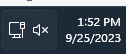
I have a test machine running the most current Insider Beta build (22631.2338). For a while now, the bell icon shows up even when notifications are turned off.

I've tried comparing registries to see if maybe there is leftover code to disable the bell, but haven't had any luck. The closest I can get is to disable the notification area entirely via a gpo, but that also removes the calendar flyout, which I still want.
Speaking of the calendar flyout, I would love to have only the calendar flyout and not the notification flyout as well. I Also do not want the "Focus" setting either.
I've been kind of hoping Microsoft would add an option to remove the bell soon in a new Insider Build, but with 23H2 right around the corner I don't think they will.
Again, with how much searching I have done I don't think it's possible and will accept it if it's not. Just thought I'd see if anyone has come up with a way.
Thanks!
I have searched everywhere for a solution to this and I haven't found anything. I do not want to install 3rd party software for this tweak, if it it is not possible natively, I will not worry about it.
In 22H2 (build 22621.2283), when notifications are turned off, there is no bell on the taskbar. This is what I want
I have a test machine running the most current Insider Beta build (22631.2338). For a while now, the bell icon shows up even when notifications are turned off.
I've tried comparing registries to see if maybe there is leftover code to disable the bell, but haven't had any luck. The closest I can get is to disable the notification area entirely via a gpo, but that also removes the calendar flyout, which I still want.
Speaking of the calendar flyout, I would love to have only the calendar flyout and not the notification flyout as well. I Also do not want the "Focus" setting either.
I've been kind of hoping Microsoft would add an option to remove the bell soon in a new Insider Build, but with 23H2 right around the corner I don't think they will.
Again, with how much searching I have done I don't think it's possible and will accept it if it's not. Just thought I'd see if anyone has come up with a way.
Thanks!
- Windows Build/Version
- 22631.2338
My Computers
-
At a glance
Windows 11 25H2AMD Ryzen 5 5600 3.5 GHz 6-Core16 GBRadeon RX 7800 XT 16GB- OS
- Windows 11 25H2
- Computer type
- PC/Desktop
- CPU
- AMD Ryzen 5 5600 3.5 GHz 6-Core
- Motherboard
- ASRock B450M Pro4 Micro ATX AM4
- Memory
- 16 GB
- Graphics Card(s)
- Radeon RX 7800 XT 16GB
- Monitor(s) Displays
- 2
- Screen Resolution
- 1920 x 1080
- Hard Drives
- 1 TB 2.5" SATA
500 GB 2.5" SATA
- PSU
- Cooler Master MWE Gold 850 V3
- Browser
- Firefox
- Antivirus
- Defender
-
At a glance
Windows 11 25H2i58 GB- Operating System
- Windows 11 25H2
- Computer type
- Laptop
- Manufacturer/Model
- Dell
- CPU
- i5
- Memory
- 8 GB
- Hard Drives
- 1 TB 2.5" SATA
- Browser
- Firefox
- Antivirus
- Defender