Disable the Windows Preview Update Notifications?


win11freak

Well-known member
Member
Local time
12:06 AM
Posts
245
OS
Windows 11 Pro 22H2
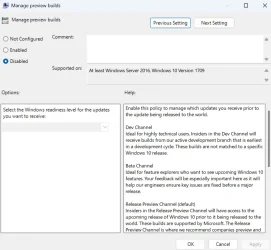
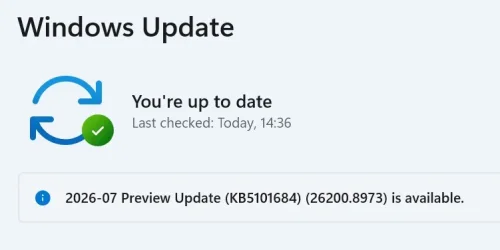
How can disabled these Windows Preview Updates notifications?

I already tried the Group Policy setting (with GPUPDATE /FORCE) and then also restarted my machine and I can still see it.

And suggestions?

If not, then i can live with it - No big deal.

Thanks in Advance.
 

Attachments
  • Screenshot 2026-08-09 144100.webp
    Screenshot 2026-08-09 144100.webp
    15.6 KB · Views: 1
  • Screenshot 2026-08-09 143934.webp
    Screenshot 2026-08-09 143934.webp
    69.9 KB · Views: 1

My Computer My Computer

At a glance

Windows 11 Pro 22H2
OS
Windows 11 Pro 22H2
Yeah I dont think there's a toggle for it ....I dont like em either but try to ignore them.
 

My Computer My Computer

At a glance

Win11 24H2 IOT LTSC / Win11 Pro 25H2AMD Ryzen 7 8700G / Ryzen 7 8700G / Ryzen 8600GF5-6000J3636F16GX2-FX5 32GB / Lexar Ares RGB ...internal
OS
Win11 24H2 IOT LTSC / Win11 Pro 25H2
Computer type
PC/Desktop
Manufacturer/Model
Gigabyte x2 / Asus = Home builds
CPU
AMD Ryzen 7 8700G / Ryzen 7 8700G / Ryzen 8600G
Motherboard
Gigabyte B650 AORUS ELITE AX V2 / ASUS TUF GAMING B650-PLUS / B650 GAMING X AX V2
Memory
F5-6000J3636F16GX2-FX5 32GB / Lexar Ares RGB LD5BU016G-R6000GDLA 32GB / Kingston FURY Beast 32 GB DDR5-5600
Graphics Card(s)
internal
Sound Card
Realtek
Monitor(s) Displays
BenQ 27 L EW2780
Screen Resolution
1920x1080
Hard Drives
Many M.2's (WD)
PSU
be quiet! Pure Power 13 M 550W
Case
Chieftec HC-10B-OP
Cooling
Gelid Solutions Tranquillo 5, many Noctua's 12x12
Keyboard
Microsoft
Mouse
Cherry
Internet Speed
500 mbs
Browser
Vivaldi
Antivirus
Eset
Other Info
PC builder / repair / Trouble-shooter etc.
I just use WuMgr and hide them when I see any. What’s hidden never shows again.
 

My Computer My Computer

At a glance

Windows 11 Pro
OS
Windows 11 Pro
1. You can toggle off get the latest updates as soon as they are available. Then restart your machine. This prevents non security preview patches from being downloaded automatically.

2. You can pause updates until after the next Microsoft update Tuesday. Install all the updates on the Wednesday and pause it again.

3. Use the Hide Windows Update tool, it's a stand alone that I downloaded years ago from Microsoft. It says it's no longer supported, but it works. I use it if I get an issue with an update not installing. I run it, it sees the update and you check a check box and save changes. Windows update no longer sees that update when you check again. You may have to pause updates and re enable them for windows update to flush any previously downloaded files.

Just do a Google search and download it from MajorGeeks.
 

My Computer My Computer

At a glance

11 ProIntel Core Ultra 7 Meteor Lake 7nm Technology64GB DDR5 5600Integrated Intel (R)
OS
11 Pro
Computer type
Laptop
Manufacturer/Model
Dell Latitude 5450
CPU
Intel Core Ultra 7 Meteor Lake 7nm Technology
Motherboard
Dell Inc XD41K
Memory
64GB DDR5 5600
Graphics Card(s)
Integrated Intel (R)
Sound Card
Integrated Realtek ALC3254
Monitor(s) Displays
14" Full HD 1920 x 1080 IPS 250 nits 16:9 Two AOC 2483HA2 external screens
Screen Resolution
Laptop 1920 x 1080, AOC 1920 x 1080
Hard Drives
Integrated 1tb NVMe Gen4, 2 External Crucial 1tb NVMe Gen3 housed in ugreen caddies, 1 SanDisk Extreme 512gb
PSU
65w USB C
Case
Laptop
Cooling
Integrated
Keyboard
Dell KM555 Pro Silent Keyboard
Mouse
Dell KM555 Pro Mouse
Internet Speed
100mb, But I am based in Kenya, so it is very fast for a home user here
Browser
Firefox, Chrome and Edge
Antivirus
AVG Internet Security
Other Info
I upgraded and fitted a 4g Modem into the laptop. The system is connected up via a ugreen 14 in 1 Docking Station, all hanging of an APC UPS. I use a lot of ugreen products, peripherals and cables. I am a retired IT Engineer who started out in 1993.
Back
Top Bottom