Disk has the same disk identifiers as one or more disks connected to the system.


Winback

Well-known member
Local time
3:36 PM
Posts
57
OS
Windows 11
Hello,

When I connect my two USB backup disks, I get a warning message in the Windows logs “Disk has the same disk identifiers as one or more disks connected to the system”.

Both disks have the same name. Should I change the names or leave them as they are ?
I've had no problem using both disks at the same time so far.

Thanks for your help.
 

My Computer My Computer

At a glance

Windows 11
OS
Windows 11
When I connect my two USB backup disks, I get a warning message in the Windows logs “Disk has the same disk identifiers as one or more disks connected to the system”.

Both disks have the same name. Should I change the names or leave them as they are ?
The problem isn't the names of the partition, it is that two of your disks have the same disk ID. Whether this is a GUID or a DWORD depends on whether the disk is GPT or MBR. Diskpart can show you the disk ID.

1732022229259.png

Windows cannot mount two disks that have the same ID, they are supposed to be unique. You can change a disk's ID using Diskpart. On the rare occasions I've seen this changing the ID of one of the disks by just one digit was sufficient to resolve the ID clash.

1732022433573.png
 

My Computers My Computers

  • At a glance

    Windows 11 HomeAMD Athlon Silver 3050U8GBRadeon Graphics
    OS
    Windows 11 Home
    Computer type
    Laptop
    Manufacturer/Model
    Acer Aspire 3 A315-23-R9VY
    CPU
    AMD Athlon Silver 3050U
    Memory
    8GB
    Graphics Card(s)
    Radeon Graphics
    Monitor(s) Displays
    laptop screen
    Screen Resolution
    1366x768 native resolution, up to 2560x1440 with Radeon Virtual Super Resolution
    Hard Drives
    1TB Samsung EVO 870 SSD (from April 2026: 250GB EVO 850)
    Internet Speed
    150 Mbps
    Browser
    Edge, Firefox
    Antivirus
    Defender
    Other Info
    fully 'Windows 11 ready' laptop. Windows 10 C: partition migrated from my old unsupported 'main machine' then upgraded to 11. A test migration ran Insider builds for 2 months. When 11 was released on 5th October 2021 it was re-imaged back to 10 and was offered the upgrade in Windows Update on 20th October. Windows Update offered the 22H2 Feature Update on 20th September 2022. It got the 23H2 Feature Update on 4th November 2023 through Windows Update, 24H2 on 3rd October 2024 through Windows Update by setting the Target Release Version for 24H2, and 25H2 on 30th September 2025 through Windows Update by setting the Target Release Version for 25H2.

    UPDATE - 11 April 2026: due to mechanical deterioration this PC has been retired from active duty. The OS with all software and files has been migrated to my System Seven in 'Other systems' to carry on as my general purpose 'main machine'.
  • At a glance

    Windows 11 ProIntel® Core™ i5-520M8GB(integrated graphics) Intel HD Graphics
    Operating System
    Windows 11 Pro
    Computer type
    Laptop
    Manufacturer/Model
    Dell Latitude E4310
    CPU
    Intel® Core™ i5-520M
    Motherboard
    0T6M8G
    Memory
    8GB
    Graphics card(s)
    (integrated graphics) Intel HD Graphics
    Screen Resolution
    1366x768
    Hard Drives
    500GB Crucial MX500 SSD
    Browser
    Firefox, Edge
    Antivirus
    Defender
    Other Info
    unsupported machine: Legacy bios, MBR, TPM 1.2, upgraded from W10 to W11 using W10/W11 hybrid install media workaround.

    In-place upgrade to 22H2 using ISO and a workaround.
    Feature Update to 23H2 by manually installing the Enablement Package.
    In-place upgrade to 24H2 using hybrid 23H2/24H2 install media.
    Upgraded to 25H2 by Enablement Package.

    Also running Insider Dev, and Canary builds and Windows 10 as native boot .vhdx.
  • My SYSTEM THREE is a Dell Latitude 5410, i7-10610U, 32GB RAM, 512GB NVMe ssd, supported device running Windows 11 Pro.

    My SYSTEM FOUR is a 2-in-1 convertible Lenovo Yoga 11e 20DA, Celeron N2930, 8GB RAM, 256GB ssd. Unsupported device: currently running Win10 Pro, plus Win11 Pro RTM and Insider Dev, Beta, and RP 24H2 as native boot vhdx.

    My SYSTEM FIVE is a Dell Latitude 3190 2-in-1, Pentium Silver N5030, 8GB RAM, 1TB NVMe ssd, supported device running Windows 11 Pro, plus Insider Beta, Dev, and Canary builds (and a few others) as a native boot .vhdx.

    My SYSTEM SIX is a Dell Latitude 5550, Core Ultra 7 165H, 64GB RAM, 1TB NVMe SSD, supported device, Windows 11 Pro 24H2, Hyper-V host machine. Updated to 25H2 on 30th September 2025.

    My SYSTEM SEVEN is a Lenovo Thinkpad T580, Intel Core i7-8650U, 16GB RAM, 512GB NVMe SSD + 2nd 512GB NVMe SSD, a supported device for Windows 11. This is my current general purpose 'main machine'. The installed Windows 11 Home from my System One has been migrated to this machine.
Thank you for your quick reply.

I can use both my disks at the same time, one with the letter D: and the other E: But they have the same name.
I just get a warning message in the Windows logs when I plug in the second disk.

I made copies between the two this morning with no problems.

If I leave things as they are without changing the ID, will it still work and not cause any problems for the files ?
 

My Computer My Computer

At a glance

Windows 11
OS
Windows 11
I can use both my disks at the same time, one with the letter D: and the other E: But they have the same name.
I just get a warning message in the Windows logs when I plug in the second disk.
In that case the warning may just be referring to the fact that both disks were originally assigned to use the same drive letter, but with both plugged in one has been forced to use a new letter. You could stop the warnings by permanently assigning a different drive letter to one of the disks.

If I leave things as they are without changing the ID, will it still work and not cause any problems for the files ?
This is not a problem for Windows. It doesn't care what the names are, it identifies which disk is which by its disk ID. It may be a problem for you though, trying to remember which is which ;)
 

My Computers My Computers

  • At a glance

    Windows 11 HomeAMD Athlon Silver 3050U8GBRadeon Graphics
    OS
    Windows 11 Home
    Computer type
    Laptop
    Manufacturer/Model
    Acer Aspire 3 A315-23-R9VY
    CPU
    AMD Athlon Silver 3050U
    Memory
    8GB
    Graphics Card(s)
    Radeon Graphics
    Monitor(s) Displays
    laptop screen
    Screen Resolution
    1366x768 native resolution, up to 2560x1440 with Radeon Virtual Super Resolution
    Hard Drives
    1TB Samsung EVO 870 SSD (from April 2026: 250GB EVO 850)
    Internet Speed
    150 Mbps
    Browser
    Edge, Firefox
    Antivirus
    Defender
    Other Info
    fully 'Windows 11 ready' laptop. Windows 10 C: partition migrated from my old unsupported 'main machine' then upgraded to 11. A test migration ran Insider builds for 2 months. When 11 was released on 5th October 2021 it was re-imaged back to 10 and was offered the upgrade in Windows Update on 20th October. Windows Update offered the 22H2 Feature Update on 20th September 2022. It got the 23H2 Feature Update on 4th November 2023 through Windows Update, 24H2 on 3rd October 2024 through Windows Update by setting the Target Release Version for 24H2, and 25H2 on 30th September 2025 through Windows Update by setting the Target Release Version for 25H2.

    UPDATE - 11 April 2026: due to mechanical deterioration this PC has been retired from active duty. The OS with all software and files has been migrated to my System Seven in 'Other systems' to carry on as my general purpose 'main machine'.
  • At a glance

    Windows 11 ProIntel® Core™ i5-520M8GB(integrated graphics) Intel HD Graphics
    Operating System
    Windows 11 Pro
    Computer type
    Laptop
    Manufacturer/Model
    Dell Latitude E4310
    CPU
    Intel® Core™ i5-520M
    Motherboard
    0T6M8G
    Memory
    8GB
    Graphics card(s)
    (integrated graphics) Intel HD Graphics
    Screen Resolution
    1366x768
    Hard Drives
    500GB Crucial MX500 SSD
    Browser
    Firefox, Edge
    Antivirus
    Defender
    Other Info
    unsupported machine: Legacy bios, MBR, TPM 1.2, upgraded from W10 to W11 using W10/W11 hybrid install media workaround.

    In-place upgrade to 22H2 using ISO and a workaround.
    Feature Update to 23H2 by manually installing the Enablement Package.
    In-place upgrade to 24H2 using hybrid 23H2/24H2 install media.
    Upgraded to 25H2 by Enablement Package.

    Also running Insider Dev, and Canary builds and Windows 10 as native boot .vhdx.
  • My SYSTEM THREE is a Dell Latitude 5410, i7-10610U, 32GB RAM, 512GB NVMe ssd, supported device running Windows 11 Pro.

    My SYSTEM FOUR is a 2-in-1 convertible Lenovo Yoga 11e 20DA, Celeron N2930, 8GB RAM, 256GB ssd. Unsupported device: currently running Win10 Pro, plus Win11 Pro RTM and Insider Dev, Beta, and RP 24H2 as native boot vhdx.

    My SYSTEM FIVE is a Dell Latitude 3190 2-in-1, Pentium Silver N5030, 8GB RAM, 1TB NVMe ssd, supported device running Windows 11 Pro, plus Insider Beta, Dev, and Canary builds (and a few others) as a native boot .vhdx.

    My SYSTEM SIX is a Dell Latitude 5550, Core Ultra 7 165H, 64GB RAM, 1TB NVMe SSD, supported device, Windows 11 Pro 24H2, Hyper-V host machine. Updated to 25H2 on 30th September 2025.

    My SYSTEM SEVEN is a Lenovo Thinkpad T580, Intel Core i7-8650U, 16GB RAM, 512GB NVMe SSD + 2nd 512GB NVMe SSD, a supported device for Windows 11. This is my current general purpose 'main machine'. The installed Windows 11 Home from my System One has been migrated to this machine.
In that case the warning may just be referring to the fact that both disks were originally assigned to use the same drive letter, but with both plugged in one has been forced to use a new letter. You could stop the warnings by permanently assigning a different drive letter to one of the disks.
OK, thanks for the information. That must be it, because when I plug in the first “Backup” disk (NVME USB) it takes the letter D: and when I plug in the second “Backup” disk (HDD USB) it takes the letter E: The second disk might want to switch to D: hence the warning message.

Otherwise, I'd have to set the second disk to H: to avoid getting the message in the logs.

This is not a problem for Windows. It doesn't care what the names are, it identifies which disk is which by its disk ID. It may be a problem for you though, trying to remember which is which :wink:
But it's still reassuring if it doesn't put my files at risk despite the warning. I just wanted to be sure.

In the end, I don't think I'll touch anything else, just leave the letter D: for one and E: for the other, then ignore the warning.
 
Last edited:

My Computer My Computer

At a glance

Windows 11
OS
Windows 11
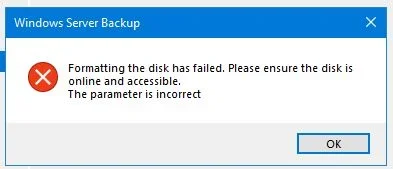
An Older thread, I know, but am seeing a similar situation which is preventing me adding a Seagate OneTouch 5TB Driver to a Server Backup Pool.

There is already 1 Drive Assigned, but if I try and add a 2nd, wbadmin says:-
Format Error.webp
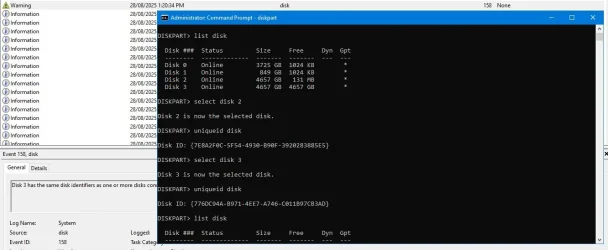
Have Searched this issue extensively, but then came across this in the System Logs, Event ID: 158,
Disk 3 has the same disk identifiers as one or more disks connected to the system.
Wondered if this was related to wbadmin rejecting the drive.


The problem isn't the names of the partition, it is that two of your disks have the same disk ID. Whether this is a GUID or a DWORD depends on whether the disk is GPT or MBR. Diskpart can show you the disk ID.
So I went down the road mentioned above, & Diskpart tells me that the drives do have different GUID's.
Diskpart OP.webp

Not Sure it's related, but hoping someone can shed some light on the issue.
Probably More Specifically the wbadmin issue.

Edit:- Disk 2 & 3 are the Seagate 5TB OT Drives.

Thanks.
 

My Computer My Computer

At a glance

Windows Server 2025Intel(R) Core(TM) i7-14700 2.10 GHz128 GB
OS
Windows Server 2025
Computer type
PC/Desktop
Manufacturer/Model
Asus
CPU
Intel(R) Core(TM) i7-14700 2.10 GHz
Motherboard
PRIME-Z790-P-WIFI-CSM
Memory
128 GB
Hard Drives
2x Micron 5400 Pro 960GB 2.5" SATA3 Enterpise SSD
2x WD 4TB 256MB 7200RPM SATA3 6Gb/s Enterprise Class
Both Raid1 Arrays

Latest Support Threads

Back
Top Bottom