DisplayPort in the back of the Motherboard doesn't show any signal when it boots up


IgnaciaIce

Active member
Member
Local time
5:06 PM
Posts
63
OS
Windows 11 Home 25H2
I am noticing the DisplayPort doesn't want to show anything on the Screen from the back of an ASUS TUF Gaming B650-E WIFI.

I was turning off my PC, and now it won't recognize my monitor, which is an older Samsung Monitor from 2019. It completely blacks out when I log in.
 
Windows Build/Version
Windows 11 25H2

My Computer My Computer

At a glance

Windows 11 Home 25H2AMD Ryzen 7 7700X-8-Core Processor32GBNvidia Geforce RTX 3060
OS
Windows 11 Home 25H2
Computer type
PC/Desktop
CPU
AMD Ryzen 7 7700X-8-Core Processor
Motherboard
Asus TUF Gaming B650E-E WIFI
Memory
32GB
Graphics Card(s)
Nvidia Geforce RTX 3060
Monitor(s) Displays
Samsung C27RG50
Screen Resolution
1920x1080
Keyboard
ReDragon Surara K582
Mouse
ReDragon Impact M908
Browser
Brave
Antivirus
Bitdefender Total Security
Make sure you select the correct video source from Monitor settings.
 

My Computer My Computer

At a glance

Windows 11AMD Ryzen 7 5700GMicron Technology DDR4-3200 16GBNVIDIA GeForce RTX 3060
OS
Windows 11
Computer type
PC/Desktop
Manufacturer/Model
HP Pavilion
CPU
AMD Ryzen 7 5700G
Motherboard
Erica6
Memory
Micron Technology DDR4-3200 16GB
Graphics Card(s)
NVIDIA GeForce RTX 3060
Sound Card
Realtek ALC671
Monitor(s) Displays
Samsung SyncMaster U28E590
Screen Resolution
3840 x 2160
Hard Drives
SAMSUNG MZVLQ1T0HALB-000H1
I have done that, but it still doesn't show any picture when I plug it into a different DisplayPort.
 

My Computer My Computer

At a glance

Windows 11 Home 25H2AMD Ryzen 7 7700X-8-Core Processor32GBNvidia Geforce RTX 3060
OS
Windows 11 Home 25H2
Computer type
PC/Desktop
CPU
AMD Ryzen 7 7700X-8-Core Processor
Motherboard
Asus TUF Gaming B650E-E WIFI
Memory
32GB
Graphics Card(s)
Nvidia Geforce RTX 3060
Monitor(s) Displays
Samsung C27RG50
Screen Resolution
1920x1080
Keyboard
ReDragon Surara K582
Mouse
ReDragon Impact M908
Browser
Brave
Antivirus
Bitdefender Total Security
Check your UEFI settings for clues
 

My Computers My Computers

  • At a glance

    Windows 11 Enterprise 25H2 26200 7462Intel XEON E5-2699 v364GB Teamgroup UD4-3600NVIDIA GeForce GTX 1080 Ti
    OS
    Windows 11 Enterprise 25H2 26200 7462
    Computer type
    PC/Desktop
    Manufacturer/Model
    Custom Build
    CPU
    Intel XEON E5-2699 v3
    Motherboard
    ASUS X99-A
    Memory
    64GB Teamgroup UD4-3600
    Graphics Card(s)
    NVIDIA GeForce GTX 1080 Ti
    Sound Card
    Integrated
    Monitor(s) Displays
    ACER X34 Predator
    Screen Resolution
    3440 x 1440
    Hard Drives
    Crucial CT1000P 3P SSD8 1TB
    Crucial CT1000 BX500 SSD 1TB
    PSU
    GameMax Pro
    Case
    Fractal Design
    Cooling
    Corsair H110iGT + 6 140mm Fans
    Keyboard
    Corsair K4
    Mouse
    G-Skill G502
    Internet Speed
    300MBs
    Browser
    Chrome
    Antivirus
    OEM
    Other Info
    ASUS RT-AC87U Router
  • At a glance

    25H2 26200.50748GB
    Operating System
    25H2 26200.5074
    Computer type
    Laptop
    Manufacturer/Model
    ASUS X555LA
    Memory
    8GB
    Browser
    Chrome
    Antivirus
    OEM
What part of the UEFI settings do I go into to find the problem?
 

My Computer My Computer

At a glance

Windows 11 Home 25H2AMD Ryzen 7 7700X-8-Core Processor32GBNvidia Geforce RTX 3060
OS
Windows 11 Home 25H2
Computer type
PC/Desktop
CPU
AMD Ryzen 7 7700X-8-Core Processor
Motherboard
Asus TUF Gaming B650E-E WIFI
Memory
32GB
Graphics Card(s)
Nvidia Geforce RTX 3060
Monitor(s) Displays
Samsung C27RG50
Screen Resolution
1920x1080
Keyboard
ReDragon Surara K582
Mouse
ReDragon Impact M908
Browser
Brave
Antivirus
Bitdefender Total Security
Try the HDMI port!
 

My Computer My Computer

At a glance

Win 7/10/11
OS
Win 7/10/11
Computer type
PC/Desktop
Other Info
I'm a computer enthusiast so have quite a few systems that I run. More like an advanced hobby.
Not sure what you've done. Your description is lacking.

The TUF Gaming B650E-E WIFI has a single DP port. But you're using an RTX 3060 graphics card, and the monitor should be plugged into one of its 3 DP ports. I didn't check the details, but some motherboards will automatically disable their built-in graphics ports if a discrete GPU is installed.

It's hard to troubleshoot when there's no signal.
 

My Computers My Computers

  • At a glance

    Windows 11 26200.8728Amd Threadripper 7970X128GB (4 X 32) G.Skill DDR5 6400 (RDIMM)Gigabyte RTX 4090 OC
    OS
    Windows 11 26200.8728
    Computer type
    PC/Desktop
    Manufacturer/Model
    homebuilt
    CPU
    Amd Threadripper 7970X
    Motherboard
    Gigabyte TRX50 Aero D Rev. 1.0
    Memory
    128GB (4 X 32) G.Skill DDR5 6400 (RDIMM)
    Graphics Card(s)
    Gigabyte RTX 4090 OC
    Sound Card
    none (USB to speakers), Realtek
    Monitor(s) Displays
    Innocn 32" OLED
    Screen Resolution
    3840 X 2160 @ 60Hz
    Hard Drives
    Crucial T700 2TB M.2 NVME SSD
    WD 4TB Blue SATA SSD
    Seagate 18TB IronWolf Pro
    PSU
    BeQuiet! Straight Power 12 1500W
    Case
    Lian Li 011 Dynamic Evo XL
    Cooling
    SilverStone Technology XE360-TR5, with 3 Phanteks T30 fans
    Keyboard
    Cherry KC 500 MX LP (mechanical)
    Mouse
    Logitech M500s (wired)
    Internet Speed
    2000/250 Mbps (down/up)
    Other Info
    xFinity gateway
  • At a glance

    windows 11 26200.8728Intel I9-13900K64GB G.Skill DDR5-6000Gigabyte RTX 3090 ti
    Operating System
    windows 11 26200.8728
    Computer type
    PC/Desktop
    Manufacturer/Model
    homebuilt
    CPU
    Intel I9-13900K
    Motherboard
    Asus RoG Strix Z690-E
    Memory
    64GB G.Skill DDR5-6000
    Graphics card(s)
    Gigabyte RTX 3090 ti
    Sound Card
    built in Realtek
    Monitor(s) Displays
    Philips 27E1N8900 27" OLED
    Screen Resolution
    3840 X 2160 @60Hz
    Hard Drives
    WDC SN850 1TB
    8TB Seagate Ironwolf
    4TB Seagate Ironwolf
    PSU
    eVGA SuperNOVA 1300 GT
    Case
    Lian Li 011 Dynamic Evo
    Cooling
    Corsair iCUE H150i ELITE CAPELLIX Liquid CPU Cooler
    Keyboard
    Cherry Streaming (wired)
    Mouse
    Logitech M500s (wired)
Mostly, I wanted to test the newer DisplayPort located near the HDMI port on the upper back of the PC to see if it worked, but it didn't since the monitor I have only has a DisplayPort 1.2 on it, and the other one is probably newer as I am using an Ivanky DP 1.4 cable in the back of it
 

My Computer My Computer

At a glance

Windows 11 Home 25H2AMD Ryzen 7 7700X-8-Core Processor32GBNvidia Geforce RTX 3060
OS
Windows 11 Home 25H2
Computer type
PC/Desktop
CPU
AMD Ryzen 7 7700X-8-Core Processor
Motherboard
Asus TUF Gaming B650E-E WIFI
Memory
32GB
Graphics Card(s)
Nvidia Geforce RTX 3060
Monitor(s) Displays
Samsung C27RG50
Screen Resolution
1920x1080
Keyboard
ReDragon Surara K582
Mouse
ReDragon Impact M908
Browser
Brave
Antivirus
Bitdefender Total Security
Mostly, I wanted to test the newer DisplayPort located near the HDMI port on the upper back of the PC to see if it worked, but it didn't since the monitor I have only has a DisplayPort 1.2 on it, and the other one is probably newer as I am using an Ivanky DP 1.4 cable in the back of it
That's not it. The DP cables have the same pinouts. The newer versions have higher available data rates (but are backward compatible).

If you have a discrete graphics card installed, the motherboard's graphic ports may be disabled.
 

My Computers My Computers

  • At a glance

    Windows 11 26200.8728Amd Threadripper 7970X128GB (4 X 32) G.Skill DDR5 6400 (RDIMM)Gigabyte RTX 4090 OC
    OS
    Windows 11 26200.8728
    Computer type
    PC/Desktop
    Manufacturer/Model
    homebuilt
    CPU
    Amd Threadripper 7970X
    Motherboard
    Gigabyte TRX50 Aero D Rev. 1.0
    Memory
    128GB (4 X 32) G.Skill DDR5 6400 (RDIMM)
    Graphics Card(s)
    Gigabyte RTX 4090 OC
    Sound Card
    none (USB to speakers), Realtek
    Monitor(s) Displays
    Innocn 32" OLED
    Screen Resolution
    3840 X 2160 @ 60Hz
    Hard Drives
    Crucial T700 2TB M.2 NVME SSD
    WD 4TB Blue SATA SSD
    Seagate 18TB IronWolf Pro
    PSU
    BeQuiet! Straight Power 12 1500W
    Case
    Lian Li 011 Dynamic Evo XL
    Cooling
    SilverStone Technology XE360-TR5, with 3 Phanteks T30 fans
    Keyboard
    Cherry KC 500 MX LP (mechanical)
    Mouse
    Logitech M500s (wired)
    Internet Speed
    2000/250 Mbps (down/up)
    Other Info
    xFinity gateway
  • At a glance

    windows 11 26200.8728Intel I9-13900K64GB G.Skill DDR5-6000Gigabyte RTX 3090 ti
    Operating System
    windows 11 26200.8728
    Computer type
    PC/Desktop
    Manufacturer/Model
    homebuilt
    CPU
    Intel I9-13900K
    Motherboard
    Asus RoG Strix Z690-E
    Memory
    64GB G.Skill DDR5-6000
    Graphics card(s)
    Gigabyte RTX 3090 ti
    Sound Card
    built in Realtek
    Monitor(s) Displays
    Philips 27E1N8900 27" OLED
    Screen Resolution
    3840 X 2160 @60Hz
    Hard Drives
    WDC SN850 1TB
    8TB Seagate Ironwolf
    4TB Seagate Ironwolf
    PSU
    eVGA SuperNOVA 1300 GT
    Case
    Lian Li 011 Dynamic Evo
    Cooling
    Corsair iCUE H150i ELITE CAPELLIX Liquid CPU Cooler
    Keyboard
    Cherry Streaming (wired)
    Mouse
    Logitech M500s (wired)
I have a physical Nvidia RTX 3060 inside the PC
 

My Computer My Computer

At a glance

Windows 11 Home 25H2AMD Ryzen 7 7700X-8-Core Processor32GBNvidia Geforce RTX 3060
OS
Windows 11 Home 25H2
Computer type
PC/Desktop
CPU
AMD Ryzen 7 7700X-8-Core Processor
Motherboard
Asus TUF Gaming B650E-E WIFI
Memory
32GB
Graphics Card(s)
Nvidia Geforce RTX 3060
Monitor(s) Displays
Samsung C27RG50
Screen Resolution
1920x1080
Keyboard
ReDragon Surara K582
Mouse
ReDragon Impact M908
Browser
Brave
Antivirus
Bitdefender Total Security
I have a physical Nvidia RTX 3060 inside the PC
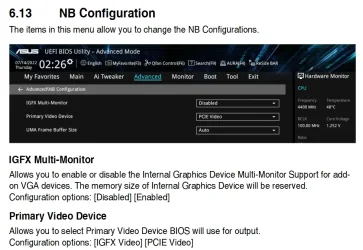
A quick look at the manual suggests that using a discrete GPU may not automatically disable the onboard graphics. However, there is a BIOS setting to enable or disable the iGPU. Have you checked that?
 

My Computers My Computers

  • At a glance

    Windows 11 26200.8728Amd Threadripper 7970X128GB (4 X 32) G.Skill DDR5 6400 (RDIMM)Gigabyte RTX 4090 OC
    OS
    Windows 11 26200.8728
    Computer type
    PC/Desktop
    Manufacturer/Model
    homebuilt
    CPU
    Amd Threadripper 7970X
    Motherboard
    Gigabyte TRX50 Aero D Rev. 1.0
    Memory
    128GB (4 X 32) G.Skill DDR5 6400 (RDIMM)
    Graphics Card(s)
    Gigabyte RTX 4090 OC
    Sound Card
    none (USB to speakers), Realtek
    Monitor(s) Displays
    Innocn 32" OLED
    Screen Resolution
    3840 X 2160 @ 60Hz
    Hard Drives
    Crucial T700 2TB M.2 NVME SSD
    WD 4TB Blue SATA SSD
    Seagate 18TB IronWolf Pro
    PSU
    BeQuiet! Straight Power 12 1500W
    Case
    Lian Li 011 Dynamic Evo XL
    Cooling
    SilverStone Technology XE360-TR5, with 3 Phanteks T30 fans
    Keyboard
    Cherry KC 500 MX LP (mechanical)
    Mouse
    Logitech M500s (wired)
    Internet Speed
    2000/250 Mbps (down/up)
    Other Info
    xFinity gateway
  • At a glance

    windows 11 26200.8728Intel I9-13900K64GB G.Skill DDR5-6000Gigabyte RTX 3090 ti
    Operating System
    windows 11 26200.8728
    Computer type
    PC/Desktop
    Manufacturer/Model
    homebuilt
    CPU
    Intel I9-13900K
    Motherboard
    Asus RoG Strix Z690-E
    Memory
    64GB G.Skill DDR5-6000
    Graphics card(s)
    Gigabyte RTX 3090 ti
    Sound Card
    built in Realtek
    Monitor(s) Displays
    Philips 27E1N8900 27" OLED
    Screen Resolution
    3840 X 2160 @60Hz
    Hard Drives
    WDC SN850 1TB
    8TB Seagate Ironwolf
    4TB Seagate Ironwolf
    PSU
    eVGA SuperNOVA 1300 GT
    Case
    Lian Li 011 Dynamic Evo
    Cooling
    Corsair iCUE H150i ELITE CAPELLIX Liquid CPU Cooler
    Keyboard
    Cherry Streaming (wired)
    Mouse
    Logitech M500s (wired)
Yes i have and i've disabled the Integrated graphics since i have a physical one in there currently.
 

My Computer My Computer

At a glance

Windows 11 Home 25H2AMD Ryzen 7 7700X-8-Core Processor32GBNvidia Geforce RTX 3060
OS
Windows 11 Home 25H2
Computer type
PC/Desktop
CPU
AMD Ryzen 7 7700X-8-Core Processor
Motherboard
Asus TUF Gaming B650E-E WIFI
Memory
32GB
Graphics Card(s)
Nvidia Geforce RTX 3060
Monitor(s) Displays
Samsung C27RG50
Screen Resolution
1920x1080
Keyboard
ReDragon Surara K582
Mouse
ReDragon Impact M908
Browser
Brave
Antivirus
Bitdefender Total Security
Yes i have and i've disabled the Integrated graphics since i have a physical one in there currently.
The ports in the motherboard's I/O panel are driven by the iGPU.

I'm quite confused as to what you're trying to do.
 

My Computers My Computers

  • At a glance

    Windows 11 26200.8728Amd Threadripper 7970X128GB (4 X 32) G.Skill DDR5 6400 (RDIMM)Gigabyte RTX 4090 OC
    OS
    Windows 11 26200.8728
    Computer type
    PC/Desktop
    Manufacturer/Model
    homebuilt
    CPU
    Amd Threadripper 7970X
    Motherboard
    Gigabyte TRX50 Aero D Rev. 1.0
    Memory
    128GB (4 X 32) G.Skill DDR5 6400 (RDIMM)
    Graphics Card(s)
    Gigabyte RTX 4090 OC
    Sound Card
    none (USB to speakers), Realtek
    Monitor(s) Displays
    Innocn 32" OLED
    Screen Resolution
    3840 X 2160 @ 60Hz
    Hard Drives
    Crucial T700 2TB M.2 NVME SSD
    WD 4TB Blue SATA SSD
    Seagate 18TB IronWolf Pro
    PSU
    BeQuiet! Straight Power 12 1500W
    Case
    Lian Li 011 Dynamic Evo XL
    Cooling
    SilverStone Technology XE360-TR5, with 3 Phanteks T30 fans
    Keyboard
    Cherry KC 500 MX LP (mechanical)
    Mouse
    Logitech M500s (wired)
    Internet Speed
    2000/250 Mbps (down/up)
    Other Info
    xFinity gateway
  • At a glance

    windows 11 26200.8728Intel I9-13900K64GB G.Skill DDR5-6000Gigabyte RTX 3090 ti
    Operating System
    windows 11 26200.8728
    Computer type
    PC/Desktop
    Manufacturer/Model
    homebuilt
    CPU
    Intel I9-13900K
    Motherboard
    Asus RoG Strix Z690-E
    Memory
    64GB G.Skill DDR5-6000
    Graphics card(s)
    Gigabyte RTX 3090 ti
    Sound Card
    built in Realtek
    Monitor(s) Displays
    Philips 27E1N8900 27" OLED
    Screen Resolution
    3840 X 2160 @60Hz
    Hard Drives
    WDC SN850 1TB
    8TB Seagate Ironwolf
    4TB Seagate Ironwolf
    PSU
    eVGA SuperNOVA 1300 GT
    Case
    Lian Li 011 Dynamic Evo
    Cooling
    Corsair iCUE H150i ELITE CAPELLIX Liquid CPU Cooler
    Keyboard
    Cherry Streaming (wired)
    Mouse
    Logitech M500s (wired)
Mostly, I'd want to use the DisplayPort that is connected to the Motherboard, not the GPU
 

My Computer My Computer

At a glance

Windows 11 Home 25H2AMD Ryzen 7 7700X-8-Core Processor32GBNvidia Geforce RTX 3060
OS
Windows 11 Home 25H2
Computer type
PC/Desktop
CPU
AMD Ryzen 7 7700X-8-Core Processor
Motherboard
Asus TUF Gaming B650E-E WIFI
Memory
32GB
Graphics Card(s)
Nvidia Geforce RTX 3060
Monitor(s) Displays
Samsung C27RG50
Screen Resolution
1920x1080
Keyboard
ReDragon Surara K582
Mouse
ReDragon Impact M908
Browser
Brave
Antivirus
Bitdefender Total Security
Mostly, I'd want to use the DisplayPort that is connected to the Motherboard, not the GPU
What, why then we don't need dedicated GPU on or PC?
 

My Computer My Computer

At a glance

Windows 11AMD Ryzen 7 5700GMicron Technology DDR4-3200 16GBNVIDIA GeForce RTX 3060
OS
Windows 11
Computer type
PC/Desktop
Manufacturer/Model
HP Pavilion
CPU
AMD Ryzen 7 5700G
Motherboard
Erica6
Memory
Micron Technology DDR4-3200 16GB
Graphics Card(s)
NVIDIA GeForce RTX 3060
Sound Card
Realtek ALC671
Monitor(s) Displays
Samsung SyncMaster U28E590
Screen Resolution
3840 x 2160
Hard Drives
SAMSUNG MZVLQ1T0HALB-000H1

My Computers My Computers

  • At a glance

    Win 11 Pro 25H2 26200.8894Intel® Core™ i7-14700KG.SKILL Ripjaws S5 Series 64GB (2 x 32GB) DDR5ASUS GeForce RTX 4070 Super 12GB
    OS
    Win 11 Pro 25H2 26200.8894
    Computer type
    PC/Desktop
    Manufacturer/Model
    Self Built
    CPU
    Intel® Core™ i7-14700K
    Motherboard
    ASUS TUF Z690-PLUS WIFI (BIOS 4505)
    Memory
    G.SKILL Ripjaws S5 Series 64GB (2 x 32GB) DDR5
    Graphics Card(s)
    ASUS GeForce RTX 4070 Super 12GB
    Sound Card
    Sound Blaster AE-5 Plus
    Monitor(s) Displays
    ASUS TUF Gaming 27" 2K HDR Gaming
    Screen Resolution
    2560 x 1440
    Hard Drives
    Samsung 990 Pro 1TB NVMe (Win 11 25H2)
    SK hynix P41 500GB NVMe
    SK hynix P41 2TB NVMe (x3)
    Crucial P3 Plus 4TB
    PSU
    Corsair RM850x Shift
    Case
    Antec Dark Phantom DP502 FLUX
    Cooling
    Corsair Nautilus 360 RS AIO
    Keyboard
    Logitech MK 320
    Mouse
    Razer Basilisk V3
    Internet Speed
    750Mbs
    Browser
    Firefox
    Antivirus
    Winows Security
    Other Info
    MR 8.1 Home
  • At a glance

    Win 11 Pro 25H2 26200.8894Intel Core i5-1140064 GB DDR4MSI GeForce RTX 3060 Ventus 2X 12GB
    Operating System
    Win 11 Pro 25H2 26200.8894
    Computer type
    PC/Desktop
    Manufacturer/Model
    Self Built
    CPU
    Intel Core i5-11400
    Motherboard
    Asus TUF Gaming Z590 Plus WiFi (BIOS 2803)
    Memory
    64 GB DDR4
    Graphics card(s)
    MSI GeForce RTX 3060 Ventus 2X 12GB
    Sound Card
    SoundBlaster Audigy Fx V2
    Monitor(s) Displays
    Samsung F27T350
    Screen Resolution
    1920x1080
    Hard Drives
    Samsung 980 Pro 1TB
    Samsung 970 EVO Plus 2TB
    Samsung 870 EVO 500GB SSD
    PSU
    Corsair HX750
    Case
    Cougar MX330-G Window
    Cooling
    Thermalright Frozen Edge 240 Black AIO
    Internet Speed
    350Mbps
    Browser
    Firefox
    Antivirus
    Windows Security
  • System Three
    Win 11 Pro 25H2 26200.8894
    ASUS PRIME Z370-P II BIOS 3004 7/12/21
    Intel Core i7-8700 CPU @ 3.20GHz
    32GB DDR4 RAM (4x8)
    iGPU Intel UHD Graphics 630
    Mid-Tower Desktop
Back
Top Bottom