Do disk benchmarking tools reduce the live of SSD/USB drives


Local time
6:56 AM
Posts
65
OS
Windows 11
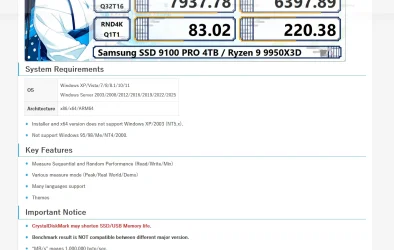
Crystal Mark Info is tool used to benchmark a drive's performance. Or to set a baseline for a SSD performance. However on the Crystal Mark Info Web site the following is mentioned

CrystalDiskMark may shorten SSD/USB Memory life.
Please see the screenshot

So my question is do running disk benchmark tools actually reduce the lifespan of a SSD? This is not specific to CrystalDiskMark tool alone.

Does it apply to other benchmark tools too like PCMark, etc?
 

Attachments
  • 1769428404435.webp
    1769428404435.webp
    86 KB · Views: 2

My Computer My Computer

At a glance

Windows 11Intel16 GBIntel UHD Integrated
OS
Windows 11
Computer type
Laptop
CPU
Intel
Memory
16 GB
Graphics Card(s)
Intel UHD Integrated
Mouse
Inbuilt
Browser
Firefox
Antivirus
Microsoft Defender
All use of any disk uses up some of its [unknown-in-advance] lifespan.


Denis
 

My Computer My Computer

At a glance

Windows 11 Home x64 Version 25H2 Build 26200....
OS
Windows 11 Home x64 Version 25H2 Build 26200.9168
Crystal Mark Info is tool used to benchmark a drive's performance. Or to set a baseline for a SSD performance. However on the Crystal Mark Info Web site the following is mentioned


Please see the screenshot

So my question is do running disk benchmark tools actually reduce the lifespan of a SSD? This is not specific to CrystalDiskMark tool alone.

Does it apply to other benchmark tools too like PCMark, etc?
Yes. One example is samsung magician wrote 32gb to disk in a basic test. They have to if you want write speeds measured.
 

My Computers My Computers

  • At a glance

    Win7,Win11i7-97002x16gb 3600mhz
    OS
    Win7,Win11
    Computer type
    PC/Desktop
    CPU
    i7-9700
    Motherboard
    gigabyte b365m ds3h
    Memory
    2x16gb 3600mhz
    Monitor(s) Displays
    benq gw2480
    PSU
    bequiet pure power 11 400CM
    Cooling
    cryorig m9i
  • At a glance

    win7,win11i5-84002x8gb 3200
    Operating System
    win7,win11
    Computer type
    PC/Desktop
    CPU
    i5-8400
    Motherboard
    gigabyte b365m ds3h
    Memory
    2x8gb 3200
    PSU
    xfx pro 450
So if only read or seek tests are carried out then that should be non destructive?

And if running these tests require 32gb to be written onto a SSD then does it mean that test ssd benchmark tests should be run only say once a year?

The reason of running the tests is to find out how much wear-leveling has occurred on the disk. And whether getting a new SSD would boost things up. These days not just upgrading RAM but also upgrading the SSD is one of the go to steps for prolonging the life of the hardware.
 

My Computer My Computer

At a glance

Windows 11Intel16 GBIntel UHD Integrated
OS
Windows 11
Computer type
Laptop
CPU
Intel
Memory
16 GB
Graphics Card(s)
Intel UHD Integrated
Mouse
Inbuilt
Browser
Firefox
Antivirus
Microsoft Defender
So if only read or seek tests are carried out then that should be non destructive?
All use of any disk uses up some of its [unknown-in-advance] lifespan.
Since the read capability of solid state devices generally exceeds their write capability by an order of 10 or more, you might never suffer as a result of excessive reading.

The reason of running the tests is to find out how much wear-leveling has occurred on the disk.
Reading a disk's Smart attributes ought to give you that info without any writing being necessary.
I have CrystalDiskInfo & HDS. I have never figured out if one is better than the other.


Denis
 
Last edited:

My Computer My Computer

At a glance

Windows 11 Home x64 Version 25H2 Build 26200....
OS
Windows 11 Home x64 Version 25H2 Build 26200.9168
So my question is do running disk benchmark tools actually reduce the lifespan of a SSD? This is not specific to CrystalDiskMark tool alone.

Does it apply to other benchmark tools too like PCMark, etc?
Yes it does as others have stated, but the degradation is very minor. A more significant issue with SSD's is a phenomenon known as "bit rot". This is the loss of charge in a sector that has not been written to for an extended period of time (this could be as short as 6 months). When this happens the drive has to spend extra time in retrieving the data resulting in the loss of performance. Many people experience this a slow boot of their PC's. A rewrite of those sectors will restore performance, but the drive does not do that on its own. There are tools designed to perform that function or you could make an image copy of the drive and then do a complete restore. Yes, this process will reduce the lifespan of the drive but so does using the drive on a daily basis.

HD Tune Pro is similar to CrystalDiskMark, and graphs the read speed by sectors. I check my drives every 6 months with this tool and will perform a refresh if there are any slow performing areas.

Have a look at this SpinRite tool for further information.
 

My Computer My Computer

At a glance

Windows 11 ProIntel Core Ultra16GBIntel(R) Arc Graphics
OS
Windows 11 Pro
Computer type
Laptop
Manufacturer/Model
ASUS Zenbook 14 OLED
CPU
Intel Core Ultra
Memory
16GB
Graphics Card(s)
Intel(R) Arc Graphics
Sound Card
Realtek High Definition Audio(SST)
Screen Resolution
2880 x 1800
Hard Drives
500 GB NVMe SSD
Internet Speed
1,500Mbps
Browser
Firefox, Edge
Antivirus
Windows Defender
It is not a question of destruction or non-destruction. Obviously read or seek tests have less wear than tests involving writes.

Running write/read tests (benchmarking) on an SSD or indeed any HDD should not be done too often, it is not necessary. Just tests for the manufacturers claimed speeds.
The reason of running the tests is to find out how much wear-leveling has occurred on the disk.
Wear levelling is just that, levelling up the wear on each memory cell does not relate much to performance.
 

My Computer My Computer

At a glance

Windows 11
OS
Windows 11
The reason of running the tests is to find out how much wear-leveling has occurred on the disk. And whether getting a new SSD would boost things up.
Reading a disk's Smart attributes ought to give you that info without any writing being necessary.
I have CrystalDiskInfo & HDS. I have never figured out if one is better than the other.
Anything that can display the SSD's S.M.A.R.T data will do. I have both too, CrystalDiskInfo is easier to read and how it displays the data more configurable, Hard Disk Sentinel shows green (or red) marks alongside the most critical S.M.A.R.T data for indicating remaining SSD life.

Exactly what information is stored varies a lot between manufacturers, but all will have an indicator of the remaining life.

'Percentage Used' is the total writes to date as a percentage of the manufacturer's specified Terabytes Written (TBW) capability of the SSD. This is usually a conservative estimate, most SSDs will exceed their TBW.

'Wear Levelling Count' is the average number of times each block of cells has been erased.

if running these tests require 32gb to be written onto a SSD then does it mean that test ssd benchmark tests should be run only say once a year?
The manufacturer's specified endurance is measured in Terabytes. A typical 500GB SSD will have a TBW of 300. A test that writes 32GB is about 1/10,000th of that, the effect on lifespan is negligible.

1769436102672.webp 1769436117287.webp
 

My Computers My Computers

  • At a glance

    Windows 11 HomeAMD Athlon Silver 3050U8GBRadeon Graphics
    OS
    Windows 11 Home
    Computer type
    Laptop
    Manufacturer/Model
    Acer Aspire 3 A315-23-R9VY
    CPU
    AMD Athlon Silver 3050U
    Memory
    8GB
    Graphics Card(s)
    Radeon Graphics
    Monitor(s) Displays
    laptop screen
    Screen Resolution
    1366x768 native resolution, up to 2560x1440 with Radeon Virtual Super Resolution
    Hard Drives
    1TB Samsung EVO 870 SSD (from April 2026: 250GB EVO 850)
    Internet Speed
    150 Mbps
    Browser
    Edge, Firefox
    Antivirus
    Defender
    Other Info
    UPDATE - 11 April 2026: due to lid hinges starting to break up this laptop has been retired from active duty. The OS with all software and files has been migrated to my System Seven in 'Other systems' to carry on as my general purpose 'main machine'.

    I've now clean installed 25H2 and used Garlin's scripts to update Secure Boot to CA 2023 and revoke the PCA 2011 certificates. It's new role is to test secure boot issues.

    Info for 2021-2026:
    fully 'Windows 11 ready' laptop. Windows 10 C: partition migrated from my old unsupported 'main machine' then upgraded to 11. A test migration ran Insider builds for 2 months. When 11 was released on 5th October 2021 it was re-imaged back to 10 and was offered the upgrade in Windows Update on 20th October. Windows Update offered the 22H2 Feature Update on 20th September 2022. It got the 23H2 Feature Update on 4th November 2023 through Windows Update, 24H2 on 3rd October 2024 through Windows Update by setting the Target Release Version for 24H2, and 25H2 on 30th September 2025 through Windows Update by setting the Target Release Version for 25H2.
  • At a glance

    Windows 11 ProIntel® Core™ i5-520M8GB(integrated graphics) Intel HD Graphics
    Operating System
    Windows 11 Pro
    Computer type
    Laptop
    Manufacturer/Model
    Dell Latitude E4310
    CPU
    Intel® Core™ i5-520M
    Motherboard
    0T6M8G
    Memory
    8GB
    Graphics card(s)
    (integrated graphics) Intel HD Graphics
    Screen Resolution
    1366x768
    Hard Drives
    500GB Crucial MX500 SSD
    Browser
    Firefox, Edge
    Antivirus
    Defender
    Other Info
    unsupported machine: Legacy bios, MBR, TPM 1.2, upgraded from W10 to W11 using W10/W11 hybrid install media workaround.

    In-place upgrade to 22H2 using ISO and a workaround.
    Feature Update to 23H2 by manually installing the Enablement Package.
    In-place upgrade to 24H2 using hybrid 23H2/24H2 install media.
    Upgraded to 25H2 by Enablement Package.

    Also running Insider Experimental 263xx and 29xxx builds and Windows 10 as native boot .vhdx.
  • My SYSTEM THREE is a Dell Latitude 5410, i7-10610U, 32GB RAM, 512GB NVMe ssd, supported device running Windows 11 Pro.

    My SYSTEM FOUR was a 2-in-1 convertible Lenovo Yoga 11e (1st gen) type 20DA, Celeron N2930, 8GB RAM, 256GB ssd. Unsupported device. This has now been sold. It has been replaced by my System Eight.

    My SYSTEM FIVE is a Dell Latitude 3190 2-in-1, Pentium Silver N5030, 8GB RAM, 1TB NVMe ssd, supported device running Windows 11 Pro, plus Insider Beta, Experimental 263xx and 29xxx builds (and a few others) as a native boot .vhdx.

    My SYSTEM SIX is a Dell Latitude 5550, Core Ultra 7 165H, 64GB RAM, 1TB NVMe SSD, supported device, Windows 11 Pro, Hyper-V host machine. Updated to 25H2 on 30th September 2025.

    My SYSTEM SEVEN is a Lenovo Thinkpad T580, 1920x1080 touchscreen, Intel Core i7-8650U, 16GB RAM, 512GB NVMe SSD + 2nd 512GB NVMe SSD, a supported device for Windows 11. This is my current general purpose 'main machine'. The installed Windows 11 Home from my System One has been migrated to this machine. As its new home has an existing digital licence for Pro I've been able to upgrade the migrated OS from Home to Pro.

    My SYSTEM EIGHT is a 2-in-1 convertible Lenovo Yoga 11e (5th gen) type 20LN, Celeron N4120, 8GB RAM, 512GB NVMe ssd, a supported device for Windows 11. Currently running Windows 11 Pro, plus Insider Beta, Experimental 263xx and 29xxx builds as native boot vhdx.
The manufacturer's specified endurance is measured in Terabytes. A typical 500GB SSD will have a TBW of 300.
As long as it has TLC cells. Some 500 GB SSDs with QLC cells have a TBW of 150, when they specify it. Still "good enough" for normal 5 years use.
 

My Computer My Computer

At a glance

Windows 10
OS
Windows 10
While technically the benchmark tools would reduce lifespan, in the real world it most likely will have very little noticeable effect on longevity. Obviously, if you run a benchmark every hour, you'll significantly reduce the lifespan of the drive. However, in a real-world setting where you might do a benchmark once in a while, I can't imagine you could even measure the impact!
 

My Computers My Computers

  • At a glance

    Win 11 Pro 25H2, Build 26200.9278Intel Core i5 14500, 14th Generation64GB DDR4GeForce RTX 4060
    OS
    Win 11 Pro 25H2, Build 26200.9278
    Computer type
    PC/Desktop
    Manufacturer/Model
    Home Brew
    CPU
    Intel Core i5 14500, 14th Generation
    Motherboard
    Gigabyte B760M G P WIFI
    Memory
    64GB DDR4
    Graphics Card(s)
    GeForce RTX 4060
    Sound Card
    Chipset Realtek
    Monitor(s) Displays
    LG 45" Ultragear & Acer 24" 1080p
    Screen Resolution
    5120x1440 & 1920x1080
    Hard Drives
    Crucial P310 2TB 2280 PCIe Gen4 3D NAND NVMe M.2 SSD (O/S)
    Silicon Power 2TB US75 NVMe PCIe Gen4 M.2 2280 SSD (backup)
    Crucial BX500 2TB 3D NAND (2nd backup)
    Seagate 4TB Ironwolf, rotating HDD secondary backup
    External off-line backup Drives: 2 NVMe 4TB drives in external enclosures
    PSU
    Thermaltake Toughpower GF3 750W
    Case
    LIAN LI LANCOOL 216 E-ATX PC Case
    Cooling
    Lots of fans!
    Keyboard
    Microsoft Comfort Curve 2000
    Mouse
    Logitech G305
    Internet Speed
    Verizon FiOS 1GB
    Browser
    Firefox
    Antivirus
    Malware Bytes & Windows Defender Security
  • At a glance

    Win 11 Pro 25H2, Build 26200.9168Intel Core i5 1440032GB DDR5Intel 700 Embedded GPU
    Operating System
    Win 11 Pro 25H2, Build 26200.9168
    Computer type
    PC/Desktop
    Manufacturer/Model
    Home Brew
    CPU
    Intel Core i5 14400
    Motherboard
    Gigabyte B760M DS3H AX
    Memory
    32GB DDR5
    Graphics card(s)
    Intel 700 Embedded GPU
    Sound Card
    Realtek Embedded
    Monitor(s) Displays
    27" HP 1080p
    Screen Resolution
    1920x1080
    Hard Drives
    Crucial P310 2TB NVMe Gen4 SSD
    Samsung EVO 990 2TB NVMe Gen4 SSD
    Samsung 2TB SATA SSD
    Seagate 4TB Ironwolf, rotating HDD secondary backup
    PSU
    Thermaltake Smart BM3 650W
    Case
    Okinos Micro ATX Case
    Cooling
    Fans
    Keyboard
    Microsoft Comfort Curve 2000
    Mouse
    Logitech G305
    Internet Speed
    Verizon FiOS 1GB
    Browser
    Firefox
    Antivirus
    Malware Bytes & Windows Defender Security
  • Nimo N171 17" Laptop, (Intel i3-1215U, 16GB RAM, 2TB NVMe, Win11 Pro)
    Acemagic Vista Mini PC V1 (Intel N150, 16GB RAM, 1TB NVMe, Win11 Pro)
    HP ENVY h8-1540t, (24GB RAM, 2TB SSD, 2TB HDD, Win11 Pro)
While technically the benchmark tools would reduce lifespan, in the real world it most likely will have very little noticeable effect on longevity. Obviously, if you run a benchmark every hour, you'll significantly reduce the lifespan of the drive. However, in a real-world setting where you might do a benchmark once in a while, I can't imagine you could even measure the impact!

I totally agree. I don't see how running benchmarks once in a great moon would have any effect on it. I do mine maybe two or three times a year, at most. I'm not worried about it.
 

My Computers My Computers

  • At a glance

    Windows 11 Pro 25H2 build: (26200.7623)32GB
    OS
    Windows 11 Pro 25H2 build: (26200.7623)
    Computer type
    Laptop
    Manufacturer/Model
    Microsoft Surface Pro
    Memory
    32GB
  • At a glance

    Microsoft 25H2 ProIntel Core Ultra 764GBIntel Integrated Graphics
    Operating System
    Microsoft 25H2 Pro
    Computer type
    Laptop
    Manufacturer/Model
    Dell Pro 14 - PC14250
    CPU
    Intel Core Ultra 7
    Memory
    64GB
    Graphics card(s)
    Intel Integrated Graphics
    Hard Drives
    Micron 1TB SSD
As long as it has TLC cells. Some 500 GB SSDs with QLC cells have a TBW of 150, when they specify it. Still "good enough" for normal 5 years use.
Apologises for such a late posting. How can I check whether a ssd has TLC cell or QLC cells? Is there a command or smart attribute that can provide this information?
 

My Computer My Computer

At a glance

Windows 11Intel16 GBIntel UHD Integrated
OS
Windows 11
Computer type
Laptop
CPU
Intel
Memory
16 GB
Graphics Card(s)
Intel UHD Integrated
Mouse
Inbuilt
Browser
Firefox
Antivirus
Microsoft Defender
Yes it does as others have stated, but the degradation is very minor. A more significant issue with SSD's is a phenomenon known as "bit rot". This is the loss of charge in a sector that has not been written to for an extended period of time (this could be as short as 6 months). When this happens the drive has to spend extra time in retrieving the data resulting in the loss of performance. Many people experience this a slow boot of their PC's. A rewrite of those sectors will restore performance, but the drive does not do that on its own. There are tools designed to perform that function or you could make an image copy of the drive and then do a complete restore. Yes, this process will reduce the lifespan of the drive but so does using the drive on a daily basis.

HD Tune Pro is similar to CrystalDiskMark, and graphs the read speed by sectors. I check my drives every 6 months with this tool and will perform a refresh if there are any slow performing areas.

Have a look at this SpinRite tool for further information.
Which are the tools that can detect a "bit rot" and then prevent further writing/reading from it? Also is there a way to move the data that is stored in these cells to other cells?

If we were to take a Windows drive image using say wmic and then apply the same, then probably it may write to same cell which has bit rot. How can that be prevented? Or do we have to use specialized tools to create image backup and then while restoring the image, the tool takes care not to write to the cells which have "bit rot"?

I will have a look at the SpinRite tool.
 

My Computer My Computer

At a glance

Windows 11Intel16 GBIntel UHD Integrated
OS
Windows 11
Computer type
Laptop
CPU
Intel
Memory
16 GB
Graphics Card(s)
Intel UHD Integrated
Mouse
Inbuilt
Browser
Firefox
Antivirus
Microsoft Defender
@Transcendence72 "Bit rot" is the loss of charge to a cell. This is not permanent, and rewriting the cell restores its charge. That should address your concerns.
 

My Computer My Computer

At a glance

Windows 11 ProIntel Core Ultra16GBIntel(R) Arc Graphics
OS
Windows 11 Pro
Computer type
Laptop
Manufacturer/Model
ASUS Zenbook 14 OLED
CPU
Intel Core Ultra
Memory
16GB
Graphics Card(s)
Intel(R) Arc Graphics
Sound Card
Realtek High Definition Audio(SST)
Screen Resolution
2880 x 1800
Hard Drives
500 GB NVMe SSD
Internet Speed
1,500Mbps
Browser
Firefox, Edge
Antivirus
Windows Defender
How can I check whether a ssd has TLC cell or QLC cells?
Look up its specs. Your screenshot says it's a Samsung SSD 9100 PRO 4TB. Here is the spec sheet for the 9100 PRO series. For the 4TB version the manufacturer's specified endurance is 2,400 Terabytes Written.

NAND Flash Memory - Samsung V-NAND TLC
Warranty - TBW 2,400 TB
 

My Computers My Computers

  • At a glance

    Windows 11 HomeAMD Athlon Silver 3050U8GBRadeon Graphics
    OS
    Windows 11 Home
    Computer type
    Laptop
    Manufacturer/Model
    Acer Aspire 3 A315-23-R9VY
    CPU
    AMD Athlon Silver 3050U
    Memory
    8GB
    Graphics Card(s)
    Radeon Graphics
    Monitor(s) Displays
    laptop screen
    Screen Resolution
    1366x768 native resolution, up to 2560x1440 with Radeon Virtual Super Resolution
    Hard Drives
    1TB Samsung EVO 870 SSD (from April 2026: 250GB EVO 850)
    Internet Speed
    150 Mbps
    Browser
    Edge, Firefox
    Antivirus
    Defender
    Other Info
    UPDATE - 11 April 2026: due to lid hinges starting to break up this laptop has been retired from active duty. The OS with all software and files has been migrated to my System Seven in 'Other systems' to carry on as my general purpose 'main machine'.

    I've now clean installed 25H2 and used Garlin's scripts to update Secure Boot to CA 2023 and revoke the PCA 2011 certificates. It's new role is to test secure boot issues.

    Info for 2021-2026:
    fully 'Windows 11 ready' laptop. Windows 10 C: partition migrated from my old unsupported 'main machine' then upgraded to 11. A test migration ran Insider builds for 2 months. When 11 was released on 5th October 2021 it was re-imaged back to 10 and was offered the upgrade in Windows Update on 20th October. Windows Update offered the 22H2 Feature Update on 20th September 2022. It got the 23H2 Feature Update on 4th November 2023 through Windows Update, 24H2 on 3rd October 2024 through Windows Update by setting the Target Release Version for 24H2, and 25H2 on 30th September 2025 through Windows Update by setting the Target Release Version for 25H2.
  • At a glance

    Windows 11 ProIntel® Core™ i5-520M8GB(integrated graphics) Intel HD Graphics
    Operating System
    Windows 11 Pro
    Computer type
    Laptop
    Manufacturer/Model
    Dell Latitude E4310
    CPU
    Intel® Core™ i5-520M
    Motherboard
    0T6M8G
    Memory
    8GB
    Graphics card(s)
    (integrated graphics) Intel HD Graphics
    Screen Resolution
    1366x768
    Hard Drives
    500GB Crucial MX500 SSD
    Browser
    Firefox, Edge
    Antivirus
    Defender
    Other Info
    unsupported machine: Legacy bios, MBR, TPM 1.2, upgraded from W10 to W11 using W10/W11 hybrid install media workaround.

    In-place upgrade to 22H2 using ISO and a workaround.
    Feature Update to 23H2 by manually installing the Enablement Package.
    In-place upgrade to 24H2 using hybrid 23H2/24H2 install media.
    Upgraded to 25H2 by Enablement Package.

    Also running Insider Experimental 263xx and 29xxx builds and Windows 10 as native boot .vhdx.
  • My SYSTEM THREE is a Dell Latitude 5410, i7-10610U, 32GB RAM, 512GB NVMe ssd, supported device running Windows 11 Pro.

    My SYSTEM FOUR was a 2-in-1 convertible Lenovo Yoga 11e (1st gen) type 20DA, Celeron N2930, 8GB RAM, 256GB ssd. Unsupported device. This has now been sold. It has been replaced by my System Eight.

    My SYSTEM FIVE is a Dell Latitude 3190 2-in-1, Pentium Silver N5030, 8GB RAM, 1TB NVMe ssd, supported device running Windows 11 Pro, plus Insider Beta, Experimental 263xx and 29xxx builds (and a few others) as a native boot .vhdx.

    My SYSTEM SIX is a Dell Latitude 5550, Core Ultra 7 165H, 64GB RAM, 1TB NVMe SSD, supported device, Windows 11 Pro, Hyper-V host machine. Updated to 25H2 on 30th September 2025.

    My SYSTEM SEVEN is a Lenovo Thinkpad T580, 1920x1080 touchscreen, Intel Core i7-8650U, 16GB RAM, 512GB NVMe SSD + 2nd 512GB NVMe SSD, a supported device for Windows 11. This is my current general purpose 'main machine'. The installed Windows 11 Home from my System One has been migrated to this machine. As its new home has an existing digital licence for Pro I've been able to upgrade the migrated OS from Home to Pro.

    My SYSTEM EIGHT is a 2-in-1 convertible Lenovo Yoga 11e (5th gen) type 20LN, Celeron N4120, 8GB RAM, 512GB NVMe ssd, a supported device for Windows 11. Currently running Windows 11 Pro, plus Insider Beta, Experimental 263xx and 29xxx builds as native boot vhdx.
Look up its specs. Your screenshot says it's a Samsung SSD 9100 PRO 4TB. Here is the spec sheet for the 9100 PRO series. For the 4TB version the manufacturer's specified endurance is 2,400 Terabytes Written.


Thanks for the link to the specifications of the drive. However the drive does not list whether it is a SLC or TLC or QLC. Since it is "V-NAND" can I take it to mean that it will be a TLC drive?

Sorry for the earlier post, please ignore it. According to the specs, screenshot given below, it is a TLC drive. So does this make it better than QLC but not better than SLC in terms of endurance and sustained write and read speeds?

1771433402955.webp
 

My Computer My Computer

At a glance

Windows 11Intel16 GBIntel UHD Integrated
OS
Windows 11
Computer type
Laptop
CPU
Intel
Memory
16 GB
Graphics Card(s)
Intel UHD Integrated
Mouse
Inbuilt
Browser
Firefox
Antivirus
Microsoft Defender
According to the specs, screenshot given below, it is a TLC drive. So does this make it better than QLC but not better than SLC in terms of endurance and sustained write and read speeds?
Because it stores less data in each cell TLC has greater TBW endurance than QLC by about a factor of two. SLC is the most expensive, mainly used these days in enterprise servers. TLC is by far the most common client SSD technology these days, with a TBW that will outlast most users' needs.

For speeds, see the comparisons here:


My Computers My Computers

  • At a glance

    Windows 11 HomeAMD Athlon Silver 3050U8GBRadeon Graphics
    OS
    Windows 11 Home
    Computer type
    Laptop
    Manufacturer/Model
    Acer Aspire 3 A315-23-R9VY
    CPU
    AMD Athlon Silver 3050U
    Memory
    8GB
    Graphics Card(s)
    Radeon Graphics
    Monitor(s) Displays
    laptop screen
    Screen Resolution
    1366x768 native resolution, up to 2560x1440 with Radeon Virtual Super Resolution
    Hard Drives
    1TB Samsung EVO 870 SSD (from April 2026: 250GB EVO 850)
    Internet Speed
    150 Mbps
    Browser
    Edge, Firefox
    Antivirus
    Defender
    Other Info
    UPDATE - 11 April 2026: due to lid hinges starting to break up this laptop has been retired from active duty. The OS with all software and files has been migrated to my System Seven in 'Other systems' to carry on as my general purpose 'main machine'.

    I've now clean installed 25H2 and used Garlin's scripts to update Secure Boot to CA 2023 and revoke the PCA 2011 certificates. It's new role is to test secure boot issues.

    Info for 2021-2026:
    fully 'Windows 11 ready' laptop. Windows 10 C: partition migrated from my old unsupported 'main machine' then upgraded to 11. A test migration ran Insider builds for 2 months. When 11 was released on 5th October 2021 it was re-imaged back to 10 and was offered the upgrade in Windows Update on 20th October. Windows Update offered the 22H2 Feature Update on 20th September 2022. It got the 23H2 Feature Update on 4th November 2023 through Windows Update, 24H2 on 3rd October 2024 through Windows Update by setting the Target Release Version for 24H2, and 25H2 on 30th September 2025 through Windows Update by setting the Target Release Version for 25H2.
  • At a glance

    Windows 11 ProIntel® Core™ i5-520M8GB(integrated graphics) Intel HD Graphics
    Operating System
    Windows 11 Pro
    Computer type
    Laptop
    Manufacturer/Model
    Dell Latitude E4310
    CPU
    Intel® Core™ i5-520M
    Motherboard
    0T6M8G
    Memory
    8GB
    Graphics card(s)
    (integrated graphics) Intel HD Graphics
    Screen Resolution
    1366x768
    Hard Drives
    500GB Crucial MX500 SSD
    Browser
    Firefox, Edge
    Antivirus
    Defender
    Other Info
    unsupported machine: Legacy bios, MBR, TPM 1.2, upgraded from W10 to W11 using W10/W11 hybrid install media workaround.

    In-place upgrade to 22H2 using ISO and a workaround.
    Feature Update to 23H2 by manually installing the Enablement Package.
    In-place upgrade to 24H2 using hybrid 23H2/24H2 install media.
    Upgraded to 25H2 by Enablement Package.

    Also running Insider Experimental 263xx and 29xxx builds and Windows 10 as native boot .vhdx.
  • My SYSTEM THREE is a Dell Latitude 5410, i7-10610U, 32GB RAM, 512GB NVMe ssd, supported device running Windows 11 Pro.

    My SYSTEM FOUR was a 2-in-1 convertible Lenovo Yoga 11e (1st gen) type 20DA, Celeron N2930, 8GB RAM, 256GB ssd. Unsupported device. This has now been sold. It has been replaced by my System Eight.

    My SYSTEM FIVE is a Dell Latitude 3190 2-in-1, Pentium Silver N5030, 8GB RAM, 1TB NVMe ssd, supported device running Windows 11 Pro, plus Insider Beta, Experimental 263xx and 29xxx builds (and a few others) as a native boot .vhdx.

    My SYSTEM SIX is a Dell Latitude 5550, Core Ultra 7 165H, 64GB RAM, 1TB NVMe SSD, supported device, Windows 11 Pro, Hyper-V host machine. Updated to 25H2 on 30th September 2025.

    My SYSTEM SEVEN is a Lenovo Thinkpad T580, 1920x1080 touchscreen, Intel Core i7-8650U, 16GB RAM, 512GB NVMe SSD + 2nd 512GB NVMe SSD, a supported device for Windows 11. This is my current general purpose 'main machine'. The installed Windows 11 Home from my System One has been migrated to this machine. As its new home has an existing digital licence for Pro I've been able to upgrade the migrated OS from Home to Pro.

    My SYSTEM EIGHT is a 2-in-1 convertible Lenovo Yoga 11e (5th gen) type 20LN, Celeron N4120, 8GB RAM, 512GB NVMe ssd, a supported device for Windows 11. Currently running Windows 11 Pro, plus Insider Beta, Experimental 263xx and 29xxx builds as native boot vhdx.
Back
Top Bottom