
Don't give up on old spinners just yet.


jimbo45

Well-known member
Pro User
VIP
Local time
10:35 PM
Posts
5,808
Location
Hafnarfjörður IS
OS
Windows XP,11 Linux Fedora Rawhide pre-release 45
Hi folks
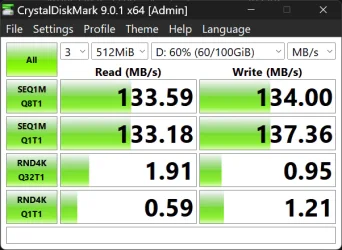
For some things keeping older spinners is just fine (for multi media, backup, streaming stuff etc) so long as the quality is fine and they have a decent cache and at least 7200 rpm. Don't use for the OS but fine for all sorts of other things so don't dump them just yet.

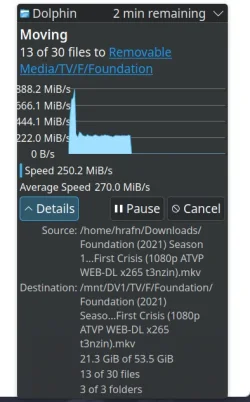
Copying a lot of data from internal Nvme (ssd type) to a decent toshiba enterprise 14 TB HDD connected to a modest minipc via a USB3 caddy (with its own power supply) gives a decent transfer rate - no complaints. The host PC is a modest MiniPC and the data transfer is consistent.
Screenshot_20251008_113912.webp


Cheers
jimbo
 

My Computer My Computer

At a glance

Windows XP,11 Linux Fedora Rawhide pre-releas...2 X Intel i7
OS
Windows XP,11 Linux Fedora Rawhide pre-release 45
Computer type
PC/Desktop
CPU
2 X Intel i7
Screen Resolution
4KUHD X 2
Hi folks
For some things keeping older spinners is just fine (for multi media, backup, streaming stuff etc) so long as the quality is fine and they have a decent cache and at least 7200 rpm. Don't use for the OS but fine for all sorts of other things so don't dump them just yet.

Copying a lot of data from internal Nvme (ssd type) to a decent toshiba enterprise 14 TB HDD connected to a modest minipc via a USB3 caddy (with its own power supply) gives a decent transfer rate - no complaints. The host PC is a modest MiniPC and the data transfer is consistent.

View attachment 148172


Cheers
jimbo
Mine have all gone to the bit bucket in the sky. RIP.
 

My Computer My Computer

At a glance

Windows 11 Pro + Win11 Canary VM.I9 13th gen i9-13900H 2.60 GHZ16 GB solderedIntegrated Intel Iris XE
OS
Windows 11 Pro + Win11 Canary VM.
Computer type
Laptop
Manufacturer/Model
ASUS Zenbook 14
CPU
I9 13th gen i9-13900H 2.60 GHZ
Motherboard
Yep, Laptop has one.
Memory
16 GB soldered
Graphics Card(s)
Integrated Intel Iris XE
Sound Card
Realtek built in
Monitor(s) Displays
laptop OLED screen
Screen Resolution
2880x1800 touchscreen
Hard Drives
1 TB NVME SSD (only weakness is only one slot)
PSU
Internal + 65W thunderbolt USB4 charger
Case
Yep, got one
Cooling
Stella Artois (UK pint cans - 568 ml) - extra cost.
Keyboard
Built in UK keybd
Mouse
Bluetooth , wireless dongled, wired
Internet Speed
900 mbs (ethernet), wifi 6 typical 350-450 mb/s both up and down
Browser
Edge
Antivirus
Defender
Other Info
TPM 2.0, 2xUSB4 thunderbolt, 1xUsb3 (usb a), 1xUsb-c, hdmi out, 3.5 mm audio out/in combo, ASUS backlit trackpad (inc. switchable number pad)

Macrium Reflect Home V8
Office 365 Family (6 users each 1TB onedrive space)
Hyper-V (a vm runs almost as fast as my older laptop)
I still maintain a HDD for data storage on most of my PCs. Cheap way to hold/archive data. My daily driver has an 8 TB model but I also have 3 NVMe drives for other purposes.
 

My Computer My Computer

At a glance

Win 7/10/11
OS
Win 7/10/11
Computer type
PC/Desktop
Other Info
I'm a computer enthusiast so have quite a few systems that I run. More like an advanced hobby.
I fully agree @jimbo45

You can't even get properly sized SSDs as of yet. They will come soon though but they will also cost an arm and a leg plus some internal body parts.
 

My Computers My Computers

  • At a glance

    Win 11 Pro 25H2 26200.8457 / Linux Mint 22.3Ryzen 7 2700U Pro32GBiGPU Vega 10
    OS
    Win 11 Pro 25H2 26200.8457 / Linux Mint 22.3
    Computer type
    Laptop
    Manufacturer/Model
    Lenovo A485
    CPU
    Ryzen 7 2700U Pro
    Motherboard
    Lenovo (WiFi/BT module upgraded to Intel Wireless-AC-9260)
    Memory
    32GB
    Graphics Card(s)
    iGPU Vega 10
    Sound Card
    Realtek
    Monitor(s) Displays
    14" FHD (built-in) + 14" Lenovo Thinkvision M14t (touch+pen) + 32" Asus PB328
    Screen Resolution
    FHD + FHD + 1440p
    Hard Drives
    Intel 660p m.2 nVME PCIe3.0 x2 512GB
    PSU
    125W(Dock)/65W(Travel Adapter)
    Keyboard
    Thinkpad / Logitech MX Keys
    Mouse
    Logitech MX Master 2S
    Internet Speed
    1/1Gbit
    Browser
    Firefox
    Antivirus
    Windows Defender
    Other Info
    SecureBoot: Enabled
    TPM2.0: Enabled
    AMD-V: Enabled
  • At a glance

    Win 11 Pro 25H2 26200.8521(RP)i7-7700k @4.8GHz32GB 2x16GB 2133MHz CL15EVGA GTX1080Ti FTW 11GB
    Operating System
    Win 11 Pro 25H2 26200.8521(RP)
    Computer type
    PC/Desktop
    Manufacturer/Model
    Custom
    CPU
    i7-7700k @4.8GHz
    Motherboard
    Asus PRIME Z270-A
    Memory
    32GB 2x16GB 2133MHz CL15
    Graphics card(s)
    EVGA GTX1080Ti FTW 11GB
    Sound Card
    Integrated
    Monitor(s) Displays
    32" 10-bit Asus PB328Q
    Screen Resolution
    WQHD 2560x1440
    Hard Drives
    512GB ADATA SX8000NP NVMe PCIe Gen 3 x4
    PSU
    850W
    Case
    Fractal Design Define 7
    Cooling
    Noctua NH-D15 chromax.black
    Keyboard
    Logitech MX Keys
    Mouse
    Logitech MX Master 2S
    Internet Speed
    1/1Gbit
    Browser
    Firefox
    Antivirus
    Windows Defender
    Other Info
    AC WiFi Card
Still counting on external HDDs for Downloads (even apps and drivers like the Nvidia package.... don't like the of idea of downloading a temp 1gb installer on a SSD - only to delete it shortly after installing the app/driver), large size and back-up. For same reason - have even browser disk cache disabled - on Firefox (yet another reason why i prefer over chromium - where there's only workaround like "C:\Program Files\BraveSoftware\Brave-Browser\Application\brave.exe" --disk-cache-size=1 --media-cache-size=1). For personal use - external HDDs are still wortwhile imo. Only for specific profesional use - like video recording and edditing (even photo - taking into account modern standards of curent profesional cameras), 3D modeling (even A.I. this days) and such - i find SSDs esential (after getting used to SSDs speed - even the fastest HDDs are rather cringe by comparision).
 

My Computer My Computer

At a glance

WinDOS 25H2Intel & AMDSO-DIMM SK Hynix 15.8 GB Dual-Channel DDR4-26...nVidia RTX 2060 6GB Mobile GPU (TU106M)
OS
WinDOS 25H2
Computer type
Laptop
CPU
Intel & AMD
Memory
SO-DIMM SK Hynix 15.8 GB Dual-Channel DDR4-2666 (2 x 8 GB) 1329MHz (19-19-19-43)
Graphics Card(s)
nVidia RTX 2060 6GB Mobile GPU (TU106M)
Sound Card
Onbord Realtek ALC1220
Screen Resolution
1920 x 1080
Hard Drives
1x Samsung PM981 NVMe PCIe M.2 512GB / 1x Seagate Expansion ST1000LM035 1TB
Still counting on external HDDs for Downloads (even apps and drivers like the Nvidia package.... don't like the of idea of downloading a temp 1gb installer on a SSD - only to delete it shortly after installing the app/driver), large size and back-up. For same reason - have even browser disk cache disabled - on Firefox (yet another reason why i prefer over chromium - where there's only workaround like "C:\Program Files\BraveSoftware\Brave-Browser\Application\brave.exe" --disk-cache-size=1 --media-cache-size=1). For personal use - external HDDs are still wortwhile imo. Only for specific profesional use - like video recording and edditing (even photo - taking into account modern standards of curent profesional cameras), 3D modeling (even A.I. this days) and such - i find SSDs esential (after getting used to SSDs speed - even the fastest HDDs are rather cringe by comparision).
One doesn't need these for high speed - especially for archival stuff, backups, file sharing or data streaming. But don't use the slow RPM stuff with poor cache sizes -- minimum should be 7200 RPM.

The 5400 RPM stuff really is only fit for the bin - those you can junk. Smash with a hammer or whatever before disposing of them -- even "The Holy Ghost" couldn't retrieve data if the disk is physically smashed up. !!!

These also work perfectly for security / video cam stuff -- - I wouldn't use any SSD for this purpose -- also depends on how long you need to keep the security video for, how long in a 24 hr period it's actually recording -- decent security stops recording if nothing detected after a user defined period and starts again if motion etc is detected. While the HDD is starting up data is held in a buffer area by the security application and written to the HDD as soon as the HDD is ready. Play back of video is perfectly OK with HDD's -- again DECENT HDD's of course. !!!

Also BTW if you need to hand over video to the Police / a Court or other legal authority I'd rather give them a cheap HDD rather than an expensive (often hugely expensive) large capacity Nvme device).

Cheers
jimbo
 

My Computer My Computer

At a glance

Windows XP,11 Linux Fedora Rawhide pre-releas...2 X Intel i7
OS
Windows XP,11 Linux Fedora Rawhide pre-release 45
Computer type
PC/Desktop
CPU
2 X Intel i7
Screen Resolution
4KUHD X 2
The 5400 RPM stuff really is only fit for the bin - those you can junk. Smash with a hammer or whatever before disposing of them -- even "The Holy Ghost" couldn't retrieve data if the disk is physically smashed up. !!!

Nooo! 😢 Hearing that upsets my old and faithful...
4.webp
These also work perfectly for security / video cam stuff -- - I wouldn't use any SSD for this purpose -- also depends on how long you need to keep the security video for, how long in a 24 hr period it's actually recording -- decent security stops recording if nothing detected after a user defined period and starts again if motion etc is detected. While the HDD is starting up data is held in a buffer area by the security application and written to the HDD as soon as the HDD is ready. Play back of video is perfectly OK with HDD's -- again DECENT HDD's of course. !!!

Yes, cause even in 2025 - most security cams have 1080p resolution (quite a lot of them have 480p & 720p - cause nobody bothered to upgrade them after over a decade of use).. Apparently, you're suppose to pay 3000$ for its IP66 rating. And they call them Pro CCTV. While 300$ baby cams have 6K - but use SD cards. :)
 

My Computer My Computer

At a glance

WinDOS 25H2Intel & AMDSO-DIMM SK Hynix 15.8 GB Dual-Channel DDR4-26...nVidia RTX 2060 6GB Mobile GPU (TU106M)
OS
WinDOS 25H2
Computer type
Laptop
CPU
Intel & AMD
Memory
SO-DIMM SK Hynix 15.8 GB Dual-Channel DDR4-2666 (2 x 8 GB) 1329MHz (19-19-19-43)
Graphics Card(s)
nVidia RTX 2060 6GB Mobile GPU (TU106M)
Sound Card
Onbord Realtek ALC1220
Screen Resolution
1920 x 1080
Hard Drives
1x Samsung PM981 NVMe PCIe M.2 512GB / 1x Seagate Expansion ST1000LM035 1TB
Hi folks
For some things keeping older spinners is just fine (for multi media, backup, streaming stuff etc) so long as the quality is fine and they have a decent cache and at least 7200 rpm. Don't use for the OS but fine for all sorts of other things so don't dump them just yet.

are those old HDDs the "legacy" style PATA/IDE or SATA?

i even ran a Win11 {23H2} OS on a PATA/IDE based 160Gb HDD, heeheehee :p
 

My Computer My Computer

At a glance

windows 10 ltsc
OS
windows 10 ltsc
are those old HDDs the "legacy" style PATA/IDE or SATA?

i even ran a Win11 {23H2} OS on a PATA/IDE based 160Gb HDD, heeheehee :p
IDE would not be good -- they must be at least SATA to be of any serious use on modern systems.Even a CRAY supercomputer can be "rowed back" to terrible performance if the I/O systems are junk.

Cheers
jimbo
 

My Computer My Computer

At a glance

Windows XP,11 Linux Fedora Rawhide pre-releas...2 X Intel i7
OS
Windows XP,11 Linux Fedora Rawhide pre-release 45
Computer type
PC/Desktop
CPU
2 X Intel i7
Screen Resolution
4KUHD X 2
I use my large USB external hard drives for storage, and data, and for stuff that gets deleted, or changed a lot. My SSD is there for some data that doesn't get erased, or changed often, or for programs and apps. A 1-TB SSD is sufficient (for me) for programs and some text data. Large USB 3+, 7,200 rpm "Spinners" are necessary when working with large images, or 4K video, and provide scratch disk space for those programs to work well. And, when a large external HDD is filled up, it's file structure can be recorded to a searchable free program, like Cathy, so in case you need something on any of your retired drives, you can find it and hook it up via USB to get the files. Note, when storing retired drives, store them with all the cables and power supply wiring that came with them. I use large zip-lock bags for storage, and put in a note to correspond with the designation in Cathy.
 

My Computers My Computers

  • At a glance

    Windows 11 Pro Version 25H2 (OS Build 26200.8...i9 12th Generation64GBPNY 3060 12GB
    OS
    Windows 11 Pro Version 25H2 (OS Build 26200.8655)
    Computer type
    PC/Desktop
    Manufacturer/Model
    Dell 8950
    CPU
    i9 12th Generation
    Memory
    64GB
    Graphics Card(s)
    PNY 3060 12GB
    Monitor(s) Displays
    NEC EA27IU
    Screen Resolution
    3840X2160
    Hard Drives
    SSD internal, external drives
    Cooling
    Advanced Air Cooling
    Keyboard
    Microsoft
    Mouse
    Logitech
    Internet Speed
    High-Speed
    Browser
    MS Edge
    Antivirus
    Norton 360
  • At a glance

    Win 11 Pro 25H2 (OS Build 26200.8655)Intel Ultra 7 265 (20 cores) processor32GB DDR5 RamBuilt-in Intel UHD Graphics
    Operating System
    Win 11 Pro 25H2 (OS Build 26200.8655)
    Computer type
    PC/Desktop
    Manufacturer/Model
    Dell Tower ECT1250
    CPU
    Intel Ultra 7 265 (20 cores) processor
    Memory
    32GB DDR5 Ram
    Graphics card(s)
    Built-in Intel UHD Graphics
    Sound Card
    Built-in
    Screen Resolution
    1920X1080
    Hard Drives
    2TB internal SSD
    Case
    Tower
I still create backup images on HDD as I do not trust SSD for long term storage.
SSD store data as electrical charges which can start losing data or become corrupted the longer they are without power.
I have a HDD dock and the SATA port on the motherboard that it is hooked up to is set for hot swap.
 

My Computer My Computer

At a glance

Windows 11 Pro
OS
Windows 11 Pro
I have more than 15 HDD external disks. I use them mainly to store my movies.
 

My Computer My Computer

At a glance

Win 7,8.1,10,11, Mint, Kde Plasma, DebianIntel(R) Core(TM) i7-6500U CPU @ 2.50GHz16 GBIntel(R) HD Graphics 520/Nvidia GeForce 930M
OS
Win 7,8.1,10,11, Mint, Kde Plasma, Debian
Computer type
Laptop
Manufacturer/Model
Dell
CPU
Intel(R) Core(TM) i7-6500U CPU @ 2.50GHz
Memory
16 GB
Graphics Card(s)
Intel(R) HD Graphics 520/Nvidia GeForce 930M
Sound Card
Intel(R) Display Audio/RealtekAudio
Monitor(s) Displays
Generic Pnp Monitor
Screen Resolution
1366 X 768
Hard Drives
ST2000LM024-1EJ164
Keyboard
Eng (US)
Mouse
Sanwa Supply
Browser
Firefox
Antivirus
Avast One
Other Info
Too many laptops with different system specifications.
I have a 4TB backup HDD in this machine, and I also have an 8TB NAS with mirrored HDD drives. The other disks in my systems are either NVMe SSD or SATA SSD. Any backup SSD gets a full rewrite at least every month, so I'm not too concerned about it forgetting. They also live in a 65F-75F 40-50% humidity climate controlled space.
 

My Computers My Computers

  • At a glance

    Win 11 Pro 25H2, Build 26200.8655Intel Core i5 1450064GB DDR4GeForce RTX 4060
    OS
    Win 11 Pro 25H2, Build 26200.8655
    Computer type
    PC/Desktop
    Manufacturer/Model
    Home Brew
    CPU
    Intel Core i5 14500
    Motherboard
    Gigabyte B760M G P WIFI
    Memory
    64GB DDR4
    Graphics Card(s)
    GeForce RTX 4060
    Sound Card
    Chipset Realtek
    Monitor(s) Displays
    LG 45" Ultragear, Acer 24" 1080p
    Screen Resolution
    5120x1440, 1920x1080
    Hard Drives
    Crucial P310 2TB 2280 PCIe Gen4 3D NAND NVMe M.2 SSD (O/S)
    Silicon Power 2TB US75 NVMe PCIe Gen4 M.2 2280 SSD (backup)
    Crucial BX500 2TB 3D NAND (2nd backup)
    Seagate 4TB Ironwolf, rotating HDD archive files
    External off-line backup Drives: 2 NVMe 4TB drives in external enclosures
    PSU
    Thermaltake Toughpower GF3 750W
    Case
    LIAN LI LANCOOL 216 E-ATX PC Case
    Cooling
    Lots of fans!
    Keyboard
    Microsoft Comfort Curve 2000
    Mouse
    Logitech G305
    Internet Speed
    Verizon FiOS 1GB
    Browser
    Firefox
    Antivirus
    Malware Bytes & Windows Defender Security
  • At a glance

    Win 11 Pro 25H2, Build 26200.8524Intel Core i5 1440032GB DDR5Intel 700 Embedded GPU
    Operating System
    Win 11 Pro 25H2, Build 26200.8524
    Computer type
    PC/Desktop
    Manufacturer/Model
    Home Brew
    CPU
    Intel Core i5 14400
    Motherboard
    Gigabyte B760M DS3H AX
    Memory
    32GB DDR5
    Graphics card(s)
    Intel 700 Embedded GPU
    Sound Card
    Realtek Embedded
    Monitor(s) Displays
    27" HP 1080p
    Screen Resolution
    1920x1080
    Hard Drives
    Crucial P310 2TB 2280 PCIe Gen4 eD NAND PCIe SSD
    Samsung EVO 990 2TB NVMe Gen4 SSD
    Samsung 2TB SATA SSD
    PSU
    Thermaltake Smart BM3 650W
    Case
    Okinos Micro ATX Case
    Cooling
    Fans
    Keyboard
    Microsoft Comfort Curve 2000
    Mouse
    Logitech G305
    Internet Speed
    Verizon FiOS 1GB
    Browser
    Firefox
    Antivirus
    Malware Bytes & Windows Defender Security

Latest Support Threads

Back
Top Bottom




