Driver updater


stevem5000

Well-known member
Member
Local time
4:39 AM
Posts
86
OS
10 and 11 Linux
I install W11 on many older PC's......In Driver Manager I will often have 3 drivers that do not install...
And when I RClick to install drivers....Microsoft cannot find any.....
And since these are older machines......going to the driver website I cannot find the correct driver....

The drivers are...
PCI Data Acquisition & Signal Processing Controller
PCI Memory Controller
SM Bus Controller....

Only these 3....

I have tried several driver updaters....but some of them dump junk on the PC......othere don't find the drivers I need....

So....Any suggestions for a Driver Updater program.......I'm willing to pay for it as long as it's clean and does the job....

Thanks
Steve
 

My Computer

System One

  • OS
    10 and 11 Linux
    Computer type
    PC/Desktop
    Motherboard
    Asus Z97-ar
    Memory
    16
    Graphics Card(s)
    HIS QP3-41H-A
    Sound Card
    default
    Monitor(s) Displays
    2 Dell 22"
    Hard Drives
    M.2 for system M.2 Data and 2 - SATA for photos and music data
    PSU
    Yes...I have one
    Case
    Now sure
    Internet Speed
    650 both ways
    Browser
    Brave
    Antivirus
    Win Defender
My suggestion is to NEVER use 3rd party driver update utilities. If you want to check for updated drivers, go to the various OEM websites or, in the case of laptops, to the website of the laptop manufacturer. Many issues on support forums are the result of drivers being updated unnecessarily. A driver should only be updated if the new version offers a fix or new app support that you require.
 

My Computer

System One

  • OS
    W11
    Computer type
    PC/Desktop
    Manufacturer/Model
    2 HP Desktops, 1 Dell Desktop, 2 Dell XPS Laptops, 1 HP Laptop
    Keyboard
    Logitech
    Mouse
    Logitech MX Master 4 & 3
    Internet Speed
    500 mps
    Browser
    Firefox
    Antivirus
    Bitdefender
If your drivers work, there is no reason to update them. Its not like software, where a new version fixes bugs and improves the experience.
 

My Computers

System One System Two

  • OS
    Windows 11 Education For 25H2
    Computer type
    Laptop
    Manufacturer/Model
    HP ZBook G2
    CPU
    Intel® Core i7 5500u
    Motherboard
    HP
    Memory
    8 GB
    Graphics Card(s)
    Intel HD Family Graphics 5500 AMD Firepro 4150M
    Sound Card
    Realtek High Audio
    Hard Drives
    1 TB SSD
    Mouse
    HP USB Mouse
    Antivirus
    Windows Defender
  • Operating System
    Windows 11 Pro For Workstations 25H2
    Computer type
    Laptop
    Manufacturer/Model
    HP Zbook G4
    CPU
    Xeon 1535m v6
    Motherboard
    HP
    Memory
    32 GB
    Graphics card(s)
    AMD Quadro Pro 4100
    Sound Card
    Bang and Olufson Audio
    Hard Drives
    1TB SSD
    Mouse
    HP USB Mouse
    Antivirus
    Windows Defender
The 3 instances in Device Manager all have yellow "marks" beside them.....
Do I assume those item do NOT work......or just have an older driver working...
 

My Computer

System One

  • OS
    10 and 11 Linux
    Computer type
    PC/Desktop
    Motherboard
    Asus Z97-ar
    Memory
    16
    Graphics Card(s)
    HIS QP3-41H-A
    Sound Card
    default
    Monitor(s) Displays
    2 Dell 22"
    Hard Drives
    M.2 for system M.2 Data and 2 - SATA for photos and music data
    PSU
    Yes...I have one
    Case
    Now sure
    Internet Speed
    650 both ways
    Browser
    Brave
    Antivirus
    Win Defender

Those drivers are part of the chipset drivers for any particular device. Since you say you install Windows on "many older PCs" you'd be dealing with any number of different chipsets. Thus different drivers. Rather than right click to update drivers you would be much better off to use Windows update and see if it will update the drivers rather than using 3rd party driver updaters.

Sounds to me like you may be installing Windows 11 on a lot of old incompatible machines and reselling them. If that be the case, I hope you advise buyers that it what you have done since those machines will give unsuspecting buyers fits down the road the first time a version update fails or they have to repair or reinstall Windows 11. I know it's a "buyer beware" world but the honest thing to do to make those unsuspecting buyers aware that workarounds will have to be used to recover from those ocassions..
 

My Computers

System One System Two

  • OS
    Windows 11 Pro 25H2
    Computer type
    PC/Desktop
    Manufacturer/Model
    Dell Optiplex 7080
    CPU
    i9-10900 10 core 20 threads
    Motherboard
    DELL 0J37VM
    Memory
    32 gb
    Graphics Card(s)
    none-Intel UHD Graphics 630
    Sound Card
    Integrated Realtek
    Monitor(s) Displays
    Benq 27
    Screen Resolution
    2560x1440
    Hard Drives
    2x1tb Solidigm m.2 nvme /External drives 512gb Samsung m.2 sata+2tb Kingston m2.nvme
    PSU
    500w
    Case
    MT
    Cooling
    Dell Premium
    Keyboard
    Logitech wired
    Mouse
    Logitech wireless
    Internet Speed
    so slow I'm too embarrassed to tell
    Browser
    #1 Edge #2 Firefox
    Antivirus
    Defender+MWB Premium
  • Operating System
    Windows 11 Pro 24H2 26200.8457
    Computer type
    PC/Desktop
    Manufacturer/Model
    Beelink Mini PC SER5
    CPU
    AMD Ryzen 7 6800U
    Memory
    32 gb
    Graphics card(s)
    integrated
    Sound Card
    integrated
    Monitor(s) Displays
    Benq 27
    Screen Resolution
    2560x1440
    Hard Drives
    1TB Crucial nvme
    Keyboard
    Logitech wired
    Mouse
    Logitech wireless
    Internet Speed
    still too embarrassed to tell
    Browser
    Firefox
    Antivirus
    Defender
    Other Info
    System 3 is non compliant Dell 9020 i7-4770/24gb ram Win11 PRO 26200.8457
I have an old computer that originally had Windows 7. After I upgraded it to Windows 10 some of the hardware did not have good drivers as indicated by the Device Manager. I used Snappy Driver Installer to find and update the missing drivers. Note I usually try to find drivers from the manufacturer but when they are not available I rely on Snappy.
 

My Computers

System One System Two

  • OS
    Windows 11 Pro 25H2 (26200.6901)
    Computer type
    Laptop
    Manufacturer/Model
    ASUS TUF Gaming A15 (2022)
    CPU
    AMD Ryzen 7 6800H with Radeon 680M GPU (486MB RAM)
    Memory
    Crucial DDR5-4800 (2400MHz) 32GB (2 x 16GB)
    Graphics Card(s)
    NVIDIA RTX 3060 Laptop (6GB RAM)
    Sound Card
    n/a
    Monitor(s) Displays
    15.6-inch
    Screen Resolution
    1920x1080 300Hz
    Hard Drives
    2 x Samsung 990 Evo Plus (2TB M.2 NVME SSD)
    PSU
    n/a
    Mouse
    Wireless Mouse M510
    Internet Speed
    2100Mbps/300Mbps
    Browser
    Firefox
    Antivirus
    Malwarebytes
  • Operating System
    Windows 11 Pro 25H2 (26200.8246)
    Computer type
    PC/Desktop
    Manufacturer/Model
    Custom build
    CPU
    AMD Ryzen 7 5700X3D
    Motherboard
    ASUS ROG Strix B550-F Gaming WiFi II
    Memory
    G.SKILL Flare X 32GB (2x16GB) DDR4
    Graphics card(s)
    ASUS ROG-STRIX-RTX3060TI-08G-V2-GAMING (RTX 3060-Ti, 8GB RAM)
    Monitor(s) Displays
    Samsung G50D IPS 27"
    Screen Resolution
    1440p/180Hz
    Hard Drives
    SAMSUNG 990 EVO Plus (2TB] M.2 NVME SSD
    SAMSUNG 990 EVO Plus (4TB) M.2 NVME SSD
    PSU
    Corsair RM750x (750 watts)
    Case
    Cooler Master MasterCase 5
    Cooling
    Scythe Mugen 6
    Keyboard
    Logitech K520 (MK540 keyboard/mouse combo)
    Mouse
    Logitech M310 (MK540 keyboard/mouse combo)
    Internet Speed
    2100 Mbps down / 300 Mbps up
    Browser
    Firefox, Edge, Chrome
    Antivirus
    Malwarebytes (Premium)
    Other Info
    ASUS Blu-ray Burner BW-16D1HT (SATA) || Western Digital Easystore 20TB USB 3.0 external hard drive used with Acronis True Image 2025 backup software || HP OfficeJet Pro 6975 Printer/Scanner
Glass kutter.....I don;t sell the PC's...I give them away.....and I tell them what I did to the PC's....
 

My Computer

System One

  • OS
    10 and 11 Linux
    Computer type
    PC/Desktop
    Motherboard
    Asus Z97-ar
    Memory
    16
    Graphics Card(s)
    HIS QP3-41H-A
    Sound Card
    default
    Monitor(s) Displays
    2 Dell 22"
    Hard Drives
    M.2 for system M.2 Data and 2 - SATA for photos and music data
    PSU
    Yes...I have one
    Case
    Now sure
    Internet Speed
    650 both ways
    Browser
    Brave
    Antivirus
    Win Defender

In the old days we didn't have Snappy Driver Installer or other such tools. Internet was ISDN (64Kbps) at best and so I kept a small driver collection to be able to install Windows on many computers without spending hours finding, downloading and installing drivers each time. After some cases I had the experience to identify the most common drivers and kept a copy of those, as well as some hard to find ones. You can do the same. Today with over 200Mbps download speeds is even easier. Yes, downloading the full Snappy Driver Installer (over 20GB) seems a good workaround to cover most drivers, but as you may know you never choose which drivers are installed in Windows Update, Snappy and other tools. It can be an old OEM driver, it can be a basic-functionality driver that covers many models but not 100% suitable for all devices it covers. One thing is for sure, it is a core driver only, it never installs "optional" software such as nVidia Control Panel or Logitech software etc. If you want maximum compatibility and all the software always prefer the officials drivers. You download them once, you build a small collection and then you can install them on most computers. In every computer I install Windows I keep a folder C:\DRIVERS with all the official drivers and OEM utilities. Even if some of them are automatically installed by Windows Update. I want an offline copy. You never know when it becomes handy. Some might argue the order is not important, but in very old computers if you installed the chipset drivers after the other drivers, it could cause a BSOD because every other device depends on them. So I always install the chipset first, then the graphics and then everything else. If you also upgrade the BIOS, the correct order is upgrade the BIOS first, restart, configure BIOS and then install any drivers.

PS: To solve the mystery of what happened to OP, earlier Windows versions have some old chipset drivers built-in and they are automatically installed. Windows 10 and 11 removed these old drivers from the database because they are deemed obsolete and that's why you see these three devices missing drivers in Device Manager. They are part of the chipset. So, download the chipset (aka platform) drivers from manufacturer, install them and Ta-Da! These devices will have their drivers installed and you might even improve the performance of the system. If you next install the official graphics drivers, you will see more improvement. Needless to say you can install Windows 10 64-bit or earlier 64-bit drivers if there are no Windows 11 drivers available.
 
Last edited:

My Computers

System One System Two

  • OS
    Windows 11 Pro 23H2 (5699), 25H2 (8457)
    Computer type
    Laptop
    Manufacturer/Model
    Acer Extensa 5630EZ
    CPU
    Mobile DualCore Intel Core 2 Duo T7250, 2000 MHz
    Motherboard
    Acer Extensa 5630
    Memory
    4GB
    Graphics Card(s)
    Mobile Intel(R) GMA 4500M (Mobile 4 series)
    Sound Card
    Realtek ALC268 @ Intel 82801IB ICH9 - High Definition Audio Controller
    Monitor(s) Displays
    1
    Screen Resolution
    1280x800
    Hard Drives
    Samsung SSD 850 EVO 250GB SATA Device (250 GB, SATA-III)
    Internet Speed
    VDSL 50 Mbps
    Browser
    MICROSOFT EDGE
    Antivirus
    WINDOWS DEFENDER
    Other Info
    Legacy MBR installation, no TPM, no Secure Boot, no WDDM 2.0 graphics drivers, no SSE4.2, cannot get more unsupported ;) This is only my test laptop. I had installed Windows 11 here before upgrading my main PC. For my main PC I use everyday see my 2nd system specs.
  • Operating System
    Windows 11 Pro v25H2 (build 26200.8457)
    Computer type
    PC/Desktop
    Manufacturer/Model
    Custom-built PC
    CPU
    Intel Core-i7 3770 3.40GHz s1155 (3rd generation)
    Motherboard
    Asus P8H61 s1155 ATX
    Memory
    2x Kingston Hyper-X Blu 8GB DDR3-1600
    Graphics card(s)
    GIGABYTE GeForce RTX 3050 WINDFORCE OC V2 6GB (GV-N3050WF2OCV2-6GD)
    Sound Card
    Realtek HD audio (ALC887)
    Monitor(s) Displays
    Sony Bravia KDL-19L4000 19" LCD TV via VGA
    Screen Resolution
    1440x900 32-bit 60Hz
    Hard Drives
    WD Blue SA510 2.5 1000GB SSD as system disk, Western Digital Caviar Purple 4TB SATA III (WD40PURZ) as second
    PSU
    Thermaltake Litepower RGB 550W Full Wired
    Case
    SUPERCASE MIDI-TOWER
    Cooling
    Deepcool Gamma Archer CPU cooler, 1x 8cm fan at the back
    Keyboard
    Mitsumi 101-key PS/2
    Mouse
    Sunnyline OptiEye PS/2
    Internet Speed
    100Mbps
    Browser
    Microsoft Edge, Mozilla Firefox
    Antivirus
    Microsoft Windows Defender
    Other Info
    Legacy BIOS (MBR) installation, no TPM, no Secure Boot, WDDM 3.0 graphics drivers, WEI score 7.4
Spapakons....great idea....thanks...!!!
 

My Computer

System One

  • OS
    10 and 11 Linux
    Computer type
    PC/Desktop
    Motherboard
    Asus Z97-ar
    Memory
    16
    Graphics Card(s)
    HIS QP3-41H-A
    Sound Card
    default
    Monitor(s) Displays
    2 Dell 22"
    Hard Drives
    M.2 for system M.2 Data and 2 - SATA for photos and music data
    PSU
    Yes...I have one
    Case
    Now sure
    Internet Speed
    650 both ways
    Browser
    Brave
    Antivirus
    Win Defender
NVIDIA GeForce RTX 4060 (8 GB)
 

My Computer

System One

  • OS
    10 and 11 Linux
    Computer type
    PC/Desktop
    Motherboard
    Asus Z97-ar
    Memory
    16
    Graphics Card(s)
    HIS QP3-41H-A
    Sound Card
    default
    Monitor(s) Displays
    2 Dell 22"
    Hard Drives
    M.2 for system M.2 Data and 2 - SATA for photos and music data
    PSU
    Yes...I have one
    Case
    Now sure
    Internet Speed
    650 both ways
    Browser
    Brave
    Antivirus
    Win Defender
Install latest official nVidia drivers. Make sure you include all components and the nVidia Control Panel to tweak graphics settings. If you don't play latest games you can choose the Studio drivers for better stability and performance in photo and video editing.
 
Last edited:

My Computers

System One System Two

  • OS
    Windows 11 Pro 23H2 (5699), 25H2 (8457)
    Computer type
    Laptop
    Manufacturer/Model
    Acer Extensa 5630EZ
    CPU
    Mobile DualCore Intel Core 2 Duo T7250, 2000 MHz
    Motherboard
    Acer Extensa 5630
    Memory
    4GB
    Graphics Card(s)
    Mobile Intel(R) GMA 4500M (Mobile 4 series)
    Sound Card
    Realtek ALC268 @ Intel 82801IB ICH9 - High Definition Audio Controller
    Monitor(s) Displays
    1
    Screen Resolution
    1280x800
    Hard Drives
    Samsung SSD 850 EVO 250GB SATA Device (250 GB, SATA-III)
    Internet Speed
    VDSL 50 Mbps
    Browser
    MICROSOFT EDGE
    Antivirus
    WINDOWS DEFENDER
    Other Info
    Legacy MBR installation, no TPM, no Secure Boot, no WDDM 2.0 graphics drivers, no SSE4.2, cannot get more unsupported ;) This is only my test laptop. I had installed Windows 11 here before upgrading my main PC. For my main PC I use everyday see my 2nd system specs.
  • Operating System
    Windows 11 Pro v25H2 (build 26200.8457)
    Computer type
    PC/Desktop
    Manufacturer/Model
    Custom-built PC
    CPU
    Intel Core-i7 3770 3.40GHz s1155 (3rd generation)
    Motherboard
    Asus P8H61 s1155 ATX
    Memory
    2x Kingston Hyper-X Blu 8GB DDR3-1600
    Graphics card(s)
    GIGABYTE GeForce RTX 3050 WINDFORCE OC V2 6GB (GV-N3050WF2OCV2-6GD)
    Sound Card
    Realtek HD audio (ALC887)
    Monitor(s) Displays
    Sony Bravia KDL-19L4000 19" LCD TV via VGA
    Screen Resolution
    1440x900 32-bit 60Hz
    Hard Drives
    WD Blue SA510 2.5 1000GB SSD as system disk, Western Digital Caviar Purple 4TB SATA III (WD40PURZ) as second
    PSU
    Thermaltake Litepower RGB 550W Full Wired
    Case
    SUPERCASE MIDI-TOWER
    Cooling
    Deepcool Gamma Archer CPU cooler, 1x 8cm fan at the back
    Keyboard
    Mitsumi 101-key PS/2
    Mouse
    Sunnyline OptiEye PS/2
    Internet Speed
    100Mbps
    Browser
    Microsoft Edge, Mozilla Firefox
    Antivirus
    Microsoft Windows Defender
    Other Info
    Legacy BIOS (MBR) installation, no TPM, no Secure Boot, WDDM 3.0 graphics drivers, WEI score 7.4
The motherboard website has tested drivers for Windows 10.

None were tested for Windows 11.


Create a restore point then please install these two drivers from the motherboard website:


Intel(R) Management Engine Interface V11.0.0.1155 for Windows 10 64bit.(WHQL)
Version 11.0.0.1155

Intel Chipset V10.1.1.7 for Win10 32bit&64bit
Version 10.1.1.7


PCI Data Acquisition & Signal Processing Controller

Intel(R) Management Engine Interface V11.0.0.1155 for Windows 10 64bit.(WHQL)
Version 11.0.0.1155
61.22 MB
2015/07/23
Intel(R) Management Engine Interface V11.0.0.1155 for Windows 10 64bit.(WHQL)


PCI Memory Controller


Intel Chipset V10.1.1.7 for Win10 32bit&64bit
Version 10.1.1.7
4.56 MB
2015/07/15
Intel Chipset V10.1.1.7 for Win10 32bit&64bit


SM Bus Controller....

Intel Chipset V10.1.1.7 for Win10 32bit&64bit
Version 10.1.1.7
4.56 MB
2015/07/15
Intel Chipset V10.1.1.7 for Win10 32bit&64bit
 
Last edited:

My Computer

System One

  • OS
    Windows 10
    Computer type
    Laptop
    Manufacturer/Model
    HP
    CPU
    Intel(R) Core(TM) i7-4800MQ CPU @ 2.70GHz
    Motherboard
    Product : 190A Version : KBC Version 94.56
    Memory
    16 GB Total: Manufacturer : Samsung MemoryType : DDR3 FormFactor : SODIMM Capacity : 8GB Speed : 1600
    Graphics Card(s)
    NVIDIA Quadro K3100M; Intel(R) HD Graphics 4600
    Sound Card
    IDT High Definition Audio CODEC; PNP Device ID HDAUDIO\FUNC_01&VEN_111D&DEV_76E0
    Hard Drives
    Model Hitachi HTS727575A9E364
    Antivirus
    Microsoft Defender
    Other Info
    Mobile Workstation
I only install drivers supplied via Windows Update or ones I choose from NVidia or my motherboard firm's web site
 

My Computer

System One

  • OS
    Windows 11 Pro
    Computer type
    PC/Desktop
    Manufacturer/Model
    Self build
    CPU
    Core i7-13700K
    Motherboard
    Asus TUF Gaming Plus WiFi Z790
    Memory
    64 GB Kingston Fury Beast DDR5
    Graphics Card(s)
    Gigabyte GeForce RTX 2060 Super Gaming OC 8G
    Sound Card
    Realtek S1200A
    Monitor(s) Displays
    Viewsonic VP2770 & Dell (secondary)
    Screen Resolution
    2560 x 1440
    Hard Drives
    Kingston KC3000 2TB NVME SSD & SATA HDDs & SSD
    PSU
    EVGA SuperNova G2 850W
    Case
    Nanoxia Deep Silence 1
    Cooling
    Noctua NH-D14
    Keyboard
    Microsoft Digital Media Pro
    Mouse
    Logitech Wireless
    Internet Speed
    80 Mb / s
    Browser
    Chrome
    Antivirus
    Defender, Malwarebytes Free & AdwCleaner
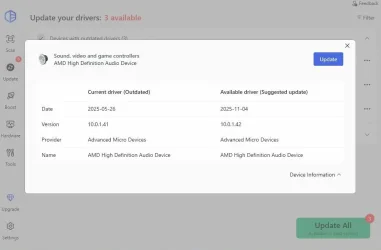
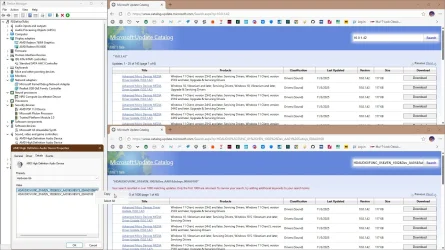
Driver Easy has not failed me yet, once it finds an outdated driver, you can just google it.
Using Device Hardware ID or looking for the driver version in Microsoft Update Catalog

capture_05222026_082009.webp capture_05222026_081947.webp

Its not like software, where a new version fixes bugs and improves the experience.
Actually, it is exactly like that, the same goes for BIOS, they fix performance issues, security vulnerabilities.
I am perplexed that people recommending updating Windows, recommend not to update drivers. :think:
 

My Computer

System One

  • OS
    Home26H2Can
    Computer type
    PC/Desktop
    CPU
    AMD Ryzen 5 8600G (07/24)
    Motherboard
    ASROCK B650M-HDV/M.2 (07/24) BIOS 4.21 AGESA ComboAM5 1.3.0.1 (04/26)
    Memory
    2x32GB Kingston FURY DDR5 5600 MHz CL36 @5200 CL36 (07/24)
    Graphics Card(s)
    ASROCK Radeon RX 6600 Challenger D 8G @48FPS (08/24)
    Sound Card
    Creative Sound BlasterX AE-5 Plus (05/24)
    Monitor(s) Displays
    24" Philips 24M1N3200ZS/00 (05/24)
    Screen Resolution
    1920×1080@165Hz via DP1.4
    Hard Drives
    Kingston KC3000 NVMe 2TB (05/24)
    ADATA XPG GAMMIX S11 Pro 512GB (07/19)
    PSU
    Seasonic Core GM 550 Gold (04/24)
    Case
    Fractal Design Define 7 Mini with 3x Noctua NF-P14s/12@555rpm (04/24)
    Cooling
    Noctua NH-U12S with Noctua NF-P12 (04/24)
    Keyboard
    HP Pavilion Wired Keyboard 300 (07/24) + Rabalux 76017 Parker (01/24)
    Mouse
    Logitech M330 Silent Plus (01/26)
    Internet Speed
    500/100 Mbps via RouterOS (05/21) & TCP Optimizer
    Browser
    Edge, Brave for YouTube, LibreWolf for FB
    Antivirus
    NextDNS blocking 1/3 Traffic
    Other Info
    Phone: Motorola Moto G86 (02/26)
    Backup: Hasleo Backup Suite (PreOS)
    Headphones: Sennheiser RS170 (09/10)
    Chair: Huzaro Force 4.4 Grey Mesh (05/24)
    Notifier: Xiaomi Mi Band 9 Milanese (10/24)
    FlexCore USB-C 3.2 Gen 1 (M) to LAN (F) (08/25)
The 3 instances in Device Manager all have yellow "marks" beside them.....
Do I assume those item do NOT work.....

They work.

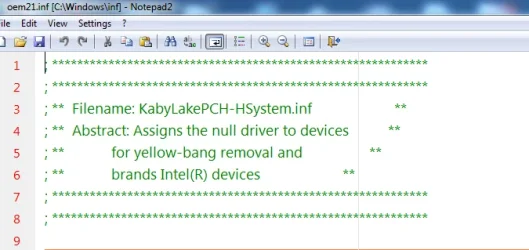
To get rid of the yellow bangs you can use the little thing below.


It should put in the matching inf files. Wont make any difference to performance all the Intel chipset "drivers" do is make device manager look pretty, There are no .sys files, there are no drivers just text files.

you dont need SDI if its just those few infs.
 
Last edited:

My Computers

System One System Two

  • OS
    Win7,Win11
    Computer type
    PC/Desktop
    CPU
    i7-9700
    Motherboard
    gigabyte b365m ds3h
    Memory
    2x16gb 3600mhz
    Monitor(s) Displays
    benq gw2480
    PSU
    bequiet pure power 11 400CM
    Cooling
    cryorig m9i
  • Operating System
    win7,win11
    Computer type
    PC/Desktop
    CPU
    i5-8400
    Motherboard
    gigabyte b365m ds3h
    Memory
    2x8gb 3200
    PSU
    xfx pro 450
The motherboard website has tested drivers for Windows 10.

None were tested for Windows 11.


Create a restore point then please install these two drivers from the motherboard website:


Intel(R) Management Engine Interface V11.0.0.1155 for Windows 10 64bit.(WHQL)
Version 11.0.0.1155

Intel Chipset V10.1.1.7 for Win10 32bit&64bit
Version 10.1.1.7


Intel(R) Management Engine Interface V11.0.0.1155 for Windows 10 64bit.(WHQL)
Version 11.0.0.1155
61.22 MB
2015/07/23
Intel(R) Management Engine Interface V11.0.0.1155 for Windows 10 64bit.(WHQL)


Intel Chipset V10.1.1.7 for Win10 32bit&64bit
Version 10.1.1.7
4.56 MB
2015/07/15
Intel Chipset V10.1.1.7 for Win10 32bit&64bit


Intel Chipset V10.1.1.7 for Win10 32bit&64bit
Version 10.1.1.7
4.56 MB
2015/07/15
Intel Chipset V10.1.1.7 for Win10 32bit&64bit
Windows 11 is Windows 10 with a different skin and some other differences. All drivers for Windows 10 64-bit should also work on Windows 11.
 

My Computers

System One System Two

  • OS
    Windows 11 Pro 23H2 (5699), 25H2 (8457)
    Computer type
    Laptop
    Manufacturer/Model
    Acer Extensa 5630EZ
    CPU
    Mobile DualCore Intel Core 2 Duo T7250, 2000 MHz
    Motherboard
    Acer Extensa 5630
    Memory
    4GB
    Graphics Card(s)
    Mobile Intel(R) GMA 4500M (Mobile 4 series)
    Sound Card
    Realtek ALC268 @ Intel 82801IB ICH9 - High Definition Audio Controller
    Monitor(s) Displays
    1
    Screen Resolution
    1280x800
    Hard Drives
    Samsung SSD 850 EVO 250GB SATA Device (250 GB, SATA-III)
    Internet Speed
    VDSL 50 Mbps
    Browser
    MICROSOFT EDGE
    Antivirus
    WINDOWS DEFENDER
    Other Info
    Legacy MBR installation, no TPM, no Secure Boot, no WDDM 2.0 graphics drivers, no SSE4.2, cannot get more unsupported ;) This is only my test laptop. I had installed Windows 11 here before upgrading my main PC. For my main PC I use everyday see my 2nd system specs.
  • Operating System
    Windows 11 Pro v25H2 (build 26200.8457)
    Computer type
    PC/Desktop
    Manufacturer/Model
    Custom-built PC
    CPU
    Intel Core-i7 3770 3.40GHz s1155 (3rd generation)
    Motherboard
    Asus P8H61 s1155 ATX
    Memory
    2x Kingston Hyper-X Blu 8GB DDR3-1600
    Graphics card(s)
    GIGABYTE GeForce RTX 3050 WINDFORCE OC V2 6GB (GV-N3050WF2OCV2-6GD)
    Sound Card
    Realtek HD audio (ALC887)
    Monitor(s) Displays
    Sony Bravia KDL-19L4000 19" LCD TV via VGA
    Screen Resolution
    1440x900 32-bit 60Hz
    Hard Drives
    WD Blue SA510 2.5 1000GB SSD as system disk, Western Digital Caviar Purple 4TB SATA III (WD40PURZ) as second
    PSU
    Thermaltake Litepower RGB 550W Full Wired
    Case
    SUPERCASE MIDI-TOWER
    Cooling
    Deepcool Gamma Archer CPU cooler, 1x 8cm fan at the back
    Keyboard
    Mitsumi 101-key PS/2
    Mouse
    Sunnyline OptiEye PS/2
    Internet Speed
    100Mbps
    Browser
    Microsoft Edge, Mozilla Firefox
    Antivirus
    Microsoft Windows Defender
    Other Info
    Legacy BIOS (MBR) installation, no TPM, no Secure Boot, WDDM 3.0 graphics drivers, WEI score 7.4
Driver Easy has not failed me yet, once it finds an outdated driver, you can just google it.
Using Device Hardware ID or looking for the driver version in Microsoft Update Catalog

View attachment 172237 View attachment 172238


Actually, it is exactly like that, the same goes for BIOS, they fix performance issues, security vulnerabilities.
I am perplexed that people recommending updating Windows, recommend not to update drivers. :think:
My own experience is BSOD and other issues if you upgrade the chipset drivers, let alone the BIOS, using Snappy or similar utility. At least install only the missing drivers (green text), avoid updating working drivers (blue text).
 

My Computers

System One System Two

  • OS
    Windows 11 Pro 23H2 (5699), 25H2 (8457)
    Computer type
    Laptop
    Manufacturer/Model
    Acer Extensa 5630EZ
    CPU
    Mobile DualCore Intel Core 2 Duo T7250, 2000 MHz
    Motherboard
    Acer Extensa 5630
    Memory
    4GB
    Graphics Card(s)
    Mobile Intel(R) GMA 4500M (Mobile 4 series)
    Sound Card
    Realtek ALC268 @ Intel 82801IB ICH9 - High Definition Audio Controller
    Monitor(s) Displays
    1
    Screen Resolution
    1280x800
    Hard Drives
    Samsung SSD 850 EVO 250GB SATA Device (250 GB, SATA-III)
    Internet Speed
    VDSL 50 Mbps
    Browser
    MICROSOFT EDGE
    Antivirus
    WINDOWS DEFENDER
    Other Info
    Legacy MBR installation, no TPM, no Secure Boot, no WDDM 2.0 graphics drivers, no SSE4.2, cannot get more unsupported ;) This is only my test laptop. I had installed Windows 11 here before upgrading my main PC. For my main PC I use everyday see my 2nd system specs.
  • Operating System
    Windows 11 Pro v25H2 (build 26200.8457)
    Computer type
    PC/Desktop
    Manufacturer/Model
    Custom-built PC
    CPU
    Intel Core-i7 3770 3.40GHz s1155 (3rd generation)
    Motherboard
    Asus P8H61 s1155 ATX
    Memory
    2x Kingston Hyper-X Blu 8GB DDR3-1600
    Graphics card(s)
    GIGABYTE GeForce RTX 3050 WINDFORCE OC V2 6GB (GV-N3050WF2OCV2-6GD)
    Sound Card
    Realtek HD audio (ALC887)
    Monitor(s) Displays
    Sony Bravia KDL-19L4000 19" LCD TV via VGA
    Screen Resolution
    1440x900 32-bit 60Hz
    Hard Drives
    WD Blue SA510 2.5 1000GB SSD as system disk, Western Digital Caviar Purple 4TB SATA III (WD40PURZ) as second
    PSU
    Thermaltake Litepower RGB 550W Full Wired
    Case
    SUPERCASE MIDI-TOWER
    Cooling
    Deepcool Gamma Archer CPU cooler, 1x 8cm fan at the back
    Keyboard
    Mitsumi 101-key PS/2
    Mouse
    Sunnyline OptiEye PS/2
    Internet Speed
    100Mbps
    Browser
    Microsoft Edge, Mozilla Firefox
    Antivirus
    Microsoft Windows Defender
    Other Info
    Legacy BIOS (MBR) installation, no TPM, no Secure Boot, WDDM 3.0 graphics drivers, WEI score 7.4
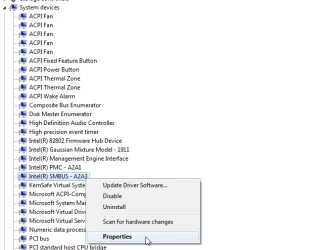
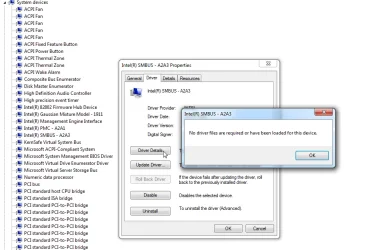
For example:

SMBUS-NULL1.webp


SMBUS-NULL3.webp

this is what the Intel inf does puts the description in device manager

SMBUS-NULL5.webp
 
Last edited:

My Computers

System One System Two

  • OS
    Win7,Win11
    Computer type
    PC/Desktop
    CPU
    i7-9700
    Motherboard
    gigabyte b365m ds3h
    Memory
    2x16gb 3600mhz
    Monitor(s) Displays
    benq gw2480
    PSU
    bequiet pure power 11 400CM
    Cooling
    cryorig m9i
  • Operating System
    win7,win11
    Computer type
    PC/Desktop
    CPU
    i5-8400
    Motherboard
    gigabyte b365m ds3h
    Memory
    2x8gb 3200
    PSU
    xfx pro 450
Like I said it is a motherboard component* and therefore you have to install the chipset drivers if it has no driver installed. Don't forget that the motherboard is where every other device is connected so avoid Windows Update or any driver tool. Manually download and install latest chipset drivers from motherboard (computer) manufacturer. This will eliminate the risk of BSOD, will maximize compatibility and even performance. I have seen it before, that's why I insist.

* According to Google AI:
The System Management Bus (SMBus) is a two-wire communication protocol used in computer motherboards and embedded systems to monitor and control hardware. It allows components—like temperature sensors, smart batteries, and cooling fans—to pass data to the processor without requiring individual control lines.

As you realize installing inappropriate drivers will compromise compatibility and risk a BSOD.
 

My Computers

System One System Two

  • OS
    Windows 11 Pro 23H2 (5699), 25H2 (8457)
    Computer type
    Laptop
    Manufacturer/Model
    Acer Extensa 5630EZ
    CPU
    Mobile DualCore Intel Core 2 Duo T7250, 2000 MHz
    Motherboard
    Acer Extensa 5630
    Memory
    4GB
    Graphics Card(s)
    Mobile Intel(R) GMA 4500M (Mobile 4 series)
    Sound Card
    Realtek ALC268 @ Intel 82801IB ICH9 - High Definition Audio Controller
    Monitor(s) Displays
    1
    Screen Resolution
    1280x800
    Hard Drives
    Samsung SSD 850 EVO 250GB SATA Device (250 GB, SATA-III)
    Internet Speed
    VDSL 50 Mbps
    Browser
    MICROSOFT EDGE
    Antivirus
    WINDOWS DEFENDER
    Other Info
    Legacy MBR installation, no TPM, no Secure Boot, no WDDM 2.0 graphics drivers, no SSE4.2, cannot get more unsupported ;) This is only my test laptop. I had installed Windows 11 here before upgrading my main PC. For my main PC I use everyday see my 2nd system specs.
  • Operating System
    Windows 11 Pro v25H2 (build 26200.8457)
    Computer type
    PC/Desktop
    Manufacturer/Model
    Custom-built PC
    CPU
    Intel Core-i7 3770 3.40GHz s1155 (3rd generation)
    Motherboard
    Asus P8H61 s1155 ATX
    Memory
    2x Kingston Hyper-X Blu 8GB DDR3-1600
    Graphics card(s)
    GIGABYTE GeForce RTX 3050 WINDFORCE OC V2 6GB (GV-N3050WF2OCV2-6GD)
    Sound Card
    Realtek HD audio (ALC887)
    Monitor(s) Displays
    Sony Bravia KDL-19L4000 19" LCD TV via VGA
    Screen Resolution
    1440x900 32-bit 60Hz
    Hard Drives
    WD Blue SA510 2.5 1000GB SSD as system disk, Western Digital Caviar Purple 4TB SATA III (WD40PURZ) as second
    PSU
    Thermaltake Litepower RGB 550W Full Wired
    Case
    SUPERCASE MIDI-TOWER
    Cooling
    Deepcool Gamma Archer CPU cooler, 1x 8cm fan at the back
    Keyboard
    Mitsumi 101-key PS/2
    Mouse
    Sunnyline OptiEye PS/2
    Internet Speed
    100Mbps
    Browser
    Microsoft Edge, Mozilla Firefox
    Antivirus
    Microsoft Windows Defender
    Other Info
    Legacy BIOS (MBR) installation, no TPM, no Secure Boot, WDDM 3.0 graphics drivers, WEI score 7.4
Back
Top Bottom