
Silencious
Well-known member
- Local time
- 8:19 PM
- Posts
- 23
- OS
- windows 11
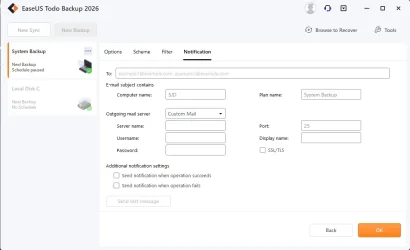
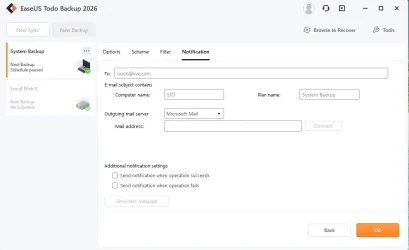
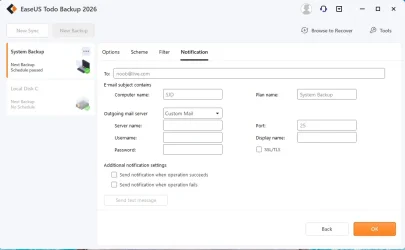
Hi guys, can you help? I wish to use the EaseUS Todo Backup notification email option to let me know if the scheduled backup was a success or failure. To do that, I need to fill in the sections shown in the picture. Could someone help me with what I need to complete?
At the top, the "To:" field is obviously my email address, say, [email protected]. The computer name and plan name are included.
The outgoing mail server has three options in the dropdown box (Google Mail, Microsoft Mail, and custom mail), so do I use Microsoft Mail, or do I choose custom mail, which gives more options? Either way, I'm confused.
The port number (which I'm guessing is 993) and username, which will be my email address (I may be wrong) or just my name. The password would be my Microsoft password; again, I'm assuming as much. The display name must be EaseUS Todo Backup. For SSL/TLS, do I leave it blank or tick it for encryption? If someone can suggest which option is best and if it is custom, let me know what I'm supposed to complete in the boxes; I would really appreciate it. Thank you!
At the top, the "To:" field is obviously my email address, say, [email protected]. The computer name and plan name are included.
The outgoing mail server has three options in the dropdown box (Google Mail, Microsoft Mail, and custom mail), so do I use Microsoft Mail, or do I choose custom mail, which gives more options? Either way, I'm confused.
Attachments
My Computer
At a glance
windows 11
- OS
- windows 11






