Solved Edge won't save cookies after close.


LAPIII

Well-known member
Local time
12:34 PM
Posts
70
OS
Windows 11
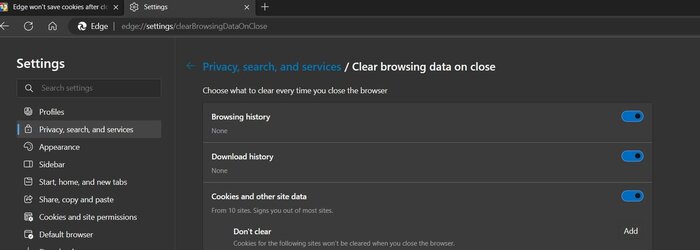
I have edge clear cookies upon closing and I add cookies to the following Allow list, so I don't know what I'm doing wrong (I'm not blocking third-party cookies):


R50qriSVaz.jpg
 
Windows Build/Version
Windows 11 Pro 10.0.22621

My Computer My Computer

At a glance

Windows 11AMD Ryzen 7 5700U16.0GB Dual-Channel Unknown @ 1596MHz (22-22-...512MB ATI AMD Radeon Graphics (HP)
OS
Windows 11
Computer type
Laptop
CPU
AMD Ryzen 7 5700U
Motherboard
HP 887A (FP6)
Memory
16.0GB Dual-Channel Unknown @ 1596MHz (22-22-22-52)
Graphics Card(s)
512MB ATI AMD Radeon Graphics (HP)
Monitor(s) Displays
Generic PnP Monitor
Screen Resolution
1920x1080
Hard Drives
238GB KBG40ZNV256G KIOXIA (Unknown (SSD))
Mouse
Razer Naga Pro
Internet Speed
424.4 Mbps download 230.5 Mbps upload
Browser
Microsoft Edge
Antivirus
Bitdefender Total Security
Need to also check settings for Privacy, search and services. There is options there to clear data (incl. cookies) on exit.
 

My Computers My Computers

  • At a glance

    Windows 11 2xH2 (latest update ... forever anal)Intel i5-124008GBNVIDIA GeForce GT730
    OS
    Windows 11 2xH2 (latest update ... forever anal)
    Computer type
    PC/Desktop
    Manufacturer/Model
    HP Slim S01
    CPU
    Intel i5-12400
    Memory
    8GB
    Graphics Card(s)
    NVIDIA GeForce GT730
    Sound Card
    OOBE
    Monitor(s) Displays
    Acer 32"
    Screen Resolution
    1920x1080
    Hard Drives
    512GB KIOXIA NVMe
    1TB SATA SSD
    PSU
    OOBE
    Case
    OOBE
    Cooling
    OOBE
    Keyboard
    BT
    Mouse
    BT
    Browser
    Brave FFox Chrome Opera
    Antivirus
    KIS
  • At a glance

    Windows 11 Pro 2xH2 (latest update ... 4ever ...i7-1165G7 @ 2.80GHzIntel Iris Xe Graphics
    Operating System
    Windows 11 Pro 2xH2 (latest update ... 4ever anal)
    Computer type
    Laptop
    Manufacturer/Model
    HP Pavillion 15
    CPU
    i7-1165G7 @ 2.80GHz
    Graphics card(s)
    Intel Iris Xe Graphics
    Hard Drives
    Samsung NVMe 512GB
    + numerous/multiple SSD Type C USB enclosures
    Internet Speed
    NBN FTTN 50
    Browser
    Brave
    Antivirus
    KIS
If I add a cookie, using the Add button, then it will still be cleared after close.
 

Attachments

  • Settings_and_1_more_page_-_Personal_-_Microsoft​_E 16_02_23 09⦂16⦂16⦂474 PM.jpg
    Settings_and_1_more_page_-_Personal_-_Microsoft​_E 16_02_23 09⦂16⦂16⦂474 PM.jpg
    50.5 KB · Views: 4

My Computer My Computer

At a glance

Windows 11AMD Ryzen 7 5700U16.0GB Dual-Channel Unknown @ 1596MHz (22-22-...512MB ATI AMD Radeon Graphics (HP)
OS
Windows 11
Computer type
Laptop
CPU
AMD Ryzen 7 5700U
Motherboard
HP 887A (FP6)
Memory
16.0GB Dual-Channel Unknown @ 1596MHz (22-22-22-52)
Graphics Card(s)
512MB ATI AMD Radeon Graphics (HP)
Monitor(s) Displays
Generic PnP Monitor
Screen Resolution
1920x1080
Hard Drives
238GB KBG40ZNV256G KIOXIA (Unknown (SSD))
Mouse
Razer Naga Pro
Internet Speed
424.4 Mbps download 230.5 Mbps upload
Browser
Microsoft Edge
Antivirus
Bitdefender Total Security

If I add a cookie, using the Add button, then it will still be cleared after close.
Add a "cookie", or add a site (with/out cookies) ?
 

My Computers My Computers

  • At a glance

    Windows 11 2xH2 (latest update ... forever anal)Intel i5-124008GBNVIDIA GeForce GT730
    OS
    Windows 11 2xH2 (latest update ... forever anal)
    Computer type
    PC/Desktop
    Manufacturer/Model
    HP Slim S01
    CPU
    Intel i5-12400
    Memory
    8GB
    Graphics Card(s)
    NVIDIA GeForce GT730
    Sound Card
    OOBE
    Monitor(s) Displays
    Acer 32"
    Screen Resolution
    1920x1080
    Hard Drives
    512GB KIOXIA NVMe
    1TB SATA SSD
    PSU
    OOBE
    Case
    OOBE
    Cooling
    OOBE
    Keyboard
    BT
    Mouse
    BT
    Browser
    Brave FFox Chrome Opera
    Antivirus
    KIS
  • At a glance

    Windows 11 Pro 2xH2 (latest update ... 4ever ...i7-1165G7 @ 2.80GHzIntel Iris Xe Graphics
    Operating System
    Windows 11 Pro 2xH2 (latest update ... 4ever anal)
    Computer type
    Laptop
    Manufacturer/Model
    HP Pavillion 15
    CPU
    i7-1165G7 @ 2.80GHz
    Graphics card(s)
    Intel Iris Xe Graphics
    Hard Drives
    Samsung NVMe 512GB
    + numerous/multiple SSD Type C USB enclosures
    Internet Speed
    NBN FTTN 50
    Browser
    Brave
    Antivirus
    KIS
I added a cookie and then I cleared all cookies. Even though the cookie remained, it disappeared upon restarting the browser. Did I misunderstand you?
 

My Computer My Computer

At a glance

Windows 11AMD Ryzen 7 5700U16.0GB Dual-Channel Unknown @ 1596MHz (22-22-...512MB ATI AMD Radeon Graphics (HP)
OS
Windows 11
Computer type
Laptop
CPU
AMD Ryzen 7 5700U
Motherboard
HP 887A (FP6)
Memory
16.0GB Dual-Channel Unknown @ 1596MHz (22-22-22-52)
Graphics Card(s)
512MB ATI AMD Radeon Graphics (HP)
Monitor(s) Displays
Generic PnP Monitor
Screen Resolution
1920x1080
Hard Drives
238GB KBG40ZNV256G KIOXIA (Unknown (SSD))
Mouse
Razer Naga Pro
Internet Speed
424.4 Mbps download 230.5 Mbps upload
Browser
Microsoft Edge
Antivirus
Bitdefender Total Security

I added a cookie and then I cleared all cookies. Even though the cookie remained, it disappeared upon restarting the browser. Did I misunderstand you?
To me it appears you are defeating your own purpose. Closing the browser seems to be acting like RAM/Random Access Memory which clears everything in it when restarting Windows or shutting down, gives a fresh start when next opened.
 

My Computers My Computers

  • At a glance

    Win11 Pro RTM Version 24H2 Build 26100.4202Intel Core i5 11th Gen. 2.40GHz12GB
    OS
    Win11 Pro RTM Version 24H2 Build 26100.4202
    Computer type
    Laptop
    Manufacturer/Model
    Dell Vostro 3400
    CPU
    Intel Core i5 11th Gen. 2.40GHz
    Memory
    12GB
    Hard Drives
    256GB SSD NVMe M.2
  • At a glance

    Win11 Pro RTM Version 24H2 Build 26100.4202Intel Core i5 10th Gen. 2.90GHz16GBOnboard, no VGA, using a DisplayPort-to-VGA a...
    Operating System
    Win11 Pro RTM Version 24H2 Build 26100.4202
    Computer type
    PC/Desktop
    Manufacturer/Model
    Dell Vostro 5890
    CPU
    Intel Core i5 10th Gen. 2.90GHz
    Memory
    16GB
    Graphics card(s)
    Onboard, no VGA, using a DisplayPort-to-VGA adapter
    Monitor(s) Displays
    24" Dell
    Hard Drives
    512GB SSD NVMe, 4TB Seagate HDD
    Browser
    Firefox, Edge
    Antivirus
    Windows Defender/Microsoft Security
I had been able to keep certain cookies by disabling Allow sites to save and read cookie data (recommended), but when I tried to sign into Eleven Forum I got:

Oops! We ran into some problems.
Cookies are required to use this site. You must accept them to continue using the site.
 

My Computer My Computer

At a glance

Windows 11AMD Ryzen 7 5700U16.0GB Dual-Channel Unknown @ 1596MHz (22-22-...512MB ATI AMD Radeon Graphics (HP)
OS
Windows 11
Computer type
Laptop
CPU
AMD Ryzen 7 5700U
Motherboard
HP 887A (FP6)
Memory
16.0GB Dual-Channel Unknown @ 1596MHz (22-22-22-52)
Graphics Card(s)
512MB ATI AMD Radeon Graphics (HP)
Monitor(s) Displays
Generic PnP Monitor
Screen Resolution
1920x1080
Hard Drives
238GB KBG40ZNV256G KIOXIA (Unknown (SSD))
Mouse
Razer Naga Pro
Internet Speed
424.4 Mbps download 230.5 Mbps upload
Browser
Microsoft Edge
Antivirus
Bitdefender Total Security

Since we subscribers don't have to pay to use the site, and most other Web sites, it relies upon 'guests' reading advertising which to my knowledge is linked to the cookies which can provide the income to setup and maintain a site. It normally is a small inconvenience to click the acceptance button to continue to the full site, user's choice.
 

My Computers My Computers

  • At a glance

    Win11 Pro RTM Version 24H2 Build 26100.4202Intel Core i5 11th Gen. 2.40GHz12GB
    OS
    Win11 Pro RTM Version 24H2 Build 26100.4202
    Computer type
    Laptop
    Manufacturer/Model
    Dell Vostro 3400
    CPU
    Intel Core i5 11th Gen. 2.40GHz
    Memory
    12GB
    Hard Drives
    256GB SSD NVMe M.2
  • At a glance

    Win11 Pro RTM Version 24H2 Build 26100.4202Intel Core i5 10th Gen. 2.90GHz16GBOnboard, no VGA, using a DisplayPort-to-VGA a...
    Operating System
    Win11 Pro RTM Version 24H2 Build 26100.4202
    Computer type
    PC/Desktop
    Manufacturer/Model
    Dell Vostro 5890
    CPU
    Intel Core i5 10th Gen. 2.90GHz
    Memory
    16GB
    Graphics card(s)
    Onboard, no VGA, using a DisplayPort-to-VGA adapter
    Monitor(s) Displays
    24" Dell
    Hard Drives
    512GB SSD NVMe, 4TB Seagate HDD
    Browser
    Firefox, Edge
    Antivirus
    Windows Defender/Microsoft Security
Brave now has a default setting at installation to remove cookie acceptance messages (I think it just auto accepts the basic/required cookies and not the tracking/advertising ones) for any web site that asks. So, doesn't matter whether the site asks or not, the user never sees the request and Brave takes care of it.
 

My Computers My Computers

  • At a glance

    Windows 11 2xH2 (latest update ... forever anal)Intel i5-124008GBNVIDIA GeForce GT730
    OS
    Windows 11 2xH2 (latest update ... forever anal)
    Computer type
    PC/Desktop
    Manufacturer/Model
    HP Slim S01
    CPU
    Intel i5-12400
    Memory
    8GB
    Graphics Card(s)
    NVIDIA GeForce GT730
    Sound Card
    OOBE
    Monitor(s) Displays
    Acer 32"
    Screen Resolution
    1920x1080
    Hard Drives
    512GB KIOXIA NVMe
    1TB SATA SSD
    PSU
    OOBE
    Case
    OOBE
    Cooling
    OOBE
    Keyboard
    BT
    Mouse
    BT
    Browser
    Brave FFox Chrome Opera
    Antivirus
    KIS
  • At a glance

    Windows 11 Pro 2xH2 (latest update ... 4ever ...i7-1165G7 @ 2.80GHzIntel Iris Xe Graphics
    Operating System
    Windows 11 Pro 2xH2 (latest update ... 4ever anal)
    Computer type
    Laptop
    Manufacturer/Model
    HP Pavillion 15
    CPU
    i7-1165G7 @ 2.80GHz
    Graphics card(s)
    Intel Iris Xe Graphics
    Hard Drives
    Samsung NVMe 512GB
    + numerous/multiple SSD Type C USB enclosures
    Internet Speed
    NBN FTTN 50
    Browser
    Brave
    Antivirus
    KIS
I think I found my own solution to my problem. At edge://settings/clearBrowsingDataOnClose I had disabled Cached images and files and so while enabled Cookies and other site data with added cookies to Don't clear, I can now close Edge while keeping the cookies.
 

My Computer My Computer

At a glance

Windows 11AMD Ryzen 7 5700U16.0GB Dual-Channel Unknown @ 1596MHz (22-22-...512MB ATI AMD Radeon Graphics (HP)
OS
Windows 11
Computer type
Laptop
CPU
AMD Ryzen 7 5700U
Motherboard
HP 887A (FP6)
Memory
16.0GB Dual-Channel Unknown @ 1596MHz (22-22-22-52)
Graphics Card(s)
512MB ATI AMD Radeon Graphics (HP)
Monitor(s) Displays
Generic PnP Monitor
Screen Resolution
1920x1080
Hard Drives
238GB KBG40ZNV256G KIOXIA (Unknown (SSD))
Mouse
Razer Naga Pro
Internet Speed
424.4 Mbps download 230.5 Mbps upload
Browser
Microsoft Edge
Antivirus
Bitdefender Total Security

This doesn't work too well unfortunately, Edge still has these bugs to work out. I'll just allow all cookies and not delete them on exit.
 
Last edited:

My Computer My Computer

At a glance

Windows 11AMD Ryzen 7 5700U16.0GB Dual-Channel Unknown @ 1596MHz (22-22-...512MB ATI AMD Radeon Graphics (HP)
OS
Windows 11
Computer type
Laptop
CPU
AMD Ryzen 7 5700U
Motherboard
HP 887A (FP6)
Memory
16.0GB Dual-Channel Unknown @ 1596MHz (22-22-22-52)
Graphics Card(s)
512MB ATI AMD Radeon Graphics (HP)
Monitor(s) Displays
Generic PnP Monitor
Screen Resolution
1920x1080
Hard Drives
238GB KBG40ZNV256G KIOXIA (Unknown (SSD))
Mouse
Razer Naga Pro
Internet Speed
424.4 Mbps download 230.5 Mbps upload
Browser
Microsoft Edge
Antivirus
Bitdefender Total Security

An easy, simple solution to this would be to download CCleaner (Portable, Free, Builds) and just use the Cookies saver function (Options, Cookies, Cookies to keep). Moving your desired Edge cookies from the left column to the right column will (well, it's supposed to) keep your cookies for you. You don't need to use any other function of CCleaner if you don't want to. Just open it, manage your cookies, and close it.
 

My Computers My Computers

  • At a glance

    11 Pro 24H2 26100.2454i7-9700 @ 3.00GHz32GBDDR4 @ 2666MHzIntel HD 630 Graphics onboard
    OS
    11 Pro 24H2 26100.2454
    Computer type
    PC/Desktop
    Manufacturer/Model
    Lenovo ThinkCentre M920S SFF
    CPU
    i7-9700 @ 3.00GHz
    Motherboard
    Lenovo 3132
    Memory
    32GBDDR4 @ 2666MHz
    Graphics Card(s)
    Intel HD 630 Graphics onboard
    Sound Card
    Realtek HD Audio
    Monitor(s) Displays
    LG E2442
    Screen Resolution
    1920x1080
    Hard Drives
    1 x Samsung 970 EVO PLUS 500GB NVMe SSD, 1 x WD_BLACK SN770
    250GB NVMe SSD (OS and programs), 1 x WD_BLACK SN770
    500GB NVMe SSD (Data)
    Case
    Lenovo SFF
    Keyboard
    Cherry Stream TKL JK-8600US-2 Wired
    Mouse
    LogiTech M510 wireless
    Internet Speed
    Fast (for fixed wireless!)
    Browser
    Chrome, sometimes Firefox
    Antivirus
    Malwarebytes Premium & Defender (working together beautifully!)
  • At a glance

    11 Pro 24H2 26100.2454i5-8400 @ 2.80GHz32GB DDR4 @ 2600MHzIntel HD 630 Graphics onboard
    Operating System
    11 Pro 24H2 26100.2454
    Computer type
    PC/Desktop
    Manufacturer/Model
    Lenovo ThinkCentre M920S SFF
    CPU
    i5-8400 @ 2.80GHz
    Motherboard
    Lenovo 3132
    Memory
    32GB DDR4 @ 2600MHz
    Graphics card(s)
    Intel HD 630 Graphics onboard
    Sound Card
    Realtek High Definition Audio onboard
    Monitor(s) Displays
    LG FULL HD (1920x1080@59Hz)
    Screen Resolution
    1920 x 1080
    Hard Drives
    1 x Samsung 970 EVO PLUS NVMe; 1 x Samsung 980 NVMe SSD
    Case
    Lenovo Think Centre SFF
    Keyboard
    Cherry Stream TKL JK-8600US-2 Wired
    Mouse
    LogiTech M510 wireless
    Internet Speed
    Fast (for fixed wireless!)
    Browser
    Chrome
    Antivirus
    Malwarebytes Premium and MS Defender, beautiful together

Latest Support Threads

Back
Top Bottom