Enable dark wallpaper with registry key


DMD

Well-known member
Member
Local time
1:06 PM
Posts
218
OS
W11
Good morning
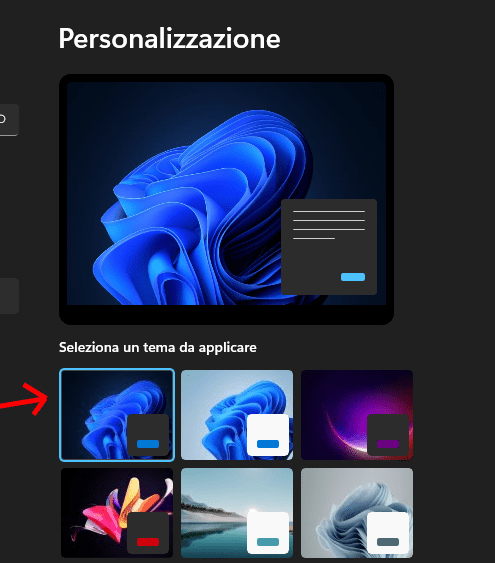
I ask how you can customize the secure theme by enabling the dark wallpaper via the registry key, which I would like to insert in the iso in order to have it already active after installation.
thank you
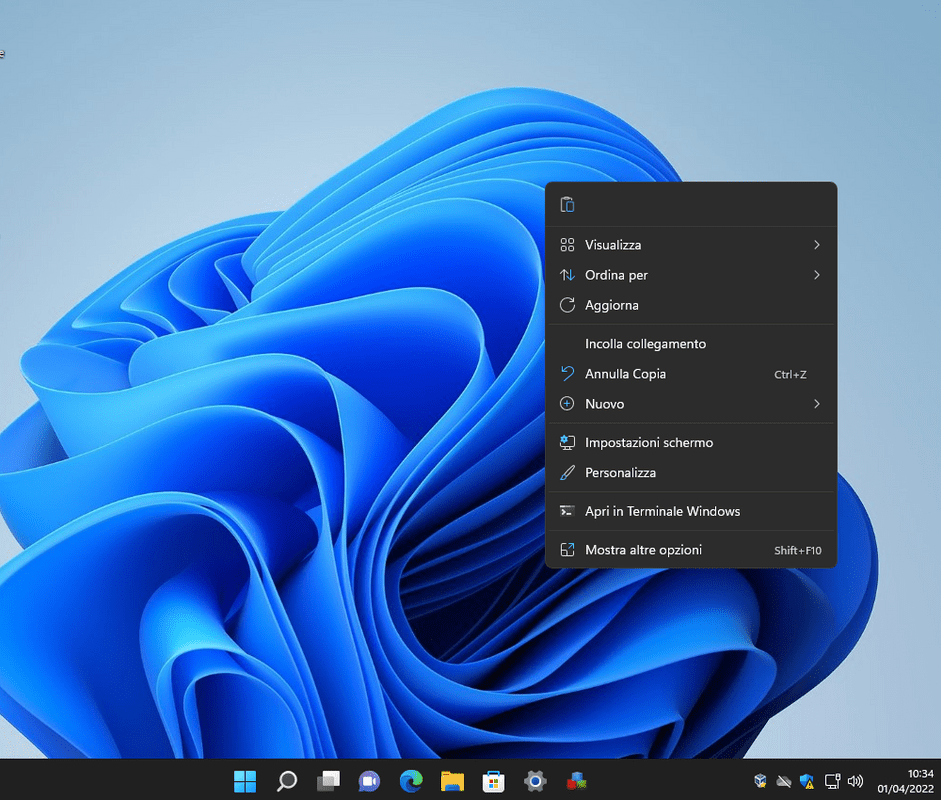
Screenshot-001.png
 

My Computer My Computer

At a glance

W11CPU AMD Ryzen 9 7950XG.Skill Flare X5 32GB Kit DDR5-6000 CL32 (F5-...
OS
W11
Computer type
PC/Desktop
CPU
CPU AMD Ryzen 9 7950X
Motherboard
ASUS ROG Strix X670E-F Gaming WiFi
Memory
G.Skill Flare X5 32GB Kit DDR5-6000 CL32 (F5-6000J3238F16GX2-FX5)
Monitor(s) Displays
LG E2381VR
Screen Resolution
1920x1080
Hard Drives
1x Samsung Memorie MZ-V8P1T0B 980 PRO SSD 1TB
2x Western Digital WD Red Nas 4TB
PSU
SEASONIC FOCUS PX-850 Plus Platinum
Case
Corsair 4000D Airflow
Cooling
ARCTIC Liquid Freezer II 280 A-RGB
Keyboard
Logitech G510
Mouse
Logitech G502 HERO
Browser
Firefox
Antivirus
Avg free
Other Info
Download: 90 Mbps
Upload: 20Mbps
You can use attached batch script to enable dark or light theme to do that execute the batch script and type N letter to enable dark theme.
 

Attachments

My Computer My Computer

At a glance

Windows 11AMD Ryzen 7 5700GMicron Technology DDR4-3200 16GBNVIDIA GeForce RTX 3060
OS
Windows 11
Computer type
PC/Desktop
Manufacturer/Model
HP Pavilion
CPU
AMD Ryzen 7 5700G
Motherboard
Erica6
Memory
Micron Technology DDR4-3200 16GB
Graphics Card(s)
NVIDIA GeForce RTX 3060
Sound Card
Realtek ALC671
Monitor(s) Displays
Samsung SyncMaster U28E590
Screen Resolution
3840 x 2160
Hard Drives
SAMSUNG MZVLQ1T0HALB-000H1
Thank you for the script, but the problem that it does not replace the light wallpaper with the dark one

Screenshot-002.png
 

My Computer My Computer

At a glance

W11CPU AMD Ryzen 9 7950XG.Skill Flare X5 32GB Kit DDR5-6000 CL32 (F5-...
OS
W11
Computer type
PC/Desktop
CPU
CPU AMD Ryzen 9 7950X
Motherboard
ASUS ROG Strix X670E-F Gaming WiFi
Memory
G.Skill Flare X5 32GB Kit DDR5-6000 CL32 (F5-6000J3238F16GX2-FX5)
Monitor(s) Displays
LG E2381VR
Screen Resolution
1920x1080
Hard Drives
1x Samsung Memorie MZ-V8P1T0B 980 PRO SSD 1TB
2x Western Digital WD Red Nas 4TB
PSU
SEASONIC FOCUS PX-850 Plus Platinum
Case
Corsair 4000D Airflow
Cooling
ARCTIC Liquid Freezer II 280 A-RGB
Keyboard
Logitech G510
Mouse
Logitech G502 HERO
Browser
Firefox
Antivirus
Avg free
Other Info
Download: 90 Mbps
Upload: 20Mbps
See you can change it from below registry value:

Code:
HKEY_USERS\S-1-5-21-1250897756-1007707114-1137306247-1001\Control Panel\Desktop\WallPaper
 

My Computer My Computer

At a glance

Windows 11AMD Ryzen 7 5700GMicron Technology DDR4-3200 16GBNVIDIA GeForce RTX 3060
OS
Windows 11
Computer type
PC/Desktop
Manufacturer/Model
HP Pavilion
CPU
AMD Ryzen 7 5700G
Motherboard
Erica6
Memory
Micron Technology DDR4-3200 16GB
Graphics Card(s)
NVIDIA GeForce RTX 3060
Sound Card
Realtek ALC671
Monitor(s) Displays
Samsung SyncMaster U28E590
Screen Resolution
3840 x 2160
Hard Drives
SAMSUNG MZVLQ1T0HALB-000H1

My Computer My Computer

At a glance

Windows 11AMD Ryzen 7 5700GMicron Technology DDR4-3200 16GBNVIDIA GeForce RTX 3060
OS
Windows 11
Computer type
PC/Desktop
Manufacturer/Model
HP Pavilion
CPU
AMD Ryzen 7 5700G
Motherboard
Erica6
Memory
Micron Technology DDR4-3200 16GB
Graphics Card(s)
NVIDIA GeForce RTX 3060
Sound Card
Realtek ALC671
Monitor(s) Displays
Samsung SyncMaster U28E590
Screen Resolution
3840 x 2160
Hard Drives
SAMSUNG MZVLQ1T0HALB-000H1
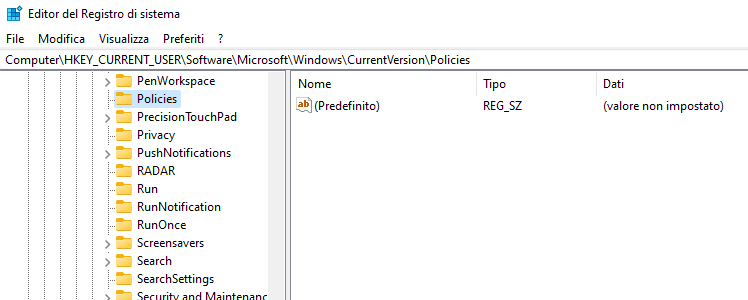
Unfortunately I can't find the System key in W11

Screenshot-003.png
 

My Computer My Computer

At a glance

W11CPU AMD Ryzen 9 7950XG.Skill Flare X5 32GB Kit DDR5-6000 CL32 (F5-...
OS
W11
Computer type
PC/Desktop
CPU
CPU AMD Ryzen 9 7950X
Motherboard
ASUS ROG Strix X670E-F Gaming WiFi
Memory
G.Skill Flare X5 32GB Kit DDR5-6000 CL32 (F5-6000J3238F16GX2-FX5)
Monitor(s) Displays
LG E2381VR
Screen Resolution
1920x1080
Hard Drives
1x Samsung Memorie MZ-V8P1T0B 980 PRO SSD 1TB
2x Western Digital WD Red Nas 4TB
PSU
SEASONIC FOCUS PX-850 Plus Platinum
Case
Corsair 4000D Airflow
Cooling
ARCTIC Liquid Freezer II 280 A-RGB
Keyboard
Logitech G510
Mouse
Logitech G502 HERO
Browser
Firefox
Antivirus
Avg free
Other Info
Download: 90 Mbps
Upload: 20Mbps

My Computer My Computer

At a glance

Windows 11AMD Ryzen 7 5700GMicron Technology DDR4-3200 16GBNVIDIA GeForce RTX 3060
OS
Windows 11
Computer type
PC/Desktop
Manufacturer/Model
HP Pavilion
CPU
AMD Ryzen 7 5700G
Motherboard
Erica6
Memory
Micron Technology DDR4-3200 16GB
Graphics Card(s)
NVIDIA GeForce RTX 3060
Sound Card
Realtek ALC671
Monitor(s) Displays
Samsung SyncMaster U28E590
Screen Resolution
3840 x 2160
Hard Drives
SAMSUNG MZVLQ1T0HALB-000H1
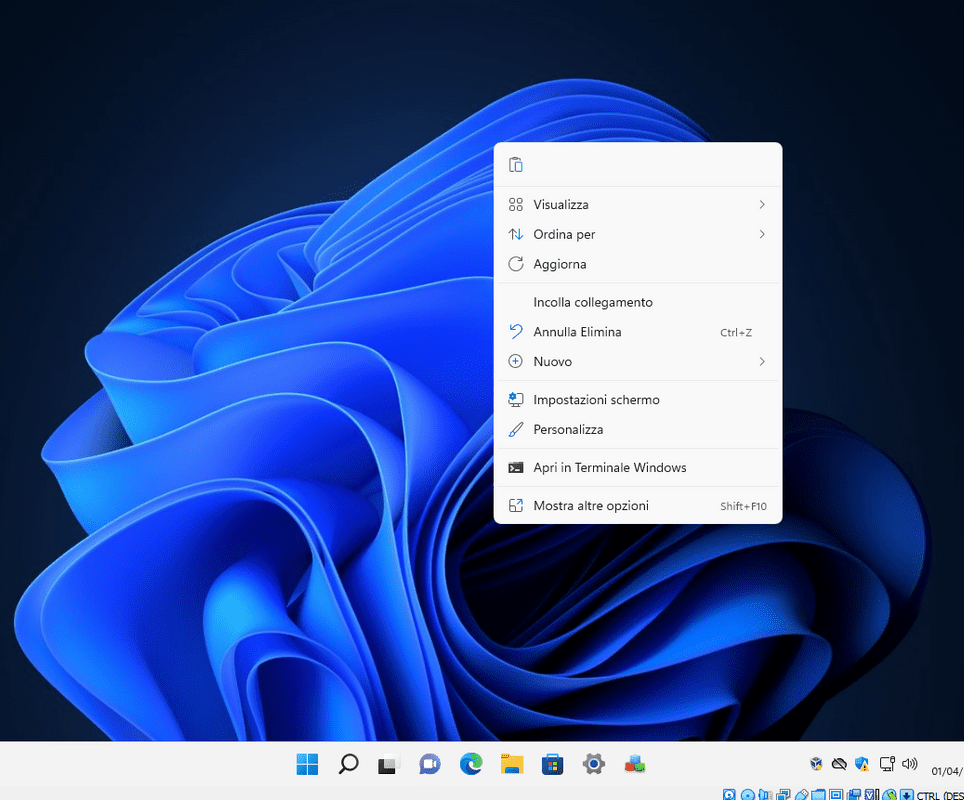
Thanks, it works. however, it does not allow you to change the background, I tried to set a light background, but it always remains the one set in the registry key.

Screenshot-004.png
 

My Computer My Computer

At a glance

W11CPU AMD Ryzen 9 7950XG.Skill Flare X5 32GB Kit DDR5-6000 CL32 (F5-...
OS
W11
Computer type
PC/Desktop
CPU
CPU AMD Ryzen 9 7950X
Motherboard
ASUS ROG Strix X670E-F Gaming WiFi
Memory
G.Skill Flare X5 32GB Kit DDR5-6000 CL32 (F5-6000J3238F16GX2-FX5)
Monitor(s) Displays
LG E2381VR
Screen Resolution
1920x1080
Hard Drives
1x Samsung Memorie MZ-V8P1T0B 980 PRO SSD 1TB
2x Western Digital WD Red Nas 4TB
PSU
SEASONIC FOCUS PX-850 Plus Platinum
Case
Corsair 4000D Airflow
Cooling
ARCTIC Liquid Freezer II 280 A-RGB
Keyboard
Logitech G510
Mouse
Logitech G502 HERO
Browser
Firefox
Antivirus
Avg free
Other Info
Download: 90 Mbps
Upload: 20Mbps
I don't know how to help you with that one.
 

My Computer My Computer

At a glance

Windows 11AMD Ryzen 7 5700GMicron Technology DDR4-3200 16GBNVIDIA GeForce RTX 3060
OS
Windows 11
Computer type
PC/Desktop
Manufacturer/Model
HP Pavilion
CPU
AMD Ryzen 7 5700G
Motherboard
Erica6
Memory
Micron Technology DDR4-3200 16GB
Graphics Card(s)
NVIDIA GeForce RTX 3060
Sound Card
Realtek ALC671
Monitor(s) Displays
Samsung SyncMaster U28E590
Screen Resolution
3840 x 2160
Hard Drives
SAMSUNG MZVLQ1T0HALB-000H1
I have found a combination of registry keys, after applying the keys you need to restart the desktop,
and you can change the background normally.

Dark Theme
Code:
Windows Registry Editor Version 5.00

[HKEY_CURRENT_USER\Control Panel\Desktop]
"WallPaper"="C:\\Windows\\web\\wallpaper\\Windows\\img19.jpg"

[HKEY_CURRENT_USER\Software\Microsoft\Windows\CurrentVersion\Themes]
"CurrentTheme"="C:\\Windows\\resources\\Themes\\dark.theme"
"ThemeMRU"="C:\\Windows\\resources\\Themes\\dark.theme;"

[HKEY_CURRENT_USER\Software\Microsoft\Windows\CurrentVersion\Themes\HighContrast]
"Pre-High Contrast Scheme"="C:\\Windows\\resources\\Themes\\dark.theme"

[HKEY_CURRENT_USER\Software\Microsoft\Windows\CurrentVersion\Themes\Personalize]
"AppsUseLightTheme"=dword:00000000
"SystemUsesLightTheme"=dword:00000000

Default Theme
Code:
Windows Registry Editor Version 5.00

[HKEY_CURRENT_USER\Control Panel\Desktop]
"WallPaper"="C:\\Windows\\web\\wallpaper\\Windows\\img0.jpg"

[HKEY_CURRENT_USER\Software\Microsoft\Windows\CurrentVersion\Themes]
"CurrentTheme"="C:\Windows\resources\Themes\aero.theme"
"ThemeMRU"="C:\Windows\resources\Themes\aero.theme;C:\Windows\resources\Themes\themeA.theme;C:\Windows\resources\Themes\dark.theme;"

[HKEY_CURRENT_USER\Software\Microsoft\Windows\CurrentVersion\Themes\HighContrast]
"Pre-High Contrast Scheme"="C:\Windows\resources\Themes\aero.theme"

[HKEY_CURRENT_USER\Software\Microsoft\Windows\CurrentVersion\Themes\Personalize]
"AppsUseLightTheme"=dword:00000001
"SystemUsesLightTheme"=dword:00000001
 

My Computer My Computer

At a glance

W11CPU AMD Ryzen 9 7950XG.Skill Flare X5 32GB Kit DDR5-6000 CL32 (F5-...
OS
W11
Computer type
PC/Desktop
CPU
CPU AMD Ryzen 9 7950X
Motherboard
ASUS ROG Strix X670E-F Gaming WiFi
Memory
G.Skill Flare X5 32GB Kit DDR5-6000 CL32 (F5-6000J3238F16GX2-FX5)
Monitor(s) Displays
LG E2381VR
Screen Resolution
1920x1080
Hard Drives
1x Samsung Memorie MZ-V8P1T0B 980 PRO SSD 1TB
2x Western Digital WD Red Nas 4TB
PSU
SEASONIC FOCUS PX-850 Plus Platinum
Case
Corsair 4000D Airflow
Cooling
ARCTIC Liquid Freezer II 280 A-RGB
Keyboard
Logitech G510
Mouse
Logitech G502 HERO
Browser
Firefox
Antivirus
Avg free
Other Info
Download: 90 Mbps
Upload: 20Mbps
Sorry to resume this discussion.
When I launch the registry key to enable the dark theme, and perform the explorer restart, it doesn't work, I have to necessarily restart the system.
Is there any way not to do this with registry key?
Thank you
 

My Computer My Computer

At a glance

W11CPU AMD Ryzen 9 7950XG.Skill Flare X5 32GB Kit DDR5-6000 CL32 (F5-...
OS
W11
Computer type
PC/Desktop
CPU
CPU AMD Ryzen 9 7950X
Motherboard
ASUS ROG Strix X670E-F Gaming WiFi
Memory
G.Skill Flare X5 32GB Kit DDR5-6000 CL32 (F5-6000J3238F16GX2-FX5)
Monitor(s) Displays
LG E2381VR
Screen Resolution
1920x1080
Hard Drives
1x Samsung Memorie MZ-V8P1T0B 980 PRO SSD 1TB
2x Western Digital WD Red Nas 4TB
PSU
SEASONIC FOCUS PX-850 Plus Platinum
Case
Corsair 4000D Airflow
Cooling
ARCTIC Liquid Freezer II 280 A-RGB
Keyboard
Logitech G510
Mouse
Logitech G502 HERO
Browser
Firefox
Antivirus
Avg free
Other Info
Download: 90 Mbps
Upload: 20Mbps
Sorry to resume this discussion.
When I launch the registry key to enable the dark theme, and perform the explorer restart, it doesn't work, I have to necessarily restart the system.
Is there any way not to do this with registry key?
Thank you
What if you had both light background regsitry and dark background on your desktop, then double click whichever you need?
 

My Computers My Computers

  • At a glance

    Windows 11 21H2AMD Ryzen 3 3100Corsair 8GB x 2 (16GB)Asus Nvidia Geforce GTX 1650 Super
    OS
    Windows 11 21H2
    Computer type
    PC/Desktop
    Manufacturer/Model
    Chillblast
    CPU
    AMD Ryzen 3 3100
    Motherboard
    Asus ROG Strix b450-f
    Memory
    Corsair 8GB x 2 (16GB)
    Graphics Card(s)
    Asus Nvidia Geforce GTX 1650 Super
    Monitor(s) Displays
    Dell 27" 1440p
    Screen Resolution
    1440p
    Hard Drives
    Seagate Barracuda 1TB
    256GB NVME Seagate Barracuda
    Browser
    Firefox / Edge
    Antivirus
    Windows Defender
  • At a glance

    Windows 8.1Amd E24GB
    Operating System
    Windows 8.1
    Computer type
    Laptop
    Manufacturer/Model
    HP
    CPU
    Amd E2
    Memory
    4GB
    Hard Drives
    128GB SSD
Yes it's true, you can do it conveniently from the settings which is very simple and straightforward and you immediately activate the Dark background. What I was wondering is how come instead with the registry key you need to reboot.
 

My Computer My Computer

At a glance

W11CPU AMD Ryzen 9 7950XG.Skill Flare X5 32GB Kit DDR5-6000 CL32 (F5-...
OS
W11
Computer type
PC/Desktop
CPU
CPU AMD Ryzen 9 7950X
Motherboard
ASUS ROG Strix X670E-F Gaming WiFi
Memory
G.Skill Flare X5 32GB Kit DDR5-6000 CL32 (F5-6000J3238F16GX2-FX5)
Monitor(s) Displays
LG E2381VR
Screen Resolution
1920x1080
Hard Drives
1x Samsung Memorie MZ-V8P1T0B 980 PRO SSD 1TB
2x Western Digital WD Red Nas 4TB
PSU
SEASONIC FOCUS PX-850 Plus Platinum
Case
Corsair 4000D Airflow
Cooling
ARCTIC Liquid Freezer II 280 A-RGB
Keyboard
Logitech G510
Mouse
Logitech G502 HERO
Browser
Firefox
Antivirus
Avg free
Other Info
Download: 90 Mbps
Upload: 20Mbps

I don't understand why you want to do these superficial changes with reg editor.
 

My Computers My Computers

  • At a glance

    Windows 11 ProAMD Ryzen 7 9800X3D32GB DDR5 CL30 Kingston FuryASUS Prime Radeon RX 9060 XT OC Edition 16GB
    OS
    Windows 11 Pro
    Computer type
    PC/Desktop
    CPU
    AMD Ryzen 7 9800X3D
    Motherboard
    MSI PRO B850-P Wifi
    Memory
    32GB DDR5 CL30 Kingston Fury
    Graphics Card(s)
    ASUS Prime Radeon RX 9060 XT OC Edition 16GB
    Monitor(s) Displays
    LG Ultrawide 34" 1440p+ MSI 27" 4K UHD
    Screen Resolution
    3440x1440
    Hard Drives
    Main Boot Drive : 512GB Adata XPG RGB Gen3x4 NVMe M.2 SSD
    PSU
    EVGA 750 Watts 80+ Gold
    Case
    Deepcool Genome II
    Cooling
    Thermalright Burst Assassin 120
    Internet Speed
    FTTH 3Gbps
    Browser
    Chrome
    Antivirus
    "Moderna"
  • At a glance

    Windows 11 Proi7-4790K16GB Corsair Vengeance ProMSI R9 290
    Operating System
    Windows 11 Pro
    Computer type
    PC/Desktop
    CPU
    i7-4790K
    Motherboard
    ASRock Xtreme6 Z97
    Memory
    16GB Corsair Vengeance Pro
    Graphics card(s)
    MSI R9 290
    Monitor(s) Displays
    LG Ultrawide 34"
    Screen Resolution
    3440x1440
    Hard Drives
    500GB Adata SSD (OS Only)
    PSU
    Thermaltake 475 Watts 80 Bronze
    Case
    Thermaltake Commander I Snow Edition
    Cooling
    Deep Cool Archer Air Cooler
    Keyboard
    Armageddon MKA-5R RGB-Hornet
    Mouse
    Logitech G402
    Internet Speed
    1Gbps
    Browser
    Chrome
    Antivirus
    Moderna :)
No I don't want to do that.
It's just to understand why the registry key action requires a reboot instead the direct command from settings is not needed.
 

My Computer My Computer

At a glance

W11CPU AMD Ryzen 9 7950XG.Skill Flare X5 32GB Kit DDR5-6000 CL32 (F5-...
OS
W11
Computer type
PC/Desktop
CPU
CPU AMD Ryzen 9 7950X
Motherboard
ASUS ROG Strix X670E-F Gaming WiFi
Memory
G.Skill Flare X5 32GB Kit DDR5-6000 CL32 (F5-6000J3238F16GX2-FX5)
Monitor(s) Displays
LG E2381VR
Screen Resolution
1920x1080
Hard Drives
1x Samsung Memorie MZ-V8P1T0B 980 PRO SSD 1TB
2x Western Digital WD Red Nas 4TB
PSU
SEASONIC FOCUS PX-850 Plus Platinum
Case
Corsair 4000D Airflow
Cooling
ARCTIC Liquid Freezer II 280 A-RGB
Keyboard
Logitech G510
Mouse
Logitech G502 HERO
Browser
Firefox
Antivirus
Avg free
Other Info
Download: 90 Mbps
Upload: 20Mbps

As an alternative, you could consider creating your own desktop themepack. I use one in combination with a batch file that tweaks all my Windows settings.

So, my workflow when setting up a new system looks like this:

1) Install Windows fully automated via an unattended install file.

2) After Windows is installed, plug in a thumb drive that has my customizations including a desktop themepack.

3) Run the batch file. That one batch file installs ALL of the drivers for the system, customizes many settings within Windows, and applies the themepack.

At that point, Windows is fully configured for me.
 

My Computers My Computers

  • At a glance

    Win11 Pro 26H2 (Release Preview)Intel i7-14650HX32 GBNo GPU - Built-in Intel Graphics
    OS
    Win11 Pro 26H2 (Release Preview)
    Computer type
    PC/Desktop
    Manufacturer/Model
    Acemagic Matrix M5
    CPU
    Intel i7-14650HX
    Memory
    32 GB
    Graphics Card(s)
    No GPU - Built-in Intel Graphics
    Sound Card
    Integrated
    Monitor(s) Displays
    Varies as machine will often be moved to locations with different monitors
    Screen Resolution
    Varies
    Hard Drives
    1 x 1TB Gen 4 NVMe SSD
    PSU
    120W Power Brick
    Keyboard
    Corsair K70 Max RGB Magnetic Keyboard
    Mouse
    Logitech MX Master 3
    Internet Speed
    1Gb Up / 1 Gb Down
    Browser
    Edge
    Antivirus
    Windows Defender
  • At a glance

    Win11 Pro 26H2 (Release Preview)Intel i7-1255U16 GBIntel Iris Xe Graphics
    Operating System
    Win11 Pro 26H2 (Release Preview)
    Computer type
    Laptop
    Manufacturer/Model
    Lenovo ThinkBook 13x Gen 2
    CPU
    Intel i7-1255U
    Memory
    16 GB
    Graphics card(s)
    Intel Iris Xe Graphics
    Sound Card
    Realtek® ALC3306-CG codec
    Monitor(s) Displays
    13.3-inch IPS Display
    Screen Resolution
    WQXGA (2560 x 1600)
    Hard Drives
    4 TB 4 x 4 NVMe SSD
    PSU
    USB-C / Thunderbolt 4 Power / Charging Using an Anker 160W Charger
    Keyboard
    Backlit, spill resistant keyboard
    Mouse
    Buttonless Glass Precision Touchpad
    Internet Speed
    1Gb Up / 1Gb Down
    Browser
    Edge
    Antivirus
    Windows Defender
    Other Info
    WiFi 6e / Bluetooth 5.1 / Facial Recognition / Fingerprint Sensor / ToF (Time of Flight) Human Presence Sensor
I cleaned up your two reg files; and had zero problems switching themes on 21H2 & 22H2.
Are you using other Explorer add-on's?

Update - 22H2 is now ignoring the reg imports. Hmmmm...

Default Theme
Code:
Windows Registry Editor Version 5.00

[HKEY_CURRENT_USER\Control Panel\Desktop]
"WallPaper"="C:\\Windows\\web\\wallpaper\\Windows\\img0.jpg"

[HKEY_CURRENT_USER\Software\Microsoft\Windows\CurrentVersion\Themes]
"CurrentTheme"="C:\Windows\resources\Themes\aero.theme"

[HKEY_CURRENT_USER\Software\Microsoft\Windows\CurrentVersion\Themes\HighContrast]
"Pre-High Contrast Scheme"="C:\Windows\resources\Themes\aero.theme"

[HKEY_CURRENT_USER\Software\Microsoft\Windows\CurrentVersion\Themes\Personalize]
"AppsUseLightTheme"=dword:00000001
"SystemUsesLightTheme"=dword:00000001

Dark Theme
Code:
Windows Registry Editor Version 5.00

[HKEY_CURRENT_USER\Control Panel\Desktop]
"WallPaper"="C:\\Windows\\web\\wallpaper\\Windows\\img19.jpg"

[HKEY_CURRENT_USER\Software\Microsoft\Windows\CurrentVersion\Themes]
"CurrentTheme"="C:\\Windows\\resources\\Themes\\dark.theme"

[HKEY_CURRENT_USER\Software\Microsoft\Windows\CurrentVersion\Themes\HighContrast]
"Pre-High Contrast Scheme"="C:\\Windows\\resources\\Themes\\dark.theme"

[HKEY_CURRENT_USER\Software\Microsoft\Windows\CurrentVersion\Themes\Personalize]
"AppsUseLightTheme"=dword:00000000
"SystemUsesLightTheme"=dword:00000000

This batch script will load either reg file, and apply the background image listed by "WallPaper".
H/T to Jose Espitia's Set-Wallpaper Powershell Function

SwitchThemes.bat
Batch:
@echo off
reg import %1 2> NUL
REM https://www.joseespitia.com/2017/09/15/set-wallpaper-powershell-function/

powershell -nop $Wallpaper=(Get-ItemProperty """HKCU:\Control Panel\Desktop""" -Name Wallpaper).Wallpaper; ^
if ($Wallpaper -match 'PSObject') { $Image=(((Get-ItemProperty "HKCU:\Control Panel\Desktop" -Name Wallpaper).Wallpaper -split ';')[0] -split '=')[-1] } else { $Image=$Wallpaper }; ^
Add-Type -TypeDefinition """using System;`n using System.Runtime.InteropServices;`n public class Params { [DllImport("`""User32.dll"`"",CharSet=CharSet.Unicode)] public static extern int SystemParametersInfo (Int32 uAction,Int32 uParam,String lpvParam,Int32 fuWinIni); }"""; ^
$null=[Params]::SystemParametersInfo(20,0,$Image,3)

SwitchThemes.bat dark_theme.reg
SwitchThemes.bat default_theme.reg
 
Last edited:

My Computer My Computer

At a glance

Windows 7
OS
Windows 7
More trial & error with "reg import", revealed 22H2 behaves differently than 21H2.

1. My original script works fine on 21H2.

2. 22H2 interprets the same sequence as you making a Custom (user-defined) theme. When you reg import a file, System Settings will immediately switch themes -- but none of the other apps.

The solution is delete Custom.theme from your LocalAppData folder, and add the step of restarting Explorer to change the taskbar.
For unexplained reasons, the only app which ignores this refresh are open CMD windows.

SwitchThemes_22H2.bat
Batch:
@echo off
set CUSTOM=%LOCALAPPDATA%\Microsoft\Windows\Themes\Custom.theme
if exist %CUSTOM% del /f %CUSTOM%

taskkill /f /im explorer.exe > NUL & reg import %1 2> NUL
start /b explorer

REM https://www.joseespitia.com/2017/09/15/set-wallpaper-powershell-function/

powershell -nop $Wallpaper=(Get-ItemProperty """HKCU:\Control Panel\Desktop""" -Name Wallpaper).Wallpaper; ^
if ($Wallpaper -match 'PS') { $Image=(((Get-ItemProperty "HKCU:\Control Panel\Desktop" -Name Wallpaper).Wallpaper -split ';')[0] -split '=')[-1] } else { $Image=$Wallpaper }; ^
Add-Type -TypeDefinition """using System;`n using System.Runtime.InteropServices;`n public class Params { [DllImport("`""User32.dll"`"",CharSet=CharSet.Unicode)] public static extern int SystemParametersInfo (Int32 uAction,Int32 uParam,String lpvParam,Int32 fuWinIni); }"""; ^
$null=[Params]::SystemParametersInfo(20,0,$Image,3)

timeout 3 1> NUL

3. From my testing, this restart sequence minimizes the onscreen flashing. Maybe someone can do better?
4. Cortana can randomly open when Explorer starts, I have no idea why... but it will close by itself.
 
Last edited:

My Computer My Computer

At a glance

Windows 7
OS
Windows 7

Latest Support Threads

Back
Top Bottom