Privacy and Security Enable or Disable Local Security Authority (LSA) Protection in Windows 11

  • Thread starter Thread starter Brink
  • Start date Published: Start date Updated Updated:

Windows_Security_banner.png

This tutorial will show you how to enable or disable Local Security Authority (LSA) protection for all users in Windows 11.

Core isolation is a security feature of Microsoft Windows that protects important core processes of Windows from malicious software by isolating them in memory. It does this by running those core processes in a virtualized environment.

Windows 11, version 22H2 supports additional protection for the Local Security Authority (LSA) process to prevent code injection that could compromise credentials.

Windows has several critical processes to verify a user’s identity. The LSA is one of those processes, responsible for authenticating users and verifying Windows logins. It is responsible for handling user credentials, like passwords, and tokens used to provide single sign-on to Microsoft accounts and Azure services. Attackers have developed tools and have abused Microsoft tools to take advantage of this process to steal credentials. To combat this, additional LSA protection will be enabled by default in the future for new, enterprise-joined Windows 11 devices making it significantly more difficult for attackers to steal credentials by ensuring LSA loads only trusted, signed code.

Reference:

You must be signed in as an administrator to enable or disable Local Security Authority (LSA) protection.

LSA requires CPU virtualization turned on.


Contents

  • Option One: Turn On or Off Local Security Authority (LSA) Protection in Windows Security
  • Option Two: Turn On or Off Local Security Authority (LSA) Protection using REG file
  • Option Three: Turn On or Off Local Security Authority (LSA) Protection using Command
  • Option Four: Enable or Disable Local Security Authority (LSA) Protection in Local Group Policy Editor
  • Option Five: Enable or Disable Local Security Authority (LSA) Protection using REG file


Option One

Turn On or Off Local Security Authority (LSA) Protection in Windows Security


1 Open Windows Security.

2 Click/tap on Device security on the left side, and click/tap on the Core isolation details link on the right side. (see screenshot below)

LSA_protection_Windows_Security-1.png

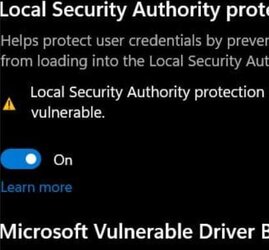
3 Turn on (default) or off Local Security Authority protection for what you want. (see screenshots below)

LSA_protection_Windows_Security-2.png
LSA_protection_Windows_Security-3.png

4 If prompted by UAC, click/tap on Yes to approve.

5 Restart the computer to apply. (see screenshot below)

6 If prompted by UAC, click/tap on Yes to approve.

LSA_protection_Windows_Security-5.png


Option Two

Turn On or Off Local Security Authority (LSA) Protection using REG file


1 Do step 2 (on without UEFI Lock), step 3 (on with UEFI Lock) or step 4 (off) below for what you want.

2 Turn On Local Security Authority (LSA) Protection without UEFI Lock

This is the default setting.


A) Click/tap on the Download button below to download the REG file below, and go to step 5 below.​

Turn_ON_Local_Security_Authority_protection_without_UEFI_Lock.reg


(Contents of REG file for reference)
Code:
Windows Registry Editor Version 5.00

[HKEY_LOCAL_MACHINE\SYSTEM\CurrentControlSet\Control\Lsa]
"RunAsPPL"=dword:00000002
"RunAsPPLBoot"=dword:00000002

3 Turn On Local Security Authority (LSA) Protection with UEFI Lock

When LSA is used with UEFI lock and Secure Boot, additional protection is achieved because disabling the HKEY_LOCAL_MACHINE\SYSTEM\CurrentControlSet\Control\Lsa registry key has no effect. It acts as a tamper protection.


A) Click/tap on the Download button below to download the REG file below, and go to step 5 below.​

Turn_ON_Local_Security_Authority_protection_with_UEFI_Lock.reg


(Contents of REG file for reference)
Code:
Windows Registry Editor Version 5.00

[HKEY_LOCAL_MACHINE\SYSTEM\CurrentControlSet\Control\Lsa]
"RunAsPPL"=dword:00000001
"RunAsPPLBoot"=dword:00000002

4 Turn Off Local Security Authority (LSA) Protection

If you turned on LSA with UEFI Lock using step 3, then you will need to use the Local Security Authority Protected Process Opt-out tool to remove the UEFI variable in the registry.


A) Click/tap on the Download button below to download the REG file below, and go to step 5 below.​

Turn_OFF_Local_Security_Authority_protection.reg


(Contents of REG file for reference)
Code:
Windows Registry Editor Version 5.00

[HKEY_LOCAL_MACHINE\SYSTEM\CurrentControlSet\Control\Lsa]
"RunAsPPL"=dword:00000000
"RunAsPPLBoot"=dword:00000000

5 Save the .reg file to your desktop.

6 If you have Smart App Control turned on, you will need to unblock the downloaded REG file.

7 Double click/tap on the downloaded .reg file to merge it.

8 When prompted, click/tap on Run, Yes (UAC), Yes, and OK to approve the merge.

9 Restart the computer to apply.

10 You can now delete the downloaded .reg file if you like.


Option Three

Turn On or Off Local Security Authority (LSA) Protection using Command


1 Open Windows Terminal (Admin), and select Command Prompt.

2 Copy and paste the command below you want to use into Windows Terminal (Admin), and press Enter.

Turn On Local Security Authority (LSA) Protection without UEFI Lock

This is the default setting.


reg add HKLM\SYSTEM\CurrentControlSet\Control\Lsa /v RunAsPPL /t REG_DWORD /d 2 /f & reg add HKLM\SYSTEM\CurrentControlSet\Control\Lsa /v RunAsPPLBoot /t REG_DWORD /d 2 /f

OR​

Turn On Local Security Authority (LSA) Protection with UEFI Lock

When LSA is used with UEFI lock and Secure Boot, additional protection is achieved because disabling the HKEY_LOCAL_MACHINE\SYSTEM\CurrentControlSet\Control\Lsa registry key has no effect. It acts as a tamper protection.


reg add HKLM\SYSTEM\CurrentControlSet\Control\Lsa /v RunAsPPL /t REG_DWORD /d 1 /f & reg add HKLM\SYSTEM\CurrentControlSet\Control\Lsa /v RunAsPPLBoot /t REG_DWORD /d 2 /f

OR​

Turn Off Local Security Authority (LSA) Protection

If you turned on LSA with UEFI Lock, then you will need to use the Local Security Authority Protected Process Opt-out tool to remove the UEFI variable in the registry.


reg add HKLM\SYSTEM\CurrentControlSet\Control\Lsa /v RunAsPPL /t REG_DWORD /d 0 /f & reg add HKLM\SYSTEM\CurrentControlSet\Control\Lsa /v RunAsPPLBoot /t REG_DWORD /d 0 /f

3 Restart the computer to apply.


Option Four

Enable or Disable Local Security Authority (LSA) Protection in Local Group Policy Editor


The Local Group Policy Editor is only available in the Windows 11 Pro, Enterprise, and Education editions.

All editions can use Option Five to configure the same policy.


1 Open the Local Group Policy Editor (gpedit.msc).

2 Navigate to the policy location below in the left pane of the Local Group Policy Editor. (see screenshot below)

Computer Configuration > Administrative Templates > System > Local Security Authority

LSA_protection_gpedit-1.png

3 In the right pane of Local Security Authority in the Local Group Policy Editor, double click/tap on the Configure LSASS to run as a protected process policy to edit it. (see screenshot above)

4 Do step 5 (default), step 6 (disable), step 7 (enable with UEFI Lock), or step 8 (enable without UEFI Lock) below for what you want.

5 Default User Choice Local Security Authority (LSA) Protection

This is the default setting to allow using Option One Option Two, and Option Three.


A) Select (dot) Not Configured. (see screenshot below)​

B) Click/tap on OK, and go to step 9 below.​

LSA_protection_gpedit-2.png

6 Disable Local Security Authority (LSA) Protection

This will override and prevent using Option One, Option Two, and Option Three.


A) Select (dot) Enabled. (see screenshot below)​

B) Select Disabled in the Configure LSA to run as a protected process drop menu.​

C) Click/tap on OK, and go to step 9 below.​

LSA_protection_gpedit-3.png

7 Enable Local Security Authority (LSA) Protection with UEFI Lock

This will override and prevent using Option One, Option Two, and Option Three.

When LSA is used with UEFI lock and Secure Boot, additional protection is achieved because disabling the HKEY_LOCAL_MACHINE\SYSTEM\CurrentControlSet\Control\Lsa registry key has no effect. It acts as a tamper protection.


A) Select (dot) Enabled. (see screenshot below)​

B) Select Enabled with UEFI Lock in the Configure LSA to run as a protected process drop menu.​

C) Click/tap on OK, and go to step 9 below.​

LSA_protection_gpedit-4.png

8 Enable Local Security Authority (LSA) Protection without UEFI Lock

This will override and prevent using Option One, Option Two, and Option Three.


A) Select (dot) Enabled. (see screenshot below)​

B) Select Enabled without UEFI Lock in the Configure LSA to run as a protected process drop menu.​

C) Click/tap on OK, and go to step 9 below.​

LSA_protection_gpedit-4.png

9 You can now close the Local Group Policy Editor if you like.


Option Five

Enable or Disable Local Security Authority (LSA) Protection using REG file


1 Do step 2 (default), step 3 (disable), step 4 (enable with UEFI Lock), or step 5 (enable without UEFI Lock) below for what you want.


 2. Default User Choice Local Security Authority (LSA) Protection

This is the default setting to allow using Option One, Option Two, and Option Three.


A) Click/tap on the Download button below to download the file below, and go to step 6 below.​

Default_user_choice_Local_Security_Authority_protection.reg


(Contents of REG file for reference)
Code:
Windows Registry Editor Version 5.00

[HKEY_LOCAL_MACHINE\SOFTWARE\Policies\Microsoft\Windows\System]
"RunAsPPL"=-


 3. Disable Local Security Authority (LSA) Protection

This will override and prevent using Option One, Option Two, and Option Three.


A) Click/tap on the Download button below to download the file below, and go to step 6 below.​

Disable_Local_Security_Authority_protection.reg


(Contents of REG file for reference)
Code:
Windows Registry Editor Version 5.00

[HKEY_LOCAL_MACHINE\SOFTWARE\Policies\Microsoft\Windows\System]
"RunAsPPL"=dword:00000000


 4. Enable Local Security Authority (LSA) Protection with UEFI Lock

This will override and prevent using Option One, Option Two, and Option Three.

When LSA is used with UEFI lock and Secure Boot, additional protection is achieved because disabling the HKEY_LOCAL_MACHINE\SYSTEM\CurrentControlSet\Control\Lsa registry key has no effect.


A) Click/tap on the Download button below to download the file below, and go to step 6 below.​

Always_Enable_Local_Security_Authority_protection_with_UEFI_Lock.reg


(Contents of REG file for reference)
Code:
Windows Registry Editor Version 5.00

[HKEY_LOCAL_MACHINE\SOFTWARE\Policies\Microsoft\Windows\System]
"RunAsPPL"=dword:00000001


 5. Enable Local Security Authority (LSA) Protection without UEFI Lock

This will override and prevent using Option One, Option Two, and Option Three.


A) Click/tap on the Download button below to download the file below, and go to step 6 below.​

Always_Enable_Local_Security_Authority_protection_without_UEFI_Lock.reg


(Contents of REG file for reference)
Code:
Windows Registry Editor Version 5.00

[HKEY_LOCAL_MACHINE\SOFTWARE\Policies\Microsoft\Windows\System]
"RunAsPPL"=dword:00000002

6 Save the REG file to your desktop.

7 If you have Smart App Control turned on, you will need to unblock the downloaded REG file.

8 Double click/tap on the downloaded REG file to merge it.

9 When prompted, click/tap on Run, Yes (UAC), Yes, and OK to approve the merge.

10 You can now delete the downloaded REG file if you like.


That's it,
Shawn Brink


Attachments

Last edited:
That's ok. :alien:

You can download and merge the REG file in option two to do it for you.
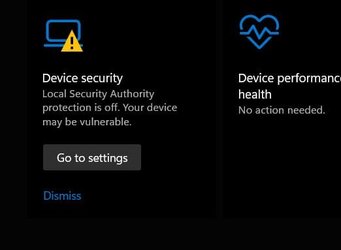
Hi Brink ! Followed your instructions.. after the reg download, I ran it . Did a restart. No Change triangle is still there?
 

My Computer My Computer

At a glance

Windows 11 25H2 (OS Build 26200.9168)Processor: 11th Gen Intel(R) Core(TM) i5-1135...12GBIntel R Iris R XE Graphics family
OS
Windows 11 25H2 (OS Build 26200.9168)
Computer type
Laptop
Manufacturer/Model
Dell
CPU
Processor: 11th Gen Intel(R) Core(TM) i5-1135G7 @ 2.40G
Motherboard
64-bit operating system Dell 0XMF7W
Memory
12GB
Graphics Card(s)
Intel R Iris R XE Graphics family
Sound Card
Cirrus Speakers High Definition Audio
Monitor(s) Displays
Generic PnP monitor
Screen Resolution
1920 x 1080
Hard Drives
NVMe 670p SSDPEKNU512GZ NVMe I NTEL 512GB
Case
cheap
Mouse
Logitech wireless mouse
Internet Speed
16 Mps download
Browser
Google Chrome
Antivirus
Security: Microsoft Defender & Malwarebytes Premium (with browser guard)
Other Info
Dell model: Inspiron 15 3511
Hi Brink ! Followed your instructions.. after the reg download, I ran it . Did a restart. No Change triangle is still there?
Go ahead and post a screenshot showing this and the LSA settings in Windows Security to see if anything may stand out.
 

My Computers My Computers

  • At a glance

    Windows 11 Pro for WorkstationsIntel i7-8700K 5 GHz64 GB (4x16GB) G.SKILL TridentZ RGB DDR4 3600...ASUS ROG-STRIX-GTX1080TI-O11G-GAMING (11GB GD...
    OS
    Windows 11 Pro for Workstations
    Computer type
    PC/Desktop
    Manufacturer/Model
    Custom self build
    CPU
    Intel i7-8700K 5 GHz
    Motherboard
    ASUS ROG Maximus XI Formula Z390
    Memory
    64 GB (4x16GB) G.SKILL TridentZ RGB DDR4 3600 MHz (F4-3600C18D-32GTZR)
    Graphics Card(s)
    ASUS ROG-STRIX-GTX1080TI-O11G-GAMING (11GB GDDR5X)
    Sound Card
    Integrated Digital Audio (S/PDIF)
    Monitor(s) Displays
    2 x Samsung Odyssey G75 27"
    Screen Resolution
    2560x1440
    Hard Drives
    1TB Samsung 990 PRO M.2,
    4TB Samsung 990 PRO M.2,
    TerraMaster F8 SSD Plus NAS
    PSU
    Seasonic Prime Titanium 850W
    Case
    Thermaltake Core P3 wall mounted
    Cooling
    Corsair Hydro H115i
    Keyboard
    Amazon Basics Wired Full Keyboard MD005
    Mouse
    Logitech MX Master 4
    Internet Speed
    2 Gbps Download and 100 Mbps Upload
    Browser
    Chrome and Edge
    Antivirus
    Microsoft Defender
    Other Info
    Logitech Z625 speaker system,
    Logitech BRIO 4K Pro webcam,
    HP Color LaserJet Pro MFP M477fdn,
    CyberPower CP1500PFCLCD
    Galaxy S23 Plus phone
  • At a glance

    Windows 11 ProSnapdragon X Elite (12 core) 3.42 GHz16 GB LPDDR5x-7467 MHz
    Operating System
    Windows 11 Pro
    Computer type
    Laptop
    Manufacturer/Model
    Surface Laptop 7 Copilot+ PC
    CPU
    Snapdragon X Elite (12 core) 3.42 GHz
    Memory
    16 GB LPDDR5x-7467 MHz
    Monitor(s) Displays
    15" HDR
    Screen Resolution
    2496 x 1664
    Hard Drives
    1 TB SSD
    Internet Speed
    Wi-Fi 7 and Bluetooth 5.4
    Browser
    Chrome and Edge
    Antivirus
    Microsoft Defender
Go ahead and post a screenshot showing this and the LSA settings in Windows Security to see if anything may stand out.
Brink! Not sure what else you may want?
 

Attachments

  • screen.jpg
    screen.jpg
    28.6 KB · Views: 131
  • settings.jpg
    settings.jpg
    11.9 KB · Views: 135
  • taskbar.jpg
    taskbar.jpg
    4.9 KB · Views: 118

My Computer My Computer

At a glance

Windows 11 25H2 (OS Build 26200.9168)Processor: 11th Gen Intel(R) Core(TM) i5-1135...12GBIntel R Iris R XE Graphics family
OS
Windows 11 25H2 (OS Build 26200.9168)
Computer type
Laptop
Manufacturer/Model
Dell
CPU
Processor: 11th Gen Intel(R) Core(TM) i5-1135G7 @ 2.40G
Motherboard
64-bit operating system Dell 0XMF7W
Memory
12GB
Graphics Card(s)
Intel R Iris R XE Graphics family
Sound Card
Cirrus Speakers High Definition Audio
Monitor(s) Displays
Generic PnP monitor
Screen Resolution
1920 x 1080
Hard Drives
NVMe 670p SSDPEKNU512GZ NVMe I NTEL 512GB
Case
cheap
Mouse
Logitech wireless mouse
Internet Speed
16 Mps download
Browser
Google Chrome
Antivirus
Security: Microsoft Defender & Malwarebytes Premium (with browser guard)
Other Info
Dell model: Inspiron 15 3511
Go ahead and post a screenshot showing this and the LSA settings in Windows Security to see if anything may stand out.
No problem here, kb5007651 2302 came down also on 22000.1757.
Had to set the same two DWORD in the registry and now it is happy. 👍

Edition Windows 11 Pro
Version 21H2
Installed on ‎9/‎8/‎2022
OS build 22000.1757
Experience Windows Feature Experience Pack 1000.22000.1757.0


1679015227902.png


1679015041918.png
1679014951711.png
 

My Computer My Computer

At a glance

Windows 11 Pro 25H2Intel I9-9900K64GBNVIDIA RTX 2060
OS
Windows 11 Pro 25H2
Computer type
PC/Desktop
Manufacturer/Model
Dell XPS 8930
CPU
Intel I9-9900K
Memory
64GB
Graphics Card(s)
NVIDIA RTX 2060
Sound Card
NVIDIA High Definition Audio
Monitor(s) Displays
4k Samsung
Screen Resolution
3840 x 2160
Hard Drives
512GB NVMe, ADATA SU 800, 2TB HDD
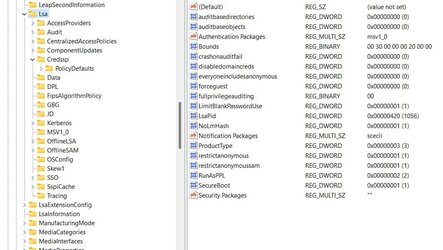
I'm missing RunAsPPLBoot in the Lsa regestry
 

Attachments

  • runasppl.jpg
    runasppl.jpg
    85.2 KB · Views: 111

My Computer My Computer

At a glance

Windows 11 25H2 (OS Build 26200.9168)Processor: 11th Gen Intel(R) Core(TM) i5-1135...12GBIntel R Iris R XE Graphics family
OS
Windows 11 25H2 (OS Build 26200.9168)
Computer type
Laptop
Manufacturer/Model
Dell
CPU
Processor: 11th Gen Intel(R) Core(TM) i5-1135G7 @ 2.40G
Motherboard
64-bit operating system Dell 0XMF7W
Memory
12GB
Graphics Card(s)
Intel R Iris R XE Graphics family
Sound Card
Cirrus Speakers High Definition Audio
Monitor(s) Displays
Generic PnP monitor
Screen Resolution
1920 x 1080
Hard Drives
NVMe 670p SSDPEKNU512GZ NVMe I NTEL 512GB
Case
cheap
Mouse
Logitech wireless mouse
Internet Speed
16 Mps download
Browser
Google Chrome
Antivirus
Security: Microsoft Defender & Malwarebytes Premium (with browser guard)
Other Info
Dell model: Inspiron 15 3511
I'm missing RunAsPPLBoot in the Lsa regestry

The REG file in step 2 option 2 should restore that for you.

Be sure to do steps 4 to 7 with the REG file to merge and apply.
 

My Computers My Computers

  • At a glance

    Windows 11 Pro for WorkstationsIntel i7-8700K 5 GHz64 GB (4x16GB) G.SKILL TridentZ RGB DDR4 3600...ASUS ROG-STRIX-GTX1080TI-O11G-GAMING (11GB GD...
    OS
    Windows 11 Pro for Workstations
    Computer type
    PC/Desktop
    Manufacturer/Model
    Custom self build
    CPU
    Intel i7-8700K 5 GHz
    Motherboard
    ASUS ROG Maximus XI Formula Z390
    Memory
    64 GB (4x16GB) G.SKILL TridentZ RGB DDR4 3600 MHz (F4-3600C18D-32GTZR)
    Graphics Card(s)
    ASUS ROG-STRIX-GTX1080TI-O11G-GAMING (11GB GDDR5X)
    Sound Card
    Integrated Digital Audio (S/PDIF)
    Monitor(s) Displays
    2 x Samsung Odyssey G75 27"
    Screen Resolution
    2560x1440
    Hard Drives
    1TB Samsung 990 PRO M.2,
    4TB Samsung 990 PRO M.2,
    TerraMaster F8 SSD Plus NAS
    PSU
    Seasonic Prime Titanium 850W
    Case
    Thermaltake Core P3 wall mounted
    Cooling
    Corsair Hydro H115i
    Keyboard
    Amazon Basics Wired Full Keyboard MD005
    Mouse
    Logitech MX Master 4
    Internet Speed
    2 Gbps Download and 100 Mbps Upload
    Browser
    Chrome and Edge
    Antivirus
    Microsoft Defender
    Other Info
    Logitech Z625 speaker system,
    Logitech BRIO 4K Pro webcam,
    HP Color LaserJet Pro MFP M477fdn,
    CyberPower CP1500PFCLCD
    Galaxy S23 Plus phone
  • At a glance

    Windows 11 ProSnapdragon X Elite (12 core) 3.42 GHz16 GB LPDDR5x-7467 MHz
    Operating System
    Windows 11 Pro
    Computer type
    Laptop
    Manufacturer/Model
    Surface Laptop 7 Copilot+ PC
    CPU
    Snapdragon X Elite (12 core) 3.42 GHz
    Memory
    16 GB LPDDR5x-7467 MHz
    Monitor(s) Displays
    15" HDR
    Screen Resolution
    2496 x 1664
    Hard Drives
    1 TB SSD
    Internet Speed
    Wi-Fi 7 and Bluetooth 5.4
    Browser
    Chrome and Edge
    Antivirus
    Microsoft Defender
I'm missing RunAsPPLBoot in the Lsa regestry
Just add the missing DWORD with the value of 2 and you should be all set. 😉
 

My Computer My Computer

At a glance

Windows 11 Pro 25H2Intel I9-9900K64GBNVIDIA RTX 2060
OS
Windows 11 Pro 25H2
Computer type
PC/Desktop
Manufacturer/Model
Dell XPS 8930
CPU
Intel I9-9900K
Memory
64GB
Graphics Card(s)
NVIDIA RTX 2060
Sound Card
NVIDIA High Definition Audio
Monitor(s) Displays
4k Samsung
Screen Resolution
3840 x 2160
Hard Drives
512GB NVMe, ADATA SU 800, 2TB HDD
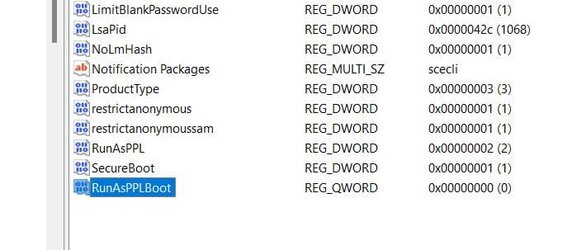
I need help please, putting a (2) at the end of RunAsPPLBoot --- don't know how to change the aero to a 2 --- note: I had to add the word in the reg. it was not there? as compared to the screenshot in

fg2001gf11F the shot above​


Attachments

  • Run.jpg
    Run.jpg
    31.9 KB · Views: 109

My Computer My Computer

At a glance

Windows 11 25H2 (OS Build 26200.9168)Processor: 11th Gen Intel(R) Core(TM) i5-1135...12GBIntel R Iris R XE Graphics family
OS
Windows 11 25H2 (OS Build 26200.9168)
Computer type
Laptop
Manufacturer/Model
Dell
CPU
Processor: 11th Gen Intel(R) Core(TM) i5-1135G7 @ 2.40G
Motherboard
64-bit operating system Dell 0XMF7W
Memory
12GB
Graphics Card(s)
Intel R Iris R XE Graphics family
Sound Card
Cirrus Speakers High Definition Audio
Monitor(s) Displays
Generic PnP monitor
Screen Resolution
1920 x 1080
Hard Drives
NVMe 670p SSDPEKNU512GZ NVMe I NTEL 512GB
Case
cheap
Mouse
Logitech wireless mouse
Internet Speed
16 Mps download
Browser
Google Chrome
Antivirus
Security: Microsoft Defender & Malwarebytes Premium (with browser guard)
Other Info
Dell model: Inspiron 15 3511
I need help please, putting a (2) at the end of RunAsPPLBoot --- don't know how to change the aero to a 2 --- note: I had to add the word in the reg. it was not there? as compared to the screenshot in

The problem is you added RunAsPPLBoot as a QWORD value instead of DWORD value.

Please delete this QWORD value, and merge the downloaded REG file from step 2 option 2 below using steps 4 to 7 in option two below to add the correct value.


My Computers My Computers

  • At a glance

    Windows 11 Pro for WorkstationsIntel i7-8700K 5 GHz64 GB (4x16GB) G.SKILL TridentZ RGB DDR4 3600...ASUS ROG-STRIX-GTX1080TI-O11G-GAMING (11GB GD...
    OS
    Windows 11 Pro for Workstations
    Computer type
    PC/Desktop
    Manufacturer/Model
    Custom self build
    CPU
    Intel i7-8700K 5 GHz
    Motherboard
    ASUS ROG Maximus XI Formula Z390
    Memory
    64 GB (4x16GB) G.SKILL TridentZ RGB DDR4 3600 MHz (F4-3600C18D-32GTZR)
    Graphics Card(s)
    ASUS ROG-STRIX-GTX1080TI-O11G-GAMING (11GB GDDR5X)
    Sound Card
    Integrated Digital Audio (S/PDIF)
    Monitor(s) Displays
    2 x Samsung Odyssey G75 27"
    Screen Resolution
    2560x1440
    Hard Drives
    1TB Samsung 990 PRO M.2,
    4TB Samsung 990 PRO M.2,
    TerraMaster F8 SSD Plus NAS
    PSU
    Seasonic Prime Titanium 850W
    Case
    Thermaltake Core P3 wall mounted
    Cooling
    Corsair Hydro H115i
    Keyboard
    Amazon Basics Wired Full Keyboard MD005
    Mouse
    Logitech MX Master 4
    Internet Speed
    2 Gbps Download and 100 Mbps Upload
    Browser
    Chrome and Edge
    Antivirus
    Microsoft Defender
    Other Info
    Logitech Z625 speaker system,
    Logitech BRIO 4K Pro webcam,
    HP Color LaserJet Pro MFP M477fdn,
    CyberPower CP1500PFCLCD
    Galaxy S23 Plus phone
  • At a glance

    Windows 11 ProSnapdragon X Elite (12 core) 3.42 GHz16 GB LPDDR5x-7467 MHz
    Operating System
    Windows 11 Pro
    Computer type
    Laptop
    Manufacturer/Model
    Surface Laptop 7 Copilot+ PC
    CPU
    Snapdragon X Elite (12 core) 3.42 GHz
    Memory
    16 GB LPDDR5x-7467 MHz
    Monitor(s) Displays
    15" HDR
    Screen Resolution
    2496 x 1664
    Hard Drives
    1 TB SSD
    Internet Speed
    Wi-Fi 7 and Bluetooth 5.4
    Browser
    Chrome and Edge
    Antivirus
    Microsoft Defender
The problem is you added RunAsPPLBoot as a QWORD value instead of DWORD value.

Please delete this QWORD value, and merge the downloaded REG file from step 2 option 2 using steps 4 to 7 in option two to add the correct value.
Brink ! I changed it to (2) to the right of RunASPPLBoot in the reg. -- but I still have the triangle on the taskbar & this pic remains the same. I didn't forget the reboots. ?
 

Attachments

  • last.jpg
    last.jpg
    17.7 KB · Views: 108

My Computer My Computer

At a glance

Windows 11 25H2 (OS Build 26200.9168)Processor: 11th Gen Intel(R) Core(TM) i5-1135...12GBIntel R Iris R XE Graphics family
OS
Windows 11 25H2 (OS Build 26200.9168)
Computer type
Laptop
Manufacturer/Model
Dell
CPU
Processor: 11th Gen Intel(R) Core(TM) i5-1135G7 @ 2.40G
Motherboard
64-bit operating system Dell 0XMF7W
Memory
12GB
Graphics Card(s)
Intel R Iris R XE Graphics family
Sound Card
Cirrus Speakers High Definition Audio
Monitor(s) Displays
Generic PnP monitor
Screen Resolution
1920 x 1080
Hard Drives
NVMe 670p SSDPEKNU512GZ NVMe I NTEL 512GB
Case
cheap
Mouse
Logitech wireless mouse
Internet Speed
16 Mps download
Browser
Google Chrome
Antivirus
Security: Microsoft Defender & Malwarebytes Premium (with browser guard)
Other Info
Dell model: Inspiron 15 3511
Brink ! I changed it to (2) to the right of RunASPPLBoot in the reg. -- but I still have the triangle on the taskbar & this pic remains the same. I didn't forget the reboots. ?

Just to confirm, did you change RunASPPLBoot from a QWORD to DWORD value?
 

My Computers My Computers

  • At a glance

    Windows 11 Pro for WorkstationsIntel i7-8700K 5 GHz64 GB (4x16GB) G.SKILL TridentZ RGB DDR4 3600...ASUS ROG-STRIX-GTX1080TI-O11G-GAMING (11GB GD...
    OS
    Windows 11 Pro for Workstations
    Computer type
    PC/Desktop
    Manufacturer/Model
    Custom self build
    CPU
    Intel i7-8700K 5 GHz
    Motherboard
    ASUS ROG Maximus XI Formula Z390
    Memory
    64 GB (4x16GB) G.SKILL TridentZ RGB DDR4 3600 MHz (F4-3600C18D-32GTZR)
    Graphics Card(s)
    ASUS ROG-STRIX-GTX1080TI-O11G-GAMING (11GB GDDR5X)
    Sound Card
    Integrated Digital Audio (S/PDIF)
    Monitor(s) Displays
    2 x Samsung Odyssey G75 27"
    Screen Resolution
    2560x1440
    Hard Drives
    1TB Samsung 990 PRO M.2,
    4TB Samsung 990 PRO M.2,
    TerraMaster F8 SSD Plus NAS
    PSU
    Seasonic Prime Titanium 850W
    Case
    Thermaltake Core P3 wall mounted
    Cooling
    Corsair Hydro H115i
    Keyboard
    Amazon Basics Wired Full Keyboard MD005
    Mouse
    Logitech MX Master 4
    Internet Speed
    2 Gbps Download and 100 Mbps Upload
    Browser
    Chrome and Edge
    Antivirus
    Microsoft Defender
    Other Info
    Logitech Z625 speaker system,
    Logitech BRIO 4K Pro webcam,
    HP Color LaserJet Pro MFP M477fdn,
    CyberPower CP1500PFCLCD
    Galaxy S23 Plus phone
  • At a glance

    Windows 11 ProSnapdragon X Elite (12 core) 3.42 GHz16 GB LPDDR5x-7467 MHz
    Operating System
    Windows 11 Pro
    Computer type
    Laptop
    Manufacturer/Model
    Surface Laptop 7 Copilot+ PC
    CPU
    Snapdragon X Elite (12 core) 3.42 GHz
    Memory
    16 GB LPDDR5x-7467 MHz
    Monitor(s) Displays
    15" HDR
    Screen Resolution
    2496 x 1664
    Hard Drives
    1 TB SSD
    Internet Speed
    Wi-Fi 7 and Bluetooth 5.4
    Browser
    Chrome and Edge
    Antivirus
    Microsoft Defender

My Computer My Computer

At a glance

Windows 11 Pro 25H2Intel I9-9900K64GBNVIDIA RTX 2060
OS
Windows 11 Pro 25H2
Computer type
PC/Desktop
Manufacturer/Model
Dell XPS 8930
CPU
Intel I9-9900K
Memory
64GB
Graphics Card(s)
NVIDIA RTX 2060
Sound Card
NVIDIA High Definition Audio
Monitor(s) Displays
4k Samsung
Screen Resolution
3840 x 2160
Hard Drives
512GB NVMe, ADATA SU 800, 2TB HDD
Not according to his screenshot. 😎

View attachment 55501
BRINK !! I changed it to a Dword - I missed the part that where you said "Make a "D" word !! That fixed the issue. !!!!! Thank you very much..
Sorry for the mixup it was me..... Regards
 

My Computer My Computer

At a glance

Windows 11 25H2 (OS Build 26200.9168)Processor: 11th Gen Intel(R) Core(TM) i5-1135...12GBIntel R Iris R XE Graphics family
OS
Windows 11 25H2 (OS Build 26200.9168)
Computer type
Laptop
Manufacturer/Model
Dell
CPU
Processor: 11th Gen Intel(R) Core(TM) i5-1135G7 @ 2.40G
Motherboard
64-bit operating system Dell 0XMF7W
Memory
12GB
Graphics Card(s)
Intel R Iris R XE Graphics family
Sound Card
Cirrus Speakers High Definition Audio
Monitor(s) Displays
Generic PnP monitor
Screen Resolution
1920 x 1080
Hard Drives
NVMe 670p SSDPEKNU512GZ NVMe I NTEL 512GB
Case
cheap
Mouse
Logitech wireless mouse
Internet Speed
16 Mps download
Browser
Google Chrome
Antivirus
Security: Microsoft Defender & Malwarebytes Premium (with browser guard)
Other Info
Dell model: Inspiron 15 3511
BRINK !! I changed it to a Dword - I missed the part that where you said "Make a "D" word !! That fixed the issue. !!!!! Thank you very much..
Sorry for the mixup it was me..... Regards

Great news. I'm happy to hear you have it sorted now. :party:
 

My Computers My Computers

  • At a glance

    Windows 11 Pro for WorkstationsIntel i7-8700K 5 GHz64 GB (4x16GB) G.SKILL TridentZ RGB DDR4 3600...ASUS ROG-STRIX-GTX1080TI-O11G-GAMING (11GB GD...
    OS
    Windows 11 Pro for Workstations
    Computer type
    PC/Desktop
    Manufacturer/Model
    Custom self build
    CPU
    Intel i7-8700K 5 GHz
    Motherboard
    ASUS ROG Maximus XI Formula Z390
    Memory
    64 GB (4x16GB) G.SKILL TridentZ RGB DDR4 3600 MHz (F4-3600C18D-32GTZR)
    Graphics Card(s)
    ASUS ROG-STRIX-GTX1080TI-O11G-GAMING (11GB GDDR5X)
    Sound Card
    Integrated Digital Audio (S/PDIF)
    Monitor(s) Displays
    2 x Samsung Odyssey G75 27"
    Screen Resolution
    2560x1440
    Hard Drives
    1TB Samsung 990 PRO M.2,
    4TB Samsung 990 PRO M.2,
    TerraMaster F8 SSD Plus NAS
    PSU
    Seasonic Prime Titanium 850W
    Case
    Thermaltake Core P3 wall mounted
    Cooling
    Corsair Hydro H115i
    Keyboard
    Amazon Basics Wired Full Keyboard MD005
    Mouse
    Logitech MX Master 4
    Internet Speed
    2 Gbps Download and 100 Mbps Upload
    Browser
    Chrome and Edge
    Antivirus
    Microsoft Defender
    Other Info
    Logitech Z625 speaker system,
    Logitech BRIO 4K Pro webcam,
    HP Color LaserJet Pro MFP M477fdn,
    CyberPower CP1500PFCLCD
    Galaxy S23 Plus phone
  • At a glance

    Windows 11 ProSnapdragon X Elite (12 core) 3.42 GHz16 GB LPDDR5x-7467 MHz
    Operating System
    Windows 11 Pro
    Computer type
    Laptop
    Manufacturer/Model
    Surface Laptop 7 Copilot+ PC
    CPU
    Snapdragon X Elite (12 core) 3.42 GHz
    Memory
    16 GB LPDDR5x-7467 MHz
    Monitor(s) Displays
    15" HDR
    Screen Resolution
    2496 x 1664
    Hard Drives
    1 TB SSD
    Internet Speed
    Wi-Fi 7 and Bluetooth 5.4
    Browser
    Chrome and Edge
    Antivirus
    Microsoft Defender
Sorry, it's probably me just not understanding this stuff - basically you are saying that if I don't use this PC for connecting to work or using it to create VM's, then I can safely turn off LSA, memory integrity and Vulnerable Driver Blocklist in Windows, then go back to BIOS and disable SVM (AMD) and just dismiss any warnings that Windows Defender throws up?
Thanks for your help, just want to be sure I am not leaving something off that could cause harm with regards to my private data.
Hi,
Yeah feel free to use all this stuff.
Virtual machine/ remote desktop all this stuff is not used by many people so best to disable it imho seeing all this opens many holes that aren't needed in the first place.
As far as popup defender does nag a lot so yes I turn off all notifications seeing I use third party AV so defender is mostly unneeded in my use case.
 

My Computer My Computer

At a glance

Win-7-10-11Pro's10900k & 9940x & 5930kTrident-Z Royal 4000c16 2x16gb & Trident-Z 36...Titan Xp & 1080ti FTW3 & evga 980ti gaming
OS
Win-7-10-11Pro's
Computer type
PC/Desktop
Manufacturer/Model
Acer 17" Nitro 7840sn/ 2x16gb 5600c40/ 4060/ stock 1tb-os/ 4tb sn850x
CPU
10900k & 9940x & 5930k
Motherboard
z490-Apex & x299-Apex & x99-Sabertooth
Memory
Trident-Z Royal 4000c16 2x16gb & Trident-Z 3600c16 4x8gb & 3200c14 4x8gb
Graphics Card(s)
Titan Xp & 1080ti FTW3 & evga 980ti gaming
Sound Card
Onboard Realtek x3
Monitor(s) Displays
1-AOC G2460PG 24"G-Sync 144Hz/ 2nd 1-ASUS VG248QE 24"/ 3rd LG 43" series
Screen Resolution
1920-1080 not sure what the t.v is besides 43" class scales from 1920-1080 perfectly
Hard Drives
2-WD-sn850x 4tb/ 970evo+500gb/ 980 pro 2tb.
PSU
1000p2 & 1200p2 & 850p2
Case
D450 x2 & 1 Test bench in cherry Entertainment center
Cooling
Custom water loops x3 with 2x mora 360mm rads only 980ti gaming air cooled
Keyboard
G710+x3
Mouse
Redragon x3
Internet Speed
xfinity gigabyte
Browser
Firefox
Antivirus
mbam pro
THANK YOU BRINK! Windows Security was reporting LSA as being disabled, regardless of the fact that the GUI switch within Core Isolation features showed it as enabled. This is the second time I've had to manually modify a workaround for LSA due to Windows patches.

I am running virtualization so I prefer to have this functional.

Adding this worked for me:

[HKEY_LOCAL_MACHINE\SOFTWARE\Policies\Microsoft\Windows\System]
"RunAsPPL"=dword:00000001

I used the download file to execute the REG change under " 4. Enable Local Security Authority (LSA) Protection with UEFI Lock"
 

My Computer My Computer

At a glance

Windows 11AMD Ryzen Threadripper 3960X 24-Core Processo...64.0 GB (63.9 GB usable)NVIDIA GeForce GTX 660 x 2 (SLI)
OS
Windows 11
Computer type
PC/Desktop
Manufacturer/Model
My Own Creation
CPU
AMD Ryzen Threadripper 3960X 24-Core Processor 4.17
Motherboard
ASUS ZENITH II EXTREME ALPHA
Memory
64.0 GB (63.9 GB usable)
Graphics Card(s)
NVIDIA GeForce GTX 660 x 2 (SLI)
Cooling
Noctua Air Cooled
THANK YOU BRINK! Windows Security was reporting LSA as being disabled, regardless of the fact that the GUI switch within Core Isolation features showed it as enabled. This is the second time I've had to manually modify a workaround for LSA due to Windows patches.

I am running virtualization so I prefer to have this functional.

Adding this worked for me:

[HKEY_LOCAL_MACHINE\SOFTWARE\Policies\Microsoft\Windows\System]
"RunAsPPL"=dword:00000001

I used the download file to execute the REG change under " 4. Enable Local Security Authority (LSA) Protection with UEFI Lock"
Glad it could help, and welcome. :alien:
 

My Computers My Computers

  • At a glance

    Windows 11 Pro for WorkstationsIntel i7-8700K 5 GHz64 GB (4x16GB) G.SKILL TridentZ RGB DDR4 3600...ASUS ROG-STRIX-GTX1080TI-O11G-GAMING (11GB GD...
    OS
    Windows 11 Pro for Workstations
    Computer type
    PC/Desktop
    Manufacturer/Model
    Custom self build
    CPU
    Intel i7-8700K 5 GHz
    Motherboard
    ASUS ROG Maximus XI Formula Z390
    Memory
    64 GB (4x16GB) G.SKILL TridentZ RGB DDR4 3600 MHz (F4-3600C18D-32GTZR)
    Graphics Card(s)
    ASUS ROG-STRIX-GTX1080TI-O11G-GAMING (11GB GDDR5X)
    Sound Card
    Integrated Digital Audio (S/PDIF)
    Monitor(s) Displays
    2 x Samsung Odyssey G75 27"
    Screen Resolution
    2560x1440
    Hard Drives
    1TB Samsung 990 PRO M.2,
    4TB Samsung 990 PRO M.2,
    TerraMaster F8 SSD Plus NAS
    PSU
    Seasonic Prime Titanium 850W
    Case
    Thermaltake Core P3 wall mounted
    Cooling
    Corsair Hydro H115i
    Keyboard
    Amazon Basics Wired Full Keyboard MD005
    Mouse
    Logitech MX Master 4
    Internet Speed
    2 Gbps Download and 100 Mbps Upload
    Browser
    Chrome and Edge
    Antivirus
    Microsoft Defender
    Other Info
    Logitech Z625 speaker system,
    Logitech BRIO 4K Pro webcam,
    HP Color LaserJet Pro MFP M477fdn,
    CyberPower CP1500PFCLCD
    Galaxy S23 Plus phone
  • At a glance

    Windows 11 ProSnapdragon X Elite (12 core) 3.42 GHz16 GB LPDDR5x-7467 MHz
    Operating System
    Windows 11 Pro
    Computer type
    Laptop
    Manufacturer/Model
    Surface Laptop 7 Copilot+ PC
    CPU
    Snapdragon X Elite (12 core) 3.42 GHz
    Memory
    16 GB LPDDR5x-7467 MHz
    Monitor(s) Displays
    15" HDR
    Screen Resolution
    2496 x 1664
    Hard Drives
    1 TB SSD
    Internet Speed
    Wi-Fi 7 and Bluetooth 5.4
    Browser
    Chrome and Edge
    Antivirus
    Microsoft Defender
After going through a handful of pointless youtube videos regarding this problem I was close to simply reformatting. Fortunately, I came across this page:-)

Downloading and merging the reg file fixed the issue for me (both files were missing after the latest update).

Thanks for this!
 

My Computer My Computer

At a glance

Windows 11Intel Core i7-8700K @ 5.0GhzG.SKILL Trident Z RGB Series 16GBAORUS GeForce RTX 3090 XTREME
OS
Windows 11
Computer type
PC/Desktop
Manufacturer/Model
Custom
CPU
Intel Core i7-8700K @ 5.0Ghz
Motherboard
ASUS ROG Maximus X Hero
Memory
G.SKILL Trident Z RGB Series 16GB
Graphics Card(s)
AORUS GeForce RTX 3090 XTREME
Sound Card
IFI AMP/DAC
Monitor(s) Displays
Dell AW3418DW
Screen Resolution
3440x1440
Hard Drives
Samsung 960 EVO M.2 500GB
WD Black 2TB
PSU
EVGA SuperNOVA 750 G3 80 Plus Gold 750W
Case
Phanteks Enthoo Evolv ATX
Cooling
Corsair Hydro Series H115i
Keyboard
Vortex Pok3r LE
Mouse
Logitech GPW Superlight
Internet Speed
Gig 1-1
After going through a handful of pointless youtube videos regarding this problem I was close to simply reformatting. Fortunately, I came across this page:-)

Downloading and merging the reg file fixed the issue for me (both files were missing after the latest update).

Thanks for this!
I'm glad it could help, and welcome. :alien:
 

My Computers My Computers

  • At a glance

    Windows 11 Pro for WorkstationsIntel i7-8700K 5 GHz64 GB (4x16GB) G.SKILL TridentZ RGB DDR4 3600...ASUS ROG-STRIX-GTX1080TI-O11G-GAMING (11GB GD...
    OS
    Windows 11 Pro for Workstations
    Computer type
    PC/Desktop
    Manufacturer/Model
    Custom self build
    CPU
    Intel i7-8700K 5 GHz
    Motherboard
    ASUS ROG Maximus XI Formula Z390
    Memory
    64 GB (4x16GB) G.SKILL TridentZ RGB DDR4 3600 MHz (F4-3600C18D-32GTZR)
    Graphics Card(s)
    ASUS ROG-STRIX-GTX1080TI-O11G-GAMING (11GB GDDR5X)
    Sound Card
    Integrated Digital Audio (S/PDIF)
    Monitor(s) Displays
    2 x Samsung Odyssey G75 27"
    Screen Resolution
    2560x1440
    Hard Drives
    1TB Samsung 990 PRO M.2,
    4TB Samsung 990 PRO M.2,
    TerraMaster F8 SSD Plus NAS
    PSU
    Seasonic Prime Titanium 850W
    Case
    Thermaltake Core P3 wall mounted
    Cooling
    Corsair Hydro H115i
    Keyboard
    Amazon Basics Wired Full Keyboard MD005
    Mouse
    Logitech MX Master 4
    Internet Speed
    2 Gbps Download and 100 Mbps Upload
    Browser
    Chrome and Edge
    Antivirus
    Microsoft Defender
    Other Info
    Logitech Z625 speaker system,
    Logitech BRIO 4K Pro webcam,
    HP Color LaserJet Pro MFP M477fdn,
    CyberPower CP1500PFCLCD
    Galaxy S23 Plus phone
  • At a glance

    Windows 11 ProSnapdragon X Elite (12 core) 3.42 GHz16 GB LPDDR5x-7467 MHz
    Operating System
    Windows 11 Pro
    Computer type
    Laptop
    Manufacturer/Model
    Surface Laptop 7 Copilot+ PC
    CPU
    Snapdragon X Elite (12 core) 3.42 GHz
    Memory
    16 GB LPDDR5x-7467 MHz
    Monitor(s) Displays
    15" HDR
    Screen Resolution
    2496 x 1664
    Hard Drives
    1 TB SSD
    Internet Speed
    Wi-Fi 7 and Bluetooth 5.4
    Browser
    Chrome and Edge
    Antivirus
    Microsoft Defender
Hi Brink,
Looks like these 2 DWORD entries are repeated in 2 places, ControlSet001 and CurrentControlSet.
Any comments?

Computer\HKEY_LOCAL_MACHINE\SYSTEM\ControlSet001\Control\Lsa

Computer\HKEY_LOCAL_MACHINE\SYSTEM\CurrentControlSet\Control\Lsa

1679086966105.png


1679087042505.png
 

My Computer My Computer

At a glance

Windows 11 Pro 25H2Intel I9-9900K64GBNVIDIA RTX 2060
OS
Windows 11 Pro 25H2
Computer type
PC/Desktop
Manufacturer/Model
Dell XPS 8930
CPU
Intel I9-9900K
Memory
64GB
Graphics Card(s)
NVIDIA RTX 2060
Sound Card
NVIDIA High Definition Audio
Monitor(s) Displays
4k Samsung
Screen Resolution
3840 x 2160
Hard Drives
512GB NVMe, ADATA SU 800, 2TB HDD

Latest Support Threads

Back
Top Bottom