Browsers and Mail Enable or Disable Microsoft Edge Secure Network VPN Service


Microsoft_Edge_banner.png

This tutorial will show you how to turn on or off using the Microsoft Edge Secure Network built-in VPN service to protect your browsing for your account in Windows 10 and Windows 11.

Microsoft Edge is the AI-powered browser. A smarter way to browse. As the only browser built and optimized for Windows, it’s AI-powered tools are designed to help you make the most of your time online. Whether you’re searching, shopping or gaming, AI-powered tools and a security-first approach help you stay productive, save money, and get things done your way.

Microsoft Edge helps keep you safe online. However, the networks you join may not be adequately secure. Microsoft Edge Secure Network can help you protect your device and sensitive data as you browse.

Microsoft Edge Secure Network is a service provided in partnership with Cloudflare.

How does Microsoft Edge Secure Network work?​

Microsoft Edge Secure Network:

Protection when you need it: When in use, Secure Network automatically turns protection off and on when needed so you don't have to worry about managing bandwidth or knowing when you need additional protection. If you visit an unsecure HTTP site or connect to an open Wi-Fi, Secure Network encrypts your data and hides your location through our VPN service. To conserve your allocated VPN data bandwidth, content streaming sites such as Netflix, Hulu, HBO, and more, won't be routed through the Secure Network VPN service.

Encrypts your connection: Secure network encrypts your internet connection to help protect your data from online threats like hackers. When Microsoft Edge Secure Network is protecting your network traffic, your data is routed from Microsoft Edge through an encrypted tunnel to create a secure connection, even when using a non-secure URL that starts with HTTP. This makes it harder for hackers to access your browsing data on a shared public Wi-Fi network.

Helps prevent online tracking: By encrypting your web traffic directly from Microsoft Edge, we help prevent your internet service provider from collecting your browsing data like details about which websites you visit.

Keeps your location private: On sites where Microsoft Edge Secure Network is encrypting your web traffic via our VPN service, we help prevent your internet service provider from collecting browsing data about the websites you visit.

Keeps your location private: Online entities can use your location and IP address for profiling and sending you targeted ads. Microsoft Edge Secure Network lets you browse with a virtual IP address that masks your IP and replaces your geolocation with a similar regional address to make it more difficult for online trackers to follow you as you browse.

Access with your personal account: To access Secure Network, log in with your personal Microsoft account. Microsoft Edge Secure Network is not available for enterprise accounts.

Is free to use: Get 5 gigabytes of free data every month when you sign into Microsoft Edge with your Microsoft Account.

A Microsoft Edge sign-in is required to track free data usage and access Secure Network every month. All bandwidth data that is required to provide the Microsoft Edge Secure Network service is automatically deleted at the end of the required service window.


References:


Here's How:

1 Open Microsoft Edge.

2 Click/tap on the Setting and more (Alt+F) 3 dots button, and click/tap on Settings. (see screenshot below)

Microsoft_Edge_Settings.png

3 Click/tap on Privacy, search, and services in the left pane, and click/tap on Security on the right side. (see screenshot below)

If you do not see a left pane, then either click/tap on the 3 bars menu button towards the top left OR widen the horizontal borders of the Microsoft Edge window until you do.


Edge_Security_settings.webp

4 Do step 5 (on) or step 6 (off) below for what you want.

5 Turn On Microsoft Edge Secure Network

This is the default setting.


A) Turn on Use Microsoft Edge Secure Network. (see screenshot below)​

B) Select Select Sites, Optimized (default), or All sites mode you want to use.​

Edge_Secure_Network-2.webp

6 Turn Off Microsoft Edge Secure Network

A) Turn off Use Microsoft Edge Secure Network. (see screenshot below)​

Edge_Secure_Network-1.webp


That's it,
Shawn Brink


Last edited:
Anyone excited that they will be getting a free VPN service with Edge similar to the one in Opera? Will it have different servers around the globe that you can choose from?
 

My Computer My Computer

At a glance

Windows 11/Linux MintIntel Core 2 Duo CPU E8400 @ 3.00 GHz x 28 GBIntel 4 Series Chipset Integrated Graphics Co...
OS
Windows 11/Linux Mint
Computer type
PC/Desktop
Manufacturer/Model
Dell Optiplex 960
CPU
Intel Core 2 Duo CPU E8400 @ 3.00 GHz x 2
Memory
8 GB
Graphics Card(s)
Intel 4 Series Chipset Integrated Graphics Controller
Monitor(s) Displays
HP x22LED
Hard Drives
Crucial 250 GB SSD, HD 1Tb
Using Canary Ver. 102.0.1247.0 and do not have the "Secure Network" option. Something I need to do to enable it or I am using wrong version?
 

My Computer My Computer

At a glance

Windows 11 Home 25H2Intel i9-14900KFTeamGroup T-Force Delta DDR5-6000 64Gb(32Gb x 2)MSI Shadow 3X NVIDIA GeForce RTX-5080 w/16Gb ...
OS
Windows 11 Home 25H2
Computer type
PC/Desktop
Manufacturer/Model
IBuyPower Intel 14th Gen Ultra Extreme Gaming PC
CPU
Intel i9-14900KF
Motherboard
ASUS Z790 Gaming WIFI-7
Memory
TeamGroup T-Force Delta DDR5-6000 64Gb(32Gb x 2)
Graphics Card(s)
MSI Shadow 3X NVIDIA GeForce RTX-5080 w/16Gb GDDR7
Sound Card
Realtec 3D Premium Surround Sound Onboard
Monitor(s) Displays
Samsung Odessey G70NC 43"
Screen Resolution
3840 x 2160 144Hz
Hard Drives
WD BLUE SN7100 M.2 PCIe NVMe SSD 1Tb (Main Drive with Win 11 Home)
WD BLUE SN570 M.2 PCIe NVMe SSD 1Tb (Game Drive)
WD BLUE SN570 M.2 PCIe NVMe SSD 1Tb (Programs Drive)
WD BLUE SN570 M.2 PCIe NVMe SSD 1Tb (Data BackUp)
PSU
Enermax Revolution III, 80 Plus Gold, 1000 Watts, Gen 5
Case
Hyte 70, 3 - 120mm Side Fans, 1 - 120mm Back Fan, 3 - 120mm Bottom Fans
Cooling
iBuyPower AW5 360 ARGB Liquid Cooling Radiator
Keyboard
Corsair K70
Mouse
Basilisk v3 RZ01-0400
Internet Speed
Spectrum 1 Gb
Browser
Firefox Nightly
Antivirus
Windows Defender
Other Info
On Board Network and Bluetooth
Anyone excited that they will be getting a free VPN service with Edge similar to the one in Opera? Will it have different servers around the globe that you can choose from?
Not if you only get a 1gb limit for free, OperaGx's is unlimited for free, Yeah its not a true VPN like Nord or something but its decent for free. If im gonna need to pay to up my 1gb limit then ima just pay for Nord or one of the top ones for all it is.
 

My Computer My Computer

At a glance

11[email protected]Viper Steelseries 32gb@ 3600mhzGigabyte 2070 Super 8GB, +200 core + 600 memory
OS
11
Computer type
PC/Desktop
Manufacturer/Model
Custom
CPU
[email protected]
Motherboard
Gigabyte Gaming X Z490
Memory
Viper Steelseries 32gb@ 3600mhz
Graphics Card(s)
Gigabyte 2070 Super 8GB, +200 core + 600 memory
Monitor(s) Displays
ASUS 4k HDR, Two 1080p Benq and Samsung
Screen Resolution
3840x2160/2560x1440/1920x1080
Hard Drives
Adata XPG SX8200 PRO 1tb
Samsung EVO 870 500GB
PSU
Corsair RX 650
Case
NZXT h510
Cooling
CM HYPER 212 RGB
Keyboard
Razer Ornata Chroma
Mouse
Steelseries Rival 710
I saw this article from a few days ago that says that MS is developing VPN Capabilities with Edge Secure Network. Since I'm not on a test release, I don't have any more info than that. I can't tell if it's available yet to anyone on the test releases.


My Computer My Computer

At a glance

Windows 11/Linux MintIntel Core 2 Duo CPU E8400 @ 3.00 GHz x 28 GBIntel 4 Series Chipset Integrated Graphics Co...
OS
Windows 11/Linux Mint
Computer type
PC/Desktop
Manufacturer/Model
Dell Optiplex 960
CPU
Intel Core 2 Duo CPU E8400 @ 3.00 GHz x 2
Memory
8 GB
Graphics Card(s)
Intel 4 Series Chipset Integrated Graphics Controller
Monitor(s) Displays
HP x22LED
Hard Drives
Crucial 250 GB SSD, HD 1Tb
Any idea when Edge VPN might be available in the stable release?
 

My Computers My Computers

  • At a glance

    Windows 11 (25H2)Core(TM) i5-12400T12.0 GB (11.7 GB usable)Intel(R) UHD Graphics 730
    OS
    Windows 11 (25H2)
    Computer type
    PC/Desktop
    Manufacturer/Model
    HP Pavilion 577B5AA#ABA
    CPU
    Core(TM) i5-12400T
    Motherboard
    HP 89E9
    Memory
    12.0 GB (11.7 GB usable)
    Graphics Card(s)
    Intel(R) UHD Graphics 730
    Sound Card
    DFX Audio
    Monitor(s) Displays
    HO Generic PnP Monitor
    Screen Resolution
    1920 x 1080
    Hard Drives
    SAMSUNG MZVLQ10HBLB00BH1 SSD 1TB
    PSU
    HP Std. for this product
    Case
    All-in-One
    Cooling
    Fan
    Keyboard
    HP Wireless / Bluetooth
    Mouse
    HP Wireless / Bluetooth
    Internet Speed
    Link speed (Receive/Transmit): 1000/1000 (Mbps)
    Browser
    Firefox
    Antivirus
    Malwarebytes Pro / Windows Security
    Other Info
    Retired IT professional.
  • At a glance

    Windows 11 (25H2)Intel I-7-1165G78 GB DDR4-3200 SDRAMIntel Iris Xe Graphics
    Operating System
    Windows 11 (25H2)
    Computer type
    Laptop
    Manufacturer/Model
    HP 15tegooo [HP Pavilion Laptop Intel I-7]
    CPU
    Intel I-7-1165G7
    Motherboard
    HP
    Memory
    8 GB DDR4-3200 SDRAM
    Graphics card(s)
    Intel Iris Xe Graphics
    Sound Card
    Realtek
    Monitor(s) Displays
    HP HD micro edge, Bright View, 250 nits
    Screen Resolution
    1366 x768
    Hard Drives
    256 GB DD4-3200 SDRAM
    PSU
    HP
    Case
    Std HP Laptop
    Cooling
    Fan
    Keyboard
    std
    Mouse
    Logi M585
    Browser
    Edge
    Antivirus
    Windows Security
The article says that the feature is currently rolling out to Canary users. Maybe someone that gets it can tell us more about it.
 

My Computer My Computer

At a glance

Windows 11/Linux MintIntel Core 2 Duo CPU E8400 @ 3.00 GHz x 28 GBIntel 4 Series Chipset Integrated Graphics Co...
OS
Windows 11/Linux Mint
Computer type
PC/Desktop
Manufacturer/Model
Dell Optiplex 960
CPU
Intel Core 2 Duo CPU E8400 @ 3.00 GHz x 2
Memory
8 GB
Graphics Card(s)
Intel 4 Series Chipset Integrated Graphics Controller
Monitor(s) Displays
HP x22LED
Hard Drives
Crucial 250 GB SSD, HD 1Tb
Any idea when Edge VPN might be available in the stable release?
''Microsoft Edge Secure Network is currently not yet available in Microsoft Edge, but should be released in the Canary channel first when made available by Microsoft.''

And also to note as usual, Not all things that ship in previews ship to the full release, Like the tablet taskbar thing they removed last update, Was in preview but didn't make it to release(yet). Who knows with these things, How long is a piece of string
 

My Computer My Computer

At a glance

11[email protected]Viper Steelseries 32gb@ 3600mhzGigabyte 2070 Super 8GB, +200 core + 600 memory
OS
11
Computer type
PC/Desktop
Manufacturer/Model
Custom
CPU
[email protected]
Motherboard
Gigabyte Gaming X Z490
Memory
Viper Steelseries 32gb@ 3600mhz
Graphics Card(s)
Gigabyte 2070 Super 8GB, +200 core + 600 memory
Monitor(s) Displays
ASUS 4k HDR, Two 1080p Benq and Samsung
Screen Resolution
3840x2160/2560x1440/1920x1080
Hard Drives
Adata XPG SX8200 PRO 1tb
Samsung EVO 870 500GB
PSU
Corsair RX 650
Case
NZXT h510
Cooling
CM HYPER 212 RGB
Keyboard
Razer Ornata Chroma
Mouse
Steelseries Rival 710
Microsoft Edge Secure Network VPN service now available in Microsoft Edge Canary build 103.0.1255.0. :-)


My Computers My Computers

  • At a glance

    Windows 11 Pro for WorkstationsIntel i7-8700K 5 GHz64 GB (4x16GB) G.SKILL TridentZ RGB DDR4 3600...ASUS ROG-STRIX-GTX1080TI-O11G-GAMING (11GB GD...
    OS
    Windows 11 Pro for Workstations
    Computer type
    PC/Desktop
    Manufacturer/Model
    Custom self build
    CPU
    Intel i7-8700K 5 GHz
    Motherboard
    ASUS ROG Maximus XI Formula Z390
    Memory
    64 GB (4x16GB) G.SKILL TridentZ RGB DDR4 3600 MHz (F4-3600C18D-32GTZR)
    Graphics Card(s)
    ASUS ROG-STRIX-GTX1080TI-O11G-GAMING (11GB GDDR5X)
    Sound Card
    Integrated Digital Audio (S/PDIF)
    Monitor(s) Displays
    2 x Samsung Odyssey G75 27"
    Screen Resolution
    2560x1440
    Hard Drives
    1TB Samsung 990 PRO M.2,
    4TB Samsung 990 PRO M.2,
    TerraMaster F8 SSD Plus NAS
    PSU
    Seasonic Prime Titanium 850W
    Case
    Thermaltake Core P3 wall mounted
    Cooling
    Corsair Hydro H115i
    Keyboard
    Amazon Basics Wired Full Keyboard MD005
    Mouse
    Logitech MX Master 4
    Internet Speed
    2 Gbps Download and 100 Mbps Upload
    Browser
    Chrome and Edge
    Antivirus
    Microsoft Defender
    Other Info
    Logitech Z625 speaker system,
    Logitech BRIO 4K Pro webcam,
    HP Color LaserJet Pro MFP M477fdn,
    CyberPower CP1500PFCLCD
    Galaxy S23 Plus phone
  • At a glance

    Windows 11 ProSnapdragon X Elite (12 core) 3.42 GHz16 GB LPDDR5x-7467 MHz
    Operating System
    Windows 11 Pro
    Computer type
    Laptop
    Manufacturer/Model
    Surface Laptop 7 Copilot+ PC
    CPU
    Snapdragon X Elite (12 core) 3.42 GHz
    Memory
    16 GB LPDDR5x-7467 MHz
    Monitor(s) Displays
    15" HDR
    Screen Resolution
    2496 x 1664
    Hard Drives
    1 TB SSD
    Internet Speed
    Wi-Fi 7 and Bluetooth 5.4
    Browser
    Chrome and Edge
    Antivirus
    Microsoft Defender
Really great feature, although that 1GB limit is very low even for free tiers, they should give users at least 10GB limit with an upgrade option for unlimited plan.

Since this feature is coming from Cloudflare networks and Cloudflare already offers WARP for free, unlimited traffic, to everyone in the world, then this shouldn't be a problem.

Microsoft and Cloudflare could even include Cloudflare WARP in Microsoft Edge browser, the same free and unlimited plan, which is a VPN using the strong and fast WireGuard protocol, and then offer an option to the user for WARP+ (Plus).
 

My Computer My Computer

At a glance

Windows 11
OS
Windows 11
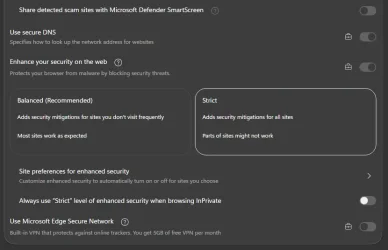
Mine's grayed out:
1781817388363.webp
The lock is usually there due to a group policy (like with the DNS and Enhanced Security on the screenshot), but I definitely haven't disabled this particular feature with GPedit. I've double- and triple-checked.
Maybe Microsoft saw that Security is set to Strict and thought, "This one's secure enough." Huge bummer. This would be really neat to have.
 

My Computer My Computer

At a glance

Windows 11
OS
Windows 11
Mine's grayed out:
View attachment 174578
Maybe Microsoft saw that Security is set to Strict and thought, "This one's secure enough." Huge bummer. This would be really neat to have.

Hello, :alien:

Looks like you have a policy configured that disabled this setting. You can check using the method in the tutorial below to see which Edge policies you have configured to ID the culprit to enable again.


My Computers My Computers

  • At a glance

    Windows 11 Pro for WorkstationsIntel i7-8700K 5 GHz64 GB (4x16GB) G.SKILL TridentZ RGB DDR4 3600...ASUS ROG-STRIX-GTX1080TI-O11G-GAMING (11GB GD...
    OS
    Windows 11 Pro for Workstations
    Computer type
    PC/Desktop
    Manufacturer/Model
    Custom self build
    CPU
    Intel i7-8700K 5 GHz
    Motherboard
    ASUS ROG Maximus XI Formula Z390
    Memory
    64 GB (4x16GB) G.SKILL TridentZ RGB DDR4 3600 MHz (F4-3600C18D-32GTZR)
    Graphics Card(s)
    ASUS ROG-STRIX-GTX1080TI-O11G-GAMING (11GB GDDR5X)
    Sound Card
    Integrated Digital Audio (S/PDIF)
    Monitor(s) Displays
    2 x Samsung Odyssey G75 27"
    Screen Resolution
    2560x1440
    Hard Drives
    1TB Samsung 990 PRO M.2,
    4TB Samsung 990 PRO M.2,
    TerraMaster F8 SSD Plus NAS
    PSU
    Seasonic Prime Titanium 850W
    Case
    Thermaltake Core P3 wall mounted
    Cooling
    Corsair Hydro H115i
    Keyboard
    Amazon Basics Wired Full Keyboard MD005
    Mouse
    Logitech MX Master 4
    Internet Speed
    2 Gbps Download and 100 Mbps Upload
    Browser
    Chrome and Edge
    Antivirus
    Microsoft Defender
    Other Info
    Logitech Z625 speaker system,
    Logitech BRIO 4K Pro webcam,
    HP Color LaserJet Pro MFP M477fdn,
    CyberPower CP1500PFCLCD
    Galaxy S23 Plus phone
  • At a glance

    Windows 11 ProSnapdragon X Elite (12 core) 3.42 GHz16 GB LPDDR5x-7467 MHz
    Operating System
    Windows 11 Pro
    Computer type
    Laptop
    Manufacturer/Model
    Surface Laptop 7 Copilot+ PC
    CPU
    Snapdragon X Elite (12 core) 3.42 GHz
    Memory
    16 GB LPDDR5x-7467 MHz
    Monitor(s) Displays
    15" HDR
    Screen Resolution
    2496 x 1664
    Hard Drives
    1 TB SSD
    Internet Speed
    Wi-Fi 7 and Bluetooth 5.4
    Browser
    Chrome and Edge
    Antivirus
    Microsoft Defender

Latest Support Threads

Back
Top Bottom