DrMopp
Well-known member
- Local time
- 1:40 PM
- Posts
- 60
- OS
- Windows 11 Pro 25H2
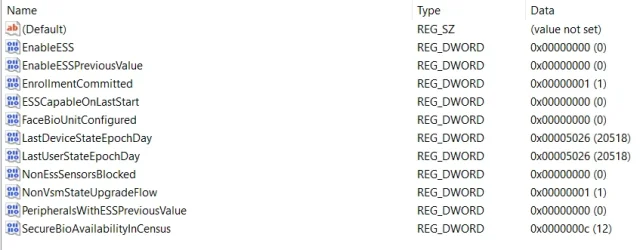
I have been having problems with turning on biometric login in the NordPass Edge browser extension, and NP support have suggested it may be because my fingerprint sensor is not ESS compatible (it isn't, but works fine in Windows Hello). To see if they were right, I have replaced the sensor with another which is ESS compatible, but no change. I can see no switches to turn ESS on or off in the UI (I have seen one before I'm sure). Registry keys under the HKLM\SOFTWARE\Microsoft\Windows\CurrentVersion\WinBio branch are set as per the screenprint uploaded. Thoughts anyone?
- Windows Build/Version
- Win 11 25H2 Build 26200.8039
Attachments
My Computer
At a glance
Windows 11 Pro 25H2Intel(R) Core(TM) i7-1070016GB
- OS
- Windows 11 Pro 25H2
- Computer type
- PC/Desktop
- Manufacturer/Model
- Dell Optiplex
- CPU
- Intel(R) Core(TM) i7-10700
- Memory
- 16GB
- Monitor(s) Displays
- Dell U2722DE
- Screen Resolution
- 2560x1440
- Hard Drives
- NVMe Kioxia 512GB
- Keyboard
- Logi MX Keys
- Mouse
- Logi MX Vertical
- Internet Speed
- 76
- Browser
- Edge/Chrome/Firefox
- Antivirus
- Bitdefender