
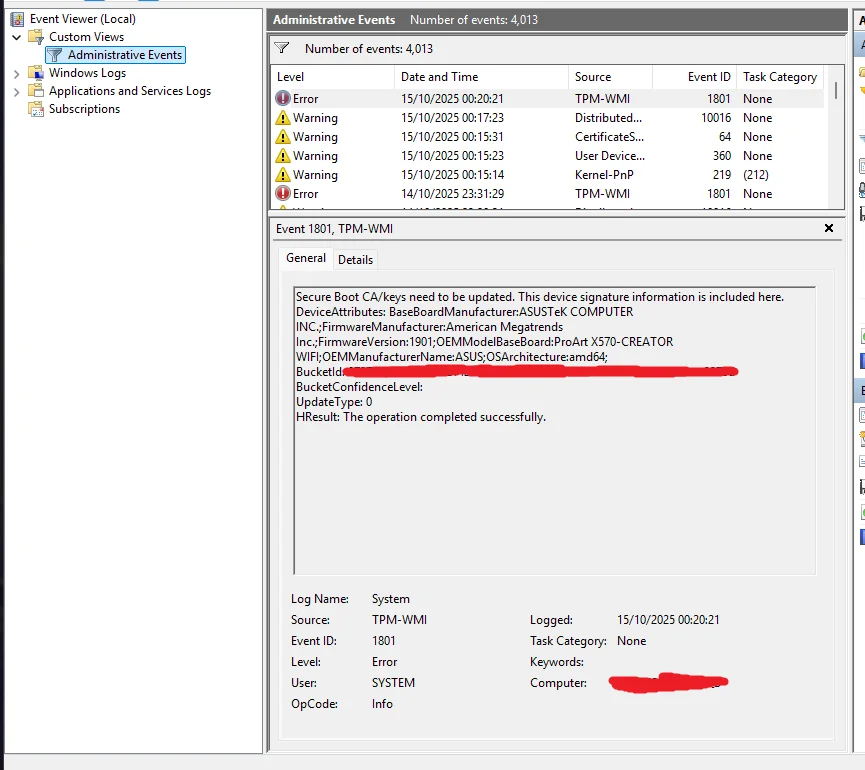
Error 1801 Telling me to update my Secure Boot CA/Keys?


Secrios

Member
Local time
5:50 AM
Posts
30
OS
Windows 11
This came up ever since I installed the latest Windows Update today.
TPM Help.webp

Should I be concerned? Should I do anything?
Anyone else getting this?
 
Windows Build/Version
Windows 11 25h2 26200.6899

My Computer My Computer

At a glance

Windows 11
OS
Windows 11
Computer type
PC/Desktop
Manufacturer/Model
Asus
  • Like
Reactions: x_1
This is an informational warning. You have the latest BIOS firmware (v1901) for the X570-Creator WiFi. At some point next year, Windows will force a revocation of the CA 2011 certs. But it's not required at this time.
 

My Computer My Computer

At a glance

Windows 7
OS
Windows 7
I don’t understand why people visit the Event Viewer. The only time I have ever seen it was to work out how to instruct a member on how to use it. It causes mayhem, panic, there’s always blood and someone dies in the end.
 

My Computers My Computers

  • At a glance

    Windows 11 Pro 25H2 Build 26200.8894Intel(R) Core(TM) i7-4770K CPU @ 3.50GHz32.0 GB of I forget and the box is in storage.Gigabyte nVidia GeForce GTX 1660 Super OC 6GB
    OS
    Windows 11 Pro 25H2 Build 26200.8894
    Computer type
    PC/Desktop
    Manufacturer/Model
    Sin-built 2013
    CPU
    Intel(R) Core(TM) i7-4770K CPU @ 3.50GHz
    Motherboard
    ASUS ROG Maximus VI Formula
    Memory
    32.0 GB of I forget and the box is in storage.
    Graphics Card(s)
    Gigabyte nVidia GeForce GTX 1660 Super OC 6GB
    Sound Card
    ROG SupremeFX Formula 8-Channel High Definition Audio
    Monitor(s) Displays
    5 x LG 25MS500-B - 1 x 24MK430H-B - 1 x Wacom Pro 22" Touch Screen Tablet
    Screen Resolution
    All over the place
    Hard Drives
    Too many to list. OS on Samsung 1TB 870 QVO SATA
    PSU
    Silverstone 1500
    Case
    NZXT Phantom 820 Full-Tower Case
    Cooling
    Noctua NH-D15 Elite Class Dual Tower CPU Cooler / 6 x EziDIY 120mm / 2 x Corsair 140mm somethings / 1 x 140mm Thermaltake something / 2 x 200mm Corsair.
    Keyboard
    Corsair K95 / Logitech diNovo Edge Wireless
    Mouse
    Logitech: G402 / G502 / Mx Masters / Mx Air Cordless
    Internet Speed
    2000/500Mbps
    Browser
    All sorts
    Antivirus
    Kaspersky Premium
    Other Info
    ㅤㅤㅤㅤㅤㅤㅤㅤㅤㅤㅤㅤㅤㅤㅤㅤㅤㅤㅤㅤㅤㅤㅤㅤㅤㅤㅤㅤㅤㅤㅤㅤㅤㅤㅤㅤㅤㅤㅤㅤ⠀⠀⠀⠀⠀⠀⠀⠀⠀⠀
    TP-Link BE9300 WiFi 7 Bluetooth 5.4 (Archer TBE550E)
    TP-Link TX201 V1 2.5GB Lan

    Grandstream HT812 - VoIP
    ASUS DSL-AX82U - Mesh
    ASUS RT-AC68U - Mesh
    ASUS RT-BE88U Router

    Brother MFC-L2880DW Printer

    I’m on a horse.
  • At a glance

    Windows 11 Pro 25H2 Build 26200.8894 (Wifes)13th Generation Intel® Core™ i5-1340P Process...16GB LPDDR5-52001x Intel® Iris® Xe Graphics
    Operating System
    Windows 11 Pro 25H2 Build 26200.8894 (Wifes)
    Computer type
    Laptop
    Manufacturer/Model
    LENOVO Yoga 7 14IRL8 - Type 82YL
    CPU
    13th Generation Intel® Core™ i5-1340P Processor(Core™ i5-1340P)
    Memory
    16GB LPDDR5-5200
    Graphics card(s)
    1x Intel® Iris® Xe Graphics
    Sound Card
    Optimized with Dolby Atmos®
    Screen Resolution
    QHD 2880 x 1800 OLED
    Hard Drives
    M.2 512 GB SSD PCIe
    Mouse
    Logiteck MX Master 3S
    Internet Speed
    2000/500
    Antivirus
    Defender / Malwarebytes
    Other Info
    …still on a horse.


    Wireless Network: Wi-Fi 6E 2x2 AX; Bluetooth® 5.1 or above
    Ports: 1x 1 Novo button; 2 in 1 Audio Combo jack; Micro SD Card Reader; HDMI 1.4b; 2 x USB Type-C (TBT4)
    USB 3.2 Gen 2 DP 1.4a
    PD 3.0); 1 x USB 3.2 Gen1 Type A
    Camera
    1x 1080P FHD IR/RGB Hybrid with Privacy Shutter and Dual Array Microphone
    Graphics
    1x Intel® Iris® Xe Graphics
    Monitor
    14" WUXGA
    Form Factor
    Convertible Notebook
  • Windows 11 Pro 25H2 Build 26200.8894 (Wifes)

    Yoga 7 2-in-1 14IML9 - Type 83DJ

    Processor: Intel® Core™ Ultra 7 155H Processor(Core™ Ultra 7 155H)

    Memory: 32GB LPD5X-7467

    Hard Drive: 1 TB SSD PCIe

    Wireless Network: 1x Wi-Fi 6E 2x2 AX; Bluetooth® 5.1 or above

    Ports: 1 x HDMI 2.1 TMDS; 1 x Novo Button; 1 x Combo Audio Jack
    2 x USB-C (USB 4.0)
    1 x USB-A 3.2 Gen 1

    Camera: 1080P FHD IR Hybrid with Dual Microphone

    Graphics: Intel® Arc™ Graphics

    Monitor: 14" 2.8K

    ...Where's my horse?
This is an informational warning. You have the latest BIOS firmware (v1901) for the X570-Creator WiFi. At some point next year, Windows will force a revocation of the CA 2011 certs. But it's not required at this time.
The crime is they mark stuff like this as an error, not a warning or an informational message!
 

My Computers My Computers

  • At a glance

    Win 11 Pro 25H2, Build 26200.8894Intel Core i5 1450064GB DDR4GeForce RTX 4060
    OS
    Win 11 Pro 25H2, Build 26200.8894
    Computer type
    PC/Desktop
    Manufacturer/Model
    Home Brew
    CPU
    Intel Core i5 14500
    Motherboard
    Gigabyte B760M G P WIFI
    Memory
    64GB DDR4
    Graphics Card(s)
    GeForce RTX 4060
    Sound Card
    Chipset Realtek
    Monitor(s) Displays
    LG 45" Ultragear, Acer 24" 1080p
    Screen Resolution
    5120x1440, 1920x1080
    Hard Drives
    Crucial P310 2TB 2280 PCIe Gen4 3D NAND NVMe M.2 SSD (O/S)
    Silicon Power 2TB US75 NVMe PCIe Gen4 M.2 2280 SSD (backup)
    Crucial BX500 2TB 3D NAND (2nd backup)
    Seagate 4TB Ironwolf, rotating HDD archive files
    External off-line backup Drives: 2 NVMe 4TB drives in external enclosures
    PSU
    Thermaltake Toughpower GF3 750W
    Case
    LIAN LI LANCOOL 216 E-ATX PC Case
    Cooling
    Lots of fans!
    Keyboard
    Microsoft Comfort Curve 2000
    Mouse
    Logitech G305
    Internet Speed
    Verizon FiOS 1GB
    Browser
    Firefox
    Antivirus
    Malware Bytes & Windows Defender Security
  • At a glance

    Win 11 Pro 25H2, Build 26200.8894Intel Core i5 1440032GB DDR5Intel 700 Embedded GPU
    Operating System
    Win 11 Pro 25H2, Build 26200.8894
    Computer type
    PC/Desktop
    Manufacturer/Model
    Home Brew
    CPU
    Intel Core i5 14400
    Motherboard
    Gigabyte B760M DS3H AX
    Memory
    32GB DDR5
    Graphics card(s)
    Intel 700 Embedded GPU
    Sound Card
    Realtek Embedded
    Monitor(s) Displays
    27" HP 1080p
    Screen Resolution
    1920x1080
    Hard Drives
    Crucial P310 2TB 2280 PCIe Gen4 eD NAND PCIe SSD
    Samsung EVO 990 2TB NVMe Gen4 SSD
    Samsung 2TB SATA SSD
    PSU
    Thermaltake Smart BM3 650W
    Case
    Okinos Micro ATX Case
    Cooling
    Fans
    Keyboard
    Microsoft Comfort Curve 2000
    Mouse
    Logitech G305
    Internet Speed
    Verizon FiOS 1GB
    Browser
    Firefox
    Antivirus
    Malware Bytes & Windows Defender Security
  • Nimo N171 17" Laptop, (Intel i3-1215U, 16GB RAM, 2TB NVMe, Win11 Pro)
    Acemagic Vista Mini PC V1 (Intel N150, 16GB RAM, 1TB NVMe, Win11 Pro)
    HP ENVY h8-1540t, (24GB RAM, 2TB SSD, 2TB HDD, Win11 Pro)
The crime is they mark stuff like this as an error, not a warning or an informational message!
If Windows logs Event 1801/TPM-WMI as a Warning now, and then it's changed to Error – someone who's filtering on event logs is going to miss the switch.
 

My Computer My Computer

At a glance

Windows 7
OS
Windows 7
This is an informational warning. You have the latest BIOS firmware (v1901) for the X570-Creator WiFi. At some point next year, Windows will force a revocation of the CA 2011 certs. But it's not required at this time.
How was you able to deduce this is only informational?
 

My Computer My Computer

At a glance

Windows 11
OS
Windows 11
Computer type
PC/Desktop
Manufacturer/Model
Asus
If you have not been following along, MS has been trying to inform users of the upcoming Secure Boot migration which is underway. The messaging will be more common and visible in the upcoming months.

As a two part problem, the existing CA 2011 Secure Boot signing certs have been abused to sign UEFI rootkit malware and will eventually expire anyway in 2026. MS needs to simultaneously ban the use of CA 2011-signed boot code, and get your UEFI to trust CA 2023 signing certs for the next generation of Windows boot files.

At this stage of the process, they're encouraging users to download the latest UEFI firmware whenever possible. Your motherboard has the latest (per ASUS's website). This should add the CA 2023 signing certs to be in parallel with CA 2011.

The next step is to revoke the CA 2011 certs. Currently in the migration plan, it's optional and early adopters can do this. If you don't do anything, MS will take more active steps next year to finish the update process.

There's three ElevenForum threads going on (in parallel) about the Secure Boot migration process. If you feel that you need to take action now to prevent your PC from being exposed to Black Lotus UEFI malware, then you can revoke the CA 2011 certs today. But that also requires you to update the boot files on any Windows install ISO or boot USB media you're using.


My Computer My Computer

At a glance

Windows 7
OS
Windows 7
No problem with secure boot and revocation of old certificates "CA 2011".

Screenshot 2025-10-15 045251.webp


Screenshot 2025-10-15 045334.webp


Screenshot 2025-10-15 045723.webp
 

My Computer My Computer

At a glance

Windows 11 Pro 25H2Intel Core i5 12th generation16GB
OS
Windows 11 Pro 25H2
Computer type
PC/Desktop
CPU
Intel Core i5 12th generation
Motherboard
GIGABYTE
Memory
16GB
PSU
750W
@garlin
I now have a new BIOS update. What does the text in the red box mean? Is it related to updating the secure boot keys?

Screenshot 2025-10-15 050509.webp
 

My Computer My Computer

At a glance

Windows 11 Pro 25H2Intel Core i5 12th generation16GB
OS
Windows 11 Pro 25H2
Computer type
PC/Desktop
CPU
Intel Core i5 12th generation
Motherboard
GIGABYTE
Memory
16GB
PSU
750W
I don’t understand why people visit the Event Viewer
I agree with you.

EventViewer was not designed to assist the user [judging by its interface] and its provenance has never been explained.
There is no documentation to tell us whether an error event is temporary [to act as an internal trigger for a repeat operation for which successful completion is not recorded] or not.

It can be very useful when investigating [real] fault symptoms but I never regard an entry in Event vwr to be sufficient reason to initiate a fault investigation.
I have quite a few Custom views set up ready for the things I look in Event vwr most frequently [but several of them have never proved to be useful].
EventVwr Custom views.webp


Denis
 

My Computer My Computer

At a glance

Windows 11 Home x64 Version 25H2 Build 26200....
OS
Windows 11 Home x64 Version 25H2 Build 26200.8037
@garlin
I now have a new BIOS update. What does the text in the red box mean? Is it related to updating the secure boot keys?
No. Those are UEFI features unrelated to Secure Boot.

Pre-boot DMA prevents other UEFI-level devices (that have a smart onboard controller) from snooping UEFI's memory. VT-d and IOMMU are HW features that speed up virtualization when Window enables Core Integrity.
 

My Computer My Computer

At a glance

Windows 7
OS
Windows 7
It's a small world, isn't it. Just after reading this thread, I stumbled across a similar one.
I see lots of 1796 EventIDs.
Mine are all annotated with the fact that Secure boot is currently disabled on my computer.

What evidence have you got that there is anything to be fixed?
I have studied this thread and there is nothing to indicate that any response is required at all.

Event viewer was not designed for our benefit and there is no documentation to explain its various entries.
I firmly believe that Event viewer can be a useful tool in investigating faults that have [operational] symptoms but the existence or otherwise of an entry in Event viewer is not sufficient reason to launch a fault investigation let alone take any action.


All the best,
Denis
 

My Computer My Computer

At a glance

Windows 11 Home x64 Version 25H2 Build 26200....
OS
Windows 11 Home x64 Version 25H2 Build 26200.8037
No. Those are UEFI features unrelated to Secure Boot.

Pre-boot DMA prevents other UEFI-level devices (that have a smart onboard controller) from snooping UEFI's memory. VT-d and IOMMU are HW features that speed up virtualization when Window enables Core Integrity.
Ok, thank you, BIOS has been successfully updated.
 

My Computer My Computer

At a glance

Windows 11 Pro 25H2Intel Core i5 12th generation16GB
OS
Windows 11 Pro 25H2
Computer type
PC/Desktop
CPU
Intel Core i5 12th generation
Motherboard
GIGABYTE
Memory
16GB
PSU
750W
There's three ElevenForum threads going on (in parallel) about the Secure Boot migration process. If you feel that you need to take action now to prevent your PC from being exposed to Black Lotus UEFI malware, then you can revoke the CA 2011 certs today. But that also requires you to update the boot files on any Windows install ISO or boot USB media you're using.
And some nice guy conveniently provided a simple batch file to update the boot files on USB boot disks. :giggle: (y)
 

My Computers My Computers

  • At a glance

    Win 11 Pro 25H2, Build 26200.8894Intel Core i5 1450064GB DDR4GeForce RTX 4060
    OS
    Win 11 Pro 25H2, Build 26200.8894
    Computer type
    PC/Desktop
    Manufacturer/Model
    Home Brew
    CPU
    Intel Core i5 14500
    Motherboard
    Gigabyte B760M G P WIFI
    Memory
    64GB DDR4
    Graphics Card(s)
    GeForce RTX 4060
    Sound Card
    Chipset Realtek
    Monitor(s) Displays
    LG 45" Ultragear, Acer 24" 1080p
    Screen Resolution
    5120x1440, 1920x1080
    Hard Drives
    Crucial P310 2TB 2280 PCIe Gen4 3D NAND NVMe M.2 SSD (O/S)
    Silicon Power 2TB US75 NVMe PCIe Gen4 M.2 2280 SSD (backup)
    Crucial BX500 2TB 3D NAND (2nd backup)
    Seagate 4TB Ironwolf, rotating HDD archive files
    External off-line backup Drives: 2 NVMe 4TB drives in external enclosures
    PSU
    Thermaltake Toughpower GF3 750W
    Case
    LIAN LI LANCOOL 216 E-ATX PC Case
    Cooling
    Lots of fans!
    Keyboard
    Microsoft Comfort Curve 2000
    Mouse
    Logitech G305
    Internet Speed
    Verizon FiOS 1GB
    Browser
    Firefox
    Antivirus
    Malware Bytes & Windows Defender Security
  • At a glance

    Win 11 Pro 25H2, Build 26200.8894Intel Core i5 1440032GB DDR5Intel 700 Embedded GPU
    Operating System
    Win 11 Pro 25H2, Build 26200.8894
    Computer type
    PC/Desktop
    Manufacturer/Model
    Home Brew
    CPU
    Intel Core i5 14400
    Motherboard
    Gigabyte B760M DS3H AX
    Memory
    32GB DDR5
    Graphics card(s)
    Intel 700 Embedded GPU
    Sound Card
    Realtek Embedded
    Monitor(s) Displays
    27" HP 1080p
    Screen Resolution
    1920x1080
    Hard Drives
    Crucial P310 2TB 2280 PCIe Gen4 eD NAND PCIe SSD
    Samsung EVO 990 2TB NVMe Gen4 SSD
    Samsung 2TB SATA SSD
    PSU
    Thermaltake Smart BM3 650W
    Case
    Okinos Micro ATX Case
    Cooling
    Fans
    Keyboard
    Microsoft Comfort Curve 2000
    Mouse
    Logitech G305
    Internet Speed
    Verizon FiOS 1GB
    Browser
    Firefox
    Antivirus
    Malware Bytes & Windows Defender Security
  • Nimo N171 17" Laptop, (Intel i3-1215U, 16GB RAM, 2TB NVMe, Win11 Pro)
    Acemagic Vista Mini PC V1 (Intel N150, 16GB RAM, 1TB NVMe, Win11 Pro)
    HP ENVY h8-1540t, (24GB RAM, 2TB SSD, 2TB HDD, Win11 Pro)
Will Microsoft see to it these certificates will be resolved painlessly with their own updates?
 

My Computer My Computer

At a glance

Windows 11
OS
Windows 11
Computer type
PC/Desktop
Manufacturer/Model
Asus
The general answer is yes. Especially since you have an up-to-date BIOS. Other users with older PC's that haven't received BIOS updates to address the Secure Boot issue will have problems that need to be solved manually.
 

My Computer My Computer

At a glance

Windows 7
OS
Windows 7
Hi everyone.

Need some help this below error message is from the VM on Hyper V. Please help me with this
I got the same TPM- wmi error but my log message is this -

Secure Boot CA/keys need to be updated. This device signature information is included here.
DeviceAttributes:
Bucketid:
BucketConfidenceLevel:
UpdateType: 0
HResult: The system cannot find the file specified.
 

My Computer My Computer

At a glance

Windows
OS
Windows
Computer type
Laptop
Manufacturer/Model
HP
Same error here this morning.

However, I have the latest version of the motherboard BIOS. There is no newer version on the Asus website.

At the end of the message in the details, it says “the operation was successful,” which contradicts the event classified as an error.

Does that mean everything is fine and that a future Windows update will fix this ?

1761896239065.webp
1761896484488.webp
 

My Computer My Computer

At a glance

Windows 11
OS
Windows 11
Same error here this morning.
Make sure Diagnostics Reporting is enabled, and that your Windows system is starting up in Secure Boot mode. Microsoft will push out updated keys in the next few weeks or months using a phased and scheduled roll-out.

You don't need the updates now, and won't need them until Microsoft concludes revoking trust in the 2011 keys and commences allowing only 2023 signed boot managers to start Windows in Secure Boot, probably not before mid-year next but it may happen for some earlier since this IS a gradual and phased roll out.

OR... read through the below thread to get ideas how to manually update them ahead of time.

If you don't use Secure Boot now and never intend to then just ignore the whole thing.

 
Last edited:

My Computers My Computers

  • At a glance

    Windows 11 ProRyzen 7 5800XGSkill 3200, 2x8GBMSI RX 6800 XT Gaming Z
    OS
    Windows 11 Pro
    Computer type
    PC/Desktop
    Manufacturer/Model
    DIY
    CPU
    Ryzen 7 5800X
    Motherboard
    Gigabyte B550M Aorus Pro
    Memory
    GSkill 3200, 2x8GB
    Graphics Card(s)
    MSI RX 6800 XT Gaming Z
    Sound Card
    on-board Realtek
    Monitor(s) Displays
    MSI 180hz
    Screen Resolution
    1440p
    Hard Drives
    Samsung 980 Pro, Samsung 870 Evo, generic PCIe NVME, WD 1TB 2.5" laptop spinner
    PSU
    Corsair RM 650
    Case
    mATX
    Cooling
    BeQuiet 240mm AIO and a bunch of case fans
    Keyboard
    one that clacks softly
    Mouse
    logitech
    Internet Speed
    bunches of bps
    Browser
    Firefox
    Antivirus
    Windows' own
  • At a glance

    Win11 ProRyzen 7 170016GB DDR4RX-480
    Operating System
    Win11 Pro
    Computer type
    PC/Desktop
    Manufacturer/Model
    DIY
    CPU
    Ryzen 7 1700
    Motherboard
    GA-AB350M G-3
    Memory
    16GB DDR4
    Graphics card(s)
    RX-480
    Sound Card
    In-Built Realtek
    Monitor(s) Displays
    Samsung
    Screen Resolution
    1440p
    Hard Drives
    NVME/SSD's
    PSU
    Thermaltake BX1 550W
    Case
    Some junky thing
    Cooling
    ThermalTake Assassin(?)
    Browser
    FF/Edge
    Antivirus
    Whatever Windows does
    Other Info
    Secure Boot enabled updated to 2023 CA keys, TPM2.0 enabled with system drive Bitlocker'd.

Latest Support Threads

Back
Top Bottom





