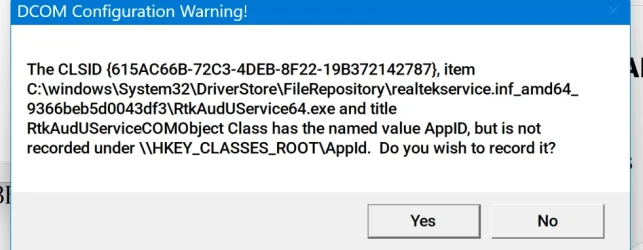
error message - and I can't access sensitive sites such as my cloud storage


mlg

Active member
Member
Local time
6:35 AM
Posts
31
OS
Windows 11
Win 11 Pro
version 25H

I don't understand this error message quite well enough to proceed. Would appreciate some help as it's interfering with my ability to access sites such as my own pcloud data:
The application-specific permission settings do not grant Local Activation permission for the COM Server application with CLSID

{6B3B8D23-FA8D-40B9-8DBD-B950333E2C52}

and APPID

{4839DDB7-58C2-48F5-8283-E1D1807D0D7D}

to the user NT AUTHORITY\LOCAL SERVICE SID (S-1-5-19) from address LocalHost (Using LRPC) running in the application container Unavailable SID (Unavailable). This security permission can be modified using the Component Services administrative tool.

Thanks
 

My Computer

System One

  • OS
    Windows 11
    Computer type
    PC/Desktop
    Manufacturer/Model
    custom built
    CPU
    AMD Ryzen 9 9900X 4.4GHz 12 Core 120W
    Motherboard
    Asus ProArt X870E-Creator WiFi
    Memory
    Kingston DDR5-5600 64GB
    Graphics Card(s)
    PNY GeForce RTX 5060 Ti Dual Fan 16GB
    Sound Card
    built in Realtek
    Monitor(s) Displays
    Dell U2722DE
    Screen Resolution
    2560x1440
    Hard Drives
    Crucial T705 2TB Gen5 M.2 SSD and 3 Samsung EVO SSDs: 250GB, 2 TB and 4 TB (2 partitions)
    PSU
    Super Flower LEADEX VII Gold 1300W
    Case
    Fractal Design Define 7
    Cooling
    Asetek 624S-M2 240mm CPU Cooler plus 3 140mm Noctua fans
    Keyboard
    Kinesis Freestyle Pro
    Mouse
    Razer Basilisk Pro
    Internet Speed
    FIOS 2 gb
    Browser
    Chrome
    Antivirus
    Bitdefender
    Other Info
    Plan to use a VPN with adblocker

Would this be a symptom of the recent broken localhost introduced a couple of updates ago?

Have you tried the usual DISM and SFC diagnosis?
 

My Computers

System One System Two

  • OS
    Windows 11 Enterprise 25H2 26200 7462
    Computer type
    PC/Desktop
    Manufacturer/Model
    Custom Build
    CPU
    Intel XEON E5-2699 v3
    Motherboard
    ASUS X99-A
    Memory
    64GB Teamgroup UD4-3600
    Graphics Card(s)
    NVIDIA GeForce GTX 1080 Ti
    Sound Card
    Integrated
    Monitor(s) Displays
    ACER X34 Predator
    Screen Resolution
    3440 x 1440
    Hard Drives
    Crucial CT1000P 3P SSD8 1TB
    Crucial CT1000 BX500 SSD 1TB
    PSU
    GameMax Pro
    Case
    Fractal Design
    Cooling
    Corsair H110iGT + 6 140mm Fans
    Keyboard
    Corsair K4
    Mouse
    G-Skill G502
    Internet Speed
    300MBs
    Browser
    Chrome
    Antivirus
    OEM
    Other Info
    ASUS RT-AC87U Router
  • Operating System
    25H2 26200.5074
    Computer type
    Laptop
    Manufacturer/Model
    ASUS X555LA
    Memory
    8GB
    Browser
    Chrome
    Antivirus
    OEM
Would this be a symptom of the recent broken localhost introduced a couple of updates ago?

Have you tried the usual DISM and SFC diagnosis?
I'm not familiar with the "recent localhost" from a few days ago.
I did run DISM and sfc and it came back clean. "windows resource protection found no integrity violations".
Where can I find more info on recent broken localhost?

Thanks very much
 

My Computer

System One

  • OS
    Windows 11
    Computer type
    PC/Desktop
    Manufacturer/Model
    custom built
    CPU
    AMD Ryzen 9 9900X 4.4GHz 12 Core 120W
    Motherboard
    Asus ProArt X870E-Creator WiFi
    Memory
    Kingston DDR5-5600 64GB
    Graphics Card(s)
    PNY GeForce RTX 5060 Ti Dual Fan 16GB
    Sound Card
    built in Realtek
    Monitor(s) Displays
    Dell U2722DE
    Screen Resolution
    2560x1440
    Hard Drives
    Crucial T705 2TB Gen5 M.2 SSD and 3 Samsung EVO SSDs: 250GB, 2 TB and 4 TB (2 partitions)
    PSU
    Super Flower LEADEX VII Gold 1300W
    Case
    Fractal Design Define 7
    Cooling
    Asetek 624S-M2 240mm CPU Cooler plus 3 140mm Noctua fans
    Keyboard
    Kinesis Freestyle Pro
    Mouse
    Razer Basilisk Pro
    Internet Speed
    FIOS 2 gb
    Browser
    Chrome
    Antivirus
    Bitdefender
    Other Info
    Plan to use a VPN with adblocker

Maybe co-pilot's answer can lead you in the right direction. It is much too lengthy and detailed for me to post here. While on this forum page, open copilot and ask
application-specific permission settings do not grant Local Activation permission for the COM Server application

Co-pilot gives you the reason for the errors, what it means and how to fix it.
At any step respond to co-pilot's question to get more details.
 

My Computers

System One System Two

  • OS
    Windows 11 Pro 25H2
    Computer type
    PC/Desktop
    Manufacturer/Model
    Dell Optiplex 7080
    CPU
    i9-10900 10 core 20 threads
    Motherboard
    DELL 0J37VM
    Memory
    32 gb
    Graphics Card(s)
    none-Intel UHD Graphics 630
    Sound Card
    Integrated Realtek
    Monitor(s) Displays
    Benq 27
    Screen Resolution
    2560x1440
    Hard Drives
    2x1tb Solidigm m.2 nvme /External drives 512gb Samsung m.2 sata+2tb Kingston m2.nvme
    PSU
    500w
    Case
    MT
    Cooling
    Dell Premium
    Keyboard
    Logitech wired
    Mouse
    Logitech wireless
    Internet Speed
    so slow I'm too embarrassed to tell
    Browser
    #1 Edge #2 Firefox
    Antivirus
    Defender+MWB Premium
  • Operating System
    Windows 11 Pro 24H2 26200.8457
    Computer type
    PC/Desktop
    Manufacturer/Model
    Beelink Mini PC SER5
    CPU
    AMD Ryzen 7 6800U
    Memory
    32 gb
    Graphics card(s)
    integrated
    Sound Card
    integrated
    Monitor(s) Displays
    Benq 27
    Screen Resolution
    2560x1440
    Hard Drives
    1TB Crucial nvme
    Keyboard
    Logitech wired
    Mouse
    Logitech wireless
    Internet Speed
    still too embarrassed to tell
    Browser
    Firefox
    Antivirus
    Defender
    Other Info
    System 3 is non compliant Dell 9020 i7-4770/24gb ram Win11 PRO 26200.8457
  • Like
Reactions: mlg
Thanks a lot. going there right now!
 

My Computer

System One

  • OS
    Windows 11
    Computer type
    PC/Desktop
    Manufacturer/Model
    custom built
    CPU
    AMD Ryzen 9 9900X 4.4GHz 12 Core 120W
    Motherboard
    Asus ProArt X870E-Creator WiFi
    Memory
    Kingston DDR5-5600 64GB
    Graphics Card(s)
    PNY GeForce RTX 5060 Ti Dual Fan 16GB
    Sound Card
    built in Realtek
    Monitor(s) Displays
    Dell U2722DE
    Screen Resolution
    2560x1440
    Hard Drives
    Crucial T705 2TB Gen5 M.2 SSD and 3 Samsung EVO SSDs: 250GB, 2 TB and 4 TB (2 partitions)
    PSU
    Super Flower LEADEX VII Gold 1300W
    Case
    Fractal Design Define 7
    Cooling
    Asetek 624S-M2 240mm CPU Cooler plus 3 140mm Noctua fans
    Keyboard
    Kinesis Freestyle Pro
    Mouse
    Razer Basilisk Pro
    Internet Speed
    FIOS 2 gb
    Browser
    Chrome
    Antivirus
    Bitdefender
    Other Info
    Plan to use a VPN with adblocker

Where can I find more info on recent broken localhost?
Thanks very much
Use the forum search feature.
 

My Computers

System One System Two

  • OS
    Windows 11 Enterprise 25H2 26200 7462
    Computer type
    PC/Desktop
    Manufacturer/Model
    Custom Build
    CPU
    Intel XEON E5-2699 v3
    Motherboard
    ASUS X99-A
    Memory
    64GB Teamgroup UD4-3600
    Graphics Card(s)
    NVIDIA GeForce GTX 1080 Ti
    Sound Card
    Integrated
    Monitor(s) Displays
    ACER X34 Predator
    Screen Resolution
    3440 x 1440
    Hard Drives
    Crucial CT1000P 3P SSD8 1TB
    Crucial CT1000 BX500 SSD 1TB
    PSU
    GameMax Pro
    Case
    Fractal Design
    Cooling
    Corsair H110iGT + 6 140mm Fans
    Keyboard
    Corsair K4
    Mouse
    G-Skill G502
    Internet Speed
    300MBs
    Browser
    Chrome
    Antivirus
    OEM
    Other Info
    ASUS RT-AC87U Router
  • Operating System
    25H2 26200.5074
    Computer type
    Laptop
    Manufacturer/Model
    ASUS X555LA
    Memory
    8GB
    Browser
    Chrome
    Antivirus
    OEM
Maybe co-pilot's answer can lead you in the right direction. It is much too lengthy and detailed for me to post here. While on this forum page, open copilot and ask
application-specific permission settings do not grant Local Activation permission for the COM Server application

Co-pilot gives you the reason for the errors, what it means and how to fix it.
At any step respond to co-pilot's question to get more details.
Thank you so much. I had no idea that copilot had this feature and that pme cpi;d. of pme cjpse tp. get [rettu far dpwm tje Microft rabbit hole.

I was following a whole list of steps to hopefully repair some event error and I hit this 1765869096750.webpI couldn't get out of it and finally decided I would click yes.
And some things are fixed! There were times I couldn't register having clicked on "submit" in a form. So far that hasn't happended again.

I'm also very glad to know this exists. I kept being locked out of next steps but copilot anticipated this and told me how to proceed. When I have some spare energy and patience I'll go back and try some more critical events.

Not sure what was solved - although something is definitely better...and you showed me a whole new wayto learn more. Thanks so much
I'm trying to find the helpful button but can only locate the like - or i would definitely have chosen helpful.
 

My Computer

System One

  • OS
    Windows 11
    Computer type
    PC/Desktop
    Manufacturer/Model
    custom built
    CPU
    AMD Ryzen 9 9900X 4.4GHz 12 Core 120W
    Motherboard
    Asus ProArt X870E-Creator WiFi
    Memory
    Kingston DDR5-5600 64GB
    Graphics Card(s)
    PNY GeForce RTX 5060 Ti Dual Fan 16GB
    Sound Card
    built in Realtek
    Monitor(s) Displays
    Dell U2722DE
    Screen Resolution
    2560x1440
    Hard Drives
    Crucial T705 2TB Gen5 M.2 SSD and 3 Samsung EVO SSDs: 250GB, 2 TB and 4 TB (2 partitions)
    PSU
    Super Flower LEADEX VII Gold 1300W
    Case
    Fractal Design Define 7
    Cooling
    Asetek 624S-M2 240mm CPU Cooler plus 3 140mm Noctua fans
    Keyboard
    Kinesis Freestyle Pro
    Mouse
    Razer Basilisk Pro
    Internet Speed
    FIOS 2 gb
    Browser
    Chrome
    Antivirus
    Bitdefender
    Other Info
    Plan to use a VPN with adblocker

That shows the realtek audio service as being what is associated with that clsid. However, I can't understand how that would have any relation to you being unable to get to certain sites,. From what I know DCOM errors do not cause such an issue in the first place and most of them can be ignored.. We do have to consider the source here before we do something rash that might well affect your sound.

The only way I would take that step and register it would be IF I HAD A CURRENT SYSTEM IMAGE. Otherwise, I don't think I would.
 

My Computers

System One System Two

  • OS
    Windows 11 Pro 25H2
    Computer type
    PC/Desktop
    Manufacturer/Model
    Dell Optiplex 7080
    CPU
    i9-10900 10 core 20 threads
    Motherboard
    DELL 0J37VM
    Memory
    32 gb
    Graphics Card(s)
    none-Intel UHD Graphics 630
    Sound Card
    Integrated Realtek
    Monitor(s) Displays
    Benq 27
    Screen Resolution
    2560x1440
    Hard Drives
    2x1tb Solidigm m.2 nvme /External drives 512gb Samsung m.2 sata+2tb Kingston m2.nvme
    PSU
    500w
    Case
    MT
    Cooling
    Dell Premium
    Keyboard
    Logitech wired
    Mouse
    Logitech wireless
    Internet Speed
    so slow I'm too embarrassed to tell
    Browser
    #1 Edge #2 Firefox
    Antivirus
    Defender+MWB Premium
  • Operating System
    Windows 11 Pro 24H2 26200.8457
    Computer type
    PC/Desktop
    Manufacturer/Model
    Beelink Mini PC SER5
    CPU
    AMD Ryzen 7 6800U
    Memory
    32 gb
    Graphics card(s)
    integrated
    Sound Card
    integrated
    Monitor(s) Displays
    Benq 27
    Screen Resolution
    2560x1440
    Hard Drives
    1TB Crucial nvme
    Keyboard
    Logitech wired
    Mouse
    Logitech wireless
    Internet Speed
    still too embarrassed to tell
    Browser
    Firefox
    Antivirus
    Defender
    Other Info
    System 3 is non compliant Dell 9020 i7-4770/24gb ram Win11 PRO 26200.8457
You're right! of course. I've lost some vision and didn't fully read the message (it was tiny on the screen) and I get impatient. Fortunately, I just checked sound from streaming and sound from a file on my computer and they're both ok. I'm learning...slowly to slow down and be more patient....very slowly.
I don't understand it either. I've done other things such as completely uninstalling Nord VPN andj disabling another vpn which I'd turned off but not fully disabled. I use Revo for both these things. Neither VPN is running, nor have they been running since this started. Since this computer is less than two months old I do have a flash drive from the people who built it (Puget). But I shouldn't have done it.

Next I'm realizing my G 900 Logitech gaming mouse which has buttons programmed for cut, paste etc, has Windows 11 software available. Going to uninstall the old and put in the new.

The reason for this is all the strange things that happen with key combinations which I can't locate. For example if I hit shift+enter the text inside a box like this becomes three times as large and some voice starts reading the screen to me. Likely some vision enhancement I tried but what? I always uninstall with Revo.
 

My Computer

System One

  • OS
    Windows 11
    Computer type
    PC/Desktop
    Manufacturer/Model
    custom built
    CPU
    AMD Ryzen 9 9900X 4.4GHz 12 Core 120W
    Motherboard
    Asus ProArt X870E-Creator WiFi
    Memory
    Kingston DDR5-5600 64GB
    Graphics Card(s)
    PNY GeForce RTX 5060 Ti Dual Fan 16GB
    Sound Card
    built in Realtek
    Monitor(s) Displays
    Dell U2722DE
    Screen Resolution
    2560x1440
    Hard Drives
    Crucial T705 2TB Gen5 M.2 SSD and 3 Samsung EVO SSDs: 250GB, 2 TB and 4 TB (2 partitions)
    PSU
    Super Flower LEADEX VII Gold 1300W
    Case
    Fractal Design Define 7
    Cooling
    Asetek 624S-M2 240mm CPU Cooler plus 3 140mm Noctua fans
    Keyboard
    Kinesis Freestyle Pro
    Mouse
    Razer Basilisk Pro
    Internet Speed
    FIOS 2 gb
    Browser
    Chrome
    Antivirus
    Bitdefender
    Other Info
    Plan to use a VPN with adblocker
Back
Top Bottom