Error using Win7 image recovery for win11


Yes mount the image you created with Win7 Backup tool to recover your personal files.
but I do not think have this "mount" option under WinRE? I simply used the "System Image recovery" tool and my image backup showed up in the dropdown list
 

My Computer My Computer

At a glance

Win11
OS
Win11
Computer type
PC/Desktop
No you use working version of Windows to mount the image.
 

My Computer My Computer

At a glance

Windows 11AMD Ryzen 7 5700GMicron Technology DDR4-3200 16GBNVIDIA GeForce RTX 3060
OS
Windows 11
Computer type
PC/Desktop
Manufacturer/Model
HP Pavilion
CPU
AMD Ryzen 7 5700G
Motherboard
Erica6
Memory
Micron Technology DDR4-3200 16GB
Graphics Card(s)
NVIDIA GeForce RTX 3060
Sound Card
Realtek ALC671
Monitor(s) Displays
Samsung SyncMaster U28E590
Screen Resolution
3840 x 2160
Hard Drives
SAMSUNG MZVLQ1T0HALB-000H1
Yes mount the image you created with Win7 Backup tool to recover your personal files.
well I can only access WinRE now because I cannot log into Win11 OS anymore... it kept saying that the auto repair could not fix the issue
 

My Computer My Computer

At a glance

Win11
OS
Win11
Computer type
PC/Desktop
but I do not think I can mount the image under WinRe, because the image just shows up in the drop down list of the "System Image Recovery" tool I used under WinRE.
My friend i said working installed version of Windows 11 can be use to mount the image file with WinRe you don't have that option.
 

My Computer My Computer

At a glance

Windows 11AMD Ryzen 7 5700GMicron Technology DDR4-3200 16GBNVIDIA GeForce RTX 3060
OS
Windows 11
Computer type
PC/Desktop
Manufacturer/Model
HP Pavilion
CPU
AMD Ryzen 7 5700G
Motherboard
Erica6
Memory
Micron Technology DDR4-3200 16GB
Graphics Card(s)
NVIDIA GeForce RTX 3060
Sound Card
Realtek ALC671
Monitor(s) Displays
Samsung SyncMaster U28E590
Screen Resolution
3840 x 2160
Hard Drives
SAMSUNG MZVLQ1T0HALB-000H1
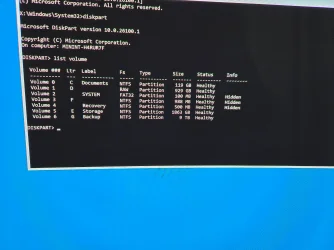
Do you have all the partitions from Windows 11 use below command and paste or post picture of the commands outputs.


Code:
diskpart

list volume
 

My Computer My Computer

At a glance

Windows 11AMD Ryzen 7 5700GMicron Technology DDR4-3200 16GBNVIDIA GeForce RTX 3060
OS
Windows 11
Computer type
PC/Desktop
Manufacturer/Model
HP Pavilion
CPU
AMD Ryzen 7 5700G
Motherboard
Erica6
Memory
Micron Technology DDR4-3200 16GB
Graphics Card(s)
NVIDIA GeForce RTX 3060
Sound Card
Realtek ALC671
Monitor(s) Displays
Samsung SyncMaster U28E590
Screen Resolution
3840 x 2160
Hard Drives
SAMSUNG MZVLQ1T0HALB-000H1
Do you have all the partitions from Windows 11 use below command and paste or post picture of the commands outputs.


Code:
diskpart

list volume
 

My Computer My Computer

At a glance

Win11
OS
Win11
Computer type
PC/Desktop
Sorry the image did not get attached previously
 

Attachments

  • 20250206_002304.webp
    20250206_002304.webp
    1.1 MB · Views: 1

My Computer My Computer

At a glance

Win11
OS
Win11
Computer type
PC/Desktop
Use Notepad.exe command to start Notepad and click Open from menu bar to open File Explorer now select All files (*.*) from File Explorer and browse to disk partition where you have installed Windows 11 to copy your personal files and perform clean installation.

This guide contains step-by-step instructions to backup files if Windows cannot start normally.


My Computer My Computer

At a glance

Windows 11AMD Ryzen 7 5700GMicron Technology DDR4-3200 16GBNVIDIA GeForce RTX 3060
OS
Windows 11
Computer type
PC/Desktop
Manufacturer/Model
HP Pavilion
CPU
AMD Ryzen 7 5700G
Motherboard
Erica6
Memory
Micron Technology DDR4-3200 16GB
Graphics Card(s)
NVIDIA GeForce RTX 3060
Sound Card
Realtek ALC671
Monitor(s) Displays
Samsung SyncMaster U28E590
Screen Resolution
3840 x 2160
Hard Drives
SAMSUNG MZVLQ1T0HALB-000H1
Use Notepad.exe command to start Notepad and click Open from menu bar to open File Explorer now select All files (*.*) from File Explorer and browse to disk partition where you have installed Windows 11 to copy your personal files and perform clean installation.

This guide contains step-by-step instructions to backup files if Windows cannot start normally.

by clean installation, do you mean I clean all the partitions on my internal drives, then restore?
 

My Computer My Computer

At a glance

Win11
OS
Win11
Computer type
PC/Desktop
Clean installation is performed by deleting everything on HDD and using Windows 11 Installation media to install Windows 11.
 

My Computer My Computer

At a glance

Windows 11AMD Ryzen 7 5700GMicron Technology DDR4-3200 16GBNVIDIA GeForce RTX 3060
OS
Windows 11
Computer type
PC/Desktop
Manufacturer/Model
HP Pavilion
CPU
AMD Ryzen 7 5700G
Motherboard
Erica6
Memory
Micron Technology DDR4-3200 16GB
Graphics Card(s)
NVIDIA GeForce RTX 3060
Sound Card
Realtek ALC671
Monitor(s) Displays
Samsung SyncMaster U28E590
Screen Resolution
3840 x 2160
Hard Drives
SAMSUNG MZVLQ1T0HALB-000H1
Clean installation is performed by deleting everything on HDD and using Windows 11 Installation media to install Windows 11.
So there is really no other way to restore? I am trying to avoid starting from scratch...
 

My Computer My Computer

At a glance

Win11
OS
Win11
Computer type
PC/Desktop
I understand try Sfc command.

Please boot your computer with Windows Setup Media and fromWindows Recovery Environment start the Command Prompt.

Please type below command into Command Prompt and press Enter key.

The following command scans integrity of all protected Windows system files and repairs files with problems when possible.

Code:
Sfc  /Scannow   /OFFBOOTDIR=D:\   /OFFWINDIR=D:\Windows


Please replace partition letter D: with Windows installed partition letter. When computer boots into Windows Recovery Environment (WinRE) environment the drive letter assign to Windows partition may not be C: drive letter because Windows 7, 8 , 8.1 and 10 creates a separate system partition when it's installed from scratch. The system partition contains boot files WinRE assigns the system partition the C: drive letter and the Windows installed partition will be assign any other drive letter usually D: drive letter is assign to Windows installed partition. The Bcdedit /enum | find "osdevice" command can be use to find out the drive letter of the Windows installed partition the output of the Bcdedit command is similar to this osdevice partition=D:. The drive letter after partition= is the drive letter of the Windows partition.


To troubleshoot Windows 10 or Windows 11 boot problem, just follow the instructions in this guide, and hopefully you will fix the not booting problem in no time.


My Computer My Computer

At a glance

Windows 11AMD Ryzen 7 5700GMicron Technology DDR4-3200 16GBNVIDIA GeForce RTX 3060
OS
Windows 11
Computer type
PC/Desktop
Manufacturer/Model
HP Pavilion
CPU
AMD Ryzen 7 5700G
Motherboard
Erica6
Memory
Micron Technology DDR4-3200 16GB
Graphics Card(s)
NVIDIA GeForce RTX 3060
Sound Card
Realtek ALC671
Monitor(s) Displays
Samsung SyncMaster U28E590
Screen Resolution
3840 x 2160
Hard Drives
SAMSUNG MZVLQ1T0HALB-000H1
You have RAW volume 1 disk with drive letter D:, RAW file system indicates a state of your hard drive which has no or unknown file system.
 

My Computer My Computer

At a glance

Windows 11AMD Ryzen 7 5700GMicron Technology DDR4-3200 16GBNVIDIA GeForce RTX 3060
OS
Windows 11
Computer type
PC/Desktop
Manufacturer/Model
HP Pavilion
CPU
AMD Ryzen 7 5700G
Motherboard
Erica6
Memory
Micron Technology DDR4-3200 16GB
Graphics Card(s)
NVIDIA GeForce RTX 3060
Sound Card
Realtek ALC671
Monitor(s) Displays
Samsung SyncMaster U28E590
Screen Resolution
3840 x 2160
Hard Drives
SAMSUNG MZVLQ1T0HALB-000H1
So there is really no other way to restore? I am trying to avoid starting from scratch

I’m not sure why you can’t Diskpart the C Drive and remove all partitions. Then use the Windows Rescue USB to restore your Backup & Restore (Win 7) image.
Regardless of what people say, It’s never failed me, since Win 7.
But I do use Hasleo now as my main backup, Win7 B&R as my second.
But I had to use a Win 7 image last month due to Win 24H2.

Yeah I have thought of using "CLEAN" via diskpart, but is it worth the risk of deleting everything on my drives (C drive for OS and D drive for data)? In that case, my only hope is the backup image...

OH, you partitioned for a D Drive on your main OS drive?
Not good.
 

My Computers My Computers

  • At a glance

    Windows 11 Pro 25H2 Build 26200.8655Intel(R) Core(TM) i7-4770K CPU @ 3.50GHz32.0 GB of I forget and the box is in storage.Gigabyte nVidia GeForce GTX 1660 Super OC 6GB
    OS
    Windows 11 Pro 25H2 Build 26200.8655
    Computer type
    PC/Desktop
    Manufacturer/Model
    Sin-built 2013
    CPU
    Intel(R) Core(TM) i7-4770K CPU @ 3.50GHz
    Motherboard
    ASUS ROG Maximus VI Formula
    Memory
    32.0 GB of I forget and the box is in storage.
    Graphics Card(s)
    Gigabyte nVidia GeForce GTX 1660 Super OC 6GB
    Sound Card
    ROG SupremeFX Formula 8-Channel High Definition Audio
    Monitor(s) Displays
    5 x LG 25MS500-B - 1 x 24MK430H-B - 1 x Wacom Pro 22" Touch Screen Tablet
    Screen Resolution
    All over the place
    Hard Drives
    Too many to list. OS on Samsung 1TB 870 QVO SATA
    PSU
    Silverstone 1500
    Case
    NZXT Phantom 820 Full-Tower Case
    Cooling
    Noctua NH-D15 Elite Class Dual Tower CPU Cooler / 6 x EziDIY 120mm / 2 x Corsair 140mm somethings / 1 x 140mm Thermaltake something / 2 x 200mm Corsair.
    Keyboard
    Corsair K95 / Logitech diNovo Edge Wireless
    Mouse
    Logitech: G402 / G502 / Mx Masters / Mx Air Cordless
    Internet Speed
    2000/500Mbps
    Browser
    All sorts
    Antivirus
    Kaspersky Premium
    Other Info
    ㅤㅤㅤㅤㅤㅤㅤㅤㅤㅤㅤㅤㅤㅤㅤㅤㅤㅤㅤㅤㅤㅤㅤㅤㅤㅤㅤㅤㅤㅤㅤㅤㅤㅤㅤㅤㅤㅤㅤㅤ⠀⠀⠀⠀⠀⠀⠀⠀⠀⠀
    TP-Link BE9300 WiFi 7 Bluetooth 5.4 (Archer TBE550E)
    TP-Link TX201 V1 2.5GB Lan

    Grandstream HT812 - VoIP
    ASUS DSL-AX82U - Mesh
    ASUS RT-AC68U - Mesh
    ASUS RT-BE88U Router

    Brother MFC-L2880DW Printer

    I’m on a horse.
  • At a glance

    Windows 11 Pro 25H2 Build 26200.8655 (Wifes)13th Generation Intel® Core™ i5-1340P Process...16GB LPDDR5-52001x Intel® Iris® Xe Graphics
    Operating System
    Windows 11 Pro 25H2 Build 26200.8655 (Wifes)
    Computer type
    Laptop
    Manufacturer/Model
    LENOVO Yoga 7 14IRL8 - Type 82YL
    CPU
    13th Generation Intel® Core™ i5-1340P Processor(Core™ i5-1340P)
    Memory
    16GB LPDDR5-5200
    Graphics card(s)
    1x Intel® Iris® Xe Graphics
    Sound Card
    Optimized with Dolby Atmos®
    Screen Resolution
    QHD 2880 x 1800 OLED
    Hard Drives
    M.2 512 GB SSD PCIe
    Mouse
    Logiteck MX Master 3S
    Internet Speed
    2000/500
    Antivirus
    Defender / Malwarebytes
    Other Info
    …still on a horse.


    Wireless Network: Wi-Fi 6E 2x2 AX; Bluetooth® 5.1 or above
    Ports: 1x 1 Novo button; 2 in 1 Audio Combo jack; Micro SD Card Reader; HDMI 1.4b; 2 x USB Type-C (TBT4)
    USB 3.2 Gen 2 DP 1.4a
    PD 3.0); 1 x USB 3.2 Gen1 Type A
    Camera
    1x 1080P FHD IR/RGB Hybrid with Privacy Shutter and Dual Array Microphone
    Graphics
    1x Intel® Iris® Xe Graphics
    Monitor
    14" WUXGA
    Form Factor
    Convertible Notebook
  • Windows 11 Pro 25H2 Build 26200.8655 (Wifes)

    Yoga 7 2-in-1 14IML9 - Type 83DJ

    Processor: Intel® Core™ Ultra 7 155H Processor(Core™ Ultra 7 155H)

    Memory: 32GB LPD5X-7467

    Hard Drive: 1 TB SSD PCIe

    Wireless Network: 1x Wi-Fi 6E 2x2 AX; Bluetooth® 5.1 or above

    Ports: 1 x HDMI 2.1 TMDS; 1 x Novo Button; 1 x Combo Audio Jack
    2 x USB-C (USB 4.0)
    1 x USB-A 3.2 Gen 1

    Camera: 1080P FHD IR Hybrid with Dual Microphone

    Graphics: Intel® Arc™ Graphics

    Monitor: 14" 2.8K

    ...Where's my horse?
I’m not sure why you can’t Diskpart the C Drive and remove all partitions. Then use the Windows Rescue USB to restore your Backup & Restore (Win 7) image.
Regardless of what people say, It’s never failed me, since Win 7.
But I do use Hasleo now as my main backup, Win7 B&R as my second.
But I had to use a Win 7 image last month due to Win 24H2.


OH, you partitioned for a D Drive on your main OS drive?
Not good.
I partitioned C drive for OS only, then a D drive for other stuff. My backup has the same partition arrangement. I can see that my C drive is empty but my D drive still has all the data, so I am going to use the notepad method under WinRE to backup all those files to an external HDD, then "Clean" my internal Disk to remove all partitions and try restore one last time
 

My Computer My Computer

At a glance

Win11
OS
Win11
Computer type
PC/Desktop
You have RAW volume 1 disk with drive letter D:, RAW file system indicates a state of your hard drive which has no or unknown file system.
My C drive (OS) is already empty, so I might as well clean all my internal drives and give restore another go.
 

My Computer My Computer

At a glance

Win11
OS
Win11
Computer type
PC/Desktop
My C drive (OS) is already empty, so I might as well clean all my internal drives and give restore another go.
Good luck!
 

My Computer My Computer

At a glance

Windows 11AMD Ryzen 7 5700GMicron Technology DDR4-3200 16GBNVIDIA GeForce RTX 3060
OS
Windows 11
Computer type
PC/Desktop
Manufacturer/Model
HP Pavilion
CPU
AMD Ryzen 7 5700G
Motherboard
Erica6
Memory
Micron Technology DDR4-3200 16GB
Graphics Card(s)
NVIDIA GeForce RTX 3060
Sound Card
Realtek ALC671
Monitor(s) Displays
Samsung SyncMaster U28E590
Screen Resolution
3840 x 2160
Hard Drives
SAMSUNG MZVLQ1T0HALB-000H1

Latest Support Threads

Back
Top Bottom