Event Viewer What Is This Error


Toughbook

Well-known member
Local time
10:18 PM
Posts
26
Location
Georgia
OS
Windows 11 Pro 25H2
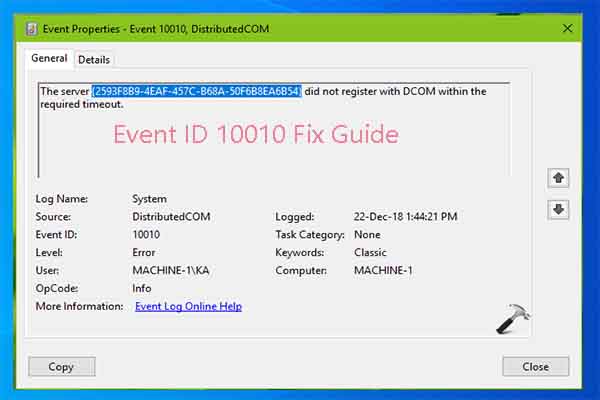
I see this error a lot in the Event Viewer. What is this and should I be concerned?


Log Name: System
Source: Microsoft-Windows-DistributedCOM
Date: 3/21/2025 10:44:12 PM
Event ID: 10010
Task Category: None
Level: Error
Keywords: Classic
User: SYSTEM
Computer: FZ-55
Description:
The server {5908117A-ED9A-5D13-906D-DF921375C50B} did not register with DCOM within the required timeout.
Event Xml:
<Event xmlns="http://schemas.microsoft.com/win/2004/08/events/event">
<System>
<Provider Name="Microsoft-Windows-DistributedCOM" Guid="{1B562E86-B7AA-4131-BADC-B6F3A001407E}" EventSourceName="DCOM" />
<EventID Qualifiers="0">10010</EventID>
<Version>0</Version>
<Level>2</Level>
<Task>0</Task>
<Opcode>0</Opcode>
<Keywords>0x8080000000000000</Keywords>
<TimeCreated SystemTime="2025-03-22T02:44:12.7315856Z" />
<EventRecordID>85132</EventRecordID>
<Correlation ActivityID="{a3d66568-991f-0001-95d7-dfa31f99db01}" />
<Execution ProcessID="1416" ThreadID="17448" />
<Channel>System</Channel>
<Computer>FZ-55</Computer>
<Security UserID="S-1-5-18" />
</System>
<EventData>
<Data Name="param1">{5908117A-ED9A-5D13-906D-DF921375C50B}</Data>
</EventData>
</Event>
 

My Computer My Computer

At a glance

Windows 11 Pro 25H2Intel Core i7-1370P vPro32GB DDR4-3200MhzIntel Iris Xe Graphics
OS
Windows 11 Pro 25H2
Computer type
Laptop
Manufacturer/Model
Panasonic Toughbook FZ-55 MK-3
CPU
Intel Core i7-1370P vPro
Motherboard
Panasonic
Memory
32GB DDR4-3200Mhz
Graphics Card(s)
Intel Iris Xe Graphics
Monitor(s) Displays
ASUS
Hard Drives
1st Samsung SSD 990 PRO 2TB
2nd Panasonic Opal 1Tb Quick Release
Keyboard
Logitech MX Keys
Mouse
LogiTech MX-3
Browser
Chrome
Antivirus
Malwarebytes
Other Info
Logitech BRIO Webcam

My Computer My Computer

At a glance

Microsoft Windows 11 HomeIntel Core i5-13490F2 x 16 Patriot Memory (PDP Systems) PSD516G56...GIGABYTE GeForce RTX 4070 WINDFORCE OC 12G (G...
OS
Microsoft Windows 11 Home
Computer type
PC/Desktop
Manufacturer/Model
MSI MS-7D98
CPU
Intel Core i5-13490F
Motherboard
MSI B760 GAMING PLUS WIFI
Memory
2 x 16 Patriot Memory (PDP Systems) PSD516G560081 6400MT (32-37-37-74); 1.35V)
Graphics Card(s)
GIGABYTE GeForce RTX 4070 WINDFORCE OC 12G (GV-N4070WF3OC-12GD)
Sound Card
Bluetooth Аудио
Monitor(s) Displays
INNOCN 15K1F
Screen Resolution
1920 x 1080
Hard Drives
WD_BLACK SN770 250GB
KINGSTON SNV2S1000G (ELFK0S.6)
PSU
Thermaltake Toughpower GF3 1000W
Case
CG560 - DeepCool
Cooling
ID-COOLING SE-224-XTS / 2 x 140Mm Fan - rear and top; 3 x 120Mm - front
Keyboard
Corsair K70 RGB TKL
Mouse
Corsair KATAR PRO XT
Internet Speed
100 Mbps
Browser
Firefox
Antivirus
Microsoft Defender Antivirus
Other Info
https://www.userbenchmark.com/UserRun/66553205
CLSID {5908117A-ED9A-5D13-906D-DF921375C50B} is associated with Google Chrome updater.

You may want to uninstall and reinstall Chrome to fix it.
 

My Computer My Computer

At a glance

Windows 7
OS
Windows 7
The server {5908117A-ED9A-5D13-906D-DF921375C50B} did not register with DCOM within the required timeout.
CLSID {5908117A-ED9A-5D13-906D-DF921375C50B} is associated with Google Chrome updater.

You may want to uninstall and reinstall Chrome to fix it.
i'd agree with reinstallation, but if you absolutely don't want to, you can try these 3 options... couldn't tell you if they'll work for chrome... but possibly

.https://www.thewindowsclub.com/server-did-not-register-with-dcom
 

My Computer My Computer

At a glance

Windows 11 Pro
OS
Windows 11 Pro
Years ago @EdTittel had posted a link on DCOM (most can be ignored).


My Computer My Computer

At a glance

Windows 10Intel(R) Core(TM) i7-4800MQ CPU @ 2.70GHz16 GB Total: Manufacturer : Samsung MemoryTyp...NVIDIA Quadro K3100M; Intel(R) HD Graphics 4600
OS
Windows 10
Computer type
Laptop
Manufacturer/Model
HP
CPU
Intel(R) Core(TM) i7-4800MQ CPU @ 2.70GHz
Motherboard
Product : 190A Version : KBC Version 94.56
Memory
16 GB Total: Manufacturer : Samsung MemoryType : DDR3 FormFactor : SODIMM Capacity : 8GB Speed : 1600
Graphics Card(s)
NVIDIA Quadro K3100M; Intel(R) HD Graphics 4600
Sound Card
IDT High Definition Audio CODEC; PNP Device ID HDAUDIO\FUNC_01&VEN_111D&DEV_76E0
Hard Drives
Model Hitachi HTS727575A9E364
Antivirus
Microsoft Defender
Other Info
Mobile Workstation

My Computer My Computer

At a glance

Windows 11Ryzen 9 7900X64 GBNvidia GeForce GTX 1650
OS
Windows 11
Computer type
PC/Desktop
Manufacturer/Model
Custom
CPU
Ryzen 9 7900X
Motherboard
ASUS ROG STRIX B-650 E-F
Memory
64 GB
Graphics Card(s)
Nvidia GeForce GTX 1650
Hard Drives
C: SSD, 500 GB
D: HDD, 1 TB
J: HDD, 1 TB
Antivirus
Norton
I have started back on this issue again this morning as I have some time. It's very interesting that ya'll mentioned Chrome. Chrome started being very slow and just not acting right. I uninstalled it and reinstalled it. At first everything was working well and then it started slowing down again. I can't even log in to the Dashlane extension with an error. What's interesting with that is I can't log in to Dashlane in Edge either. I go to my other laptop and I have no issues with it.
I am very bewildered to say the least.
 

My Computer My Computer

At a glance

Windows 11 Pro 25H2Intel Core i7-1370P vPro32GB DDR4-3200MhzIntel Iris Xe Graphics
OS
Windows 11 Pro 25H2
Computer type
Laptop
Manufacturer/Model
Panasonic Toughbook FZ-55 MK-3
CPU
Intel Core i7-1370P vPro
Motherboard
Panasonic
Memory
32GB DDR4-3200Mhz
Graphics Card(s)
Intel Iris Xe Graphics
Monitor(s) Displays
ASUS
Hard Drives
1st Samsung SSD 990 PRO 2TB
2nd Panasonic Opal 1Tb Quick Release
Keyboard
Logitech MX Keys
Mouse
LogiTech MX-3
Browser
Chrome
Antivirus
Malwarebytes
Other Info
Logitech BRIO Webcam
Back
Top Bottom