
Windows 11 Version 22H2 (OS Build 2261.3447) x.64
On April10th, I OK'ed a windows update. It rebooted OK. I backup my files myself on a few external drives. Coincidently, I had need to restore an old file. So I mounted my external Drive (K:). When I clicked on my backup folder, Windows backup came up and asked me to backup or restore. I have never used this nor do I use OneDrive. I could find no way to access my folder. I panicked. I thought I had lost all my backups. I turned off all the Windows Backup features I could find. Still no luck. I rebooted, same problem.
Then I noticed that a Windows Update had failed to install. So I retried the install. When complete, the failed install was gone, disappeared. The last update on History was April 9 (the day before), but thankfully I now had access to my folder. The only remnant of this install I could find was the icon on my backup folder had changed. In my case, my backup folder name is the same as the Win11 "Device Name" XPS9520, which may be a contributing factor?
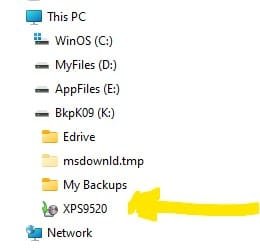
I have attached a screen shot of the external drive with the changed icon. And I can't seem to change it back to a regular folder icon.
Any ideas.
I am losing my faith in Windows Update.
On April10th, I OK'ed a windows update. It rebooted OK. I backup my files myself on a few external drives. Coincidently, I had need to restore an old file. So I mounted my external Drive (K:). When I clicked on my backup folder, Windows backup came up and asked me to backup or restore. I have never used this nor do I use OneDrive. I could find no way to access my folder. I panicked. I thought I had lost all my backups. I turned off all the Windows Backup features I could find. Still no luck. I rebooted, same problem.
Then I noticed that a Windows Update had failed to install. So I retried the install. When complete, the failed install was gone, disappeared. The last update on History was April 9 (the day before), but thankfully I now had access to my folder. The only remnant of this install I could find was the icon on my backup folder had changed. In my case, my backup folder name is the same as the Win11 "Device Name" XPS9520, which may be a contributing factor?
I have attached a screen shot of the external drive with the changed icon. And I can't seem to change it back to a regular folder icon.
Any ideas.
I am losing my faith in Windows Update.
- Windows Build/Version
- Windows 11 Version 22H2 (OS Build 2261.3447) x.64
My Computer
At a glance
Windows 1112th Gen Intel(R) Core(TM) i7-12700H 2.30 GHz16.0 GB (15.7 GB usable)Intel IRIS Xe Graphics; NVIDIA GeForce RTX Ti
- OS
- Windows 11
- Computer type
- Laptop
- Manufacturer/Model
- Dell XPS15 9520
- CPU
- 12th Gen Intel(R) Core(TM) i7-12700H 2.30 GHz
- Memory
- 16.0 GB (15.7 GB usable)
- Graphics Card(s)
- Intel IRIS Xe Graphics; NVIDIA GeForce RTX Ti
- Sound Card
- Realtek Audio
- Monitor(s) Displays
- Dell XPS 15 SHP1515 Display; Dell G2722HS (HDMI)
- Screen Resolution
- 1920 x 1080 (recommended)
- Hard Drives
- PC801 NVMe SK hynix 1TB, Samsung SSD 970 EVO Plus 1TB
- Browser
- Google Chrome
- Antivirus
- McAfee






