
Solved FAST STARTUP is not available


jessewilliams56

Autism Awareness - Blessed
Local time
4:36 AM
Posts
300
Location
Pell City, Alabama 35125
OS
Windows 11 Home 64-bit
I have an HP Desktop that has all of a sudden lost its FAST STARTUP setting in Control Panel > Hardware and Sound > System Settings. I first noticed this when I would turn off the computer, and it would say "Shutting Down", instead of just having a spinning circle and turning off. It's been going on for I would say about a week. The question is, how do I get Fast Startup back? This is not an SSD, it's just a 1TB HDD.
 
Windows Build/Version
Windows 11 Home 25H2

My Computers

System One System Two

  • OS
    Windows 11 Home 64-bit
    Manufacturer/Model
    HP Laptop -15-ef1079nr & HP All-in-One 24-df1370 Bundle PC
    CPU
    AMD Ryzen 3 & 11th Gen Intel Core i5-1135G7
    Motherboard
    HP 8706 (FP5) & HP 87F3 (ROW)
    Memory
    8 GB & 8 GB
    Graphics Card(s)
    AMD Radeon Graphics & Integrated Intel Iris X Graphics
    Sound Card
    Realtek Audio
    Monitor(s) Displays
    AMD Radeon Graphics Monitor & FHD Diagonal Touchscreen
    Screen Resolution
    1366x768 & 1920x1080
    Hard Drives
    SK Hynix BC511 HFM256GDJTNI-82A0A (SSD) & 512 GB PCIe® NVMe™ M.2 (SSD)
    Keyboard
    HP Slim Keyboard
    Mouse
    Logitech Wireless & HP Wireless
    Internet Speed
    500 Mbps
    Browser
    Microsoft Edge
    Antivirus
    Microsoft Defender/Windows Security & Malwarebytes
  • Operating System
    Windows 11 Home 64-bit
    Computer type
    PC/Desktop
    Manufacturer/Model
    HP Slim Desktop - S01-pF1013w
    CPU
    Intel Celeron G5900
    Motherboard
    8768 A (SMVB)
    Memory
    8 GB
    Graphics card(s)
    Intel UHD Graphics 610
    Sound Card
    Intel(R) Display Audio
    Monitor(s) Displays
    HP 23es 23-inch Monitor
    Screen Resolution
    1920x1080
    Hard Drives
    1 TB 7200 rpm SATA HDD
    Keyboard
    HP 230 Wireless Keyboard
    Mouse
    HP 230 Wireless Mouse
    Internet Speed
    500 Mbps
    Browser
    Microsoft Edge
    Antivirus
    Microsoft Defender/Windows Security & Malwarebytes
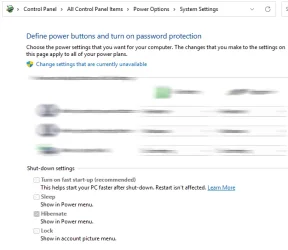
1 What does the response to this cmd say about Fast startup?
PowerCfg -a

2 What does this setting say about Fast startup?
Control panel, Power options, Choose what the power buttons do
Control panel, Power options, Choose what the power buttons do.webp


Denis
 

My Computer

System One

  • OS
    Windows 11 Home x64 Version 25H2 Build 26200.8037
1 What does the response to this cmd say about Fast startup?
PowerCfg -a

2 What does this setting say about Fast startup?
Control panel, Power options, Choose what the power buttons do


Denis
Microsoft Windows [Version 10.0.26200.7171]
(c) Microsoft Corporation. All rights reserved.

C:\Windows\System32>PowerCfg -a
The following sleep states are available on this system:
Standby (S3)

The following sleep states are not available on this system:
Standby (S1)
The system firmware does not support this standby state.

Standby (S2)
The system firmware does not support this standby state.

Hibernate
Hibernation has not been enabled.

Standby (S0 Low Power Idle)
The system firmware does not support this standby state.

Hybrid Sleep
Hibernation is not available.
The hypervisor does not support this standby state.

Fast Startup
Hibernation is not available.


C:\Windows\System32>
 

My Computers

System One System Two

  • OS
    Windows 11 Home 64-bit
    Manufacturer/Model
    HP Laptop -15-ef1079nr & HP All-in-One 24-df1370 Bundle PC
    CPU
    AMD Ryzen 3 & 11th Gen Intel Core i5-1135G7
    Motherboard
    HP 8706 (FP5) & HP 87F3 (ROW)
    Memory
    8 GB & 8 GB
    Graphics Card(s)
    AMD Radeon Graphics & Integrated Intel Iris X Graphics
    Sound Card
    Realtek Audio
    Monitor(s) Displays
    AMD Radeon Graphics Monitor & FHD Diagonal Touchscreen
    Screen Resolution
    1366x768 & 1920x1080
    Hard Drives
    SK Hynix BC511 HFM256GDJTNI-82A0A (SSD) & 512 GB PCIe® NVMe™ M.2 (SSD)
    Keyboard
    HP Slim Keyboard
    Mouse
    Logitech Wireless & HP Wireless
    Internet Speed
    500 Mbps
    Browser
    Microsoft Edge
    Antivirus
    Microsoft Defender/Windows Security & Malwarebytes
  • Operating System
    Windows 11 Home 64-bit
    Computer type
    PC/Desktop
    Manufacturer/Model
    HP Slim Desktop - S01-pF1013w
    CPU
    Intel Celeron G5900
    Motherboard
    8768 A (SMVB)
    Memory
    8 GB
    Graphics card(s)
    Intel UHD Graphics 610
    Sound Card
    Intel(R) Display Audio
    Monitor(s) Displays
    HP 23es 23-inch Monitor
    Screen Resolution
    1920x1080
    Hard Drives
    1 TB 7200 rpm SATA HDD
    Keyboard
    HP 230 Wireless Keyboard
    Mouse
    HP 230 Wireless Mouse
    Internet Speed
    500 Mbps
    Browser
    Microsoft Edge
    Antivirus
    Microsoft Defender/Windows Security & Malwarebytes

@Try3 Denis, that above is what Command Prompt says.
 

My Computers

System One System Two

  • OS
    Windows 11 Home 64-bit
    Manufacturer/Model
    HP Laptop -15-ef1079nr & HP All-in-One 24-df1370 Bundle PC
    CPU
    AMD Ryzen 3 & 11th Gen Intel Core i5-1135G7
    Motherboard
    HP 8706 (FP5) & HP 87F3 (ROW)
    Memory
    8 GB & 8 GB
    Graphics Card(s)
    AMD Radeon Graphics & Integrated Intel Iris X Graphics
    Sound Card
    Realtek Audio
    Monitor(s) Displays
    AMD Radeon Graphics Monitor & FHD Diagonal Touchscreen
    Screen Resolution
    1366x768 & 1920x1080
    Hard Drives
    SK Hynix BC511 HFM256GDJTNI-82A0A (SSD) & 512 GB PCIe® NVMe™ M.2 (SSD)
    Keyboard
    HP Slim Keyboard
    Mouse
    Logitech Wireless & HP Wireless
    Internet Speed
    500 Mbps
    Browser
    Microsoft Edge
    Antivirus
    Microsoft Defender/Windows Security & Malwarebytes
  • Operating System
    Windows 11 Home 64-bit
    Computer type
    PC/Desktop
    Manufacturer/Model
    HP Slim Desktop - S01-pF1013w
    CPU
    Intel Celeron G5900
    Motherboard
    8768 A (SMVB)
    Memory
    8 GB
    Graphics card(s)
    Intel UHD Graphics 610
    Sound Card
    Intel(R) Display Audio
    Monitor(s) Displays
    HP 23es 23-inch Monitor
    Screen Resolution
    1920x1080
    Hard Drives
    1 TB 7200 rpm SATA HDD
    Keyboard
    HP 230 Wireless Keyboard
    Mouse
    HP 230 Wireless Mouse
    Internet Speed
    500 Mbps
    Browser
    Microsoft Edge
    Antivirus
    Microsoft Defender/Windows Security & Malwarebytes
This tutorial will show you how to turn on or off fast startup in Windows 11.


My Computer

System One

  • OS
    Windows 11 25H2 (OS Build 26200.8524)
    Computer type
    Laptop
    Manufacturer/Model
    Dell
    CPU
    Processor: 11th Gen Intel(R) Core(TM) i5-1135G7 @ 2.40G
    Motherboard
    64-bit operating system Dell 0XMF7W
    Memory
    12GB
    Graphics Card(s)
    Intel R Iris R XE Graphics family
    Sound Card
    Cirrus Speakers High Definition Audio
    Monitor(s) Displays
    Generic PnP monitor
    Screen Resolution
    1920 x 1080
    Hard Drives
    NVMe 670p SSDPEKNU512GZ NVMe I NTEL 512GB
    Case
    cheap
    Mouse
    Logitech wireless mouse
    Internet Speed
    16 Mps download
    Browser
    Google Chrome
    Antivirus
    Security: Microsoft Defender & Malwarebytes Premium (with browser guard)
    Other Info
    Dell model: Inspiron 15 3511
I turned on hibernate and this is what I get.
C:\Windows\System32>powercfg -a
The following sleep states are available on this system:
Standby (S3)
Fast Startup

The following sleep states are not available on this system:
Standby (S1)
The system firmware does not support this standby state.

Standby (S2)
The system firmware does not support this standby state.

Hibernate
The hiberfile type does not support hibernation.

Standby (S0 Low Power Idle)
The system firmware does not support this standby state.

Hybrid Sleep
Hibernation is not available.
The hypervisor does not support this standby state.

But with this being a desktop, it does not need to hibernate.
 

My Computers

System One System Two

  • OS
    Windows 11 Home 64-bit
    Manufacturer/Model
    HP Laptop -15-ef1079nr & HP All-in-One 24-df1370 Bundle PC
    CPU
    AMD Ryzen 3 & 11th Gen Intel Core i5-1135G7
    Motherboard
    HP 8706 (FP5) & HP 87F3 (ROW)
    Memory
    8 GB & 8 GB
    Graphics Card(s)
    AMD Radeon Graphics & Integrated Intel Iris X Graphics
    Sound Card
    Realtek Audio
    Monitor(s) Displays
    AMD Radeon Graphics Monitor & FHD Diagonal Touchscreen
    Screen Resolution
    1366x768 & 1920x1080
    Hard Drives
    SK Hynix BC511 HFM256GDJTNI-82A0A (SSD) & 512 GB PCIe® NVMe™ M.2 (SSD)
    Keyboard
    HP Slim Keyboard
    Mouse
    Logitech Wireless & HP Wireless
    Internet Speed
    500 Mbps
    Browser
    Microsoft Edge
    Antivirus
    Microsoft Defender/Windows Security & Malwarebytes
  • Operating System
    Windows 11 Home 64-bit
    Computer type
    PC/Desktop
    Manufacturer/Model
    HP Slim Desktop - S01-pF1013w
    CPU
    Intel Celeron G5900
    Motherboard
    8768 A (SMVB)
    Memory
    8 GB
    Graphics card(s)
    Intel UHD Graphics 610
    Sound Card
    Intel(R) Display Audio
    Monitor(s) Displays
    HP 23es 23-inch Monitor
    Screen Resolution
    1920x1080
    Hard Drives
    1 TB 7200 rpm SATA HDD
    Keyboard
    HP 230 Wireless Keyboard
    Mouse
    HP 230 Wireless Mouse
    Internet Speed
    500 Mbps
    Browser
    Microsoft Edge
    Antivirus
    Microsoft Defender/Windows Security & Malwarebytes
Enable hibernation.
Then you should be able to turn on Fast startup.
Have you, by any chance, recently updated or otherwise changed your display driver?


Denis
Yes I did have a graphics driver update available.
 

My Computers

System One System Two

  • OS
    Windows 11 Home 64-bit
    Manufacturer/Model
    HP Laptop -15-ef1079nr & HP All-in-One 24-df1370 Bundle PC
    CPU
    AMD Ryzen 3 & 11th Gen Intel Core i5-1135G7
    Motherboard
    HP 8706 (FP5) & HP 87F3 (ROW)
    Memory
    8 GB & 8 GB
    Graphics Card(s)
    AMD Radeon Graphics & Integrated Intel Iris X Graphics
    Sound Card
    Realtek Audio
    Monitor(s) Displays
    AMD Radeon Graphics Monitor & FHD Diagonal Touchscreen
    Screen Resolution
    1366x768 & 1920x1080
    Hard Drives
    SK Hynix BC511 HFM256GDJTNI-82A0A (SSD) & 512 GB PCIe® NVMe™ M.2 (SSD)
    Keyboard
    HP Slim Keyboard
    Mouse
    Logitech Wireless & HP Wireless
    Internet Speed
    500 Mbps
    Browser
    Microsoft Edge
    Antivirus
    Microsoft Defender/Windows Security & Malwarebytes
  • Operating System
    Windows 11 Home 64-bit
    Computer type
    PC/Desktop
    Manufacturer/Model
    HP Slim Desktop - S01-pF1013w
    CPU
    Intel Celeron G5900
    Motherboard
    8768 A (SMVB)
    Memory
    8 GB
    Graphics card(s)
    Intel UHD Graphics 610
    Sound Card
    Intel(R) Display Audio
    Monitor(s) Displays
    HP 23es 23-inch Monitor
    Screen Resolution
    1920x1080
    Hard Drives
    1 TB 7200 rpm SATA HDD
    Keyboard
    HP 230 Wireless Keyboard
    Mouse
    HP 230 Wireless Mouse
    Internet Speed
    500 Mbps
    Browser
    Microsoft Edge
    Antivirus
    Microsoft Defender/Windows Security & Malwarebytes
go search bar type powershell run as admin, copy paste this powercfg /h on

click enter
 

My Computers

System One System Two

  • OS
    windows 11 home 23H2 22631.6199
    Computer type
    Laptop
    Manufacturer/Model
    HP
    CPU
    Intel core i7 (2nd gen) Turbo 3.10 ghz
    Memory
    6gb
    Graphics Card(s)
    Amd Radeon HD 7400m 1GB & Intel hd graphics
    Sound Card
    BeatsAudio
    Hard Drives
    128gb SSD
  • Operating System
    macOS Sequoia
    Computer type
    PC/Desktop
    Manufacturer/Model
    iMac 24"
    CPU
    M1 3.2 ghz
    Memory
    8gb onboard
    Graphics card(s)
    igpu
    Monitor(s) Displays
    Retina 4.5K
    Screen Resolution
    4480x2520
    Hard Drives
    512gb SSD
Yes I did have a graphics driver update
Perhaps it reset your Hibernation & Fast startup settings.

And do note the warning in the Fast startup tutorial that it needs Hibernation on & that Fast startup on/off can be reported incorrectly if Hibernation is off.


Denis
 

My Computer

System One

  • OS
    Windows 11 Home x64 Version 25H2 Build 26200.8037
Thanks for all the help! I ran the batch script to enable Fast Startup and that fixed it. I am not sure what happened and why all of a sudden Fast Startup had disappeared and stopped working. Thank you all!
 

My Computers

System One System Two

  • OS
    Windows 11 Home 64-bit
    Manufacturer/Model
    HP Laptop -15-ef1079nr & HP All-in-One 24-df1370 Bundle PC
    CPU
    AMD Ryzen 3 & 11th Gen Intel Core i5-1135G7
    Motherboard
    HP 8706 (FP5) & HP 87F3 (ROW)
    Memory
    8 GB & 8 GB
    Graphics Card(s)
    AMD Radeon Graphics & Integrated Intel Iris X Graphics
    Sound Card
    Realtek Audio
    Monitor(s) Displays
    AMD Radeon Graphics Monitor & FHD Diagonal Touchscreen
    Screen Resolution
    1366x768 & 1920x1080
    Hard Drives
    SK Hynix BC511 HFM256GDJTNI-82A0A (SSD) & 512 GB PCIe® NVMe™ M.2 (SSD)
    Keyboard
    HP Slim Keyboard
    Mouse
    Logitech Wireless & HP Wireless
    Internet Speed
    500 Mbps
    Browser
    Microsoft Edge
    Antivirus
    Microsoft Defender/Windows Security & Malwarebytes
  • Operating System
    Windows 11 Home 64-bit
    Computer type
    PC/Desktop
    Manufacturer/Model
    HP Slim Desktop - S01-pF1013w
    CPU
    Intel Celeron G5900
    Motherboard
    8768 A (SMVB)
    Memory
    8 GB
    Graphics card(s)
    Intel UHD Graphics 610
    Sound Card
    Intel(R) Display Audio
    Monitor(s) Displays
    HP 23es 23-inch Monitor
    Screen Resolution
    1920x1080
    Hard Drives
    1 TB 7200 rpm SATA HDD
    Keyboard
    HP 230 Wireless Keyboard
    Mouse
    HP 230 Wireless Mouse
    Internet Speed
    500 Mbps
    Browser
    Microsoft Edge
    Antivirus
    Microsoft Defender/Windows Security & Malwarebytes

My Computers

System One System Two

  • OS
    Windows 11 Pro 25H2
    Computer type
    Laptop
    Manufacturer/Model
    Huawei MateBook D15
    CPU
    Ryzen 5 3500U
    Memory
    8GB
    Graphics Card(s)
    Vega 8
    Screen Resolution
    FHD
    Hard Drives
    256GB Samsung SSD + 1TB HDD
    Browser
    Microsoft Edge
    Antivirus
    ESET Smart Security Premium
  • Operating System
    Windows 10 Enterprise LTSC 21H2
    Computer type
    Laptop
    Manufacturer/Model
    MSI GS73 6RF Stealth Pro
    CPU
    intel core i7 6700HQ
    Memory
    16GB
    Graphics card(s)
    Nvidia Geforce GTX1060 (6GB)
    Screen Resolution
    FHD
    Hard Drives
    128GB SSD + 1TB HDD
    Browser
    Microsoft Edge
    Antivirus
    Windows Defender
maybe you ran "powercfg -h off" in the past.
Honestly, there's no telling. I do however do a full cleanup on all of my home computers once per month. I use Glary Utilities as one of my cleanup tools. I used to use Ccleaner, but it was very limited on what I could do with it and to get more I had to pay for it. So someone on the forum recommended Glary Utilities. Glary Utilities has been good. But it has a certain tool that optimizes PC boot time. I think that may have been what interfered with Fast Startup.
 

My Computers

System One System Two

  • OS
    Windows 11 Home 64-bit
    Manufacturer/Model
    HP Laptop -15-ef1079nr & HP All-in-One 24-df1370 Bundle PC
    CPU
    AMD Ryzen 3 & 11th Gen Intel Core i5-1135G7
    Motherboard
    HP 8706 (FP5) & HP 87F3 (ROW)
    Memory
    8 GB & 8 GB
    Graphics Card(s)
    AMD Radeon Graphics & Integrated Intel Iris X Graphics
    Sound Card
    Realtek Audio
    Monitor(s) Displays
    AMD Radeon Graphics Monitor & FHD Diagonal Touchscreen
    Screen Resolution
    1366x768 & 1920x1080
    Hard Drives
    SK Hynix BC511 HFM256GDJTNI-82A0A (SSD) & 512 GB PCIe® NVMe™ M.2 (SSD)
    Keyboard
    HP Slim Keyboard
    Mouse
    Logitech Wireless & HP Wireless
    Internet Speed
    500 Mbps
    Browser
    Microsoft Edge
    Antivirus
    Microsoft Defender/Windows Security & Malwarebytes
  • Operating System
    Windows 11 Home 64-bit
    Computer type
    PC/Desktop
    Manufacturer/Model
    HP Slim Desktop - S01-pF1013w
    CPU
    Intel Celeron G5900
    Motherboard
    8768 A (SMVB)
    Memory
    8 GB
    Graphics card(s)
    Intel UHD Graphics 610
    Sound Card
    Intel(R) Display Audio
    Monitor(s) Displays
    HP 23es 23-inch Monitor
    Screen Resolution
    1920x1080
    Hard Drives
    1 TB 7200 rpm SATA HDD
    Keyboard
    HP 230 Wireless Keyboard
    Mouse
    HP 230 Wireless Mouse
    Internet Speed
    500 Mbps
    Browser
    Microsoft Edge
    Antivirus
    Microsoft Defender/Windows Security & Malwarebytes
Honestly, there's no telling. I do however do a full cleanup on all of my home computers once per month. I use Glary Utilities as one of my cleanup tools. I used to use Ccleaner, but it was very limited on what I could do with it and to get more I had to pay for it. So someone on the forum recommended Glary Utilities. Glary Utilities has been good. But it has a certain tool that optimizes PC boot time. I think that may have been what interfered with Fast Startup.
If you have an SSD, you don't need fast startup as it causes more writes on your drive and doesn't have any speed benefits.
 

My Computers

System One System Two

  • OS
    Windows 11 Pro 25H2
    Computer type
    Laptop
    Manufacturer/Model
    Huawei MateBook D15
    CPU
    Ryzen 5 3500U
    Memory
    8GB
    Graphics Card(s)
    Vega 8
    Screen Resolution
    FHD
    Hard Drives
    256GB Samsung SSD + 1TB HDD
    Browser
    Microsoft Edge
    Antivirus
    ESET Smart Security Premium
  • Operating System
    Windows 10 Enterprise LTSC 21H2
    Computer type
    Laptop
    Manufacturer/Model
    MSI GS73 6RF Stealth Pro
    CPU
    intel core i7 6700HQ
    Memory
    16GB
    Graphics card(s)
    Nvidia Geforce GTX1060 (6GB)
    Screen Resolution
    FHD
    Hard Drives
    128GB SSD + 1TB HDD
    Browser
    Microsoft Edge
    Antivirus
    Windows Defender
If you have an SSD, you don't need fast startup as it causes more writes on your drive and doesn't have any speed benefits.
That specific computer with the issue has a 1 TB HDD.
 

My Computers

System One System Two

  • OS
    Windows 11 Home 64-bit
    Manufacturer/Model
    HP Laptop -15-ef1079nr & HP All-in-One 24-df1370 Bundle PC
    CPU
    AMD Ryzen 3 & 11th Gen Intel Core i5-1135G7
    Motherboard
    HP 8706 (FP5) & HP 87F3 (ROW)
    Memory
    8 GB & 8 GB
    Graphics Card(s)
    AMD Radeon Graphics & Integrated Intel Iris X Graphics
    Sound Card
    Realtek Audio
    Monitor(s) Displays
    AMD Radeon Graphics Monitor & FHD Diagonal Touchscreen
    Screen Resolution
    1366x768 & 1920x1080
    Hard Drives
    SK Hynix BC511 HFM256GDJTNI-82A0A (SSD) & 512 GB PCIe® NVMe™ M.2 (SSD)
    Keyboard
    HP Slim Keyboard
    Mouse
    Logitech Wireless & HP Wireless
    Internet Speed
    500 Mbps
    Browser
    Microsoft Edge
    Antivirus
    Microsoft Defender/Windows Security & Malwarebytes
  • Operating System
    Windows 11 Home 64-bit
    Computer type
    PC/Desktop
    Manufacturer/Model
    HP Slim Desktop - S01-pF1013w
    CPU
    Intel Celeron G5900
    Motherboard
    8768 A (SMVB)
    Memory
    8 GB
    Graphics card(s)
    Intel UHD Graphics 610
    Sound Card
    Intel(R) Display Audio
    Monitor(s) Displays
    HP 23es 23-inch Monitor
    Screen Resolution
    1920x1080
    Hard Drives
    1 TB 7200 rpm SATA HDD
    Keyboard
    HP 230 Wireless Keyboard
    Mouse
    HP 230 Wireless Mouse
    Internet Speed
    500 Mbps
    Browser
    Microsoft Edge
    Antivirus
    Microsoft Defender/Windows Security & Malwarebytes

That specific computer with the issue has a 1 TB HDD.
I disable FS on HDD too, in order to prevent future bugs and system failures. I don't like hibernation but a full shut down. (It becomes slower in startup)
 

My Computers

System One System Two

  • OS
    Windows 11 Pro 25H2
    Computer type
    Laptop
    Manufacturer/Model
    Huawei MateBook D15
    CPU
    Ryzen 5 3500U
    Memory
    8GB
    Graphics Card(s)
    Vega 8
    Screen Resolution
    FHD
    Hard Drives
    256GB Samsung SSD + 1TB HDD
    Browser
    Microsoft Edge
    Antivirus
    ESET Smart Security Premium
  • Operating System
    Windows 10 Enterprise LTSC 21H2
    Computer type
    Laptop
    Manufacturer/Model
    MSI GS73 6RF Stealth Pro
    CPU
    intel core i7 6700HQ
    Memory
    16GB
    Graphics card(s)
    Nvidia Geforce GTX1060 (6GB)
    Screen Resolution
    FHD
    Hard Drives
    128GB SSD + 1TB HDD
    Browser
    Microsoft Edge
    Antivirus
    Windows Defender

Latest Support Threads

Back
Top Bottom



