File Explorer Selection Highlight Color


mccmw

Well-known member
Member
VIP
Local time
3:50 AM
Posts
520
OS
Windows 11
I know this has been asked for years...just curious if a fix/app has been found. Are we still stuck with the very "light" selection/hover color in File Explorer or is there a way to make it darker?
 

My Computers My Computers

  • At a glance

    Windows 11Intel i7-7700K32GB 2666Mhz (Kingston Hyper X Fury)Powercolor RX6600XT
    OS
    Windows 11
    Computer type
    PC/Desktop
    Manufacturer/Model
    Custom
    CPU
    Intel i7-7700K
    Motherboard
    Asus Prime Z-270A
    Memory
    32GB 2666Mhz (Kingston Hyper X Fury)
    Graphics Card(s)
    Powercolor RX6600XT
    Sound Card
    N/A
    Monitor(s) Displays
    KTC
    Screen Resolution
    2560 x 1440
    Hard Drives
    1TB Western Digital SN770 (System) and 2TB Western Digital SN770 (Storage)
    Antivirus
    Windows Security
  • At a glance

    Windows 11 Homei9-11900H32GBIntegrated Intel and Nvidia 3050Ti
    Operating System
    Windows 11 Home
    Computer type
    Laptop
    Manufacturer/Model
    Dell/XPS 15 9510
    CPU
    i9-11900H
    Motherboard
    Unknown
    Memory
    32GB
    Graphics card(s)
    Integrated Intel and Nvidia 3050Ti
    Sound Card
    Integrated (Realtek)
    Monitor(s) Displays
    None
    Screen Resolution
    1920 x 1200 (non-Touch)
    Hard Drives
    2TB SK Hynix P41 Platinum
    Antivirus
    Windows Security
... just curious if a fix/app has been found..., ... is there a way to make it darker?
There is a host of different ways to achieve a desired affect.
First and foremost depends on if you are running Light or Dark Mode in Windows.
(I'm not sure what switching basic themes within Windows does, haven't played with them for years!!!)
Then, there are simple Reg tweaks, such as HotTrackingColor and Highlight, etc., (I don't mess with those).
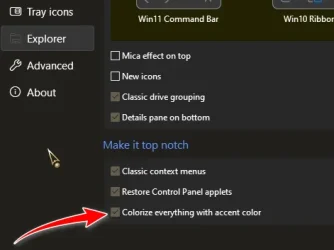
Then, you could also experiment with GUI altering apps such as StartAllBack, or Explorer shell extensions such as QTTabBar, that do all the dirty work for you!
There exists many more!

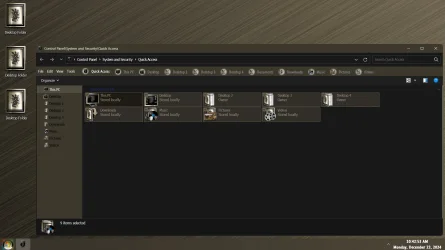
Me..., I run Dark Mode in Windows, QTTabBar and StartAllBack with my theme and accent color complimenting each other, including Explorer highlights...

8627.webp
 

My Computers My Computers

  • At a glance

    Windows 11 Pro
    OS
    Windows 11 Pro
    Computer type
    PC/Desktop
    Manufacturer/Model
    ASUS ROG Strix
  • At a glance

    Windows 11 Pro
    Operating System
    Windows 11 Pro
    Computer type
    Laptop
    Manufacturer/Model
    ASUS VivoBook
  • ASUS VivoBook 'Lite' ~ Windows 11 Home
I have Start All Back...and run it in dark mode with apps in light mode (e.g. Custom in Windows 11). I don't see anything for that setting though.
 

My Computers My Computers

  • At a glance

    Windows 11Intel i7-7700K32GB 2666Mhz (Kingston Hyper X Fury)Powercolor RX6600XT
    OS
    Windows 11
    Computer type
    PC/Desktop
    Manufacturer/Model
    Custom
    CPU
    Intel i7-7700K
    Motherboard
    Asus Prime Z-270A
    Memory
    32GB 2666Mhz (Kingston Hyper X Fury)
    Graphics Card(s)
    Powercolor RX6600XT
    Sound Card
    N/A
    Monitor(s) Displays
    KTC
    Screen Resolution
    2560 x 1440
    Hard Drives
    1TB Western Digital SN770 (System) and 2TB Western Digital SN770 (Storage)
    Antivirus
    Windows Security
  • At a glance

    Windows 11 Homei9-11900H32GBIntegrated Intel and Nvidia 3050Ti
    Operating System
    Windows 11 Home
    Computer type
    Laptop
    Manufacturer/Model
    Dell/XPS 15 9510
    CPU
    i9-11900H
    Motherboard
    Unknown
    Memory
    32GB
    Graphics card(s)
    Integrated Intel and Nvidia 3050Ti
    Sound Card
    Integrated (Realtek)
    Monitor(s) Displays
    None
    Screen Resolution
    1920 x 1200 (non-Touch)
    Hard Drives
    2TB SK Hynix P41 Platinum
    Antivirus
    Windows Security

My Computers My Computers

  • At a glance

    Windows 11 Pro
    OS
    Windows 11 Pro
    Computer type
    PC/Desktop
    Manufacturer/Model
    ASUS ROG Strix
  • At a glance

    Windows 11 Pro
    Operating System
    Windows 11 Pro
    Computer type
    Laptop
    Manufacturer/Model
    ASUS VivoBook
  • ASUS VivoBook 'Lite' ~ Windows 11 Home
regedit
Code:
HKEY_CURRENT_USER\Control Panel\Colors

Code:
HotTrackingColor
is the border of the highlight selection rectangle

Code:
HotTrackingColor
is the fill color of the rectangle

color codes are RR GG BB
 

My Computer My Computer

At a glance

Windows 11 Pro
OS
Windows 11 Pro

Latest Support Threads

Back
Top Bottom